CCAvenue Payment Module – OpenCart 2.x.x (OpenCart)

CCAvenue Payment Gateway Module – OpenCart 2.x.x

Our aim to design and built easy One-Click installable module for non-technical person to use our Extension to their OpenCart Store.

CC Avenue is India’s Top Payment Gateway, provides quick, secure, affordable and complete e-commerce solutions to Indian merchants wanting to transact on-line business.

Why CCAvenue is Required For Indian Merchants ?

  • Maximum Payment Options including Credit/Debit Cards, Internet Banking, Cash Cards, Debit EMI, Online Wallet of Paytm, Freecharge, MobiKwin and more.
  • Multiple Currency Processing – 27 major Foreign Currencies
  • Multilingual Checkout Page – Indian + International Languages

Extension Features.

  • Compatible with OpenCart 2.x.x.x version!
  • Fully Installation Manual.
  • One-Click Installation + Single Page Easy Configuration

Installation & Support

  • Included in Downloadable Files.
  • Support Available

Download CCAvenue Payment Module – OpenCart 2.x.x (OpenCart)

Music – Addon for TZ Portfolio+ (Add-ons)

This is an amazing content TZ Portfolio+ add-on that can helps you create a playlist with article.

Music add-on allows you to upload songs with image, lyric to create a playlist with some simple steps. You can also enter Music Title, Link easily for this playlist to sell your songs.

We believe that with all the features above, Music addon will never make you disappointed!

Let’s try it and create your own playlist with your favorite songs now!

Highlight Features:

  • Well support to audio and video playlist
  • Easy to upload audio, music, video
  • Easy configuration
  • Joomla 3+ support
  • It’s addon of TZ Portfolio+
  • Clean and Clear design

Download Music – Addon for TZ Portfolio+ (Add-ons)

Focus WordPress Featured Slider Styling Add-on (Sliders)

Focus Slider Styling is a premium add-on for Focus WordPress Featured Slider Plugin which is free on .org repository : https://wordpress.org/plugins/focus-slider/. This plugin will give you powerful styling and layout options to display the featured post slider better and perfectly blend on your current theme.

WordPress Featured Slider Plugin

WordPress Featured Post Slider Plugin

Focus WordPress Featured Slider Styling Add-on Features

  • Additional Layout Options
  • Styling Option
  • User Friendly Interface
  • Add Featured Slider as shortcode or widgets
  • Fully Responsive
  • Fast and Lightweight Slider
  • Mobile Touch Slider Navigation Support

Focus on What Truly Matters.

WordPress Featured Posts Slider Widget & Shortcode

Spotlight your most valuable content elegantly to serve your visitors what truly matters on your WordPress sites. Interact freely using modern and simple featured slider which gives more attention to your beloved readers. Less confusion more interaction, Focused.

Download Focus WordPress Featured Slider Styling Add-on (Sliders)

Facebook Gallery – WordPress Plugin (Galleries)

The Facebook Gallery harnesses the power of WordPress, Javascript, HTML5 and CSS3 to take everything you throw at it – images, videos, animations, image effects, text, urls and more – and automatically shape them into a custom gallery unique to you. As your needs grow, it evolves with you, effortlessly adapting to your needs. Want to add Facebook Album(s)? Facebook users albums or timeline feed? Or just a single album photos? A different layout? The Facebook Gallery just takes care of it.

Download Facebook Gallery – WordPress Plugin (Galleries)

Seating Charts – OpenTickets (WordPress)

Seating Charts have never been easier
Create, manage and edit your own seating charts this OpenTickets Community Extension – Seating.

Create and manage seating charts
Using simple tools, set colors, prices, layouts and more
Seating numbering made easy through automation
Your charts will be mobile friendly for your customers!
Create reserved seating, zone seating, GA.. or any combination!
You can see how easy it is in our video tutorials.

Download Seating Charts – OpenTickets (WordPress)

Display Options Extension – OpenTickets (WordPress)

The Display Options Extension enables several ways to display your Events and the Tickets for sale on your WordPress website.

Once installed, there is a new ‘Settings’ tab, called ‘Display Options’, which controls the various features

allow events to show in the WooCommerce Shop experience, as if they were products
use a shortcode to display upcoming events
use a shortcode to display a featured event
use a widget to display upcoming events
use a widget to display a featured event

Download Display Options Extension – OpenTickets (WordPress)

Viral Lists Pro (Social Networking)

Viral Lists Pro is a stand-alone CMS that help you create Lists based Articles Easily with Seven Pre-Defined Types of Content (Text, Image, Video, Animated GIF, Quote, IFrame and Poll).

Requirements

  • Most Important : mod_security = disabled
  • PHP 5 or Higher
  • MySQLi Extension
  • MultiBytes Strings Functions (mb_ functions)

Demo

Front-End

Back-End
username : admin
password : demo

Documentations

http://xmush.com/demos/viral-lists/docs/

Changelog

initial release

Download Viral Lists Pro (Social Networking)

WYSIWYG HTML Editor – Bootstrap based Rich Text Editor (Forms)

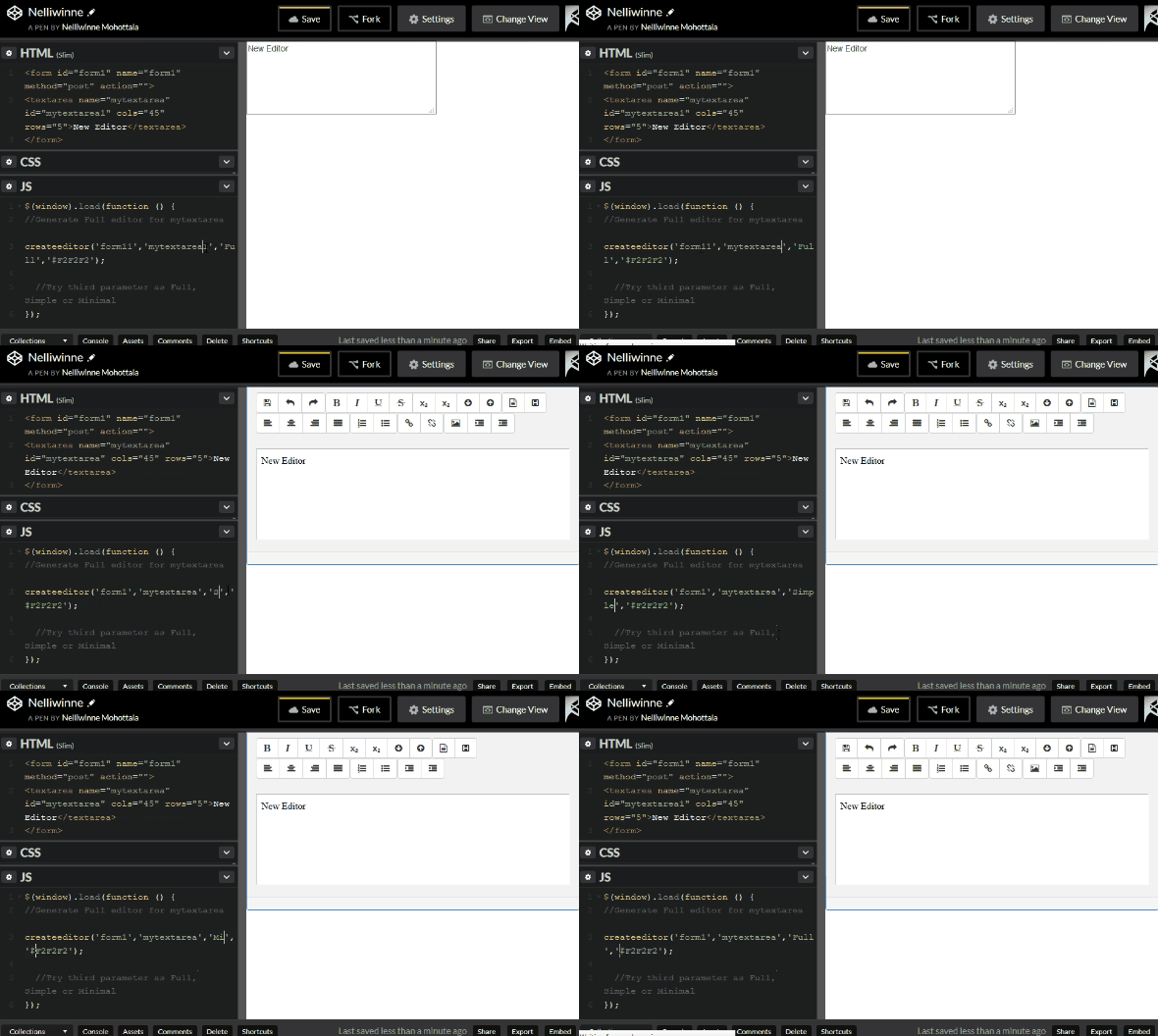
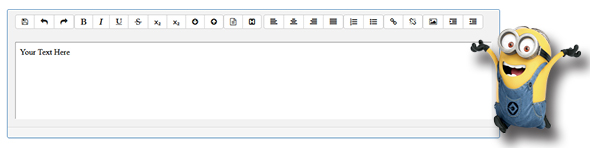
WYSIWYG (What You See Is What You Get) HTML Editor is a simple and easy to use Javascript execCommand() based editor. This is complete solution for getting HTML input from users using a form, when you do your website contact form or any web based HTML Page something similar to blog post, blog comment, article comments, feedback from etc. And this is not a template for editor, but this is a real and working WYSIWYG HTML Editor script where you can really input html input, WYSIWYG Editor or Code Editor and post data to your server side script. Technically this is for execCommand WYSIWYG Editor.

Features

  • 3 Versions of Editors (Full, Simple and Minimal)
  • 5 minutes to setup, and even a dummy can apply this to a html page
  • Bootstrap Ready
  • Tooltip for Buttons
  • Very User Friendly Interface
  • Easy to Apply a skin color using createditor() function itself
  • Converts any text area within a form using simple javascription function at the head of the HTML Page
  • Fontowesome based nice buttons for editor
  • Live Demo Available
  • Documentation is available
  • Line by Line Comments are available for understanding the code

How to Apply ?

Head


<script type="text/javascript">
$(window).load(function () {
createeditor('form1','mytextarea','Full','#F2F2F2');
});
</script>

Body


<form id="form1" name="form1" method="post" action="">
<textarea name="textarea" id="textarea" cols="45" rows="5"></textarea>
</form>

Preview


Download WYSIWYG HTML Editor – Bootstrap based Rich Text Editor (Forms)

iSocial – The Ultimate Social Network Platform (Social Networking)

With iSocial you can start your own social network.

Very easy to install, it has all the functionality of a modern, simple, and attractive social network.

iSocial, is the Ultimate Social Network Platform.

Demo:

http://www.kanorika.com/isocial/demo/

User: usermain

Pass: 123456

Download iSocial – The Ultimate Social Network Platform (Social Networking)

Sitecake, Simple CMS for Static Websites (Miscellaneous)

Sitecake is drag and drop CMS for static websites. It works with both HTML and PHP websites.

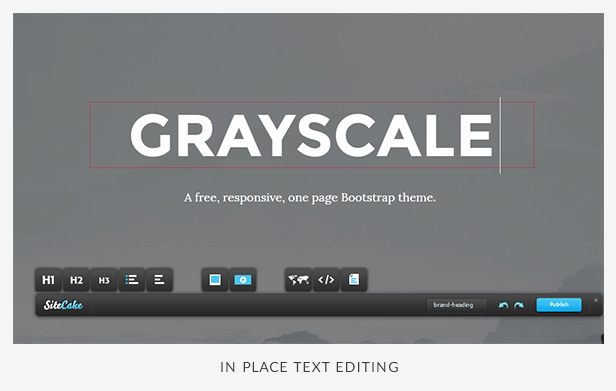
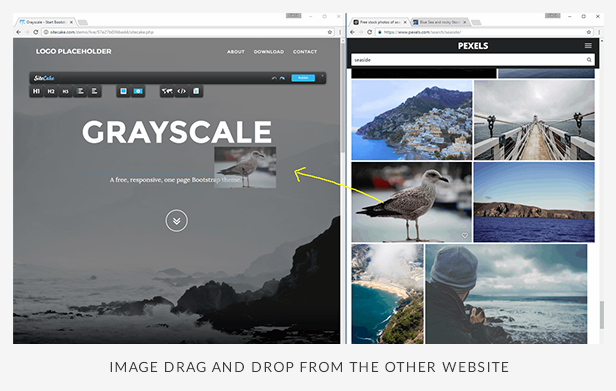
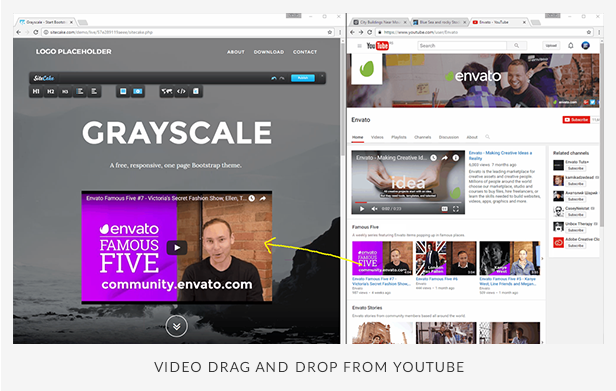
It has really minimal interface: the toolbar with content icons that floats on top of your website. With dragging and dropping content icons (text, photo, video…) to your website you are adding the content. Content can be drag and dropped from your desktop or different cloud services like YouTube, Vimeo, Facebook, Twitter, Google Maps, …

Sitecake features easy integration and only basic editing capabilities, which makes it a perfect CMS for website owners who find WordPress too difficult.

Edit in Place, Drag and Drop Everything

Important Features

  • No template engine. It works with any HTML website.
  • No database. It’s flat file CMS, saves text to HTML, images to file system. Website is static all the time.
  • Simple integration. Add “sc-content” CSS class to divs that you want to become editable.
  • WYSIWYG. Edit text in place, resize and crop images in place. Edit live website, not lookalike copy in your admin.
  • Easy to upgrade. Just replace /sitecake folder with new version. Silent update (Google Chrome style) is on our road map.
  • Multi language UI (English, Spanish, Russian, German, French, Italian, Danish, Czech, Slovenian, Serbian, Slovak, Portuguese, Portuguese Brazil, Turkish, Norwegian, Dutch)
  • Sitecake is completely separate from your website. If you delete Sitecake, your website is still up to date, still working fine.
  • Static websites are much simpler, and much, much faster to load than a typical WordPress website. Google loves this.

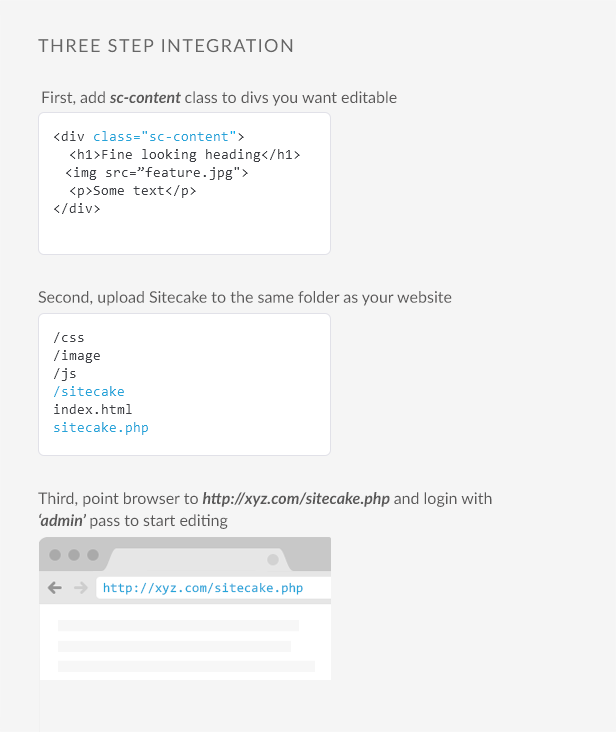
Three Step Integration

  1. Add ‘sc-content’ class to divs you want editable
  2. Upload Sitecake to the same folder as your website
  3. Point browser to http://domain.com/sitecake.php and login with ‘admin’ pass to start editing

Read more about integration in our docs.

Is Sitecake for You?

  • If your client has a problem navigating WordPress to edit a website, Sitecake is for you and your client!
  • If you have one page website, need an easy way to edit, but don’t want to spend money on a developer to integrate a ‘real’ CMS. Sitecake is for you!
  • If you need the fastest possible website. Get yourself a static website, cash it with free CDN service like CloudFlare and manage it with Sitecake.

Road Map

v2.x

  • page manger (clone pages, delete pages, reorder menu items, on page SEO)
  • snippets (create custom HTML snippets and add them as drag and drop content items on the toolbar)

v3.x

  • completely rewritten client side, switch from GWT to Javascript
  • opening for third party Javascript plugins
  • slideshow/gallery content item
  • table content item
  • silent update (auto update)
  • layout manager (drag and drop page builder from pre-designed modules)

Change Log

2.3.6 Release

  • Supported for PHP 7 added. New minimal version for running Sitecake is PHP 5.6
  • Opening link in a new window supported
  • Request parametar name for opening Sitecake on a page changed to “scpage”
    (sitecake.php?scpage=contact.html)
  • Fixed: BACKSPACE/DEL deletes content of the bullet list
  • Fixed: CloudFlare caching issue
  • Fixed: Bad (404) redirection after logout from asubdirectory
  • Fixed: Crashing on undo press while editing text element
  • Fixed: Impossible to press delete (X button) on image placeholder
  • Fixed: Srcset disappearance
  • Fixed: Undo caused duplication of br tags

2.3.4 Release

  • Improved session handling
  • Fixed: error handler shows full paths inside error message description
  • Fixed: Sitecake tried to copy deleted files and displayed missing file error

2.3.2 Release

  • Fixed: In edit mode links to other pages failed to invoke Sitecake toolbar on a newly open page
  • Fixed: site root permission check failure, manifesting in HTTP 500 error

2.3.1 Release

  • PHP sites supported – except for HTML files/pages, PHP pages can also be edited by Sitecake (certain restrictions applied).
  • Subdirectories support – Sitecake can edit pages located in subdirectories as well.
  • Explicitly control what pages are under Sitecake control
  • Automatic refresh of draft content upon manual template changes – when page files are manually changed, draft files (in sitecake-temp) are automatically updated.
  • New server side (PHP) session handlers supported (memcache, memcached and redis)
  • Logging server-side (PHP) errors into log file
  • Configurable entry point URL (sitecake.php)
  • HTML code within content containers beautified
  • Support for multi-class user styles
  • Support for user styles in named content containers
  • Prevent caching of the editor configuration file
  • Server side logging and error handling improved
  • Fixed: CSS rules with pseudo selectors treated as user styles
  • Fixed: problem with logging out from non-index pages
  • Fixed: raw html content item cannot be clicked/selected after initial edit

Download Sitecake, Simple CMS for Static Websites (Miscellaneous)

Magento 2 Promotion Bar (Magento Extensions)

Add a promotion bar to your online store in seconds, and engage with your customers easily. Communicate important messages or promotions, encourage social sharing, all in a friendly elegant fashion.

The Promotion Bar is mobile optimized and appears in every page of your website/store, in order to attract the customer’s attentions in a non-invasive efficient way. The Bar makes it easy to share a custom message with your audience.

User Engagement = Increase in Sales

Key Features:

  • Fully Responsive
  • Add your custom message to the top bar
  • Promote offers, news and coupons effectively
  • Easily drive traffic to specific pages
  • Customize text and background colors
  • Add eye catching animation
  • Add a link button to drive more traffic to a specific product – either your own pages or an outside website
  • Free to use. No coding required. Easy Installation.
  • Auto-schedule and display bars based on promotion period
  • Works perfectly with multiple stores
  • Support unlimited active bars

What can you do with Promotion bar?

  • Notify customers using promotion bar
  • Greet users with a custom message
  • Remind customers about current promotions
  • Easily drive traffic to specific pages
  • Introduce a product with promotion bar and create a hyperlink via buttons
  • Auto-schedule and display bars based on promotion period
  • Support multiple active bars at same time
  • Everything in the bar is fully configurable to match your store theme
  • Easily create promotion bar for different stores

We believe in providing the highest level of service, so we make an effort to respond to every mail within 1-2 days. So you can be sure we’re here for you.

Download Magento 2 Promotion Bar (Magento Extensions)

Firetask – Ionic 2 and Firebase 3 full application (Full Applications)

Firetask is a fully application built on top of Ionic 2 and Firebase 3. It implements nice features like

  • Angular 2 RC4
  • Account Management
  • Analytics
  • Native Cordova Plugins
  • Offline Support
  • Pure Typescript
  • Push Notifications
  • Realtime Database
  • Security Rules
  • Social Login
  • Documentation & Support

Test from Google Play before you buy

Checkout full documentation at firetask.io/docs/

Download Firetask – Ionic 2 and Firebase 3 full application (Full Applications)

jQuery Time Lapse Painter Plus Editor (Images and Media)

Demo
Demo
Demo

The Effect

For a very long time I wanted to create an effect of artist drawing animation that can be applied to any image. I consulted artists and watched many time lapse videos, which present the process of creating a painting or drawing. I wanted my effect to work well on any photo as well. The effect can be used by photographers or artists to present their work in a new eye-catching way. The effect is tested with paintings, pencil drawings, black and white images, true color images, transparent and semi-transparent images.

The Effect

The Finished Product

Time Lapse Painter product consists of jQuery Time Lapse Painter plugin (TLP plugin) that plays the effect and an editor called Time Lapse Painter Studio (TLP Studio). TLP Studio is the means by which the resources needed for the animation are created and the values to control it are set.

Features

  • Responsive behavior. TLP Plugin scales according to available width.
  • Countless ways to animate your true color image, provided by TLP Studio.
  • Transparent and semi transparent PNG images.
  • Method and events that allow the effect to be used in trending slideshow plugins.

jQuery Time Lapse Painter Plugin

The jQuery Time Lapse Painter plugin (TLP plugin) is a tool that uses canvas objects to animate the drawing and reveal effects defined in the TLP Studio. It uses as source the true color image and the animation map image. It also has a set of few parameters, methods and events that further define and control the effects as described in the Time Lapse Painter Documentation.

jQuery TLP Plugin

Time Lapse Painter Studio

The TLP Studio is software written in PHP, which in few distinctive steps leads the user through the process of creating the animation map image. The animation map image contains the essential data that is used by the TLP plugin to animate the source image.

TLP Studio

Basic Usage of the jQuery TLP Plugin

In order to execute, the tool needs some JavaScript files added in the web page. These are:

<script src="js/time-lapse-support.js"></script>
<script src="js/jquery-latest.min.js"></script>
<script src="js/jquery.time-lapse-painter.js"></script>

The first file contains some support code for reading PNG files, for WebGL support and other minor tasks. The second file is the jQuery library and the last is the JavaScript file of the TLP plugin. The next requirement is to have a container where the animation will display. This needs to be a div element with some style settings like this:

<div id="tlp_holder" style="position: relative; max-width: 0px; "></div>

The animation looks better if there is some background it can play over. It can set to the container div or to some parent holder, or to the body of the page. Finally some initialization code is needed, which can be like this:

  jQuery(function() {
    tlp = jQuery("#tlp_holder").TimeLapsePainter({
      rev:"001", rev_percent:0.5,
      animation_map_image: "path-to-animation-maps/eye.png",
      source_real_colors: "path-to-true-color-images/eye.jpg" 
    });
  });

The few options listed here are explained in the documentation.

Changelog

RELEASED [OCTOBER 2016]

Download jQuery Time Lapse Painter Plus Editor (Images and Media)

near – Augmented Reality Locations Mobile App (Full Applications)

\

\

near is an Augmented Reality type mobile app, displaying locations 3 ways: AR view, map and list. It is a Cordova based app, and the code is written in HTML, CSS, jQuery.

\

We did test the app on Android, and it works very well, I didn’t tested in iOS yet, and that’s why I am selling this as an Android app so far, but as the app is based on Cordova, I don’t think there will be any issues for iOS version.

The price is the starting one, if you would like to support our work in the early stages, you can PURCHASE the app at this point, and you will receive lifetime updates FOR FREE. With each update the price will be increased.

The docs contain a short tutorial on how to setup your computer to use Cordova apps and also how to submit your apps to the market (both iOS and Android).

I am thinking to add:

 – custom server solution API + Admin Area / Dashboard

 – Location owner submission

– Google Places API instead of Foursquare

 – User ratings and reviews / comments

 – better design and UI

 The app is well documented.

\

The app uses the FourSquare API to get venues. You can create your own data source on your server if you are familiar with PHP and JSON data. There is no framework involved in production to handle the app look, just plain HTML, CSS and jQuery, easy to use and modify. There is also an easy way to customize the look of the map, only by changing the color codes, everything explained in the docs.

The app price is $39 until this Friday. After that, the product price will be increased. So, what are you waiting for?

Download near – Augmented Reality Locations Mobile App (Full Applications)

Premium Games Bundle (Games)

6 incredible adventure games in one package. winning games, with excellent graphics and dozens of levels. The ideal file for adventure games.

The games was made using the program Construct 2, included capx file. Use the most stable version of the program. If you want to edit the game, you will need to have a license of the program. But to edit the images, just replace them.

Indiara and the Skull Gold

Princess Goldblade and the Dangerous Waters

Game FlapCat Steampunk

Game Christmas Furious

Snowball World

Earth Attack


More games!


Download Premium Games Bundle (Games)