GWD | Tour & Travel HTML5 Banners – 07 Sizes (Ad Templates)

TRAVEL BANNER – 10 – HTML5 AD BANNER BASED ON GOOGLE WEB DESIGNER

    Attractive HTML 5 based ad banner features-

  • 7 Standard Sizes (160×600, 300×600, 300×250, 336×280, 200×200, 728×90, 468×60)
  • HTML5/CSS3 based
  • Fully editable using Google Web Designer
  • Google based web fonts
    Download will include-

  • 7 fully editable layered PSD files
  • 7 HTML5 ready banners editable in Google Web Designer
  • Detailed Documentation
  • Shapes/Graphics and CSS included

Google Fonts used-
Roboto Slab

Image used is for preview purpose and can be downloaded from photodune.net –

Please rate us it will help us a lot :)

Download GWD | Tour & Travel HTML5 Banners – 07 Sizes (Ad Templates)

Ionic Social Network App (Full Applications)

IONIC FRAMEWORK

A framework for building amazing mobile apps.
Ionic is the beautiful, free and open source mobile SDK for developing native and progressive web apps with ease.

Ionic is an HTML5 framework for Mobile App development targeting Hybrid Mobile Apps. Take Ionic framework as front-end user interface that manages the look and feel of your App and give it an attractive and compelling look.

Built on top of Angular. Ionic uses Cordova to deploy natively, or runs in the browser as a Progressive Web App.

Build Dynamic Websites and Applications

Know how to build websites? Then you already know how to build mobile apps. Ionic Framework offers the best web and native app components for building highly interactive native and progressive web apps with Angular.

ANGULAR JS

Why AngularJS?
HTML is great for declaring static documents, but it falters when we try to use it for declaring dynamic views in web-applications. AngularJS lets you extend HTML vocabulary for your application. The resulting environment is extraordinarily expressive, readable, and quick to develop.

AngularJS is a toolset for building the framework most suited to your application development. It is fully extensible and works well with other libraries. Every feature can be modified or replaced to suit your unique development workflow and feature needs. Read on to find out how.

APACHE CORDOVA

•Hybrid Apps: HTML5 that acts like native
•Web wrapped in native layer
•Direct access to native APIs
•Familiar web dev environment
•Develop a single code base (web platform)

For more documentation visit:

https://ionicframework.com/docs

CORDOVA PLUGINS

What is a Cordova plugin?
A plugin is a bit of add-on code that provides JavaScript interface to native components. They allow your app to use native device capabilities beyond what is available to pure web apps.

FUNCTIONALITIES INCLUDE:

•Register
•Form validations
•Login with username and password
•Create a post
•Single Post view
•Comment the Post
•Share the post: Cordova Social Sharing Plugin
•Upload an image: Image Picker and Cordova Plugin Camera
•Single Image view
•Comment the image
•Add the image to favorite
•Change Profile Information
•Changes are reflected in the Ionic App in real-time
•Carousel with images from the galleryFirebase starter
•Send messages within users
•Inbox
•As an admin user you can update information or delete posts, images or users.

HOW TO START

Install Ionic

First, install Node.js 6.x LTS. Then, install the latest Cordova and Ionic command-line tools in your terminal (read our Terminal tutorial if you’re new to the command line!). Follow the Android and iOS platform guides to install required tools for iOS and Android development.

npm install -g cordova ionic

Use the Ionic tool to build, test, and run your apps (or use Cordova directly). Make sure to substitute iOS with Android to build for Android.

cd “myApp”
ionic platform add ios
ionic build ios
ionic emulate ios

To view in your browser : ionic serve

For more information visit:
https://ionicframework.com/getting-started/

Download Ionic Social Network App (Full Applications)

Responsive Drag&Drop Website Builder (Miscellaneous)

Creating a professional website is so easy with new website builder from Host Instantly LLC. With a wide range of responsive layouts to choose from, you will find one that suits your needs.

Preview Demos

Samples

Preview Demos
Preview Demos
Preview Demos
Preview Demos

Features List

  • 31 Fully Responsive Layouts
  • 17 Pre-built Image Effects
  • 800+ icons
  • Retina Display
  • Boxed and Wide Layout
  • Sortable Menu
  • Unlimited Theme color
  • Parallax effect
  • Scroll-To-Top
  • Image and color site background
  • 14 CkEditor Bootstrap Plugin Templates
  • Google Website Translator – Allows your site to translate over 100+ different languages within a click
  • Facebook comment
  • Social Share
  • Youtube Video widget
  • Google Map widget
  • Google Chart widget
  • Gallery Widget
  • Slideshow Widget
  • Basic Text, Image, HTML, WYSIWYG editor
  • Button Generator for CKeditor Plugin
  • Accordion Content Widget
  • Accordion Block Widget
  • Panel Widget
  • FAQ Widget
  • Tabs Widget
  • File Widget
  • Link Widget
  • Table Widget
  • Fontawesome for CKeditor Plugin
  • Bootstrap for CKeditor Plugin
  • Bootstrap Layout template Plugin
  • Price Templates for CKeditor Plugin
  • Contact Form and Request Quote
  • Pre-built Team member, Portfolio, and Blog content types along with View blocks. (The system allows to create Unlimited content type and page.)
  • Pre-built Contact Us and Request Quote form. (Allows to create Unlimited form)
  • Contact form message report
  • Easily with 1 click maintenance mode
  • IPE (In Place Editor) mode – provides a quick way to edit content.
  • Quick Edit mode – Inline Edit.
  • Full Edit mode – Edit content and allows custom JS and CSS to add to the pages.
  • Unlimited page and content type.
  • SEO Optimised – Provide custom meta tags along with valid HTML5 and CSS3 for the best SEO practices.
  • Easily config site name and email
  • Content report Widget
  • System logs to track all warning and error
  • Content report Google Analytic integrate
  • Site caches to improve performance
  • Manage users, system reports, plugin status, and many more…

Download Responsive Drag&Drop Website Builder (Miscellaneous)

Super – Social Share Sidebar (Navigation and Menus)

Easy to use the beautiful and colorful Super – Social Share Sidebar for their your website or landing page. Simply insert into the existing CSS file and enjoy the new Social Side-Bar. we are giving best Created with rounded corner, box-shadow and share fontawesome icon.

Super – Social Share Sidebar you easily add a “floating” social media sidebar on your website that includes share social fontawesome icon for the most popular social media websites online such as Facebook, Twitter, and Google +1 icon etc. Build with project it will load faster on website, no image used.

Features

  • – 100% Responsive Design
  • – 5 Types of Social Sidebar Layout
  • – Best Google Web Font Use
  • – Fontawesome Icon Based
  • – Smooth Animation Effect
  • – Documentation included
  • – Clean Design and Code
  • – Easy to Customize
  • – Easy to use

Live Demo URL: Click here

Sources and Credits
I’ve used the following: Thanks so much to
Fontawsome icon: Free Font Awesome, the iconic font
jQuery: Javascript
Fontawsome icon: Free Font Awesome, the iconic font
Images Source: Pixbay.com   

If you have any questions related to this email template, Feel free to email us at [email protected] or via our Design Collection page contact form to get further information.

Best wishes
Design Collection

Download Super – Social Share Sidebar (Navigation and Menus)

Orgazio Poster Facebook – Groups/Pages/Profiles (PHP Scripts)

INTRODUCTION

OrgaZio Poster is a facebook auto poster tool developed to help you post your Text / links / Images / Videos on facebook groups and pages.

OrgaZio Poster alows you to share your content and drive Facebook traffic to your website / blog / page.

Features:

– Multi-User system
– Multi-Language system
– Multi-facebook accounts
– No facebook app ID / Secret needed
– Super Easy and simple installation
– Super Easy user interface
– Facebook post preview before posting in real
– Ability to use personal facebook application
– Ability to use multi facebook application in the same account
– Schedule posts
– Save post
– Random interval
– Spintax ( Status / Link / description )
– Unique post adding a unique ID to the post status/message and to the link
– Support four post types Text Post, Link, Image And Video.
– Support post Closed Groups
– Register User
– 4 Apps Get Token
-And many more features

DEMO

Website: http://demoposter.orgazio.com
Admin
Username: admin
Password: orgazioposter

User
Username: Rokizulti
Password: orgazioposter


Orgazio Poster - Version 1.0.0 (09/24/2016)

- First release

Download Orgazio Poster Facebook – Groups/Pages/Profiles (PHP Scripts)

WPSec – WordPress Web Application Firewall and Intrusion Prevention System (Utilities)

WPSec is a WordPress security suite that contains some essential security tools for any WordPress site. Featuring a Web Application Firewall, Intrusion Prevention System, Rate Limiter and a number of hardening steps; this plugin leaves you in the best position to combat security threats.

Whilst the WAF can defeat dynamic security threats (even before vulnerabilities have been exposed), the Rate Limiter will prevent scanning attacks and brute force attacks. A number of security patches are also applied to WordPress in a bolt-on fashion to protect a number of attack vectors.

This plugin goes beyond what other WordPress security plugins can offer, by offering dynamic security instead of passive attack prevention measures. This plugin will even protect the WordPress core, themes and plugins by enforcing itself as a priority script in WordPress.

Tech Specs:

  • Custom Web Application Firewall with customisable ruleset
  • Comes with 78 Firewall rules
  • Able to block SQL Injection, XSS, CSRF, Arbitrary Code Execution
  • Rate Limiter to block brute force attacks
  • Site wide rate limiting for penetration testing attacks
  • Bolt-on patches to protect the WordPress core
  • Protect against vulnerabilities in third-party themes and plugins
  • Enforces itself as the first loaded plugin and runs scripts before WordPress actions have a chance to kick-in
  • Compatible with and protects third-party plugins (e.g. WooCommerce)

Download WPSec – WordPress Web Application Firewall and Intrusion Prevention System (Utilities)

Global Content Plugin for WordPress (Add-ons)

Global content is an easy to use plugin for WordPress, which allows you to create content and share it on pages and posts throughout your website as you need.

Global content works with all posts types and allows you to insert almost any type of content you need; from a simple phone number or date displayed inline in existing copy, to more complex elements such as announcements, tables or terms and conditions.

Quick guide:

  1. Go to Plugins, then Add New
  2. Upload zip file
  3. Activate plugin
  4. Create new content block “Add New Global Content”
  5. Add title (just for your use)
  6. Add the content (text and/or HTML)
  7. Select styles (including colour? / use dropdown container? / etc.)
  8. Select animation (if any)
  9. Select inline or blocked content
  10. Click the “Generate Shortcode” button
  11. Copy shortcode from below the button
  12. Paste shortcode everywhere you want it to appear on your site
  13. That’s it! Now when that needs to be changed, just change the Global Content

To get the most out of the plugin we recommend enabling Bootstrap and / or Font Awesome.

Edit once, update all

Global content is a custom post type and as such can be made of simple text and HTML elements. If you can create it in WordPress, then it can become a Global Content block.

Creating a global content block is easy, it’s just like creating a new post. Once your content block is created you can simply copy the auto-generated shortcode and paste it where you’d like it to appear.

Every time you update a global content block, it’ll auto update that content everywhere it appears on the site.

Great for contact details, special dates and even prices.

Nested content

You can even nest content blocks! For example: create a content block for a special date, you can use this date in your main content but also add it to other content blocks which require the date to display. If the date changes, simply update the relevant content block and not only is the site content updated, but so are the other content blocks using the date.

No more having to search your content for specific information to update.

Adding your own styles to your content is easy, just add CSS classes or inline styles as you would with any content or select from built in animations and styles.

Global content supports the Bootstrap framework, but is widely compatible across WordPress themes.

No more out of date information

Add often updated information such as phone numbers, names, prices, dates and even images to your content. Update the original Global content post and see your entire site updated instantly. No more worries about missed pages or posts.

Download Global Content Plugin for WordPress (Add-ons)

Ultimate PHP, HTML5 & AJAX Contact Form (Bootstrap Edition) (Forms)

Introducing our ultimate contact form – BOOTSTRAP EDITION

With the success of our latest contact form, and by popular request, we’re now selling a bootstrap compatible version!

This form is compatible with bootstrap v3.3.7, and has not been tested with previous versions

Live Demo

You can view a live demo by clicking “Live Preview” below the product image.

Note:
You won’t receive an email (emails go to site admin, not users).
As this is a demo, the email doesn’t go anywhere, but you’ll see what feedback the user will get.

Features List

  • Easy integration/instructions into your current PHP site
  • Progressively enhanced (fully functional without JS or CSS)
  • Field type validation (HTML, javascript fallback with PHP backup)
  • Required field validation
  • Multiple forms per page allowed
  • Repeat submission prevention
  • Cross Site Scripting (XSS) attack prevention
  • No database required
  • SMTP option available (default is PHP’s mail())
  • Translations via simple JSON file
  • AJAX enabled (no page reloads)
  • CSS animations on messaging and active field
  • Google reCAPTCHA capable (no-captcha-recaptcha), honeypot backup
  • Mobile friendly
  • Supports file(s) uploads to attach to email
  • Shows upload progress with bootstrap’s progress bar
  • Multiple “send to” addresses on submission
  • Optional success custom page redirect
  • Extremely clean, well commented code

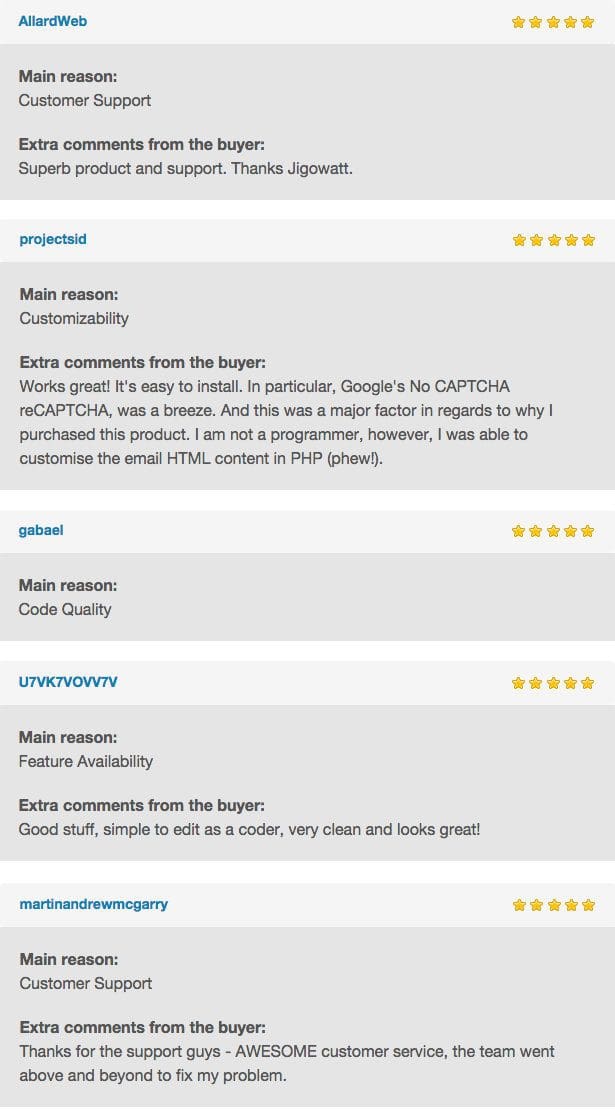
Reviews for the non-bootstrap version are great! Grab this one if you need bootstrap support!

Server & Browser Support

  • PHP5+
  • IE10+
  • Latest Chrome, Firefox, Safari

Support & Bug Reporting

Here at Jigowatt, we try to produce the best products we
can for sale on Envato.

If you find a problem with our product, we want to know
about it straight away.

If you have found a legitimate bug in our code, we’ll fix
it in a timely fashion and update the product.
If we remember, we will also credit you for finding it.

If you are having problems getting the product working or
have modified the code, we can offer help, but it may be
chargeable at £60/hr.

The reason for this is that the product costs less than an
hour of our developer’s time and we have to cover our
costs.

Thank you for understanding.

Follow us on Twitter

Updates

10.10.16 - v1.0.0 - Released for public sale

Download Ultimate PHP, HTML5 & AJAX Contact Form (Bootstrap Edition) (Forms)

Fat Boy World 2 (Games)

Try to help Fat Boy to run as much as possible can in this adventures world of different settings.

Guide Fat Boy in running action, collecting point in game , together with different skills that have been required in game.

You will be Ninja, Jungle Man, JetPack Pilot, Helicopter Pilot, Underwater Diver.

All of this setting in game request different skills, which you need to master.

Try the game:

About

Source code with 64 Bit Support, Xcode 8 IOS 10
BuildBox Project Included ( BuildBox 2 )

Game Artwork is included with .PSD file

Advertising Networks:

  • HeyZap
  • HeyZap Ads already configured with AdMob ( Banner, Interstitial ), Chartboost, Unity Ads, Applovin Ads

How To:

  • Create new App ID related to your project.
  • Create new Distribution Provisioning profile for your App ID, download it and install it in Xcode.
  • Setup new icons, launch screens, localization and meta-data for your app.
  • Change Atlases file with new images.
  • Change ID for AD Networks.
  • Update Review Us URL.
  • Configure Game Center.
  • Archive and Publish your game.

Download Fat Boy World 2 (Games)

Css Magician Magento2 extension (Magento Extensions)

What is this ?

Css Magician is a WYSIWYG editor so What You See Is What You get to edit the css styles of your store.
Customize the look of your Magento 2 front end store without technical knowledge.
You can to use it with any themes.
Customize, Fonts, Colors,  Backgrounds, buttons, positions and more in minutes.
Simply Click and Customize using Visual Editor tools.
 

How to use it ?

Css Magician can be used by non technicals users to modify the look of a Magento 2 theme.

You can change what you want and immediately see the result and it run for all themes.

Perhaps you are not satisfied with the look of your store or it does not conform to your graphic charter.

So it is necessary to change its appearance but you do not know how.

Css Magician use a Visual Editor with visual tools to change colors, fonts, sizes, etc … without technical knowledge.

You simply move the mouse over an item, click the item you want to change and choose in the tools offered by css magician what you want to change (color, text, size etc …).

You see immediately what you do. No need to know how to code. No need to contact a design agency.

You are doing exactly what you want without spending extra money.

Themes Manager

With Css Magician you can also create several themes design and choose which one you want to present to your customers.

You can create themes for special events like Christmas, Easter or Halloween. And display the desired theme whenever you want with a simple click.

So with Css Magician you can adapt the look and feel of your store as you want and when you want.

How it works ?

If your are an administrator of the store, Css Magician add a Tab on Upper Right corner in your Front end store. This is the WYSIWYG css editor.

Simply click with the mouse on an element you want to update and choose what you want to modify (colors, font etc…)

You can change:

* colors
* Fonts
* Add background images
* Blocks size
* Blocks margins
* Buttons
* Position
* Shadow
* etc…

Css Magician use color picker, fonts picker, sliders and texts fields to edit all css properties of a selected element.

Example of use

Place the mouse over a product name and click on it. The product name is selected. You open the Css Magician Tab and choose to update the Font color of that element. You click on the color picker associated to the font color and select which color you want to use. When you move the mouse over the color picker you immediatly see the result on the selected element.

When you are satisfied of the chosen color, you can save it.

Does it modify Magento 2 Files ?

No it overwrite anything.
At any time you can back to your original theme because it only create new css file.
And you can create severals themes and choose which one to display with a simple click.
You publish your work when you want. Until your work is not published, it is not displayed to your visitors.

Perhaps you are an advanced user or want to learn CSS ?

In that case, you can use the css inspector include with css magician.
The Css inspector found all the css rules applied to an element and are displayed in a css editor.
So you can update the css properties in the editor and immediatly see the result.

Back End Demo

http://demo-mage.presta-magician.com/admindemo

login: demo

password: demomagician1

Go to Content -> Themes (you can not create a theme or update)

Front End Demo

http://demo-mage.presta-magician.com/

In a real store, the css magician is only available for administrator (your visitors do not see it)

In the demo all save functions are disabled.

Download Css Magician Magento2 extension (Magento Extensions)

Archiving Documents & Share Center | Entreprise Edition (Project Management Tools)

Video TutorialsDocumentation

Archiving Documents & Share Center | Entreprise Edition

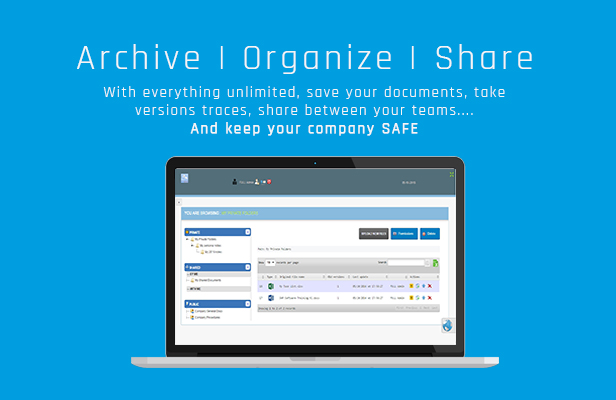
The most needed Application for companies to keep safe their documents with all files update versions and Sharing between teams.

Use it wit NO LIMIT and BE SAFE !

Archive, organize, save
Features

Download Archiving Documents & Share Center | Entreprise Edition (Project Management Tools)

Infinite Grid Pro WordPress Plugin (Galleries)

What is Infinite Grid Pro WordPress Plugin

Infinite Grid Pro WordPress Plugin is an unique responsive HTML5 multimedia infinite grid that can only be found on sale here, it runs on all major browsers and mobile devices like iPhone, iPad, IOS, Android and Windows8. Supports unlimited categories and each category can have unlimited content. When a thumbnail is pressed you can choose to do nothing, display multimedia content using our great revolution lightbox or to open a new webpage. The lightbox has support for image, video (mp4), audio (mp3), Vimeo, YouTube, iFrame, Google maps and flash. Infinite Grid Pro WordPress Plugin has high performance using OOP code and the latest CSS3 techniques, ready for mobile with swipe and pinch support, very flexible, easy to setup and extremely customizable.

The way Infinite Grid Pro WordPress Plugin is handling the thumbnails is as follows. Once the grid is initialized the first available thumbnails from the current category are added in order from left to right, after a drag or zoom is performed using a complex mathematical algorithm new thumbnails are added randomly, the new added thumbnails will remember their place in the grid no matter in which direction the grid is dragged and at the same time IGP is not allowing the same thumbnail to be repeated in it’s close proximity.

Royal Video Player WordPress Plugin main features:

Responsive layout and customizable color theme.

Mobile and desktop optimized (Android demo or Ipad demo).

Multiple display types, responsive, fixed, fullscreen, fluid width and after parent.

Support for multiple categories.

Shortcode generator.

Optional drop down categories menu, this categories selector can be positioned on the left or right side of the grid canvas.

Custom press thumbnail action. When a thumbnail is pressed you can choose to do nothing, display multimedia content using our great revolution lightbox, or to open a new webpage.

Revolution lightbox used to display multimedia content. When a thumbnail is clicked the lightbox can be used to display image, video (mp4), audio (mp3), Vimeo, YouTube, iFrame, Google maps or flash.

Optional visited thumbnails, this allows thumbnails that were clicked or viewed with the ligthbox to have reduced opacity, this way the user can easily see which content was viewed.

Customizable drag, the grid drag direction can be set to horizontal, vertical, both or none.

Two types of thumbnail transition animation (opacity or motion).

Auto scroll, the grid can be set to auto scroll, the auto scroll direction and speed are customizable.

Optional grid zoom.

Customizable thumbnails interactivity (thumbnails can be set to do nothing when clicked).

Randomizable categories, each playlist can load and show thumbnails in random order or in normal order.

Optional thumbnails overlay, also a specific color can be set individually for each thumbnail overlay.

Optional thumbnails multimedia icon.

Optional help screen.

Two skins included along with the psd files.

Detailed documentation and sample files included.

Updates log:

Special notes:

When using the video or audio player on a mobile browser the autoplay is set to false, also the volume bar is disabled.
The skin is constructed from png files.
For support or customizations please contact us here.

Download Infinite Grid Pro WordPress Plugin (Galleries)

FastestShooter – Admob and Revmob (Games)

Description:

Welcome to FastestShooter,this is a shooting infinite game.
This game is made with cocos2d-x.

How to play:

Tap anywhere on the screen to kill enemies.

Demo:

FastestShooter demo

Features:

1) Admob banner ads.

  • It requires Google Play Services revision 25.

2) Revmob banner ads.
3) it’s a 2.5D game (mixing 2d and 3d in a game).

What you get:

1) Full C++/Java source code (Cocos2d-x project).

  • It requires Cocos2d-x version 3.12 or later.

2) Source code for Eclipse (Eclipse project).

  • It includes Cocos2d-x libraries.

3) Documentation.

Support:

1) Customer support via email, [email protected]

Changelog:

  • Version 1.0

Download FastestShooter – Admob and Revmob (Games)

WP News Slider Widgets Pro (WordPress)

WP News Slider Widgets Documentation

If you have any questions that are beyond the scope of this
documentation, please feel free to email us:
[email protected] .

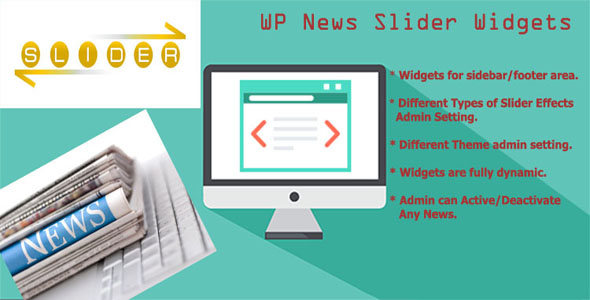
Plugin Banner

Plugin installation

There are 2 ways to install a WordPress plugin:

  1. using the WordPress installer
  2. uploading the plugin via FTP

1. Using the WordPress installer

  1. Go to Plugins > Add new
  2. Click Upload
  3. Select the wp-news-slider-widgets.zip file
  4. Click Install now
  5. Once the plugin has been installed click Activate Plugin

2. Uploading the plugin via FTP

  1. Upload the wp-news-slider-widgets folder into the wp-content/plugins/ folder on your server
  2. Once the plugin is uploaded log into WordPress and go to Plugins
  3. Find the WP News Slider Widgets Pro plugin and click Activate Plugin

Plugin updates

In order to add new functionalities, to stay up to date with the
WordPress software evolution, to correct bugs, WP News Slider Widgets Pro plugin is regularly
updated.

Updating does not affect the content of your site. All the settings and data associated with the plugin will stay the same.

There are 2 ways to update the plugin:

  • Automatic update
  • FTP update

Whatever method you should backup your website.
It is not compulsory but periodically backing up your entire
installation (entire directory structure + database) is a good idea,
especially before making any type of update to themes, plugins, core
files, etc.
Learn more about backups here.

Automatic update

If you entered your admin->plugins page you will get WP News Slider Widgets Pro plugin in the plugin list.
you will get notifications of new plugin releases directly on the plugin page and
you will be able to update in one click. thanks to the Update now action.

FTP update

  1. Go on the downloads page of CodeCanyon and download the plugin again
    (when you download the plugin you always get the latest version available)
  2. Unzip the plugin (you need to get an unzipped wp-news-slider-widgets folder
    that can be uploaded on your server later on)
  3. Go on the plugin page and deactivate WP News Slider Widgets Pro plugin
  4. On your server delete the wp-news-slider-widgets folder which is located in
    wp-content/plugins (note that this will not delete the WP News Slider Widgets Pro settings
    since they are stored in your WordPress installation).
  5. Upload the wp-news-slider-widgets folder you have just unzipped into the wp-content/plugins/ folder
  6. Go on the plugin page and activate WP News Slider Widgets Pro plugin

Admin News Options

In this section of the documentation, you will find information regarding the News Slider Admin News Options.

For the plugin to work correctly you need to create news with or without news.

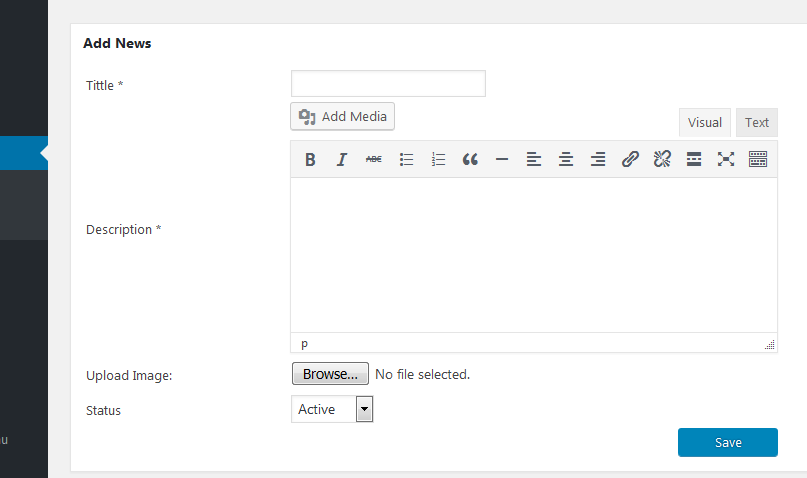
Below is the Add New News page

Here you need to give title of the news, Description of the News and you can upload a image for that news.

and then there is an option to set the status of the news. active or in-active.

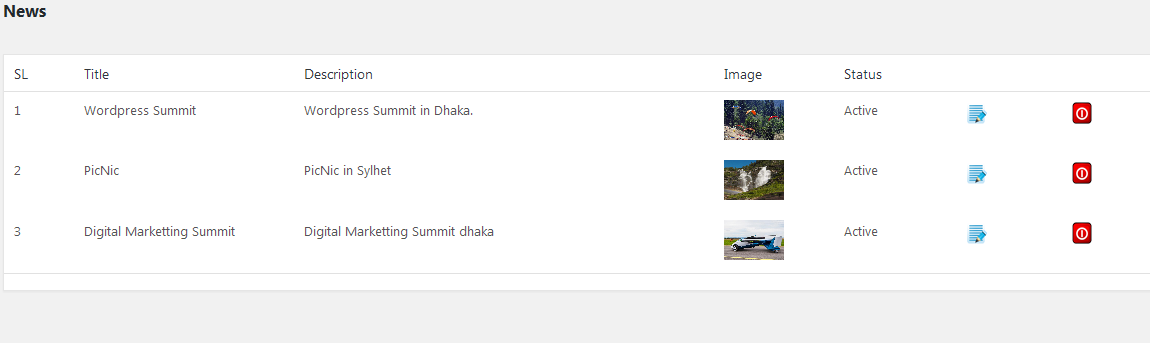
Below is the News Listing page

Here you will get all created news as a list. you can delete any news you want from here. and you can edit a news from this page.
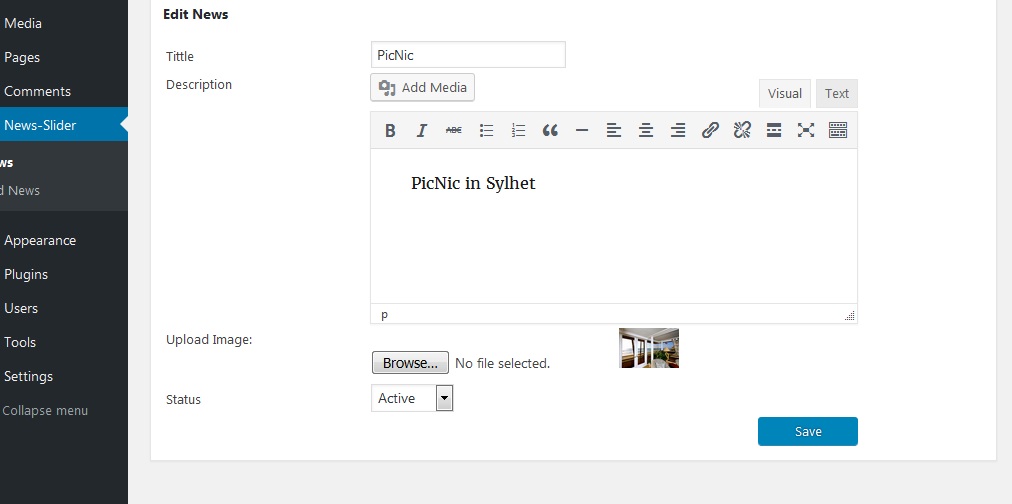
Below is a example of exit page:

News Slider Widget Settings

In this section of the documentation, you will find information regarding the Widget Settings menu.

Below is the News Slider Widget

In Widget settings you can do below things:

  1. Set title Caption.
  2. Title position
  3. Title Color and News title color
  4. News Description Color
  5. Background Color
  6. you can choose Sliding effects. there are around 27 effects option to choose.
  7. you can set timeout and speed of news sliding.
  8. you can choose a color theme from a dropdown of around 23 theme.
  9. you can choose to show pager or hide it.
  10. you can choose pager color , and pager color active.
  11. height of the news slider
  12. height and width of the image etc….

News Slider

In this section of the documentation, you will find information regarding the News Slider menu.

Below is the Dynamically designed Custom Widget

This is an example output of news slider widget.

  1. you can design slider widget according to your choise from admin.
  2. you can place the widget any widget area
  3. you can create multiple widget and show in different widget area or footer.
  4. you can give only text or only imagfe or both image and text.
  5. if you want you can inactive or active any particular news.

Download WP News Slider Widgets Pro (WordPress)

WooCommerce Checkout Upsells (WooCommerce)

WooCommerce Checkout Upsells Checkout upsell plugin will help you to display products you want as an upsell, to your customers based on your selection. You can customize the look of upsell products by applying custom CSS.

? Easy to install

? Easy to customize product list with custom css

Shops using the WooCommerce Checkout Upsells plugin have generated thousands and thousands in upsells offers, with a total overall conversion rate of 62%!! Could you be making more on every sale like these stores? You bet, and you can start today!

Download WooCommerce Checkout Upsells (WooCommerce)