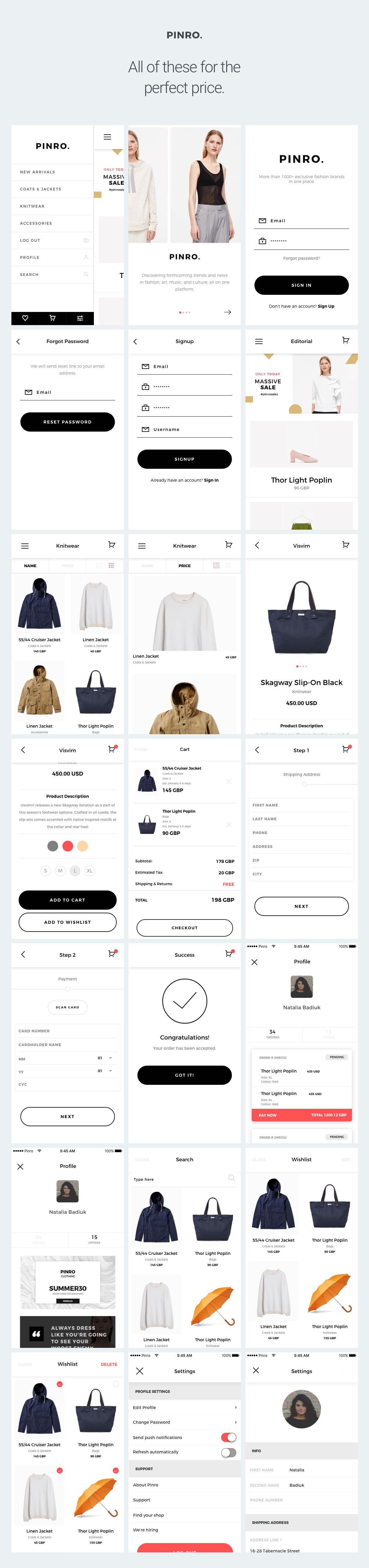
You can convert a single product with different attributes in various products.
Category: code
download PHP, ASP.NET, Java and Javascript from CodeCanyon – the marketplace for code scripts and snippets.Javascript, Java, Program, Code, Snippet, Script, Dev, Development, Codebase, MySQL, Class, Widget, System, CMS
MailWizz EMA integration with VeriAS.com (Add-ons)
MailWizz EMA integration with VeriAS.com
Clean integration with VeriAS.com for your MailWizz EMA powered application!
Once this extension is installed and enabled, your customers will be able to add their own credentials and select the areas where they need to verify the emails, for example they can decide to only check emails that are imported in their lists.
Please note that by customers we assume anyone that can login in the customers area of the app, so it can be just you, or if you use the app as a SAAS platform, your customers.
INSTALL in a few easy steps
– Login in the backend of your MailWizz EMA powered website and navigate to Extend menu then click the Extensions link.
– Hit the upload button and select the extension archive and upload it.
– Enable the extension and decide which customers can use it.
CONFIGURE the extension (after the above steps)
– Once the extension has been enabled, your customers will be able to insert their credentials and setup the extension for their own use case.
– Please note that your customers will need to have their own account with VeriAS.com.
REQUIREMENTS / Notes
This extension requires MailWizz EMA >= 1.3.7.3
QUESTIONS/SUPPORT
Please address any question, support ticket or any other query by using your mailwizz customer account.
Download MailWizz EMA integration with VeriAS.com (Add-ons)
Change Product Information (Prestashop)
Gym Master – Gym Management System (PHP Scripts)
GYM master demo : http://dasinfomedia.com.au/php/gym
Member access : alex / alex
Staff access : james / james


Download Gym Master – Gym Management System (PHP Scripts)
Royal Dock Menu Multimedia Slider (Sliders)
What is Royal Dock Menu Multimedia Slider?
Royal Dock Menu Multimedia Slider is a fully responsive dock menu style multimedia slider plugin that allows to display multimedia content with an unique original layout. It’s perfect for any kind of presentation, for anyone that wants to deliver a great impact to thier visitors. It runs on all major browsers and mobile devices like iPhone, iPad, IOS, Android and Windows. When a thumbnail is clicked you can choose to do nothing, display multimedia content using our great revolution lightbox or to open a new webpage. The lightbox has support for image, video (mp4), audio (mp3), Vimeo, YouTube, iFrame, Google maps and flash. Royal Dock Menu Multimedia Slider has high performance using OOP code and the latest CSS techniques, ready for mobile with swipe, very flexible, easy to setup and extremely customizable.
Royal Dock Menu Multimedia Slider main features:
Scroll and swipe functions for the desktop and mobile devices.
Optional categories Menu.
Support for unlimited categories and each category can have any number of thumbnails.
The option to start at a specific category.
Customizable thumbnails size, style and geometry.
Thumbnails image or THTML content: The thumbnails can contain simple images or HTML content that can be formatted with CSS.
Thumbnail’s tooltip: each thumb can have a tooltip. It is visible when the mouse is over a thumbnail, it can be dynamic (following the mouse) or static (above the thumbnails), the text can be formatted with CSS, the background image or color and opacity also can be modified (optional). The thumbnails can be also static, this means that nothing will happen when the mouse is over them or they are clicked/touched..
Responsive / Fluid layout with autoscale function.
Mobile and desktop optimized.
Customizable reflection for the thumbnails.
Custom press thumbnail action. When a thumbnail is pressed you can choose to do nothing, display multimedia content using our great revolution lightbox, or to open a new webpage.
Revolution lightbox used to display multimedia content. When a thumbnail is clicked the lightbox can be used to display image, video (mp4), audio (mp3), Vimeo, YouTube, iFrame, Google maps or flash.
Powerful API included.
Multiple instances on the same page.
Three skins included.
Detailed documentation and sample files.
Tons of other features.
Download Royal Dock Menu Multimedia Slider (Sliders)
Dailymotion Video Application, Android Eclipse Ready, ADMOB & STARTAPP ADS INTEGRATED (Full Applications)
Features:
– Exciting new application for Dailymotion videos.
– Fully new libraries & fast working.
– No server needed.
– Easy to add your own videos from Dailymotion channel.
– Use multiple backgrounds.
– Fully documented and ready to use.
– Easy to reskin.
– Documentation are added in main file.
– 2 Ads networks Integrated.
– ADMOB
– STARTAPP
Demo apk: https://www.dropbox.com/s/rhnvuw2o9t7w1ij/DailymotionVideoApp.apk
For more detail: [email protected]
Download Dailymotion Video Application, Android Eclipse Ready, ADMOB & STARTAPP ADS INTEGRATED (Full Applications)
Tank Shelf – HTML5 (.CAPX) (Games)
Casual game, ideal for children, a simple game to play where to aim the game and collect coins that comes with the passage of time, to deviate from the obstacles that come in the way that is the tanks too.
How to play:
Touch the screen to control the hero’s position (TANK).
You do not need the construct2 license!
• Get Construct 2 .capx file!
• Easy image replacement!
• Play on desktop and device.
• Easy export to HTML5 for website (included).
• Support for Touch & Mouse.
Download Tank Shelf – HTML5 (.CAPX) (Games)
Agree/Disagree Interactive Voting Social Plugin (WordPress)
Have a controversial topic? Sometimes our blog posts can stir up interest in our readers and there are sides to take. With our agree/disagree wordpress plugin it will allow your readers to either agree/disagree with the blog post and prompt them to enter their email address and a comment if they would like to add one.
This lead generation feature lets users connect with each other and also allows bloggers/webmasters segment their readers. The agree/disagree plugin also will tag the users whether they are in agreement or in disagreement in the comment section.
Compatible up to WordPress 4.6.1
Features
- Vote to Agree or Disagree on Posts
- Mailing List Integrations ( Mailchimp & Maropost )
- Customization Settings
- 5 Premium Design Pop Up Templates
- Export Votes to CSV
- Backend Report View
- Backend Control Panel
- Customizable Agree/Disagree Buttons
- Comment pop up form
- Font & Color Customizations


Download Agree/Disagree Interactive Voting Social Plugin (WordPress)
Elegant Tabs for Fusion Builder (Add-ons)
This plugin is an addon for Fusion Builder WordPress plugin that comes with Avada WordPress Theme version 5.0 and above. It works great with the WordPress 4.6 and Fusion Builder 1.0 and above. To get Fusion Builder plugin, Buy Avada Here.
It lets you add any shortcode or html content in multiple tabs so that users get to choose the data they want to see. We have also added numerous possibilities of customization where you can select different colors, icons, backgrounds for different sections/tabs. The content area can be filled up with TinyMCE editor; which means you can implement WYSIWYG.
Features
Tab Icon:
You can choose the icon for each tab from the available fonts library in Fusion Builder.
Tabs Alignment:
Most of our users have asked for this feature. We have added an option for alignment. You can now align your tabs left, right or center.
Currently, Elegant Tabs for Fusion Builder offers around 10 different styles of tabs and unlimited variations to make sure no two websites have similar looking tabs. This also lets you choose from a wide variety of options. Following are the style we provide –
– Bar Style
– Icon Box Style
– Underline Style
– Top line Style
– Fallig Icon Style
– Line Style
– Line Box Style
– Flip Style
– Trapezoid Style
– Fillup Style
For Theme Authors ?
We offer theme authors an easy way to include this plugin in their themes on Themeforest. If you wish to include this plugin in your theme to be sold exclusively on Themeforest, just purchase an Extended License for each of your themes and send the purchase code and Theme name via contact form on our profile page. We will provide you with the stock license for that particular purchase code.
Download Elegant Tabs for Fusion Builder (Add-ons)
BMI Calculator (Material Design) (Full Applications)
Customize your own BMI Calculator app now!
- Very Easy to Personalize
>> NO CODING SKILLS REQUIRED <<
- Beautiful Material Design
- Stunning Animations
- Rate/Share Buttons/Dialogs!
- Switch Between 2 Modes: kg/cm & lbs/inches!
- BMI Info Screen
- Splash Screen
- Adapts to Different Screen Sizes
- Gradle
Download BMI Calculator (Material Design) (Full Applications)
Candy Game Runner Full Ios Game – (Xcode project – Admob – Buildbox) (Games)
Candy Game Runner is a addictive game which simple gameplay that you must tap the screen to jump over the obstacle and run to get The finally to this game is the the best score with the distance coins and stars recollected.Have a full music and documentation support.
Description :
How to Play:
For playing this game, you can use touch in screen.
Don’t have Buildbox? Don’t worry, we can help you! If you need help customizing the game, feel free to contact us via Email.
NOTE :
We provide complete support of our products, so if you faced any issues, feel free to ask and remember that our main contact method is via Email.
Features:
This game has been created with buildbox (BBDOC file included)
Game Features
Universal (phone & tablet)
Endless
Game Tap Play
Sound on/Off Option
Google play services
Admob integration
Info of the game
Includes :
Xcode Project
PNG Files
( Icon Game )
Documentation DOCX File
BBDOC File
Reskin:
You don’t need Buildbox engine to reskin the game. Just replace default images with what you want using an image editor software. If you need help in reskining the game, feel free to contact us via Email
Download Candy Game Runner Full Ios Game – (Xcode project – Admob – Buildbox) (Games)
WP Post Tools – Fully automated SEO helper for your auto blog plugin! (Utilities)
Idea
There are several auto blogging plugins that can be used with WordPress. An auto blogging plugin, such as an RSS plugin or WP Content Crawler, is used to automatically get content from other sites to your WordPress site. You can get content from other sites, but, most of the time, you cannot automatically edit those automatically saved posts. WP Post Tools offers a few tools that can be used to automatically edit those posts. The plugin can work with any auto blogging plugin.
The auto blog plugin has to use WordPress’ wp_insert_post function to save the posts or trigger the save_post hook after it saves a post. Since this is the WordPress way to create a post, most of the plugins probably do it that way. If you have concerns about this, please ask the developer of the auto blog plugin you use about this to make sure.
How it works
When your auto blogging plugin creates a post on your site, WP Post Tools interrupts the save operation by making the post’s status ‘draft’. Then, it applies the edits you configured, and turns the status of the post back to its original, which is most probably ‘publish’. So, it edits automatically saved posts and publish them, automatically.

Video tutorials
The video tutorials that you can find in the playlist below cover almost every aspect of the plugin and they will help you understand how the plugin works.


Available in two languages, ready for translation

Existing tools
There are several tools which can be grouped as templates, images, videos, social media, and advertisements.
1. Templates
A template is a text that can contain short codes that the plugin offers or any other text or HTML you want. For example, you can use a post title template to create/change a post title, or post content template to create/change a post content. Inside those templates, you can use several short codes. You can define more than one template for a, let’s say, post title. In that case, the plugin will use one of the templates you defined randomly. So, you can define, for example, 10 post title templates.
1.1 Short codes
The plugin makes it possible to include almost any post data into almost any template. For example, you can use post categories in the title, post content in meta description, post tags in meta keywords, or even post content in post title and so on. The short codes can have several attributes. For example, you can make the post title all uppercase, make only the first chars of the words uppercase, cut the text by words, word percentage or even sentence percentage, add ellipsis to cut texts, limit the number of categories a post can have and a lot more.
One of the most powerful short codes is “conditional phrase” short codes. You can use those to conditionally show something. For example, you can show “code canyon” when the post content contains “wordpress”. Again, you can use that short code in any template. So, you can add “wordpress” tag to a post when the post content contains “envato”. The only limit is your imagination when you use this short code.
Another powerful short code is “random phrase” short code. You can define several random phrases for a short code. Then, when you include the short code in a template, it will be replaced with one of the phrases you defined for that short code. Again, how you will use this depends on your imagination.
2. Images
The plugin can add a related image for a post. You can define image folders and relate them with a keyword or phrase. For example, you can create an image folder named as “health”, put some apple or doctor photos in it, and use that folder when a post’s title contains “health”. So, in case that there is a post whose title contains “health”, the plugin can add one of the images in “health” folder.
It can also write some texts onto the image. You can use the short codes to define the text that will be written onto the image. There are several styling options available as well. Please watch the video tutorial to understand the image creation better.
3. Videos
The plugin can create a video for a post and upload it to YouTube. For this to work, you need to install FFmpeg library to your server and include a few libraries for it as well. You can make sure the libraries are activated properly using “system check” page of the plugin.
So, the plugin can use the images you defined in “images” section along with the images inside a post and make them a slideshow video by adding a background audio and some text. Again, you can define the texts using the short codes. There are several styling options available as well. Please watch the video tutorial to understand the video creation better.
4. Social Media
The plugin is able to share the posts on Facebook and Twitter. You can define the share texts using the templates and short codes. Since you might not want to share every post on social media, the plugin offers you a “popular posts” option, using which you can define the minimum number of views that a post should have so that it can be published. Please watch the video tutorial to understand the social media options better.
5. Advertisements
This tool can be used to show related affiliate products or any other advertisements for a post. The plugin can show manually created advertisement codes, or it can show products from a web site. For example, you can configure the plugin to show “android figures” from Amazon when the post content contains “android”. Please watch the video tutorial to understand the advertisements better.
Other things
The plugin can also
- spin texts
- find and replace (it is possible to use regex as well) in post content, excerpt, title, tags, meta title, description and keywords
- add links to defined phrases
- remove unwanted phrases
- boost related posts
- change post category depending on phrases
- add tags depending on phrases
- extract tags from post title
- use custom RSS feed to export edited content to another site
- show bonus videos
- make different configurations for different categories
and do several other handy things.
Also
- Ready to translate (.po file)
- Get updates from your WP admin panel
Final notes
This plugin makes it possible to fully automate post editing. It offers several tools to help you implement your SEO techniques. How you can use the provided tools depends on your imagination. With combination of WP Post Tools and an auto blog plugin, you can fully automate your blog.
For more information on how the plugin works or how it is used, you can watch the video tutorials, read the documentation or check out the demo.
System Requirements
Must
PHP >= 5.6, mbstring, allow_url_fopen
Optional for video creation to work
exec, FFmpeg library (with libraries enabled: gpl, libass, libfdk-aac, libfreetype, libfontconfig, libfribidi, libmp3lame, libopus, libtheora, libvorbis, libvpx, libx264, libx265, nonfree)
Feature list
Below are the main but not all features of the plugin.
- Import/export almost every setting.
- Test almost every setting.
1. General
- Activate/deactivate auto editing
- Select suitable/unsuitable categories for auto editing
- Extract tags from post title
- Set maximum meta title/description length
- Add ellipsis to long meta titles/descriptions
- Set maximum number of meta keywords
- Set maximum number of tags
- Set maximum number of tags that can be extracted from the title
- Set maximum number of post categories
- Set maximum number of phrases that can be linked in the post content
- Link phrases on run time or hard link them
- Set minimum and maximum tag/meta keyword length
- Set post meta keys for meta title, meta description and meta keywords so that you can set meta information of the post for any SEO plugin you have
- Set suitable post types for auto editing
- Activate the RSS feed that you can get detailed post information to export auto edited posts to other sites
- Set post categories depending on the phrases the post has in its title or content.
- Create templates for post title, excerpt, content, tags, meta title, meta description and meta keywords. You can create unlimited number of templates for each one to randomize.
- Find and replace in post title, excerpt, content, tags, meta title, meta description and meta keywords.
- Find and replace using regular expressions.
- Use “find and replace” options for text-spinning.
- Set post tags depending on the phrases the post has in its title or content.
- Add links to phrases in the post content.
- Create phrases that you can use randomly in the templates.
- Create phrases for the short code that will show what you want only if some phrases exist in post title, excerpt, content, tags, meta title, meta description or meta keywords.
- Set unwanted phrases so that they are removed from the content.
- Boost related posts.
- Create your own boost post template and add your custom CSS.
2. Images
- Activate/deactivate auto image creation.
- Add a random related image to the posts.
- Add the image as a featured image.
- Add the image to the post content.
- Delete old featured images automatically to use your disk space effectively.
- Write texts onto the image using templates and short codes.
- Change color of the texts and text backgrounds, add border to the images, set border color, set the font of the texts.
- Add a related image to the post depending on the phrases the post has in its title or content.
3. Videos
- Activate/deactivate auto video creation.
- Set suitable/unsuitable categories for auto video creation.
- Upload videos to YouTube channels.
- Delete videos after they are uploaded to use the disk space effectively.
- Set minimum view count for the posts for which a video can be created.
- Set maximum number of popular posts that can be added to video creation queue each time.
- Set video title, description and tags using the templates and short codes.
- Set a text template that will be used to create the text that will be written onto the video.
- Set minimum display duration for an image.
- Set duration per word, to make sure the texts are shown long enough for the viewer to read.
- Add intro/outro videos.
- Set video size, background color, font, percentage of the area that will be used to show the texts, text color, text background color, font size, image fade color.
- Add a related background audio to the video depending on the existence of some phrases in the post’s title or content.
- Upload to several YouTube channels.
- Set video category.
- Add bonus YouTube videos to the posts.
4. Social Media
- Activate/deactivate automatic sharing.
- Share on several Facebook and/or Twitter pages/accounts.
- Set minimum view count for the posts that can be shared.
- Set maximum number of popular posts that can be added to share queue each time.
- Create share texts using templates and short codes.
5. Adverisements
- Activate/deactivate advertisements
- Set maximum ad title and text length.
- Open ads in new window.
- Add ad links “nofollow”.
- Add additional CSS to ad codes.
- Create ad groups.
- Activate/deactivate an ad group.
- Set an ad group as fallback.
- Add additional CSS to ad groups.
- Show ads of an ad group in specific posts.
- Show ads depending on the phrases the post’s title, excerpt, content, tags, categories, meta title, meta description and/or meta keywords contain.
- Show ads/affiliate products from other web sites.
- Add custom URL parameters to the URLs of the ads retrieved from other web sites.
- Get an ad from target web site if it contains/starts with/matches the phrases you define.
- Remove unnecessary elements from the ads retrieved from other web sites.
- Find and replace in codes of the ads retrieved from other web sites.
- Add manual ad codes to an ad group.
- Show an ad full width and single.
- Import/export ad group settings.
- Define custom general fallback ad codes.
- Make custom general fallback ad codes full width and single.
6. Tester
- Test auto edit, video creation, advertisements and bonus videos for a post.
- See before and after the edit side by side in the tester.
7. Tools
- Edit/revert a post.
- Remove boost post data.
- Create a video for a post.
- Remove the video from a post.
- Remove bonus video data from a post.
- Remove saved Facebook pages, Twitter accounts and YouTube channels.
- Create manual ad codes.
- Invalidate caches for the URLs used to retrieve advertisements.
8. Logs
- See almost everything happening in the background.
- Set a refresh interval to see changes while they are happening.
- Download logs.
9. System Check
- See if your system satisfies the requirements for the plugin.
Changelog
v1.0.0 - First release
Download WP Post Tools – Fully automated SEO helper for your auto blog plugin! (Utilities)
Copter attack – HTML5 game. Construct 2 (.capx) (Games)

Features
- The game works on all popular browsers
- Easy export to Android and IOS platforms
- Very easy customization, reskin
- Cocoon + Ads Supported
- Including Constuct 2 file (.capx – all source)
- AdMob! (interstital)
- Mobile control
- Easy to use
- Nice graphics
- You can embed the game on the frames HTML5
- The ability to change the location of the on-screen buttons and their size
- ADS quick start!!!
- Full HD: 1920×1080
- Random enemy generation
- Upgrade system
- With every appearance of enemies become tougher
File includes
- Images
- Sounds
- Project file Construct 2
- HTML5
- ADS cocoon plugin
- logo 16-550px
- Quick start DOCUMENTATION
Do you have ideas for games? You found bugs? Send me an email in my account profile
BEST SELLING


OTHER GAMES


.png)


Logos:


Download Copter attack – HTML5 game. Construct 2 (.capx) (Games)
More WooCommerce Options (WooCommerce)

More WooCommerce options is a plugin that supplements the standard WooCommerce settings with some important settings.
The plugin provides its own tab in the WooCommerce settings with the name “MoreWooOption”.
You can find this tab under: WooCommerce > Settings > MoreWooOptions
The setting possibilities are subordinated in several sections. You will find tabs for “General Settings”,
“Product Setting”, “Shop / Archive Settings”, “Account Settings”, “Cart Settings” and “Checkout Settings”.
More WooCommerce Options – Features
- Remove woocommerce breadcrumbs
- Change the first woocommerce breadcrumb
- Replace “Out of stock” by custom text
- Change the add to cart button text on product pages
- Display “product already in cart” instead of “add to cart” button on product pages
- Add a text under product image
- Disable product tabs separately
- Change the add to cart button text on product archives
- Display “product already in cart” instead of “add to cart” button on product archives
- Hide the “read more” button for out of stock products and show up the “add to cart” button
- Show up quantities next to “add to cart” buttons on product archives
- Hide the price and “add to cart” button for logged out users
- Remove the product count functionality
- Add a message above the registering form
- Hide shipping method selection when free shipping is available
- Set a basic surcharge in % to all transactions
- Add a minimum order amount
- Automatically complete orders
- Redirect the user to the checkout, after adding a product to the cart
- Set the phone number to a not required field in the checkout
Refunds
Before asking for a refund please review “valid” and “invalid” reasons for refunds at http://themeforest.net/page/author_refund_policy