WP Mega Menu Pro – Responsive Mega Menu Plugin for WordPress (WordPress)

Tested with WordPress 4.7

WP Mega Menu Pro is a Premium WordPress plugin, where you can easily add widgets in a single or multiple group wise. You can assign specific column to specific group if you selected multiple type group for mega menu. This plugin includes both horizontal as well as vertical mega menu, it is a built in visual mega menu builder plugin with features to display menu as flyout or megamenu type with orientation as vertical or horizontal type.

Total of 14 Pre-Available beautifully designed template/skins and you can customize your menu bar with multiple customization options creating your own custom templates. Configure Menu wise settings from admin navigation page.

WP Mega Menu Pro - Sales Page


Advanced Features List

  • Mega Menu/ Flyout 14 Free Elegant Template Layouts/ Custom Design
  • 13 pre available custom widgets with different layout
  • Single/Multiple Group Mega Menu Type
  • Supports Flyout or Mega Menu sub-menu styles
  • Widgetized Mega Menu with Visual Builder Drag and Drop Position Method
  • Horizontal and Vertical Menus
  • 5 Available Inbuilt Menu Icons / Custom Icons
    • 650+ Font Awesome Icons
    • 120+ Genericons
    • 160+ Dash Icons
    • 400+ IcoMoon
    • 40+ Line Icons
  • Top/ Bottom Section for Mega Menu
  • Unlimited Custom Item Styling
  • Advanced Menu Items(Horizontal/Vertical Tabbed) with trigger effect and different animation.
  • Menu Label Animation
  • Upload Background Image
  • Menu Replacement Settings 
    • Login Type
    • Register Type
    • Search Type
      • Popup Form Type
      • Mega Menu Type
      • Inline Type
    • Woocommerce Cart Total
    • Logo Image
  • Roles and restriction
  • Enable Sticky Mega Menu
  • Custom CSS
  • Translation Ready & Fully Responsive
  • Tested on all modern browsers
  • Touch Friendly and Search Engine Optimized


Lifetime Dedicated Support

– You can find us anytime when you have some queries, problems or with any valuable suggestions for plugin or us. You can find us through following ways:

Constant Free Upgrades

– Not fixed on dates, but we assure you to provide you new updates and feature upgrade in the plugin at regular basis.

Download WP Mega Menu Pro – Responsive Mega Menu Plugin for WordPress (WordPress)

Carnival Balloon Shoot – AdMob – HTML5 – Construct 2 (Games)

Video Preview

https://www.youtube.com/watch?v=RUW8a458JIU

FEATURES

– HTML5
– 1280×720 HD resolution
– Made in Construct 2
– Easy To Edit
– Endless game
– Includes Psd & Png files
– All platforms (Desktop,android,ios,windows phone etc.)
– Admob ads ready to earn money

Download Carnival Balloon Shoot – AdMob – HTML5 – Construct 2 (Games)

User Management with Privilege Label (Project Management Tools)

Summary

This application based on new CodeIgniter 3 Framework that allows website owners to quickly add and
enable authentication, authorisation and user management to their website.
Multi-level user access, user communication by internal mail system and that mail will be available in real email.
It is designed latest security and code standards and it is ready for high availability websites.

The User Management System can control unauthorized access in your system.
It features changable User Levels via the user control panel incase your website requires different levels of page security amongst loads of other useful features!
By purchasing and integrating this script into your existing website you can create a private user area where visitors to your website have to be logged in to view page content.

This application is equipped with several features that will be very easy to use & simple modify to create a dynamic and user based applications.
You can integrate it with your CodeIgniter application and saved the development time.

Documentation

You can view the documentation by following this link: Documentation

Live Demo

You can view a demo installation by following this link: Live Demo

Super Admin

  • Username: superadmin
  • Password: demo

Admin

  • Username: admin
  • Password: demo

User

  • Username: user
  • Password: demo

Features

  • Twitter Bootstrap design.
  • Using CodeIgniter 3
  • Cross-Browser Compatible (IE6+, FF, Safari and more).
  • Fully object oriented and commented PHP and JavaScript code.
  • SEO friendly URL.
  • Auto pagination.
  • Captcha integration.
  • Public profiles.
  • Custom user profiles.
  • User can upload their own avatar.
  • Social icons used to link to your other sites and sections.
  • Each can be disabled in the admin panel if you do not need them to be displayed.
  • Multiple user levels (Superadmin, Admin, User).
  • Login expiration – Control default time before a user is logged out.
  • Two-Factor authentication.
  • “Remember Me” feature on login.
  • Login with email or username.
  • Authentication Throttling (lock user account after few incorrect login attempts)
  • Lock screen experience.
  • Supports password hashing/ encryption.
  • Customizable password validation.
  • User can retrieve password by specifying either username or email.
  • Completely customizable “Password Reset Email”.
  • Supports both (HTML and Text) Messages.
  • Security Considerations.
  • Forgotten password screen.
  • Forgotten password reset.
  • Email based password recovery.
  • Email activation – Avoid false signup!
  • All old password reset codes are removed from database for security purposes.
  • After one use a password reset code expires and any further access to the page takes you to reset link expired page.
  • At any point of time there is only one reset code per password as the system cleans up old information that is not needed.
  • My Account (“Settings”) page.
  • Extremely easy to integrate.
  • Reliable and secure MySQL database backend.
  • Automatic HTML5 & PHP field validation.
  • Auto Sortable columns.
  • Interactive Dashboard.
  • Unlimited number of user roles.
  • Powerful admin panel.
  • Unlimited number of permissions.
  • Manage permissions from admin interface.
  • Assign permission to roles.
  • Easily check if user has permission to perform some action.
  • Super easy installation using installation wizard.
  • User activity log.
  • Active sessions management (see and manage all your active sessions).
  • Full unicode support.
  • Client side and server side form validation.
  • Fully customisable from settings section.
  • Destination URL (redirect) after Login for any Role.
  • Extremely easy to integrate!.
  • Reliable and secure MySQL database backend.
  • Automatic AJAX field validation.
  • Mailbox System allows users on your system to send messages to each other.
  • Here is possible to reply on each mail.
  • Get notifications when you receive new mail.
  • Users can delete mail.
  • Block list & Suspend list allows users to block other users from contacting them.
  • Customize the access, denied, register, forget password, activation link messages.
  • View list of recently registered users.
  • Search through all users.
  • Add new user manually.
  • Reset any user’s password.
  • Edit any user’s level or access.
  • View list of user levels.
  • Search through user levels to edit.
  • Supper admin can change site name, site email and site logo.
  • Integrates with new or existing “User Management Area”.
  • Complete documentation provided.
  • Live demo view.
  • Full Support.

Server Requirements

  • Web server – Apache
  • PHP version 5.3 or newer is recommended.
  • MySQL – 5.1+

Installation

Follow all the steps carefully…

  1. Download the file which you have purchased
  2. Upload zip file in your server
  3. Extract the zip file that you uploaded
  4. Create a database using hosting database wizard
  5. Go to purchased folder and find database.php file (application/config/database.php)
  6. 'hostname' => 'your host name',
    'username' => 'your username',
    'password' => 'your user password',
    'database' => 'your database name'
    
  7. Then go to application/config folder, find config.php file
  8. Change base url (26 number line)
  9. $config['base_url'] = 'http://yourdomain.com';
  10. Now Go to your browser and check your domain.

If you using any folder location in your hosting to install this script, then you need some extra change in root (.htaccess) file on line number 3.
You can open to edit this file on Notepad or Notepad++. Here will be adding your folder name as below..

<IfModule mod_rewrite.c>
        RewriteEngine on
        RewriteBase /your_folder_name/
        RewriteCond %{REQUEST_FILENAME} !-f
        RewriteCond %{REQUEST_FILENAME} !-d
        RewriteRule ^(.*)$ index.php/$1 [L]
</IfModule>

Support

Please feel free to contact us with any questions you may have via the contact form on our author profile page

or email us: [email protected]

Updates Note

Version 1.0.0 – 01 August 2017

Initial release

Credits

Download User Management with Privilege Label (Project Management Tools)

Bump System plugin for Minecraft Servers List (Add-ons)


This is the Bump System plugin for the Minecraft Servers List script. This plugin will allow your users to Bump their servers on the front page’s sidebar in order to promote it. Easy installation ( copy and paste ) and configuration through a single file. More installation details are available after purchasing.

Download Bump System plugin for Minecraft Servers List (Add-ons)

Button Generator (Images and Media)

The Nathan Button Generator allows you to create customizable button from Bootstrap Glyphicon Components and downloadable button, work in localhost or web hosting (IPV6 version).

Features include:

  • Choose from many Bootstrap Glyphicon Components with icon picker
  • Customize button text
  • Customize button color
  • Customize icon size, and
  • Downloadable button (in the IPV6 version)

bGenerator Class

This class allows to print Bootstrap Glyphicon Components and text over a created image. It requires Glyphicons Unicode HTML Entites and glyphicons-halflings-regular.ttf.

The resulting image will be show on PNG, and saved the works in ”./imgs” folder.

Usage

Adding the class

require_once ’./Class.bGenerator.php’;

Creating the object

$img = new bGenerator($UniHex, $text, $tcolor, $bsize, $bcolor);

Showing and saving the image

$img->show();

Download Button Generator (Images and Media)

Recipe Calculator (WordPress)

Functionality, that your readers will love!

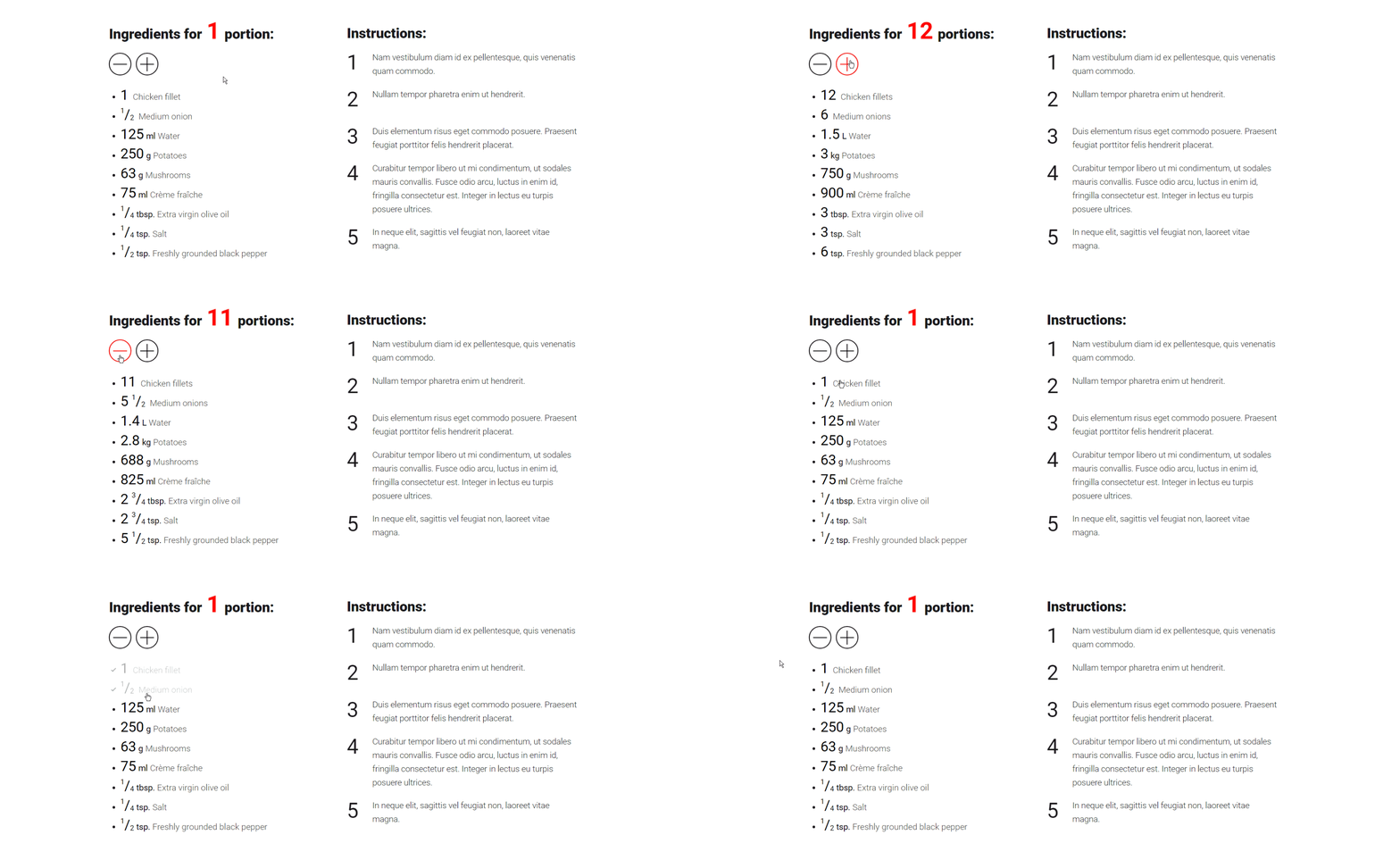
The 1-click option for customizing the portions of your recipes and instantly recalculating the needed ingredients.

Features: Responsive, Interactive, Structured data markup, available in 6 Languages

recipecalculator

Recipe Calculator will make the life of your visitors much easier, when they want to cook less (or more) portions than the default, given in a recipe. For you it can be a very powerful tool for increasing the returning visitors on your website, because… well, no one likes calculating.

Wouldn’t you prefer coming back to a website, that provides you with 1-click option for customizing the portions of your favorite meal and instantly recalculating the ingredients for you?
Without losing time in calculations, you can prepare dinner for the friends, you have invited over this weekend.

And, if your visitors are like me – such that can’t cook and have to follow very strict every recipe they want to prepare, otherwise the result is total disaster – they will love you for having this functionality on your website!

My intention, creating this plugin was to help you serve your visitors better – in a way that they will truly appreciate, and stay your loyal fans.

Responsive
Recipe Calculator helps you deliver great experience to your users throughout all screens – mobile, tablet and desktop.

Interactive
It lets the user change the amount of portions in 1 click and automatically recalculates the amount of ingredients needed for the preparation of a recipe.

When the user clicks or taps on an ingredient that they already have, it changes its opacity. This makes it easy to see the ingredients they have to add.

Structured data markup
If your WordPress theme uses Structured data markup for Recipes, Recipe Calculator comes ready with microdata markup for the following fields from Schema.org: recipeYield, recipeIngredient and recipeInstructions.

It also supports microformats2 h-recipe with the following class names: p-yield, p-ingredient and e-instructions.

Languages
Recipe Calculator is currently available in English, Dutch, Bulgarian, German, Spanish and Russian.

Download Recipe Calculator (WordPress)

EZ SchoolMate – Most Complete School Management System (Project Management Tools)

EZ SchoolMate, the most complete automation process for managing your school/college. Every work and event that performed manually now, can be performed automatically through our system’s student module, teacher module, staff module, admission/online admission module, promotion module, course material module, routine module, result processing module, accounts module, library module, internal messaging module, sms/email alert module and many many other modules.

You can use this system in your own language, we have built-in support for 11 different languages.

You don’t need any kind of technical knowledge to operate the system but must have to read our user manual very well.

Key Features

Internal Messaging

SMS/Email Alert

Responsive Design

Online Admission (PayPal)

Complete Library System

Result Processing (Percentage,GPA & CGPA)

Accounts System

Multilingual Support

Dashboard Preview

Live Demo

Admin/ student/ teacher panel : http://csms.xeroneit.net
Online admission application : http://csms.xeroneit.net/online
Applicant panel : http://csms.xeroneit.net/applicant

How to install?

Please read our installation manual before you go : Installation Manual

User Manual

Visit our documentation to explore more

Support

Our team is ready to solve your problem as soon as possible. Please feel free to check our envato support instructions.We will try our best to get your five star rating.

Download EZ SchoolMate – Most Complete School Management System (Project Management Tools)

SocialGuru – WhatsApp Group Join Button Widget (Widgets)

SocialGuru – WhatsApp Group Join Button Widget is a WordPress widget that automatically gives you a “Join group” button on your website for WhatsApp!

When one of your customers clicks on the button, he will be automatically prompted to join the WhatsApp group.

Download SocialGuru – WhatsApp Group Join Button Widget (Widgets)

Santa Run – Complete Buildbox Project + Eclipse & Android Studio Project (Games)

Santa Run is a very new platformer game which is very addictive and challenging. Just tap on screen and jump as high by escaping the enemies. You can reskin and use this game template to publish your own game in Google Play. This is complete game, so, there is no need to code. This is an opportunity to have a state-of-the-art game mechanics in your portfolio. Enjoy the endless fun and the beautiful design and don’t forget to share your top score to beat your friends.

Demo

Demo apk: https://drive.google.com/open?id=0BwvQmOTqiKBWb0otN216TDZEY3M

Main Features:

  • BuildBox 2 Project Included
  • Eclipse Project
  • Android Studio Project
  • Universal (phone & tablet)
  • Admob Interstitial
  • Game Services
  • Endless gameplay
  • Rate buttons

DISCLAIMER:

As per Envato rules, you must purchase our game template under an Extended License if:

You plan to sell your own version of this game as a paid app on the Appstore/Google Play.
You plan to add In-App Purchase to your own version of this template.
You plan to sell your own version of this game on marketplaces via App Transfer.

Download Santa Run – Complete Buildbox Project + Eclipse & Android Studio Project (Games)

Easy Touch – Assistive Touch (Full Applications)

Assistive Touch

APK Real Demo : https://www.dropbox.com/s/xl3vcdtf2pmxg6z/4.Assistive%20Touch.apk?dl=0

What is Assistive Touch?
Assistive Touch is an assistant manipulation tool for your Android phone is a similar shortcut IPHONE cell phone. Assistive Touch gives you more easily to operate and more conveniently to quickly access to all your favorite apps, games, settings, and notifications by a floating panel on the screen. Assistive Touch is also an excellent ideal to protect the physical buttons! Our virtual panel can effectively reduce the hardware consumption, thus prolonging your phone’s life. And Assistive Touch is fast, light, and FREE.

  • What Assistive Touch can do?
    Assistive Touch provides the easiest ways with one touch to:
    – Go to Home Screen
    – Quick toggle settings: quick access App as Call, SMS, Clock, YouTube, Setting, Flashlight, Games and all Apps installed
    – Set up and quick open your favorite applications
    – Lock Screen
    – Back button

*Quick switch or Turn on/off, including:
– Wi-Fi, GPS, Bluetooth
– Brightness
– Ringer mode
– Auto rotation
– Volume
– Ring down, Ring up
– Memory clean and optimize
– App list

+ Android Studio Project
+ Admob Added ( 1 banner + 1 full_intersitial )
+ Assistive Touch like an Iphone device with: home, setting, shortcut, lock, clean memory.

Download Easy Touch – Assistive Touch (Full Applications)

Plugin Combo For Wowonder (Add-ons)

Wowonder is the best way to create your own social website or online community. Launch it in just 1 minute with ultimate features. It’s easy to install.

Using this plugin you can publish reactions on your site, this plugin is compatible with wowonder 1.4.3
DEMO

Features :

> New plugin for Wowonder

>Well documentation added.

>Fastest Working Script.

> Fully Responsive.

> No Needed Any Coding Skill(Only copy, paste( remplace) and install)

Buy in this moment!!

Download Plugin Combo For Wowonder (Add-ons)

Window Cleaner – HTML5 Arcade Game (Games)

How To Play
+Touchscreen
– Touch Sprite on screen to Player Move

+Keyboard
– Press left or right ket to pplayer move
– Up key to Jump
– Down Key to Throw the Pot

FEATURES :
– Keyboard And Touch Screen
– CDR (Corel Draw)
– Power Up
– HTML5 File
– 5 Levels
– convert to Android n IOS (Cocoon JS, Intel XDK)
– Easy to Customize level
– Sound FX
– Made in Construct 2
– Included Construct 2 file .CAPX

Download Window Cleaner – HTML5 Arcade Game (Games)

Page Builder Sandwich (Utilities)

Special introductory price 20% off!


Page Builder Sandwich is quite possibly the the last page builder you’ll ever need. With its front-end drag and drop capabilities, Page Builder Sandwich allows you to create and design your site the way your visitors see it. Get access to numerous features such as shortcode mapping, hassle-free and pop up-less editing, and more. With us, you’re sure to have a page building experience like no other.

Human-Oriented Interface

Most of the time, page builders make you go through a lot of popups just to edit a simple thing. For example, if you want to edit a heading, you’ll have to open up a popup, type in a text field, then save and close the popup. With Page Builder Sandwich, it’s super easy, just click on your content and start typing. It’s so much faster and feels more natural.

Global Shortcode Mapping

Other page builders let you map out the different attributes of the shortcodes that you have. Page Builder Sandwich on the other hand, does things in a global scale. We have hundreds of plugins listed in our shortcode mapping database. Shortcodes from popular plugins in the WordPress plugin directory will be mapped out right away, complete with attribute descriptions to boot. Easily create and edit shortcodes from NextGEN Gallery, JetPack, ACF, WooCommerce, Shortcodes Ultimate, bbPress, and hundreds more. This feature is unique to Page Builder Sandwich.

Ease of Use

Using Page Builder Sandwich is unbelievably easy, fast and unlike anything you’ve used before:

  • Click on text and headings and start typing right away
  • Type in shortcodes directly to add them, or pick them from a list
  • Paste in a URL or an embed code to add videos and other content
  • Hit Ctrl+Z / Command+Z to undo mistakes
  • Drag content to move it to another location
  • Drag images in your browser from your Windows Explorer / Finder to add them
  • Pick styles from our inspector to design your page
  • Add raw HTML, widgets, sidebars, shortcodes, Google Maps, vector icons, and plenty more

Stress-Free and Fluid Experience

We made sure to remove all distractions and hinderances from the flow of editing. Now you can concentrate on creating your design with nothing else holding you back. No more going through multiple popups and filling out fields to edit stuff.

Use familiar tools to make your site

Following your intuition is key. Add text, columns, colors, pictures, videos and other design elements using buttons and shortcuts that you already know.

Site Performance

We include as little scripts and styles as possible to your site to ensure that everything loads fast. Scripts and styles are only included when you use them.

Use With Your Current Set Up

We have successfully used Page Builder Sandwich with a lot of themes including themes from the WordPress.org theme repository, Genesis Themes, StudioPress Themes, Elegant Themes and themes from ThemeForest. If it doesn’t work with your theme, please let us know and will fix it.

Works With Your Existing Content

Page Builder Sandwich integrates with how WordPress deals with content, so it should work well with your existing pages. Your content should be editable right away in the frontend.

Download Page Builder Sandwich (Utilities)

Monster Falls (Games)

Monster Falls is a auto runner platformer game, avoid the monster and jump on your enemies to defeat them. other key or touch the screen make player jump and double clik to double jump, pause the game with the space bar or the button.
Easy to change the images, just replace the image file!

Features:
• One touch control
• Construct2 File included! (.capx All source)
• Playable on all platform (PC, Mobile, etc)
• Responsive

Download Monster Falls (Games)