Extract Youtube Video Subtitle To Text PHP Script (Social Networking)

This powerful PHP script with a clean look and feel allow you to extract Youtube subtitle text from a video with a click.

Preview Demos

Screenshots

Screenshot

Features List

  • Validate user input before extract subtitle.
  • Return Subtitle text in a clean format.
  • Extract both manual and automatically generated subtitle within seconds.
  • Fully Responsive
  • Clean Codes with Bootstrap v3.3.7
  • Easy to integrate this script into other PHP program.
  • Retina displays ready

Download Extract Youtube Video Subtitle To Text PHP Script (Social Networking)

Scroll Top Button : For Responsive Websites (Muse Widgets)


See also:

Hello, dear friends!
Here is a Unique Widget for Adobe Muse – Scroll Top Button (for responsive website)+Bonus 20 png arrows

Present a unique widget – scroll button for Adobe Muse. This Widget like is configured and operates in the responsive version starting in 2015.2.x

As you know, the problem of the responsive layout of the website in Muse is the lack of scrolling up. Now it’s no longer a problem. This widget allows you to perform scrolling in each stopping point. There is no need to anchor

The widget is very easy to use, has many settings and most importantly – do not need to create the anchor. Just place the widget on a page and configure according to the instructions.

Thank you!


Download Scroll Top Button : For Responsive Websites (Muse Widgets)

XAds for SAM Pro (Advertising)

Extended visualization of ads served by SAM Pro (Lite and Free edition).

This addon provides extended visualization of ads served by SAM Pro (Lite and Free edition). It adds possibility of displaying ads as popup ads, fly-in ads, background ads and corner ads. All single Ad Objects (Ad, Place, Zone) can be used as content of XAds addon.

You can use this addon not only for extended visualization of ads, you can use it also as simple messaging system.

Features

  • Peelback corner ad (javascript)
  • Background ads
  • FlyIn ads
  • Popup ad
  • The ability to triggering of fly-in ads by scroll events
  • The ability to customize the appearance of ad dialog boxes
  • The ability to customize positions of fixed ads dialog boxes
  • Several animation effects of triggering ad dialog boxes

System Requirements

  • PHP 5.3+
  • WordPress 4.1+
  • SAM Pro (Free or Lite) 1.9.9+

Changelog

1.1.0.11

  • One-click updating has been added

1.0.0.10

  • Initial upload

Download XAds for SAM Pro (Advertising)

Jurrasic Adventure (Elipse,Buildbox,APK Project File – Animated Menu – Admob Banner & Intertitial) (Games)

Jurrasic Adventure is a game that you need to avoid death by Rat and collect diamond coin .

This game is already completed you can put it directly to playstore if you’r a reskiner juste change whats you need to change in eclipse and put your own game in play store .

For playing this game, you can use touch in screen ( up – down – rights – left )

Without forget this game has animated menu ….

You can edit all the game assets, sounds, Ids…

Don’t have Buildbox? Don’t worry, we can help you! If you need help customizing the game, feel free to contact us via Email.

NOTE :

This game has been created with buildbox (BBDOC file included)

Game Features

Universal (phone & tablet)

Endless

Charachter Shop

Game Tap Play

Sound On/Off Option

Admob integration

Includes :

-PNG Files ( Icon Game )

-Documentation DOC

-BBDOC File

-Video Documentation

-Eclipse Project File

-APK file

Download Jurrasic Adventure (Elipse,Buildbox,APK Project File – Animated Menu – Admob Banner & Intertitial) (Games)

Valentine Card 4 (Canvas)


Description:

• Get this valentine card and share it with your love.. Enjoy this card, enjoy the valentine’s day!

Help:

• Modify the card and upload the folder to your hosting. Use the card as is, or as iframe. Example:
<iframe frameborder="0" width="1000" height="500" src="http://yoursite.com/card/"></iframe>
• Replace link (src) with yours, use your own sizes (width, height).

Computers (Any Browser):
Use mouse wheel to zoom, click the card and move around.
Mobile-Browsers:
Use 2 fingers to zoom, touch-hold the card and move around.

• You will have my full support concerning my items. Primary contact method is by e-mail. Please make sure to contact me asap if you have any questions and/or requests..

Features:

• HTML5 eCard (With and Without Logo and Title)
• Mouse and/or Touch
• Online Fonts
• Replace Messages/Images/Any With Yours
Use Mouse/Touch to Zoom
• High Definition
• Responsive Design
• Help (Image) Steps Included
• Email Support

Credits:

• Music “Be My Valentine” by Tim McMorris, you can find it here: Link here

Changelog:

Version 1.0
• Initial Release

Screenshots:


Support:

• If you have any questions and/or requests, please contact me at [email protected] or using contact form.

Download Valentine Card 4 (Canvas)

Quicksers – Ask questions and get quick answers (PHP Scripts)

Welcome to Quicksers!
Quick – fast, rapid
sers – answers

Quicksers is a questions and answers community. You will ask a question and the community will answer it.

Features:
– Login & Register System
– Badge System
– Powerful Admin Panel
– HTML E-mails
– Different Categories for Questions
– Top users rank by points
– User profile
– Report questions and answers
– Best answers and featured questions
– Promoted questions (not implemented yet)
– much more!

Credits:
– FontAwesome
– Google Fonts
– jQuery

Demo & Admin:
– Username: demo
– Password: demo
– Admin username: admin
– Admin password: admin
– Admin link: http://xsuve.16mb.com/p/Quicksers/admin.php

Please report any bugs & suggestions at: [email protected]

Download Quicksers – Ask questions and get quick answers (PHP Scripts)

Supported Browsers (Prestashop)

Get the most out of the internet

More than ever, websites are taking advantages of all the new features that modern web browsers provide; HTML5 video and audio, advanced JavaScript and CSS styling all rely on you having a modern web browser. If you don’t use the latest version of your web browser, you’re probably missing out on some of the latest features.

Stay safe and secure

If you run a web browser that is out of date and which contains security vulnerabilities, you risk having your computer compromised by criminals. Depending on the security exploit, your personal information (including emails, banking details, online sales, photos and other sensitive information) could be stolen or destroyed. This is not a hypothetical occurrence; it happens regularly and in large volumes.
If your computer’s security is compromised you also run the risk of being used as a “middle man” in online crime; or as an unwitting pawn in large scale attacks against other internet users or companies. So even if your personal data is not stolen, if compromised, your computer can be turned into a “zombie”; sending out thousands of spam emails per day, or be forced to participate in “denial of service” attacks against other websites; all without you even being aware.

What this module does for you

Notify your customers via pop up if their browser is out of date, if the browser is out of date the popup window will display a link to the browsers download page.>

If the end user does not wish to update their browser they can simply click on the close button at the bottom of the box to continue browsing your website, they will not be prompted again until the session cookie expires.

Features

  • Supported Browsers.
    • Chrome
    • Firefox
    • Safari
    • Opera
    • IE
    • Select minimum browser version
    • Change and translate message shown to customers.
    • Change styling i.e. background colour, background opacity
    • Show links where customers can download updated browser version
  • Compatible with Prestashop 1.5x & 1.6.x.
  • Compatibility (IE8+, Firefox, Opera, Safari, Chrome).
  • User Guide Documentation.
  • Demo Store

    Back Office Credentials

    Username: [email protected]

    Password: demodemo

    Back Office Demo

    Front Office Demo

    Changelog

    • Version 1.0.0 (21/01/2017)

      - Initial Release

    Download Supported Browsers (Prestashop)

    Mini Jump – HTML5 Game (CAPX) (Games)

    Mini Jump simple touch base game with cute characters. Game gets difficult as you make more score.There are 5 more locked characters…Make score and collect coins to unlock awesome characters.

    This game is build by Construct 2 Game Engine (Capx File Included).

    How to play

    Touch and hold then release to jump the character

    Features

    – HTML 5
    – Construct 2 Files Included
    – Cocoon + Admob Ads Supported
    – Admob Ads Integrated
    – Playable in all platforms (Mobile, PC, etc.)
    – Including Constuct 2 file (.capx – all source)
    – Easy export to Android & iOS
    – Single Touch To Play

    Download Android Example APK

    Our Other Games

    Download Mini Jump – HTML5 Game (CAPX) (Games)

    Newsletter Subscriber (OpenCart)

    Overview:
    =================

    Newsletter Subscriber Module Will allow to you place a Newsletter subscriber module around your website. Your customers will be able to subscribe to your newsletter without the need of creating an account with this module.and You can easily prompt your products for sale and long-term relationship with the customer and online store with this extension.

    Main Features:
    ===============

    • Create Unlimited Custom Email Templates.
    • Beautiful Newsletter Popup / static module view.
    • All Form Feilds manage from adminpanel
    • Export subscribers list to excel file.
    • Export/import Feature.
    • Admin can enable/disable subscribes.
    • Customer email subscribe confirmation.
    • Ajax processing and Fast and smooth Loading.
    • Full Responsive.
    • Multi language support.
    • Cron Feature for scheduled mails.
    • Send Unlimited Emails to Subscribers.
    • Easy Installation and setup.
    • Uses OpenCart’s built-in module system (no core files are overwritten)

    Admin Preview

    http://extensionsbazaar.com/newsletter/admin/index.php?route=module/awesomenewsletter

    U=demo
    p= demo

    For Support : [email protected]

    Download Newsletter Subscriber (OpenCart)

    The Kafe – Ultimate Freelance Marketplace (Miscellaneous)

    Demo Login Credentials
    Demo URL – Kafe Demo
    Admin URL – Admin Kafe Demo

    Admin

    Client

    Freelancer


    Download The Kafe – Ultimate Freelance Marketplace (Miscellaneous)

    Plugin Enhancer for phpDolphin (Plugins)

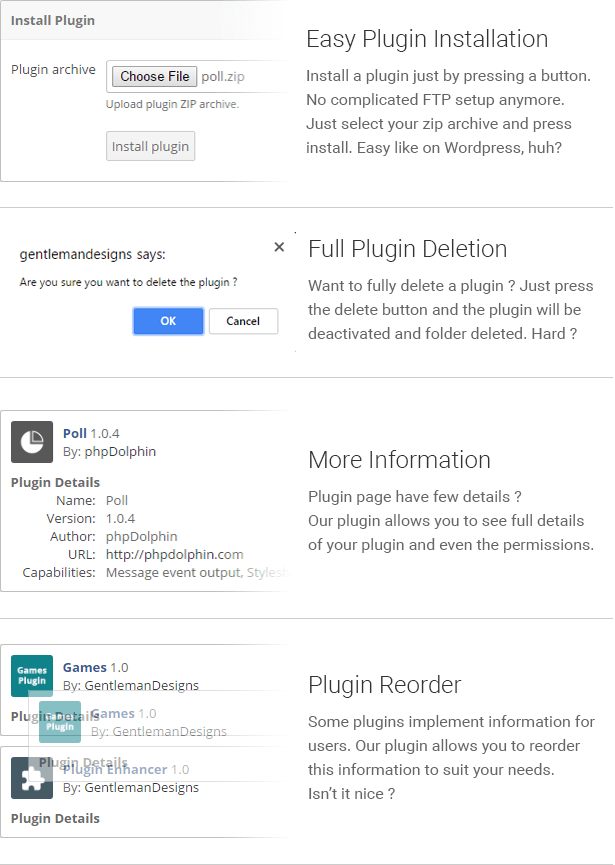
    The Plugin Enhancer for phpDolphin – Social Network Platform allows you to easily reorder, install, delete and manage your phpDolphin plugins. Plugin Enhancer allows you to install plugins from a zip, to completely delete plugins, to reorder how the plugins information is shown and also to see more information about your plugins.

    Features

  • Easy plugins installation
  • Completely remove plugins
  • Easy plugin reordering
  • Plugins permissions list

  • Download Plugin Enhancer for phpDolphin (Plugins)

    Pinterest Auto Pin on Multi Boards | Magento 2 Extensions (Magento Extensions)

    Pinterest Auto Pin for Magento 2 is a simple, flexible, yet powerful solution to provide information to your buyers, advertise, promote your products, special offers and campaigns on Pinterest. The extension helps you pin your products to Pinterest after add new product automatically. Additionally, It can save your time with feature pin multiple product on Pinterest with just one click. The extension also does not change any core file of Magento 2, so you can update your installation with total peace of mind.

    Feature

    Auto Pin product on Pinterest after add a new product
    Auto Pin multiple products with just one click
    Create new Pin on multi Pinterest boards
    Auto Pin products on multiple Pinterest Boards
    Auto Pin randomly product base on cron job.

    Download Pinterest Auto Pin on Multi Boards | Magento 2 Extensions (Magento Extensions)

    DROP | Responsive Dropdown Navigation (Navigation)

    DROP | Responsive Dropdown Navigation

    An awesome navigation plugin ready to use in any HTML page displayed on mobile phones, tablets and desktop devices.

    Fully Responsive
    A responsive navigation ready to fit perfectly on mobile phones, tablets and desktop devices.

    Various skins
    DROP – Dropdown Responsive Navigation comes with a set of skins ready to use.

    Vertical or horizontal dropdowns
    A Versatile navigation with vertical or horizontal dropdowns with unlimited levels.

    Left, Center and Right alignment
    Because sometimes you need a navbar aligned to left, to right or centered.

    HTML5 and CSS3
    Crafted with HTML5 and CSS3 according with the latest web patterns and best practices.

    A lot of options
    More than 25 options between settings, methods and callbacks. Modify as you want.

    Cross Browser
    Compatible with the major browsers like Chrome, Firefox, Safari, Opera, IE and Edge.

    Bootstrap Compatible
    Compatible with the most famous front-end framework in the world: Bootstrap.

    Free Updates
    Zero cost for updates for enhancements, compatibility, inclusion of features and more.

    Well documented
    High level documentation teaching you to build the navigation step by step.

    Several examples
    Create your navigation fast using one of the examples included in the package.

    Extra elements
    Use a button, a plain text or a search panel in your navigation.

    Changelog

    22 January 2017

    Version 1.0
    Initial release
    

    Download DROP | Responsive Dropdown Navigation (Navigation)

    Popups Generator – powerful WordPress plugin for generate of popups & flyouts block (WordPress)

    Functional plugin “Popups Generator” for CMS WordPress is designed to ease the process of creating and configuring popups on a web site. He helps to manage pop-up information blocks flexible. It’s comfortable to change the content and settings of plugin display. A characteristic feature of this solution is the simplicity and efficiency of use.

    The advantages of plugin

    Popups Generator is a powerful tool designed under the demands of various sites owners. It is used for comfortable informing web resource visitors of current promotions and advertising campaigns, important news and much more.

    Among its advantages should be noted:

    • user-friendly control panel interface;
    • large variety of styles and display settings;
    • the use of animation effects;
    • detailed popups display settings;
    • the possibility of using different media;
    • HTML-enhanced editor;
    • creation of unlimited number of pop-ups;
    • preview of the information blocks in the editing process.

    The plugin is a “flexible” modern solution for effective work with popups.

    Peculiarities of  dealing with Popups Generator

    A distinctive feature of Popups Generator is the possibility of fine-tuning pop-up information blocks. It allows you to adjust to the activity of individual network users, using cookies. To edit popups an administrator is provided by a big set of solutions.

    Editor with extended functionality

    Convenient editor with features familiar to many users is designed for rapid entry and change the information you need. Setting the display of text content is done via the menu panel. It allows:

    • specify the text style;
    • align the content to the page width or the page edges;
    • add lists and quotations;
    • insert, edit and delete links;
    • expand the editor to full screen;
    • display additional toolbar (changing the color of messages, insertion of a horizontal line, specifying indents and other tasks).

    To add media files in the window just choose them on a local disk or link to third-party site. Downloaded from an external source images, audio and video, are stored in the shared library, where they can be grouped by date and sorted by the galleries, playlists. Each media file is additionally defined by a title, caption, and description. The image has an alternative text and proportions input fields, the ability to customize miniatures.

    For a detailed study of the appearance of a pop-up content unit there is an easy to use HTML-editor. It enables formatting with special tags and set precise settings of the window display content. It supports the use of shortcodes (shortcode) for various purposes.

    Style

    \

    This section is intended to adjust the display style of a popup. Allows to change the appearance of a pop-up block, its size and color scheme. The main feature set includes:

    • width – used to change the popup width;
    • height – specifies the height of the pop-up unit;
    • padding – used to configure the internal indents from the content to the parent container.

    Framework unit display is regulated:

    • border width – sets the border thickness around the window;
    • border radius – determines the degree of rounding the block corners;

    The starting position is determined by:

    • position – sets the positioning parameters of an element on the page (absolute or fixed);
    • z-index – indicates the parameters of the “overlapping” the other elements by the window.

    The following values allow to indicate the distance from the pop-up window to the parent element in percentage :

    • top position and Bottom position – from the top and bottom edges, respectively;
    • left position and Right position – from the left and right edge.

    To set the background of the window and change its color schemes are used:

    • Background image – add a background image in a popup box with the specified reference;
    • Overlay – allows to plug the background layer overlay to a web page when displaying the window and select its color;
    • Background color – sets the general color block solution;
    • Border color – determines the display frame color.

    Style block is used to give the popup a distinctive style that corresponds to specific user targets. With just a few clicks you can create an attractive block with important information for visitors.

    Mobile style

    \

    In this unit the style of pop-ups on mobile devices can be adjusted. One can set:

    • trigger screening less than the specified resolution;
    • form width.

    Specifying the settings allow to display popups on a site very harmoniously for small screen devices owners.

    Close Button

    \

    Extended settings unit is designed to modify the appearance of the popup close button. With the help of it one can specify alternative ways of completing the pop-up display unit, such as clicking on the background layer (overlay) or «Esc» button. «Select a type» menu item allows to choose the type of button display as a graphic element (image) or a short text message (text). Main settings unit for “image” includes:

    • size – setting the size of the cover form;
    • top position – location on the Y axis;
    • right position – location on the X axis;
    • delay –  specifying  the delay time of button appearance;
    • background color – sets the background image color;
    • color –  is used to select a color of the graphic element (or text) display .

    When choosing a close button in the form of text, appear some additional parameters:

    • content – a field for entering a text message. The specified text will be displayed on the close button of a popup;
    • padding top & bottom – internal upper and lower indent from the content to the closing element borders;
    • padding left & right – internal indent on the left and right sides from the button content to the container borders;
    • border width – it allows you to set the display frame width around the form;
    • border radius – adds a decorative effect of rounding button corners;
    • border color – sets the frame color.

    With the Close Button menu it’s easy to create and configure bright closing buttons for the popup. Closing element delay output function will attract the user’s attention to the information, provided by the pop-up block.

    Display

    \

    Flexible display trigger system enables optimal configuring the information window display, depending on the user’s actions:

    • after page loading;
    • clicking on a link with the set id or anchor;
    • scrolling the window;
    • closing the page.

    In this section pop-up unit re-demonstration for a particular user can be set (using cookies). Additionally should be specified:

    • reset in – reset the display after a set number of days;
    • delay – the delay time for the popup display on the user’s screen;
    • reach – pop-up block display after reaching the specified page size while scrolling.

    Animation

    \

    Animation Settings section contains a large set of effects for dynamic display appearing (Animate In) and closing (Animate Out) of the pop-up box. They are designed to attract the attention of a web resource visitors to the content of the popup.

    To “revive” the page one can use:

    • rolling out;
    • bouncing;
    • falling;
    • dividing a block into several pieces;
    • fading;
    • pulsating;
    • zoom and much more.

    Changing the duration of the applied effect (Animation duration) will create the necessary impression and allow to focus on a specific block. Animation is used to add dynamics to the page, to improve aesthetic display unit.

    Button

    \

    In the Button menu a special button withdrawal to call the popup can be allowed. There are some additional settings with the following options:

    • button position – allows you to place a call button at the top of the window, bottom, the left or righ side of the page;
    • button’s text – a field for entering the name of the element;
    • button width – sets the width of the button;
    • button color – sets the form color;
    • button hover color – determines the illumination color while hovering the mouse cursor on the item.

    With the help of the button it is possible to review the pop-up block information at any time. This is useful when displaying important news or offers for the user.

    Popup display

    \

    In the popup display menu one can set up more detailed parameters of its displaying:

    • pop-up unit display (Show for users) is set both for all visitors and selectively: for authorized or unauthorized site users;
    • «Show after popup» function helps to set pop-up blocks display options one after another, if cookies are used;
    • block display can be limited depending on the screen resolution;
    • the language filter on the page sets in the drop-down list.

    Popups display can be carried out on all the pages in all the website publications indicating the specified exceptions, choosing pages/posts by the set id or inserted shortcode at the same time.

    Show after popup

    «Show after popup» function allows setting the sequential windows display dependence on the site. To do this it’s necessary to:

    1. Create and name the first popup (Window 1).
    2. In the Display section set the cookies support and specify the reset time (Reset in) for pop-up block.
    3. Create and name the second popup (Window 2).
    4. In the «Show modal window» unit check on the item «Show after popup». Select the name of the first (the one before display) pop-up block in the appeared drop-down list. Save all settings through the «Update».

    Visiting the site for the first time the user will see Window 1, and for the second time – Window 2. The first block rerun depends on the settings in the Reset in field. The same can be done for the next information blocks display. The plugin allows creating a whole network of dependencies used in a popups web resource.

    Connecting a popup to the site (Publish)

    \

    Publish block consists of the three functional buttons:

    1. Preview – is used to preview the popup before the publication on the website. With the help of this option the process of checking the changes, made in the project, and correcting them without transferring data to the web resource becomes very comfortable.
    2. Update – saves the changes and applies them to the connected pop-up block.
    3. Delete – the button for deleting the window.

    Popups Generator plugin serves for creation, optimal setting and easy pop-up information blocks management on the site. User-friendly interface makes it easy to understand the settings and the functional tool details.

    Download Popups Generator – powerful WordPress plugin for generate of popups & flyouts block (WordPress)

    Placeholder Image Generator and Replacer for WordPress Themes (Utilities)

    Replace your copyright images in your WordPress Themes automatically in three clicks.
    The plugin automatically searches for the images, measures the dimensions and generates placeholder images, replaces them in your WordPress Theme beautifully.
    No need to spend hours creating placeholder images in different sizes.

    Why we created the plugin

    Imagine you have used 100 + copyright images in your WordPress theme. And you have to replace the images with placeholders one by one manually.
    Its a fruturating task for any theme developer who is creating themes for marketplaces like Themeforest. Using third party services is cumbersome as it requires replacing the urls at the database level.

    The plugin however takes a simple approach. It reads your existing image, creates a new placeholder image for the same dimension and replaces it.

    Save time. Just install the plugin. Search and replace with three clicks.

    Key features

    • Automatically finds the dimension of the image and replaces with a placeholder of the same size.
    • Ajax based batch processing. So it can work even in servers with low memory
    • Allows you to control the number images to be processed per batch
    • Bakckup your original images automatically before replacing them with placeholders

    Replace images with placeholders

    System Requirements

    • PHP 5.5 +
    • Imagick or GD extension for PHP enabled (Most servers will have this by default). Xampp, Mamp, Wamp all have this pre-installed.

    Changelog

    - 20/01/2017 
    Initial release


    Download Placeholder Image Generator and Replacer for WordPress Themes (Utilities)