My App – Build Android App for your website (Full Applications)

My app allows you to create your own app for Android Phones and Tablets from your URL Website . With just a few clicks, all without any code ,it is fast and easy to create Android apps Now ! There are two pages where you just throw a bunch of information.”contact us” and “about us”

APK demo: Link to APK


\

Features

  • Page Intro 
  • Page contacs us 
  • Page about us 
  • Share application
  • adMob
  • Swipe to refresh the page
  • Sliding Menu using Navigation Drawer
  • Tested on android 4.0 , 5.1 ,5.0,6.1
  • tested on tabled 4.3

Download My App – Build Android App for your website (Full Applications)

Jungle Adventure of Ninja: Game Android-multiple charcters-multiple worlds-Easy Reskin-and more (Games)

Jungle Adventure of ninja is an adventure games where the characters must overcome the enmies to continue to complete the stages. In this game You can collect corners to buy world or other characters
– in this game there are characters who can kill all enmies
-the games contains deffirent background and deffirents characters
-the games contains 6 worlds and 5 characters

Download Jungle Adventure of Ninja: Game Android-multiple charcters-multiple worlds-Easy Reskin-and more (Games)

Share on Facebook for Prestashop (Prestashop)

Share on Facebook is a premium Prestashop addon that allows admins to easily share their products on their shop’s Facebook Page!

As an eshop admin, from time to time, you need to post on your Facebook Page a selection of your products! So, just navigate into your eshop’s admin area, choose the product you need to post, and just click on the “Share on Facebook” button! Instantly, the product is shared and promoted!

Share on Facebook comes packed with all the necessary configuration options in order to totally control the way your posts look! You can choose the post’s language, description, image size, and whether you want to display the product’s price or not! Moreover, for each post, you can add a custom message!

Check the screenshots to get a closer look to all admin parts of the module!

Features

  • One click “share on facebook” functionality
  • Ability to easily add a custom message to your post
  • Customize your posts image size
  • Customize your posts language and description
  • Optionally display your product’s price
  • Multi-shop

Changelog

v.1.0 - February 4, 2017
Initial release

Download Share on Facebook for Prestashop (Prestashop)

Shipping (Shipping)

WordPress Shipping plugin is a dynamic shipping plugin for any type of product shipping. I use ajax functionality for data input, update, delete & search option both of back-end & front-end. If you so busy for other work, you can just input booking information just single 2/3 field full-up, which name is shortcut booking, and you can complete this shortcut booking letter when you have time. I use booking date, booking time, delivery time etc. & many more for booking option. User can search there product current status with there booking number from front-end. Also admin can update, delete, change current booking status from Back-end / dashboard. I use separate table in MySQL for store this data in your database, so that you can find any data in for your future use, if you not delete data permanently.

Download Shipping (Shipping)

X-Ray Scanner (Elipse/APK : ( Project File ) – Blue X-ray – Admob Advertiser) (Games)

X-Ray is a prank that you move the phone and the hands x-ray will move .

You can prank your friends with putting your hand and move your phone on top of your hand then prank them with xray :D .

You can edit X-ray color in eclipse code .

Don’t have Eclipse? Don’t worry, we can help you! If you need help customizing the game, feel free to contact us via Email.

NOTE :

It support also 7.0 & 7.1 android version !

This game has been created with Eclipse

Game Features :

Universal (phone & tablet)

Move to play

Admob integration

Includes :

-PNG Files ( Icon Game )

-Documentation DOC

-Video Documentation

-Eclipse Project File

-APK file

Download X-Ray Scanner (Elipse/APK : ( Project File ) – Blue X-ray – Admob Advertiser) (Games)

Princess Coloring Book (Elipse/APK : ( Project File ) – Many Charachter – Admob Advertiser) (Games)

Princess Coloring Book is a game that you choose color’s and paint Princess charachter .

Princess Coloring Book is specially for children and they will have fun :D !

You can edit with eclipse !

Don’t have Eclipse? Don’t worry, we can help you! If you need help customizing the game, feel free to contact us via Email.

NOTE :

This game has been created with Eclipse

The Game Support Android 7.0 & 7.1 !

Game Features :

Universal (phone & tablet)

choose color and paint

Admob integration

High resolution retina graphics

Super fast hardware accelerated paint (Android 4.0+)

Compatible and tested with 7 and 10 inch Tablets, and Phones.

Includes :

-PNG Files ( Icon Game )

-Documentation DOC

-Video Documentation

-Eclipse Project File

-APK file

Download Princess Coloring Book (Elipse/APK : ( Project File ) – Many Charachter – Admob Advertiser) (Games)

Total Recipe Generator – Visual Composer Addon (Add-ons)

Total Recipe Generator helps you create online recipe content instantly with rich microdata and nutritional facts. Make your recipe content stand apart with clear steps and precise information with this plugin.

When you put a lot of efforts and hard work in creating online recipe content, your work deserves more exposure. With Total Recipe Generator, your recipe content gets organized in semantic and hierarchical manner. This improves your site’s presence in search results and personalized media platforms like Pinterest. The content generated by TRG is a mix of schema micro data, internal links, JSON LD micro data, and required/recommended Meta tags for a “Recipe” content type.

For theme developers, the plugin supports modification of core template file by copying it inside theme folder. The core files are easy to extend and style. With clean design and well documented code, the plugin offers good scope of creativity and modification for theme developers.

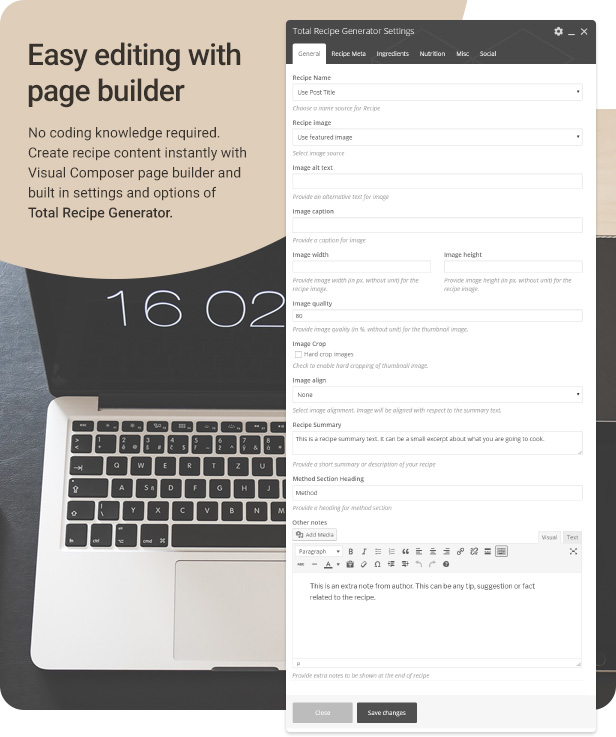
Not to mention, the plugin is shipped as Visual Composer Add-on. It inherits drag-and-drop interface, along with built-in support for tons of VC elements which you can use inside recipe method instructions. The Total Recipe Generator plugin is well supported on pages, posts and custom post types.
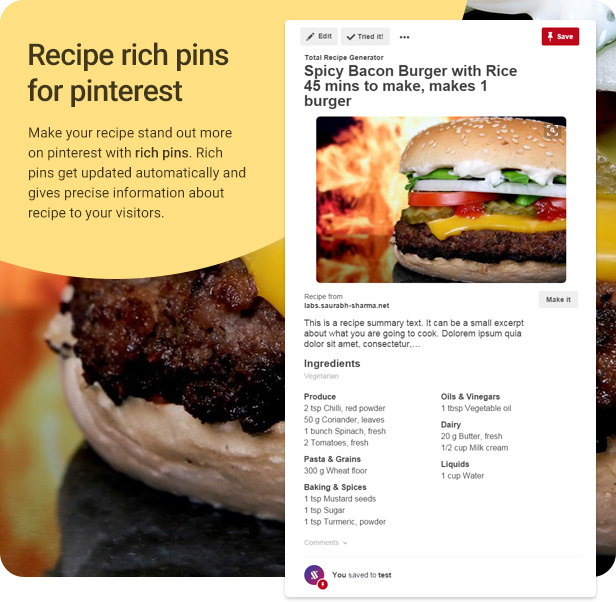
recipe rich pins

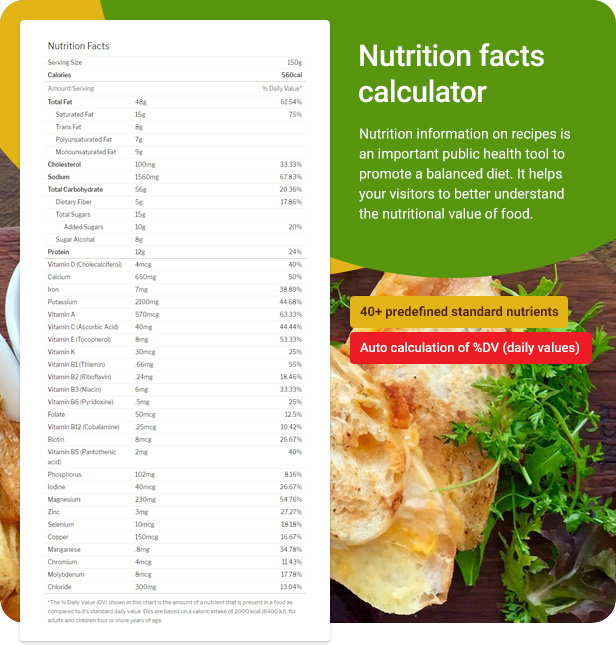
nutrition facts calculator

visual composer page builder

buy total recipe generator plugin

Full feature list

  • Clean and minimalist design, WordPress 4.7+ ready
  • Shipped as Visual Composer Add-On
  • Supports page, post and public custom post types
  • Back end and front end page builder support
  • Create recipe content instantly by launching pre built template
  • Drag and drop interface via Visual Composer
  • Auto calculation of total time from prep time and cooking time
  • Auto conversion of time into minutes/hour
  • Use recipe image from featured image, media library or external URL
  • Recipe image resize on-the-fly with custom dimensions and hard cropping
  • Recipe method element with inline support for all Visual Composer elements (Text block, single image, tabs, accordion, videos, etc.)
    – Recipe method can be reordered with drag and drop functionality
    – Organize recipe instructions in groups
    – Auto numbering on recipe method steps (can be disabled from element settings)
  • Built in Nutrition Facts calculator
    – Around 40+ built in nutrients with standard Daily Values
    – Nutrients show only if a value is set by user
    – Auto calculation of %DV based on recipe nutrient value as set by user
    – The reference for standard daily values (DVs) are taken from Wikipedia and FDA Guidance Document
    – Built in Meta labels for “Suitable for diet” as multi select dropdown
  • Internal links support for Recipe Meta
    – Automatically creates link if a category or tag exists in the same name as Recipe Meta
  • Custom author name and author URL supported
  • Dynamically add recipe ingredients as single item or groups
  • Ingredient groups can be reordered with drag and drop facility
  • Show/hide recipe name, summary, image, author, date, etc. if your theme already shows these elements. These are still included as Meta data, so it doesn’t harm SEO.
  • Built in social sharing buttons for recipe content
    – Buttons include Twitter, Facebook, Whatsapp, Google Plus, LinkedIn, Pinterest, VKOntakte, Email, Reddit
    – Print button included for printing only recipe content
    – Sticky social links for mobile (can be disabled from settings)
  • Valid and recommended Schema Microdata for Recipe content (Run Schema Test)
    – Contains inline schema markup and JSON LD microdata
    – Full support for Pinterest rich pins
    – Built in support for aggregate rating schema via WP Review plugin
  • W3C valid HTML markup for recipe generated content
  • For developers, recipe template output can be easily extended in theme files by copying the template file
  • Fully compatible with most standard and premium themes
  • Translation ready with sample .pot file included
  • Supports languages with RTL orientation
  • Works on all modern browsers and IE9+
  • Step by step documentation guide and installation manual for setting up recipe content
  • One to one personalized support on email and comments section

Important: Images shown on live demo are not included in download package. They are only for demonstration purpose.

Plugin support

All support is provided via comments section and email. For any questions related to the plugin or general query, feel free to email me from my profile page message box here or comment on the item comments section. I would be glad to respond. Thank you for browsing the plugin.

Credits

Installation

For installation and setup, please refer to the documentation/index.html file inside your
main download archive.

Changelog

= 1.0.0 =
* initial release

Download Total Recipe Generator – Visual Composer Addon (Add-ons)

CSS3 Buttons Hover Effects and Social Media Icons (Buttons)

This Uneek item is bascially built with the help of CSS3 and HTML5. There is no java and jquery involved.
NOTE:
1. This item includes HTML and CSS files only with its documentation.
2. The code of the social icons is included in the package(well commented) and the working of these icons is shown using GIFs in the preview section.
3. Social icons are created using fontawesome and entypo.
4. Based on the comments that have been written besides the code make it easier to customize.
5. No images are used.
6. Documentation is also included in the package itself.

Download CSS3 Buttons Hover Effects and Social Media Icons (Buttons)

Safe Wheel Template (Games)

Safe Wheel
” Safe Wheel ” Tap on the screen while the pointer is covering the star

Made with Buildbox, easy to reskin

If you don’t have BuildBox I also include the eclipse version (You can also import it to Android Studio) With Step by Step video Tutorial. Also show you how to reskin the eclipse version

Features:
– Universal Android Game
– Full Game Template
– 3 Games Mode
– Easy to Reskin
– Buildbox Source Code (Include)
– Includes details Documentation
– Facebook Button
– Endless Game Play
– Ads Installed, ADMOB (Banner + Interstitial), CHARTBOOST
– Game Center
– Share & Rate Buttons
– And More

What You Get:
– Eclipse Source Code
– BUILDBOX TEMPLATE
– Documentation File Pdf
– 2 Video File (Reskin + Upload on PlayStore)

APK: http://bit.ly/SafeWheelGexGigapk

If you don’t have BuildBox = Eclipse + Reskin Video also include

Thank You
GexGig

Download Safe Wheel Template (Games)

Forms Generator – powerful WordPress plugin for generate of forms (Forms)

Forms Generator WordPress plugin — set of instruments for creation of effective interaction forms with users having flexibility for customization for each form posted on the website. It allows creating classical and non-standard forms. It stands out because it’s easy-to-master and use, and a wide functionality of settings.

Individual control of unlimited forms

  • simple and customizable control panel;
  • enable fields that you need: input, select, checkbox, radio, textarea;
  • big set of parameters for a form style change;
  • display settings for mobile devices;
  • save emails to a list;
  • send emails to users;
  • easily duplicate your forms;
  • integration with reliable postal services (MailChimp and GetResponse);
  • form publication with the use of a shortcode in any place of the web page;
  • form publication with the use of a widget and function, which add a form in end of posts;
  • great compatibility with plugin of creation and configuration of the modal window “Popups Generator”;
  • possibility of a content database print in a paper form;
  • copying and export of the subscribers contact list in different formats.

What can you create with the Forms Generator:

  • subscription form;
  • feedback form;
  • survey form;
  • signup form;
  • order form;
  • inquiry form;

\

Form builder

  • enable fields that you need: input, select, checkbox, radio, textarea;
  • validation for input: neme, email, number,text;
  • title for each field;
  • setting required fields;
  • field width;

Powerful Style

  • Form align – serves for center-justified alignment, left or the right justified alignment of a parent object (post, page, modal window, etc.);
  • Form width – sets the overall width of a subscription form (in px or %);
  • Font size – is used for specifying the font size in fields;
  • Placeholder & text alignment – alignment property of the hint and input text. It accepts left, center and right values;
  • Form border – adds a frame around the subscription block and determines its width;
  • Form border radius – allows changing degree of rounding the main frame corners;
  • Form’s field border – sets framing element width around the fields;
  • Form’s field border radius – serves for a frame rounding off at the form fields;
  • Margin top & bottom – designates a form arrangement according to the high and low borders of a container;
  • Margin left & right – form margins from the left and right edges of a parent object;
  • Padding top & bottom – placing of the content of the subscription block according to its upper and lower bound;
  • Padding left & right – serves for specifying paddings in a form from its left and right content’s side;
  • Input height – determines height of a form element;
  • Button’s width – serves for the indication of width. It is set in pixels (px) or percents. When selecting the auto parameter it accepts width corresponding to the button’s text contents;
    Button position – sets the element position within a parent container. It accepts left, center and right values;
  • Button’s text – the field for the text message input is displayed on the button;
  • Button text size – allows editing the font size specified on the element of the text;
  • Background image – background image installation in the subscription block through the pathway to him;
  • Form background color – the parameter for the general color scheme indication of a form;
  • Form border color – defines the main frame color;
  • Text color – sets color display entered into data fields;
  • Placeholder text color – property for the text-hint color indication;
  • Form’s field border color – indicates the tone option of the framing devices for the form fields;
  • Form’s field background color – indicates the general background fill for fields with the value entries;
  • Button text color – the selection parameter for the text color contents of the button;
  • Button background color – allows a background option for an upload submission element;
  • Button background hover color – is used for the color display change of the button at a mouseover

Mobile style

  • the block output on screens less specified in the resolution field;
  • width value of the form (in px or %).

Integration

  • MailChimp;
  • GetResponse.

Email settings

  • Send to – is designed for email address input of the administrator or the owner of the website;
  • Mail subject – is used for designation of a subject of the message;
  • Error text – is applied to installation of the text message about incorrect filling format of the field;
  • Error text size – allows changing the font size of the displayed information block;
  • Error text color – sets the text color about the mistake (and for the fields’ frames if available);
  • Confirmation text – At a successful send the user will see the message specified via the Confirmation text block

Email to user

  • Email from – the field for the e-mail address input from which posting is performed;
  • Mail subject – specifies the subject of the message for the user;
  • Text from – allows to specify the sender (the name of the website, the company, etc.);
  • Email to user – The text of the message is entered through the editor with advanced settings. With its help it is possible to change easily information display sent to the user. Modern HTML-code capabilities are applied for advanced customization. Media files addition makes posting interesting and draws attention of users

Preview and Publish

  • Preview – Responsive preview block allows seeing a display format of the form on the website in advance;
  • Update – saves result of all changes which are carried out with the subscription block;
  • Delete – serves for deleting the form from the list.

Download Forms Generator – powerful WordPress plugin for generate of forms (Forms)

Machine Carousel – Responsive Muse Widget (Muse Widgets)

Machine Carousel:

If You use Adobe Muse To Create Your WebSite
Machine Carousel
will help you to create the next generation of sliders, using the CSS3 transitions, By Machine Carousel You Will Can to Choose Between Animations, you Also Will Be Able To Change Animation Duration, Change Animation Interval, Add Images, Add Contents

Main Features

  • Built With Bootstrap
  • Fully Responive With Any Browser and Any Device
  • Support Touch Swipe
  • Text Contents Animations Using Animate.css
  • Controlled Carousel Animation Duration
  • Controlled Carousel Animation Interval
  • Controll Carousel Auto play

machine carousel

Download Machine Carousel – Responsive Muse Widget (Muse Widgets)

Category Restriction Magento 2 extension (Magento Extensions)

Extension Overview

The Category Restriction extension enables you to hide category from specific group of customers.

It allows to change visibility of certain category for different stores and customer groups.

  • Adjust category visibility to your business needs
  • Manage category access based on stores and customer groups
  • Manage category access based on date (start & end date)
  • Works with all Magento 2.x

Download Category Restriction Magento 2 extension (Magento Extensions)

StockWatch Magento 2 extension (Magento Extensions)

Extension Overview

Stock Wach module keep eye on each product stock movement and track all products ordered quantity and as well also updated quantity from admin.

Monitor all stock changes in Magento.

List all stock movements in a separate grid also in product edit section.

  • Easy installation and configuration.
  • Monitor all stock changes in Magento.
  • List all stock movements in a separate grid also in product edit section.
  • Following stock changes are observed and recorded:
    • Create new order
    • Create new order in back-end
    • Cancel order
    • Create credit memo (full+partial return to stock)
    • Back-end administrator changes

Download StockWatch Magento 2 extension (Magento Extensions)

GoStock – Free Stock Photos Script (Images and Media)

GoStock – Free Stock Photos Script It is a platform to share stock photos free of high quality, users will be able to upload their photos to share with the whole community and visitors, and may receive donations through PayPal. In addition users will be able to give you like, comment, share and add to collections your favorite photos.

  • Demo User: john
  • User Pass 123456
  • URL http://gostock.miguelvasquez.net/login
  • Features are disabled in Panel Admin
  • Features:

  • Built with Laravel 5.3.x
  • Bootstrap
  • Font Awesome
  • IcoMoon
  • Facebook Login
  • Follow / Unfollow system
  • Like in Photos
  • Collections of Photos
  • Categories
  • Notifications Real-time
  • Latest, Featured, Popular, Most Commented, Most Viewed, Most Downloads sections
  • Photo search
  • Download photos in different size
  • Search for photos by colors and cameras
  • Members can upload unlimited photos
  • Updates photos
  • Option Delete Account
  • Members can change their name, email and password
  • Upload Avatar
  • Upload Cover
  • Change password
  • Donations through PayPal for members
  • XSS: Protection from cross site scripting
  • Secure Bcrypt password hashing
  • SMTP Support
  • Share social
  • Easy translation
  • Ajax pagination in Photos and Comments
  • Comment system
  • Like in comments
  • Feed section (Posts by users you follow)
  • Admin Features:

  • Change the site name
  • Change the site title welcome
  • Manage General Settings and Limits
  • Statistics
  • Set keywords for the site. (SEO)
  • Add a description (SEO)
  • Create/Edit pages e.g.: Help, Privacy, etc.
  • Manage Categories
  • Manage Photos
  • Manage Members.
  • Manage Members, Photos Reported
  • Set up social accounts
  • Manage Google Adsense, Google Analytics
  • Requirements:

  • PHP 5.6 or Greater
  • OpenSSL PHP Extension
  • cURL
  • PDO PHP Extension
  • GD Library.
  • Enabled function mbstring
  • Tokenizer PHP Extension
  • allow_url_fopen (PHP.INI) is ON
  • XML PHP Extension
  • MCrypt PHP Extension
  • Important: All images used in this demo are solely and exclusively from their owners and they are not included in the script

    Download GoStock – Free Stock Photos Script (Images and Media)