Skin Editor for Minecraft 3D – Admob, Firebase, Server PHP API (Android)

Demo Link : https://www.dropbox.com/s/guir19189lh7nk9/appDemo.apk?dl=0

– Create your own custom skins with Minecraft skin creator
– Minecraft 1.8+ Compatible
– Skin editor for minecraft pocket edition ( also you can use in computer version of minecraft by using export to minecraft)
– Edit the skins you create color pixel by color pixel
– Support for both 64×32 (old version) and 64×64 (new version) skins.
– Export skins in both 64×32 old minecraft skin format for 1.8 below and 64×64 new 1.8+ minecraft skin
– Multiple categories for minecraft skin you can just pick any one and start dressing and editing.
– Create your skin from Steve, Alex, Blank skin.
– Color palette and Eye dropper tools for coloring the skin.
– Zoom in/out and rotate the skin
– Upload to Minecraft.net for Computer editon.
– For minecraft PE, save custom skins to your device
– Body part visibility tool for coloring various hidden part of the skin.
– Colorful, creative, funny and cool skins for boys, girls and special characters
– Large collection of dressing and accessories to apply directly to your skin.
– Random skin you can create and enjoy thousand of skins.
– Eraser and Undo/redo tool make things easy for editing skin.
– Reset tools useful for editing the skin also.
– View Skin Editor 360 Degree 3D after editing the skin.
– Load custom pre-made skin for Minecraft – Minecraft skin stealer
– Allows stealing skins from any other players using their username.
– Import minecraft skins from your gallery
– Save Minecraft skin characters
– Export to Minecraft PE (Minecraft pocket edition)
– Export custom miskins to your gallery.
– Download external minecraft skins

Use advanced tools like brush, paint bucket, eraser and color picker to edit your skin and create just the look you’ve been searching for! “Skin Editor for Minecraft” has an easy to use skin part visibility chooser to let you focus just on the parts you want to edit.

Download Skin Editor for Minecraft 3D – Admob, Firebase, Server PHP API (Android)

MyKart eCommerce android template (Android)

Live Preview/ How to integrate firebase : http://mykartdocumentation.blogspot.in/2017/05/mykart-documentation.html

Description: MyKart is a ecommerce android template developed with firebase as a database. All the basic functionalities needed for an ecommerce app has been covered in this template which is easy to reskin according to the buyers need. If you want to integrate firebase login to this app then you can purchase global fitness android app for this. You can purchase it from below link . https://codecanyon.net/item/multipurpose-android-fitnessbody-building-application-with-material-design-and-firebase-integration/19857073

App Features:
Supports Android Studio.

Material Design.

Firebase Database.

Firebase Storage.

Animated Recycler View.

Reusable android Template.

Neat and Clean code.

e-Commerce template.

Easy to resking, commented code for understanding purpose to beginners.

Documentation included.

Support: we will surely support you, just mail us [email protected]

Download MyKart eCommerce android template (Android)

Game 1 Clairvoyance – Construct 2 – HTML5 + .CAPX (Games)

        HTML5 / Construct 2 GAMES


Features:

    • Works on all browsers and all mobile devices!
    • Optimized code ( Good performance in old devices )
    • Mouse and Touch control available.
    • The game download the latest version before start.
    • Easy to add / replace images ( Reskin ).
    • You can embed the game on the frames HTML5.
    • You can export this game to IOS and ANDROID.
    • You can add ADS, like AdMob Ads, to monetize.
    • Plugins & Behaviors included.
    • Orientations: Portrait.
    • Resolution: 480×854.
    • Aspect ratio: 16:9.
    • Events: 38.
    • Size: 1.4MB.

Download Game 1 Clairvoyance – Construct 2 – HTML5 + .CAPX (Games)

ezStarz (Ratings and Charts)

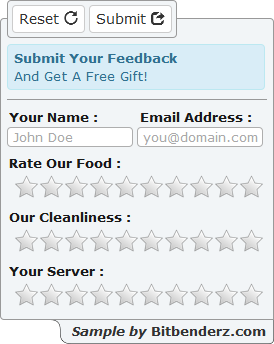
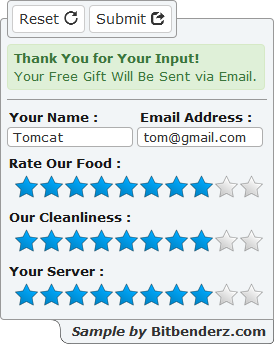
ezStarz by Bitbenderz.com is a light-weight, easy to use, jQuery plugin that turns any HTML text input into a Star Rating element. ezStarz employs HTML5 Canvas methods to draw and color the stars; so no external images are required.

Notable features include :

  • Definable Star Size
  • Definable Stars per Input
  • Definable Star Colors
  • Definable Tooltips
  • Whole or Fractional Resolution
  • Read Only Support
  • Touchscreen Device Aware
  • Modern Browser Compatible


Includes complete documentation and sample form.

Download ezStarz (Ratings and Charts)

WP Media Folders (Media)


WP Media Folders

WP Media Folders is powerful WordPress plugin for organizing thousands of files into handy folders hierarchy. It turns Media Library into high quality WordPress File Manager that works similar to your PC’s file explorer.

Features

Uploading Nested Folders

Drag&Drop nested folders with tons of files
from your PC directly to WordPress Media Library by one click.


3rd Party Compatible

Compatible with WooCommerce, Visual Composer, Divi Builder,
any Themes, any other plugins that use default “Add Media” dialog.


Count of Files in Folders

See count of files that displays a real files count
inside the folder and all sub-folders in it with any depth.


Moving Folders & Files

Drag&Drop selected folders and files between
different folders using folders tree or folders explorer with no effort.


Creating Folder

You can create new folder using “Add Folder” button
using folders tree at the left or folders list above files list.


Renaming Folder

You can rename folder inline using pen icon
that appears when your mouse cursor slides over the folder.


Deleting Folders

You can delete folder using dustbin icon over the folder.
It automatically removes all nested folders and files. Be careful!


Regenerating Thumbnails

You can regenerate selected thumbnails using
Bulk actions. It automatically regenerates thumbnails for all nested files.


Download WP Media Folders (Media)

WooCommerce Fullscreen Image Zoom (WooCommerce)

An easy-to-use WooCommerce plugin which makes fullscreen image zooming available. This plugin presents a magnified product images to your customers.

Features

  • Viewing the details of the product images better
  • Fully responsive and 100% customizable
  • Easy-to-use & light plugin
  • Easy settings panel
  • Slider for products & fullscreen thumbnails
  • Supportive after sales services

Download WooCommerce Fullscreen Image Zoom (WooCommerce)

Facebook Block – Page Plugin for Drupal 8 (Drupal)

Facebook Block module for Drupal 8 allows you to display any number of posts from any Facebook Page using a fully responsive column layout on your website. This module provides much more flexibility than the standard Facebook Page plugin. There are many options for number of columns to show on each screen size and you can choose if you want to show or hide the header of the posts. This module also allows you to override the styling using your own custom css, so you can adjust fonts and colors to perfectly fit the layout of your website.

Facebook is the number one network for people all over the world to connect and share content. Thus, Facebook is an important platform for promoting your business and products. This module lets you easily embed and promote any Facebook Page * on your website.

  • Note that this module requires a Facebook Access Token. Instructions for obtaining one are included.

Features:

• Display posts from any Facebook Page in a block

• Manage number of posts to show

• Fully responsive using Twitter Bootstrap

• Optional column count for different screen sizes

• Option to show/hide header of Facebook posts

• Use your own css to customize the style of your posts

• Share buttons to most popular social media

Download Facebook Block – Page Plugin for Drupal 8 (Drupal)

Hi-Tech Tabs – Effective and Animated Design (Tabs and Sliders)

Hi-Tech Tabs is a simple and easy customizable tab. It’s made with Bootstrap responsive design and some awesome animations. It’s solution for creating beautiful tabbed navigation without customize any javascript code. It has 4 Styles, 4 layouts, 12 colors, 10+ animations, ripple effect, steps or wizard (Prev-Next)Button other lots of customization options and can be easily integrated to any website.

It’s very easy to customize, Because this plugin customization process you just need to custom your css class, and don’t need to change any javascript code!!! :)

Features: Hi-Tech Tabs – Effective and Animated Design

  1. Unlimited Tab Steps.
  2. 4 Different Tabs Styles.
  3. 4 Different Tabs Layouts.
  4. 10+ Different Tabs Animations.
  5. 12 Different Tabs Colors.
  6. Auto Height Tabs.
  7. Nested Possibility.
  8. Can Use Tab Subtitle.
  9. Clean Design And Commented Code.
  10. Can Display Any Content, Video, Form, Table, Image or Other Elements.
  11. Fully Responsive.
  12. Made With Bootstrap v3
  13. Vertical & Horizontal Tabs Layouts.
  14. Include Steps or Wizard Button.
  15. Cross-Browser Compatibility.
  16. Clean HTML, Javascript & CSS Code.
  17. Animated Design.
  18. Ripple Effect.
  19. Uses Font Awesome Icon.
  20. Easy to Customize.
  21. Easy to Setup.
  22. Step by Step Documentation.
  23. And Much More!

Thank You For Staying With Us! :) :) :)

Our Visitors

Flag Counter

Download Hi-Tech Tabs – Effective and Animated Design (Tabs and Sliders)

Php Password Protect Pro (Forms)

Description:

PHP Password Protect is a web page protection script written in PHP which protects any web page on your site with single line of code only,

Whether you have a website or not, you can use PHP Password Protect any way you like. You may offer some pages to your visitors or you may restrict access to some personal pages with a username and a password. It is easily configurable and can be installed within minutes. Customizing is also easy and the documentation included explains how to customize and install the script.

Features:

  • Protect any page on website irrespective of PhpPasswordProtect directory
  • If user is not logged in then redirects to login page and after successfull login back to protected page
  • Signup option for new users
  • Signup Disable option
  • Password Change
  • Disable Password Change
  • Sql injection proof
  • Full documentation

Requirements:

  • Platform: Linux or Windows
  • Server: PHP5.5 or 5.5+ Supported
  • Browser: All Major Browsers

Download Php Password Protect Pro (Forms)

Huge Multipurpose Responsive Navigation Menu (Navigation)

Huge Navigation Menu is a modern, well-crafted, pixel perfect Responsive multi-purpose navigation menu designed with great attention to detail, flexibility, and performance. It is ultra professional, smooth and sleek, with a clean modern layout. Using Huge Navigation Menu you able to make any kind of navigation menu like Mega Menu, standard drop down menu, One Pager Menu, sidebar Menu etc.

Huge Navigation Menu is based on HTML5, CSS3, Bootstrap 3 which help you to be quick to setup and easy to customize to suit your websites. It is super responsive to have a stunning display on any devices.

If you love the Navigation Menu, Do not forget to rate us 5 stars and let us know your feedback for a better update.

Feature list

  • 100+ Real Example Menu & design
  • Elegant and Minimal Design
  • Based on Bootstrap 3.x
  • 100% Responsive
  • Clean and commented code
  • HTML & CSS & JS files are included
  • Valid HTML5 / CSS3
  • W3C Valid HTML
  • Google Fonts
  • Fontawesome Icon
  • 24/7 Awesome Support
  • Detailed documentation
  • And more…

SOURCES and CREDITS:

Note:

Images used in the demo aren’t included in the main template.

Version changelog:

Huge Nav v.1.0 (13 May, 2017)
---------------------
Initial release.

Download Huge Multipurpose Responsive Navigation Menu (Navigation)

dbRuler (Miscellaneous)

dbRuler

dbRuler is a lightweight jQuery and canvas based plug-in featuring the most common options for web development. Ruler can be used in full screen size and in container. Plug-in is full responsive. Compatable with any kind of devices. It can be used as custom ruler with user defined data. Futuremore the app can be used as a pixel ruler. Fully customizable. Compatable with any kind of browsers inclusive IE8 (for IE8 include: ‘<!-[if lte IE 8]><script type=”text/javascript” src=”excanvas.js”></script><![endif]->’ in head tag).

1. Usage: – HTML Markup is just canvas tag with width and height according options if provided or container size if there is no options.

2. Includes: – jQuery: <script type=”text/javascript” src=”jquery-3.2.1.min.js”></script> – ruler script: <script type=”text/javascript” src=”db-ruler.js”></script>

3. Initiation: – Default options example:

$(‘.target-element’).dbRuler();

– Props initiation example:

$(‘.target-element’).dbRuler({   width: 768,   height: 120,   step: 15 });

4. Options list: width: int – default: container width (responsive – 100% width of parent)
– User can assign custom width or use containers width

height: int – default: container height (responsive – 100% height of parent) – User can assign custom height or use containers height

step: int – default: 15 – Property step defines distance in pixels bethween ruler divisions

titlesCount: int – default: 7 – Property titlesCount indicates count of bigger divisions on the ruler by default they are bigger from other divisions. Futuremore above them can exists additional text (titles and subtitles) which can be (Measure, DateTime or what else user need)

font: string – default: “15 serif” – Property font declares font size and type of the ruler text

color: string – default: “black” – Property color defines color of the divisions and text on the ruler

divisionHeight: int – default: 5 – Property divisionHeight defines how long to be each of the divisions

divisionWidth: int – default: 1 – Property divisionWIdth defines how width to be each of the divisions

titleDivisionHeight: int – default: 9
– Property titleDivisionHeight defines how long to be each of the title divisions

titleDivisionWidth: int – default: 1 – Property titleDivisionWidth defines how width to be each of the title divisions

margin: int – default: 0 – Property margin defines difference bethween ruler divisions and ruler border. Leave 0 (default) to start every time immediate from ruler border

titleMargin: int – default: 0 – Property titleMargin defines difference bethween ruler title divisions and ruler border. Leave 0 (default) to start every time immediate from ruler border

titles: array – default: [] – Property titles contains titles text which will be written above the title divisions to indicate Measure, DateTime or what user need to show on ruler. This property can be used if type option is set to custom

titlesDistance: int – default: 25 – Property titlesDistance indicates distance (in pixels) bethween title text and ruler border

titlesDiverge: int – default: 0 – Property titlesDiverge indicates how pixels from center (according title division) to be title text diverged

subtitles: array – default: [] – Property subtitles contains subtitles text which will be written above the titles text. This property can be used if type option is set to custom

subtitlesDistance: int – default: 40 – Property subtitlesDistance indicates distance (in pixels) bethween subtitle text and ruler border

subtitlesDiverge: int – default: 0 – Property subtitlesDiverge indicates how pixels from center (according title division) to be subtitle text diverged

side: string (inner/outer) – default: “inner” – Property side indicates in which side of the ruler to be the units drawn

direction: string (vertical/horizontal) – default: “vertical” – Property direction indicates are we attend to write vertical or horizontal ruler

type: string (custom/pixel) – default: “custom” – Property type indicates what kind of ruler we are attend to draw (custom or pixel). – pixel ruler will automatically measure pixels on itself in dependenxe of step and size (width: if horizontal or height: if vertical) – custom ruler will measure what is provided in titles and subtitles

Download dbRuler (Miscellaneous)

Enestife – Fire Mega Menu Responsive (Navigation and Menus)

Enestife – Fire Mega Menu Responsive

Perfect choise for your site and your business!

Features:

  • Font Awesome included
  • Fully Responsive
  • Social icons
  • Mega Menu
  • Modern and Awesome Design
  • Easy to Customize
  • Tabs in Megamenu
  • Well Documented
  • Grid system (12 columns)
  • Created with love <3

DEMO SOURCES:

Image source:Unsplash.com

Font:Montserrat
Font:Montserrat

Icons:Font Awesome
NOTE:

If you have any questions regarding to menu issues or if you wish to customize it somehow, please contact me through Codecanyon.

Download Enestife – Fire Mega Menu Responsive (Navigation and Menus)

NovaMenu – Responsive Mega Footer Navigation (Navigation)

NovaMenu is a mega footer navigation designed and coded to work and fit on any device. It’s fully responsive and comes with a flexible grid system to hold your content within panels.

Features Included:

  • Fully responsive design
  • Supports multiple instances
  • Sticks to the bottom of the browser
  • 3 ways of dropdown (hover, click, toggle)
  • 12 columns fluid grid
  • 3 types of dropdowns (fixed width, mega, full width)
  • You can add images or videos
  • Custom mega dropdowns, social icons or HTML
  • 8 color skins which can be changed easily
  • Left/Right alignment for the menu items and the drop downs
  • Custom & automatic scrollbars within panels
  • Lots of styled elements
  • Over 430 Font Awesome Icons
  • Compatible with mobile devices
  • Help file is included

Download NovaMenu – Responsive Mega Footer Navigation (Navigation)

Member Account Login VB.NET (With Source) (.NET)

Member Account Login

Our program is completely securely registered via WebBrowser and has login control. Moreover, the admin control panel option is available in php script settings. It will continue to be updated continuously. We will constantly improve our program and we will do our best for you.

Download Demo: https://goo.gl/0OqTGA

Username: testcode1 – testcode1

What are the features?

  • Registration panel
  • Advanced User login
  • Remember me option
  • Multipurpose usage
  • Language option
  • Admin panel management
  • With an entrance panel with effects
  • Fully translatable using .NET resource files
  • Easy To Use

Download Member Account Login VB.NET (With Source) (.NET)

Bootstrap Drag & Drop Builder – BootGear (HTML5)

The HTML Builder is a great tool for being able to visually see the blocks as you drag them in to position and decide which layout works best for your site.

The builder includes some simple editing functions, for changing text content, style and importing images, the individual block’s code can also be edited from the builder.

Once you have the layouts finished you can export your page(s) which will download all the necessary files to your computer.

  • Element Editing
  • The HTML Builder allows users to drag content blocks onto a canvas and drop them where they’d like them to appear. These blocks can be re-positioned on the page by clicking and dragging again. Hovering over a placed content block will display options to ‘View Source’, ‘Reset’ or ‘Delete’.

  • Content Editing
  • The HTML Builder allows for certain portions of text to be edited from within the builder, by selecting the ‘Content’ option at the top of the screen, then click the text block you wish to edit.

  • Detail Editing
  • Selecting the ‘Detail’ option at the top also allows you to edit images, text details (size, color etc) and icons.

  • Export HTML
  • Once you are all done with customizations, click the ‘Export’ button at the top or the left panel.

    The software will then collect together all HTML files along with all CSS, JS and Image files and will download to your computer as a ZIP file.

    We have separated the Elements into the following categories:

  • All Elements
  • Headers
  • Promo Section
  • Content Section
  • Gallery
  • Team
  • Pricing Tables
  • E-Commerce
  • Blog
  • Contact
  • Footer
  • Shortcodes
  • Want More Elements to be added or Maybe we missed out some shortcodes, Let us know we will add for you!

    Use Of Resources

    • Theme is based on Twitter Bootstrap, its recommended to see visit bootstrap docs page if you are not familiar with it.
    • Font awesome icons has been used. you can visit the page for more details
    • and lets not forget most important ingredient , Jquery – JS library

    Download Bootstrap Drag & Drop Builder – BootGear (HTML5)