Visual Composer Add-on – Exclusive jQuery FlipBook (Add-ons)

See also Visual Composer Addons Bundle:

See my other Books:


Features:

  • flipbook is based on the library turn.js 3rd release. Library “turn.js 3rd release” is not included. You need to download it separately here.This library is free to personal use. If you need for commercial use – here you can buy license “3rd release”.Cost of License “turn.js 3rd release” is 45$ for five domains ( 9$ per domain).
  • works on the iPad,iPhone etc. ( no Flash Player needed )
  • support for tags in WYSIWYG editor:
  • – heading – h1,h2,h3,h4,h5,h6
    – paragraph – p
    – link – a
    – list – ul,li
    – img and float right and left for image
    Pages in Flipbook does not have support for all the html characters.
    New characters html will be added with new updates.

  • reverse flip book for the eastern countries (right to left)
  • two techniques show flipbook:
    – shortcode – you can put flipbook anywhere in content ( page, post, custom post etc)
    – template – you can add flipbook as an independent template in the whole browser window, the advantage is that it is 100% working with all theme ( no conflict with css styles etc…. )
  • insert scripts in section head – only subpages where is the shortcode flipbook
  • you can disable / enable individual icons in the admin panel
  • icon fullScreen ( only works under FF and Chrome )
  • you can change the zoom to double click the mouse
  • you can change the zoom step for zoomIn and for zoomOut
  • you can enable / disable deeplinking (string at the end of the browser’s address)
  • youtube videos are shown on a layer above book
  • responsive design
  • the flipbook does not show all the page – only 7 pages is displayed / loaded
    ( It really improves the performance )
  • you can create an unlimited number of flipbooks on one theme
  • unlimited number of pages to flipbook
  • double pages
  • show all pages
  • excellent tools to zoom
  • and other…


Credits

  • turn.js 3rd release

    Library “turn.js 3rd release” is not included. You need to download it separately here.
    This library is free to personal use. If you need for commercial use – here you can buy license “3rd release”.

Download Visual Composer Add-on – Exclusive jQuery FlipBook (Add-ons)

Creative Testimonial V1 for Adobe Muse (Muse Widgets)

Creative Testimonial V1

Creative Testimonial V1 is a widget for Adobe Muse CC, It contains Creative Testimonial brand new essensial special for you.

Main Feature:

four tips for effectively using testimonials to convert more leads on your website:

  1. Be Selective
  2. Show Face
  3. Show Them Off Everywhere
  4. Remember Your Buyer Personas

Package content:

  • [TA] – Creative Testimonial V1 [Widget]
  • Documentation
    • assets
    • index.html

  1. Browse to the location where you downloaded the widget file.
  2. Extract the contents of the file.
  3. Double-click the MULIB file to import it into the Library. This will launch Muse if it’s not already open.
  4. After extracting the files, click the Import Muse Library icon at the bottom of the Library Panel in Muse.
  5. Browse to the location you where you extracted the widget files. Select the MULIB file.

Now it’s time to start gathering your testimonials. Reach out to your current customers that you know are happy with your company and ask them to share their success story. By showcasing these powerful feelings and stories about your product or services, you’re creating another tool to get prospects to trust your brand and commit to it.

Note: The help file is included in the main package.

Download Creative Testimonial V1 for Adobe Muse (Muse Widgets)

EMI Calculator with Percentage Calculator for Joomla (Joomla)

EMI Calculator

If you manage any Joomla website of Bank, Real Estate, Auto shop or something like this, you should use this
Module to let the visitor calculate expense just in your website without leaving it. If client enters Principal Amount, Interest Rate, and Period in months; then it will show EMI, Interest Amount, Total Amount.


Percentage Calculator

You will get an extra Module with this without any extra fee, that is ‘Percentage Calculator’. Your clients will be able to calculate percentage of figures, if they want. Although it’s up to you that you will activate this
Module or not.


Features

  • The Modules will automatically match with your Joomla Template’s color, font, style. Visitor will think it as the part of your template. If you use these
    Modules in different templates, you will feel the change
  • Mobile Responsive Module, But your template must be well-coded and
    responsive too
  • The Modules takes very low space in hosting
  • Easy Installation! After activation of the Modules, you can use the Modules
    into sidebar or footer or inside page

Question?

Don’t hesitate to contact by email! Just go to profile page to send message

Looking for different CMS?

This Product is a Joomla PlugIn, and it has a
WordPress version also!

Download EMI Calculator with Percentage Calculator for Joomla (Joomla)

Rainbow – Responsive Pricing Tables (Pricing Tables)

Pricing tables with responsive web design that only use CSS and HTML.
These pricing tables are provided with 8 unique designs where each design has multiple color themes and use Font Awesome icons.

This product includes CSS and HTML, it’s not a WordPress plugin.

WordPress version is available

wpPricing Builder

Features

  • Responsive web design
  • 8 unique designs
  • 22 color themes for each design
  • Tooltips with text and lists
  • 12 tooltip positions
  • 2, 3, 4, 5 column layouts
  • 3 types of hover animation
  • Different color themes for each column
  • Easy to use and customize
  • Well documented
  • Compatible with Bootstrap
  • Font Awesome icons
  • No Javascript, only HTML and CSS


Download Rainbow – Responsive Pricing Tables (Pricing Tables)

Conditional Payment Methods PRO for WooCommerce (WooCommerce)

Conditional Payment Methods PRO for WooCommerce provides features conditionally display payment gateways on checkout based on wide range of conditions. This plugin supports user types based, user shipping country based, order total based, product based and WooCommerce product type based payment methods in checkout.

Practical Usage and Benefits

  Enable Paypal payment gateway only for guests.
  Enable Paypal payment gateway only for members.
  Enable Paypal payment gateway only for specific user roles.
  Enable Paypal payment gateway only for users from Australia and United Status
  Enable Paypal payment gateway only for users who purchase WooCommerce simple products

  Enable Paypal payment gateway only for orders with a minimum order value
  Enable Paypal payment gateway only for orders with a order value less than a maximum value

  Enable Paypal payment gateway only for users who purchase from a selected set of products
  Enable Paypal payment gateway only for members from Australia
  Enable Paypal payment gateway only for guests from United Status or France
  Enable Paypal payment gateway only for members from United Kingdom who purchases only simple products.

  Enable Paypal payment gateway only for guests from United Status or France who purchases custom product type created by another plugin.
  Enable Paypal payment gateway only for subscribers with order value greater than 50 and less than 200
  Enable Paypal payment gateway only for authors with order value greater than 20 and less than 300
  Enable Paypal payment gateway only for subscribers who purchase products A/B/C
  Enable Paypal payment gateway only for subscribers who purchase products A/B/C, order value less than 100 and from Australia
  Ability to create unlimited combinations with these 7 settings

Features List

  Enable/ Disable any payment method on WooCommerce checkout based on guests , logged in members or specific user roles

  Enable/ Disable any payment method on WooCommerce checkout based on users shipping countries

  Enable/ Disable any payment method on WooCommerce checkout based on WooCommerce product type

  Enable/ Disable any payment method on WooCommerce checkout based on specific WooCommerce products
  Enable/ Disable any payment method on WooCommerce checkout based on minimum order value
  Enable/ Disable any payment method on WooCommerce checkout based on maximum order value
  Supports multiple set of conditions for each payment method

Usage

Once Conditional Payment Methods PRO for WooCommerce is activated, you will see a settings menu on the left menu called Woo Conditional Payment Methods. Click on the menu item to get the screen for adding payment method conditions, as shown in the following screenshot.
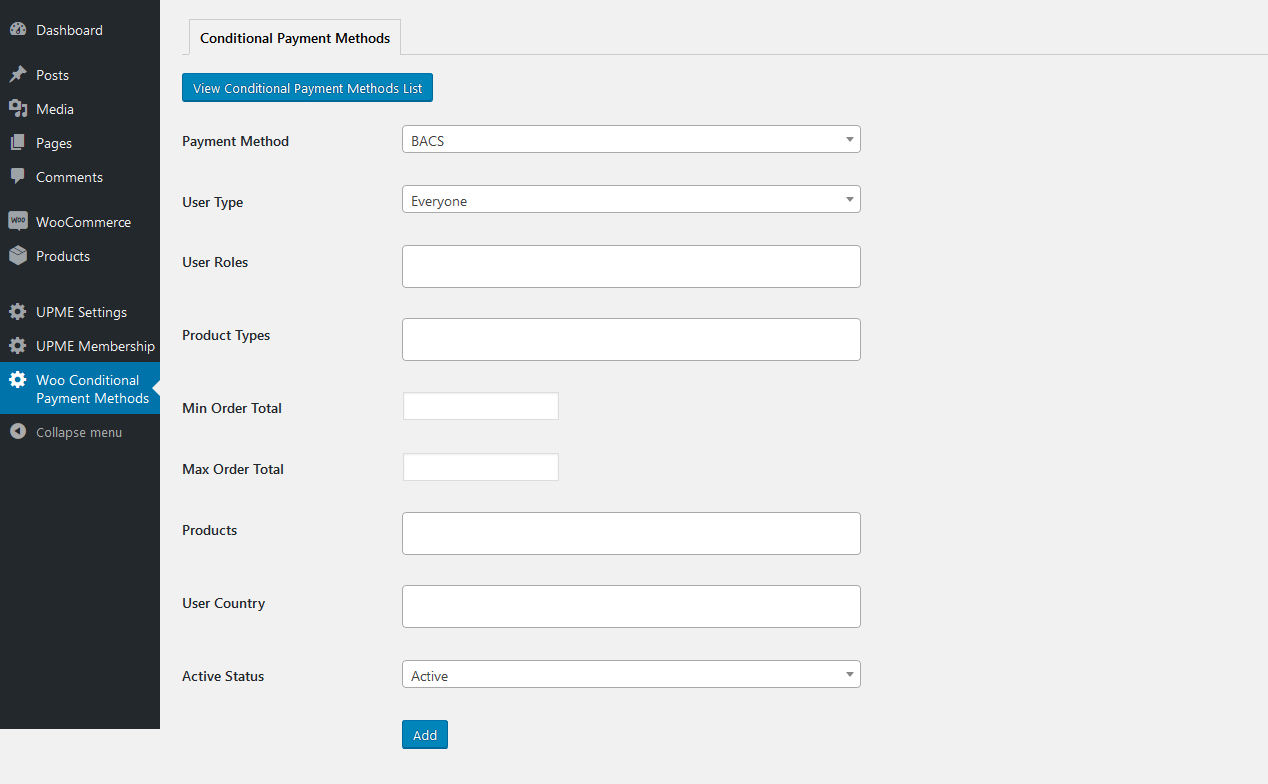
Let’s look at the available fields.

Payment Method – Payment methods enabled in WooCommerce checkout settings section will be listed here. You can select a payment method to add the conditions for enabling it on checkout.

User Type – provides 4 options called Everyone, Guest, Members and User Roles. When Everyone is selected, payment method will be always visible depending on other conditions. When Guest is selected, payment method will be only available for guests. When Member is selected, payment method will be only available for logged in users. When User Roles is selected, payment method will be only available for user roles specified in the next setting.

User Roles – If User Roles is selected for User Type field, you can add the allowed user roles from the available user roles list. This includes custom user roles created by other plugins.

Product Types – WooCommerce allows you to create different types of products such as Simple products, Variable Products etc. This field allows you to define the product types for allowing the payment method. Assume you select Simple products for this setting. In such case, payment method will be only enabled when all the items on the users cart has the simple product type. If one of the product has a different type, condition is not matched and payment method is not displayed.

Min Order Total – This field defines the minimum order total value required to display the payment method. If users cart value is less than this value, payment method will not be available.

Max Order Total – This field defines the maximum order total value to display the payment method. If users cart value is greater than this value, payment method will not be available.

Products – This field define the products for this condition. If you add products to this field, user will only see the payment method when users cart only contains products defined for this field. If cart contains other products, payment gateway will not be visible based on current condition.

User Country – This field defines the shipping countries of users allowed to see the payment method. This is useful for blocking certain payment method for certain countries.

Active Status – This field defines whether payment method condition is active or inactive. If you don’t need conditions for a payment method, you can make it inactive to disable it and use it in future when required.

Once you click the Add button, conditions will be saved and payment conditions list will be shown similar to following screenshot.
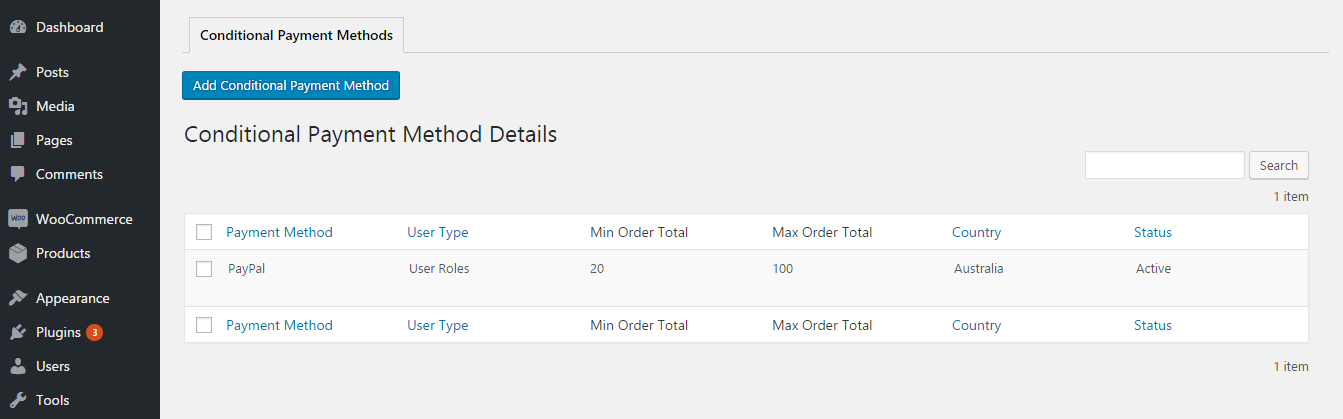
You can click on Add Conditional Payment Method button to add conditions to another payment method or click the Edit link to edit the conditions for created payment methods. Following screenshot previews the edit payment method conditions screen.
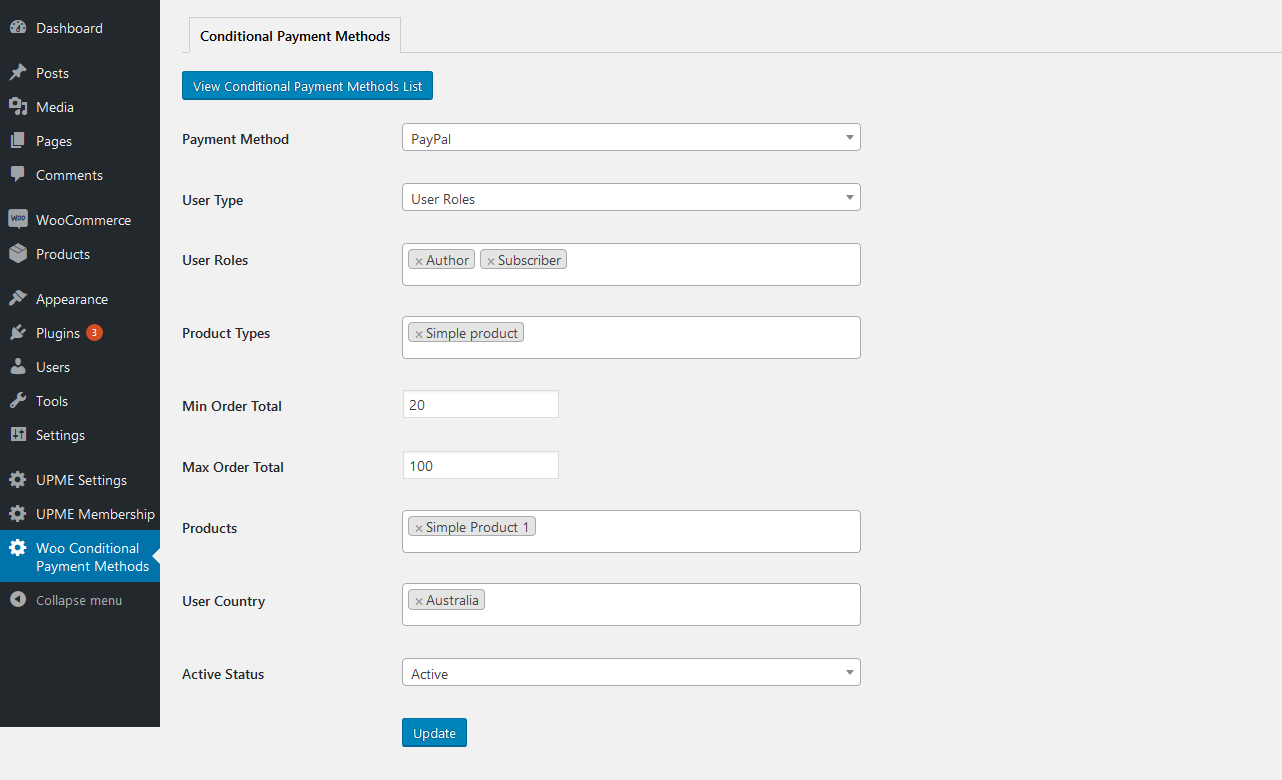
You can add different conditions for each of the available payment method on your site. Following screenshot previews the list with multiple conditions for the same payment method.
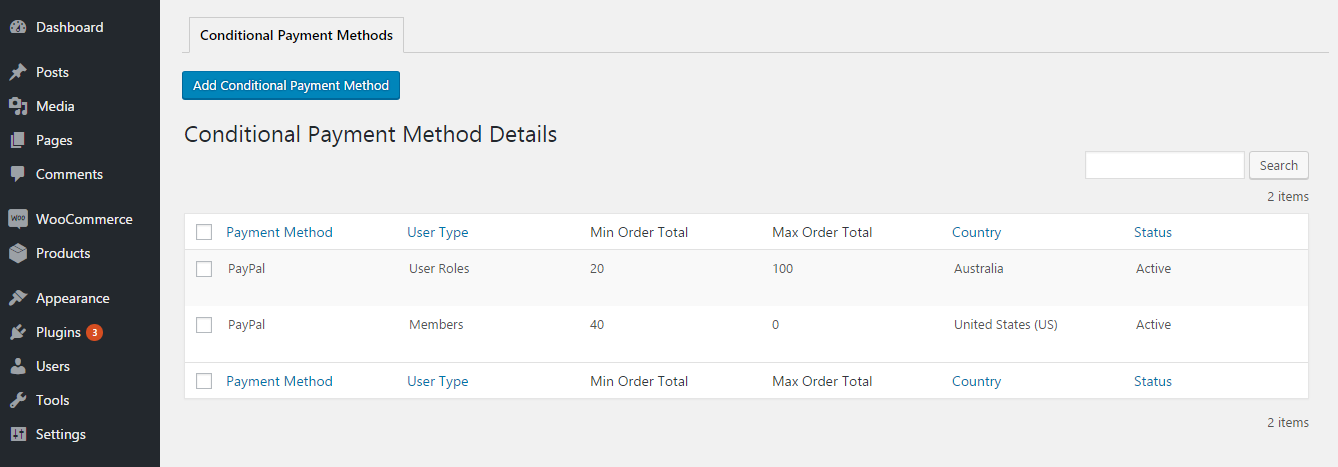
This version supports multiple set of conditions for each payment method. This is not a supported feature in free version.

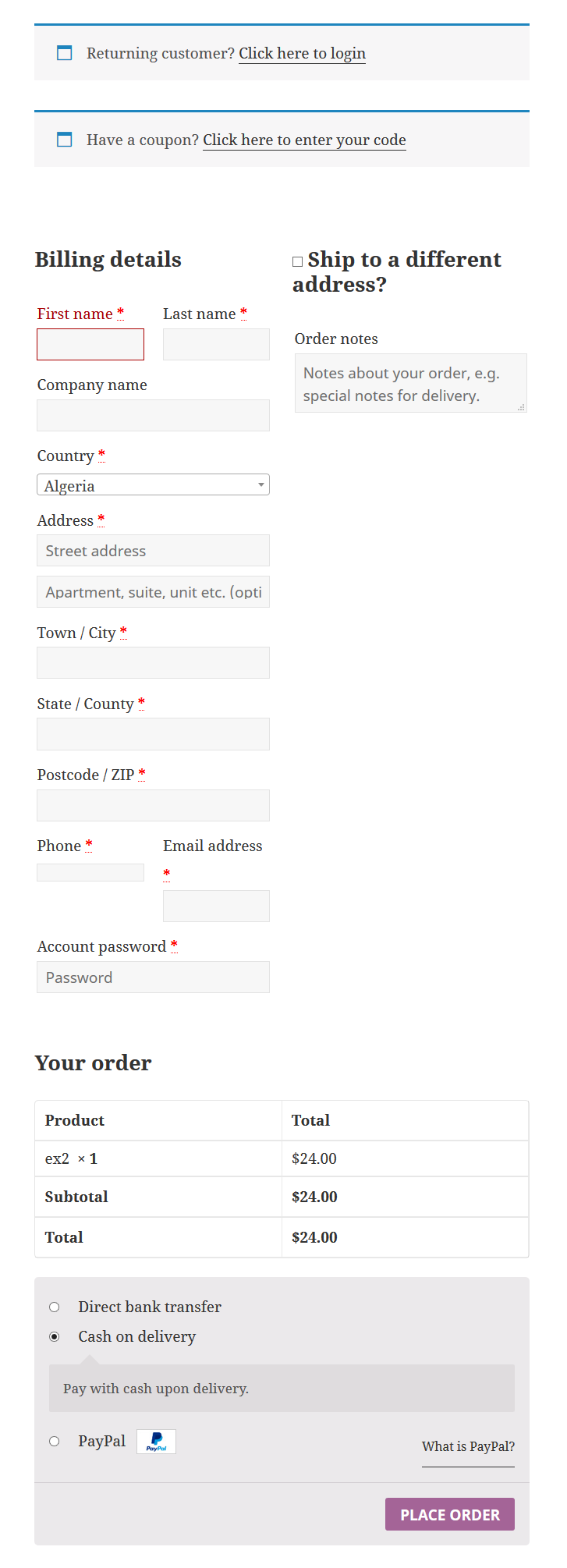
Following screenshot previews the checkout screen of WooCommerce. This screen contains 3 payment methods. These methods will be displayed / hidden based on the conditions added in the previous section.

Download Conditional Payment Methods PRO for WooCommerce (WooCommerce)

Instagram Postcard Kiosk – For Shops & Venues (Social Networking)


Please rate
1
2
3
4
5
if you like this app to encourage me to develop new features! Thanks so much!
 :)

Grow brand awareness & exposure by allowing customers to send Instagram email postcards to friends!

The Instagram postcard kiosk allows your in-store customers to send Instagram email postcards to friends with your ad so you can collect emails and promote your product or service!

Customers can view last instagram photo posted, choose a photo, compose a message and send it to a friend via email. It doesn’t require any external API to connect with Instagram so you can just change branding, upload and use straight away for your shop or venue.

EXAMPLE USES

Card Shops

If you would like customers to send Instagram email postcards to friends at your Card Shop then choose this option.

Travel Agencies

If you would like customers to send Instagram email postcards to friends at your Travel Agency then choose this option.

Galleries
If you would like customers to send Instagram email postcards to friends at your Gallery then choose this option.

Printing Shops
If you would like customers to send Instagram email postcards to friends at your Printing Shop then choose this option.

Tourist Attractions
If you would like customers to send Instagram email postcards to friends at Tourist Attraction then choose this option.

Gift Shops
If you would like customers to send Instagram email postcards to friends at your Gift Shop then choose this option.

HOW IT WORKS

  1. Enter instagram Username
  2. Choose a photo.
  3. Compose postcard (enter your email, friends email and message).
  4. Send email (the postcard will be sent with photo and your banner ad)

TOP BENEFITS

Not only does this tool offers easy and fast installation, you get the following benefits:

1. Attract more
It helps you attract more customers to your business allowing them to send postcards with your ad.

2. Engage more
It helps you engage more customers as people love interacting with kiosks, give them an incentive to keep returning!

3. Sell more
It helps you sell more of your products or services by collecting user emails and sending future promotions.

DEMO

TRY THE DEMO

Download Instagram Postcard Kiosk – For Shops & Venues (Social Networking)

Desktop Notifications Suite – Schedule reminders to yourself! (Social Networking)


Please rate
1
2
3
4
5
if you like this app to encourage me to develop new features! Thanks so much!
 :)

Schedule desktop notifications (with timezone selection, custom sound, spintax support and auto-repeat) that show in your system tray!

Ever wanted your own desktop notifications so you can send reminders to yourself or get updated whenever you want? Now you can with the new Desktop Notifications Suite!

Support: Desktop and mobile browsers – Firefox, Safari, Opera, Chrome, IOS/Android.

Limitations: You must keep the page open to receive notifications (just use chrome to pin the tab).

WHY USE IT?

We’ve all been there, your working hard on a project on your computer, surfing the web, reading an engrossing book or playing an addictive game for hours on end and you forget to take a break to rest your eyes to avoid eye-strain, stretch your legs to avoid cramps, buy food, walk the dog, take medication or even drink liquids. So use this app to remind yourself of important things so you never forget again (with custom sounds so you never ignore it)!

TOP FEATURES

Timezone Selection
If you would like send desktop notifications in your timezone so you can get messages anywhere, anyplace then choose this option.

Spintax Support
If you would like to add spintax message for study tests, quotes, jokes, facts, scriptures and other reminders then choose this option.

Custom Sounds
It you would like to use a custom sound so you can remind yourself of a appointments, meetings or interviews etc then choose this.

Custom Scheduler
If you would like to schedule desktop notifications so you can reminders of important dates like birthdays or other events then choose this option.

Custom Repeat
If you would like to auto-repeat desktop notifications so you can get regular break reminders then choose this option.

TOP USES

For Learning Stuff
If you would like to send notifications to test yourself on study questions or to remember facts, quotes, jokes, scriptures etc (using spintax and auto-repeat) then choose this option.

For Special Dates
It you would like to remind yourself of special dates like bookings, appointments, meetings, interviews, webinars, events, birthdays etc (using the scheduler) then choose this option.

For Break Reminders
If you would like to send notification to remind you to take frequent breaks to rest your eyes, stretch your legs, exercise, walk the dog, take medication, drink water, watch a TV program etc (using the scheduler) then choose this option.

HOW IT WORKS

1. Accept notifications in browser, select timezone, enter notification title and message (spintax supported).

2. Select your sound (click on the link “Player” to listen to sounds).

3. Choose your date and time to schedule the notification and click the “Start Notification” button (you can also choose to auto-repeat at specified period every minute, hour, day, week until a calendar date.
).

WHAT ARE THEY?

Notifications

Browser notifications are short messages, which are sent from a site to you. They are delivered directly to the user desktop (Windows, OS X or Linux), or to the lock screen of a device (Android). The great thing about this technology is that no special software is required for subscribing to notifications and receiving them.

Notifications

After receiving notification, you can see a “little bell” in your tray – it is a control panel where you can change notification settings. Here you can set “silent mode”, clear notifications list, check out your list of subscriptions or unsubscribe from sources that your not interested in anymore.

DEMO

TRY THE DEMO

You must accept notifications in your browser to receive them.

Download Desktop Notifications Suite – Schedule reminders to yourself! (Social Networking)

WooCommerce Security Deposits – WordPress Plugin (WooCommerce)


WooCommerce Security Deposits is a premium WordPress and WooCommerce plugin for handling refundable security deposits.
You can use it to collect a security deposit with any product, the security deposit amount you collect can be a fixed amount or a percentage of product price (can be more than 100%)
WooCommerce Security Deposits is fully compatible with WooCommerce Bookings plugin, allowing you to collect security deposits on bookings as well as other products.

Features

  • Perfect for rental purposes and refundable security deposit scenarios.
  • Collect a security deposit on any product in your WooCommerce store.
  • Select security deposit type: Fixed value or percentage.
  • Choose to multiply security deposit amount by product quantity or by number of persons for WooCommerce Bookings.
  • Allows automatic refunds of security deposit via gateway API (if payment gateway and payment gateway plugin declare refund support).
  • Feature to automatically process refunds when an order is marked completed.
  • Security deposits are product-based, store administrator can refund only some deposits made on order and withhold the rest if required to.
  • Ability to refund all order deposits with one click.
  • Provides tracking numbers linking order items with security deposits, store administrator and customer can use them for reference .
  • Security deposits amounts can be modified by administrator.
  • Works with product Variations (updates security deposit amount on front-end).
  • Built for WooCommerce: Designed from the ground up to work with WooCommerce by a WooCommerce expert developer, co-author and project maintainer of WooCommerce Deposits – Partial Payments Plugin.
  • Compatible with WooCommerce Bookings: Multiply the security deposit by persons on your bookings or collect a percentage of the total value.
  • Fully translatable: Compatible with WPML.
  • Pre-translated to 6 languages (Arabic, Dutch, French, German, Italian and Spanish).

Download WooCommerce Security Deposits – WordPress Plugin (WooCommerce)

Toby’s Adventures: Beach (appodeal ads) (Games)

Toby’s Adventures: Beach is Android game developed with Corona SDK.

Download it here:
https://play.google.com/store/apps/details?id=com.gmail.clarusgames.Toby_s_adventures_Beach_game

It’s published on Google Play, but it has only few installs, feel free to make any changes and publish it if you know how to promote it.

Please note, it’s my first game with Corona, so don’t expect perfect code.

There is a Flash version with 12 levels (Android game cointains 20 levels). Play Flash game on PC:
http://clarusgames.com/tobys_adventures_beach.php

It is a platformer-puzzle game. Play as a dog named Toby, eat cakes and ice creams in the correct order to finish the level. Break some bricks to find hidden candies. Avoid jumping monsters and snakes on your way. Eating candies can make you slower or faster. You have 40 seconds to finish a level. Are you ready for a summer adventure?

Download Toby’s Adventures: Beach (appodeal ads) (Games)

Finger Blood Pressure Prank + AdMob (Full Applications)

Description

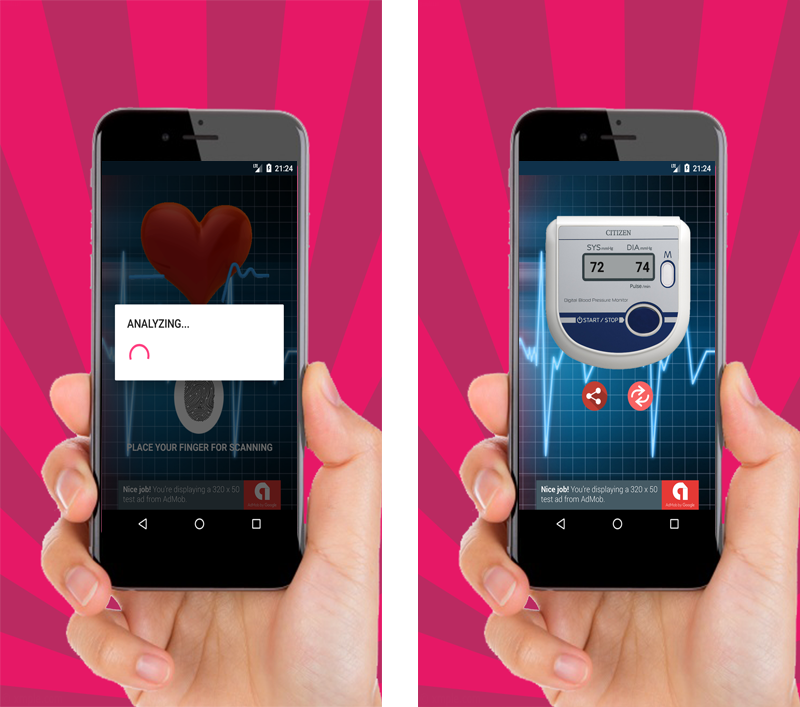
Finger blood pressure prank application that measures your blood pressure from fingerprints.Download APK

Features

Android Studio project
Easy to reskin
Admob integrated (Banner and interstitial)
Modern design
Easy Code (With comments)
And more…

Feedback

For any questions please contact me: [email protected]

Screenshots


Download Finger Blood Pressure Prank + AdMob (Full Applications)

Skype Live Chat For WordPress (Utilities)

SKype Live Chat is a WordPress plugin allow put your Skype live chat box on your website, visitors can chat with you via Skype messages. This is easy way to support and keep contact with your customers

Features

  • REALTIME CHAT WITH CUSTOMERS
  • ADD SKYPE CUSTOMERS
  • UNLIMITED BANDWITH
  • CHAT WITH YOUR CUSTOMERS ANYTIME
  • UNLIMITED HISTORY CHAT
  • MULTIPLE CHAT AT SAME TIME
  • NO SETUP REQUIRE
  • UNLIMITED COLORS
  • And more..

Admin settings

slype live chat

CHANGELOG

24/05/2017: (version 1.0)

- Version 1.0 Initial Release

Download Skype Live Chat For WordPress (Utilities)

Evendar – Event Calendar/Picker (Calendars)

\

Evendar – Event Calendar / Picker

Evendar is a Event Calendar/Picker plugin, built using jQuery and moment.js libraries. It can be used as:

  • Event Picker for forms
  • Event calendar for applications
  • Ticket sale systems
  • Bus timeline & ticket systems
  • Venue event selector
  • And many more that you can imagine

Features

  • Event Calendar / Picker
  • JSON Source Compatible
  • Grid View/List View Support
  • Minimize/Maximize Support
  • Fully customizable
  • Easy month and year switch
  • Inline or Dropdown Options
  • Portrait and Landscape Mobile Views
  • Event Details View
  • Event Links and Link Target Support
  • Built using jQuery and moment.js
  • Sass File included
  • Grunt Tasks included

Changelog

  • v1.0
    • Initial release
  • v1.0.1
    • fixed css height issues on calendars
    • added place and date information to description and listings
    • fixed css on evendar trigger button
    • documentation sidebar visibility fix
    • added more examples
    • changed images to wikimedia sourced ones

Download Evendar – Event Calendar/Picker (Calendars)

Nasaomatic – Nasa Automatic Post Generator Plugin for WordPress (Miscellaneous)

You will Love this item!

Nasaomatic Automatic Post Generator Plugin

What Can You Do With This Plugin?

Nasaomatic Automatic Post Generator Plugin for WordPress is a breaking edge (made in 2017) Nasa To WordPress and WordPress To Nasa post importer plugin that is ideal for auto blogging and automatic Nasa post publishing. It uses the Nasa API to turn your website into a auto blogging or even a money making machine!
The National Aeronautics and Space Administration (NASA) is an independent agency of the executive branch of the United States federal government responsible for the civilian space program, as well as aeronautics and aerospace research. Chances are you can make use of the site to drive traffic and generate prospects for your business.
You can import post from Nasa’s database, containing articles, images, videos or sounds.
Using this plugin, you can automatically generate posts based on a set of predefined rules. These rules can generate posts from:

  • Nasa’s Picture Of The Day
  • Blue Marble (Pictures of Earth from planetal perspective)
  • Nasa Earth – similar with Google Earth – take pictures of places, defined by coordinates
  • Mars rover images – select from Curiosity, Opportunity or Spirit
  • Space sounds – uploaded by Nasa to SoundCloud
  • Search by keyword – return videos, images or audio from Nasa’s database

Other plugin features:

  • Google Translate support – select the language in which you want to post your articles
  • Text Spinner support – automatically modify generated text, changing words with their synonyms – great SEO value!
  • customizable generated post status (published, draft, pending, private, trash)
  • automatically generate post categories or tags from marketplace items
  • manually add post categories or tags to items
  • generate post or page or any other custom post type
  • define publishing constrains: do not publish posts that do not have images, posts with short/long title/content
  • automatically generate a featured image for the post
  • enable/disable comments, pingbacks or trackbacks for the generated post
  • customize post title and content (with the included wide variety of relevant post shortcodes)
  • ‘Keyword Replacer Tool’ – It’s purpose is to define keywords that are substituted automatically with your affiliate links, anywhere they appear in the content of your site. For example, you can define a keyword ‘codecanyon’ and have it substituted by a link to http://www.codecanyon.net/?ref=user_name anywhere it appears in your site’s content.
  • ‘Random Sentence Generator Tool’ (relevant sentences – as you define them)
  • detailed plugin activity logging
  • scheduled rule runs
  • Maximum/minimum title length post limitation
  • Maximum/minimum content length post limitation
  • Add post only if predefined required keywords found in title/content
  • Add post only if predefined banned keywords are not found in the title/content

Try it out now

Testing this plugin

Plugin Requirements

  • PHP curl

Learn more about this plugin

Need support?

Just email me at [email protected] and I will respond as soon as I can.

coderevolution
coderevolution
coderevolution
coderevolution

Changelog:

Version 1.0 Release Date 2017-05-24

First version released!

Are you already a customer?

If you already bought this and you have tried it out, please contact me in the item’s comment section and give me feedback, so I can make it a better WordPress plugin!

WordPress 4.7 Tested!

Purchase this item now!

Like this? Give it a 5 star rating!

Download Nasaomatic – Nasa Automatic Post Generator Plugin for WordPress (Miscellaneous)

DCode – Coupon Code Listing Platform (Miscellaneous)

DCode Coupon Code Listing Platform software will allow you to create own Coupon Code Listing website in a few clicks. DCode is efficiently developed PHP Coupon Code Listing script .Its Very easy to use and SEO friendly software. Build your own php Coupon Code Listing script website in just few clicks. simple and vital PHP + MySQL based Coupon Code Listing script with all inbuilt options provides one step solution. It is professionally developed in PHP based Laravel framework with MySQL backend.


Visitor Frontend:

Fully Responsive Design.
Unique Template.
Informative Menu’s.
Login & Registration System.
Quick Links.
Easy to use contact form.
Coupon Category & Sub-Category.
100% User friendly.
SEO Friendly URL.
Related Coupon Code Section.
Lastest Coupon Code Section.
Featured Coupon Code Facility.
Easy to Share On Social Media.
Coupon Code Report Facility.
A to Z Description.
One Click Publisher Email System.
Publisher Profile.
Total Coupon View Counter.
Multiple Image Facility.

USER Panel:

Interactive USER Dashboard.
Easy to post new Coupon Code.
New & Used both Condition.
Unlimited Photo Upload.
Multiple Currency.
Favourites Coupon Code Section.
Own Post Gallery.
Expired Date / Time Management.
Management of Own Profile.
Email Notification.
Bookmark / Whitelist Facility.

Admin Panel:

100% Secure & Dynamic.
Gorgeous Dashboard.
Full Management of Coupon Category.
Full Management of Coupon Sub-Category.
Location / Area Management.
Multiple Currency Setup.
Full Coupon Code / POST Management.
Easy to Search Coupon Code.
SET Featured Coupon Code.
Coupon Code Management.
Reported / Spam / Duplicate Coupon Notification.
Reported / Spam / Duplicate Coupon Management.
Total View Management.
SITE Slider Management.
SITE LOGO Management.
About Us Page Management.
FAQ Management.
Website TITLE Management.
TOP & Buttom MSG Management.
Address Managemnt.
Contact Information Management.
Social Link’s Management.
Header & Footer Image Management.

Support Fecility:

Please send us your product presale query, after sales developer support request, customization project and any other queries to our dedicated support: [email protected]

Download DCode – Coupon Code Listing Platform (Miscellaneous)