








Contact Form 7 – Suite CRM Integration (Add-ons)

Contact Form 7 – SuiteCRM Integration plugin can integrate Contacts, Cases and Leads between your WordPress Contact Form 7 and SuiteCRM. Easily add automatically Contacts, Cases and Leads into SuiteCRM when people submit a Contact Form 7 form on your site.

Features

  • Easily integrate Contact Form 7 form to SuiteCRM Contact
  • Easily integrate Contact Form 7 form to SuiteCRM Case
  • Easily integrate Contact Form 7 form to SuiteCRM Lead
  • Integrated Contact Form 7 form can automatically add your site new form data to SuiteCRM Contact
  • Integrated Contact Form 7 form can automatically add your site new form data to SuiteCRM Case
  • Integrated Contact Form 7 form can automatically add your site new form data to SuiteCRM Lead
  • Easily map your Contact Form 7 form fields to SuiteCRM Contact, Case and Lead fields
  • Making customer relationship management simple
  • Integrate unlimited Contact Form 7 forms

Installation

This plugin requires the Contact Form 7 plugin.

WordPress Dashboard
  • Go to ‘Admin’ -> ‘Plugins’ -> ‘Add New’
  • Click on ‘Upload Plugin’
  • Upload ‘Contact Form 7 – SuiteCRM Integration’ plugin zip
  • Activate ‘Contact Form 7 – SuiteCRM Integration’ plugin
FTP, SFTP, SCP etc…
  • Unzip ‘Contact Form 7 – SuiteCRM Integration’ plugin zip
  • Upload the unzip plugin folder to your ’/wp-content/plugins/’ directory, using your favorite method (ftp, sftp, scp, etc…)
  • Activate ‘Contact Form 7 – SuiteCRM Integration’ plugin

Configuration

  • Go to ‘Admin’ -> ‘CF7 – SuiteCRM’ -> ‘Configuration’
  • URL: Add your instance URL. Like http://example.com
  • Username: Add your SuiteCRM account username
  • Password: Add your SuiteCRM account password
  • Click on ‘Save’ button

Integration

  • Go to ‘Admin’ -> ‘CF7 – SuiteCRM’ -> ‘Integration’
  • You can see list of Contact Form 7 Forms
  • Click on edit form icon which you want to integrate form
  • Select a SuiteCRM module you want to integrate with current form
  • Click on ‘Filter’ button to filter module fields
  • Check ‘SuiteCRM Integration?’ checkbox if you want to integrate SuiteCRM
  • Map fields which you want to map
  • Click on ‘Save’ button to map fields
  • Note: Map fields which is creatable in SuiteCRM module

Changelog

1.0.0

  • Initial release

Download Contact Form 7 – Suite CRM Integration (Add-ons)

Contact Form 7 – Sugar CRM Integration (Add-ons)

Contact Form 7 – SugarCRM Integration plugin can integrate Contacts, Cases and Leads between your WordPress Contact Form 7 and SugarCRM. Easily add automatically Contacts, Cases and Leads into SugarCRM when people submit a Contact Form 7 form on your site.

Features

  • Easily integrate Contact Form 7 form to SugarCRM Contact
  • Easily integrate Contact Form 7 form to SugarCRM Case
  • Easily integrate Contact Form 7 form to SugarCRM Lead
  • Integrated Contact Form 7 form can automatically add your site new form data to SugarCRM Contact
  • Integrated Contact Form 7 form can automatically add your site new form data to SugarCRM Case
  • Integrated Contact Form 7 form can automatically add your site new form data to SugarCRM Lead
  • Easily map your Contact Form 7 form fields to SugarCRM Contact, Case and Lead fields
  • Making customer relationship management simple
  • Integrate unlimited Contact Form 7 forms

Installation

This plugin requires the Contact Form 7 plugin.

WordPress Dashboard
  • Go to ‘Admin’ -> ‘Plugins’ -> ‘Add New’
  • Click on ‘Upload Plugin’
  • Upload ‘Contact Form 7 – SugarCRM Integration’ plugin zip
  • Activate ‘Contact Form 7 – SugarCRM Integration’ plugin
FTP, SFTP, SCP etc…
  • Unzip ‘Contact Form 7 – SugarCRM Integration’ plugin zip
  • Upload the unzip plugin folder to your ’/wp-content/plugins/’ directory, using your favorite method (ftp, sftp, scp, etc…)
  • Activate ‘Contact Form 7 – SugarCRM Integration’ plugin

Configuration

  • Go to ‘Admin’ -> ‘CF7 – SugarCRM’ -> ‘Configuration’
  • URL: Add your instance URL. Like http://example.com
  • Username: Add your SugarCRM account username
  • Password: Add your SugarCRM account password
  • Click on ‘Save’ button

Integration

  • Go to ‘Admin’ -> ‘CF7 – SugarCRM’ -> ‘Integration’
  • You can see list of Contact Form 7 Forms
  • Click on edit form icon which you want to integrate form
  • Select a SugarCRM module you want to integrate with current form
  • Click on ‘Filter’ button to filter module fields
  • Check ‘SugarCRM Integration?’ checkbox if you want to integrate SugarCRM
  • Map fields which you want to map
  • Click on ‘Save’ button to map fields
  • Note: Map fields which is creatable in SugarCRM module

Changelog

1.0.0

  • Initial release

Download Contact Form 7 – Sugar CRM Integration (Add-ons)

Form 7 – ZOHO CRM Integration (Add-ons)

Contact Form 7 – ZOHO CRM Integration plugin can integrate Contacts, Cases and Leads between your WordPress Contact Form 7 and ZOHO CRM. Easily add automatically Contacts, Cases and Leads into ZOHO CRM when people submit a Contact Form 7 form on your site.

Features

  • Easily integrate Contact Form 7 form to ZOHO CRM Contact
  • Easily integrate Contact Form 7 form to ZOHO CRM Case
  • Easily integrate Contact Form 7 form to ZOHO CRM Lead
  • Integrated Contact Form 7 form can automatically add your site new form data to ZOHO CRM Contact
  • Integrated Contact Form 7 form can automatically add your site new form data to ZOHO CRM Case
  • Integrated Contact Form 7 form can automatically add your site new form data to ZOHO CRM Lead
  • Easily map your Contact Form 7 form fields to ZOHO CRM Contact, Case and Lead fields
  • Making customer relationship management simple
  • Integrate unlimited Contact Form 7 forms

Installation

This plugin requires the Contact Form 7 plugin.

WordPress Dashboard
  • Go to ‘Admin’ -> ‘Plugins’ -> ‘Add New’
  • Click on ‘Upload Plugin’
  • Upload ‘Contact Form 7 – ZOHO CRM Integration’ plugin zip
  • Activate ‘Contact Form 7 – ZOHO CRM Integration’ plugin
FTP, SFTP, SCP etc…
  • Unzip ‘Contact Form 7 – ZOHO CRM Integration’ plugin zip
  • Upload the unzip plugin folder to your ’/wp-content/plugins/’ directory, using your favorite method (ftp, sftp, scp, etc…)
  • Activate ‘Contact Form 7 – ZOHO CRM Integration’ plugin

Configuration

  • Generating authentication token in ZOHO CRM. The guide is here
  • Go to ‘Admin’ -> ‘CF7 – ZOHO CRM’ -> ‘Configuration’
  • Authentication Token: Add your ZOHO CRM authentication token
  • Click on ‘Save’ button

Integration

  • Go to ‘Admin’ -> ‘CF7 – ZOHO CRM’ -> ‘Integration’
  • You can see list of Contact Form 7 Forms
  • Click on edit form icon which you want to integrate form
  • Select a ZOHO CRM module you want to integrate with current form
  • Click on ‘Filter’ button to filter module fields
  • Check ‘ZOHO CRM Integration?’ checkbox if you want to integrate ZOHO CRM
  • Map fields which you want to map
  • Click on ‘Save’ button to map fields
  • Note: Map fields which is creatable in ZOHO CRM module

Changelog

1.0.0

  • Initial release

Download Form 7 – ZOHO CRM Integration (Add-ons)

WP Brain – A Brain for Your WordPress WebSite (Add-ons)

The Features You Was Waiting For

Use the power of WP Brain to control when and where your website content will be visible and who can see it. Including pages and posts content, menu items and widgets

? Content Visibility

Control the visibility of content using the IF and ELSE shortcodes

    
? Menu Items Visibility

Show and hide menu items using your custom filters presets

    
? Widgets Visibility

Use the logic system to control the visibility of widgets

    
? Target Devices

You can control the content to show for each and any device

    
? Geo Location

It was never easier to show or hide content based users location

    
? Date and Time

Limit the visibility of elements based on date and time interval

    
? Users Targeting

Show elements only for some users or for some user roles

    
? Page Redirect

Redirect your visitors to other page with the help of filters

    
? Pages and Posts

WP Brain can filter content and elements based on pages and posts

    
? Archives and Categories

Display something only on some posts archives and categories

    
? Unlimited Filters

You have access to a free and large library of custom filters to use

    
? Customizable

WP Brain is fully customizable with custom filters and API hooks

    
? Flexibility

WP Brain offer flexible and can be adapted to all your needs

    
? No Coding Required

Do almost anything with the built-in features without writing any code

    
? Compatibility

We release regular updates to stay compatible with latest WordPress

    
? Free Extensions

We will release free add-ons to allow third-party integrations

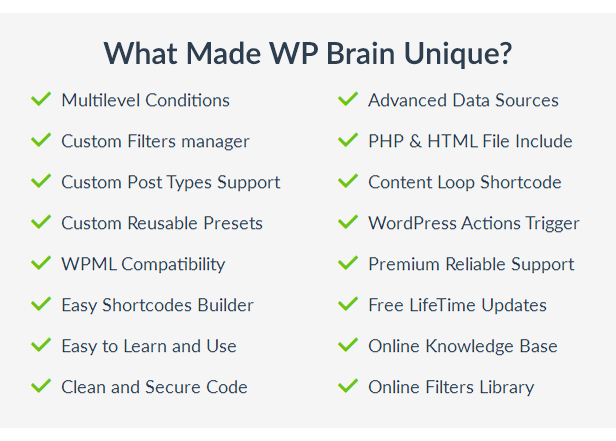
What Made WP Brain Unique?

? Multilevel conditions builder
? Custom filters generator
? Advanced data sources for custom filters
? Include PHP and HTML files in your posts
? Custom post types support
? Content loop shortcode
? Custom reusable presets
? Trigger WordPress hooks
? Compatible with multilingual plugins
? Premium and reliable support
? Easy shortcodes builder
? Free lifetime updates
? Easy to learn and use
? Clean, secure and optimized source code
? Online knowledge base (coming soon)
? Online filters library (coming soon)

24+ Built-in Logic Filters

WP Brain come with lot of handy and useful filters out of the box, you can achieve unlimited possibilities with these built-in filters, all you have to do is find the right combination for your logic conditions.

WordPress

? Page: show content only on some specific website pages
? Page Template: show content based on page templates
? Post Type: filter content visibility based on post type
? Taxonomy: show content only in some taxonomy archives

System Detection

? Device: show different content on different devices
? Operating system: control content for each operating system
? Browser: control content visibility based on the visitor’s browser
? Browser version: control content visibility based on the visitor’s browser version

Users

? Logged in: show content only for logged in members
? User: filter content by specific user IDs
? Role: this filter help you target members based on their role

Date and Time

? Date: show content for specific date range
? Time: show content during a time period
? Minute: control the visibility of elements by the clock minute
? Hour: control the visibility of elements by the clock hour
? Day: control the visibility of elements by the calendar day
? Day of week: control the visibility of elements by the day of week
? Month: control the visibility of elements by months
? Year: control the visibility of elements by year

GeoPlugin Location

? Country: display content based on the visitor country
? Region: restrict content visibility only to some region or states
? City: restrict visibility based on the visitor’s city
? Continent: restrict content visibility only to some continents
? IP Address: restrict content visibility using the IP address of the visitor

Powerful and easy to use shortcodes

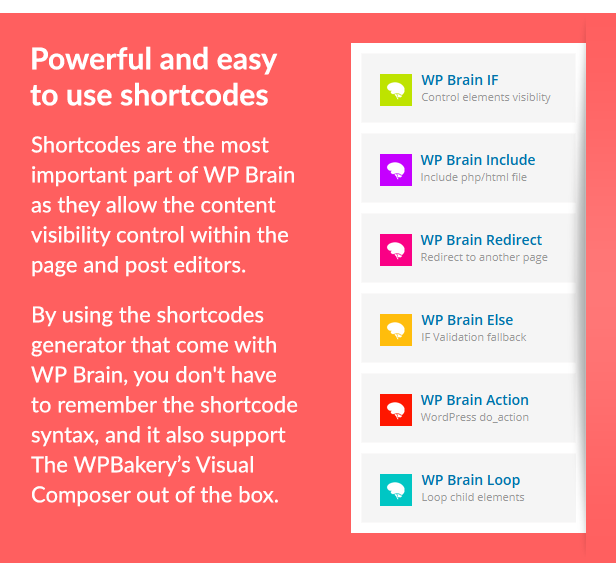
Shortcodes are the most important part in WP Brain as they offer content visibility control within the page and post editors. With the shortcodes generator that come with WP Brain you don’t have to remember the shortcodes syntax, and it also support WPBakery’s Visual Composer out of the box.

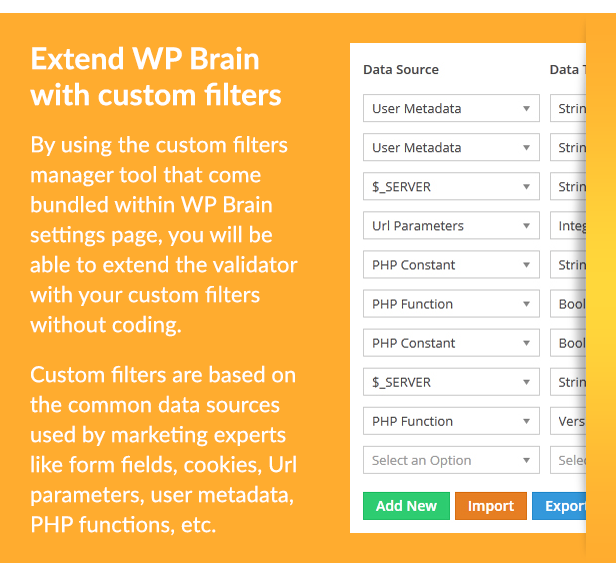
Extend WP Brain with your custom filters

By using the custom filters manager tool bundled within WP Brain settings page, you will be able to extend the logic validator with your own filters without writing a line of code. The filters are based on common data sources used by marketing experts like form fields, URL parameters, cookies, functions etc.

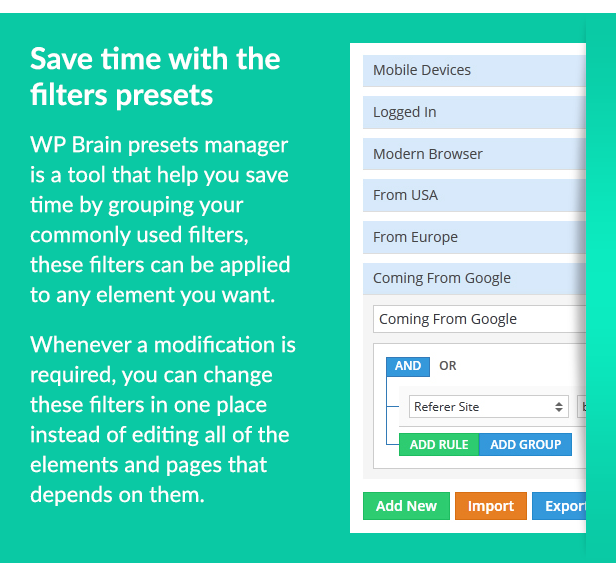
Save your time with the filters presets manager

WP Brain presets manager is a tool that help you save time by grouping commonly used filters, these filters can be applied easily in any element you want. Whenever a modification is required, you can change these filters in one place instead of editing each element or page that depends on them.

What’s New in WP Brain?

We regularly release updates with new features and improvements to stay compatible with the latest version of WordPress and all the supported plugins, if you have any feature request or question, please feel free to send us a message via this form

Version 1.0.0 – June 2017

? First WP Brain Release
? Added a brain to WordPress

Download WP Brain – A Brain for Your WordPress WebSite (Add-ons)

WireJump Game (Games)

This is an android Jumping Game, Built with BuildBox.
The aim of the player is to move through lines.

Download .apk file

GohanLee

Ads Networks

This game has the following Banner and Interstitial Ads Networks:-

  • Admob
  • Chartboost
  • Facebook
  • PlayHaven Token
  • Vungle
  • MoPub
  • HeyZap
  • Revmob
  • LeadBolt
  • Feel free to use any of those ads company.

    You can edit the game easily, no needs advance programming skills .

    This game also has a Leaderboard already setted up

    FEATURES

  • All game elements are in .ai format.
  • Pause Feature – Player can pause game during gameplay.
  • Simple to play
  • Easy User Interface
  • Music and sound – Game comes with music and Audio features. Player can choose to turn off all sound fx or music.
  • Note That!! to edit this game, it’s very much required to have buildbox software, you can’t edit the game without the software

    You can also see


    W3Schools


    W3Schools


    W3Schools


    W3Schools


    W3Schools

    You can also see Offer

    5 Games


    W3Schools

    4 Games


    W3Schools


    Download WireJump Game (Games)

    Link Expander – Convert Short URLs to Long URLs (Miscellaneous)

    Link Expander is very important tool. Everybody see shortened links on Internet. But some link maybe malware. This tool converts short urls to long urls. And support 200+ websites. If you see link shortened 1000 times don’t worry. This tool generates original URL Within seconds.

    Requriments

  • PHP 5.5 or higher with cURL
  • Installation

  • Copy files to your server or hosting.
  • That much.
  • Download Link Expander – Convert Short URLs to Long URLs (Miscellaneous)

    The Quiz Game – HTML5 & Capx (Games)

    An excellent solution for a Quiz game you plan for your website or project!
    This game comes packed with 90 Questions! divided into 9 categories, now you can test and challenge your target audience with an addictive educational questionnaire that is ready to be deployed into your website!

    Features
    – 90 Questions
    – 9 Categories:
    • Geography
    • History
    • Animals
    • Who Said That
    • General Science
    • Famous People
    • Maths
    • Food and Drink
    • Human Body
    – Facebook share
    – Locked categories until fee is paid!
    – Educational and challenging quiz

    Notes
    – using Construct 2, you can change all the questions
    – concise documentation included, main point is that IF you want to modify the game, you will need to have Construct 2, you can contact me to customize the game for you, feel free to PM me here.

    Another Quiz Game:

    Download The Quiz Game – HTML5 & Capx (Games)

    Facebook Conversion Tracking Pixels (Prestashop)

    Short Description

    With Facebook Conversion Tracking Pixel module you can easily keep track of the conversions of your Facebook ads campaign.

    Benefits for Merchants

    Facebook Conversion Tracking Pixel is a Prestashop module that will help you optimize your Facebook ads campaign. Using the Facebook pixel, you can leverage the actions people take on your website across devices to inform more effective Facebook advertising campaigns.

    Features

    • Super easy install.
    • Easy to customize.
    • Tracks the page view event on all pages.
    • Tracks the view content event on product pages.
    • Tracks the purchase event on the order confirmation page.
    • Multi-language ready.
    • Support Multi-Store.
    • Well documented.

    Download Facebook Conversion Tracking Pixels (Prestashop)

    WooCommerce Simplified Checkout (WooCommerce)

    feature_banner

    Overview

    WooCommerce Simplified Checkout plugin is allow users to easily order their products by Email or Phone number and by Email too.

    Key features

    • User can checkout with their email and add shipping/billing details after placing order.
    • User can checkout with their email and phone number at checkout page and add shipping/billing details after placing order.
    • User can checkout with their own selected fields at checkout page and add shipping/billing details after placing order.
    • Admin can divide the checkout process into multiple step to make the process easier.
    • After placing order user can update the shipping/billing details.
    • User can enable automatic user register at checkout page.
    • Admin can choose the selected field at checkout page and remove unneccessary fields.
    • Admin can select the multistep process color according to their website theme.
    • Their is a setting to add custom style to make the design according to your own choice.
    • Admin can easily customize the checkout page.

    Demo Settings

    click for frontend setting
    click for backend setting

    Minimum Requirements

    • WordPress 4.0 or greater.
    • WooCommerce 2.6.0 or greater.
    • PHP version 5.5.5 or greater.
    • MySQL version 5.0 or greater.

    Translation Ready

    .po and .mo files included, for easy translation

    Thank-you for your interest in woocommerce simplified checkout, Makewebbetter.

    Plugin Documentation

    Please click here

    Changelog

    27.05.2017 - ver 1.0.0
    
       - Initial Release
    

    Download WooCommerce Simplified Checkout (WooCommerce)

    Advanced Filters Sortable Addon (Add-ons)

    Advanced Filters Sortable Addon

    Advanced Filters allows you to create unlimited amount of filters for any post type you have or plan to create. It is easy thanks to the admin area, where you can create your filters, select the type of filter (checkbox, slider or dropdown) and select the filter value you want in the post edit page.

    You can see the filters that you create by using the original [sortable] shortcode as you have so far, and you will see your filters listed on the front-end for the post type you selected.

    Note: You also need to buy and download the Sortable plugin to use this plugin.

    Support

    We take excellent care of our customers and make sure that they successfully install, setup and use this plugin.

    You can use the comments section of this plugin to post any comments that may be helpful for others to know as well.

    Our Facebook page are available to assist you if you send us a message there, and you can always sends an email at [email protected].

    Keep us motivated to deliver new features by giving us a good rating in your Downloads page. Thank You!

    The Advanced FIlters plugin is covered by our Satisfaction Guarantee as well.

    FAQs

    Please check the FAQs available on CodeCanyon

    Change log

    6/9/2017 - Approved on CodeCanyon
    

    Download Advanced Filters Sortable Addon (Add-ons)

    HTML5 Games Bundle – 10 Casual HTML5 Games (Games)

    \

    HTML5 Game Bundle

    Save 70% when you buy this Educational Games Bundle.
    The bundle contains 10 amazing casual HTML5 games. See the list below:

    Features:

    • Work on all HTML5 browser and mobile devices
    • Easy way to add/replace images
    • Included Construct 2 files

    What you get

    • Construct 2 File
    • Game demo (HTML5 files)
    • Documentation – How to add it to your site

    If you have any question, don’t hesitate in asking. IF YOU LIKED THE GAME, PLEASE LEAVE A REVIEW :)


    \

    If you need to make changes to this or any other game or you need a brand new game, please send me a message.

    GAMES INCLUDED IN THIS BUNDLE

    Carnival Shooter – Casual HTML5 Game

    \

    Circle Pong – HTML5 Casual Game

    \

    2 Cars – HTML5 Mobile Game

    \

    50 States Challenge – HTML5 Educational Game

    \

    Classic TIC TAC TOE

    \

    Rock Paper Scissors HTML5 Game – Mobile Optimized

    \

    Block It – HTML5 Casual Game

    \

    Freaky Math – HTML5 Casual Game

    \

    Super Cow Jet – HTML5 Casual Game

    \

    Bubble Rescue – Educational HTML5 Game (CAPX included)

    \

    Download HTML5 Games Bundle – 10 Casual HTML5 Games (Games)

    Contact Form 7 – Salesforce CRM Integration (Add-ons)

    Contact Form 7 – Salesforce CRM Integration plugin can integrate Contacts, Cases and Leads between your WordPress Contact Form 7 and Salesforce CRM. Easily add automatically Contacts, Cases and Leads into Salesforce CRM when people submit a Contact Form 7 form on your site.

    Features

    • Easily integrate Contact Form 7 form to Salesforce CRM Contact
    • Easily integrate Contact Form 7 form to Salesforce CRM Case
    • Easily integrate Contact Form 7 form to Salesforce CRM Lead
    • Integrated Contact Form 7 form can automatically add your site new form data to Salesforce CRM Contact
    • Integrated Contact Form 7 form can automatically add your site new form data to Salesforce CRM Case
    • Integrated Contact Form 7 form can automatically add your site new form data to Salesforce CRM Lead
    • Easily map your Contact Form 7 form fields to Salesforce CRM Contact, Case and Lead fields
    • Making customer relationship management simple
    • Integrate unlimited Contact Form 7 forms

    Installation

    This plugin requires the Contact Form 7 plugin.

    WordPress Dashboard
    • Go to ‘Admin’ -> ‘Plugins’ -> ‘Add New’
    • Click on ‘Upload Plugin’
    • Upload ‘Contact Form 7 – Salesforce CRM Integration’ plugin zip
    • Activate ‘Contact Form 7 – Salesforce CRM Integration’ plugin
    FTP, SFTP, SCP etc…
    • Unzip ‘Contact Form 7 – Salesforce CRM Integration’ plugin zip
    • Upload the unzip plugin folder to your ’/wp-content/plugins/’ directory, using your favorite method (ftp, sftp, scp, etc…)
    • Activate ‘Contact Form 7 – Salesforce CRM Integration’ plugin

    Configuration

    • Create Connected App in Salesforce CRM. The guide is here.
    • Go to ‘Admin’ -> ‘CF7 – Salesforce’ -> ‘Configuration’
    • Consumer Key: Add your Salesforce Connected App consumer key
    • Consumer Secret: Add your Salesforce Connected App consumer secret
    • Username: Add your Salesforce account username
    • Password: Add your Salesforce account password
    • Click on ‘Save’ button

    Integration

    • Go to ‘Admin’ -> ‘CF7 – Salesforce’ -> ‘Integration’
    • You can see list of Contact Form 7 Forms
    • Click on edit form icon which you want to integrate form
    • Select a Salesforce CRM module you want to integrate with current form
    • Click on ‘Filter’ button to filter module fields
    • Check ‘Salesforce Integration?’ checkbox if you want to integrate Salesforce CRM
    • Map fields which you want to map
    • Click on ‘Save’ button to map fields
    • Note: Map fields which is creatable in Salesforce CRM module

    Changelog

    1.0.0

    • Initial release

    Download Contact Form 7 – Salesforce CRM Integration (Add-ons)

    WordPress Gallery Extra (Galleries)


    What’s WordPress Gallery Extra?

    WordPress Gallery Extra is the most intuitive and extensible gallery management tool ever created for WordPress. It comes with a lot of great features and templates, but at the same time we always try to keep things as simple and intuitive as possible, so that users with little WordPress experience have no problem using it as well. Whether you specialize in capturing magical wedding days, creative designs and innovations, expressive portraits, extraordinary architecture, or a journalistic exploration, your photos tell a unique story and deserve to be presented in their full glory.

    WordPress Gallery Extra Features

    Features

    • Clean and modern Design
    • Drag and Drop Gallery Builder
    • Ajax Themes Compatibility
    • Translation ready
    • Beautiful Templates for Customization
    • Powerful Template Manager
    • WPML ready
    • Responsive design
    • Image Sizes Manager
    • Retina Ready
    • Thumbnails Regenerator
    • Image Tags
    • Image Categories
    • Columns Gallery
    • Justified Gallery
    • Masonry Gallery
    • Mosaic Gallery
    • Horizontal Gallery
    • Easy style editor
    • More than 2 dozen Demos
    • Single click Template import
    • Top Notch Support
    • Strong SEO foundation
    • Compatible with major SEO plugins
    • Custom CSS for Templates
    • Regular Updates and Improvements
    • Free Lifetime Updates

    SUPPORT NOTES

    To be able to help solve a problem quickly, please read the entries below. I will do my best to assist you. I provide a full range of technical support except:

    1. We don’t support 3rd-party code (external plugins, javascripts, flash players, etc.). In those cases you have to contact the authors.
    2. We don’t support errors provoked by the strong modification of the original packages.
    3. We don’t customize the packages in personal way.
    4. If you sure that your improvement ideas will be helpful to others, please don’t hesitate to share it with us. Most likely that it will became a free package update.

    If you have a more general question relating to scripts on CodeCanyon, you might consider visiting the forums
    and asking your question in the “Item Discussion” section.

    Changelog

    1.0.0
        * Initial release of WordPress Gallery Extra.
    

    Download WordPress Gallery Extra (Galleries)

    Soundboard – BuildBox 2 App Template Document – iOS / Android / BBDOC (iOS)

    • SOUNDBOARD

    This fully-customisable soundboard can be targeted at whatever market you have in mind! Pranking your friends, comedy sounds, providing playtime SFX for a boy or girl…the possibilities are endless.

    • IMPORTANT! This document will be delivered with all assets desaturated. You will need to reskin it yourself. Read on to learn how we can help you do that if you don’t have an artist on your team!

    • FEATURES

    – Original App NOT a Template or Reskin?

    – Universal App (Phone / Tablet)?

    – Applovin Insterstitial / Video Ads

    ?- AdMob Banner

    ?- One tap controls?

    – Social Sharing?

    – Rate

    ?- Leaderboard?

    – FaceBook like button

    ========

    • YOUR PURCHASE INCLUDES:

    – Our BuildBox Template Document (BBDOC)

    ?- iOS Code?

    – Android Code?

    – Full reskin instructions?

    – PNG files and sounds

    • BUILT FROM THE GROUND UP IN BUILDBOX

    This Buildbox document is a fully-made app, ready to be reskinned and shipped. It was built from scratch (you won’t find this as a preset inside of Buildbox!). It was tested and tweaked by the DeadCool Apps team for quality assurance.

    Tested and working in BuildBox 2.0 – 2.9. Also included is the iOS and Android source code for your convenience.

    • RESKINNING SERVICES

    Full reskin instructions included however if you are unable or unwilling to reskin the app yourself, why not let the DeadCool Apps team do it? We have years of art and animation experience behind us and will work closely with you to make sure the app suits your needs.

    Contact: [email protected] to discuss your reskin ideas and get a price quote!

    IMPORTANT: All our products are original, hand crafted games you won’t find anywhere else apart from DeadCool. You will stand out from the crowd rather than blending in with every old reskin or clone. It pays to be original when making games! That’s why our games have been featured by Apple 13 times and counting! Finally we pour our heart and soul into our products and fully guarantee them, if you need help or any further information get in touch – THANK YOU! :D

    Download Soundboard – BuildBox 2 App Template Document – iOS / Android / BBDOC (iOS)