Fruitybar – HTML5 Casino Game (Games)

The Fruitybar is a HTML5 casino game.
This game has been developed in HTML5 / JavaScript and third-party library phaser – http://phaser.io/

Features:
• Audio on off
• Fullscreen
• Multilanguage can choose in the settings (English / German / Spanish)
• Autoplay
• Jackpot
• Freegames

The ZIP package contains the game with 989×1080 resolution that scales to fit the current screen device.
The game is fully compatible with all most common mobile devices.

Download Fruitybar – HTML5 Casino Game (Games)

Pricing – Responsive CSS3 Pricing Table (Pricing Tables)

Pricing is a Full Responsive CSS3 Pricing Table built on Latest Version of Bootstrap Framework (v3.3.7),
HTML5/CSS3 and JQuery. Its wonderful features can be used to list your website Service Pricing.

Pricing is built on Bootstrap Framework. So you will be able to showcase your website Service Pricing
on mobile devices such as smart phones and tablets. It has month/year price switch button. All the codes are clean and well organized. Also have proper help documentation. It looks great
with all types of devices. Try out the demo.

Features

  • Clean Code
  • Easy integration into your bootstrap site
  • W3C Valid HTML Code
  • HTML5 & CSS3
  • 100% Responsive & Mobile-Friendly Layout
  • Latest Version of Bootstrap
  • Month/Year Pricing Toggle included
  • Browser Compatibility
  • Fully Customizable
  • Button CSS3 effect, Hover CSS3 effect
  • Well Documentation
  • Dedicated Support
  • and Much More!

Rating US

Note: All images are just used for Preview Purpose Only. They are not part of the template and NOT included in the final purchase files.

Credits

Download Pricing – Responsive CSS3 Pricing Table (Pricing Tables)

Smooth – Responsive Multistep Registration and Login form (Forms)

The Smooth – Responsive Multistep Registration and Login form INPUT STYLES is ready for Desktop, tablet and mobile devices. Simple to implement. Just copy the HTML and link to the CSS file. with javascript validation, change and customize them for yourself.

Features:

  • Built with semantic HTML5 & CSS3
  • Simple to implement
  • Error styling
  • Custom focus styles
  • Responsive style
  • CSS3 shadows and rounded corners for supported browsers
  • Documentation
  • 8 different styling
  • Parallax design
  • Canvas design
  • Light design
  • Easy to use


Download Smooth – Responsive Multistep Registration and Login form (Forms)

The Events Calendar Templates and Shortcode – WordPress Plugin (Calendars)

The Events Calendar Templates and Shortcode Builder WordPress Plugin

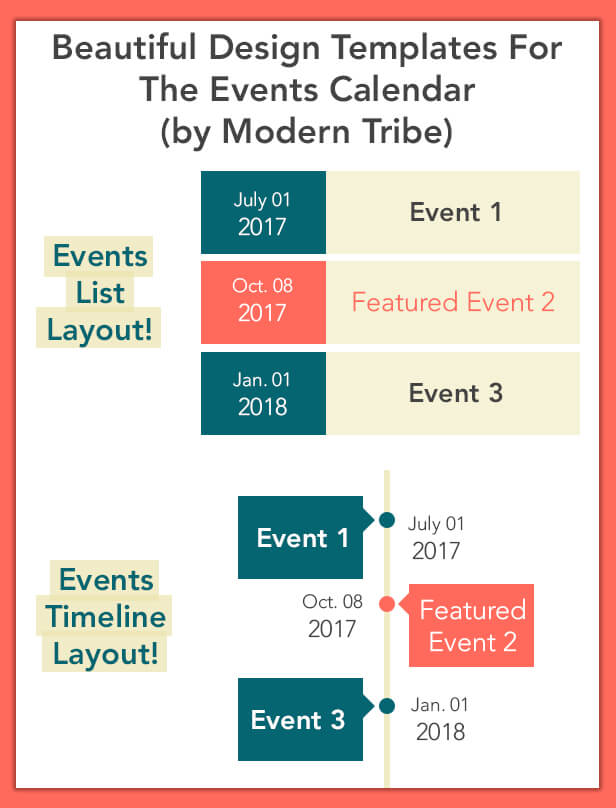
The Events Calendar Templates and Shortcode plugin provides premium design templates & shortcode generator facility for The Events Calendar Plugin (by Modern Tribe).

It is a third party addon for The Events Calendar, that extends the design and shortcode limitations of The Events Calendar free WordPress Plugin. You can choose beautiful design templates and layouts to showcase your events. Also you can choose any color combination and fonts based on your theme styles.

The Events Calendar Templates Demo

Events List Demo
Events Timeline Demo

Plugin Features

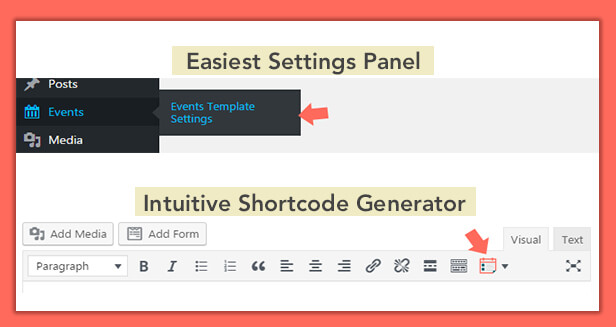
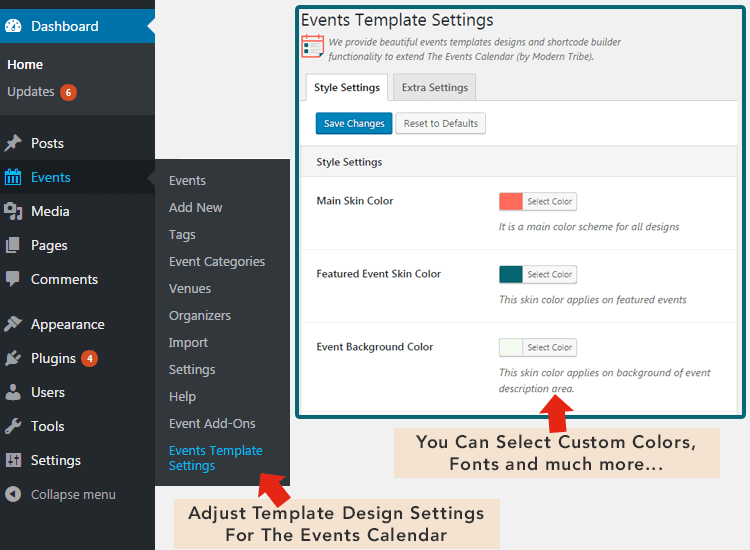
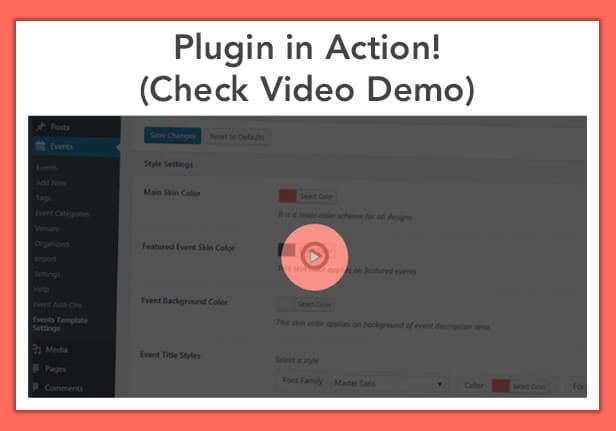
  • Plugin contains an easiest settings panel for the beginners where they can easily set colors, fonts and other design elements for their events listing page template. You can find these settings options under your WP dashboard > Events > Events Template Settings.
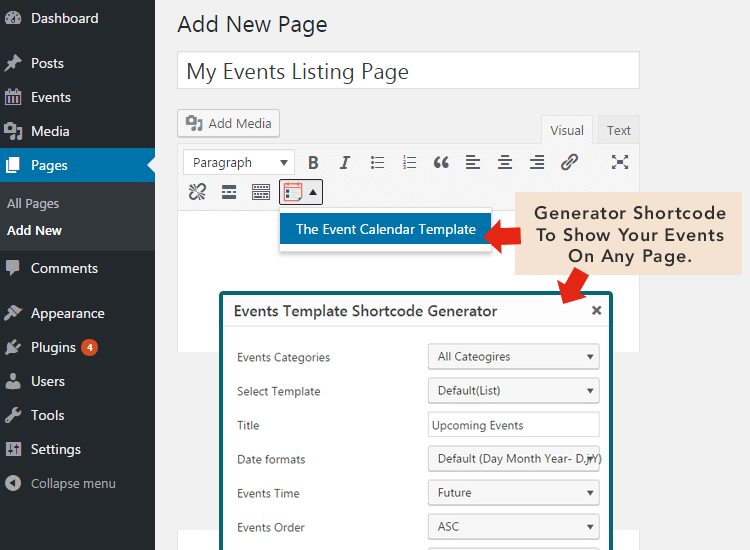
  • You can easily showcase your upcoming events on any page by using our shortcode generator for The Events Calendar.
  • 100% Responsive / Mobile Friendly design.


Download The Events Calendar Templates and Shortcode – WordPress Plugin (Calendars)

MasterPopups – Multi-Purpose Popup Plugin for WordPress with Easy Email Marketing Integration (WordPress)

\

\

Multi-Purpose Popup Plugin for WordPress

MasterPopups is a powerful popup plugin for creating Modal Popups, Full Screen Popups, Notification Bars, Slide-In popups and Inline & Widget Popups.

You can easily create popups from our pre-made templates with few clicks. We have developed it so that you can add any type of content within your popups. MasterPopups includes a system of capturing subscribers by email so you can get more subscribers and save all your data directly to WordPress or in your favorite email service as Mailchimp, GetResponse, etc.

What can you create with MasterPopups?

? Modal Popups
    
? Full Screen Popups
? Notification Bar
    
? Slide-In Popups
? Sticky Popups
    
? Inline & Widget Popups

What can you show in any Popup?

? Subscription Forms
    
? Contact Forms
? Images
    
? Youtube/Vimeo/HTML5 Videos
? Custom Content from WP Editor
    
? Shortcodes

Ready for Subscription Forms

MasterPopups allows you to get more subscribers thanks to easy integration with email services like Mailchimp, GetResponse, Mailer Lite, Constant Contact, Sendinblue, Autopilot, etc.

\

Ready for Contact Forms

MasterPopups is not only a popup plugin, you can also use it as a contact form to be more connected with your potential customers. You can even embed any shortcode from plugins such as Contact From 7, Gravity Forms, etc.

\

What would you like to do after submitting the form?

\

Highlight Features

\

\

\

\

\

\

\

\

\

\

Core Features

With MasterPopups you can create Modal Popups, Full Screen Popups, Notification Bars, Slide-In popups and Inline & Widget Popups. And we have many features available to make life easier for you.

Fully Customizable
  • Unlimited popups, you can create as many popups you want.
  • Popup size: width, height or Full Screen popup
  • Background settings
  • Entrance and Exit Animations
  • Overlay settings, colors, opacity
  • Customizable preloader
  • Sticky mode
  • Options to download a file or redirect user after submitting the form.
  • Cookies to show the popup only once.
  • Native Subscription / Contact forms.
  • Shortcodes support.
  • Inline popups: Embed your popups before or after post/page content. Or in widget area
  • Pre-Made Popup templates
  • Save your popup data for use on another website.
  • Etc
Trigers – When to run the popup?
  • On Click: Display the popup by clicking on certain element
  • On Page Load: Display the popup automatically after X seconds
  • On Exit Intent: Display the popup when the user tries to leave your website
  • On User Inactivity: Display the popup after X seconds of user inactivity
  • On Scroll: Display the popup after scrolling down X amount, after post content or after certain element
  • Display Inline: Embed the popup automatically before or after post/page content
Page Level targeting

Show your popups depending on the post/page, category, tags, custom post types, etc.

  • Display popup on all site
  • Display popup on Homepage
  • Display popup on Archives
  • Display popup on Pages
  • Display popup on Posts
  • Display popup on Categories
  • Display popup on Tags
  • Display popup on Specific URLs
  • Display popup on Custom Post Types
  • Display popup for certain users: Logged-In Users or Not Logged-In Users
  • Display popup on these devices: Desktop, Tablet, Mobile
Popup Callbacks

Run your own javascript code on After Open Popup, After Close Popup, After Form Submission

Email Marketing Integration

MasterPopups has a integrated system that lets you store and manage leads, also can be seamlessly integrated with many third party email marketing services (CRM).

  • MailChimp
  • GetResponse
  • Sendinblue
  • MailerLite
  • Autopilot
  • Constant contact
  • Hubspot
  • Active Campaign
  • Mad Mimi

Documentation

Documentation

Plugin Created with my Powerful Xbox Framework

Download MasterPopups – Multi-Purpose Popup Plugin for WordPress with Easy Email Marketing Integration (WordPress)

Daisy – Background Color Changerfor Joomla (Joomla)

This amazing Joomla Extension will change the Background Color of website’s
article page at every refresh automatically. Total 20 soft background colors installed already. See live preview


Who can use?

Anyone! You can use it any WordPress website. But this Extension is helpful especially for :

  • the websites that you want to build as eye-catching
  • entertainment website, kids website, fun website etc

Why special?

No need to edit settings or do something else. Only Extension activation is enough to bring change for whole website.


Live Preview

www.devilhunter.net/joomla

Visit this site, and browse the pages of website from all devices and browsers you have

Note!

  • 20 colors are pre-installed by the PlugIn, and non-editable.
  • Every Joomla Template has a part ‘Background’. The PlugIn works on it.
  • If you use any Image as background, this Extension will not work.

Question?

Don’t hesitate to contact by email! Just go to profile page to send message

Looking for different CMS?

This Product is a Joomla Extension, and it has a

WordPress
version also!

Download Daisy – Background Color Changerfor Joomla (Joomla)

WP Post Modules for NewsPaper and Magazine Layouts (WordPress)

WP Post Modules is a WordPress plugin for creating post snippets or modules in different display styles. The plugin is best suited for creating online magazine content, newspaper blocks, creative portfolio showcase and regular blog feeds.

WP Post Modules is shipped as Visual Composer addon. The plugin lets you create WordPress post modules with drag and drop interface and easy to configure parameters. With multiple module types and display options, you have almost endless possibilities for creating creative Home pages for your online Magazine, Newspaper and blog.

WP Post Module demos
multiple display styles
Visual Composer addon
offer on extended license

Full feature list

  • 100% responsive design, optimized for retina display
  • 20 Pre built Home page layouts (shipped as Visual Composer templates)
  • 6 Display styles
    GridSee demo
    – 4 sub styles
    – Upto 6 columns grid supported
    – Custom gutter width from 2px to 70px
    ListSee demo
    – Custom split ratio for thumbnail + content
    – Create any sized list from small to large thumbnails
    – Circular images for list thumbnails
    – Content can be separated as full border, half border or no border
    PortfolioSee demo
    – Upto 6 columns grid supported
    – Custom gutter width from 2px to 70px
    – Overlay Content position as top-let or bottom-left
    – Custom overlay content padding
    – Overlay background as black scrim, transparent or auto detected color from image
    – Show overlay as always, on-hover or never
    – Image zoom and rotate effect on hover
    TileSee demo
    – 4 sub styles
    – Custom gutter width from 2px to 70px
    – Tile viewport width for auto calculation of image dimensions
    – Auto resize and cropping for proper formation of tiles
    – Custom aspect ratio for tile images
    – Overlay features same as portfolio
    TickerSee demo
    – Custom ticker title length
    – Custom ticker animation duration
    – Custom ticker label text
    – Custom ticker label background and foreground with color picker
  • WP Query builder

    – Show posts from categories, tags, custom post types, taxonomies, post IDs, author IDs, etc.
    – Supports offset and post exclusion to prevent redundancy of posts
    – Order and Orderby parameters supported
  • jQuery Owl SliderSee demo
    – Supported for Grid, List and Portfolio display styles and their sub styles
    – Change number of slides per view
    – Toggle animation loop
    – Toggle auto play
    – Set autoplay timeout
    – Set animation speed and animation types (slide, zoom and fade)
    – Toggle auto height
    – Toggle previous/next navigation
    – Toggle dots navigation
    – Custom slide margin for desktop and mobile
  • Image resize on-the-fly using BFI Thumb
    – Custom width, height and hard crop feature
    – Set image quality from 1 to 100 (Optimization feature)
    – Auto convert imagest to grayscale
    – Auto colorize image from color picker
  • Auto detect overlay background colors from image background
  • Text content options – See screenshot
    – Choose heading tag from h1 to h6 and p (SEO factor)
    – Choose main title font size and font weight
    – Set paragraph tag and font size
    – Auto trimming of post excerpt at desired word length
    – Toggle readmore link with custom readmore text
    – Show/hide post meta items like category, author, date, excerpt and comments
    – Auto conversion of category links into expandable dropdown if category links are too many
    – Show author avatar in post meta
    – Built in style and function support for WP Review and Post Views Counter plugin
  • Valid Schema microdata on generated post content
    – Schema properties can be changed from element settings
  • AJAX Tabs with full support for WP Post Module element as content – Ajax Tabs example
  • AJAX next/previous loadmore feature for grid, list, portfolio display styles – Ajax Nav example
  • Custom title element with multiple display styles
  • W3C valid HTML markup for plugin generated data
  • Compatible on all major browsers including IE 9 or above
  • Translation ready with POT and PO/MO files included
  • Step by step documentation manual for plugin installation and usage
  • Professional and dedicated support with fast response time

Important:
– Images shown on live demo are not included in download package. They are only for demonstration purpose.
– This plugin requires WPBakery Visual Composer Plugin, and is shipped as VC addon.

Plugin support

All support is provided via comments section and email. For any questions related to the plugin or general query, feel free to email me from my profile page message box here or comment on the item comments section. I would be glad to respond. Thank you for browsing the plugin.

Credits

Installation

For installation and setup, please refer to the documentation/index.html file inside your
main download archive.

Changelog

= v1.1.0 =
* Initial release

Download WP Post Modules for NewsPaper and Magazine Layouts (WordPress)

GHOST Progressive Web App (Mobile)

GHOST is a Progressive Web Application built with Ionic Framework (1.x). Perfectly suited for publishers (bloggers and digital newspapers & magazines) – it has an outstanding look & feel and will speed up the process of creating your next mobile application (hybrid or not). GHOST comes equipped with the following options:

  • Over 10 carefully designed views and components such as social sharing (Facebook, Twitter, Google+), commenting and integration with Google DoubleClick for Publishers.
  • JSON REST API that can be extended to fit your needs
  • Compatibility with WordPress as the back-end CMS
  • Push Notifications by integrating with OneSignal
  • Angular/Ionic & SASS Source Code
  • Unit Tests and End-to-End Tests with Karma, Jasmine and Protractor (50-60% code coverage)
  • Extensive Documentation

Check out our entire collection of progressive web app themes on PWAThemes.com: BASE, MOSAIC, ELEVATE, FOLIO, INVISION, POPSICLE, PULSE, GHOST, PHANTOM, LUCID, EXTRUDE, VEDI, BLEND, PURE, GOTHAM, FUTURE & PALM.

TRY BEFORE YOU BUY

1. Open Chrome/Safari on your Android/iOS mobile device (smartphone or tablet)
2. Navigate to http://bit.ly/pwa-ghost
3. Swipe around and enjoy!

GHOST’S KEY FEATURES

Cross Platform
All it takes for a mobile web application to run is a modern mobile browser (HTML5 compatible), thus allowing users to instantly have access to your content, without needing to go through an app store, download & install the app.

Responsive UI
The mobile web application is sensitive to various screen sizes and orientation changes: landscape, portrait. In other words, the look and feel of the mobile web app seamlessly morphs into the screen size of users’ devices.

Theming
You can offer your users an exceptional reading experience by giving them a mobile web application with a native app-like look & feel. WP Mobile Pack PRO comes with 3 fully customizable app themes.

Customize Appearance
You can customize the colors & fonts, add your logo and graphic elements that can relate to your blog’s identity.

Sync Posts
The posts inside the mobile web application are organized into their corresponding categories, thus readers can simply swipe through articles and jump from category to category in a seamless way.

Sync Pages
Choose what pages you want to display on your mobile web application. You can edit, show/hide different pages and order them according to your needs.

Sync Comments
All the comments that are displayed in the blog are also synchronized into the mobile web application. On top of that, comments that are posted from within the app are also displayed on the blog.

Google Analytics
GHOST easily integrates with Google Analytics.

Google DoubleClick for Publishers
Monetization options (Google AdSense & Double Click for Publishers).

Push Notifications via OneSignal
Integration with OneSignal to enable push notifications management.

Add to Homescreen
Users can add the mobile web application to their homescreen and run it in full-screen mode.

INCLUDED APP VIEWS

Main and Related Articles
Swiping the cover left will bring to light the main articles, organized by category. Mobile users can swipe left or right to expose articles and tap on the card to read more.

Navigate through Categories
The categories section consists of a vertical list of items that’s composed of a featured image and a category title. There can be as many categories as needed, 10 of them being displayed at loading time, with the others being showed when “load-more” is fired up.

Nested Pages Menu
Pages are morphed into an app section which we entitled “More”. Its menu-like appearance makes it easy to navigate from “page” to “page” and its nested nature enables multi-level display. This is particularly useful if you’re based on WordPress CMS.

Pull-up Menu for Comments and Social Media Sharing
Commenting and sharing is directly embedded within each article’s detail page. The panels are opened by pressing the corresponding buttons from the post’s footer bar. When commenting, mobile users don’t have to be authenticated. Sharing across Facebook, Twitter and Google Plus is as seamless as it should be on any mobile device.

STYLING THE APPLICATION

Here’s a brief overview of the main files that you’ll be receiving when downloading GHOST:

Ionic.app.scss – this is where we import the Ionic library and you can import other partials before the library to override default Ionic variables.
Main.scss – this is where we import the main application styles.

By default we separate the files we import here into three categories:


BASE - where we include utilities, such as:

* SASS functions
* Variables
* Mixins
* Typography -- default styles for typography across the entire app. You can obviously override them in your components.
* Utility-classes -- are classes that help quickly style your design.

COMPONENTS - where we include the default styles for components, such as the ones in Ionic's list of CSS Components e.g. Forms, Buttons, Toggles etc.

MODULES - This is where we include styles specific to each module in your application. 

In our experience working with a handful of developers over the past months, this structure has enabled us to greatly improve how we write CSS and handle our stylesheets, and we hope it will do the same to you too. More documentation available here: https://github.com/appticles/pwa-theme-obliq

If you have questions please don’t hesitate to get in touch: http://pwathemes.com/contact.html

Download GHOST Progressive Web App (Mobile)

Valentine’s App / Valentine’s Cards Maker / Love Calculator – iOS (Objective-c / X-code) (Full Applications)

Greetings,
Valentine’s App / Valentine’s Cards Maker / Love Calculator – iOS (Objective-c / X-code)
Happy Valentine’s Day !

Any idea to greet your beloved during Valentine Day? Show your love to your beloved by sending Greetings, SMS ,romantic,and beautiful Valentine’s cards to him or her.

  1. Key Features
    – History of Valentine

– Valentine’s Day CountDown

– All Days Celebration and It’s Meaning

– Flowers and It’s Meaning

– Partner Match – Love Calculator, Meter

– Very Simple and Easy Code to Understand , no Complexity
– Unique Backgrounds in portrait and Landscape , Designed specially for this app
– Upload Background, Card, Photo From Gallary or Camera
– Create / Edit Your Valentine Cards
– Admob : Large Native Ads in Complient Way
– Admob : Small Native Ads in Complient Way
– Admob : Banner Ads in Complient Way
– Admob : Interestitial Ads in Complient Way
– Custom Banner Ads at home screen
– Custom Interestitial Ads
– 20+ Frames
– Color Library, Fonts, Sizes
– 25+ Design Elements, Stickers
– 50 + Valentine Greetings
– Preview Card Options
– Guide / How it Works for New Users
– About Company Option
– More Apps Link for promote your company
– Save Card to App / Gallery
– Share Valentine Greetings / SMS / Cards via Social Apps
Please take a demo of our live app before downloading this source code, We will provide you source code for our live app only. so if you feels that this is the functionality what you are looking for. Go and GET THIS !!!

Live App :
https://itunes.apple.com/ke/app/valentines-cards-love-calculator/id1073916336?mt=8

if you would like to add or remove any functionality, I would love to do that for you with some extra efforts ?
For more Apps, Portfolio, Feedbacks, Contact Visit : www.duainfotech.in
Thanks For visiting and Using it !

Download Valentine’s App / Valentine’s Cards Maker / Love Calculator – iOS (Objective-c / X-code) (Full Applications)

Animation Preloading Effects (Prestashop)

Description

This module is that will add a beautiful animated loading screen indicator on your site. You can create unique preloading effects. Preloader is highly customizable that gives you the possibility to add infinite kind and style of fully editable loaders. All web browsers and mobile devices supported.

Features

  • Super easy install.
  • Easy to customize.
  • CSS3 animation loader.
  • Your logo loader.
  • Custom image loader.
  • Multi-language ready.
  • Support Multi-Store.
  • Well documented.

Download Animation Preloading Effects (Prestashop)

EXTRUDE Progressive Web App (Mobile)

EXTRUDE is a Progressive Web Application built with Ionic Framework (1.x). Perfectly suited for publishers (bloggers and digital newspapers & magazines) – it has an outstanding look & feel and will speed up the process of creating your next mobile application (hybrid or not). EXTRUDE comes equipped with the following options:

  • Over 10 carefully designed views and components such as social sharing (Facebook, Twitter, Google+), commenting and integration with Google DoubleClick for Publishers.
  • JSON REST API that can be extended to fit your needs
  • Compatibility with WordPress as the back-end CMS
  • Push Notifications by integrating with OneSignal
  • Angular/Ionic & SASS Source Code
  • Unit Tests and End-to-End Tests with Karma, Jasmine and Protractor (50-60% code coverage)
  • Extensive Documentation

Check out our entire collection of progressive web app themes on PWAThemes.com: BASE, MOSAIC, ELEVATE, FOLIO, INVISION, POPSICLE, PULSE, GHOST, PHANTOM, LUCID, EXTRUDE, VEDI, BLEND, PURE, GOTHAM, FUTURE & PALM.

TRY BEFORE YOU BUY

1. Open Chrome/Safari on your Android/iOS mobile device (smartphone or tablet)
2. Navigate to http://bit.ly/pwa-extrude
3. Swipe around and enjoy!

EXTRUDE’S KEY FEATURES

Cross Platform
All it takes for a mobile web application to run is a modern mobile browser (HTML5 compatible), thus allowing users to instantly have access to your content, without needing to go through an app store, download & install the app.

Responsive UI
The mobile web application is sensitive to various screen sizes and orientation changes: landscape, portrait. In other words, the look and feel of the mobile web app seamlessly morphs into the screen size of users’ devices.

Theming
You can offer your users an exceptional reading experience by giving them a mobile web application with a native app-like look & feel. WP Mobile Pack PRO comes with 3 fully customizable app themes.

Customize Appearance
You can customize the colors & fonts, add your logo and graphic elements that can relate to your blog’s identity.

Sync Posts
The posts inside the mobile web application are organized into their corresponding categories, thus readers can simply swipe through articles and jump from category to category in a seamless way.

Sync Pages
Choose what pages you want to display on your mobile web application. You can edit, show/hide different pages and order them according to your needs.

Sync Comments
All the comments that are displayed in the blog are also synchronized into the mobile web application. On top of that, comments that are posted from within the app are also displayed on the blog.

Google Analytics
EXTRUDE easily integrates with Google Analytics.

Google DoubleClick for Publishers
Monetization options (Google AdSense & Double Click for Publishers).

Push Notifications via OneSignal
Integration with OneSignal to enable push notifications management.

Add to Homescreen
Users can add the mobile web application to their homescreen and run it in full-screen mode.

INCLUDED APP VIEWS

Cover Screen
EXTRUDE’s homepage mimics a magazine cover, highlighting the latest article. There are 6 default covers which can be replaced with your own static ones. Alternatively you can choose a more dynamic approach by displaying the article’s hero image.

Main and Related Articles
Swiping the cover left will bring to light the main articles, organized by category. Mobile users can swipe left or right to expose articles and tap on the card to read more.

Navigate through Categories
The categories section consists of a vertical list of items that’s composed of a featured image and a category title. There can be as many categories as needed, 10 of them being displayed at loading time, with the others being showed when “load-more” is fired up.

Nested Pages Menu
Pages are morphed into an app section which we entitled “More”. Its menu-like appearance makes it easy to navigate from “page” to “page” and its nested nature enables multi-level display. This is particularly useful if you’re based on WordPress CMS.

Pull-up Menu for Comments and Social Media Sharing
Commenting and sharing is directly embedded within each article’s detail page. The panels are opened by pressing the corresponding buttons from the post’s footer bar. When commenting, mobile users don’t have to be authenticated. Sharing across Facebook, Twitter and Google Plus is as seamless as it should be on any mobile device.

STYLING THE APPLICATION

Here’s a brief overview of the main files that you’ll be receiving when downloading EXTRUDE:

Ionic.app.scss – this is where we import the Ionic library and you can import other partials before the library to override default Ionic variables.
Main.scss – this is where we import the main application styles.

By default we separate the files we import here into three categories:


BASE - where we include utilities, such as:

* SASS functions
* Variables
* Mixins
* Typography -- default styles for typography across the entire app. You can obviously override them in your components.
* Utility-classes -- are classes that help quickly style your design.

COMPONENTS - where we include the default styles for components, such as the ones in Ionic's list of CSS Components e.g. Forms, Buttons, Toggles etc.

MODULES - This is where we include styles specific to each module in your application. 

In our experience working with a handful of developers over the past months, this structure has enabled us to greatly improve how we write CSS and handle our stylesheets, and we hope it will do the same to you too. More documentation available here: https://github.com/appticles/pwa-theme-obliq

If you have questions please don’t hesitate to get in touch: http://pwathemes.com/contact.html

Download EXTRUDE Progressive Web App (Mobile)

Domino Block – HTML5 Logic Game (Games)

Play It Now!

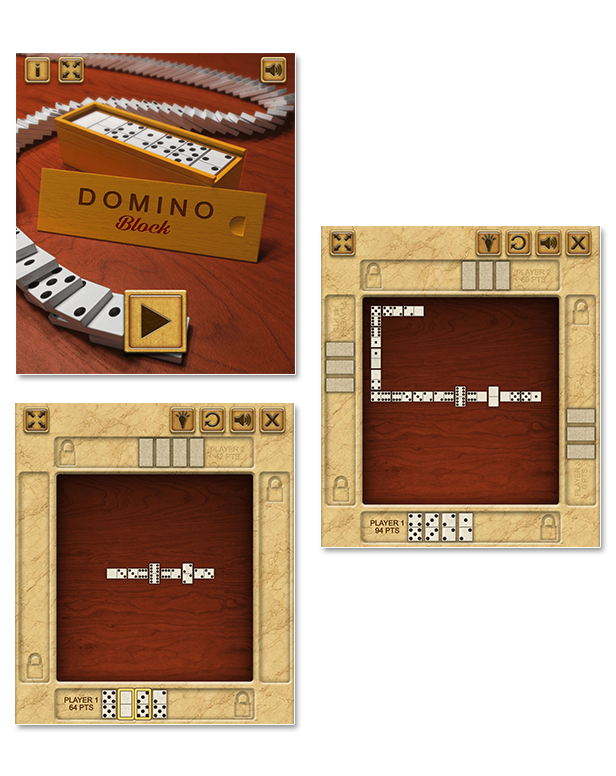
Domino Block is a HTML5 Logic Game.
Match the tiles with the same number of dots.
Be the first to use all your tiles to win the game!

The game is based on the “Domino Block” game-play. For further info visit:
https://en.wikipedia.org/wiki/List_of_domino_games#Block

This game has been developed in HTML5/js and third-party library CreateJs – http://createjs.com/ (not Construct2 or other framework).

The ZIP package contains the game with 768×1400 resolution that scales to fit the whole screen device.
The game is fully compatible with all most common mobile device browsers.
WARNING:

  • Sounds are enabled for mobile but we can’t grant full audio compatibility on all mobile devices due to some well-know issue between some mobile-browser and HTML5.
    So if you want to avoid sound loading, please read the documentation
  • Sounds can’t be enabled for Windows Phone as this kind of device have unsolvable issues with <audio> and <video> tag.
  • If you are willing to make an app out of this game, we suggest you to reskin or at least rebrand it
  • We can’t be held responsible and offer support for eventual issues met during the use of the game in third party software (i.e. PhoneGap, Cordova, Iudei)

Game Screenshot

CTL Arcade

This game is fully compatible with CTL Arcade

A WordPress Plugin that allows you to create a real arcade on your website.

Easy to Install

With CTL Arcade you can:

  • Monetize with your games adding Ads Banners
  • Promote your website with Social Share Buttons
  • Improve our games with Leaderboard, and Rating Feature

=== Even if we do our best to minimise any inconvenience, we can’t ensure the full compatibility of all our games on every device and every operating system update.
Thank you for the understanding. ===


 Follow Us

 Contact Us

YOU MIGHT ALSO BE INTERESTED IN:

Classic Backgammon

Master Chess

Master Checkers

Reversi

Tic Tac Toe

Mahjong Deluxe

jigsaw_deluxe

Wordoku

Maze

Battleship War

Mastermind

Word Search

Four Colors

Greyhound Racing

The Keno

BlackJack

Roulette 3D

All games

All Graphic Assets

Flag Counter

Download Domino Block – HTML5 Logic Game (Games)

Inject Tracking Script (Magento Extensions)

Overview

Today we have many powerful service that support for tracking website visited.Typically as
Google Analytics, Facebook Tracking, Site Meter, StatCounter, AWStats…

It may require you to add script to your page and get the analytic data, It seem to be complex to
handle source code to do that.

Inject Tracking script provide a solution for this case. It is a tool that help you easy to place tracking
script, tag in the footer on specific page. It is especially useful for managing website analytic from some analytic services.


Demo Version

Backend

Management Page: Demo

Username : injectscriptdemouser

Password : xmage2demouser

Product Features

  • Inject Script to page: Inject script to page you want to track user view, you may use script track from google analytic, facebook, …
  • Magenage Script: Add new page and script, update information

Version / Compatibility

Magento 2 Community Edition 2.1.0, 2.1.1, 2.1.2, 2.1.3, 2.1.4, 2.1.5

Request Support

Feel free to get support via email: [email protected]

 ver. 1.0.0 (2017-06-11)
- Initial version

Download Inject Tracking Script (Magento Extensions)

Monkey Top Monkey – HTML5 Game | Construct 2 (.Capx) (Games)

This game based on Stroop Test (Effect).
In this experiment you are required to say the color of the word, not what the word says.
Tap on the micro and say what color do you see.
Thank you for attention. Enjoy the game!

Features
Game created with Construct 2
HTML 5
Touch control
Construct 2 File included
Android&IOS support
Resulotion 720×1280
Easy export to all platforms
Easy reskin
AdMobAds supported

File includes

Project file Construct 2
All Images
HTML5 game
Documentation

Thank you for your purchase! Good luck

Download Monkey Top Monkey – HTML5 Game | Construct 2 (.Capx) (Games)

Plugin Colorbox For Wowonder (Add-ons)

Add color a you post in you script of wowonder

You now can select of more of 15 diferents color for you box (post), where you can create a best style to you status.

this script have a count of text for a limit of 50 caracters, for no do a problem with post that have much text..

What is Wowonder?

Wowonder is a Social Network Platform is the best way to create your own social website or online community. Launch it in just 1 minute with ultimate features. It’s easy to install.

Download Plugin Colorbox For Wowonder (Add-ons)