VC Custom Heading (Add-ons)

VC Custom Heading is Visual Composer Extension that will allow you to create heading with your custom own style.You can display heading on page, block , section etc.

Main Features

  • Unlimited Custom Style
  • Google Font
  • Custom Own Font Icon
  • Image Background/Icon
  • Custom Animation
  • Make Separator own style
  • Font Awesome, Open Iconic, Typieons, Entypo, Linecons
  • Super Easy To Customize
  • Well Commented Code
  • Very Good Documentation
  • 24/7 Support

Download VC Custom Heading (Add-ons)

Sharp Gallery for WordPress (Galleries)

Description

Sharp Gallery is a beautiful, powerful and customizable grid based image gallery. What is characteristic is that the content is displayed and functions within this grid. The thumbs are bigger and contribute to the design. The big images are opened in place, within the grid, connected to the thumbs themselves. Coupled with other design elements and effects, this creates a beautiful look and a great functionality.

Here are some of the important features of this gallery:

  • Has over 50 settings

    It has available over 50 different settings that you can use to configure the gallery in different ways. These range from thumbs width to stage position, animation settings and keyboard navigation.

  • Comes with 12 templates

    It comes with a number of 12 templates that showcase different ways of configuring the gallery and provide a starting point in customizing it.

    These are available to see on the preview page.

  • Fully responsive

    It is fully responsive, all of the content resizes based on the available space and it displays well on different screen sizes and devices.

  • Cross browser support

    It is supported on all popular browsers, both on computers and mobille devices as well on popular older browsers.

  • Lightweight

    Although it has many options, the gallery remains very lightweight. The minified JS plugin file is under 16Kb. This makes it load very fast on all devices.

  • Smooth and fast animations

    It uses Velocity for the animations which makes them smooth and fast accross all devices and browsers.

  • Easy to work with and implement

    A gallery was made to be like a post so that it is easy to understand and work with. When you create a gallery, it is similar to creating a new post or page. Once you have a gallery created, you can add it anywhere in your theme by simply posting the shortcode.

  • Support provided

    I am available for support in case you have any questions, problems or need any help implementing the gallery.

    The guide gives instructions on how to contact me and I will do my best to respond as soon as possible.

  • Free updates

    All future updates and developments to the gallery will be completely free once you have bought the project one time.

    After an update is made, the changes are documented below, in the Updates section.

This is the WordPress plugin version of the gallery. A jQuery plugin version is also available here.

Updates

Future updates and developments will be listed here and the files will be free for anyone who has purchased the gallery at any time.

1.0 (22 June 2017):

  • Launched.

Download Sharp Gallery for WordPress (Galleries)

Purchase – Awesome Bootstrap Pricing Tables (Pricing Tables)

Purchase – is a responsive unique Pricing Tables build with Bootstrap framework. It’s has been 8 Unique Style. This pricing table provided 3 and 4 column layout and price details layout. You can use upto 6 column. You can able to easily edit/change/customize of this table. just copy the HTML code to your template files and link to the CSS files.

Item Features

  • 5 Unique style
  • 3,4 Column Layout (Upto 6 Column)
  • Responsive Design
  • Flat Ui colors
  • Bootstrap Framework
  • Font Awesome Icon
  • Google Web Fonts
  • Clean Design
  • CSS Animations
  • Transition,Transform
  • Button Effect
  • Hover Effect
  • Easy To Customize
  • Easy To Use

Credits

Download Purchase – Awesome Bootstrap Pricing Tables (Pricing Tables)

ScanCode | Android QR Code and Barcode features Application, Admob (Utilities)

For demo, please contact on Facebook page

Description Android

Description

ScanCode is a amazing app to create/scan or generate barcode and QR Code easily with your Android device. You can scan and open web url, email, phone number(make calls directly from app) etc. Also you can copy scanned content into the device clipboard. It support varieties of QR Code and barcode formats. Easy and fun!

ScanCode uses the camera of a mobile device to read:
1D barcodes: EAN-13, EAN-8, UPC-A, UPC-E, Code-39, Code-93, Code-128, ITF, Codabar
2D barcodes: QR Code, Data Matrix, PDF-417, AZTEC.

The program automatically recognise the type of encoded data providing a nice preview and various sharing options.

ScanCode is professionally translated to French, Spanish, Russian, German, Korean, Turkish, Swedish, Arabic, Italian, Chinese Traditional, Chinese Simplified, Vietnamese and of course English.

Features

  • Latest Android Studio – Android Studio provides the fastest tools for building apps on every type of Android device.
  • Java – Java is a general-purpose computer programming language that is concurrent, class-based, object-oriented, and specifically designed to have as few implementation dependencies as possible.
  • Awesome Code Quality – Code is clean, consistent, easily configurable and customizable. We provide excellent support.
  • AdMob – Monetize your App with AdMob interstital and banner ads. AdMob is used and trusted by more app developers than any other ad platform worldwide. Use in-app advertising to show ads from millions of Google advertisers and access programmatic demand, or use AdMob Mediation to earn from 40+ networks.
  • Social Share – Share detected code with social networks like Facebook, Google, LinkedIn and similar.

ScanCode | iOS version of the app:
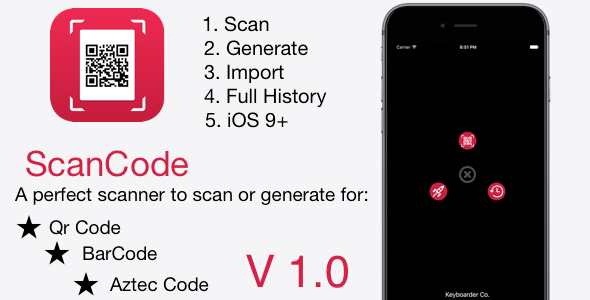
ScanCode | iOS QR Code and Barcode features Application

Customer support

  • First of all, thank you for choosing our products. We really appreciate this :)
  • Secondly, if you have any questions or difficulties with an item, please read the documentation that included to your purchased file.
  • Thirdly, if the problem is not solved, please contact us via our support system https://keyboarder.co/support. We will answer to all questions within 12-24 hours in weekdays. In some rare cases the waiting time can be to 48 hours. Support tickets sent during weekends or public holidays will be processed next Monday or the next business day.

Rate the app

Please consider rating the app if you are satisfied with the product. Thank you.

Download ScanCode | Android QR Code and Barcode features Application, Admob (Utilities)

WooCommerce Nochex payment Gateway (WooCommerce)

The Nochex Woocommerce Plugin provides solution for all E-commerce Business.Nochex is the UK’s leading independent payment service for start-up, small and medium sized online merchants. We provide a simple and straightforward payment platform that makes
it easy for your customers to use and for you to get paid, and we back that up with a world-class fraud prevention capability on our safe, secure and reliable PCI-compliant payment pages.

Features

• Enable/Disable Extension from Admin.
• Quick and seamless integration into the WooCommerce checkout page.
• Accept all credit card /Debit card.
• If customer have not Nochex account,he will pay through credit/debit card.
• Nochex accept all major credit card and debit card.
• Nochex payment support multiple currency.
• Automatically Update Orders – Use APC (Automatic Payment Confirmation) to update orders when they have been paid for.

• Nochex payment is very secure./>
• Prevent Fraud – use 3D Secure, 3D Secure is a standard developed by the card schemes – Visa and MasterCard – to improve the security of Internet payments.

• The module is compatible with all Woocommerce Version.

Steps to be taken for Plugin Installation

Step-1. Login with your WordPress admin

Step- 2.Activate Woocommerce NOCHEX Payment Gateway

Step-3.Configration of Worldpay payment

Step-4. Show Payment method of checkout Page

Step-5.Redirect to Nochex payment gateway

Step-6.Fill credit/Debit card details

Step-7. Success full Payment

Step-8. Show payment on orders

END

Download WooCommerce Nochex payment Gateway (WooCommerce)

Social Rail – Facebook And Twitter Stream (Social Networking)

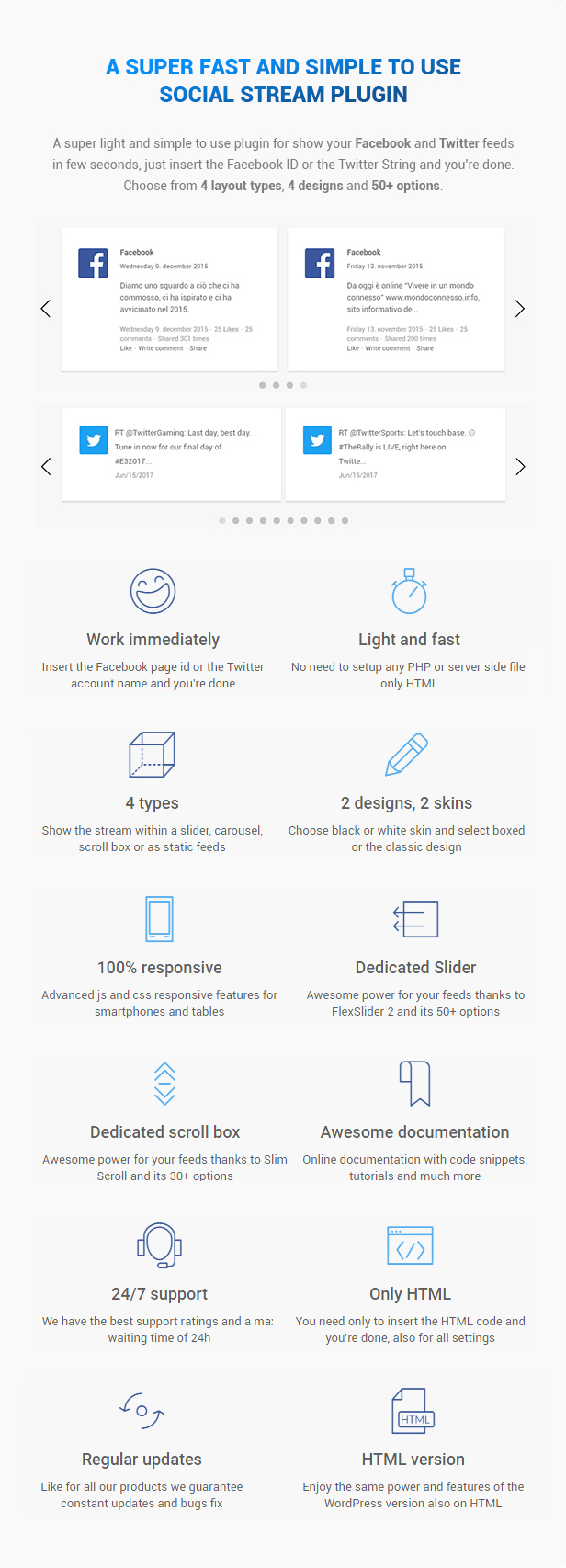
A super light and simple to use plugin for show you Facebook and Twitter feeds in few seconds, just insert the Facebook page ID or username or the Twitter account name, group name or hashtag and you’re done. Choose from 4 layout types, 4 designs and 50+ options.
Very fast with focus on performance, load only the required css and js files. Take a look now.

  • Work immediately Insert the Facebook page id or the Twitter account name and you’re done
  • Light and fast No need to setup any PHP or server side file, only HTML
  • 4 types Show the stream within a slider, carousel, scroll box or as static feeds
  • 2 designs, 2 skins Choose black or white skin and select boxed or the classic design
  • 100% responsive Advanced js and css responsive features for smartphones and tables
  • Dedicated Slider Awesome power for your feeds thanks to FlexSlider 2 and its 50+ options
  • Dedicated scroll box Awesome power for your feeds thanks to Slim Scroll and its 30+ options
  • Awesome documentation Online documentation with code snippets, tutorials and much more
  • 24/7 support We have the best support ratings and a max waiting time of 24h
  • Top performance Scripts and CSS are loaded only when required and only on shortcode’s page
  • Regular updates Like for all our products we guarantee constant updates and bugs fix

CHANGES LOG

V 1.0

Enjoy the plugin.

Download Social Rail – Facebook And Twitter Stream (Social Networking)

HRM – Workable Zone : Ultimate HR System (Project Management Tools)

WEBSITE URL : http://workablezone.com/

DEMO URL : http://demo.workablezone.com/

Original price is $79 – 25% off – Offer valid for first 15 users.

Introduction ( Version 1.0)

Workable Zone is probably one of most customizable Human resource(HR) management software for companies of all sizes. This software is designed to fulfill the needs of both the administration and their employees. Workable Zone helps you effectively organize, staff, and pay your global workforce and easily manage the full worker lifecycle in one, intuitive system.

Quick Features are listed below :


Version 1.0 : Release on June 22, 2017

Initial Release

Download HRM – Workable Zone : Ultimate HR System (Project Management Tools)

Ninja Forms – Sugar CRM Integration (Forms)

Ninja Forms – Sugar CRM Integration plugin can integrate Contacts, Cases and Leads between your WordPress Ninja Forms and Sugar CRM. Easily add automatically Contacts, Cases and Leads into Sugar CRM when people submit a Ninja Forms form on your site.

Features

  • Easily integrate Ninja Forms form to Sugar CRM Contact
  • Easily integrate Ninja Forms form to Sugar CRM Case
  • Easily integrate Ninja Forms form to Sugar CRM Lead
  • Integrated Ninja Forms form can automatically add your site new form data to Sugar CRM Contact
  • Integrated Ninja Forms form can automatically add your site new form data to Sugar CRM Case
  • Integrated Ninja Forms form can automatically add your site new form data to Sugar CRM Lead
  • Easily map your Ninja Forms form fields to Sugar CRM Contact, Case and Lead fields
  • Making customer relationship management simple
  • Integrate unlimited Ninja Forms forms

Installation

WordPress Dashboard

  • Go to ‘Admin’ -> ‘Plugins’ -> ‘Add New’
  • Click on ‘Upload Plugin’
  • Upload ‘Ninja Forms – Sugar CRM Integration’ plugin zip
  • Activate ‘Ninja Forms – Sugar CRM Integration’ plugin

FTP, SFTP, SCP etc…

  • Unzip ‘Ninja Forms – Sugar CRM Integration’ plugin zip
  • Upload the unzip plugin folder to your ’/wp-content/plugins/’ directory, using your favorite method (ftp, sftp, scp, etc…)
  • Activate ‘Ninja Forms – Sugar CRM Integration’ plugin

Configuration

  • Go to ‘Admin’ -> ‘NF – Sugar CRM’ -> ‘Configuration’
  • URL: Add your instance URL. Like http://example.com
  • Username: Add your Sugar CRM account username
  • Password: Add your Sugar CRM account password
  • Click on ‘Save’ button

Integration

  • Go to ‘Admin’ -> ‘NF – Sugar CRM’ -> ‘Integration’
  • You can see list of Ninja Forms Forms
  • Click on edit form icon which you want to integrate form
  • Select a Sugar CRM module you want to integrate with current form
  • Click on ‘Filter’ button to filter module fields
  • Check ‘Sugar CRM Integration?’ checkbox if you want to integrate Sugar CRM
  • Map fields which you want to map
  • Click on ‘Save’ button to map fields
  • Note: Map fields which is creatable in Sugar CRM module

Download Ninja Forms – Sugar CRM Integration (Forms)

Ninja Forms – Suite CRM Integration (Forms)

Ninja Forms – Suite CRM Integration plugin can integrate Contacts, Cases and Leads between your WordPress Ninja Forms and Suite CRM. Easily add automatically Contacts, Cases and Leads into Suite CRM when people submit a Ninja Forms form on your site.

Features

  • Easily integrate Ninja Forms form to Suite CRM Contact
  • Easily integrate Ninja Forms form to Suite CRM Case
  • Easily integrate Ninja Forms form to Suite CRM Lead
  • Integrated Ninja Forms form can automatically add your site new form data to Suite CRM Contact
  • Integrated Ninja Forms form can automatically add your site new form data to Suite CRM Case
  • Integrated Ninja Forms form can automatically add your site new form data to Suite CRM Lead
  • Easily map your Ninja Forms form fields to Suite CRM Contact, Case and Lead fields
  • Making customer relationship management simple
  • Integrate unlimited Ninja Forms forms

Installation

WordPress Dashboard

  • Go to ‘Admin’ -> ‘Plugins’ -> ‘Add New’
  • Click on ‘Upload Plugin’
  • Upload ‘Ninja Forms – Suite CRM Integration’ plugin zip
  • Activate ‘Ninja Forms – Suite CRM Integration’ plugin

FTP, SFTP, SCP etc…

  • Unzip ‘Ninja Forms – Suite CRM Integration’ plugin zip
  • Upload the unzip plugin folder to your ’/wp-content/plugins/’ directory, using your favorite method (ftp, sftp, scp, etc…)
  • Activate ‘Ninja Forms – Suite CRM Integration’ plugin

Configuration

  • Go to ‘Admin’ -> ‘NF – Suite CRM’ -> ‘Configuration’
  • URL: Add your instance URL. Like http://example.com
  • Username: Add your Suite CRM account username
  • Password: Add your Suite CRM account password
  • Click on ‘Save’ button

Integration

  • Go to ‘Admin’ -> ‘NF – Suite CRM’ -> ‘Integration’
  • You can see list of Ninja Forms Forms
  • Click on edit form icon which you want to integrate form
  • Select a Suite CRM module you want to integrate with current form
  • Click on ‘Filter’ button to filter module fields
  • Check ‘Suite CRM Integration?’ checkbox if you want to integrate Suite CRM
  • Map fields which you want to map
  • Click on ‘Save’ button to map fields
  • Note: Map fields which is creatable in Suite CRM module

Download Ninja Forms – Suite CRM Integration (Forms)

Ninja Forms – ZOHO CRM Integration (Forms)

Ninja Forms – ZOHO CRM Integration plugin can integrate Contacts, Cases and Leads between your WordPress Ninja Forms and ZOHO CRM. Easily add automatically Contacts, Cases and Leads into ZOHO CRM when people submit a Ninja Forms form on your site.

Features

  • Easily integrate Ninja Forms form to ZOHO CRM Contact
  • Easily integrate Ninja Forms form to ZOHO CRM Case
  • Easily integrate Ninja Forms form to ZOHO CRM Lead
  • Integrated Ninja Forms form can automatically add your site new form data to ZOHO CRM Contact
  • Integrated Ninja Forms form can automatically add your site new form data to ZOHO CRM Case
  • Integrated Ninja Forms form can automatically add your site new form data to ZOHO CRM Lead
  • Easily map your Ninja Forms form fields to ZOHO CRM Contact, Case and Lead fields
  • Making customer relationship management simple
  • Integrate unlimited Ninja Forms forms

Installation

WordPress Dashboard

  • Go to ‘Admin’ -> ‘Plugins’ -> ‘Add New’
  • Click on ‘Upload Plugin’
  • Upload ‘Ninja Forms – ZOHO CRM Integration’ plugin zip
  • Activate ‘Ninja Forms – ZOHO CRM Integration’ plugin

FTP, SFTP, SCP etc…

  • Unzip ‘Ninja Forms – ZOHO CRM Integration’ plugin zip
  • Upload the unzip plugin folder to your ’/wp-content/plugins/’ directory, using your favorite method (ftp, sftp, scp, etc…)
  • Activate ‘Ninja Forms – ZOHO CRM Integration’ plugin

Configuration

  • Generating authentication token in ZOHO CRM
  • Go to ‘Admin’ -> ‘NF – ZOHO CRM’ -> ‘Configuration’
  • Authentication Token: Add your ZOHO CRM authentication token
  • Click on ‘Save’ button

Integration

  • Go to ‘Admin’ -> ‘NF – ZOHO CRM’ -> ‘Integration’
  • You can see list of Ninja Forms Forms
  • Click on edit form icon which you want to integrate form
  • Select a ZOHO CRM module you want to integrate with current form
  • Click on ‘Filter’ button to filter module fields
  • Check ‘ZOHO CRM Integration?’ checkbox if you want to integrate ZOHO CRM
  • Map fields which you want to map
  • Click on ‘Save’ button to map fields
  • Note: Map fields which is creatable in ZOHO CRM module

Download Ninja Forms – ZOHO CRM Integration (Forms)

Ninja Forms – Salesforce CRM Integration (Forms)

Ninja Forms – Salesforce CRM Integration plugin can integrate Contacts, Cases and Leads between your WordPress Ninja Forms and Salesforce CRM. Easily add automatically Contacts, Cases and Leads into Salesforce CRM when people submit a Ninja Forms form on your site.

Features

  • Easily integrate Ninja Forms form to Salesforce CRM Contact
  • Easily integrate Ninja Forms form to Salesforce CRM Case
  • Easily integrate Ninja Forms form to Salesforce CRM Lead
  • Integrated Ninja Forms form can automatically add your site new form data to Salesforce CRM Contact
  • Integrated Ninja Forms form can automatically add your site new form data to Salesforce CRM Case
  • Integrated Ninja Forms form can automatically add your site new form data to Salesforce CRM Lead
  • Easily map your Ninja Forms form fields to Salesforce CRM Contact, Case and Lead fields
  • Making customer relationship management simple
  • Integrate unlimited Ninja Forms forms

Installation

WordPress Dashboard

  • Go to ‘Admin’ -> ‘Plugins’ -> ‘Add New’
  • Click on ‘Upload Plugin’
  • Upload ‘Ninja Forms – Salesforce CRM Integration’ plugin zip
  • Activate ‘Ninja Forms – Salesforce CRM Integration’ plugin

FTP, SFTP, SCP etc…

  • Unzip ‘Ninja Forms – Salesforce CRM Integration’ plugin zip
  • Upload the unzip plugin folder to your ’/wp-content/plugins/’ directory, using your favorite method (ftp, sftp, scp, etc…)
  • Activate ‘Ninja Forms – Salesforce CRM Integration’ plugin

Configuration

  • Create Connected App in Salesforce CRM
  • Go to ‘Admin’ -> ‘NF – Salesforce’ -> ‘Configuration’
  • Consumer Key: Add your Salesforce Connected App consumer key
  • Consumer Secret: Add your Salesforce Connected App consumer secret
  • Username: Add your Salesforce account username
  • Password: Add your Salesforce account password
  • Click on ‘Save’ button

Integration

  • Go to ‘Admin’ -> ‘NF – Salesforce’ -> ‘Integration’
  • You can see list of Ninja Forms Forms
  • Click on edit form icon which you want to integrate form
  • Select a Salesforce CRM module you want to integrate with current form
  • Click on ‘Filter’ button to filter module fields
  • Check ‘Salesforce CRM Integration?’ checkbox if you want to integrate Salesforce CRM
  • Map fields which you want to map
  • Click on ‘Save’ button to map fields
  • Note: Map fields which is creatable in Salesforce CRM module

Download Ninja Forms – Salesforce CRM Integration (Forms)

HOOVER ME! – Awesome and Colored Buttons (Buttons)

A collection of modern and colored buttons with pure CSS style.

Based on simple HTML5 , CSS3 files with a modern view. This buttons have some amazing hover effects and a pure style colors. It’s very simple to modify and to use it.

FEATURES
– 20 different syles
– 10 different colors
– pure css3 hover effects
– Easy to Use
– Bootstrap 3x columns
– font awesome icon

SOURCES
– fontawesome.io/icons/

Download HOOVER ME! – Awesome and Colored Buttons (Buttons)

Magento 2 PWA – Progressive Web Application extension for Magento 2 (Magento Extensions)

Magento 2 PWA is a extension that enables full features of Progressive Web App on your Magento 2 website

What the Magento 2 PWA enables you to do
  • Progressive Web App

    • Offline mode
    • Load faster on both desktop and mobile
    • Add to Homescreen
  • Improve your website performances

Techniques

  • Service worker runtime caching
  • Cache first strategies, always up-to-date

Lighthouse score

Performances

Caching with service worker will reduce time to load page and resources, page loaded in 4 milliseconds

User can see the page content within 0.2s

Change log

version 1.0.1 (18/06/17):
----------------------------------
- Service worker runtime caching
- Support app manifest

version 1.0 (01/06/17):
----------------------------------
- Initial release

Download Magento 2 PWA – Progressive Web Application extension for Magento 2 (Magento Extensions)

Ultimate Woocommerce Page Templates Builder | Visual Composer add-on (Add-ons)

Ultimate Woocommerce Page Templates Builder | Visual Composer add-on

If you want to build your own different templates for your WooCommerce website with visual composer, then this plugin is best suit for you. You can create templates for Single product page, Cart page & Checkout pages

Features

  1. Single product page

    You can use visual composer and create n number of templates and assign them to any product you want by selecting the template in product edit screen.

    Creating product templates:

    Single product page templates


    Visual composer elements for single product page templates:

    Product detail page templates vc elements


    You can also choose a template for all the products in a category from category edit screen


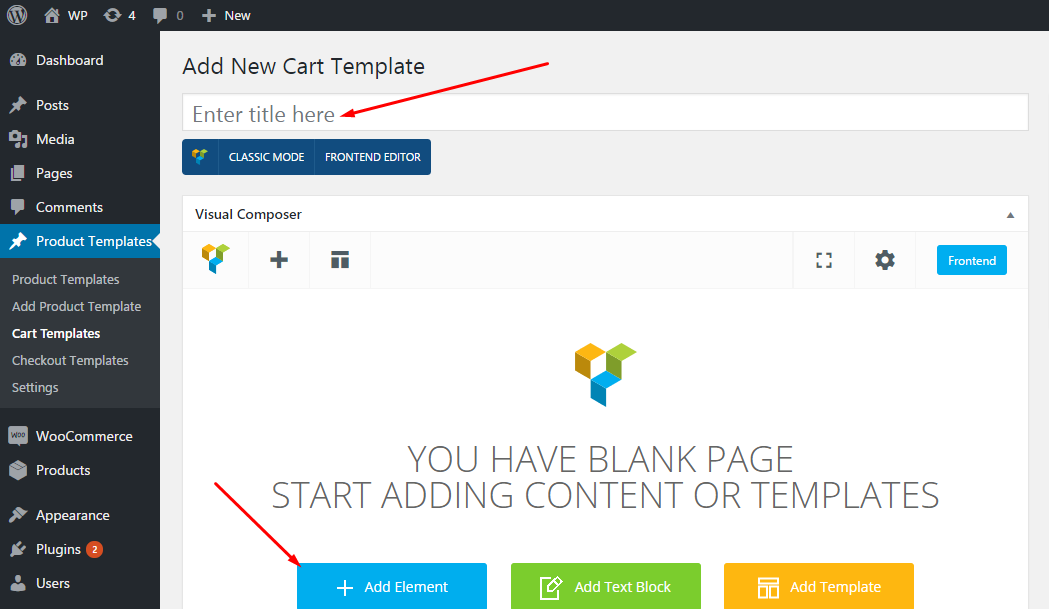
  2. Cart page

    You can use visual composer and create templates for cart page and assign it to cart page by selecting the template from this Plugin settings page.

    Creating cart page templates:

    Cart page templates


    Visual composer elements for cart page templates:

    Cart page templates vc elements


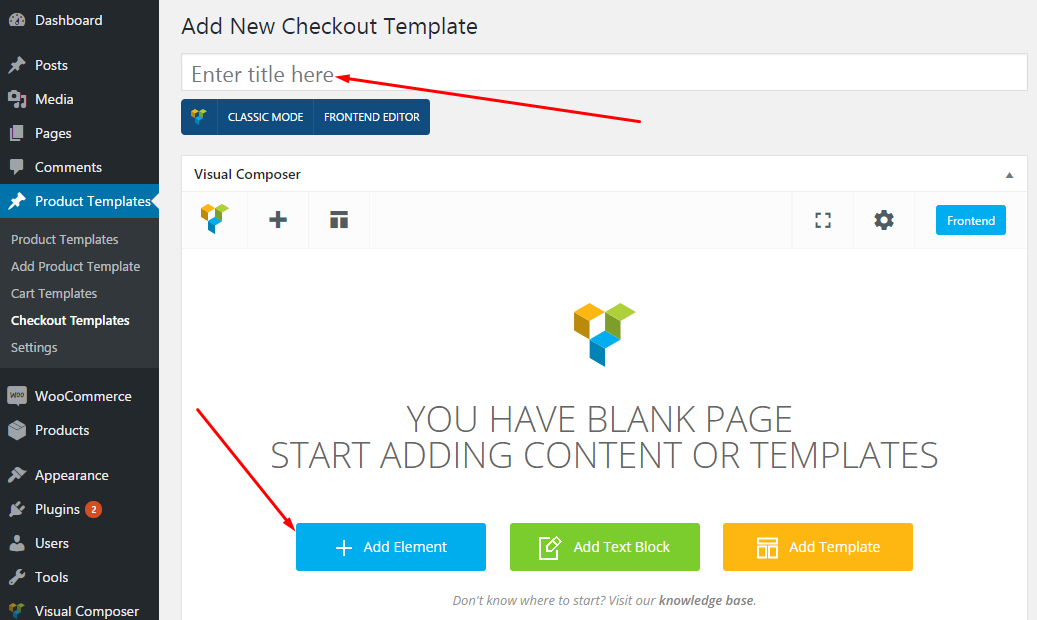
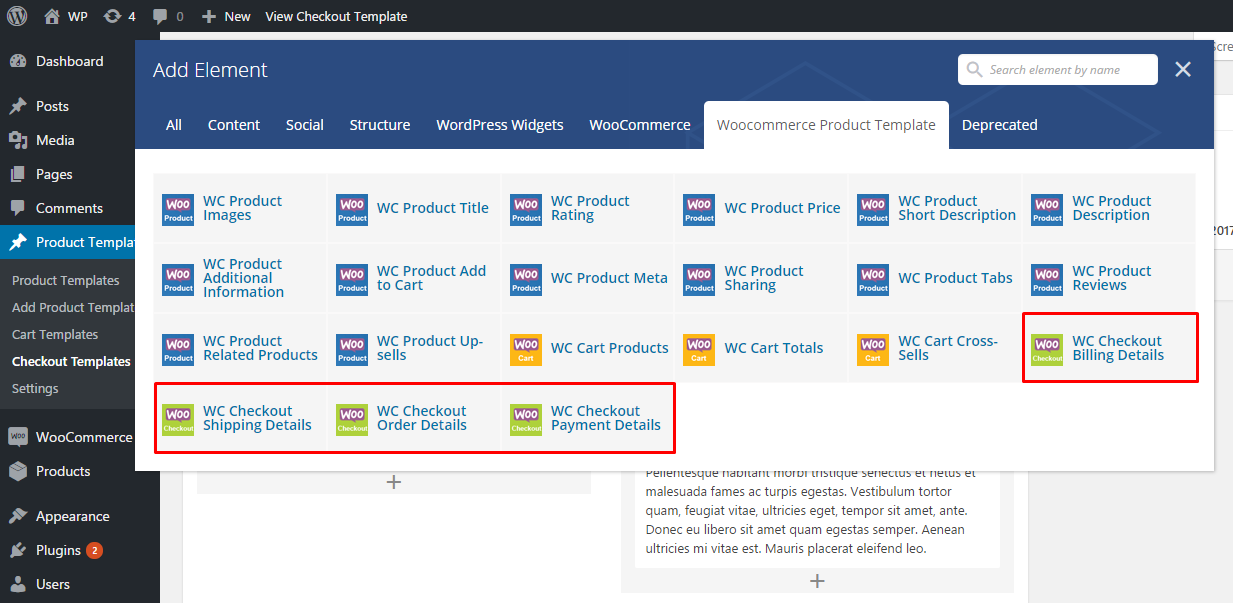
  3. Checkout page

    You can use visual composer and create templates for checkout page and assign it to checkout page by selecting the template from this Plugin settings page.

    Creating checkout page templates:

    Checkout page templates


    Visual composer elements for checkout page templates:

    Checkout page templates vc elements

Download Ultimate Woocommerce Page Templates Builder | Visual Composer add-on (Add-ons)