WordPress Multi-site Reports (WooCommerce)

WordPress Multi-site Reportsplug-in idea is to get consolidated various summaries on single dashboard. As multi-site is working on a multiple website management, we have built a report which will easily calculate the sales of All Site on single dashboard. Isn’t it sounds great? From now multisite website owner don’t need to login into each site.
They just need to add User in respective sites and get the analytical sales data of multiple website.

Features

  1. Shows multisite various summaries
  2. User can see all the sales analytical data on 1 single dashboard.
  3. Administrator and Shop Manager Users can see the sales data of assigned sites.
  4. Report can filter by dates and sites.

In order to view report of any site to respective user you will need to follow below steps:

  1. Create Users

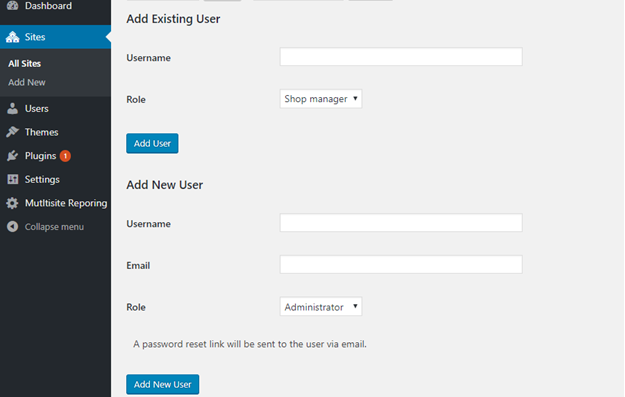
    Go to All Site > Click on edit > go to Users tab > Add New User with role
    (For Example: Suppose I have 2 shopping sites “SITE 1” and “SITE 2”, I need to give reporting access of Site1 to Site 2. For this I will go to “all sites” page then will edit my site 1 and add 1 user in it)
    \

  2. Edit that user from “All Users” to set the password.
  3. Once password is set, admin will add this user into respective site which he needs to access by Add Existing User from my site page.
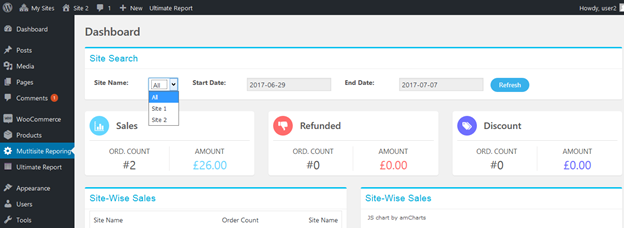
  4. For now assigned user can see the report data into his account.

    For Example: If I entered User1 of Site1 into Site 2 user’s tab then site’s 2 user will be able to see the reports of site 1.
    \

Changelog

Version 1.0 Release Aug 16th, 2017

  • First Public Release
Download WordPress Multi-site Reports (WooCommerce)

Advanced Search Form Builder (Forms)

ULTIMATE WORDPRESS SEARCH PLUGIN

Do you want to customize your WordPress search? Do you want to build your WordPress search form? Do you want to search deeper, faster? No need to look up further. Advanced WordPress Search Form Builder is here, he got your back!!

This WordPress search plugin can help you build multi-purpose search form for your project. From simple post search to advanced real estate search form.

Multi-purpose WordPress Search Plugin

Your multi-purpose search plugin, all in one search form builder, and the only one plugin you ever need for search form builder

WE GUARANTEE

BEAUTIFUL SEARCH FORM ELEMENTS

Advanced Search Form Builder for WordPress is equipped with the beautiful  element of the search form, variety design so you can adapt to your theme freely!

For Developer

Do you want to use this plugin for your outsourcing projects? Are you concerning about the documentation, hooks, and filters?

This WordPress search plugin got your back, again!!

Main Functions Of Advanced WordPress Search Form Builder

  • High performance WordPress search: 30k+ record in 0.7s
  • Deep search: post types, taxonomy (tags, category), custom fields
  • Live search: auto suggestion base on input
  • Auto complete with tab key or up/down key
  • Customizable search inputs
  • Prebuild search form elements with various design and color scheme
  • Smart caching process
  • Beautiful search result templates
  • Prebuild template for multiple niches: blog, news, e-commerce, real estate, food review…more coming soon
  • Custom template manager
  • Live customizer
  • Customize WordPress search form result by PHP, right on form builder
  • WordPress Rest API supported
  • Auto adapt styling of result to any WooCommerce theme

WANNA TRY ON YOUR SITE? TRY IT FREE

WordPress Advanced Search Form Builder – Change log

08/22/2017 - Initial release - v1.0 

Download Advanced Search Form Builder (Forms)

Woocommerce Xero Integration (Integrations)


Woocommerce Xero Integration

Sync all accounting data with one click

Description

Xero
Xero Integration is a powerful tool allow store owners to synchronize accounting data automatically and manually from Woocommerce to Xero.

Store owners save products, customers, orders and invoices in Woocommerce site. In the future, we will support store owners to track and send data on items, discount, tax and sync existing data to record sheets to keep everything in balance

Key features

    • Sync customer data from Woocommerce to Xero automaticcally or manually

    woocommerce salesforce

    • Sync product data from Woocommerce to Xero automaticcally or manually

    woocommercesalesforce integration

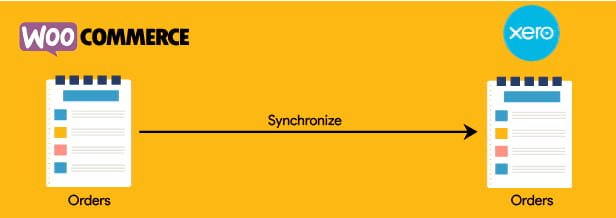
    • Sync order data from Woocommerce to Xero automaticcally or manually

    salesforce integration

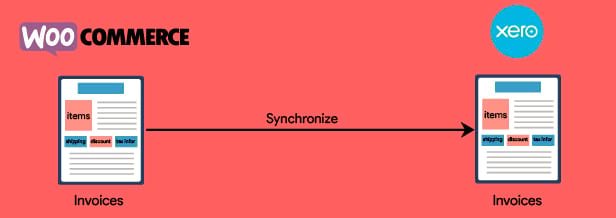
    • Sync invoice data from Woocommerce to Xero automaticcally or manually

    woocommercesalesforce integration

ChangeLog

All notable changes to this extension will be documented in this file.
This extension adheres to [Magenest](http://magenest.com/).
=========
### Version 1.1 July 25 2017

### Initial release
1. Sync customer data from wordpress store to Xero in mode Automatic synchronization/Admin Sync
2. Sync product data from wordpress store to Xero in mode Automatic synchronization/Admin Sync
3. Sync order data from wordpress store to Xero in mode Automatic synchronization/Admin Sync
4. Sync invoice data from wordpress store to Xero in mode Automatic synchronization/Admin Sync
   

Interested? Try out our demo

Download Woocommerce Xero Integration (Integrations)

gomymobiBSB’s Site Theme: Domainer (Add-ons)

                                gomymobiBSB: eCommerce
                        Business Webite & Online Store Builder

                               Discount 25% for first 5 copies

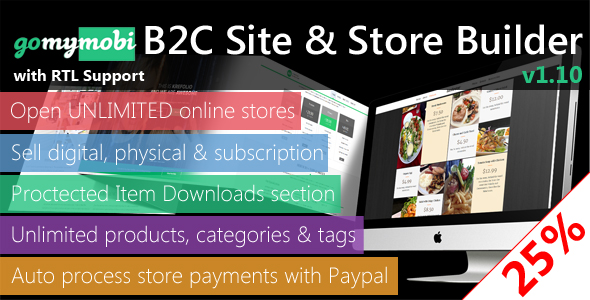
gomymobiBSB is a web-based site builder PHP script that runs on your own host, both shared host or VPS/server to build an online business site hosting platform to help your clients create business website & online store.

gomymobiBSB: eCommerce is an advanced automated platform that allows your clients to create unlimited sites & online stores then present their business/company sites easily and rapidly without any skills of web design, coding or programming. Each site has an online store to sell both digital and physical products, even subscriptions.

gomymobiBSB: eCommerce may host your cilent’s sites as subdomains, generate QR code for every site & store. Furthermore, gomymobiBSB: eCommerce is a mobile site builder where all users can upload & sell their creative website themes & store themes to other users.

In this package

1 website theme for building UNLIMITED websites to sell domains, with hot features

Usage

– Require gomymobiBSB: Drag-n-Drop Business Webite Builder and Host Platform or gomymobiBSB: eCommerce – Business Website & Online Store Builder

– Go to Website Themes -> Upload New Theme to upload

Basic Features

  • Create UNLIMITED business websites & stores + pages for each site
  • Standalone theme-based mobile site creator
  • Business site builder based on Bootstrap 3
  • Downloadable for Every site
  • Responsive Mobile Friendly Themes
  • Website builder & platform are compatiable with All browsers
  • Easy-to-use Built-in Media
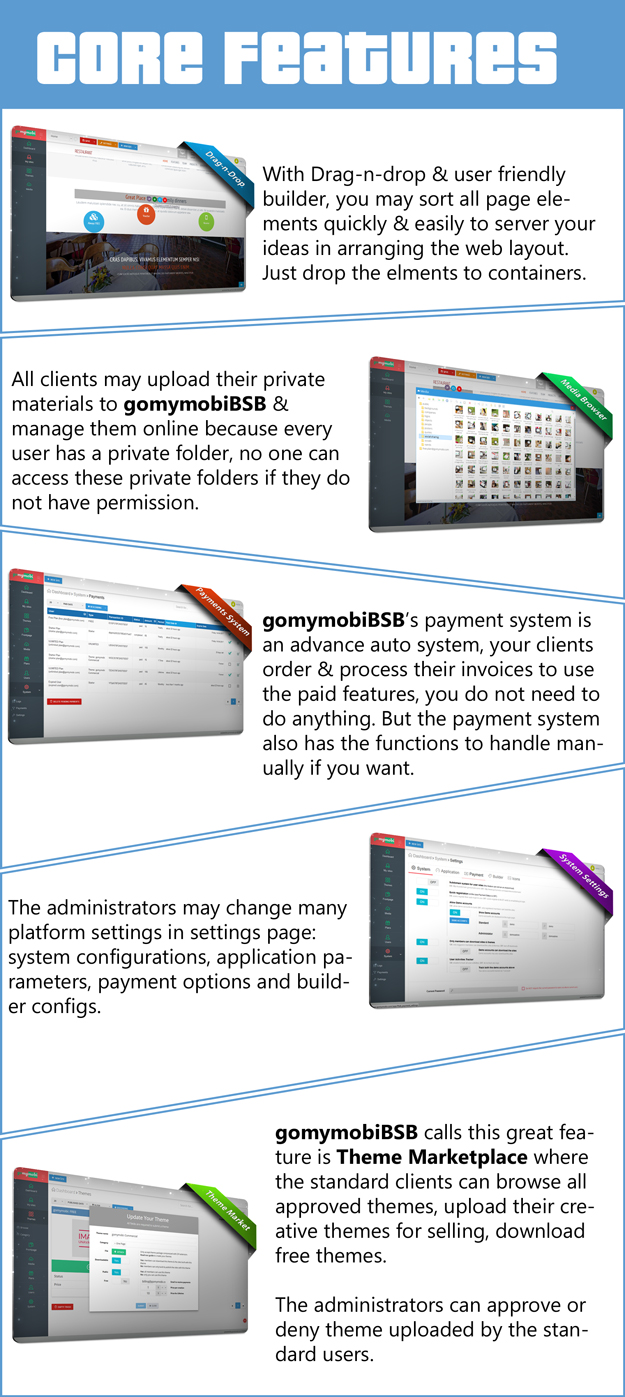
  • Drag-n-drop, User Friendly Builder & WYSIWYG HTML Editor
  • Support Multiple Languages


All Features & Functions

  • Downloadable for all created websites & website themes
  • Responsive layout for Builder & Platform
  • Drag-n-drop, user friendly HTML web site Builder
  • Responsive mobile friendly themes
  • Builder & Platform are compatiable with all browsers
  • Easy-to-use Built-in Media Browser
  • Support multiple languages
  • Site Management for all clients
  • 3 Icon Sets for easy customizations
  • Business website builder hosts all websites as subdomains
  • Online store builder allows clients to create unlimited online shops
  • Downloadable QR Code for every published website & store
  • Site Hosting Plans for Business Clients
  • Creative Website Themes Marketplace for All users
  • Business Frontpage Manager for Admins
  • Built-in Site Traffic Tracker
  • Online site maker powered with Paypal Subscriptions System
  • Clients are able to upload creative themes for selling / sharing
  • Dashboard Overview of Statistics
  • User Registration & Management
  • System Settings Panel
  • Private User Settings Personally
  • Thumbnail Web Screenshot Capturer
  • Payment History for All Users
  • Payments for Theme Licenses

Changelog

All updates & changelog listed here

Download gomymobiBSB’s Site Theme: Domainer (Add-ons)

Mega Menu – 2x & 3x (OpenCart)

Mega Menu Extension helps you to design Your menus according to your requirements. Extension has many option to make your menu more attractive. You can easily manage menus order and their type. It has many option to change it’s global settings like: colors, Height, Width, borders, etc

Display Special Offers Products
Featured Products
Bestseller Products
Categories
Multi Level Categories
Display Videos
Information Pages
Custom Links
Editors
Much More Features

? Multi-Design Layout
? Full Admin Manageable
? Global Settings
? Multi Language
? Multi Store
? Responsive – Mobile Ready
? SEO Friendly URLs
? Bootstrap Assets used
? Custom Editor
? Products Display
? No Core file change
? Vqmod and Ocmod Both available
? 12 months of support
? Many More features…

Email at: [email protected]
OR
Live Chat at www.webxitsolutions.com

Download Mega Menu – 2x & 3x (OpenCart)

Metal Warrior -Adventure Worlds | ADMOB banner and interstitial-share and review buttons (Games)

PS: For the FIRST You can Publish it without change Graphics IT will be the first in any store..

Screenshot-1136x640-2017-08-16-03.30.28

Screenshot-1136x640-2017-08-16-03.31.38

Screenshot-1136x640-2017-08-16-03.34.52

Screenshot-1136x640-2017-08-16-03.32.15

How To Play:

• use the buttons to move farward , lmake a jump and you can also shoot enemies

• try to avoid all the enemies

Features:

• Admob Banner/Interstitial

• Share To ALL SOCIAL MEDIA (Facebook)

• Rate Us Button

• Splash screen

• coins / Points

• Multi Worlds

• MANY LEVELS

• Share scores

• Arcade gameplay

• Phone and Tablet support

• HD Graphics

• HD songs

• Online Support 24/7

• More…

What You Get:

1. ECLIPSE PROJECT

2. Documentation File PDF file

3. Support 24/7.

How To:

– Import Project Into Eclipse Engine .

– Change package name in AndroidManifest.xml.

– How to Change Graphics game.

– Configure Admob Banner and Interstitial.

– Update You Rate and share Url.

– Export the apk file.

PS: For the FIRST You can Publish it without change Graphics IT will be the first in any store..

THANK YOU !

Download Metal Warrior -Adventure Worlds | ADMOB banner and interstitial-share and review buttons (Games)

Woocommerce Advance Bluedart Shipping Integration Plugin (WooCommerce)

Woocommerce Advance Bluedart Shipping Integration

Bluedart Shipping Integration is the best solution to make Cash on Delivery check feature available to the online customers.
The Plugin works with users provided zipcode of delivery location.Plugin check Cash on Delivery availability of products.
The Plugin generate PDF of shipment when Admin will generate AWB Number of orders.Admin have option to configure bluedart APi detail on backend.
Admin can generate Shipping Label and Multiple AWB generation.

Bluedart Features

Cash on Delivery check availability

Generate single AWB number

Mass AWB number generation

Download multiple AWB number

Generate Manifest PDF by selecting orders

History of Manifest generated Orders

Generate Shipping Label of Products

Generate Multiple Shipping Label of products

Upload company logo on PDF

Order PDF contains product details

Send/download AWB option available at admin Dashboard

Setup for dimensions,weight,hight,length on Bluedart Shipping

Steps to be taken for Plugin Installation

Login with your WordPress admin

Add new Plugin Bluedart Shipping Integration

Bluedart Configration Setting

Front-End Cash on Delivery Check

Generate Single AWB Number after selecting orders

Generate Multiple AWB Number after selecting orders

Download AWB shipment PDF

Preview of PDF


Generate Shipping Label of Products

Generate Manifest of Orders

Generated Manifest PDF


Download Woocommerce Advance Bluedart Shipping Integration Plugin (WooCommerce)

TLM (Theme License Manager) – Theme Purchase Code Verification, Redux Extension for WordPress (Utilities)

Stay informed who and where use your theme(s). Don’t let people use your theme(s) for free or multiple times. Save hundreds or even thousands of dollars just purchasing TLM extension.

TLM (Theme License Manager) is Redux extension for WordPress theme authors to protect their themes from give away, nulled, non legal usage and distribution in the same time get information who bought and registered theme and where use them.

Core Features

  • Code verification thru Envato API
  • Envato username, purchase code, domain name, date, admin email address recorded in your database and/or sent to your email.
  • Deregister option to change license for another domain
  • Manually deregister and register from your own database
  • Set trial period (after expiration, Redux options is hidden until registration)
  • Recieve an email as soon as new registration or dis-registration done.
  • Don’t ask license for localhost or special ip addresses.
  • Part of registration script located on your own web server, no SaaS or 3rd party involvement.
  • Intuitive interface and clear explanation for theme user – how to register, trial period, de-register and other processes.
  • Passcode – developer license, for theme author usage. Don’t require envato purchase code.
  • Well documented and tested

How it works

  1. Connect TLM extension in your Redux framework (read documentation)
  2. Update your existing theme in Themeforest, if it is already published
  3. License tab will appear in your theme options
  4. Users who use your theme, and updated to latest version will get modal window notification asking to enter purchase code with explanation how to obtain it, when they open theme options page each time until registration
  5. Once user registered or de-register license theme author receives an email notification (optional). Additionally the registration information (purchase code, envato username, domain, admin email, date) is recorded in theme author’s database
  6. If trial period expired and user still hasn’t registered purchase code, all theme options become hidden until registration. No data lose, it is hidden with css
  7. If for some reason registration fail, you can provide instruction how user can register in his website database.

Download TLM (Theme License Manager) – Theme Purchase Code Verification, Redux Extension for WordPress (Utilities)

Place Mark Swift 3 (Full Applications)

SAVE MORE THAN 1500hrs DEVELEOPMENT

Place Mark is an app used to memorize the places for entertainment, drinks and foods, resort, etc that the users used to use the services and share them with the community.

Through the collection of outstanding places selected by plenty of users, a convenient ecosystem for the users’ demand is established.

Because of the user interface designed the most simply, anyone, who can use smart phones which installed the mark app regardless of whether they are old or young, can find a best place that they want to reach in the quickest way.

Demo App:
http://bit.ly/danhdauapp

Video:
https://www.youtube.com/watch?v=_U4vg2Uu2ag

===========
Full application build for iOS 8+ with swift 3.

HOW TO SETUP:

1. Open ?ánh D?u.xcodeproj on Xcode
– Change App bundle ID

2. Open file API_URL.swift :
– Change banner ADMOB: let banner
– Change contact email: let contact_email
– Change service api : let DANHDAU_DOMAIN

3. Open Config.swift
– Change :
let group_app
let uuid_app
let user_id
let token_app
let user_avatar
let user_name
let is_login

4. Open language file change to your translates if need
– Localizable.strings
– InfoPlist.strings

5. On Xcode open tab : Capabilities
– Change your Keychain Sharing

6. Config web api; open config/database.php file
– Change info DB connect:
‘database’ => env(‘DB_DATABASE’, ’’),
‘username’ => env(‘DB_USERNAME’, ’’),
‘password’ => env(‘DB_PASSWORD’, ’’),

7. chmod 777 folder
– storage
– bootstrap

8. import DB: file db.sql

9. Create PROCEDURE for mysql
– Open your mysql console
– Select your place mark db
– Copy and paste two PROCEDURE to your console
– Enter.

Done.

Download Place Mark Swift 3 (Full Applications)

Easy Video Salespage Builder (Advertising)

EVS Builder is a WordPress page builder plugin to create video sales pages. Build a responsive video sales page and manage your content easily with intuitive EVS Builder editor. No programming knowledge required – Create video sales pages for your products that load 85% faster than traditional wordpress pages. It is compatible with any active WordPress Theme.

Download Easy Video Salespage Builder (Advertising)

Ministore one page ecommerce HTML/PHP template with Paypal and Stripe (Shopping Carts)

Ministore template is well suited for an eCommerce store with 1-6 products. Great for testing a single product.

Simple and flexible coding and design.

Mobile responsive with Bootstrap v3.3.6 and icomoon.io font icons.

Frontend: http://mini-e-store.tk
You can test Credit Card payment using this Visa Card “4000000000000077”, use random expiration date and CSV.
You should recieve an order confimration email and see order thank you page.

Admin Area: http://mini-e-store.tk/admin
Username: admin
Password: 0000

Dynamic features:

  • Order form powered by AngularJs and jQuery
  • Working PayPal and Stripe integration using Javascript and PHP
  • Order Thank You page
  • Sending Order confirmation Email to the customer and to the admin
  • Record Orders in MySQL Database table “Order”
  • Admin area to view and edit the Orders
  • Sass and Grunt
  • Working PHP Contact Form

Download Ministore one page ecommerce HTML/PHP template with Paypal and Stripe (Shopping Carts)

Event Scheduler (Calendars)

Event scheduler is a jQuery plugin to let you bind events to a specific date. All dates are shown in a tape-look box which is scroll-able using the arrows or a mouse wheel. Clicking on a specific date opens the event container below the date container in which are listed all the events that are happening at the given day. An event contains a title, date, time, place, description, link and line color (not all fields are mandatory).

The plugin has a modern look and may be used for any kind of scheduling events (concerts, meetings, festivals and even in business purposes). As the width of the component is adjustable, you can feel free to use the scheduler on a full width as a single page or fit it in some small corner.

Responsive and adjustable width

The plugin is responsive and provides pretty much the same design/look on any kind of resolution and device. As for the width, it is fully adjustable and it’s all up to a user to set a desirable width. The width can be set through various ways hence you can use the number of pixels, percentage or ‘auto’ option. ‘auto’ option calculates width all by itself so that all dates would fit in the date container so that a user don’t need to scroll. ‘auto’ option can also used be used as an addition to the width in pixels or percentage (for example: ‘500px – auto’). This would mean that if width of 500px cuts one of the date boxes (dates) on half, the ‘auto’ option would change the width so slightly so that none of the date boxes is cut.

Colors

The component comes with 8 different color schemes which can be changed very easily. The colors are: blue, black, red, green, orange, purple, cyan and pink. Adding a new color is only a 1 minute job.

Easy to implement

Event scheduler uses Module pattern which allows it to create more than one instance of the component. It also means that each instance can use a different settings (explained in detail in the next section) therefore it allows users to customize it by their needs.

Implementing the plugin is very easy. All you have to do is to invoke escScheduler.init and pass desired settings as a parameter. All the magic happens afterwards. As the mouse wheel event is not implemented by jQuery, the plugin uses an outside library to include it.

All the events are stored locally in a json file therefore there is no need for a database or any other scripting/programming language besides Javascript. Note that it is very easy to adjust the component to work with a database simply by changing the ajax url in importEvents() function (keep in mind to follow the format of a json file).

Highly customizable

The plugin is highly customizable and enables their users to fit their needs. As already explained earlier, it provides functionalities to change the width and the color, however these are only two of many other options. You can set the begging date (in case you want event scheduler to start on some day in the past), alignment, whether you want or do not want the arrows, date type (to show the day in a week or a name of a month), localization and some more. Read the documentation for more informations.

Download Event Scheduler (Calendars)

Make5 (Games)

Place three blocks with the same number and color next to each other to merge them horizontally, vertically or both. You can also rotate blocks before placing them on the grid!

Features :

– Made with Construct 2 (r239+)

– Touch & Mouse supported

– Save Last and Best Score in The Memory

– Three different sound effects

– Logo(PSD) Included

– Challenging game

– Include .Capx

– Ready to Export for Android & iOS & Web(HTML5)

Download Make5 (Games)

Super Side Menu – provide any extra content and functionality with the attention-grabbing side menu (Menus)

Super Side Menu is a great wordpress menu plugin that lets you add sleek and amazing side menus to your website.

WordPress Plugin Side Menu Pro was created to highlight the site compared to other resources that are using a similar design template. By installing the plugin, you also enhance ease of use and the informative content of each page of the web-resource.

The plugin is compatible with another product developed by our company – Wow Modal Windows. Their concurrent use will render dialog and modal windows in the side panels of the site and thereby make the design more concise and user-friendly.

Key features Wow Side Menus, plugin for creation side menus in WordPress:

  • Unlimited amount of menus
  • 2 Positions of side menu: Left, Right
  • Align menu: Top, Center,Bottom
  • Customize the style of the menu buttons
  • Choose color for buttons
  • Insert any links
  • Open link to new window
  • Insert Font awesome or custom icon
  • Built-in social share and print buttons
  • Built-in user links: LogIn, LogOut, Register, Lostpassword
  • Show menu depending on language (allows creating multi-language)
  • Show menu depending on user (for all users, only for logged-in users, only for not logged-in users)
  • Show the menu on the selected pages
  • And more…

Make your website more user friendly!

Use Side Menu for WordPress plugin with Wow Modal Windows for demonstration of all types of notifications. Assign a sidebar as a navigation element of the site using the anchor links. For example, to redirect the visitor to the page “features” just add the <a href=”#features”> to the menu item and set the same id for element, to which will drive redirection (in our case, <div id = “features”>).

Download Super Side Menu – provide any extra content and functionality with the attention-grabbing side menu (Menus)

Simple Image Slider Carousel (Sliders)


Simple Image Slider Carousel ?

Simple Image Slider Carousel is a full blown image (jpg, jpeg, png) responsive image slider gallery that runs on all major browsers and mobile devices like iPhone, iPad, iOS, Android and Windows. It can display any number of images in a slider / carousel style with extreme fine tune control. It has high performance using OOP code and the latest CSS3 / HTML / JS techniques, ready for mobile and desktop, very flexible, easy to setup and extremely customizable.

Simple Image Slider Carousel main features:

Responsive layout.

Very easy to use and setup.

Multiple display types, that will make it very easy to integrate it in your layout desgn responsive / fixed, fluid width, fullscreen, afterParent etc.

The image playlist can be contructed using simple HTML markup or JSON.

Customizable image border size, color, spacing and other visual settings can be configured with ease.

Complete control over the images geometry as you can see in the examples provided.
The option to randomize the images playlist order.

The posibility to show all images or set a number of images to be displayed.

Support for HTML / text content that can be added inside the image at the bottom or top of the image or outside the image at the bottom.

Customizable theme / skin.

Optional infinite loop.

Two animation HTML / text types and the possibility to add more.

Optional next and previous buttons.

The next and previous buttons can be positioned inside, outside, at the bottom of the image or at the edge of the browser.

Fine tunning for possitioning the next and previous buttons.

Swipe support for mobile devices and optional keyboard support for desktop.

Multiple transition types.

API support.

Autohide buttons, the buttons can be set to autohide after a number of seconds of inactivity.

Documentation included.

Much more …

BUY ALL OUR PRODUCTS IN A MEGA BUNDLE WITH A 90% DISCOUNT!!! THIS IS A LIMITED OFFER SO HURRY UP AND GRAB IT!!! : https://codecanyon.net/item/fwd-mega-bundle/19117054

Download Simple Image Slider Carousel (Sliders)