Multistep HTML Form – Multi Step Multipurpose HTML Form (Forms)

Note: In this Plugin no php script included because it is html form. We have done all setup except Ajax action and php coding. Just you have to process the Ajax and php.

Multi-Step-Form - PHP Multi Step Multipurpose Ajax Form

Multistep HTML Form is a Full Responsive Multi Step Multipurpose HTML Form with Required field jQuery validation built on Latest Version of Bootstrap Framework (v3.3.7), HTML5, CSS3, jQuery and Ajax. Code written in a simple way by which you can easily integrated at your site.

Multistep HTML Form Responsive Multi Step HTML Form can be used for your organization, company, business. So that your visitors, customers, clients, agents, members can use this form to get Quote and/or let you know their service concern through the form. Using this Plugin you can manage Multi Step form. We have done all HTML, CSS, jQuery and Ajax, so no page reload will occur. This form has Anti Spam (simple Math Captcha) human check.

Multistep HTML Form is a responsive, clean, well documented Ajax Form. It can be simply integrated at your site with the documentation help. All the codes are clean, well commented and well organized with proper help documentation. It looks great with all types of devices. Try out the demo.

Features

  • HTML, jQuery, Ajax Form
  • AJAX enabled (no page reloads)
  • HTML Ajax Form with Required field jQuery validation
  • Google Auto Location Search for Address Field (Google Api will need)
  • Bootstrap Calendar (input & Embedded)
  • Anti Spam (simple Math Captcha) human check
  • 82 Calendar Languages file included
  • W3C Valid HTML Code
  • HTML5, CSS3 & jQuery
  • 100% Responsive & Mobile-Friendly Layout
  • Latest Version of Bootstrap
  • Font Awesome icons
  • Browser Compatibility
  • Fully Customizable
  • Easy integration into your site
  • Clean and well commented Code
  • Easily customizable
  • Well Documentation ( proper help instructions for setup )
  • Dedicated Support
  • and Much More!

Rating US

Note: All images are just used for Preview Purpose Only. They are not part of the template and not included in the final purchase download files.

Credits

Download Multistep HTML Form – Multi Step Multipurpose HTML Form (Forms)

Easy Digital Downloads – PayU India Payment Gateway (WordPress)

follow on envato
follow on facebook
support

Easy Digital Download PayU India is a gateway plugin that extends Easy Digital Download, allowing you to take payments via PayU. PayU cooperates with Visa and Mastercard Credit Cards and Debit cards. This means that you easily can take credit card payments as well as direct payments via any of the associated banks.

When the order goes through, the user is taken to PayU to make a secure payment. No SSL certificate is required on your site. After payment the order is confirmed and the user is taken to the thank you page.

Note: This gateway only supports the INR currency.

Supported features, currencies and countries:

  • Physical Products, On-site Checkout, Credit Card Processing, Digital Products, E-wallet Balance, Mature Content.
  • Currencies – INR
  • Countries – India

Documentation:

Please see the Documentation of the plugin to learn how to use the plugin.

Support:

Need help? Please be sure to read the Documentation. If you’re still stuck you can contact through our support platform or email us on [email protected] for any pre-sale inquiry only.

Change Log:

= Version 1.0 (2017-09-25) =

* [+] Initial Release.

See full change log here

Download Easy Digital Downloads – PayU India Payment Gateway (WordPress)

Apple Wireless Device Connection (Frameworks and Libraries)

This item provides a ready to use swift 4 library which uses Apple’s Multipeer Connectivity Framework in order to connect up to 10 iOS devices together.
Share any files, images, videos, speech, text.
Ideal for adhoc file transfer and chat!
No internet is needed. It uses Bluetooth or Wifi automatically.
Online app that uses this library: https://itunes.apple.com/us/app/multidrop-wifi-bluetooth-chat/id988574770?ls=1&mt=8

Download Apple Wireless Device Connection (Frameworks and Libraries)

Codeigniter User Management System, Ion-Auth, HMVC and Flat Lab Admin Theme (Miscellaneous)

Where you get Quaility Work.

CodeIgniter Login with ion auth Library is a CodeIgniter based login and backend application to use as a starter kit for new projects. The login and registration system is completely taken care of members can get authorization rapidly with social accounts OR creating their own account. It provides secure login, authentication, authorization and complete user management.

The development is ongoing and improving. New features will also be added and current features will be improved based on buyer comments.

FEATURES

  • Built with latest version of Code Igniter 3.1.6.
  • Built with latest version of CI login library Ion auth 2.
  • Ready with HMVC
  • Social Login (Facebook,Twitter,Google,Instagram,Linkedin).
  • Role-based access control (RBAC), Roles and Permissions.
  • Google reCAPTCHA on registration.
  • Flat Lab Admin theme.
  • Print pages with Dompdf.
  • Print pages with Mpdf.
  • Ion Auth is extremely configurable.
  • Multiple language support.
  • Secure user registration and login.
  • Lost Password page, to allow users to reset their password.
  • Secure password algorithm using Bcrypt.
  • Enable or Disable Remember Me feature on login.
  • Enable or Disable Email Activation for new user’s registration.
  • Create Groups / Roles.
  • Assign groups to users.
  • Server side form validation.
  • Client side validation with Jquery validation
  • Admin & other User’s have their own access.
  • Activate & Deactivate Users.
  • Maximum Login Attempts.
  • Is max login attempts exceeded.
  • Increase Login Attempts.
  • Account Lock Time.
  • User cookies Extend on Login.
  • Extend User Expiry Time.
  • Track login attempts.
  • Clear login attempts.
  • Get login attempts num.
  • Layout ( Boxed Page,Horizontal Menu,Mega Menu,Email Template ).
  • Dashboard with Staff
  • Full Feature Frontend

SECURITY

  • XSS Filtering
  • CSRF protection
  • Password hashing
  • Validate input data

Admin Login

Email : [email protected].
Pass: password.

Member Login

Email: [email protected]
pass: password.

FRONT-END TEMPLATE

Watch Front End Demo

Codeigniter User Management System will be kept up-to-date to reflect the latest changes and new versions of the CodeIgniter framework.
.

«If any question then Don’t be afraid to ask. I’m always interested in knowing your issues as it might help me fine-tune this product. »

Download Codeigniter User Management System, Ion-Auth, HMVC and Flat Lab Admin Theme (Miscellaneous)

Grocery Shop Android App (Full Applications)

Grocery Shop is a Complete Solution for Sell Grocery Products like Vegetables, Fruits, Dairy Products through Android App.Its a Fully Optimized to Give Faster & Easier Shopping Experience To Your Customers. Social Login, Onepage Checkout, Simple Menu Give a convenient way to Buy Productsfor your Customer.

Feature

  • Own your branded app You can upload your own logo, banner, splash screen, texts, colour scheme etc.
  • Product Catalogue Our GroceryShop App’s product catalogue feature is designed to display your products in a sleek and easy to customize product catalogue format.
  • Login, Register and Forgot Password Users can register for using your GroceryShop App. They can login with their credentials and can also avail ‘Forgot Password’ facility, in the case they may need.
  • Shopping Cart and Check out Methods Your users can add the items they want to purchase in their shopping cart and use the checkout option to proceed with the payment.
  • Orders and Payment Your users can place an order for items they want to purchase by paying through the Mobile Payment Gateway.
  • Multilanguage and Currency The admin can add multiple languages, for users to view the site content in their language of preference. The admin can add multiple currencies, for users to purchase products, by paying with their country’s currency.
  • Social Login We have integrated Facebook and Google login to the app, so users can signup to your app with just a few clicks.
  • Product display With Grocery App, your products can be displayed with an awesome look, feel and appearance, for alluring the users of your App.
  • Payment Gateway A secured Mobile Payment Gateway, where your users can pay through their Credit/Debit card and Net banking.
  • Product Category With Grocery App, you can create unlimited categories for your eCommerce Mobile app. You can add unlimited products under the categories.
  • Search and Filters The users can search for products with keywords. The users can filter the search list with various filter options like price, brand, etc.
  • Wish list Your users can the items they wish to purchase, to their wish list.


Other Features

  • Unlimited Categories
  • Unlimited Products
  • Unlimited Manufactures
  • Unlimted Information Page
  • Multi language
  • Product Reviews
  • Dowloadable Products
  • Tax Rate
  • Related Products
  • Special Products
  • Latest Products
  • Featured Products
  • Best Sellers
  • Product Image full screen Slide Show
  • Search Products
  • Filter Products by options (Color, Size etc)
  • Sort Products
  • Compare Products
  • View Products As Grid,List,Image
  • Buy Gift Voucher For friends,family member
  • Estimate Shipping and Taxes
  • Discount Coupon system
  • Order History
  • Product Returns
  • Edit My Account Details
  • Change Password
  • Add,Update,Delete Address Book
  • Return Products
  • View the Return Products
  • Check and Apply Reward Points
  • Transaction history
  • Recurring Payments
  • Add To Cart
  • Add To Whish List
  • Push Notifications
  • Analytics
  • Social Login Integrate(Facbook and Google Plus)
  • Contact Us
  • Click to Call on contact us page

Download Grocery Shop Android App (Full Applications)

Wp Network Utilities (Utilities)

Shortcodes

  • What’s my DNS
  • Whois
  • IP Geolocation
  • E-mail check
  • Ping
  • Link checker
  • Link extractor
  • Port scanner
  • What’s my IP
  • User agent
  • User Operating System
  • User browser
  • Are cookie enabled?
  • User screen resolution
  • Hack domain name generator
  • Typo domain name generator
  • Http headers
  • Domain availability
  • Bulk domain availability
  • Lookup
  • Reverse lookup
  • Seo Statistics
  • Styles

Styles

Use your own style or included styles!
Two styles included: with a simple shortcode

Documentation

Beautiful documented

Requirements

  • PHP 5.6

Download Wp Network Utilities (Utilities)

Ewoji – The Ultimate WoWonder Emoji Plugin (Add-ons)


Ewoji – The Ultimate WoWonder Emoji Plugin

Ewoji is a WoWonder Emoji plugin, handcrafted with care. It offers best user experience and advanced emoji features for your site. Ewoji is the perfect emoji plugin for your site.
Ewoji comes with unique design crafted with love which gives your users a sense of true quality.

Works With WoWonder and Wonderful theme

Features

  • More Emojis Ewoji plugin comes with 900+ emojis to choose from. Now your users can express more.
  • Large Size Icons Perfect size of icons for desktop and mobile devices.
  • Better Layout The layout of the plugin is much better than any other plugin present. It is more user-friendly and responsive and it comes with Tab style same as you see on Facebook or WhatsApp.
  • Scroll Bar Ewoji Plugin comes with a Scroll bar to scroll more emojis.
  • Mobile Ready This plugin is fully responsive and looks great on any mobile device.
  • RTL Support This plugin fully works with RTL sites. So, no worries.
  • Fast Load Emojis will only load when you open their categories. Means Lazy Load.
  • Easy To Install You can simply install this plugin easily by replacing some files. But, make sure you read documentation first.
  • Well Documented Simple and fully documentation provided which will help you to install the plugin.
  • Many More

Changelog

v1.0
- Initial Release

Download Ewoji – The Ultimate WoWonder Emoji Plugin (Add-ons)

Twilio "Geo-text" Plug-In (a PHP Uber-style Geotracker Add On) (Social Networking)

WHAT IS “GEO-TEXTING”?

          (def) “Geo-texting” – (verb) the act of inviting people via text to share their location realtime with each other on a private geomap…uberstyle. Anyone with a smartphone and can text to the geo-text phone number can play dispatcher and invite people to share a geomap. To set up your own geo-text your own environment, you’ll need to host this plug-in, my latest script PHP Uber-style Geotracking and Twilio’s SMS “texting” services (www.twilio.com). You can try it out in my demo environment here. Just text commands (below) to 415-360-0886 – FREE! To get started, see “How-To” guide here or cllick on “Live Demo” link above.!


WHAT DOES THIS TWILIO “GEO-TEXT” PLUG-IN DO?
This Twilio “Geo-text” plug-in is an add-on to my PHP Uber-style Geotracking script that allows anyone with access to your Twilio phone number to invite people via text to share their location with others uber-style on a private geomap. In addition the script features dispatcher functionality not found in the original geotracking script. This functionality includes managing multiple geomaps, adding/deleting geotrackees, renaming maps and geotrackees, pinging geotrackees to update their location, all from a smartphone using SMS texting.

The script is easy to install – just unzip contents – 1 file – into the <root>/php/sms folder of your original PHP Uber-style Geotracking instalation. This requires a Twilio account to send and process SMS texts. Configuration instructions to link your Twilio phone number to this plug-in appear below.

NOTE: THIS SCRIPT IS AN ADD-ON AND REQUIRES THE PURCHASE OF MY PHP UBER-STYLE GEOTRACKING SCRIPT. THIS ALSO REQUIRES SIGNING UP FOR A PAID TWILIO ACCOUNT.

This script includes PHP code that CAN BE USED BY PHP DEVELOPERS AS A TEMPLATE for using SMS TEXTING (using Twilio) as the user interface for their software/web applications. For PHP developers who have not explored SMS texting as a user interface for your software (as I’ve done here), it is worth exploring. Texting is something everyone knows how to do (young, old and in between) and cuts learning curve of using your software. (see “Overview of PHP Code” section below for how code is structured).

QUICK DEMO/START
Using the plug-in is as easy as texting a list of geotrackees to the script’s twilio phone number (or for demo – 415-360-0886). Click on “Live Demo” link above for more detailed instructions.

  1. Install script/plug-in. For demo, text to 415-360-0886.
  2. Simply “text” a space or comma separated list of geotrackee email addresses or smart phone numbers to invite to a private geomap. The script will text you an invitation link (it automatically includes map owner as a geotrackee in every map. It will also text you confirmation which geotrackees were invited and which ones didn’t (didn’t pass validation).
  3. To add more geotrackees, continue to text emaill address and phone numbers to the plug-in phone number in step 1.

OTHER DISPATCHER FEATURES
Here is the list of all the dispatcher features built into this script that can be executed by texting commands to your Twilio phone number on your smartphone. Click here for screenshots of functionality below.

  • LIST ALL YOUR MAPS – Text “list-maps” or “lm” to the twilio number to get a numbered list of maps you own.
  • ADD A NEW MAP – Text “new-map” or “nm” to the twilio number
  • SWITCH ACTIVE MAP – Text “switch-map” or “sm” and then the map number (from “list-maps” list) to the twilio number (e.g. “sm 3”)
  • RENAME MAP – Give your map a friendlier name. Text “rename-map” or “rm”, followed by the map number and then the friendly name you want to give the map. (e.g. “rm 2 My Test Map”)
  • DELETING A MAP – Text “delete-map” or “dm” and then the map number you want to delete followed by the map number you want to delete.
  • ADDING A GEOTRACKEE – Text “add-geotrackee” or “ag” and then a comma or space separated list of geotrackee emails and phone numbers. This is optional, you can just text new emails and phone numbers. (e.g. “ag [email protected] [email protected] 4153333333”)
  • LIST ALL GEOTRACKEES OF ACTIVE MAP – Text “list-geotrackees” or “lg” to get a numbered list of geotrackees in the active map. (e.g. “ag [email protected] [email protected] 4153333333”)
  • DELETING A GEOTRACKEE – Text “delete-geotrackee” or “dg” and the geotrackee’s number from “list-geotrackee” list. (e.g. “dg 2”)
  • RENAME A GEOTRACKEE – Text “rename-geotrackee” or “rg”, the geotrackee’s number from “list-geotrackee” list and the geotrackee’s nickname. (e.g. “rg 2 Lucky Louie”)
  • PING ALL THE GEOTRACKEES IN THE ACTIVE MAP – Text “ping-geotrackee” or “pg”, then the word “all”. (e.g. “pg all”)
  • PING AN INDIVIDUAL GEOTRACKEE IN THE ACTIVE MAP – Text “ping-geotrackee” or “pg”, then the geotrackee’s number you want to ping. (e.g. “pg 3”)
  • GETTING HELP – Text “help-me” or ”?” to clear all the maps and geotrackees and reset.
  • RESETTING – Text “clear-all” or “ca” to clear all the maps and geotrackees and reset.

HOW DO I INSTALL THIS PLUG-IN?

  1. If you have not done so, purchase the “PHP Uber-style Geotracker” script from codecanyon.net
  2. If you have not done so, install the script (see ‘Installation Instructions’ section in the script’s documentation)
  3. Purchase this plug-in- Twilio “Geo-Text” Plug-In
  4. Unzip the contents of the zip file into the following folder in your installation from step 1 and 2 (http://<domain root>/php/sms/)
  5. Go to Twilio.com and sign up for your account (sign up for the SMS product – make sure you purchase a twilio phone number for your users to text to)
  6. Click on ‘Dashboard’ link to display Console Dashboard.
  7. Click on ‘Programmable SMS’ link under the All Twilio Products section on Console Dashboard.
  8. Click on ‘Messaging Services’ link on the Programmable SMS Dashbaord page
  9. Click on ’+’ sign on the Messaging Services page
  10. Enter ‘geotracker’ as the friendly name and ‘Notifications, 2-Way’ as the use case
  11. Check the ‘Process Inbound Messages’ check box and enter https://<your domain>/php/sms/receive.php and save Configure page

LIST OF TEXT COMMANDS
See table below for list of commands. Examples below are “text” commands that are sent to the Twilio phone number you set up during installation (or use the demo phone number: 415-360-0886).

LIST OF COMMANDS DESCRIPTION
help-me or hm

get help or list of commands
text: “help-me”
 
clear-all or ca

clear all my maps and geotrackees
text: “clear-all” or “ca”
 
new-map or nm

create new map
text: “new-map” or “nm”
 
list-maps or lm

list all my maps
text: “list-maps” or “lm”
 
rename-map or rm

rename existing map
text: “rm 2 My Map”
 
switch-map or sm

switch active map
text: “switch-map 3”
 
delete-map or dm

text: “delete-map 2”
 
add-geotrackees or ag

add geotrackees to the active map (default)
text: “ag [email protected] 4154444444”
 
list-geotrackees or lg

get list of geotrackees in active map
text: “list-geotrackees”
 
delete-geotrackee or dg

delete geotrackee
text: “dg 4”
 
rename-geotrackee or rg

create nickname for a geotrackee
text: “rename-geotrackee 2 Cool Dude”
 
ping-geotrackees or pg

ping all geotrackee to update location
text: “pg 1,2,3” or “pg all”
 
or simply type in a comma separated (”,”) list of email addresses and phone numbers directly to invite people to an active geotracking map

OVERVIEW OF PHP CODE
With this script comes a “template” PHP class that can be used as a starting point for PHP developers to create other conversational Twilio SMS applications. See below documentation of this PHP class.

CLASS SYNOPSIS

class smsGeotracker {

   // Properties
   private $twilioFrom; // phone number of “texter”
   private $twilioBody; // body of the text
   private $twilioAccountSid; // Twilio Account Sid
   private $twilioAuthToken; // Twilio Auth Token
   private $twilioPhoneNumber; // Twilio Phone Number
   private $sessionActiveMap; // mapkey for current active map
   private $db; // handle to database db
   private $urlRoot; // url of script
   private $background; // background color of geotrackee icon
   private $letter; // assigned geotrackee letter
   private $headers; // email headers<

   // Methods
   public function getTwilioFrom()
   public function setTwilioFrom($twilioFrom)
   public function getTwilioBody()
   public function setTwilioBody($twilioBody)
   public function getUrlRoot()
   public function setUrlRoot($urlRoot)
   public function getLetter()
   public function setLetter($letter)
   public function getHeaders()
   public function setHeaders($headers)
   public function getBackground()
   public function setBackground($background)
   public function getTwilioAccountSid()
   public function setTwilioAccountSid($twilioAccountSid)
   public function getTwilioAuthToken()
   public function setTwilioAuthToken($twilioAuthToken)
   public function getTwilioPhoneNumber()
   public function setTwilioPhoneNumber($twilioPhoneNumber)
   public function getSessionActiveMap()
   public function setSessionActiveMap($sessionActiveMap)
   public function getDb()
   public function setDb($db)
   public function getGeotrackeeCount() // get geotrackee count
   public function getGeotrackeeTable() // assemble geotrackee table for email
   public function generateRandomKey($length = 10) // generate random key
   public function validatePhone($phoneNumber)
   public function getMode() // get current mode of operation
   public function getArg($argNo) // get n-th token from command (text body)
   public function getMapkey($arg) // get mapkey of active map
   public function getMapname($arg) // get mapname of active map
   public function getMapCreated($arg) // get created date of active map
   public function sendSms($to, $msg) // send sms back to “texter”
   public function getActiveMap() // get active map info
   public function doHelpMe() // do “help-me” command
   public function doListMaps() // do “list-maps” command
   public function doClearAll() // do “clear-all” command
   public function doActiveMap() // do “active-map” command
   public function doSwitchMap() // do “switch-map” command
   public function doDeleteMap() // do “delete-map” command
   public function doAddMap() // do “add-map” command
   public function doRenameMap() // do “rename-map” command
   public function doListGeotrackees() // do “list-geotrackees” command
   public function doDeleteGeotrackee() // do “delete-geotrackee” command
   public function doAddGeotrackees() // do “add-geotrackee” command
   public function doPingGeotrackee() // do “ping-geotrackee” command

}

    FUTURE IMPROVEMENTS – FROM THE NINJA

Not sure if there is much more to add to this script. I may want to
add some geotrackee viewing restrictions so that you can differentiate
between geotrackee’s that can see everyone’s location, with
geotrackees that can only see their own and also hiding owner’s
location.

I do plan to create a dispatcher module that uses a regular desktop user interface for serious dispatching. But not sure of the timing of this. It will probably leverage my other scripts including PHP Dashboards, etc. Let me know what you think by commenting on this script.

-Data Ninja

AUTHOR’S NOTE IN BLOG: see blog post – Author’s Note: Twilio “Geo-text” Plug-In
DOCUMENTATION: see blog post – Author’s Note: Twilio “Geo-Text” Plug-In

REMINDER ON EXTENDED LICENSES: Just a friendly reminder that there are two different license levels at codecanyon.net. The regular license is for single FREE user use. If you have multiple clients or charging clients for functionality from this script, then an extended license is the appropriate level. It’s only fair as I do spend a lot of time tuning these scripts. And more sales/revenues means I can code more features and it has come to my attention that many purchasers are using my script for commercial (for pay) purposes with just the regular license. Thanks for you support. Click for more details – Regular vs. Extended License Comparison

SYSTEM REQUIREMENTS

  • Any browser that supports HTML5/Javascript, jQuery (2.1.4). Tested with Chrome Version 49.0.2623.110 (64-bit), Safari Version 5.1.7 (7534.57.2), Internet Explorer 11.0.9600.18230, Firefox 5.0.2
  • A PHP/MySQL supported webserver is required for jsfiddle features (preview, share, save) and render script options #3 and #4 – click here for phpinfo for PHP/MySQL versions and configuration options of the server serving up the demo. IMPORTANT: make sure to compare with phpinfo of your installation. Many PHP/MySQL errors stem from configuration options of customer php server instances.
  • You will need a PAID Twilio account and phone number
  • (See installation instructions on this page to see how to sign up and install)

VERSION HISTORY – Twilio “Geo-text” Plug-In

  • VERSION 1.0 (10/02/2017) – Initial launch version
  1. Twilio SMS texting user interface for the PHP Uber-style Geotracker script.
  2. Dispatcher features not found in the original geotracker script. See ’’List of Text Commands’ section on this page for the list of features included in this initial version.

My Other Scripts at Codecanyon:

(BRAND NEW!!!) PHP Daytrader’s Candlestick Pattern Hunter
PHP Uber-style GeoTracker
PHP Dashboard v4.0 Collaborative Social Dashboards
PHP Dashboard v2.7 – Responsive Carousels/D3js/Highcharts/Highmaps/MySQL
PHP Dashboard v3.0 – For Mobile Devices
HTML5 Cloud Dashboard Designer
HTML5 Streetmaps
PHP Streetmaps

Download Twilio "Geo-text" Plug-In (a PHP Uber-style Geotracker Add On) (Social Networking)

PlayTube – The Ultimate PHP Video Sharing Platform (Images and Media)

PlayTube is a video sharing script, PlayTube is the best way to start your own video sharing website!
PlayTube is fast, secured, and it will be regularly updated.

Do you have any questions? please read our FAQs.

Check out the Demo https://www.playtubescript.com

User Features (Demo)

  • Upload Videos: Upload any video from your device and share it online
  • Import Videos: Import videos easily from YouTube, Dailymotion, and Vimeo.
  • Auto Import Videos: Choose few keywords, run the task, sit back and thousands of videos will be importred from YouTube and Dailymotion to your site!
  • High Performance & Capability: PlayTube can handle more than 1B vidoes easily, with a very high performance and speed.
  • WoWonder Integration: With one click, user can login to your site using WoWonder Social Network.
  • Like & Dislike: User can like or dislike videos.
  • Comments System: User can comment on videos.
  • Subscriptions, History, Watch Later Pages: See what you recently watched, exploer other channels videos by subscribing to their channel, and save video to watch them later.
  • User Channels: User can create his own channel and upload/import unlimted videos.
  • Full Advertisement System: Admin can create videos, vpaid, vast, and images ads from the admin panel (Users paid ads coming in next update).
  • SiteMap Generator: If you have 10 vidoes, or 1 Billion videos, our sitemap gernator system will generate a powerful sitemap and ping it to Google/Bing.
  • SEO friendly: SEO friendly links, and HTML code that Google will love!
  • Powerful Admin panel: Manage settings, videos, design, and a lot more easily from our admin panel.
  • Powerful UI: Beautiful and modern design.
and much more…

Requirements:

PHP 5.5 or Higher.
MySQLi.
GD Library.
mbstring.
cURL.
allow_url_fopen.

Download PlayTube – The Ultimate PHP Video Sharing Platform (Images and Media)

Cryptocurrency Converter WP Widget (Widgets)

See the live Bitcoin to US Dollar exchange rate. Convert amounts to or from USD (and other currencies) with this simple Bitcoin calculator.

This script allows to add widget on your wordpress site and convert over 1,000 crypto currencies. Easy and fast installation only 2 minutes or less.

FEATURES

  • 1,000+ Currencies (BTC,LTC,ETH,USD,EUR,BCC,BTCD,CNY,ZEC AND MORE…)
  • Server Performance
  • No API KEY Required
  • 300KB Code (Light Code)
  • Real Time Prices
  • HTTPS Support

REQUIREMENTS

  • PHP 5.5.9 or higher
  • WordPress 4.8.0 or higher

Download Cryptocurrency Converter WP Widget (Widgets)

Ionic Ecommerce – Universal iOS & Android Ecommerce / Store Mobile App with Laravel CMS (Native Web)

IonicEcommerce is complete mobile app solution for android and ios platform with advanced laravel CMS.
You have variety of ready made ecommerce pages to create your mobile app and have comprehensive cms to manage your store.
It’s best app for any type of store like Fashion, Electronics, Grocery and Restaurant.
Either you are store owner or developer, it’s best solution for faster development with low cost.
We provide complete support and also provide customization & installation services at reasonabale price.

Download Ionic Ecommerce – Universal iOS & Android Ecommerce / Store Mobile App with Laravel CMS (Native Web)

Woocommerce Netbanx Payment Gateway (Gateways)

Feature and Use:

While credit cards are the preferred method of payment for online transactions by U.S., Canada and UK consumers, there are many countries where this is not the case. The NETBANX gateway allows merchants to offer a wide range of payment options that are sure to increase online conversions at checkout and customer satisfaction.

Woocommerce netbanx payment gateway plugin is powerfull features for online payment.

Installation
1. Unzip the plugin and upload the “netbanx” folder to your ”/wp-content/plugins/” directory
2. Activate the plugin through the “Plugins” administration page in WordPress

How to use
1) Go to woocommerce > settings and click on Checkout tabs
2) click payment method netbanx
3) After enter from netbanx API key,API secret,Account number,check to enable test mode,success page url and cancel page url
4) Now completed and customer can checkout with netbanx payment.

Note: If you enter success page and cancel page URL in netbanx setting page then you will create success page and decline/cancel page form pages in wordpress admin side.

Changelog/Version

= 1.0.0 =
Netbanx payment gateway using woocommerce

How to uninstall woocommerce netbanx payment gateway
To uninstall woocommerce netbanx payment gateway, you just have to de-activate the plugin from the plugins list.

Download Woocommerce Netbanx Payment Gateway (Gateways)

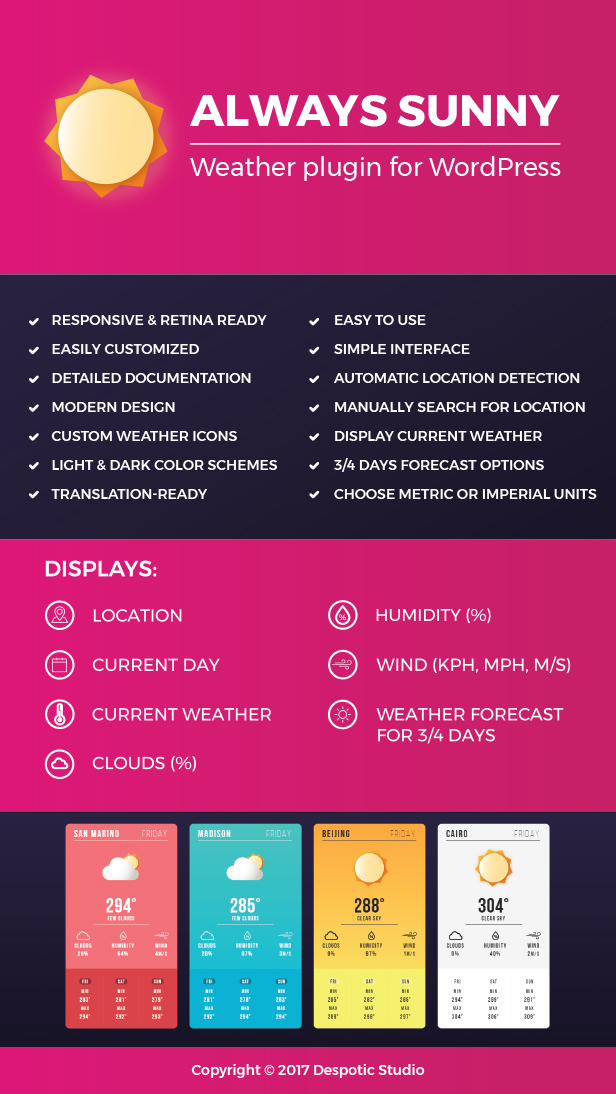
Always Sunny Plugin – WordPress Weather Widget and Shortcode (Widgets)

Always Sunny Shortcode and Widget

Always Sunny is a beautiful and easy to use weather plugin, based on OpenWeatherMap API, which provides reliable, up-to-date information about weather conditions in your area, or any location you define.

With its responsive design and customizable color schemes, it is easily implemented into many different layouts and styles, as a widget or shortcode, on all screen sizes.

Features:

  • Automatic Location Detection by User IP
  • Manually Search for Location by City Name
  • Display Current Weather
  • 3/4/5 Days Forecast Options
  • Custom Weather Icons
  • Simple Form for Creating and Adjusting Shortcodes
  • Responsive and Retina Ready
  • Easily Customized
  • Modern Design
  • Detailed Documentation
  • Simple Interface
  • Light and Dark Color Schemes
  • Translation Ready
  • Easy to Use
  • Choose Metric or Imperial Units

Download Always Sunny Plugin – WordPress Weather Widget and Shortcode (Widgets)