Pricing Table and Box Visual Composer Addon (Add-ons)

Visual Composer addon to display Pricing table & Price box.

Description

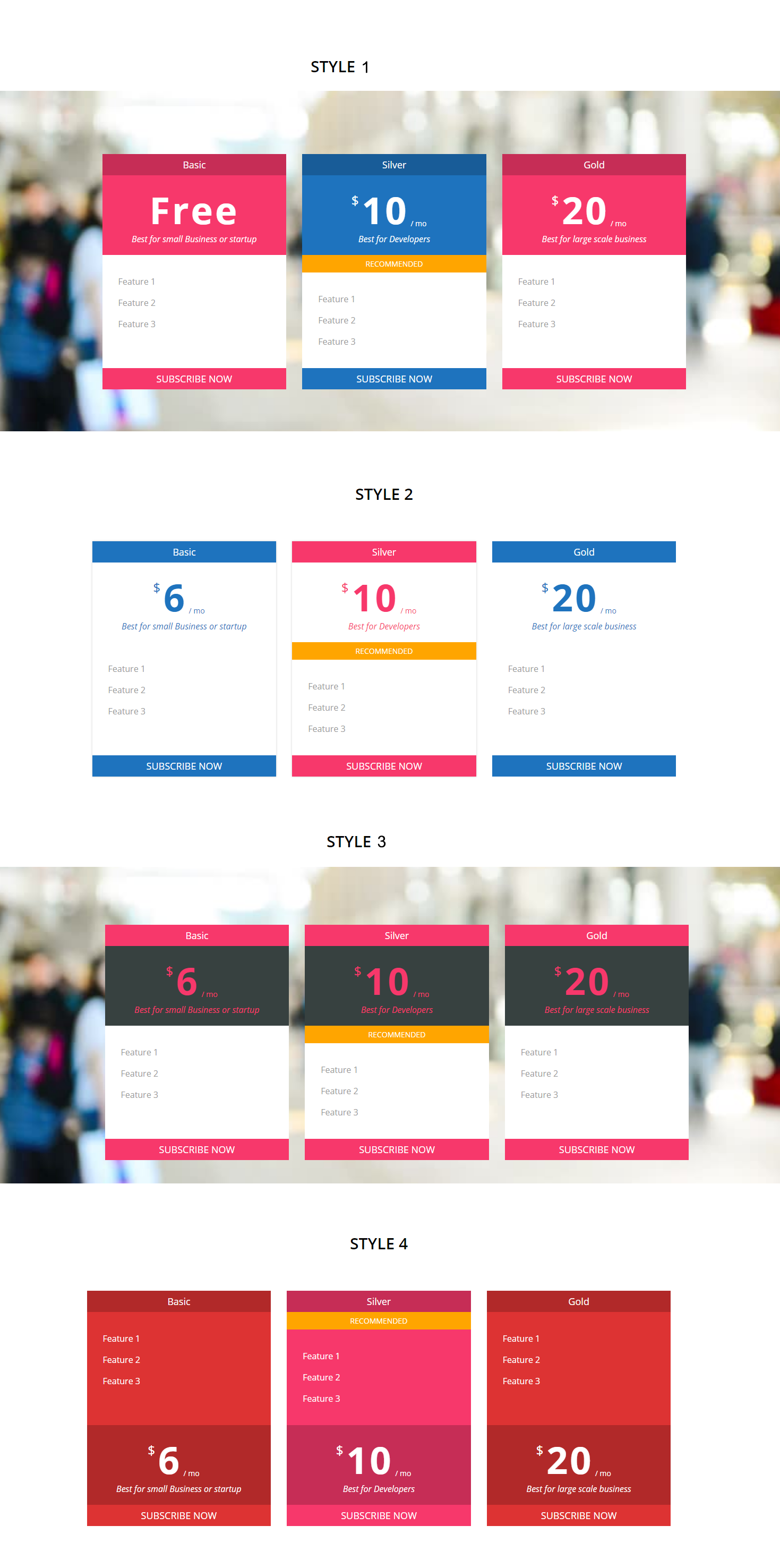
Visual composer Pricing table addon lets you add pricing table/box your website with various options.

You can select any color combination you want. Option to change set featured plan, plan details, Add sub title text, hide/show button and allow to change buynow text & url.

Moreover it is one of the best Pricing plan plugin for developers , it is developed with WordPress actions, so developer can modify it in theme according to the client’s need.

Features

  • 4 Pricing table styles
  • Can display as price box
  • Multiple color options
  • Option to add Plan details
  • Option to show/hide buy now button
  • Mobile friendly
  • Developer friendly.

pricing table

Download Pricing Table and Box Visual Composer Addon (Add-ons)

Tcard – Simple jQuery Plugin for Creating Cards (Images and Media)

Tcard is a jQuery plugin who help you to create card easily , works in all modern browsers and touch devices.
.

Tcard has 5 skin and 60 color for each skin and is easily to configure or create custom skin.

Features List:

  • 5 Skin
  • Custom Skin
  • Hover Animation
  • Button Animation
  • Flip Animation
  • Rotate Animation
  • Turn on/off – Flip/Rotate Animations
  • Count number
  • Skills
  • Gallery
  • Group Gallery
  • Individual Gallery
  • Multiple galleries on the same page
  • Scroll Animations
  • Multicolor
  • Cubic Bezier transition timing
  • Multiline Ellipsis Text
  • Unlimited number of card
  • Adjustable speed, animations delay
  • Easy to Configure
  • Use with any HTML content
  • Clean documentation with examples
  • Constant support

BROWSER SUPPORT

  • Chrome
  • Edge
  • Firefox
  • Opera
  • Safari

Download Tcard – Simple jQuery Plugin for Creating Cards (Images and Media)

Goo Calendar – plugin (Calendars)

Build calendars with static and dynamic ranges for your WordPress pages. Once the calendar is set up, publish it, and run it via shortcode on page, post or widget area.

Display in day cells all kind of information (but not limited to):

  • Posts published that day
  • Posts published that day in particular category
  • Posts with clause for that day (post meta, ACF etc.)
  • Any post type (eg. product)
  • Create rules for: every day, every Monday…Sunday, odd-even days, and run different functions & configurations
  • Create your own display function
  • Combine all above in logic way

Create static and dynamic calendar ranges:

  • Static – for given start and end date, eg. January 1, 2017, to July 15, 2017
  • Dynamic – use pseudo values for date: {now}, {+30 days}, {+1 month}, {+1 year}, {-15 days} etc.

Style your calendars in any way you want to override default styling (fonts, colors, sizing).

  • Create own global styling defaults for your calendars
  • Override each styling setting at individual calendars
  • Style headings, day names, cell contents, calendar width, borders, colors
  • Insert own CSS class names in calendar DOM tree

This plugin provides calendar functionality to the front-end of your WordPress installation. Users with no experience of programming are able to set up calendars for own needs by implementing instructions from this page and connected ‘How To’ posts. For advanced users, there is an ability to code own cell display functions or edit the default one, placing it in own functions.php file.

Screenshots

Plugin in action

Posts by date published

\

Posts by date happening (events) matched via Custom Fields (or ACF)

\

Posts by date happening (events) matched via Custom Fields (or ACF) and Category name; added custom CSS classes

\

Working hours: cells filled with the resault of the custom .PHP function instead of Goo Calendar default built-in loop function

\

Dashboard admin section

Create unlimited number of calendars

\

Plugin main settings

\

Each calendar settings

\

Documentations & Demo

documentation at official page: Goo Calendar

Demo:
Goo Calendar Demo

Changelog

  • Ver 1.0.0. Released


Download Goo Calendar – plugin (Calendars)

WooCommerce Network Merchants (NMI) Payments (Gateways)

Accept Credit Card and eCheck Payments Now With Merchant Networks (NMI)

WooCommerce Network Merchants (NMI) Payments is an easy to use, secure (PCI compliant) and fast payment gateway for WooCommerce. It brings both Three Step Redirect and Direct Post integrations as a single solution in your store allowing you to accept any credit card and eCheck payments in any currency.

Flexibility Without Compromising On Security

This plugin saves you time and money by enabling NMI payment gateway in your shop. It comes with flexibility and security: while you’re able to switch between Direct Post and Three Step Redirect at will and configure the numerous options, your customer payment information are NEVER stored on your server.

To meet PCI compliance, this tool sends your customer information to NMI security vaults in exchange of a payment token that is used to charge your customers.

Build Customer Loyalty

This plugin comes with Saved Payment Method feature which allows your customer to save their credit card and bank account for futures purchases. This feature is crucial to reduce cart abandonment. Of course, we never save sensitive data on your server.

Smooth Experience

This plugin turns NMI Three Step Redirect integration as a single comfortable, smooth and fast experience to customer. Customer never leaves your store while his payment information are directly sent to NMI without even hitting your server!

Control Restrictions

This plugin comes with options for deciding when credit cards and eChecks payments are available. For example, you can use this feature to show eChecks as payment method only for American/Canada clients. Of course, you can target more criteria like cart total, cart total weight, etc…only Sky is The Limit!

Logging Activity

While sensitive data are never saved we keep track of each process with the logging feature. This is crucial for finding bugs when they happen.

Translation Ready

Resources pot file is available to easily translate strings in your customer languages!

Free SSL Installation

SSL is a standard for websites security and online stores have responsibility to prevent security breach as much as possible. This importance is taken seriously at an extent we’re happy to provide free SSL installation service. When you’re using Direct Post integration notice you will have obligation to meet PCI compliance hence SSL installation would be checked by NMI staff before going to production.

Support 24/7

We’d like to hear from you especially if you find a bug or you’re willing to see a feature not implemented yet.

Universal Theme Compatibility

Sometimes you install a plugin that breaks your design or store after installation. This won’t happen with our plugin which nicely integrates with any theme and also doesn’t conflict with any other plugin.

Regular Update

You’re purchasing more than the features you see today as we keep updating our codebase not only to fix or refactor stuffs but also to bring new awesome features especially after hearing your needs and pains in your daily routine. We’ve automated the whole process so you don’t have to keep coming to Codecanyon and get the last update, it comes directly in your WordPress. You just have to confirm and that’s it!


Code Quality

Delivering quality artifacts is the cornerstone of our business because we understand it’s always a pain to update or maintain a low quality codebase. And because we’re committed to continuous feature delivery, you have the assurance of an item respectful of industry standards!

Developer friendly

We use filters and hooks wherever we see fit to allow perfect integration with other WordPress plugins.

WooCommerce 3+ Ready

WooCommerce 3+ especially 3.2 comes with important updates to WooCommerce. Of course, these massive changes aren’t a problem for professional plugins which this item belongs to. It even comes with support for both these recent versions as well as the old WooCommerce releases starting from 2.5!

Automatic Lifetime Update – Free of charge

When we commit an update, your WordPress install is automatically informed through our API. This allows you to upgrade quickly.

Features

After purchase, you will be able to:

  • Accept credit card payments
  • Accept eCheck payments
  • Capture payments immediately or manually
  • Allow your customers to save their credit cards and eChecks for future purchases.
  • Monitor activity through logging
  • Control payment restriction
  • Stay PCI compliant and secure payments on your store
  • Increase customer loyalty with fast and one click processing
  • Charge credit cards and eChecks manually
  • Process refunds
  • Process payment cancellations (Void)

You also have the guarantee of:

  • Lifetime Free Updates
  • Built-In Automatic Updates
  • Available Support
  • Regular Feature Additions
  • Regular Checks for Security Improvment

This plugin saves you the time you would spend:

  • Developing a custom payment gateway
  • Ensuring it meets industry standards
  • Ensuring your freelancer produces quality code
  • Ensuring fast implementation of industry protocols and new features from the payment gateway
  • Preventing stolen payment data
  • Making certain new major security flaws are quickly addressed

Frequently Asked Questions

How do I install the plugin ?
Extract your purchased item zip file. Go to your WordPress admin and plugins page. Click “Add New” button in the top. From the extracted folder, choose the plugin zip file (it looks like wc-nmi-payments.x.x.x.zip) and upload!

I installed and activated the plugin but it’s not showing in the store
Ensure, you have enabled the payment method from WooCommerce > Settings > Checkout. You also need to provide your API credentials (Username and Password for Direct Post API and API Key for Three Step Redirect) and enter your item purchase code.

Does it support my currency ?
Yes, this plugin supports any currency your store sells in.

Where do I find help in time of need ?
Find the “Comments” tab in the top of this page and leave your inquiry. We’ll respond.

Does it support NMI Direct Post ?
Yes the plugin integrates both Direct Post and Three Step redirect.

Does the plugin redirect customer to NMI during payment ?
The redirection happens behind the scene without your customer leaving your store. In short, we’ve implemented the Three Step Redirect method in smart way so you stay PCI compliant while keeping your customer on your site.

Changelog

Version 1.0, Monday, October 30, 2017
------------------------------------------------------------------------------------
[+] Initial release

Download WooCommerce Network Merchants (NMI) Payments (Gateways)
Gift Wrapping PRO for WooCommerce (Miscellaneous)

Let customers choose on checkout if they want the products to be gift wrapped for additional price.

Features

  • Earn more by gift wrapping your products
  • Customize all texts and prices
  • Custom “Want this product wrapped?” message
  • Responsive design, works with any theme
  • Works with WooCommerce 3.0+ and WordPress 4.5+

Download Gift Wrapping PRO for WooCommerce (Miscellaneous)

Gift Wrapping for WooCommerce (Miscellaneous)

Let customers choose on checkout if they want the products to be gift wrapped for additional price.

Features

  • Earn more by gift wrapping your products
  • Customize all texts and prices
  • Custom “Want this product wrapped?” message
  • Responsive design, works with any theme
  • Works with WooCommerce 3.0+ and WordPress 4.5+

For more features please check Gift Wrapping for WooCommerce PRO

Download Gift Wrapping for WooCommerce (Miscellaneous)

MyOwnSMS Marketing (Prestashop)

Overview

Improve customer relationship without additional costs.
Communication is directed from your site to your phone without any external services.

MyOwnSMS Marketing is associated with your domain, and automatically communicates with MyOwnSMS App installed on the mobile phone you want to use for sending SMS.
SMS communication and sending does not switch from external servers, making the system even safer by using the HTTPS protocol.

MyOwnSMS App, the dedicated Android application, once installed and configured, does not need any more; The service remains operational without having to start it every time you send SMS from your site.

– Sending bulk SMS for marketing
– Use own telephone plan
– No other costs to send SMS
– Send SMS without gateway
– No disclosure of customers telephone number or messages sent to them

Module work only with HTTPS protocol.
Have sure to have an SSL certificate to your domain.

Installation

Upload the module .zip file from the website backoffice.
1. Click on the button “Add a new module”.
2. Click on the button “Choose a file” and then upload the .zip file.

Remember to activate customer mobile phone number field:
• Go in “International Location [country]”
• In edit country insert “phone_mobile” in address format list that create form in front end

Upgrade Instruction

You can update the module by uploading the module .zip file from the website backoffice.
1. Click on the button “Add a new module”.
2. Click on the button “Choose a file” and then upload the .zip file.

Check for Errors and Compatibility Problems

Prestashop is a very complex platform, and every installation is unique so problems or conflicts with other modules may appear. The most common ones are Javascript errors.
To check for those you must open the browser console and check for errors. If you found any and you don’t know how to fix it please contact us for help.

Download our full documentation

Patent filed

Download MyOwnSMS Marketing (Prestashop)

Real Estate Banner Ad HTML5 (Animate CC) (Ad Templates)

Amazing water surface effect
Real Estate Banners – 7 Sizes –Adobe Animate CC

Very easy to edit and detailed help file is included. Google fonts used. This banner set can be customized with Adobe Animate CC designer software.
Can change content easily in .fla file All the files are included with the download file. ( Documentation, .fla, image, Instructor)
This set includes the following 7 sizes

-160×600 -180×150 -300×250 -300×600 -320×50 -336×280 -728×90

Support editing content in the banner, if you need !

Download Real Estate Banner Ad HTML5 (Animate CC) (Ad Templates)

Venta Social Media Contact Button (Widgets)

This plugin adds 4 contact button your website so your website visitors can easily contact website author with facebook, whatsapp, wechat and telegram

Features:
– 4 social media Account
– Change animation with 10 animation effects
– Change position
– Change style
– Ease to use.
– Filter to show just in mobile device

Download Venta Social Media Contact Button (Widgets)

Creative Agency Banners – HTML5 Animated Ad Templates (GWD) (Ad Templates)

Creative Agency Banner Ad Templates – HTML5 Animated (GWD)

Created with Google Web Designer

Item Features:

  • Super fast and easy customization
  • Google Web Fonts used
  • Created and fully editable with Google Web Designer
  • Compatible with Adwords, Doubleclick and more
  • Pixel-Perfect cross-browser compatible

What’s Included?

  • 6 Popular Sizes : 160×600, 300×250, 728×90, 468×60, 300×600, 180×150
  • Detailed instruction file
  • Generic and Google spec source files
  • 6 Month Item Support
  • Free item updates

Notes:

The stock image is not included in the download file, it is for demo purposes only.

Want us to customize this item to your exact specs? We offer item customization services for a small fee, contact us to get started!

Download Creative Agency Banners – HTML5 Animated Ad Templates (GWD) (Ad Templates)

WordPress Image Hotlinking Protection (Miscellaneous)

Image Hotlinking Protection

Protect your copyrighted images

If you’re having problem with thiefs that stealing your exclusive images, you must have this plugin!

By auto applying smart watermarked technology, your uploaded image will have the watermark, on your choice. Everything will be done automatically.

Smart Protection Technology

Same image link, but if you embed on your site, you will have the original image

When thief use the link to embed on their site, they will get watermarked image.

It’s smart, right?

Full Function List – Image Hotlinkin Protection

  • No need to config, auto enable, just active and use
  • Auto apply watermark
  • Smart Cache
  • Hotlink Image Opacity
  • Watermark settings: position, sample, opacity
  • Show URL of image on hotlink image
  • Show generated time of hotlink image
  • Show QR code on hotlink image & watermark image
  • Redirect direct click on image to specific page
  • Image not found page selection
  • Choose what image type (jpeg, png, jpg…) to protect
  • Domain whitelist: Allow specific site to embed your image
  • Bot-agents whitelist: Allow specifica bot to craw your image
  • IP Whitelist: Allow specific IP to embed your image
  • Social Whitelist: Allow your image to be shared on the networks with original image
  • Anti-Iframe: Protect your image from who use iframe embed
  • Clear watermark image folder
  • Prevent Scrape Bot to craw your site content
  • CDN Compatible

Free Test Drive

Guarantee & Support

Pre-sale Questions

If you have the pre-sale questions, just ping us here! We’re available to talk online, reply immediately!

Change log

10-25-2017 - Initial release v1.0

Download WordPress Image Hotlinking Protection (Miscellaneous)

Contact Form 7 Paypal Pro (Forms)

Contact Form 7 Paypal Pro

Each contact form can have its own PayPal settings. When a contact form is enabled with PayPal, and the user submits the form it will send the email, as usual, then auto-redirect to PayPal. If you want to collect payments with a form, you need this plugin. This plugin is very flexible and highly customizable.

Features

  • Compatible with: Contact Form 7 Cost Calculator – Price Calculation plugin
  • Easy use
  • Working all version Contact form 7
  • Charge Tax
  • Charge Shipping
  • Form items can be linked to the shipping amount field
  • Set return URL per form
  • Set cancel URL per form
  • Built in support 25 currencies (PayPal currently supports 25 currencies)
  • PayPal testing through SandBox
  • And more…

This add-on is also available in the Contact Form 7 Add-on Bundle – Save up to 80%

\

CHANGELOG

30/09/2017: (version 1.0)
- Version 1.0 Initial Release

Download Contact Form 7 Paypal Pro (Forms)

Team Showcase (WordPress)

Description

Team showcase is a WordPress Plugin and collection of 60+ pure CSS3 effects and animations and no extra library used.It gives you full control over layout and design.It contains predefined templates with different colors combinations. Admin settings are totally AJAX based which make it fastest plugin to setup in just few clicks.You can create unlimited teams and add unlimited members to your teams.

Features

  • 60+ Styles
  • Pure CSS3 based
  • Super easy Installation
  • Compatible with Visual Composer
  • Multiple and Unlimited Shortcodes
  • Multiple and Unlimited Teams
  • 100% Responsive
  • AJAX Based
  • Easy and Fastest to Setup
  • Grid Option
  • Shortcode Generator
  • All Major browser supported
  • 24/7 Support
  • Support within 12 hours

Download Team Showcase (WordPress)

Pin Basketball (Games)

-Pin Basketball made on Construct 2 game engine, Infinity game play.
-Responsive on all device
-Easy to reskin
-Included all the source file ready to export for mobile and web game (html5, cordova, cocoonjs) and .CAPX file

-Flexible event system

Features

-Construct 244+
-Play on desktop and device
-Easy export to HTML5 for website
-Ready to export for Android, iOS with Cordova platform such as phonegap, CocoonJS ? Ludei.
-AdmobAds integration
-Touch & Mouse
-Share on Twitter

Download Pin Basketball (Games)