Visual Composer – Animated Text and Typing Effect (Add-ons)

Visual Composer - Search Social Stream

Main Features Animate Text

  • 35+ in and out effect.
  • 4 Sequence
  • Sentence list animation
  • repeat animation
  • character by charcter animation
  • word by word animation
  • Texts and Words Animation
  • viewport animation
  • animation after/before callback function
  • loop and one time animation option

Typing Text Example

https://envato.com
https://git.market
https://commando.io
http://www.stephanemartinw.com
http://patrickelhage.com
http://tairemadailey.com

Download Visual Composer – Animated Text and Typing Effect (Add-ons)

Health & Fitness Banners HTML Ads (Animate CC) (Ad Templates)

Health & Fitness Banner

  • Unique design
  • The new replay feature is very interesting
  • Very easy to edit and detailed help file is included.
  • This banner set can be customized with Adobe Animate CC designer software.
  • Can change content easily in .fla file All the files are included with the download file. ( Documentation, .fla, image, Instructor, Font)

Included:

  • This set includes the following 7 sizes: 160×600 – 180×150 – 300×250 – 300×600 – 320×50 – 336×280 – 728×90
  • Detailed instruction file

    Support editing content in the banner, if you need !

    Click example video banner editing

  • Download Health & Fitness Banners HTML Ads (Animate CC) (Ad Templates)

    Gravity Forms – Salesforce CRM – Integration (Forms)

    Gravity Forms Salesforce CRM Integration is a Salesforce CRM integration plugin for WordPress that makes it really simple to send your Gravity Forms forms directly to your Salesforce CRM account. After the integration, all contacts that fill in the form are automatically added as lead, contact or case to the specified account in Salesforce CRM, together with additional data.

    Features:

    • Integrate your Gravity Forms forms with Salesforce CRM.
    • You can choice that your want to generate – lead, case or contact.
    • Fields are loaded from the CRM (including custom fields).
    • You can set up each form personally, specify which information your want to get.
    • Integrate unlimited Gravity Forms forms
    • Image previews.
    • Super easy to set-up!

    Important notes:

    • The plugin requires a minimum 5.4 PHP version.
    • The plugin can work with the following editions, in which the API access is inbuilt and enabled:
      • Enterprise Edition
      • Unlimited Edition
      • Developer Edition
      • Performance Edition
    • It can also work with the following editions if access to the API is purchased and the API is enabled. These editions do not have a default built-in API access so it is purchased separately.
      • Contact Edition
      • Professional Edition
      • Group Edition
    == Changelog ==
    
    = 1.0.0 =
    Initial public release
    

    Download Gravity Forms – Salesforce CRM – Integration (Forms)

    WordPress Keyboard Shortcuts (WordPress)

    Hi. I would like to show you plugin I’v made for myself and I think it can be useful for someone else.

    So what WP Keyboard Shortcuts plugin do ?

    Do you use shortcuts in on your computer? Like open some programs with shortcuts, open menues, manipulate with data ? With this plugin you can have same functionality inside WordPress.

    WordPress keyboard Shortcuts plugin allow you to bind keyboard shortcuts to different WordPress elements and events. Like click on some button, go to menu etc. Imagine you can manipulate all menus, and elements with only keyboard.

    Want to Add Post with just one click ? – No problem!
    Want to navigate via posts, select them, make actions with them ? – No problem, just bind all combinations you need to actions and script will do all things for you.

    For example:
    Imagine you write different articles. You need to Add set of articles – So you will need to add content, then add category, set featured image, select post type. With this plugin you can do it just with 3 clicks. Just bind combinations you need to actions and do all things extremely fast.

    So for this example we bind:

    • Shift + F1 To Add Post
    • Shift + F2 To Set Post Category
    • Shift + F3 To Set Post Type To Quote
    • Shift + F4 To Set Post Featured Image
    • Shift + F5 To Publish Post

    On settings page it will look like this:

    Below you can find video with test how we do set of actions in default way and with help of shortcuts plugin. You can see that using of it is faster, flexible and cooler :)

    https://vimeo.com/242228473

    Test account

    You can login to http://shortcuts.voodoopress.net/wp-admin with test_user/test_user login/password to test plugin online

    So let’s check what we have in plugin. After installation you will find new menu Shortcuts left hand.

    There are two subpages. Let’s start with Settings

    Here we have next options:

    1. “Show Helper Block” This option allow you to show you top right helper block, that have info about all combinations. Just in case you have bad memory or learn new combinations.
    2. “Show Combinations” In left side admin menu small string with combination will appear near menus, to remind you combination for this menu option.
    3. “Trace shortcuts on input fields” If this option turned on – combination will be traced when you input something in input block like input or textarea. Usually turned Off.
    4. “Show Shortcuts in Admin Bar” This option will add shortcuts to WordPress admin bar. That will allow you to have actions in top bar. Just maybe someone will found this useful.

    Hope all those things are clear enough.
    So here is main editor.

    Here you can enter combination for shortcut, set what action should be done on keys combination pressed. Enter details of section. Here you can add custom name to combination and select if it should be visible in top menu. And for sure you can remove row, add new or clone existed.

    So lets get into Action Types. We have three of them:

    1. Menu Action – with this type of action on shortcut pressed you will go to any Menu page.
    2. Custom Action – its set of predefined actions. You can publish posts, preview, make different action. If you need any custom action but don’t see it in list you can write it in comments and I’ll add it in next release.
    3. Click Emulation – its option for experienced users, but it have unlimited abilities. With this type of action you can emulate click on any element you need. Buttons, lists, tabs etc. Anything. So to use this type of action you will need to know CSS elector for this element. E.g. to select all posts in posts list you need to emulate click on checkbox to select all. It’s selector is ”#cb-select-all-1”. So you can just add combination in editor, select Click Emulation as Action Type and enter this CSS selector in Details input field.

    Personal Settings

    Plugin built in a way that each logged user can configure his own shortcuts, so users can fit functionality according to needs. and functions.

    Download WordPress Keyboard Shortcuts (WordPress)

    Contact Form 7 – Salesforce CRM – Integration (Forms)
    Contact Form 7 Salesforce CRM Integration is a Salesforce CRM integration plugin for WordPress that makes it really simple to send your Contact Form 7 forms directly to your Salesforce CRM account. After the integration, all contacts that fill in the form are automatically added as lead, contact or case to the specified account in Salesforce CRM, together with additional data.

    Features:

    • Integrate your Contact Form 7 forms with Salesforce CRM.
    • You can choice that your want to generate – lead, case or contact.
    • Fields are loaded from the CRM (including custom fields).
    • You can set up each form personally, specify which information your want to get.
    • Integrate unlimited Contact Form 7 forms
    • Image previews.
    • Super easy to set-up!

    Important notes:

    • The plugin requires a minimum 5.4 PHP version.
    • The plugin can work with the following editions, in which the API access is inbuilt and enabled:
      • Enterprise Edition
      • Unlimited Edition
      • Developer Edition
      • Performance Edition
    • It can also work with the following editions if access to the API is purchased and the API is enabled. These editions do not have a default built-in API access so it is purchased separately.
      • Contact Edition
      • Professional Edition
      • Group Edition
    == Changelog ==
    
    = 1.0.0 =
    Initial public release
    

    Download Contact Form 7 – Salesforce CRM – Integration (Forms)

    Everest Timeline – Responsive WordPress Timeline Plugin (Utilities)

    Everest Timeline – Responsive WordPress Timeline Plugin

    Everest Timeline is a responsive WordPress timeline plugin that comes with 50+ stunning pre-designed templates.
    It is an ultimate WP plugin to showcase your story timeline in the best way. The plugin comprises vertical timeline layout,
    horizontal timeline layout, one side layout, Facebook layout, Twitter layout
    and much more.
    Each layout comes along with various styling options and customization possibilities.

    The plugin supports media like images, slider, YouTube video, Vimeo video, HTML video and soundcloud on your timeline.
    You can also integrate filter feature, social media and share button, Facebook/Twitter feed, lightbox functionality and
    make your website stand out with stunning timeline.

    It is a shortcode ready and widget ready WordPress plugin that allows you to design a
    creative story/event timeline in no time.

    Everest Timeline- Sales Page 1

    Everest Timeline- Sales Page 2

    Everest Timeline- Sales Page 3

    Advanced Features List

    • 50+ pre designed beautiful templates ready to use.
    • Lots of configuration option to filter post from all possible wp queries condition.
    • Show story/event timeline from all possible taxonomies or categories queries of wp.

      WP Blog Manager- Select taxonomies terms

    • Show story/event timeline associated with a certain custom fields which can be either single or multiple custom fields.

      WP Blog Manager- Select custom fields

    • Show story/event timeline based on a search keyword.
    • Show popular story/event timeline from view or comments.
    • Show story/event timeline post associated with certain status.
    • Various media type support. Implement Image,Video(Youtube,Vimeo,HTML Video),Souldcloud audio and slider media types on any layout’s templates for each timeline post.
    • 5 different layout types to show the timeline in different styles.
    • 18 pre designed beautiful,responsive vertical timeline templates ready to use.
    • 5 pre designed one side timeline template. Manage right or left image position.
    • 21 pre designed beautiful,responsive horizontal slider timeline templates ready to use with single and multiple column templates.
    • Showcase facebook feed in 3 different ready to use timeline templates.Enable or disable like count ,comment count and share count to show in frontend.
    • Showcase twitter feed in 3 different ready to use timeline templates.
    • 5 stunning navigation bar template to introduce your timeline posts in a unique way.
    • 13 animation effects to show timeline in unique way
    • Showcase the timeline post with fontawesome or dashicon fonts.
    • 5 stunning image filters templates to introduce your timeline posts in a unique way.
    • Order your timeline’s posts with easy pagination options.Standard,load more and infinite scroll pagination.5 each templates for standard and load more pagination.
    • 16 avaliable loader images to show load more and infinite scroll pagination.
    • Feature to preview in backend – test with ease before going live.
    • Enable or disable the share link of post in different social media.
    • Enable/Disable the meta data of posts i.e categories,tags,author, comment count and date.
    • 14 different date format to choose from.
    • Show the post detail page from post link or custom link.
    • Show full length or excerpt length of post content.
    • Automatically generated shortcode which can be added to any post,page or templates.
    • Supports various mobile devices so it will be no issue to view in any desktop and mobile devices.

    Documentation

    Please check our detailed documentation here

    Change Log

    1.0.1

    Fixed few bugs.
    Fixed responsive issues.

    Lifetime Dedicated Support

    – You can find us anytime when you have some queries, problems or with any valuable suggestions for plugin or us. You can find us through following ways:

    Constant Free Upgrades

    – Not fixed on dates, but we assure you to provide you new updates and feature upgrade in the plugin at regular basis.

    Check out our other great plugins


    Download Everest Timeline – Responsive WordPress Timeline Plugin (Utilities)

    WooCommerce Australia Post Shipping (WooCommerce)

    \

    WooCommerce Australia Post shipping plugin has been crafted in order to offer a superior online retail experience for store owners who need to make delivery to both domestic and global destinations from Australia.

    \

    WooCommerce Australia Post Shipping Plugin helps WooCommerce store owners based in Australia to eliminate the guesswork out their shipping processes. The extension comes of great help when you want to create multiple delivery options, set shipment handling charges, offer multiple shipping methods and provide shipment tracking to customers.

    Once you integrate Australia Post WooCommerce Extension, you can also add live shipping rates for Australia Post to your store. Avoid losing your customers merely for a prolonged shipping process. Expand shipping options exponentially and enjoy effortless management of domestic and international parcels!

    \

    • Automatically updates rates according to Australia Post Shipping guidelines.
    • Offers support for both domestic and international, parcel and letter packages.
    • Increases shopping experience of customers.
    • Allows customers to choose shipping method based on cost.
    • Customers are charged reasonable rates according to products being ordered.
    • Admin can generate custom boxes for the delivery of orders or products.
    • Admin can set shipment handling charges and offer multiple shipping methods for the shipments.
    • Provides facility of tracking shipments through emails.
    • Lets admin generate and print labels for shipment along with the logo of Australia Post
    • Provides address validations for the shipping addresses.
    • It provides extra services like pre-defined satchels for parcel through Satchel Services.
    • There is an option of cheapest delivery rate through which user can view the Shipping service having cheapest rates.
    • It also provides services like ‘Signature on Delivery’ and Extra Cover for the shipments.

    Live Rates

    Once your customer has added the products in the cart he/she can view the live shipping rates from the checkout page.

    Live Rates

    Note: Shipping rates can be displayed as per the shipping configurations configured by admin from backend. Only cheapest shipping rate will be displayed if admin has enabled “Cheapest delivery rate”.

    Live Rates

    Extra Services

    Get enhanced inbuilt services like Satchel Services and Cheapest Delivery Rates. Satchel services enable customers to use predefined Satchels for their parcels. With the ‘Cheapest Rates Option’, admin lets user opt for the shipping service with cheapest rates. Other services are not shown to the users. You can also set ‘Signature on Delivery’ and Extra Cover for your Shipments.

    Extra Services

    Shipment Tracking

    Once the admin has generated shipment for customer’s order, the customer can view tracking id for particular order from the order’s page along with the added notes.

    Shipment Tracking

    Label Printing Service

    Admin can generate labels for orders after generating shipment for store orders. With the Label Printing Service, the merchant generates shipment labels having Australia Post logo in defined sizes and formats. For generating labels, merchants need to create a layout of the label for parcel and express post from available options. The generated label is then attached on the shipment.

    Label Printing Service

    Custom Boxes

    Admin can generate Custom boxes which are displayed if the package’s dimension and weight match with the defined custom box dimensions. Outer dimension can be used as a final package dimension. Here, box weight and product weight need to be lower than maximum allowed weight.

    Custom Boxes

    Address Validation

    The plugin also offers Address Validation Services admin. So while providing the address, if users writes a wrong pin-code, admin can rectify it at the moment of generating the shipment.

    Address Validation

    Download WooCommerce Australia Post Shipping (WooCommerce)

    Hezecom PHP AppCreator with Materialized CSS (Database Abstractions)

    Hezecom PHP AppCreator with Materialized CSS is a powerful tool to increase web development productivity, saves alot of time and increase your profit. Instant codes and report generation (PDF, CSV, JSON and EXCEL) with awesome responsive admin panel using Google Materialize CSS Framework, Twig engine and Slim framework.

    This software has CMS ready to use and a PHP base code generator that generates the entire module for your application base on your database. All you need to do is just create your database and the Code Generator will do everything with just a single click.

    Main Features

    Details Features

    1. Responsive admin and users interface
    2. Materialize css (front and backend)
    3. Users roles/permission management
    4. Ajax Datatable with filter, sorting and pagination
    5. Database Management. Backup and Download
    6. Reporting (Excel, CSV, PDF, JSON, Print)
    7. Language management – Generates Json translated language file for all table fields
    8. Ability to create unlimited language file
    9. Plain and WYSIWYG text editor
    10. CRUD Generated are MVC
    11. Twig template engine
    12. Slim micro framework
    13. Instant code preview after generating
    14. Simple steps (Database Settings, Project Name, Select Tables, Generate and Preview) everything on one page
    15. Generate PDO data objects class for each table
    16. Generated code support multi database connection
    17. Four database operation are generated for each table which include(SELECT, INSERT, UPDATE and DELETE)
    18. Option to Enable or Disable HTML5 form validation
    19. Detect Date Field from database (Support date picker when the field is date)
    20. Detect Enum field from database (e.g ‘Male’, ‘Female’) and use as Select Field
    21. Detect (TEXT,MEDIUMTEXT,LONGTEXT,BLOB…etc.) and use as textarea
    22. Detect primary key (AUTO_INCREMENT)
    23. Build functions
    24. Complete timestamp locale
    25. Generated codes are commented for easy understanding and editing
    26. File Upload
    27. Image upload and resize
    28. Multiple Image upload and resize
    29. Multiple File upload
    30. Slim framework 3.x
    31. Google Materialize CSS
    32. Full Documentation

    DEMO

    http://appcreator.hezecom.com/AppCreator/index.php

    Super Admin

    Username: demo
    Password: hezecom

    Users

    http://appcreator.hezecom.com/AppCreator/CodeOutput
    Username: demo
    Password: hezecom

    Requirement

  • PHP 7.0 or newer
  • MySQL 5+
  • PDO Driver Enabled
  • GD PHP Extension
  • PHP CURL Extension
  • URL Rewrite extention
  • CHANGELOG

    Version 1.0

    Download Hezecom PHP AppCreator with Materialized CSS (Database Abstractions)

    Hezecom CMS Plus PHP AppCreator with Materialized CSS (Database Abstractions)

    Hezecom CMS Plus PHP AppCreator with Materialized CSS is a powerful tool to increase web development productivity, saves alot of time and increase your profit. Instant codes and report generation (PDF, CSV, JSON and EXCEL) with awesome responsive admin panel using Google Materialize CSS Framework, Twig engine and Slim framework.

    This software has CMS ready to use and a PHP base code generator that generates the entire module for your application base on your database. All you need to do is just create your database and the Code Generator will do everything with just a single click.

    Main Features

    Details Features

    CMS Features

    1. Responsive design
    2. One step installation with sample website
    3. Ready to use CMS
    4. Create unlimited pages
    5. Blog management
    6. Portfolio management
    7. Product management
    8. Slider management
    9. Website statistics tracking
    10. Create widgets
    11. Image manager plugin
    12. Manage categories
    13. Manage menu
    14. Users account management
    15. Users roles/permission management
    16. Allow users to register or login
    17. Enable/Disable maintenance mode
    18. Theme management
    19. Switching mode WYSIWYG editor/HTML editor
    20. WYSIWYG editor/HTML editor Support all materializs css components, css and js
    21. Transfer your website from localhost to online or from one host to another without affecting the images path display
    22. SEO Ready

    AppCreator Features

    1. Responsive admin and users interface
    2. Materialize css (front and backend)
    3. Users roles/permission management
    4. Ajax Datatable with filter, sorting and pagination
    5. Database Management. Backup and Download
    6. Reporting (Excel, CSV, PDF, JSON, Print)
    7. Language management – Generates Json translated language file for all table fields
    8. Ability to create unlimited language file
    9. Plain and WYSIWYG text editor
    10. CRUD Generated are MVC
    11. Twig template engine
    12. Slim micro framework
    13. Instant code preview after generating
    14. Simple steps (Database Settings, Project Name, Select Tables, Generate and Preview) everything on one page
    15. Generate PDO data objects class for each table
    16. Generated code support multi database connection
    17. Four database operation are generated for each table which include(SELECT, INSERT, UPDATE and DELETE)
    18. Option to Enable or Disable HTML5 form validation
    19. Detect Date Field from database (Support date picker when the field is date)
    20. Detect Enum field from database (e.g ‘Male’, ‘Female’) and use as Select Field
    21. Detect (TEXT,MEDIUMTEXT,LONGTEXT,BLOB…etc.) and use as textarea
    22. Detect primary key (AUTO_INCREMENT)
    23. Build functions
    24. Complete timestamp locale
    25. Generated codes are commented for easy understanding and editing
    26. File Upload
    27. Image upload and resize
    28. Multiple Image upload and resize
    29. Multiple File upload
    30. Slim framework 3.x
    31. Google Materialize CSS
    32. Full Documentation

    DEMO

    Sample CMS

    http://appcreator.hezecom.com

    Super Admin

    http://appcreator.hezecom.com/AppCreatorCMS/CodeOutput/admin/users/login

    Username: demo
    Password: hezecom

    Users

    http://appcreator.hezecom.com/AppCreatorCMS/CodeOutput
    Username: demo
    Password: hezecom

    Requirement

  • PHP 7.0 or newer
  • MySQL 5+
  • PDO Driver Enabled
  • GD PHP Extension
  • PHP CURL Extension
  • URL Rewrite extention
  • CHANGELOG

    Version 1.0

    Download Hezecom CMS Plus PHP AppCreator with Materialized CSS (Database Abstractions)

    PaidUp – Peer-to-Peer Donation (Membership Fee/Transaction) System (Social Networking)

    PaidUp – Peer-to-Peer Donation (Membership Fee/Transaction) System

    Demo PaidLife Faq Peerup
    Documentation Peerup Support Peerup

    Features

    • Easy Registration and Login for users
    • God Mode: Simplified and appealing dashboard
    • Reset/Change user password from Admin Dashboard
    • Change user password from Admin Dashboard
    • Block user from Admin Dashboard
    • Credit user wallet from Admin Dashboard
    • Change Admin password
    • Create Multiple Admins
    • In-built Ticket/Support System
    • In-built Testimonial submission and approval system
    • Settle issues between users (Court Cases)
    • Switch between manual and automatic merging of pledges
    • Notice Board to all users
    • Wallet System with Credits transfer between users

    MATCHING MODE: Multiples of number of feeders for each package. In other words if a package has 2 feeders and requires users to donate 1000 then they get 2000 in return from two feeders. The admin determines if users get 2x or 3x or 4x etc of whatever they donated when creating the packages.

    UNIQUENESS
    When a user selects a package during registration, and merged the user is given a time limit to pay an Admin Fee as well as a Donate to another member of the platform. So admin gets paid FIRST per merging done on the platform unlike the case admins are merged to users at intervals.

    SUPPORT CHANNELS

    WhatsApp Support Peerup WhatsApp Support Peerup
    Mail Support Peerup Skype Support Peerup

    DEMO DETAILS

    User Panel: https://www.paid.life/
    Admin Panel: https://www.paid.life

    demo admin user details
    Username: admin
    Password: password

    demo user details
    Username: testuser
    Password: password

    HOW IT WORKS

    Admin creates packages and the system automatically determines how much of the package should be paid to admin and how much to other members of the platform.
    Here,
    feeders is the number of people that will pay back anyone that picks (when registering usually) that package being created. Note that users can subscribe to more than one package at once.

    A package of 5000 having 2 feeders returns 1000, while
    a 1000 package with 3 feeders returns 30000.

    Once user is about to register they have to pick a package. Once they do, they are paired with another user usually after a short period depending on registrations and pledges on the websites. Hypothetically When a USER B signs up he/she is paired with a pre-existing USER A (admin is USER A if USER B is the first registrant on the site)

    The User B pays admin and Admin Confirms that the payment was made, There are email notifications when the User B is paired and when The user B uploads Proof of Payment (usually called POP)

    The User A is expected to check their bank account and confirm the deposit before approving or confirming on the website. Once they have confirmed USER B’s transaction, USER B can now have users paired to pay him/her either 2x or 3x or 4x (depending on the package) the amount paid to USER A.

    This continues limitlessly

    Download PaidUp – Peer-to-Peer Donation (Membership Fee/Transaction) System (Social Networking)

    Facebook Video Downloader with Ajax (Images and Media)

    Facebook video downloader lets you download videos from facebook you don’t need any plugin just paste video post URL. Our tool automatically generates download links for HD and SD quality & lets you download them. Its very easy. Try it yourself

    Features

    • Beautiful Design
    • Mobile Responsive
    • Video Preview
    • Advertisement Space
    • Bootstrap Framework
    • Shared Hosting Compatible
    • SEO Ready
    • Ajax Requests
    • Php cURL support
    • Well Documented

    You will get the best support from our side

    Please do rate the product if you purchase it.

    Download Facebook Video Downloader with Ajax (Images and Media)

    Super Champion Ball (Games)

    In this Super Champion Ball game, you have to Click the ball and hold it in the air as much as possible. Your final score is based on the number of times that you have Clicked the ball before you lose. Just focus on keeping the ball in the air, because as soon as it touched the ground, you will lose!

    How to Play:
    You can Click the ball and hold it up by using mouse or touch feature of mobile devices.

    Features:
    » HTML5 game
    » Supports touch
    » Works on all HTML5 browsers
    » Can be used in mobile devices & websites
    » Made with Construct 2
    » Includes the game’s Construct 2 project file (capx file)
    » Easy to personalize the game’s appearance and sounds

    Download Super Champion Ball (Games)

    WP SEO Propeller – Advanced SEO Analysis Tool (SEO)

    Create neat onpage SEO Reports with a click of a button

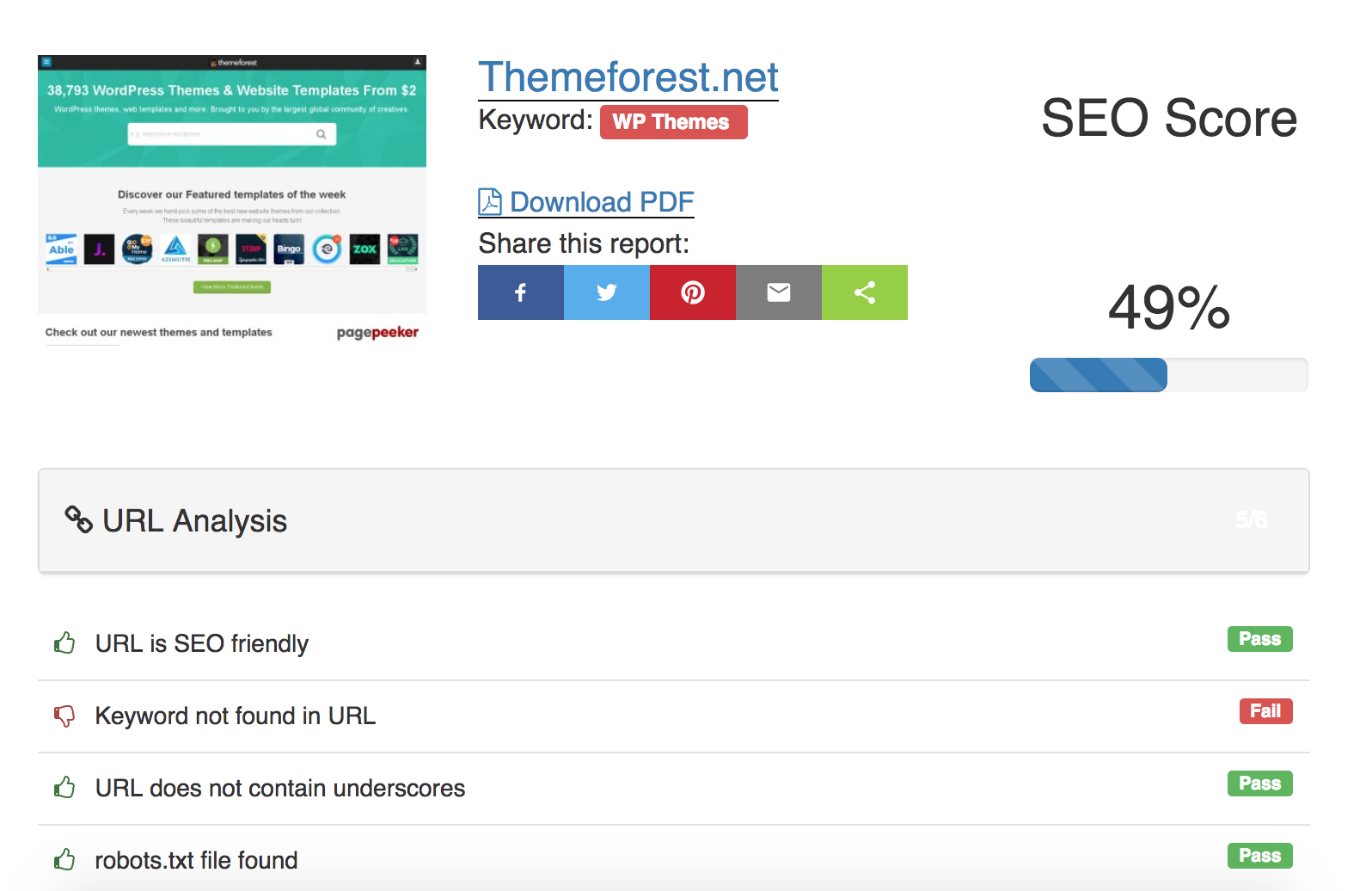
    SEO Propeller wordpress plugin allows you & your visitors to generate full onpage seo reports for any given URL and Keyword combination!

    It analyses the following on any valid & available website:

    • URL Analysis
    • Title Analysis
    • Meta Tags
    • Website load speed
    • Heading tags ( h1 to h3 )
    • Text analysis
    • Image analysis
    • Code analysis ( valid w3.org, text:html ratio, etc)
    • Social buttons
    • Top words
    • Mobile analysis

    Depending on the SEO report result, it will generate a task list to improve the SEOScore

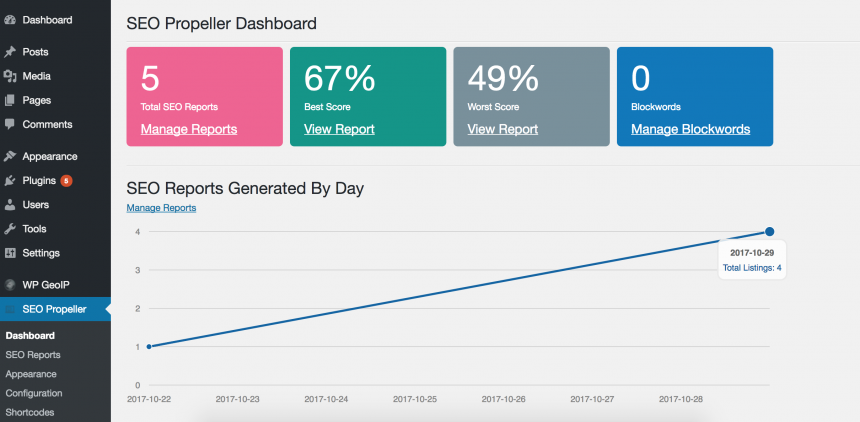
    Nice dashboard with chart and stats

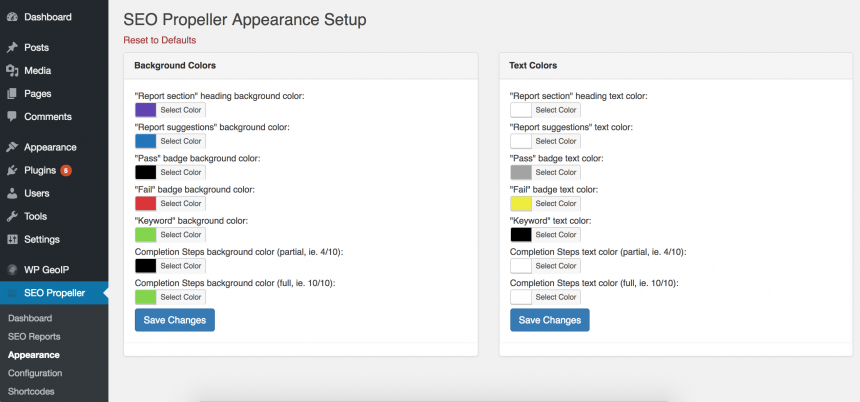
    Fully configure appearance of the SEO report

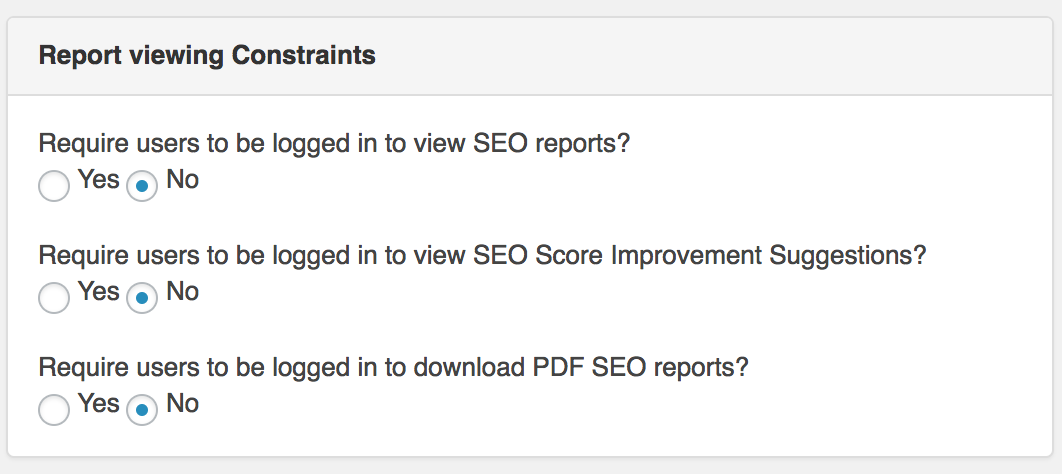
    Report viewing restrictions

    You can add constraints like:

    • On/Off: Visitors must be authenticated to view the task list
    • On/Off: Visitors must be authenticated to generate and download PDF
    • On/Off: Visitors must be authenticated to view SEO reports

    Integrates with any WP theme

    Being a WP Plugin, SEO Propeller uses shortcodes to generate the pages it needs, just like Woocommerce and others. It integrates with virtually any wordpress theme.

    Release log

    v1.0 - Nov 2017 Initial Release
    

    Download WP SEO Propeller – Advanced SEO Analysis Tool (SEO)

    Post and Buy – Classified Ads Listings (Miscellaneous)

    Please note that this is Laravel 5.5 application so exprience with this framework and server configuration is required with php 7+ version.

    Post & Buy Classified Portal

    Classified Portal is developed for creating an interactive classified website. This web application is to be conceived in its current form as a dynamic site-requiring constant updates. On the whole the objective of the project is to provide users free classified portal where user can sell there goods. It will provide various companies to create their own classified site in market. Apart from this there will be an admin module for the customer to make changes to the database content.

    Admin Login

    http://sharjeelanjum.com/demos/postbuy/public/admin/
    User: [email protected]
    Pass: test123456

    FEATURES

    • Search Ads
    • Advance Search Filters
    • Post Free Ads
    • Free Registration
    • User Profile
    • User can manage active ads
    • User Can check pending ads
    • User Can check deleted ads
    • Email to friend option
    • Report Abuse to admin for fake ads
    • Manage Posted Ads
    • Manage Featured Ads
    • Contact Seller
    • Administrator.
    • Manage Categories
    • Manage User
    • Manage user Ads
    • User can send email to seller
    • Manage Filters
    • Manage Features
    • Manage Categories Features
    • Create Sub Users
    • Manage Google Ads
    • Handle smtp setting from admin
    • Sample Data Included

    Administrator

    Administrator can manage whole website:

    • Site Settings
    • Admn Users
    • Manage Posted Ads
    • Admin Can Post Ads
    • Admin Can Make ad as a Featured
    • Add Categories
    • Add Sub Categories
    • Edit or Delete Categories
    • Add Categories Features
    • Assign Categories Features to specific Category
    • Manage Filters
    • Manage Site Users
    • Admin can add new Site User
    • Manage SEO
    • Manage FAQs
    • Manage whole website content. Dynamic CMS is included to manage the content of the website.
    • Manage advertise ads
    • and much more

    Feel free to contact us if you have any issues regarding application.

    Upcoming Update

    Re captcha
    Admin Dashboard feeds
    

    Upcoming Features

    Payment Gateways
    Multi Languages
    

    Download Post and Buy – Classified Ads Listings (Miscellaneous)