Advanced WordPress Widget Bundle (Widgets)

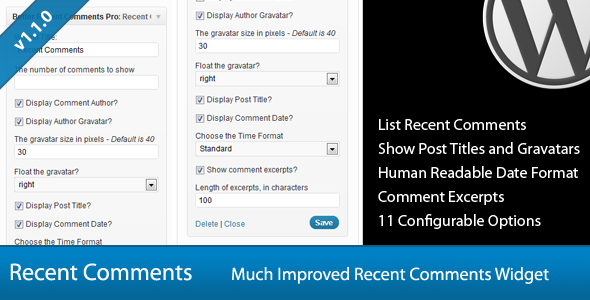
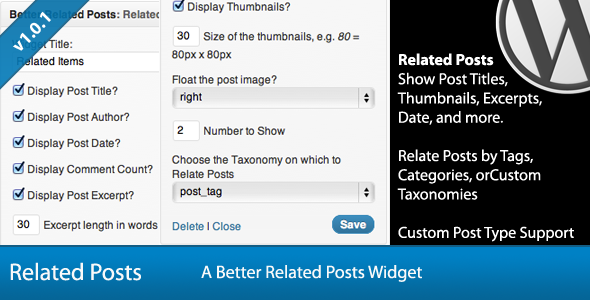
This is an advanced WordPress Widget bundle that includes 6 powerful widgets.

Widgets included:


o


Each of these widgets is available here on Code Canyon as single items, but get them all here for a greatly discounted price!

Additional details for each widget may be seen on their respective item pages.

Download Advanced WordPress Widget Bundle (Widgets)

Advanced WordPress Widget Bundle (Widgets)

This is an advanced WordPress Widget bundle that includes 6 powerful widgets.

Widgets included:


o


Each of these widgets is available here on Code Canyon as single items, but get them all here for a greatly discounted price!

Additional details for each widget may be seen on their respective item pages.

Download Advanced WordPress Widget Bundle (Widgets)

Advanced WordPress Widget Bundle (Widgets)

This is an advanced WordPress Widget bundle that includes 6 powerful widgets.

Widgets included:


o


Each of these widgets is available here on Code Canyon as single items, but get them all here for a greatly discounted price!

Additional details for each widget may be seen on their respective item pages.

Download Advanced WordPress Widget Bundle (Widgets)

Advanced WordPress Widget Bundle (Widgets)

This is an advanced WordPress Widget bundle that includes 6 powerful widgets.

Widgets included:


o


Each of these widgets is available here on Code Canyon as single items, but get them all here for a greatly discounted price!

Additional details for each widget may be seen on their respective item pages.

Download Advanced WordPress Widget Bundle (Widgets)

Fullscreen Background Image Slider WP Plugin (Sliders)

This plugin allow you to have fullscreen background image slider for your wordpress site. You can set the background image for each posts (including custom post types that comes with your active theme), manage the thumbnail settings for each post too.

Let’s check the example:

For each post (page, blog post or any other custom post type), you can setting up to use thumbnail or not, and define the position of the thumbnail.

The background slider and thumbnails are responsive! resize your browser to see it in action!

Main Features

  • Full screen background image slider – custom jQuery fullscreen slider
  • Ability to exclude some custom post types that will not use full screen background feature
  • 2 style : light and black
  • Full ajax for admin system (the plugin settings page and custom metabox)
  • Easy drag and drop to change the order of the image slider
  • Clean installation! This plugin do not create any custom tables into your database!
  • Localization ready! po and mo file included
  • Set the default backgorund that will used for any archive, 404, and search result page
  • Documentation included!

Requirements

  • WordPress 3.2 and Above
  • Server with PHP 5 installed
  • Completed theme! theme must call it’s script with standart method, theme must have ‘wp_head’ and ‘wp_footer’ in order to make this plugin works

Attention

  • Plugin may not works with themes that comes with Fullscreen image background feature
  • Plugin will create additional containers for thumbnails placement and Fullscreen image placement – each container have unique CSS ID and CSS Class – BUT I cannot guarantee that your theme will not have same css ID and Class which can make the plugin not work or break your theme layout – so below are the lists of CSS id and Class that comes from the plugin:

    • ID : bis-slider-thumbnail
    • ID : bis-slider-thumbnail-in
    • ID : bis_needHover
    • ID : bis-slider-lists
    • ID : bis-slide-next
    • ID : bis-slide-prev
    • ID : nwSlider
    • ID : nwSlider-overlay
    • class : bis-side-left
    • class : bis-side-right
    • class : bis-thumbnail-placement
    • class : bis-width-info
    • class : bis-height-info

Note

Images used in demo was purchased from fotolia and not included with download package!

Thanks :)

My WordPress Themes

PhotoGrid - One Page Ajax Photography WP Theme - ThemeForest Item for Sale
Xebax - Fullscreen Background WordPress Theme - ThemeForest Item for Sale

Aisya - Personal Portfolio WP Theme - ThemeForest Item for Sale

Anolox - Premium Portfolio WP Theme - ThemeForest Item for Sale
Adinda - Premium Business & Portfolio Wp Theme - ThemeForest Item for Sale
Intermezzo - Portfolio and Blog WordPress Theme - ThemeForest Item for Sale

Across - Proffesional Portfolio & business theme - ThemeForest Item for Sale


Joorang - Portfolio & Blog WordPress Theme - ThemeForest Item for Sale


WEGA - WordPress Corporate and Portfolio - ThemeForest Item for Sale

Auzora - One Page Portfolio and Business theme - ThemeForest Item for Sale

Download Fullscreen Background Image Slider WP Plugin (Sliders)

Fullscreen Background Image Slider WP Plugin (Sliders)

This plugin allow you to have fullscreen background image slider for your wordpress site. You can set the background image for each posts (including custom post types that comes with your active theme), manage the thumbnail settings for each post too.

Let’s check the example:

For each post (page, blog post or any other custom post type), you can setting up to use thumbnail or not, and define the position of the thumbnail.

The background slider and thumbnails are responsive! resize your browser to see it in action!

Main Features

  • Full screen background image slider – custom jQuery fullscreen slider
  • Ability to exclude some custom post types that will not use full screen background feature
  • 2 style : light and black
  • Full ajax for admin system (the plugin settings page and custom metabox)
  • Easy drag and drop to change the order of the image slider
  • Clean installation! This plugin do not create any custom tables into your database!
  • Localization ready! po and mo file included
  • Set the default backgorund that will used for any archive, 404, and search result page
  • Documentation included!

Requirements

  • WordPress 3.2 and Above
  • Server with PHP 5 installed
  • Completed theme! theme must call it’s script with standart method, theme must have ‘wp_head’ and ‘wp_footer’ in order to make this plugin works

Attention

  • Plugin may not works with themes that comes with Fullscreen image background feature
  • Plugin will create additional containers for thumbnails placement and Fullscreen image placement – each container have unique CSS ID and CSS Class – BUT I cannot guarantee that your theme will not have same css ID and Class which can make the plugin not work or break your theme layout – so below are the lists of CSS id and Class that comes from the plugin:

    • ID : bis-slider-thumbnail
    • ID : bis-slider-thumbnail-in
    • ID : bis_needHover
    • ID : bis-slider-lists
    • ID : bis-slide-next
    • ID : bis-slide-prev
    • ID : nwSlider
    • ID : nwSlider-overlay
    • class : bis-side-left
    • class : bis-side-right
    • class : bis-thumbnail-placement
    • class : bis-width-info
    • class : bis-height-info

Note

Images used in demo was purchased from fotolia and not included with download package!

Thanks :)

My WordPress Themes

PhotoGrid - One Page Ajax Photography WP Theme - ThemeForest Item for Sale
Xebax - Fullscreen Background WordPress Theme - ThemeForest Item for Sale

Aisya - Personal Portfolio WP Theme - ThemeForest Item for Sale

Anolox - Premium Portfolio WP Theme - ThemeForest Item for Sale
Adinda - Premium Business & Portfolio Wp Theme - ThemeForest Item for Sale
Intermezzo - Portfolio and Blog WordPress Theme - ThemeForest Item for Sale

Across - Proffesional Portfolio & business theme - ThemeForest Item for Sale


Joorang - Portfolio & Blog WordPress Theme - ThemeForest Item for Sale


WEGA - WordPress Corporate and Portfolio - ThemeForest Item for Sale

Auzora - One Page Portfolio and Business theme - ThemeForest Item for Sale

Download Fullscreen Background Image Slider WP Plugin (Sliders)

Fullscreen Background Image Slider WP Plugin (Sliders)

This plugin allow you to have fullscreen background image slider for your wordpress site. You can set the background image for each posts (including custom post types that comes with your active theme), manage the thumbnail settings for each post too.

Let’s check the example:

For each post (page, blog post or any other custom post type), you can setting up to use thumbnail or not, and define the position of the thumbnail.

The background slider and thumbnails are responsive! resize your browser to see it in action!

Main Features

  • Full screen background image slider – custom jQuery fullscreen slider
  • Ability to exclude some custom post types that will not use full screen background feature
  • 2 style : light and black
  • Full ajax for admin system (the plugin settings page and custom metabox)
  • Easy drag and drop to change the order of the image slider
  • Clean installation! This plugin do not create any custom tables into your database!
  • Localization ready! po and mo file included
  • Set the default backgorund that will used for any archive, 404, and search result page
  • Documentation included!

Requirements

  • WordPress 3.2 and Above
  • Server with PHP 5 installed
  • Completed theme! theme must call it’s script with standart method, theme must have ‘wp_head’ and ‘wp_footer’ in order to make this plugin works

Attention

  • Plugin may not works with themes that comes with Fullscreen image background feature
  • Plugin will create additional containers for thumbnails placement and Fullscreen image placement – each container have unique CSS ID and CSS Class – BUT I cannot guarantee that your theme will not have same css ID and Class which can make the plugin not work or break your theme layout – so below are the lists of CSS id and Class that comes from the plugin:

    • ID : bis-slider-thumbnail
    • ID : bis-slider-thumbnail-in
    • ID : bis_needHover
    • ID : bis-slider-lists
    • ID : bis-slide-next
    • ID : bis-slide-prev
    • ID : nwSlider
    • ID : nwSlider-overlay
    • class : bis-side-left
    • class : bis-side-right
    • class : bis-thumbnail-placement
    • class : bis-width-info
    • class : bis-height-info

Note

Images used in demo was purchased from fotolia and not included with download package!

Thanks :)

My WordPress Themes

PhotoGrid - One Page Ajax Photography WP Theme - ThemeForest Item for Sale
Xebax - Fullscreen Background WordPress Theme - ThemeForest Item for Sale

Aisya - Personal Portfolio WP Theme - ThemeForest Item for Sale

Anolox - Premium Portfolio WP Theme - ThemeForest Item for Sale
Adinda - Premium Business & Portfolio Wp Theme - ThemeForest Item for Sale
Intermezzo - Portfolio and Blog WordPress Theme - ThemeForest Item for Sale

Across - Proffesional Portfolio & business theme - ThemeForest Item for Sale


Joorang - Portfolio & Blog WordPress Theme - ThemeForest Item for Sale


WEGA - WordPress Corporate and Portfolio - ThemeForest Item for Sale

Auzora - One Page Portfolio and Business theme - ThemeForest Item for Sale

Download Fullscreen Background Image Slider WP Plugin (Sliders)

Fullscreen Background Image Slider WP Plugin (Sliders)

This plugin allow you to have fullscreen background image slider for your wordpress site. You can set the background image for each posts (including custom post types that comes with your active theme), manage the thumbnail settings for each post too.

Let’s check the example:

For each post (page, blog post or any other custom post type), you can setting up to use thumbnail or not, and define the position of the thumbnail.

The background slider and thumbnails are responsive! resize your browser to see it in action!

Main Features

  • Full screen background image slider – custom jQuery fullscreen slider
  • Ability to exclude some custom post types that will not use full screen background feature
  • 2 style : light and black
  • Full ajax for admin system (the plugin settings page and custom metabox)
  • Easy drag and drop to change the order of the image slider
  • Clean installation! This plugin do not create any custom tables into your database!
  • Localization ready! po and mo file included
  • Set the default backgorund that will used for any archive, 404, and search result page
  • Documentation included!

Requirements

  • WordPress 3.2 and Above
  • Server with PHP 5 installed
  • Completed theme! theme must call it’s script with standart method, theme must have ‘wp_head’ and ‘wp_footer’ in order to make this plugin works

Attention

  • Plugin may not works with themes that comes with Fullscreen image background feature
  • Plugin will create additional containers for thumbnails placement and Fullscreen image placement – each container have unique CSS ID and CSS Class – BUT I cannot guarantee that your theme will not have same css ID and Class which can make the plugin not work or break your theme layout – so below are the lists of CSS id and Class that comes from the plugin:

    • ID : bis-slider-thumbnail
    • ID : bis-slider-thumbnail-in
    • ID : bis_needHover
    • ID : bis-slider-lists
    • ID : bis-slide-next
    • ID : bis-slide-prev
    • ID : nwSlider
    • ID : nwSlider-overlay
    • class : bis-side-left
    • class : bis-side-right
    • class : bis-thumbnail-placement
    • class : bis-width-info
    • class : bis-height-info

Note

Images used in demo was purchased from fotolia and not included with download package!

Thanks :)

My WordPress Themes

PhotoGrid - One Page Ajax Photography WP Theme - ThemeForest Item for Sale
Xebax - Fullscreen Background WordPress Theme - ThemeForest Item for Sale

Aisya - Personal Portfolio WP Theme - ThemeForest Item for Sale

Anolox - Premium Portfolio WP Theme - ThemeForest Item for Sale
Adinda - Premium Business & Portfolio Wp Theme - ThemeForest Item for Sale
Intermezzo - Portfolio and Blog WordPress Theme - ThemeForest Item for Sale

Across - Proffesional Portfolio & business theme - ThemeForest Item for Sale


Joorang - Portfolio & Blog WordPress Theme - ThemeForest Item for Sale


WEGA - WordPress Corporate and Portfolio - ThemeForest Item for Sale

Auzora - One Page Portfolio and Business theme - ThemeForest Item for Sale

Download Fullscreen Background Image Slider WP Plugin (Sliders)

Sponsor Wall (Joomla)

KEY FEATURES :-

+ Slide your Favorite Product with Two Part one is hidden and one is on display.

+ Mouse hover on Wall and see Hidden part with Label/Description and Link of product or specific wall.

+ Able to Marketing your Product / Favorite sites / Advertising Sponsersip many purpose.

+ Able to Set Width/Height/Left and Between Wall margin From admin Portion.

+ Easy to Configure and Set with your own Joomla sites with Smooth Jquery Effect.

+ You will able to set 5 to 50 Wall(1 to 3 row) From administrator Dynamically.

+ Able to Set Any word replace of Link if your link is to long.

+ Able to set any word with Replace of Link Like “Press Me” , “Please Click Here” etc...

+ Able to Set Option for you Want Ranom wall everytime or not.

+ Also if you want to set Email id replace of backlink then its possible.

Download Sponsor Wall (Joomla)

Sponsor Wall (Joomla)

KEY FEATURES :-

+ Slide your Favorite Product with Two Part one is hidden and one is on display.

+ Mouse hover on Wall and see Hidden part with Label/Description and Link of product or specific wall.

+ Able to Marketing your Product / Favorite sites / Advertising Sponsersip many purpose.

+ Able to Set Width/Height/Left and Between Wall margin From admin Portion.

+ Easy to Configure and Set with your own Joomla sites with Smooth Jquery Effect.

+ You will able to set 5 to 50 Wall(1 to 3 row) From administrator Dynamically.

+ Able to Set Any word replace of Link if your link is to long.

+ Able to set any word with Replace of Link Like “Press Me” , “Please Click Here” etc...

+ Able to Set Option for you Want Ranom wall everytime or not.

+ Also if you want to set Email id replace of backlink then its possible.

Download Sponsor Wall (Joomla)

Sponsor Wall (Joomla)

KEY FEATURES :-

+ Slide your Favorite Product with Two Part one is hidden and one is on display.

+ Mouse hover on Wall and see Hidden part with Label/Description and Link of product or specific wall.

+ Able to Marketing your Product / Favorite sites / Advertising Sponsersip many purpose.

+ Able to Set Width/Height/Left and Between Wall margin From admin Portion.

+ Easy to Configure and Set with your own Joomla sites with Smooth Jquery Effect.

+ You will able to set 5 to 50 Wall(1 to 3 row) From administrator Dynamically.

+ Able to Set Any word replace of Link if your link is to long.

+ Able to set any word with Replace of Link Like “Press Me” , “Please Click Here” etc...

+ Able to Set Option for you Want Ranom wall everytime or not.

+ Also if you want to set Email id replace of backlink then its possible.

Download Sponsor Wall (Joomla)

Sponsor Wall (Joomla)

KEY FEATURES :-

+ Slide your Favorite Product with Two Part one is hidden and one is on display.

+ Mouse hover on Wall and see Hidden part with Label/Description and Link of product or specific wall.

+ Able to Marketing your Product / Favorite sites / Advertising Sponsersip many purpose.

+ Able to Set Width/Height/Left and Between Wall margin From admin Portion.

+ Easy to Configure and Set with your own Joomla sites with Smooth Jquery Effect.

+ You will able to set 5 to 50 Wall(1 to 3 row) From administrator Dynamically.

+ Able to Set Any word replace of Link if your link is to long.

+ Able to set any word with Replace of Link Like “Press Me” , “Please Click Here” etc...

+ Able to Set Option for you Want Ranom wall everytime or not.

+ Also if you want to set Email id replace of backlink then its possible.

Download Sponsor Wall (Joomla)

WP Toolset (Miscellaneous)

WordPress Toolset is a tool to helps WordPress Theme Developers to create Admin Panels and add Shortcodes easily to your themes.

This is a standalone application that runs in your localhost and generates real code in your theme folder!

You can redistribute the generated code in your theme, adding nice and pro features to your theme!

It’s an localhost application, don’t needs databases to run.

With WP Toolset you can:

Add to your theme more than +70 Shortcodes: Dividers, Quotes, Highlight, Message Boxes, Columns, Youtube, Vimeo, HTML5 Video and more, Buttons, Nivo Slider, BX Slider, LightBox, Tabs, Toggle, Accordion, Google Maps, Google Chart, Markup, Widgets and much more!

Add to your theme a nice Shortcode Generator that will give to the user a nice interface in the Post/Page Editor to add shortcodes without has to memorize the attributes. With some clicks and infos the shortcode goes to the Editor. Text, Selects and Color Pickers are avaliable.

Add to your theme a Super Options Page in the WordPress Admin, you can create Sections and Fields to get infos like: GMap Key API , Layout Options, Social Link Options and much more. Text, Textarea, Select and Toggle are avaliable!

To create a WordPress theme you need create more than 20 files without folders, images and css. To help you the WordPress Toolset has a option that allow you to create all these files automatically, including favicon template, theme thumb template and organized folders.

Download WP Toolset (Miscellaneous)
WP Toolset (Miscellaneous)

WordPress Toolset is a tool to helps WordPress Theme Developers to create Admin Panels and add Shortcodes easily to your themes.

This is a standalone application that runs in your localhost and generates real code in your theme folder!

You can redistribute the generated code in your theme, adding nice and pro features to your theme!

It’s an localhost application, don’t needs databases to run.

With WP Toolset you can:

Add to your theme more than +70 Shortcodes: Dividers, Quotes, Highlight, Message Boxes, Columns, Youtube, Vimeo, HTML5 Video and more, Buttons, Nivo Slider, BX Slider, LightBox, Tabs, Toggle, Accordion, Google Maps, Google Chart, Markup, Widgets and much more!

Add to your theme a nice Shortcode Generator that will give to the user a nice interface in the Post/Page Editor to add shortcodes without has to memorize the attributes. With some clicks and infos the shortcode goes to the Editor. Text, Selects and Color Pickers are avaliable.

Add to your theme a Super Options Page in the WordPress Admin, you can create Sections and Fields to get infos like: GMap Key API , Layout Options, Social Link Options and much more. Text, Textarea, Select and Toggle are avaliable!

To create a WordPress theme you need create more than 20 files without folders, images and css. To help you the WordPress Toolset has a option that allow you to create all these files automatically, including favicon template, theme thumb template and organized folders.

Download WP Toolset (Miscellaneous)
WP Toolset (Miscellaneous)

WordPress Toolset is a tool to helps WordPress Theme Developers to create Admin Panels and add Shortcodes easily to your themes.

This is a standalone application that runs in your localhost and generates real code in your theme folder!

You can redistribute the generated code in your theme, adding nice and pro features to your theme!

It’s an localhost application, don’t needs databases to run.

With WP Toolset you can:

Add to your theme more than +70 Shortcodes: Dividers, Quotes, Highlight, Message Boxes, Columns, Youtube, Vimeo, HTML5 Video and more, Buttons, Nivo Slider, BX Slider, LightBox, Tabs, Toggle, Accordion, Google Maps, Google Chart, Markup, Widgets and much more!

Add to your theme a nice Shortcode Generator that will give to the user a nice interface in the Post/Page Editor to add shortcodes without has to memorize the attributes. With some clicks and infos the shortcode goes to the Editor. Text, Selects and Color Pickers are avaliable.

Add to your theme a Super Options Page in the WordPress Admin, you can create Sections and Fields to get infos like: GMap Key API , Layout Options, Social Link Options and much more. Text, Textarea, Select and Toggle are avaliable!

To create a WordPress theme you need create more than 20 files without folders, images and css. To help you the WordPress Toolset has a option that allow you to create all these files automatically, including favicon template, theme thumb template and organized folders.

Download WP Toolset (Miscellaneous)