WPD subscription add-on (Add-ons)

Notice: If you purchased the WPdeposit plugin prior to 25 October it is important you upgrade it & all the add-ons!.

This WPD subscription add-on is for you If you wish to run a premium membership on your blog. You can run unlimited types of subscriptions (silver, gold, sponsors,donators, beta tester,….) and display specific content to them.


Submit a ticket


Read documentation

WPdeposit plugin

Features

  • Easy to use interface
  • Meta box when adding new posts to select which subscriber can view the page and it's content.
  • Add-on interaction. Some features are available accross different add-ons (see add-on interaction for more info)

the live demo can be found at http://uwebic.com/wpdeposit/subscribe

More add-ons?

You want to get more add-ons? Then visit http://uwebic.com/blog/portfolio_category/add-ons/

Download WPD subscription add-on (Add-ons)

RoyalSlider – Touch Content Slider for WordPress (Sliders)

Follow Semenov on TwitterFollow Semenov on EnvatoSubscribe to RSS

RoyalSlider for WordPress is a cross-device jQuery content slider with touch-based navigation and fluid layout. It has user-friendly admin area where you can manage slides, change slider settings, customize interface and add blocks-captions using custom WYSIWIG editor.

RoyalSlider for WordPress is created based on HTML version, selling here on CodeCanyon with over 750 happy buyers and five star rating.

Frontend Features:

  • Touch navigation for mobile and desktop
  • Hardware-accelerated CSS3 transitions for supported touch devices.
  • Multiple sliders per page is allowed, even with different skins.
  • Each slide can contain image and/or HTML content.
  • Smart lazy-loading — preloads nearby images after current (optional).
  • SEO — each block can contain any HTML tags (h2, p, img, ul).
  • Thumbnails or bullets for navigation.
  • Fluid(responsive) layout — size can be set in percents.
  • Three unique skins that can easily be editable using CSS . Photoshop files included.
  • Slider files are included only to WordPress pages where it is (if shortcode is used).
  • Autoplay support, interval times can be set in the settings panel.
  • Optional keyboard navigation and much more…

RoyalSlider is tested on Mac, PC, iPad 2, iPhone 4, HTC Desire, Blackberry PlayBook and even on Kindle Keyboard ;). If you’ve found that something works incorrectly on your device, so please contact me through my profile page.

Backend Features:

  • Easy to use admin area with default WordPress style and inline help.
  • Simple embedding using shortcode or PHP function.
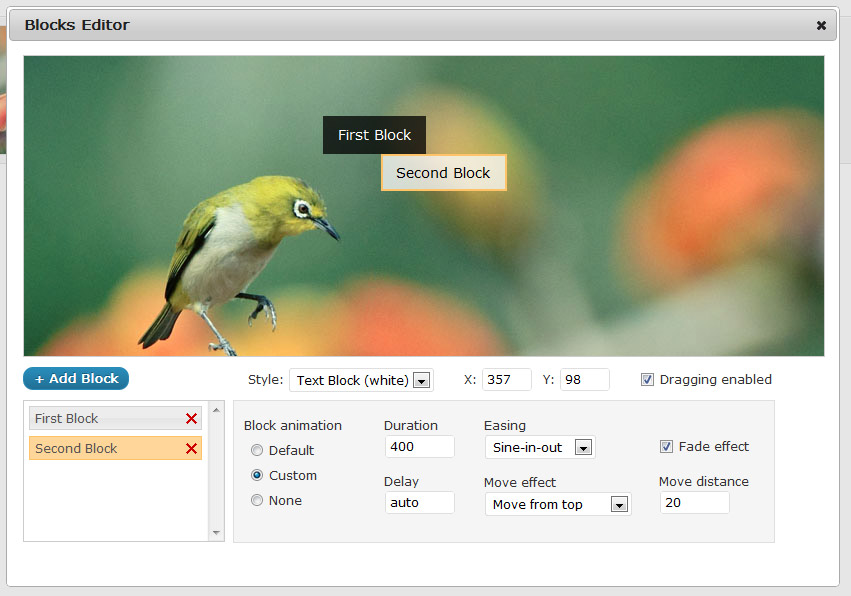
  • WYSIWIG blocks editor — add unlimited blocks-captions to each slide and edit their content inline.
  • Set custom move and fade effects, duration, easing and delay for each animated block.
  • Live slider preview in admin.
  • Add images via WordPress media uploader or paste a url.
  • Manage sliders and slides — delete, duplicate, drag and drop to sort.

Play admin panel video →

Admin Panel Screenshots (click for larger image):

 blocks editor
slides management
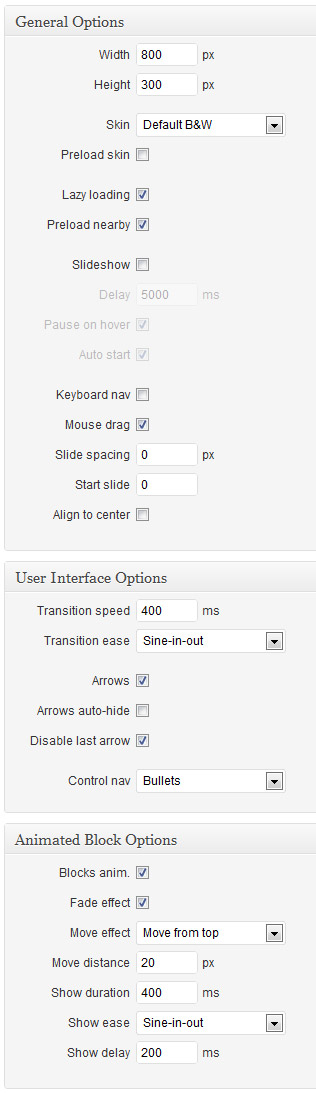
slider settings
sliders management

View Demo On Your Mobile Device

RoyalSlider qr-code

For support please contact me through contact form on my profile page.
Images in preview by John&Fish.

Download RoyalSlider – Touch Content Slider for WordPress (Sliders)

MyXML – Work with MySQL+XML (Database Abstractions)

With this PHP5 Class you are now able to:

  1. Create an XML file from MySQL Query
  2. Insert all XML Content into a MySQL table
  3. Create/Insert work as Export/Import! So you have php-friendly way to backup data of a table
  4. Create sitemap from a full MySQL table or just a query
  5. Easy way to get class-failure errors
  6. Easy way to display generated xml (with or without header) and save the data into .xml file
  7. Full examples included

Examples

Creating XML from MySQL query:

$xml->SQLtoXML(mysql_query("SELECT * FROM your_table"));
$xml->show(3, 'your_file.xml');

Import a XML content into your MySQL table:

$xml->XMLtoSQL($xml_string, 'your_table');

Creating Sitemap:

$xml->table = 'my_table';
$xml->changefreq = 'changefreq_field';
$xml->lastmod = 'lastmod_field';
$xml->url = 'url_field';
$xml->Sitemap();

$xml->Show(3, 'sitemap.xml');

‘Catching errors’

if($count($xml->errors) > 0) {
echo 'Something went wrong!<br />';
print_r($xml->errors);
}

Rating will be really appreciated.
Questions? Suggestions? Please, don’t doubt to leave a comment!

Download MyXML – Work with MySQL+XML (Database Abstractions)

Database Code Generator (Database Abstractions)

Database Code Generator:

Upload a single file to the server you are developing on and log into the SQL Server with Step 1.

The script will pilfer your database and generate a list of tables for Step 2. Simply select the table you want to work with from the drop-down.

Step 3 will populate a drop-down list of all 16 options you can use to save yourself time in development by copy and pasting the generated code into your script(s).

In step 3; if you select a form operation a button will be available at the end of the results box where you can preview your form.

Forms

This script will look to see the “type” of column that is in the database to determine the maxlength of the input fields. If the column is an INT or VarChar [or whatever] with a length of 8 then the maxlength of that particular input field will also be 8.

If the column type is “text, mediumtext, longtext, blob, mediumblob, or longblob” instead of using a text input, it will use a textarea.

HTML5 Forms

This script will match up column names with HTML5 input types to determine the type of input to use. For example: A valid input type for HTML5 is “email” – so, if the name of the column in the database is called “email” this script will use that HTML5 input type. HOWEVER , if the column name is e_mail – the script will give it a “text” input type unless e_mail is a custom column name (see box below).

HTML5 Custom Forms Types

Edit the php file. At the top you will see a list of arrays. Putting the name of your column in the appropriate array will trigger that column to be recognized as HTML5 type when the “Custom Column” checkbox is checked.

Example: Lets say you have a column named “phone” that is used to store phone numbers, and you want that input field to be a HTML5 type of “number”.
$html5_number = array("phone");
By adding “phone” in the $html5_number array when you select HTML5 from the Opt dropdown, any column with the name of phone will be assigned the HTML5 input type of “number” when the “Custom Column” checkbox is checked.

To see the custom arrays in action:

In the live demo I have a table called “demo”. In that table is a column named “notes” – it is a VarChar with a 128 character limit.
Go to the live demo and click Submit.
In Step 2 select the table : “demo”
In Step 3 select the operation : “Form – input”
Wait for the results to show up and look at the [last] input named “notes”. You will notice that it is a text input.
Now place a checkmark in the “custom columns” checkbox.
Wait for the results to update and look at the [last] input named “notes”. You will notice that it is now a textarea.

Updates

  • Version 1.0 – Initial Release – Oct. 24th 2011

Download Database Code Generator (Database Abstractions)

Cueburst Support System (Help and Support Tools)

Cueburst is a Helpdesk Support System, the two main areas of the system FAQ ’s/Knowledge Base, and support tickets.
This allows users to get help directly, and for you..the staff, easily keep track, manage and filter support requests.

Also with the option to assign Tickets to departments, in turn to staff members.

However, the advantage of Cueburst is the additional Knowledge base area, this allows users to view common questions/problems/answers, thus reducing the amount of ticket requests.

The system itself doesn’t stop at the above mentioned, it features Themes, Attachments, Post formatting, Usergroups, Assigned Staff, Subjects, Usergroups, Integration and a bunch of other system settings, all easily editable in the Staff Area.

With a clean user interface, users will easily navigate around your system ease.

Download Cueburst Support System (Help and Support Tools)

Mortgage Calculator – iPhone App (iPhone)

Ever dreamed about submitting your own app to the Apple app store? well, this is your opportunity! iMortgageCalc is a simple mortgage calculator Xcode project. This is a well documented and easy to customize project that will allow you to build your very own mortgage calculator. You can replace the app icon, logo, background, button images with your own images.

iMortgageCalc allows users to supply mortgage loan details, it will then use that user input to calculate an estimated monthly payment amount. It’s a very simple application, however you can customize it and add more features.

Check out a demo of this app running in the Xcode iPhone simulator.
http://screenr.com/i6ns

Why wait? Get your own app today!! Please do not forget to leave us your feedback, your input is highly appreciated. You input also helps build better apps for the future.

Download Mortgage Calculator – iPhone App (iPhone)

jQuery OneByOne Slider Plugin (Sliders)

The OneByOne Slider is a jQuery plugin you can use to display your image and text one by one. The CSS3 animation is driven by Animate.css. It’s mobile friendly, which support wipe left/right on your touch device. I’ve tested it on an iPhone, it works properly.

follow

The API looks like:

$(document).ready(function() { 
    $('#banner').oneByOne({
        className: 'oneByOne', // the wrapper's name
        sliderClassName: 'oneByOne_item',  // the each slider div's class name
        easeType: 'fadeInLeft',  // the ease animation style
        width: 960,  // width of the slider
        height: 420, // height of the slider
        delay: 300,  // the delay of the touch/drag tween
        tolerance: 0.25, // the tolerance of the touch/drag  
        enableDrag: true,  // enable or disable the drag function by mouse
        showArrow: true,  // display the previous/next arrow or not
        showButton: true,  // display the circle buttons or not
        slideShow: false,  // auto play the slider or not
        slideShowDelay: 3000 // the delay millisecond of the slidershow
    });  
});         

The available easeType are:

‘rollIn’, ‘fadeIn’, ‘fadeInUp’, ‘fadeInDown’, ‘fadeInLeft’, ‘fadeInRight’, ‘fadeInRight’, ‘bounceIn’, ‘bounceInDown’, ‘bounceInUp’, ‘bounceInLeft’, ‘bounceInRight’, ‘rotateIn’, ‘rotateInDownLeft’, ‘rotateInDownRight’, ‘rotateInUpLeft’, ‘rotateInUpRight’ or ‘random’.

Features:

  • CSS3 driven animation.
  • Mobile friendly, you can use it in a touch device.
  • Optional auto delay slideshow.
  • Optional drag function of mouse.
  • Optional animation style, can be in random or any other type.
  • Optional arrow and buttons.

Credit

Animate.css is form Dan Eden.

Recommendations For You

XML Image/Video Grid Gallery:
grid gallery
XML Image/Video Portfolio Template:
portfolio

Download jQuery OneByOne Slider Plugin (Sliders)

Mark as Read for WordPress (Utilities)

Mark as Read is a plugin for WordPress that gives your users a way to keep track of the posts they have read, and those they have not.

The plugin lets your users mark posts as read / unread as they view them. Everything is performed with ajax for a seamless, smooth experience.

Posts can be marked as read manually or automatically (after a specified period of time) and can have their read status changed at any point.

Every post that is marked as read receives a “read count”, which is used in one of the provided widgets to display a list of your most popular posts.

Users can easily view posts they have not read and also view a report of their reading progress on your site, including the number of posts they’ve read, the number they haven’t read, the total number of posts on the site, and the percentage of the posts they have read.

The plugin can be completely setup in less than five minutes and includes a variety of options to customize it to perfectly suit your needs.

Included are a selection of widgets, short codes, automatic functions (configurable through the settings page), and template tags. The plugin can be used by every level of WordPress user, from absolute beginner to advanced developer.

Features

  • Mark posts as read
    • Optional setting to mark posts as read automatically after a time period
  • Mark posts as unread
  • View posts not yet read
  • View complete reading report of the number of posts you’ve read, those you have not read, the total posts on the site, and the percentage of posts that you have read
  • Optional alert messages for when posts are marked as read/unread
  • Four widgets included
    • Mark Post as Read/Unread Links
    • User’s Unread Posts
    • Most Read Posts
    • User Report
  • 3 Short codes included
    • User’s Unread Posts
    • Most Read (Popular) Posts
    • User’s Report
  • Settings page that provides excellent control and complete setup in less than 5 minutes

Note that this plugin is designed to fit perfectly within your WordPress theme, and so only minimal styling is provided. The widgets and all other functions of this plugin will perfectly inherit the styles of your theme.

Download Mark as Read for WordPress (Utilities)

Sliding Tabs – WordPress Plugin (Sliders)

The Sliding Tabs WordPress plugin let’s you create tab interfaces easily from within your admin panel. Choose between horizontal and/or vertical tabs, create your own templates and include as many tab instances you want on a single page. The admin panels uses the familiar WordPress design and comes with many customization options, making it very flexible and easy to customize to your needs.

Features

  • Admin panels – Create tabs without touching any of the code! Integrate the tabs into your WordPress theme with a simple template tag or embed them into a post or page with a shortcode
  • Full featured – With the option panels you have full control of the tabs functionality. Here you can set the dimensions, animations, rearrange the tabs and much more.
  • Visual & HTML editor – Create content and upload media easily with the WordPress visual editor. If you prefer to add your own markup, just switch the editor to view HTML instead.
  • Template system – Use one of the included templates, or create fully custom CSS templates to match the tabs with your website’s design.
  • Multiple instances – The tabs can be included multiple times on the same page. A simple template tag or a shortcode is all that is needed.
  • Autoplay support – Automatically animate through the tabs when visitors arrive on your website. Interval times can be set in the options panel.
  • Cross-browser compatible – Sliding Tabs is compatible with all modern web browsers.
  • External linking – Link to the tabs from anywhere on the page by adding simple anchor elements. The tabs can also be linked to from the URL .
  • Multiple transitions – Choose between multiple fading and sliding animations. You can also choose to disable the transition effects.
  • Auto height adjustment – Useful for content with varying height.
  • Save the active/current tab – If enabled, the last tab clicked will be saved
    with a cookie and set active the next time the
    page is loaded.
  • Use the mouse wheel to slide the tabs – If enabled, the tabs can be navigated with the mouse scroll wheel.

Changelog

Current version: 1.0 (21/11/2011) – View changelog

Download Sliding Tabs – WordPress Plugin (Sliders)

WordPress Splitscreen (WordPress)

Just Split that Screen!

Introducing WordPress Splitscreen

Mobile & touch ready, WordPress Splitscreen transforms the core jQuery Splitscreen plugin into a powerful WordPress plugin.

Assign a Splitscreen to any page, category archive, post, posts within a category or shortcode enabled area in a WordPress site, including text widgets.

WordPress Splitscreen is a bold and different way for WordPress sites to display image ads, promote content, or welcome web visitors. Splitscreen remains an unique, interactive, fullscreen, billboard style, overlay plugin with three valuable modes: splash, promo, and teaser.

With over 30 available settings and options, the WordPress Splitscreen control panel makes it easy for WordPress administrators to create, manage, customize and publish Splitscreens to WordPress installations on the fly.

In Splash mode, Splitscreen appears above your website content and is dismissed (closed) by clicking on the center of the page.

In Promo mode, Splitscreen appears above your website content with two buttons behind the split. One button leads to a custom URL , while the other dismisses (closes) Splitscreen, allowing the user to view the current page.

In Teaser mode, Splitscreen appears above your website content and provides the option to add custom ‘teaser’ html behind the split; in this mode Splitscreen cannot be dismissed (closed) unless you add a special CSS class to an element in the ‘teaser’ html or use the included JavaScript call to close Splitscreen programmatically.

Download WordPress Splitscreen (WordPress)

Twitter for OpenCart (OpenCart)

Features

This plugin displays tweets on the pages of your store. You can display the tweets for keywords or specific username.

  • Easy installation
  • Display the tweets for keywords.
  • Display the tweets for username.
  • Number of tweets setting.
  • Updated in real time

Install

To install just unzip the files and copy files from “upload” in the main folder of your site. Then go to the page of modules in the admin panel and click “install” in front of “Twitter”.

You can see a demo

Download Twitter for OpenCart (OpenCart)

Categories on Main page (OpenCart)

Simple and easy module. You can choose which categories you want to see on the main page of your site.

Install

Just unpack the files from the upload folder to the root folder of your site. Go to the administrative section of your site. Go to the Extensions->Modules. Find “Categories on main” module and click “install”.

Use

Go to the administrative section of your site. On the modules page select “Categories on main” and click “edit”. Select the category you require:
.
More information.

You can see a demonstration or read the documentation

Download Categories on Main page (OpenCart)

Video Gallery – with Admin Panel (Images and Media)

“VIDEO / YOUTUBE / VIMEO GALLERY ” with Admin is the ultimate solution you need for displaying videos in your website / bussiness. It’s the mashup of an awesome, premium featured video gallery and a capable backend. The result is the fact that you can now create great galleries in a matter of minutes due to the easy-to-use admin panel.

It uses a unique custom built method for bringing the gallery into the front end, so that you don’t have to do more then one step. You just copy the embed code provided by the backend, copy it where you want the gallery do display and the magic happens. The embed location does not have to be relative to the backend. It can be anywhere. It can be on your static html site. It can be on your already setup wordpress installation. It can be in a Joomla / Tumblog install. It can be anywhere html content can be copied. Also, did I mention there is no database configuration like in other CMSs ? That is because it does not use a database. So simple to use yet so robust.

But enough words, you can test it right away

Front End: http://thezoomer.net/php_ygallery/

Back End: http://thezoomer.net/php_ygallery/admin/admin.php

Demo notice: Changes are reverted to default every 30 mins


Special Thanks

If you want to buy the beautiful videos used in preview you can go to http://videohive.net/user/Generator/portfolio?sort_by=sales_count&type=files&page=1

Download Video Gallery – with Admin Panel (Images and Media)