Video Player WordPress Plugin – YouTube/FLV/H264 (Galleries)

This wordpress plugin will help you administrate the entire video player using a very friendly interface. You’ll be able to customize the player look & feel, playlist and CSS file.

Any type of video file that Flash Player supports can be played with our player:

– FLV /H.264 encoded video : MP4 , M4V, M4A , MOV, Mp4v, F4V

YOUTUBE

– RTMP (using FMS or RED5 ) and RTMP live streaming

It also plays Audio MP3 files. It supports Google Analytics

You can set this player to any size you want in wp-admin, changing the player width, the player height and the playlist width. You can easy integrate this in your pages using the shortcode [lbg_vp1 bgcolor=’#FFFFFF’]

FEATURES :

NEW : If needed, a movie can belong to multiple categories
You do not need to know Flash in order to set the video player. Every setting can be done from the wp-admin.


AUTO RESIZE

The controllers will reposition automatically according to width and height specified. It will play 16/9 and 4/3 formats.

VIDEO STREAMING WITH BUFFER

You can set the buffer time

FULLSCREEN

It supports full screen, having all the controllers usable in full screen mode, including space bar. In full screen you can also hide or show the playlist

AUTOHIDE FOR CONTROLLERS

The controllers (play, pause, rewind, next and volume) will auto hide on fullscreen for mouse out, showing the entire movie

PREVIEW IMAGE OPTIONAL

A preview image can be defined for each video and will be displayed before playing. For YouTube files it will be taken automatically form youtube.com

VOLUME CONTROL

You have a complete sound control. You can also set the initial volume

AUTOPLAY OPTIONAL

LOOP OPTIONAL

If set to true it will loop through the movies in the current category

DESCRIPTION FOR VIDEO OPTIONAL . It can be DISABLED

For YouTube videos it will automatically download from youtube.com, the preview image, movie title and description. You can overwrite youtube movie title and description by writing your own movie title and description.

COOL PLAY BUTTON IN THE MIDDLE OF THE VIDEO

PLAYLIST SEARCH AND NAVIGATION NEW *

– you can search inside the playlist by title or description.

– next / previous buttons available

QUALITY SELECTION

– you can set the default playback quality for YouTube videos

– a list of playback quality options is displayed. You can choose to change the movie quality while playing from the options available

SHARE OPTIONAL . It can be DISABLED

Link to the current video – the link to your player is available; Using FlashVars the player will open with the video you are watching

Embed this video – YouTube like embed code is available. The visitors can generate the code lines needed to embed the player on other sites

Send To A Friend – the visitors can send an email inviting the email owner to watch the video. The email can contain HTML code and you can edit the email content for this email . No programming knowledge needed. A php file will send the email, php file included in download zip

FaceBook, Twitter, Digg, Delicious etc – you can define other sharing websites.

WATERMARK OPTIONAL . It can be DISABLED

If you need a watermark just upload the new image and change the link.

GOOGLE ANALYTICS OPTIONAL . It can be DISABLED

You can insert google analytics to your site and track your videos. Each time a video is played it will be tracked. If you are not interested in google analytics for your site/player just set false in settings.

SPACEBAR KEY LISTENER

In order to play/pause the video you can use SpaceBar key.

CLICK LISTENER

You can also click on the video to play/pause the video.

RTMP SUPPORT

You can play rtmp from FMS or RED5 . RTMP live streaming also supported.

SUPPORTS HTML AND CSS FORMATED TEXT .

PLAY LIST CUSTOMIZATION

– you can change the playlist width, playlist background color, categories color and css style, categories mouse over color, the color for the frame around the playlist image etc. You can also set if you want the categories alphabetically sorted or not. You can also disable the category section if you don’t have categories or have just one.
– you can set to show or not the playlist on first load

DESCRIPTION FOR BUTTONS ON MOUSE OVER OPTIONAL . It can be DISABLED

You can modify/translate the buttons description (Ex: If you want to translate the descriptions in other language than English )

HELP FILE

A complete help file is included


Keywords: wordpress, plugin, actionscript3, analytics, as3, categories, css, flv, fullscreen, Google, h264, hd, mov, player, playlist, resizable, rtmp, video, mp3, audio, youtube, video player, videoplayer, search, zoom, tween, quality, selection, next, previous, navigation, rtmp live streaming, watermark

If you need additional information don’t hesitate to contact us at [email protected]. We’ll try to answer you as quickly as possible.

Enjoy!

Download Video Player WordPress Plugin – YouTube/FLV/H264 (Galleries)

Facebook Viral and Marketing Social App (Social Networking)

Did you ever dream to get a viral app fully integrated to the Facebook experience? You’ve got it. With this app you can let you users connect with their Facebook account before being able to access a reserved content (video, article, download link…).

But that’s only one part of this app can do, here are the most awesome and marketing oriented list of features…

Features

– Get and store in your database the users email
– Be able to post a message on your users Facebook wall
– Be able to send an email to your users
– You can send message to only one, or a selected group of users !
– Preview any user data stored in the database (email, name, birthday etc
– Build-in tool to export your users data into a CSV format
– Automatic autopost on your users Facebook wall when they first connect
– Automatic send a defined email to your users when they first connect
– Ability to delete the users from the backend interface
– Customize the content reserved for connected users right from a backend form
– When posting on users Facebook wall, you can also define a link and/or an image (with the message).

This app can get you more traffic, features a proven way to get your real users email, and can be a base for your promotional and marketing projects.

Download Facebook Viral and Marketing Social App (Social Networking)

jQuery Shining Image (Canvas)

jQuery Shining Image is an HTML5 jQuery plugin that add an animated shining effect to your images.

This plugin use canvas element, and is compatible with all computer and mobiles modern browsers. For the others, the image keeps its default static look.

– Very easy to use : $(‘img’).shiningImage()
– Many options to customize the effect
– The shining image keeps the default style, class and id attributes
– The shining image keeps original image click, mouseover, mouseout, mouseup and mousedown events
– Compatibility : IE9 + , Firefox 4+ , Google Chrome 11+, Opera 10.6+, Safari 3.2+

Plugin parameters list :

– color : Sets the effect color
– delay : Sets the delay between each shine effect
– direction : Sets the effect direction. Horizontal, vertical or diagonal
– opacity : Sets the effect opacity
– scale : Sets the effect scale. 1 = 30% of image width or height
– speed : Sets the effect speed in ms

Download jQuery Shining Image (Canvas)

WordPress Advanced Image Lazy Load (WordPress)

Introduction

Do you want to make your web site faster? your boss and your clients consider the pages load speed a serous matter?

You are not the only one, the giant Google is also striving to make the web faster by  providing a complete family of products for analyzing pages performance.

Plugin Description

With WP Image Lazy Load plugin, no more need to sacrifice your beautiful images quality!

Family galleries, portfolios, news reports with a lot of photos. By using this plugin, page speed analyzers will not any more blame your web site images.

Main Features:

  • Ready to use, no action is needed for existing or future images on posts/pages
  • Improving images selection performance by customizing default selectors for several site sections
  • Cascading enabling/disabling levels :

    • Level 1 : Enable or disable for the whole website
    • Level 2 : Enable or disable for all posts and pages
    • Level 3 : Enable or disable for all images within a specific post or page
    • Level 4 : Enable or disable for a specific post's or page's image
  • Customizing the loading of images
  • Possibility to also lazy load theme images which are not part of posts/pages.

WP Advanced Image Lazy Load is available in the following languages:

  • English
  • French

Theme Hacks

The plugin does its magic for you when it comes to images within posts or pages. If you want to reuse the same mechanism for your own theme's images that are not part of posts body:

  1. Make sure your image belongs to the selector scope
  2. Set the src attribute of the img tag with this function helper as value get_wp_lazy_loading_image()
  3. Add a "is_lazy" attribute to the img tag
  4. Add a "rel" attribute to the img tag with the the original image URI

Example

The ReadMe or the plugin web page explains how to set it up, and it really only takes a few minutes.

Please feel free to contact me if you have any further questions Profile contact form

Download WordPress Advanced Image Lazy Load (WordPress)

zServer -Multi-User Chat Server/Data Communication (Communication Tools)

Have you ever wanted to connect your .net application to another computer? With zServer you can setup an extremely simple Data communication system with just a few simple steps. With zServer only the host needs to open a port(Port forward) the clients will NEVER have to port forward.

The zServer and zClient are both included in this package.
zServer allows users to use the Server or the Client as a standalone system. This means that if you are the host using the zServer the clients connecting to you will not have to use the zServer, they will only use the Client from zServer without having to start their own server.

With zServer/zClient You can:

  • Send Private Messages to other users
  • Send a message to everyone online
  • Get all the users online as an array
  • Manage users who just Logged in/Logged out
  • Manage every data incoming

The zServer is extremely easy to use!
You can simply just reference the DLL into your .Net application and just select the Events from the drop-down menu.
You can also just drag and drop the zServer files into your project.

The zServer can be used in any application which requires other members to interact. Whether its a Game, Chat Room, synchronized Movie player, PC-to-PC control system, or just about anything that needs to transfer data.

If you are unsure about the zServer please check out the Video Link or feel free to drop an email/comment.

free counters

Download zServer -Multi-User Chat Server/Data Communication (Communication Tools)

FlashyTitle – easy title bar notifications! (Miscellaneous)

FlashyTitle is a quick and easy way to deliver notifications to your users. Have you ever noticed how popular sites like Facebook also give you notifications in the title bar? Now you can easily do this too! FlashyTitle is a lightweight script that enables you to add single notifications or even a rotating notification queue, with customizable time intervals. It’s an easy way to make your notifications more flexible and your users will love it!

Download FlashyTitle – easy title bar notifications! (Miscellaneous)

CSS3 Accordions For WordPress (WordPress)

Admin panel video preview

Accordions video preview

This is a pack of pure CSS3 Accordions For WordPress – horizontal and vertical. Tested and working in all browsers. IE 6 – 8 is supported by JS (jQuery Fallback).

Here is non-WordPress version

Features

  • pure CSS + HTML (no javascript)
  • Horizontal and Vertical accordions
  • configurable dimensions
  • insert any content
  • unlimited data rows or columns
  • unlimited color versions (Color Picker)
  • hover states
  • intuitive admin panel
  • implementatin with simple shortcode
  • documentation included

Browser Support

  • Firefox 2 – 3.5 – Full Support (No Support for Animation)
  • Firefox 4 – 5 – Full Support
  • Opera 11 – Full Support
  • Safari 5 – Full Support
  • Chrome – Full Support
  • IE6 – 8 – Full Support (No Support for Animation)
  • IE9 – Full Support

Updates

none

Planned Updates

none

Download CSS3 Accordions For WordPress (WordPress)

ECPT: Bonus Meta Field Types Add-On (Add-ons)

This is an add-on plugin for the Easy Content Types plugin for WordPress.

Easy Content Types is an extremely powerful plugin that allows you to create unlimited post types, taxonomies, and meta boxes in your WordPress website.

Bonus Meta Field Types add-on provides 5 additional meta field types that you can use when creating meta boxes with Easy Content Types.

The additional meta fields are:

  • Taxonomy Select – provides a drop down of all registered taxonomies
  • Menu Select – provides a drop down of all registered navigation menus
  • Color Picker – provides a color picker you can use to easily choose any color
  • Google Map – render a google map of a specified address
  • Separater – display a separator line between your meta fields to clean everything up and make it easier to read

Along with the additional meta field types, this add-on plugin also provides three new short codes that can be used in conjunction with the new meta fields:

  • [ecpt_taxonomy] – Display a list of terms from the chosen taxonomy
  • [ecpt_menu] – Display all links from the chosen navigation menu
  • [ecpt_map] – Display a map of the specified address

Not Sure What to Do With These Field Types?

Here are some ideas for what you can use these field types for:

Taxonomy: Use this field to choose a taxonomy on a post-per-post basis then display a list of terms from that taxonomy in the post. Use it to display list of “category” links on any page you want.

Menu: Use this field to display the links from any of the custom navigation menus you have created. This will let you easily display custom nav menus in any post or page.

Color Picker: Use this to let your author choose colors for their post. For example, your author could choose the color he/she wants the border color of all images to be.

Map: This one is pretty obvious :)

Change Log

v1.0.1 - Updated update script and removed several non-indexed errors present when WP_DEBUG was set to TRUE.

Download ECPT: Bonus Meta Field Types Add-On (Add-ons)

iPhorm – WordPress Form Builder (Forms)


WordPress has a new best friend. iPhorm.

If you use WordPress, require custom forms and don’t like wasting time or simply don’t want to touch any code then this is the must have tool for you.

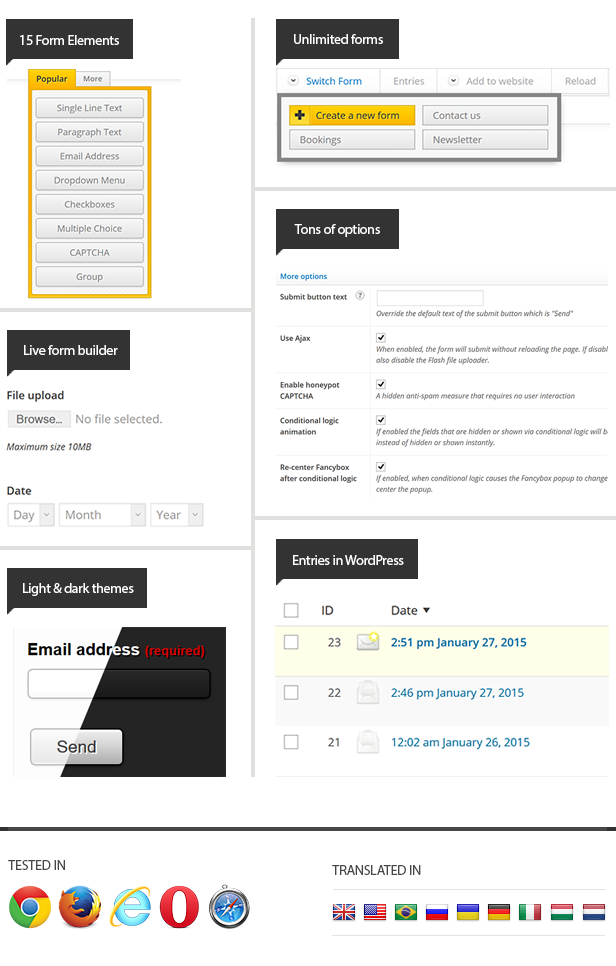
iPhorm WordPress is a brand new plugin that allows you to build multiple forms in WordPress easily and quickly with total control. If it’s a complex quote or booking form or just a simple contact form, iPhorm plugin will allow you to do this without touching any code. In a few clicks you will have a fully functional form. It’s that simple.

Please visit the iPhorm WordPress website. Or learn more below…

Functionality features

Some of iPhorms best features

Using the form builder is made simple with drag and drop and one click functionality and it works in all major browsers. There are options and settings for the basic user and for professionals. There are far too many features to list them all here, so here are the favorites:

  • Create a form without knowing any HTML or PHP !
  • Drag and drop form elements
  • Fully translatable for all languages
  • Easy to use user interface
  • View submitted form entries inside the WordPress admin
  • Send submitted form data via email
  • File uploads, sent as attachments or saved to the server (or both)
  • Preview while building
  • Flash upload progress
  • Group elements for complex form layouts
  • 15 included element types
  • Conditionally set recipients based on form values
  • Custom autoreply
  • 6 included filters to strip invalid data
  • 9 included validators
  • Import/export forms across websites
  • Plenty of help and support

Styling features

Making your form look great

Not only does the iPhorm take care of the functionality, it can very easily make your form look great too. iPhorm has a unique form theming system. You can use one of our themes, create your own theme or use other peoples theme designs. For the more advanced user, you will not be disappointed with the flexibility of the styling features of iPhorm. You can have total control of your form design and there are plenty layout options so you can take it as far as you like.

  • Dark and Light themes included
  • Create your own themes
  • Easily edit the CSS of elements via the form builder
  • Use a variety of label placements to display elements
  • Uniform (Sexy forms with jQuery) included
  • qTip2 Tooltips with 12 included styles
  • Group elements to separate sections or for layout
  • Unique identifiers make it easy to manipulate an element
  • Customize inputs with onscreen color picker

Recent feedback

We’ve just launched, so there is no feedback yet. However, we would like to make you aware that we have iPhorm PHP version on CodeCanyon and have been receiving top sales and positive reviews for our work, this was the inspiration for iPhorm WordPress.

Psssst, hey designer… wanna make an iPhorm theme?

Anyone can create a form theme for iPhorm and it’s easy. Get more information from our website and start selling.

Requirements and recommendations

WordPress v3.0 or greater

NOTE : No coding skills required :)

You will need to know CSS if you would like to create a theme.

Support

We’ve added a detailed help file to help you make any changes you need to the plugin as well extensive help throughout. If for some reason this is not enough, feel free to
contact us on our ThemeForest profile if you need additional help.

Take a look at some of our other items on our portfolio.

Stay connected for updates, support and promotions


Download iPhorm – WordPress Form Builder (Forms)

ApPHP AJAX File Uploader (Loaders and Uploaders)

ApPHP AJAX File Uploader is an easy to use, high-performance PHP AJAX Multiple File Upload Control which allows you to upload files to web server without refreshing the page.

Most of the web application available today includes a capability of user to upload files, whether it is a social media application or a CMS /Blog network platform. Upload capability of your application can be made easier and usable to the user if you are using our File Uploader control.

This control allows you select and upload multiple files and/or cancel running file uploads, add new files during uploading. The client-side look and feel may be easy customized according to your needs.

Download ApPHP AJAX File Uploader (Loaders and Uploaders)

jQuery Message Bar (Miscellaneous)

Item Description:

The jQuery Message Bar is a professional and elegant plugin that adds a message bar to your pages.

You can see the DEMO HERE . Please click on the “Play in HD” button to see it in fullscreen.

Details:

  • jQuery Framework
  • Link Support
  • 5 Different Color Variations
  • Cross-Browser Support
  • Example demos included
  • Simple to Customize
  • Well Documented


Download jQuery Message Bar (Miscellaneous)

jQuery Carousel Evolution for WordPress (Sliders)

jQuery Carousel Evolution for WordPress is a WordPress plugin that allows you to easily create powerfull carousel slider in a few minutes. You can then integrate it into any page with a single shortcode. It includes a full back-end interface to create and customize your Carousel. It also offers a preview mode to easily try out some settings before pushing them live.

The Carousel also supports YouTube videos and Vimeo videos, enabling you to play your chosen videos directly into your Carousel !

Features

– Up to 9 different styles and positioning
– Control the seize of the carousel, and of the front and back image
– Supports the automatic creation of images shadow (view)
– Supports the automatic creation of images reflection (view)
– Choose to enable to no the next/previous buttons
– Automatically animate the slides and customize the autoplay interval period
– Unlimited number of images supported by the Carousel
– Very easy admin interface to manage all your Carousels
– Supports shortcodes to integrate your Carousel into any page
– Preview mode included with a shortcode generator
– Play YouTube and Vimeo videos directly into the Carousel
– Displays consistently on major browsers
– And much more settings and customization

Demo available here

This plugin has been fully tested on the default WordPress themes (Twenty Ten and twenty eleven). You may need to make some minor CSS adjustments depending on your theme’s CSS . We will of course always provide help and support to help you getting this plugin display properly on your site.

HTML version available


This WordPress plugin is based on the awesome HTML version of the jQuery Carousel Evolution created by Mapalla and available here.

Download jQuery Carousel Evolution for WordPress (Sliders)