Hot or Not WordPress Plugin (WordPress)

Ever wanted to hold a “Hot or Not” contest on your site? The Hot or Not plugin for WordPress now lets you do that, in fact you could potentially create a whole site around the concept using our plugin.

Getting Started

Once you download the plugin, simply upload it via your Plugins upload panel and activate. You will now see a dedicated menu for the plugin.

You can now choose your “Battle Mode”, set up your image configurations, edit the text if you like, update your settings and you are good to go!

Competitors

Upload as many “competitors” as you like using the dedicated Custom Post Type created by the plugin, once your image has been uploaded simply set it to be the “Use as featured image”! The plugin will automatically pick the featured image and use it in the Hot or Not contests.

You can even set up “Groups”, they work exactly the same as regular WordPress categories.

Voting is on a scale of 1 – 10 and all the text in the plugin is fully customizable, so you can use any terminology you like. Plus it’s 100% translation ready!

Don’t want to use it with images? Not a problem, you can feature text or embed videos as well! Check out our demo site for a live preview.

Easy Embedding

Use the handy shortcode generator to enter your shortcode to show your contests in your Posts or Pages.

Want to embed contests related only to a specific Group? Not a problem, the Hot or Not script can segment via Groups as well.

Make Money with Hot or Not!

The plugin also allows you to customize the links on your images, so you can link them with your affiliate link to products and create a potential affiliate revenue stream.

Bonus

The plugin also comes with a “Battle Mode” allowing you to let images battle between each other.

Check out our demo for a preview of how the Hot or Not contests look and function.

Download Hot or Not WordPress Plugin (WordPress)

Manual Related Posts (WordPress)

What is Manual Related Posts?

Manual Related Posts is a plugin that allows you to manually specify related posts, rather than use a algorithm.

Once activated, this plugin adds a meta box to the Add/Edit Post screen where related posts can be chosen.

There is no limit to the number of related posts, and un-relating a post is simple, simply un-select the entry.

Display a Posts Related Posts

Displaying a Posts related posts is easy:

<?php
/* Displays a specific posts related posts (passing the Posts ID) /
foreach(fcnGetManualRelatedPosts($post_id) as $id) :
echo ‘’.get_the_title($id).’’;
endforeach;

/ Display current posts related posts (Can we used inside a loop) */
foreach(fcnGetManualRelatedPosts() as $id) :
echo ‘’.get_the_title($id).’’;
endforeach;
?>

Features

Manual Related Posts allows you to select and un-select posts. You also have the option to add any many related posts as you like with a tool to remove an entry. Once done, click Publish to save.

Manual Related Posts also works with WordPress’ built-in Auto Save feature.

Download Manual Related Posts (WordPress)

Microthemer – WordPress Visual Design Plugin (WordPress)

Microthemer is a visual design plugin that gives non-technical WordPress users a way to customize the appearance of their WordPress theme. Microthemer is intended for WordPress users who demand near full design control but don’t have any knowledge of CSS .

Microthemer has been described as “WordPress theme options on steroids”. This is because the level of artistic control that one can achieve with Microthemer is very high indeed.

Currently, Microthemer can be used to customize the following WordPress Themes: Twenty Eleven, Twenty Ten, Thematic, and Toolbox. Many many more Themes will be supported as time goes on.

Download Microthemer – WordPress Visual Design Plugin (WordPress)

xCommenter WordPress Auto Comment SEO Plugin (SEO)

xCommenter Logo

xCommenter is a powerful SEO WordPress plugin that will post unique (spun) content to your posts and pages and pings all the major RPC + search engines after the comments are posted. This will add unique content to your pages, entice user interactivity, and improve your SEO efforts by making your posts and page content fresh and updated when crawled by Google, Yahoo, Bing etc.

– What xCommenter does:
xCommenter will automatically create comments on your blog posts and WordPress pages. It does this by analyzing the post title, content and tags to determine find relevant Yahoo Answers comments and questions. Optionally xCommenter will then run the content through a powerful content spinner API to make the content more original and unique to improve quality. xCommenter then can approve it’s own comments if you wish, and once a new comment has been made xCommenter will then optionally PING the updated page URL to all the RPC Ping services listed within your WordPress Admin panel, getting the updated page crawled and indexed quickly and more frequently. All of this is done on auto pilot.

– Why Use xCommenter
There are three main benefits of using xCommenter on your site.

  1. Comments posted by xCommenter are typically questions or requests for more information found on Yahoo Answers, thus visitors to your blog will be more likely to respond, often dramatically increasing user interactivity. Even if users choose not to interact they are more likely to accept your content as an authority or subject matter expert.
  2. Fresh updated content. Search engines love fresh updated content. When xCommenter makes a comment on one of your pages or posts it will (optionally) PING the RPC Pingback services found within your WordPress Admin. This will get your content indexed quickly and more frequently.
  3. Increase amount of unique content in your posts/pages. If you’re using article directories tofind content, or spun content on your pages then using xCommenter will increase the amount of content uniqueness again improving your SEO efforts by helping to reduce risk of duplicate content penalties.

– How To Use xCommenter:
xCommenter is incredibly easy to set up and use on your WordPress web sites and blogs. Set up can be done in as little as 2 minutes. There is no ongoing maintenance or scheduling required to use xCommenter (other than occasional software updates and improvements). It truly is an autopilot solution.You can watch a quick video tutorial of me setting up the software and explaining what each of the settings does by visiting:
http://vimeo.com/36628711

Or read the installation/plugin activation guide here: http://www.jspicher.com/xcommenter/

– What Languages Does xCommenter Support:
Currently xCommenter only supports English content. The Yahoo Answers API currently only returns English results and this is where the xCommenter plugin gets it’s seed content for the comments.

Download xCommenter WordPress Auto Comment SEO Plugin (SEO)

iPad Solitair v2.0 (iPhone)

Solitari iPad iOS5 App v2.0

This is not an update, this is the second version of very popular old game Solitar from PC now converted for iPad which was developed bit later than the first game came out on CC. It uses PugPig framework to pull content from HTML into native iPad app environment with support for Portrait and Landscape view.

Whole game is pulled from CSS and javascript and can be very easily edited trough CSS for different styling or translated to your native language via .js file or in-game editing.

Project itself is well commented and it is quite easy to edit if your jquery skill are advanced.

Main new features are support for different languages in game, resume and undo options and also the ability to customize the look & sound of the game itself. Now the game comes with different options of gaming, supporting classic Solitair, 3-draw Solitair and many others.

The game itself pulls the data from remote server witch keeps the record data and gives you ability to refresh or pull your previous game so the wifi or 3g connection must be present on device.

UPDATE !

After purchase please pm me so i can send you the OFFLINE version so you can replace it in XCode project.

The game can be also used as an native web app, just place the “Data” folder onto your web server and give your visitors some fun times.

Big thanks goes to my friend David@pl for making this baby working like a charm ;)

Enjoy the old game in a new environment and have some fun!

Best regards!

Martin

Download iPad Solitair v2.0 (iPhone)

Slider.js – JS framework for slider development (Media)

99% of all sliders have the same functionality. And yet, as a web developer, how many times did you have to rewrite the same functions for every custom slider that had to be just a little bit different?

This is where Slider.js comes in. It’s a powerful JavaScript framework that enables you to build sliders, fast. It gives you a rock-solid foundation to build all kinds of sliders – standard, custom, complex, simple. If it’s a slider, Slider.js can do it.

Slider.js will do all of the dirty work for you, like:

  • logic
  • event handling
  • grid slicing
  • managing z-indexes
  • non-overlapping animations
  • will manage tons of information about the current state of the slider and pass it as an API

Did I mention it will even slice up the slides in a grid for you?

The 1% left for you to write is only the transition effects. It can be as simple as a fadeIn(), or you can go as nuts as you like. It’s up to you!

Download Slider.js – JS framework for slider development (Media)

WordPress Social Feedr (Social Networking)

WordPress Social Feedr

Item Description:

The DP Social Feedr plugin lets you retrieve status/posts/videos/images from different social networks.

Features:

  • Retrieve status/posts/videos/
    images from different social
    networks.
  • Twitter, Facebook Page, Youtube, Delicious, Flickr, Dribbble, Digg
  • Different display styles.
  • Translation supported.
  • Use Shortcode in your posts/pages or as a Widget.
  • Cross Browser Support.
  • Simple to Customize.
  • Well Documented.

Credits:

Recommended Items


Download WordPress Social Feedr (Social Networking)

CCAvenue Payment Gateway for WooCommerce (WooCommerce)

About

CCAvenue Payment Gateway is a WordPress Plugin which extends the WooCommerce plugin to accept payments through CCAvenue ( Indian Payment Gateway ).

So if you have Indian customer base this plugin is must for India based ecommerce stores based on woocommerce.

Features

  • Seamless integration with Woo Commerce
  • Accepts all Indian debit/credit cards
  • Compatible with latest version of WooCommerce 1.4
  • Checkout on above demo page to see its functionality.

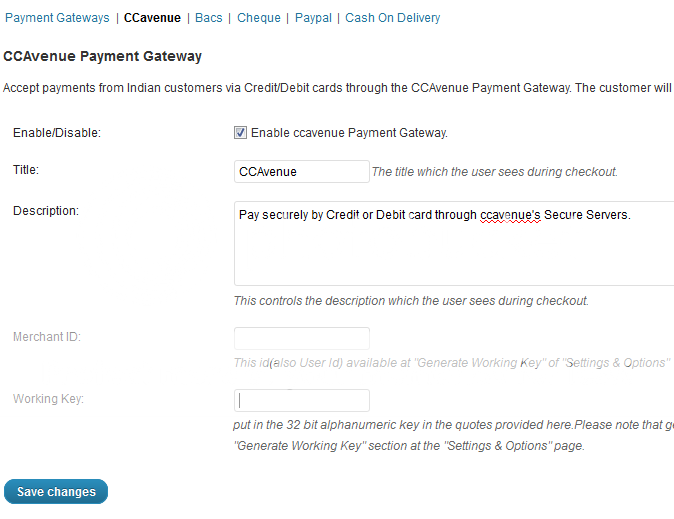
Admin Panel

Not using WooCommerce?

CCAvenue Payment Gateway also available forOpencart

Requirements

  • WordPress 3.0+
  • WooCommerce 1.3+

Download CCAvenue Payment Gateway for WooCommerce (WooCommerce)

Social Traffic Pop PRO (Add-ons)

I knew there was a set of Pro users and marketers that wanted to add all the possible bells and whistles that could be added to Social Traffic Pop, and now they have been. Social Traffic Pop PRO includes all of the great features STP does and a ton of new ones!

Social Traffic Pop PRO

Features

Granular Page Control – GPC allows you to control exactly what pages Social Traffic Pop shows on. Specify a set of page/post/content IDs from your WordPress site and choose to show only on selected page, or exclude those pages and show it on all pages but the ones you selected. You can also now choose whether or not you want STP to show on the homepage.

Delay Timer – Social Traffic Pop now has a delay timer that allows you to set how long the user will be on the page before it appears. For example is set to 10, STP will wait 10 seconds after the page is loaded and then it will be activated.

Selective API Loading – Some WordPress themes and plugins do not correctly load jQuery and some social API ’s. If your site happens to use one of these, it can cause serious issues with plugins that do load them properly as you will be loading two versions of the same API . Social Traffic Pop allows you to selective enable / disable the use of API ’s for each social service so you can work around a stubborn theme or plugin.

Selective Social Button Use – With STP Pro you can enable or disable the social buttons you do or dont want to use.

New TC Framework Admin Panel – Social Traffic Pop PRO will also upgrade the backend of the plugin to my new AJAX TC Framework!

New Facebook Features – You can now customize everything about the Like button. Specify what layout to use for the button, what color scheme to use, and also disable / enable the show faces feature.

New Twitter Features – The Twitter buttons got a full overhaul! You can now take advantage of all the new Tweet button features with Social Traffic Pop Pro. You can set the URL of the Tweet button manually (great for increasing the number that shows up in the counter for your homepage as an example), you can also pre-populate the Tweet text as well! You can choose the layout of the Tweet button, and also enable / disable the “”tweeted via” feature as well.

New Google Plus Features – Google has added a small number of customizations to the Plus button and they have been added to Social Traffic Pop as well. You can now choose the “annotation” of the button and how the counter / information is displayed, and also specify the button size to use as well.

All of these great new features are only available in the Pro version.

Requirements

Please note that this is an Add-On and requires Social Traffic Pop to function.

Download Social Traffic Pop PRO (Add-ons)

myRest – Easy REST client (Help and Support Tools)

myRest is an easy to use REST client, packed in one file, ready to handle all the hard job of interacting with all API ’s out there.

Main Features:

Interact with API ’s like youtube, twitter, vimeo, etc.
Interact with login forms, or another type of sites.
Use different methods to archieve your needs. GET ,POST,PUT,DELETE.
Handle cookies: send or retrieve, even save it into a file, for later use.
Upload files (POST).
Login into non-API sites.
Basic Auth.
Automatic parser, don’t need to worry about response, myRest choose the apropiate type of content and parse it, such like: XML ,JSON,PHP or RAW data.
Control every sended header.
Use SSL certificates
Get every response header and status code.
Quick mode, use only one line to make requests.
Debug mode, to see exactly what’s going on.
Clean and readable OOP code.

Require:

php 5.3.x
CURL

documentation can be found here: http://demos.alternanetworks.com/scripts/myrest/documentation/

Download myRest – Easy REST client (Help and Support Tools)

iRelax – A Meditation App For iPhone (iPhone)

? iRelax ?

iRelax is a very handy relaxation application, to be used when you need to relax or you are stressed or if you are about to go to sleep.

? iRelax features the following sounds: ?

– Amazon
– Beach
– Drip
– Fire
– Ocean
– Extreme Rain
– Heavy Rain
– Light Rain
– Rain Storm
– Shower
– Stream
– Thunder
– Wind

iRelax uses ambiant noises to take your mind of everything, helping you to calm down and relax.

The app is easy to edit, i have created a nice settings page that you can easily change images and sounds.

Good Luck

? THANK YOU ?

Download iRelax – A Meditation App For iPhone (iPhone)

Network Merchants Inc Payment Gateway for Jigoshop (Jigoshop)

Network Merchants e-commerce payment gateway enables companies to process online transactions in real-time anywhere in the world.

NMI (Network Merchants Inc.) Payment Gateway is a WordPress Plugin which allows the Jigoshop plugin to accept credit card payments without worrying the Customers Credit Cards Details which are taken care by the NMI .

Important Notes : This Gateway Implementation Requires the SSL Certficate to be Installed on your Site.

Download Network Merchants Inc Payment Gateway for Jigoshop (Jigoshop)

Network Merchants Payment Gateway for WooCommerce (WooCommerce)

Network Merchants e-commerce payment gateway enables companies to process online transactions in real-time anywhere in the world.

NMI (Network Merchants Inc.) Payment Gateway is a WordPress Plugin which allows the WooCommerce plugin to accept credit card payments without worrying the Customers Credit Cards Details which are taken care by the NMI .

Important Notes : This Gateway Implementation Requires the SSL Certficate to be Installed on your Site.

Download Network Merchants Payment Gateway for WooCommerce (WooCommerce)

ServerCHECK Mini II (Windows)

93.8 percent of all web servers have in average a downtime more than 20 times!

Monitor your web server or web space quickly, easily and reliably self – without expensive additional hardware or expensive third-party-services – with ServerCheck Mini II.

ServerCheck Mini II is a tool to monitor your website or web server fully automatically.
It can monitor your site and verify the content served from a web server (process availability).

As a “big brother” of the ServerCheck Mini (also available here at CodeCanyon) offers SCM II even more and improved features to monitor of your web space or web server more effective and reliable.
ServerCheck Mini II is a completely new development.

ServersCheck Mini II – Features:
– Fully portable
– No installation required
– Simply administration
– Server speed check integrated
– Log File System
– E-mail notification system
– Autostart function
– Help file included
and much more …

Protect yourself from unpleasant and long undetected server failures and detect early problems with the server through the unique server speed test and the log file system.

Download ServerCHECK Mini II (Windows)

Viral Lock PHP – Like, Google+1 or Tweet to Unlock (Social Networking)

Make your site go viral by requiring your users to Facebook Like, Google+1 or Tweet about your page to reveal premium content. Simply wrap the content you want to protect with the script and your content will be protected until the users shares your page. Viral-Lock is the first of its kind to combine Facebook, Google+ and Twitter to give maximal viral impact. More likes and tweets = More money for you.

Based on our Viral Lock plugin for WordPress the PHP version enables you to integrate the power of Viral Lock into anything. Anything you can put in a PHP file can be protected!

Features

Live demo
Also available for WordPress!
Key features
  • Content is protected until the visitor likes or shares your page.
  • User can either Facebook Like, Google+1 Recommend or Tweet your link to instantly show the content.
  • You can lock anything that you can put in a PHP file. HTML , Text, Js, PHP , Videos, Images etc.
  • Specify which link to share for each protected area or automatically use the current page URL .
  • Custom “Share to unlock” message.
  • A proven method for generating viral buzz for your site.
  • More Google+1’s = Better Google ranking.
  • Simple copy paste install in less then 5 mins.
  • No configuration required.
  • Uses cookies to remember which users have already shared your link.
Example usages
  • Premium content e.g. tutorials, e-books and guides etc.
  • Free download sites.
  • Coupon site.
  • Or any other content, links and much more.
  • Make your site go viral today!
Great documentation and copy paste examples

All our plugins come with thorough documentation and working examples that you can copy/paste.

Great Documentation

Cross browser compatible

Our scripts are W3C validated and tested in multiple browsers to make sure that your plugin always works great despite which broswers your visitors are using.

Looks great in any browser

 
More info

Live demo

Click here to check out the WP version.

Download Viral Lock PHP – Like, Google+1 or Tweet to Unlock (Social Networking)