IF YOU NEED ONLY THE JQUERY PLUGIN FOR THIS PRODUCT , YOU CAN DOWNLOAD IT FROM HERE : http://codecanyon.net/item/jquery-banner-rotator-content-slider-carousel/1534434
FEATURES :
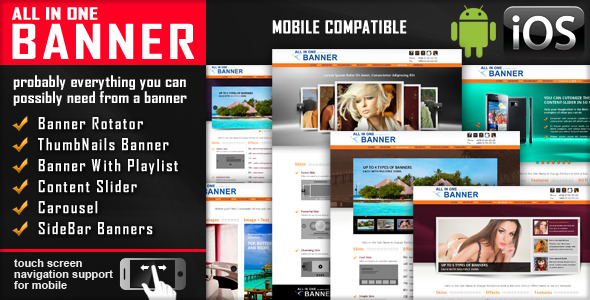
All In One Banner WordPress plugin includes 5 types of WordPress banners plugins:
– Banner Rotator
– Thumbnails Banner
– Banner with Playlist
– Content Slider
– Carousel
NEW : From these banners you can create, in just a minute, sidebar banners or mini-galleries.
 BANNER ROTATOR

Video Tutorial
Step 1: Installation – http://www.youtube.com/watch?v=D8rQdXzEz0o
Step 2: Manage Images – http://www.youtube.com/watch?v=ULrPCuP0rnQ
Step 3: Manage Text Over Image – http://www.youtube.com/watch?v=NXGbOoCvEr0
Step 4: Manage Multiple Banners – http://www.youtube.com/watch?v=y2wnD3hUdus
Features
- touch screen navigation support for mobile
- 3 predefined skins
- 16 photo transition effects
- Animated text from any direction: top, bottom, left and right. CSS and HTML formated
- width & height parameters
- autoplay parameter
- loop parameter
- randomize images parameter
- show/hide controllers parameter
- show/hide bottom thumbs parameter
- you can insert multiple instances in the same page with the same skin or using a different skin.
THUMBNAILS BANNER

Video Tutorial
Step 1: Installation – http://www.youtube.com/watch?v=iQwgvbDhmH4
Step 2: Manage Images – http://www.youtube.com/watch?v=agToQ_Hib2Y
Step 3: Manage Text Over Image – http://www.youtube.com/watch?v=W4JoplHYuwA
Step 4: Manage Multiple Banners – http://www.youtube.com/watch?v=40HwlIZxcE0
Features
- touch screen navigation support for mobile
- 3 predefined skins
- 16 photo transition effects
- Animated text from any direction: top, bottom, left and right. CSS and HTML formated
- width & height parameters
- autoplay parameter
- loop parameter
- randomize images parameter
- show/hide controllers parameter
- show/hide tumbs parameter
- thumbs reflection parameter
- you can insert multiple instances in the same page with the same skin or using a different skin.
PLAYLIST BANNER

Video Tutorial
Step 1: Installation – http://www.youtube.com/watch?v=nYp94Ri8CME
Step 2: Manage Images – http://www.youtube.com/watch?v=gQezs4xWwSs
Step 3: Manage Text Over Image – http://www.youtube.com/watch?v=3wR64OtLx7Q
Step 4: Manage Multiple Banners – http://www.youtube.com/watch?v=3EfdmbjTvoY
Features
- touch screen navigation support for mobile
- 3 predefined skins
- 16 photo transition effects
- Animated text from any direction: top, bottom, left and right. CSS and HTML formated
- width & height parameters
- autoplay parameter
- loop parameter
- randomize images parameter
- show/hide controllers parameter
- show/hide tumbs in playlist parameter
- playlist width parameter
- border width parameter
- border color parameter
- you can insert multiple instances in the same page with the same skin or using a different skin.
CONTENT SLIDER

Video Tutorial
Step 1: Installation – http://www.youtube.com/watch?v=YQNKeRU0Ozc
Step 2: Manage Images – http://www.youtube.com/watch?v=6xITUM2HLcw
Step 3: Manage Text Over Image – http://www.youtube.com/watch?v=i_6q91Uq9_g
Step 4: Manage Animated Images – http://www.youtube.com/watch?v=PBjmZD9f-rI
Step 5: Manage Multiple Banners – http://www.youtube.com/watch?v=_swprVr4rr8
Features
- touch screen navigation support for mobile
- 3 predefined skins
- Animated text from any direction: top, bottom, left and right. CSS and HTML formated
- width & height parameters
- autoplay parameter
- loop parameter
- show/hide controllers parameter
- show/hide bottom thumbs parameter
- you can insert multiple instances in the same page with the same skin or using a different skin.
CAROUSEL

Video Tutorial
Step 1: Installation – http://www.youtube.com/watch?v=dVYv4UnYxpw
Step 2: Manage Images – http://www.youtube.com/watch?v=25rHDky6dfU
Step 3: Manage Multiple Carousels – http://www.youtube.com/watch?v=ZCxAN8pjBig
Features
- touch screen navigation support for mobile
- 3 predefined skins
- width & height parameters
- number of visible items. Ex: 3, 5, 7 etc.
- elements horizontal spacing parameter
- animation time parameter
- easing parameter
- autoplay parameter
- show/hide controllers parameter
- show/hide bottom thumbs parameter
- you can insert multiple instances in the same page with the same skin or using a different skin.
SIDEBAR BANNERS

From these banners you can create, in just a minute, sidebar banners or mini-galleries.


Keywords: wordpress plugin, banner rotator, playlist banner, banner with thumbnails, carousel, content slider, sidebar banner, mini gallery, caption, gallery, image, jquery, mobile, plugin, resizable, slider, slideshow, playlist, autoplay, clean, customizable, skin, multiple skins
If you need additional information don’t hesitate to contact us at [email protected]. We’ll try to answer you as quickly as possible.
Enjoy!
Download Banner Rotator / Content Slider WordPress Plugin (Sliders)