Sidebar & Widget Manager for WordPress (Widgets)

Follow on ThemeForest
Button RSS
Button Twitter
Button Facebook

Get full control over sidebars (widget areas), page content and widgets

  • Widgetize a page so you can drag and drop widgets in page content area
  • Vertical or Horizontal widgets alignment
  • Create custom sidebars so you can display relevant content on different pages
  • Every widget can now be display on or hidden from one or few pages
  • Full support of pages, page templates, posts, taxonomies, WordPress service pages
  • Designed to fit into the core WordPress design
  • Easy and intuitive administration
  • No coding required

This plugin supports it all

  • Pages
  • Page templates
  • Posts
  • Categories
  • Tags
  • Archives
  • Custom post types
  • Taxonomies
  • Post type archives
  • WordPress service pages – home, front, 404, search, etc.

Showcase

Widgetize a page and drop some widgets in

  • Create a custom sidebar(widget area)
  • Create a page/post
  • Click on “Insert Sidebar ShortCode” button in the editor and simply insert the widget area you need wherever in the content you need it
  • Go to your widgets section (Appearance -> Widgets) and drop some widgets in your new sidebar

Vertical and Horizontal widget alignment

  • Vertical
    This is the default WordPress widget alignment. The widgets in sidebars (widget areas) with vertical alignment are arranged in a column bellow each other.
  • Horizontal
    The widgets in sidebars (widget areas) with horizontal alignment will be arranged in a row next to each other (lined up on the same line).
    Such widget areas are fluid and very flexible. The widget area width will be equally divided between all widgets in this widget area. Horizontal alignement is usually used on widgetized pages.

Check out the examples on the demo site.

Replace a sidebar with a custom one on one or few pages

  • Create a custom sidebar
  • Choose which sidebar to replace
  • Choose pages, templates, posts, taxonomies that will display the new sidebar
  • Go to your widgets section and drop some widgets in your new sidebar

Widgets can be displayed on or hidden from one or few pages

  • Go to your widgets section
  • Every widget has a button named Set Visibility
  • Choose where is the widget displayed on or hidden from

Support

First, thanks for purchasing our item – we appreciate it! Got a question or an issue? Please email us via our user page contact form here. We will get back to you as soon as possible!

Updates

If you have any suggestions on how to improve this item please let us know! We will seriously consider any suggestion and add it to item’s update list.

Rating

If you like this item please consider rating it as a way of supporting consistent improvements.
Note: If you are rating below 5 stars, please contact us. We’ll try to do our best to assist or fix all your points of criticisms.


Download Sidebar & Widget Manager for WordPress (Widgets)

Earth Viewer (3D)

Follow on CodeCanyon
CodeCanyon portfolio
Button Twitter
Button Facebook

The Earth

Around the world in 0,5 seconds… – without plugins!

With this amazing HTML5 globe, you can travel around the world, in a matter of secondes.
Show your points-of-interest with ease.

Spin it, Zoom it, Enjoy it :-)

Give your visitors the freedom to easily browse through any point in the world, by spinning, clicking and zooming this beautiful interactive globe.

  • Spin it with the mousebutton.
  • Zoom in or out with the mousewheel.
  • Click points-of-interest for lightbox with more info.
  • + 30 configurable options

Highlight any point in the world, with this HTML5 component.

Convert any div on your website into a interactive 3D Globe, using this simple syntax:

    $('div#insert_div_id_here').doGlobe({
        radius: 200
    });
    

Add clickable points-of-interest(poi) to the globe, using standard divs:

    <div id="poi_A" class="poi hidden" data-lat="32" data-long="124">
        This content will pop up into a lightbox, 
        when the spot on the globe is clicked.
    </div><!-- /POI_A -->
    

compatability

This component uses Three.js for the 3d rendering, utilizing webGl.

“WebGL (Web Graphics Library) is a JavaScript API for rendering interactive 3D graphics within any compatible web browser without the use of plug-ins. WebGL programs consist of control code written in JavaScript and shader code that is executed on a computer’s Graphics Processing Unit (GPU).”
source: http://en.wikipedia.org/wiki/WebGL

Desktop Browser Implementation

  • Mozilla Firefox – WebGL has been enabled on all platforms that have a capable graphics card with updated drivers since version 4.0.[9] Mozilla Firefox 8.0 and newer versions use Cross-Origin Resource Sharing (CORS) to control all WebGL cross-domain textures.
  • Google Chrome – WebGL has been enabled on all platforms that have a capable graphics card with updated drivers since version 9. Google Chrome 13.0 and newer versions use Cross-Origin Resource Sharing (CORS) to control all WebGL cross-domain textures.
  • Safari – Safari 5.1 and newer versions installed on Mac OS X Lion and Mac OS X Snow Leopard implemented support for WebGL, which is disabled by default.
  • Opera – WebGL has been implemented in Opera 11 and 12 alpha (pre-release) snapshots.
  • Internet Explorer – Microsoft has not announced any plans to support WebGL. The Chrome Frame and IEWebGL plugins provide options to add support for WebGL to Internet Explorer 6.0 and newer versions.

source: http://en.wikipedia.org/wiki/WebGL

This component is tested on the following:

  • Mac – FireFox 11.0
  • Mac – Safari 5.1.5
  • PC – FireFox 11.0
  • PC – Chrome 18.0.1

Credits

Thanks to the brilliant minds scattered around the internet, this project was made possible.

Thankyou :-)

Download Earth Viewer (3D)

Automatic Download (WordPress)

Automatic Download is a WordPress plugin that allows you to attach any file to you posts (including custom types) and pages. Once your visitors open such posts/pages in browser, the file will be downloaded automatically. This is really nice feature for any digital content downloading websites.

Features

  • Automatic download: plugin adds automatic download functionality to posts and pages.
  • Start downloading delay: configure start downloading delay.
  • Remember visitors: automatic download can be done only once per visitor.
  • WordPress Media Library: files can be pulled from WordPress Media Library as well as from 3rd party websites.
  • Custom post types supported: add automatic download to any post type.
  • Mobile devices supported: you can enable/disable this functionality for mobile devices.
  • Easy to install: install and activate the plugin as any other plugins.
  • Translation ready: plugin might be translated to any language.
  • Built using WordPress best practices: no any alerts from Plugin Check.

Installation

1. Install and activate the plugin.

2. Go to post/page editor, configure automatic download (view screenshot below).
Back End Functionality: Post Editor
Back End Functionality: Set File

That’s it! Enjoy using the plugin.

Support

If you have problems regarding using the plugin, please contat me and I’ll help you.

Free counters!

Download Automatic Download (WordPress)

WordPress Product Blogger (WordPress)

WordPress Product Blogger Automatically retrieves, formats & publishes a blog posting from a database table; e.g. a retail product list.

It is ideal for posting regular product information on a retail website blog or affiliate website.
Mix it in with tailored blogs to keep the content updates regular, fresh and diverse.

What it does is take a Database table containing a product list and randomly extract a record which it then turns into a blog posting.

You can format how the blog post will look and what information it will display.
Images not present can be replaced by placeholder image (and can also be resized.)
Tailored category & tags can also be created automatically from your content.

Full Documentation is included as well as a Quickstart Guide.
There is also a demo blog you can visit with numerous blog postings and commented examples.

You will need to have access to cPanel web hosting control panel (or similar) with appropriate permissions including the ability to create & edit Cron jobs.

And of course you will also need a MySQL Product Database containing the products you wish to blog.

Credits

The image preview was created using the ‘CSS3 Ribbon Pack’ (http://codecanyon.net/item/css3-ribbon-pack/851059 ) by cosmocoder.

Download WordPress Product Blogger (WordPress)

PHP File Directory Explorer (Navigation)

PHP File Directory Explorer is a lightweight php script (the whole script sums only one file in total, excluding the small images) which can be used to browse your files fast and easy.

Features:

  • Password protected.
  • Breadcrumb navigation.
  • Small icons for files.
  • Files cand be deleted.
  • Sort by Folders or Files.
  • Cross Browser compatbile.
  • Graph chart included.
  • Easy to be configured.
  • and more…

    I’m waiting suggestions for this script.

    User Interface: http://directory.pricop.info/

    User: demo
    Password: [email protected]

    Download PHP File Directory Explorer (Navigation)

    A Database Installer With Ajax (Forms)

    When I was a little boy, my grandmother used to tell that there’s an innovator person in all of us. I guess she’s right.

    Yes, we have the entire urge to build beautiful things: In web, you might create a tone of beautiful and powerful applications that seem to satisfy the needs of your clients. But somehow you doubt to not do, because they don’t have some MySQL knowledge, and what does this means?
    – Hum, clearly they cannot set up the database themselves – Said the smart boy-, and that’s may be a problem I guess.

    Well, regarding this problem, I was looking for a solution that is quick to set up, easy to use, and lightweight. I wanted something that can do the stuff for the users of my applications: I mean a step by step interface to help them setting up the application (Database, connection…) easily and with no PHP or MySQL knowledge: I create Pink-Brain-Installer.

    Pink-Brain-Installer is an AJAX application for setting up your SQL script with a sweet interface that is purely informative.

    You can use it to set up the database of your client’s application only by including it and editing a configuration file.

    Features

    • Ajax submit – NO page refresh
    • Unlimited Number of sql files.
    • A beautiful design: Pink-Brain-Installer is beautifully designed and coded in semantic HTML5 .
    • Lightweight: The script is ready for use, just include it to your application.
    • Table Prefix option: To run multiple installations in a single database.
    • Highly customizable Pink-Brain-Installer is controlled from a configuration file.
    • Easy to use configuration file.
    • Powerful validation options.
    • And much more..

    Requirements

    You need to be running PHP5 & MySQL 4+ on an Apache web server.

    Browsers

    All modern browsers are supported (IE7+, Firefox, Safari, Google Chrome, Opera)

    Support

    You can always ask me for installation support from the contact form. I will be happy to assist you.

    Customizations and personalized development are not included in the package, but are available separately.

    Download A Database Installer With Ajax (Forms)

    PHP Class for MySQL Database Manipulation (Database Abstractions)

    Description

    DBConnection is a PHP class designed to facilitate the MySQL database management with an useful set of methods,
    that allows the programmer to manipulate the data with a simplified interface.
    This class offers to the programmer a full set of methods that allow to construct SQL queries of any complexity,
    using appropriate methods in each situation.

    One of the main feature of this class is the ability to deal with the table relations, that allows you to manipulate a table without worrying about the
    related tables. You can define the relations between the tables using a simple syntax, based on an array notation. In the config.php file that comes with the project
    you have a template that you can adapt to your needs. You can see the whole content of the config.php file in the screenshots. Other screenshots show you how to use the class
    and some result examples.

    For a complete description of the class methods click on Live preview button!

    If you have any questions, just leave a comment or drop me an email!

    Download PHP Class for MySQL Database Manipulation (Database Abstractions)

    WP Visitor Heatmap (WordPress)

    The WordPress Visitor Heatmap is a WordPress plugin for recording and visualizing user behaviour on your posts. This is especially useful for acceptance testing, A/B tests and many more for your website. You want to know how users react at specific features on your posts? By tracking mouse movement and clicks you can see what users might find interesting and furthermore decide how to optimize your content and design.

    How to use
    Live Demonstration (please read the how to use first! if the preview doesn’t work for you remove the codecanyon frame-border!)

    Username: guest
    Password: guest

    Download WP Visitor Heatmap (WordPress)

    TinyKB (Help and Support Tools)

    TinyKB is a small, easy to use and easy to deploy knowledge base. Easily create answers to your frequently asked questions and allow your users to comment on your articles.

    Features:
    Unlimited Categories
    Unlimited Authors
    Unlimited Articles
    Comment System
    Comments must be approved before being shown
    Fast, easy to use installer
    Well documented throughout

    Demo:
    Username: demo
    Password: demo

    Download TinyKB (Help and Support Tools)

    Mobile jQuery Photos Gallery (Galleries)

    This mobile photos gallery is based on the powerful jQuery Mobile framework and is supporting all major mobile platforms (iOS, Android, Blackberry, Palm WebOS, Nokia/Symbian, Windows Phone 7…). It is composed of a front-end, and also a very intuitive admin interface where you can manage all your albums and images. It also supports a multiple photos upload functionality and enables you to add a caption for each of your images.

    Features

    – Powered by jQuery Mobile (Final 1.1.0)
    – Supporting all major mobile plateforms
    – Automatic galleries list display on the home page
    – Sleek images gallery
    – Slideshow support
    – Touch enabled images navigation (Swipe, next/previous buttons)
    – Compatible with the Theme Roller

    Backend features

    – Unlimited galleries (create, edit and delete functions)
    – Unlimited images (upload and delete functions)
    – Supports multiple photos upload
    – Secure and super user friendly admin interface (login and logout)
    – Customize your admin user from the config file
    – Supports captures (images description)
    – Powered by jQuery
    – Very clean application that could be extended to your needs.

    Download Mobile jQuery Photos Gallery (Galleries)

    Hack Alert – Intrusion Detection WordPress Plugin (Utilities)

    HackAlert is an intrusion detection script that monitors a web server for unauthorized changes and alerts the webmaster via email. When a hacker gains control of your server and defaces it, you have very little time to respond before users notice it.

    When configured appropriately, HackAlert can notify via email within minutes of a malicious hack attack.

    When a hacker injects malicious code (like Javascript malware), it is very hard for you to notice it. See the example below. Both web pages look the same, but the page on the right has JS malware injected in it.
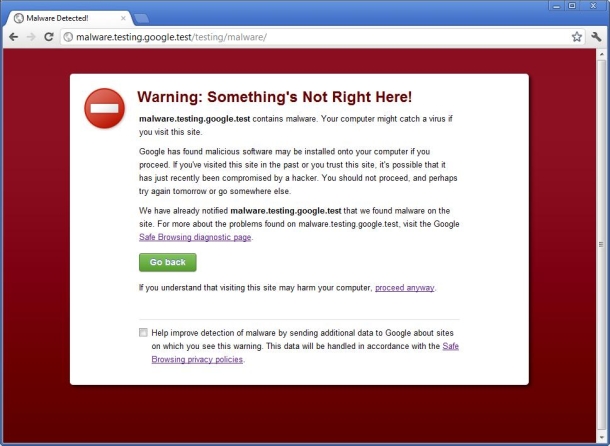
    If you do not take action as soon as this happens, users will see a screen like this when they visit your page in FF or Chrome. Ouch!

    If this happens, you will have to talk to work for many days with Google to get it resolved. And your users will keep seeing this page. Even if you remove the malicious code, visitors to your page will see this.
    So, preventing this from happening by reacting quickly to hack attacks is the best way to avoid this.

    Download Hack Alert – Intrusion Detection WordPress Plugin (Utilities)

    Amazon S3 Desktop Client (Windows)

    This tool allows you to perform drag and drop operations against your local files and your remote amazon s3 bucket storage. You can use this tool to upload or download multiple files of any size that runs on the background without affecting the performance of your computer as you go along doing your tasks. It uses in-memory and file caching to allow fast and easy access to your bucket items. Drag and drop operations, with the familiar look and feel of windows explorer. Multi-threaded application to perform responsive features even when loading tens of thousands of items from Amazon.

    Download Amazon S3 Desktop Client (Windows)

    Smart jQuery Photos gallery (Images and Media)

    This app enables you to create a photos or images gallery in minutes. You can create unlimited galleries from the secured admin interface and upload yours pictures to it using AJAX . You can also add a caption for each of your images. The front end interface enables you to filter through your albums and preview your images in different easy and user friendly ways.

    Features

    – Unlimited galleries (create, edit and delete functions)
    – Unlimited images (upload and delete functions).
    – Supports multiple photos upload
    – 2 different type of displays on the front end
    – Galleries filters (for an easy access)
    – Secure and super user friendly admin interface (login and logout)
    – Customize your admin user from the config file
    – 2 thumbnails generated for each image uploaded
    – Customize the size of your images thumnails
    – Supports captures (images description)
    – Supports Fancybox (larger image view)
    – Supports pagination
    – Based on the bootstrap CSS framework
    – Powered by jQuery
    – Very clean application that could be extended to your needs.

    Download Smart jQuery Photos gallery (Images and Media)

    Featured Audio (Media)

    You already know that WordPress has such feature as “Featured image”. It allows to add specific image to posts and pages. Featured Audio is a plugin that inherited all the best from featured image functionality. As you can see from the title, the plugin allows to set featured audio for each posts and pages. As a result this audio will be available for your visitors through powerful HTML5 audio player. You can decide how to display audio player. There are 5 different options for that. Add new feature to your website and make it unique with Featured Audio plugin.

    Features

    • Featured audio: plugin adds featured audio functionality to posts and pages.
    • HTML5 audio player: featured audio is handled by powerful HTML5 audio player.
    • iPhone, iPad, Android and WP7 devices supported: player works with any mobile devices.
    • Flexible positioning: audio player can be positioned with 5 different ways.
    • Autoplay option: start playing audio once post page opened.
    • WordPress Media Library: all audio files are stored in WordPress native media library.
    • Old browser supported: for old browsers player is switched to flash/silverlight mode.
    • Support major audio formats: mp3, wav, ogg, etc.
    • Custom post types supported: add featured audio to any post type.
    • Easy to install: install and activate the plugin as any other plugins.
    • Translation ready: plugin might be translated to any language.
    • Built using WordPress best practices: no any alerts from Plugin Check.

    Installation

    1. Install and activate the plugin.

    2. Go to post/page editor, set featured audio and configure audio player (view screenshot below).
    Back End Functionality: Post Editor
    Back End Functionality: Set Featured Audio

    That’s it! Enjoy using the plugin.

    Support

    If you have problems regarding using the plugin, please contat me and I’ll help you.

    Free counters!

    Download Featured Audio (Media)