Amazon eStore Affiliates Plugin (e-Commerce)

Amazon eStore Affiliates Plugin
How would you like to have your own store where to promote and sell Amazon products?
Amazon eStore Affiliates Plugin
With our Amazon eStore Affiliates Plugin you can have one up and running in just minutes.

Did you know?
Did you know how many products are for sale on amazon?
The answer is ‘bilions’. Did you know how many products are sold on amazon daily? The answer is ‘milions’. Why don’t we take advantage of that? With the amazon affiliate program together with our Amazon eStore Affiliates Plugin you can earn tons of money easily.
Amazon eStore Affiliates Plugin
What is Amazon eStore Affiliates Plugin?
Amazon eStore Affiliates Plugin is a product that allows you to create a store featuring amazon products in no time.
One time setup in just couple of minutes using wordpress platform and import products directly from amazon in just a flash! It doesn’t get any easier! No coding or technical skills necessary.
Amazon eStore Affiliates Plugin
Facebook store as well!
Why don’t we target the market from facebook as well? There are millions of users there anxious to buy!
With our Amazon eStore Affiliates Plugin you have the possibility to promote your store on facebook pages too. Create an application and add a tab featuring your store on facebook page right away and your visitors will be able to shop directly from your facebook business page.

Main features overview

Hello, here you’ll find the main features that are included in our Amazon eStore Affiliates Plugin!

  • Install it on your wordpress website as wordpress plugin and have your store up and running in no time.
  • Has a custom theme (different from your wordpress theme) that can be personalized from administration platform.
  • Import amazon products from any amazon locations, just setup the store from configuration
  • Add your affiliate custom settings (you need to get the money too!)
  • Marketing tools – Product categories – automatically taken from amazon when importing products
  • Amazon product reviews & facebook comments
  • Product details with image gallery
  • Featured products slideshow on homepage
  • Default install with auto configuration & some content.
  • Paginated products on homepage (you can setup from administration how many to display)
  • Analitycs – You can keep track on how many people clicked on a product or viewed it on administration.

Amazon eStore on Facebook! – Main features overview

No! You don’t need another install in order to have your Amazon eStore on facebook! You can have it both on facebook and wordpress in the same time!

  • Create a facebook application where you can easily customize the look of your store on facebook tab.
  • Amazon eStore page width – optimized with the new facebook timeline – 810px wide
  • Add as tab on your facebook page the Amazon eStore
  • Graphical customization – application preview images, customize the application pop’up window
  • Tab’s name customization
  • Increase your sales with Products and store sharing
  • Possible to restrict access to Fans Only
  • Full statistics and social marketing features
  • Like locker! Transform ‘like’ into ‘buy’ just like that. Make your users like your page in order to enter the store using the like locker!

Live demo previews


Download Amazon eStore Affiliates Plugin (e-Commerce)

CCGallery WP – Multimedia Gallery WordPress Plugin (Galleries)

Check Out HD Video Preview Here

CCGallery WP makes it easy to embed the CCGallery HTML5 Multimedia Gallery, in your WordPress theme. It displays all your images, audio files and video files in a sleek and attractive interface. You get to browse the items in Coverflow mode or in a Thumbnail grid mode. You can easily switch between the two display modes and can even filter the items by displaying only images, or audio files, or video files. Filtering of items by custom categories is also supported. Also CCGallery incorporates a responsive design so that the gallery display fits in various screen sizes ranging from mobile phones to desktop browsers. CCGallery has been designed in such a way that it is extremely easy to browse through a large number of items and also with enough eye candy!

The key features are:

  • Display images, audio and video.
  • Two display modes – Coverflow and Thumbnail, with option to switch between the two. You can also choose which mode to load first.
  • Plays audio and video natively in modern HTML5 browsers and switches over to Flash/Silverlight for older browsers by using Mediaelement.js.
  • Can also embed Youtube and Vimeo videos.
  • Filters items based on file type or based on custom categories, with a nice shuffling animation by using jQuery Quicksand plugin. You can also choose to display a particular category on page load.
  • Option to detect mobile devices so that these devices can be served low quality videos which are uploaded separately.
  • The gallery features a responsive design to account for various screen sizes ranging from mobile phones to desktop browsers.
  • Options to autoplay and loop audio and video files.
  • Various handy keyboard shortcuts for easier browsing of the gallery.
  • Can make the thumbnail images in both the Thumbnails and Coverflow modes act as links to external pages.
  • Two colour schemes (dark and light) are available.
  • Change the styling of the gallery according to your needs by tweaking the CSS .
  • Create multiple galleries and manage them with the Gallery Manager
  • Can host media files in services like Amazon AWS and then insert those file links in the gallery settings page.
  • AJAX upload of files with the option to delete them later if you wish. Images for Coverflow and Thumbnails mode are generated automatically.
  • Drag to sort gallery item order.
  • Easily embed galleries using a simple shortcode. Also shortcode for each gallery created, is visible in the Gallery Manager.

NOTE : The Coverflow mode requires HTML5 Canvas which is supported in Firefox 3.0+, Safari 3.0+, Chrome 3.0+, Opera 9.5+ and IE9 +. Older browsers that do not support Canvas will see a fallback animated effect for browsing files, so they still get to see a nicely working gallery.

Updated on 26 May, 2012 – version 1.0.2

  • Fixed the a bug regarding the gallery css file not loading when the shortcode appeared at the very beginning in a post/page.
  • Fixed the checked state of file type radio buttons in the admin panel when a new item was created.

Updated on 25 May, 2012 – version 1.0.1

  • Fixed a few bugs with keyboard shortcuts when the Lightbox and Thumbnails mode is visible
  • Fixed an error message when files were uploaded

Download CCGallery WP – Multimedia Gallery WordPress Plugin (Galleries)

iWiggle (UI Elements)

\ \

Need wiggling effects for your Images , Buttons, Views and etc … ? iWiggle is your solution , This project shows how you can create wiggling effect with remove badge .
work with iWiggle is too easy first of all create an outlet of your Object , for example :

@property (retain, nonatomic) IBOutlet UIImageView *myImage;

This method contains the wiggling animation :

 - (CAAnimation*)startAnimation;

Now it’s time to set the animation with our object :

 [[myImage layer]addAnimation:[self startAnimation] forKey:@"someKey"]; 

In order to stop the animation use this code :

  [myImage.layer  removeAllAnimations];  

This project has been tested with iOS 5.+

Download iWiggle (UI Elements)

Wave – Fancy CSS3 Flexible Sticky Footer (Navigation and Menus)

With this brand new footer, you’ll be able to add a unique sticky footer into your website in minutes. It comes with 4 variants (from 2 to 5 columns) and is very simple to use.

Features

  • Unique Sticky Footer
  • Fluid Columns
  • Fancy CSS3 Effects
  • Can contain any kind of HTML content
  • From 2 up to 5 columns
  • Styled Elements
  • Vertical accordions
  • Easy to integrate & use
  • Works only with CSS , no Javascript
  • Cross-browser compatible
  • Documentaiton included

Please note that it doesn’t include a working contact form, what you see in the preview is a set of styled form elements.

Compatible Browsers

  • Internet Explorer 7+
  • Firefox 3+
  • Safari 4+
  • Chrome 4+
  • Opera 10+

Some CSS3 effects and animations are not visible on the old versions of the listed browsers as well as Internet Explorer (shadows, sliding effect, rounded corners for example).

Download Wave – Fancy CSS3 Flexible Sticky Footer (Navigation and Menus)

CSS3 Drop Menu with Ribbon Effect (Navigation and Menus)

SEE THE VIDEO PREVIEW ON YOUTUBE / SCREENR

This CSS3 Drop Down Menu comes with ribbon effect, small mega menu and other lots more features. With this menu you can make as many column as you want and it also support deep level tiers. It also has contact form and expandable search box with beautiful transitions effect.
Now let us take a look at all its features:

  • Ribbon Effect
  • Stick on Scroll
  • Support Deep tiers
  • Contact Form
  • Works in all major browser (IE7+, opera, chrome, safari, FF3 +)
  • Expandable Search box
  • Small Mega Menu
  • Transition effect
  • Social icons menu
  • Easy Documentation

Credits

Download CSS3 Drop Menu with Ribbon Effect (Navigation and Menus)

Connexion Form In Full Css3 (Forms)

This file contains a Login and Register Form in Full CSS3 (without images and without javascript)

All Button have 3 Different States (available in video demo):

  • Static
  • Hover
  • Active

CCS3 Animation for State Transition:

  • Tab Transition
  • 3D Pressed Effect

HTML5 File Validate by W3C Conformance Checker:

  • Organized
  • Commented

CSS3 File:

  • Organized
  • Commented

Other Option

  • Error Message Integration
  • Html5 Input (email, requierd, etc.)
  • 3 Social Button Connexion
  • Easy Customization of all Elements
  • Icon Web Font for Social Button

Free Fonts Used & Link Available in this Pack.

I hope this file can be helpful, for your blog, website or newsletter.

I would greatly appreciate if you could rate after purchase.

If you have any questions please contact me by mail.

Download Connexion Form In Full Css3 (Forms)

FueledWeb Pro Thumbnail Scroller (Images and Media)

\ \ \ \

FueledWeb Pro Thumbnail Scroller is an advanced multipurpose jQuery plugin, html5 thumbnail scroller and image gallery. Hit the Live Preview page for complete description of features, examples and plugin settings.

Key Features:

  • Various settings for look and feel
  • Multi-Category
  • Dynamic CSS
  • Dynamic Reflection
  • Google font
  • AdvancedLightbox
  • Responsive Design
  • Over 50 plugin options and 25 theme variables
  • Support transparent item and custom shape
  • Feature detection with Modernizr
  • Mouse based control vs Scrollbar control
  • Custom look and feel of Scrollbar
  • Option to auto start from center item
  • Option to auto start slideshow with play and pause button
  • OOP coding with component based architect
  • Robert Penner Easing equation
  • 5 Custom Event Handlers:
    • onSwitchItem
    • onSwitchCategory
    • onShowLightbox
    • onHideLightbox
    • onSwitchLightboxItem
  • Custom theming with 3 built in themes
  • Detailed documentation

Credits:

Sintel

Elephants Dream

Big Buck Bunny

CreateJS Suite

jQuery

jQuery Easing

Download FueledWeb Pro Thumbnail Scroller (Images and Media)

Tiles Gallery (Galleries)

Would you like to present your images and photos in an innovative, artistic and original way? Then Tiles Gallery for WordPress is perfect for you!

NO PROGRAMMING SKILLS REQUIRED

Tiles Gallery arranges your images inside a random-generated grid, it’s much more than a simple multiple column layout, it’s a beautiful and fancy way to present your showcases, galleries, photos… and so on. If you don’t know where to start just copy/paste the script in the demo file bundled with the script.

NO GRAPHIC SKILLS REQUIRED

This script preloads and resizes images to fit them inside each “cell”, so you don’t need to make images of same size or proportions! Be just sure the weight of your photos is good for web (that could mean from few Kb up to 100Kb depending on desired quality).

CAPTIONS

It’s also possible to add captions simply adding them as ALT attribute of each image. The captions can be static or shown on rollover.

LIGHTBOX

By default clicking on an image tile it will popup the full size using the jQuery Lightbox plugin by Leandro Vieira Pinho

v1.1: added new features: vertical and horizontal images alignment

Download Tiles Gallery (Galleries)

3C-Events : WordPress All-in-One Event Calendar (Calendars)


3C-Events : WordPress All-in-One Event Calendar

3c-events is a powerful WordPress All-in-One event calendar plugin that may be easily integrated and used. 3c-events has a user-friendly interface and navigation. It can be viewed in various ways : mini calendar, big calendar or events list.

Our calendar plugin is more than just some boxes on a screen. We offers a comprehensive suite of events publishing, viewing and statistical information. 3c-events allows you to improve and simplify event exposure and publishing. With many features, 3c-events is the complete solution for all of your calendar needs.

Informations

Item URL : freelanceonweb.com/wp-3c-events
Contact: [email protected]
Support: freelanceonweb.com/forum

What you get?

Plugin with all Features (+Widget, Shortcode)
Free Support (+Docs & Help)
Free Updates (+Request Features)
Convert any existing Script to 3c-events (With Fee)

Features

  • Full AJAX
  • 3 Formats : Mini Calendar – Big Calendar – Events List
  • MultiLanguage Calendar : EN, FR, NL, ES
  • Multiple colors included! (Red, Blue, Grey, Green, Orange)
  • Multiple dates, Recurring events
  • Ajax Search Events feature
  • Cross-Browser Compatible (IE6+, FF, Safari)
  • Google Map Integration for Event
  • Ajax Contact Integration for Event
  • jQuery Lightbox for Day Event
  • Beautiful Admin Control Panel
  • Change Any Setting Easly
  • Manage Events in seconds

Live Demo:

Homepage: http://freelanceonweb.com/wp-3c-events/demo
Admin Demo: http://freelanceonweb.com/wp-3c-events/demo/wp-admin

Support/Suggestion:

Forum: http://freelanceonweb.com/forum/index.php
We would like to thank everyone who contributed to release and improving this script, with your useful advice and suggestions, we can develop the script together.

Changelog

Version 1.3 – 05/27/2012:

  • [Added] Repeat event by day, month
  • [Added] Ability to add multiple calendar formats in the same page
  • [Improved] Optimized code

Version 1.2 – 05/23/2012:

  • [Added] “EN”, “FR”, “ES”, “NL” Translations

Version 1.1 – 05/22/2012:

  • [Fixed] Displaying event icon
  • [Fixed] Settings accessible to users

Version 1.0 – 05/20/2012:

  • First Release

free counters

Download 3C-Events : WordPress All-in-One Event Calendar (Calendars)

Decentralized ACL Class (Miscellaneous)

The ACL class was designed to do nothing other then do Access Control.
The goal is that this Access Control List is completely decentralized, and therefor it is no tailored to any particular membership script.

Features

Changelog:

Update 1.1

  • Changed class to support MVC Frameworks.
  • Updated Documentation

Download Decentralized ACL Class (Miscellaneous)

Donation Manager Pro (WordPress)

Donation Manager Pro is a plugin which handles donations on your WordPress website. You create donation campaign, place shortcode on page and start receiving donations. The plugin allows your visitors/readers to donate and include them into list of donators. The plugin does it in automated mode and accept payments through PayPal, AlertPay, Authorize.Net, 2Checkout and InterKassa. This is only one donation plugin that support 5 payment gateways.

Features

  • Handle donations on website: use this plugin to handle donations.
  • Multiple payment gateways: accept donations via PayPal, AlertPay, Authorize.Net, 2Checkout or InterKassa.
  • Shortcode driven: insert shortcodes like [donationcampaign id="XXX"].
  • Multiple campaigns: manage multiple donation campaigns.
  • 2 templates: best view for light and dark themes.
  • AJAX -ed donation form: submit donation form details without refreshing the page.
  • Easy to install: install and activate the plugin as any other plugins.
  • Translation ready: plugin might be translated to any language.
  • WordPress Best Practices: no any alerts from Plugin Check or WP_DEBUG.

Front End Functionality

The best way to describe how the plugin works is to show live example. Click “Live Preview” or look at screenshot below. This is donation form and list of donators. You can fill up the form and click “Submit” button. If everything is OK, system asks you to confirm provided information and redirects to PayPal, AlertPay, Authorize.Net, 2Checkout or InterKassa to complete donation. After successfull payment donator’s name will be included into the list.
Front End Functionality: Donation Form

Installation

1. Install and activate the plugin. Once activated, it creates menu “Donations” in left side column in the admin area.

2. Click left side menu “Donations >>> Settings” and do required settings. Set your PayPal ID, AlertPay E-mail, InterKassa, Authorize.Net, 2Checkout parameters, e-mail templates, etc. Please look at the screenshot below to see what kind of settings you can do there.
Back End Functionality: Settings

3. Click left side menu “Donations >>> Campaigns”. In this section you can create and manage campaigns. After you created new campaign, take shortcode from “Shortcode” column and insert it into any page.
Back End Functionality: Campaigns

That’s it! Donation Manager Pro starts receiving donations for you!

As an administrator you also can manage all donors.
Back End Functionality: Donators

Support

If you have problems regarding using the plugin, please contat me and I’ll help you.

Free counters!

Download Donation Manager Pro (WordPress)

Soundboard and Ringtones with AdMob (Android)

Description

Soundboard and Ringtones app lets you to create unlimited number of soundboards for your favorite celebrities and stars. You can create ringtone applications like movie ringtones, scary ringtones, etc. The application is packed with AdMob template to start making money right away. You can easily customize the application and build your soundboard within minutes. The application UI has been tested in all Android versions and it works uniformly without any bugs.

Features

This application package has some good features to mention, they are:

  • Supports Android 1.6 and above
  • Easy Customization
  • Tab Layout with Grid View
  • Smooth Scroll
  • Set as Ringtone, Alarm and Notification
  • AdMob Template – Ready to Use
  • Good and Uniform UI design
  • About Section

Download Soundboard and Ringtones with AdMob (Android)

WordPress Multi Network (Add-ons)

This plugin works only with one WordPress installation. Its created to modificate the standard wordpress network and manipulate with posts that are in the sites(blogs) that contained in WordPress network.

WordPress Network Modifier(WNM) – This plugin was made to modificate a standard wordpress network and allow admins to create and manage multiple Networks from one WordPress installation.

Each site can exist on its own domain, and have its own set of sites.

Each administrator can select posts from sub-sites that he wants to see on his site. You can show the posts with widget or you can use special WNM function for those purposes.

Features

  1. You can create multi site/level networks.
  2. You can set to each site it`s own domain.
  3. You can specify which administrators can create new sites.
  4. You can show(link) specified posts from other sites on your site.
  5. You can view & manage all linked posts.
  6. You have two ways to show the linked posts: widget & special function.
  7. Caching system to improve performance.

ChangeLog

ChangeLog 1.1(25.05.2012)

  • Added more widget options.
  • Added widget templates, now you can show the linked posts as you need.
  • New “WNM Query” class create for easier way to show the posts.
  • Many bugs fixed.

Easy to Use

WNM has a very simple and intuitive interface,
everything you need is in the plugin menu and divided by tabs
and also can be accessed from the admin toolbar.
The installation of the plugin is very simple, just like the other plugins:
You need to extract the plugin into your WordPress plugins folder
and activate the plugin in the Admin Menu.

Note: The standard WordPress network need to be activated!

Future plans

  1. You will be able to set each site its own set of plugins.
  2. You will be able to set each site its own set of themes.
  3. You will be able to add posts to your blog from other blogs simply from the frontend.
  4. You will be able to move sub-sites(Changing the parent site of sub-site).

Requirements

  1. WordPress 3
  2. PHP 5 +.

Caveats

WNM will not automatically add the domain to your server!
Your webserver must direct requests for each domain you want to use to your WordPress install’s filesystem location.
Read the FAQ if you have trouble with it or email your web host and ask them to make this one change for you.

FAQ

How do I set the domains to points at my WordPress main installtion?
Note:DNS should resolve each desired domain to your web server.

From Web Host Manager (WHM): Add a wildcard subdomain/virtual host record to your site’s DNS record in WHM .

  1. Go to “Edit DNS Zone” and select the domain of your WPMU installation and click “Edit”.
  2. Below “Add New Entries Below This Line”, enter in the first box (Domain) an asterisk: ”*”.
  3. The second box, TTL , should be “14400”.
  4. The third box should be “IN”.
  5. Select A Record Type from the drop down “A”.
  6. And in the last box, paste in the IP address of your website/network.

From Cpanel, click on the “Parked Domains” under the “Domains” section:

  1. Under “Create a New Parked Domain” enter the domain name you want to add to your network.
  2. Click the “Add Domain” button.
  3. It should add the domain to the list of parked domains and under “Redirect to” it will say “not redirected”. That is OKAY .

From httpd.conf: If you have access to web server configuration, configure your web server to direct requests for each desired
domain to the same site (e.g. via `ServerAlias` directives or `Host Headers`) like this:

<VirtualHost %SERVER_IP%:80>
  DocumentRoot "%PATH_TO_WP%"  
  ServerName "mydomain.com" 
  ServerAlias "mydomain.com" "www.mydomain.com" 
</VirtualHost>

%SERVER_IP %- IP of your server
%PATH_TO_WP %- WordPress main installtion directory(e.g /home/webserver/httpd/).
mydomain.com -Your domain

Is WordPress Network Modifier right for me?

  • If you run blogs on one domain with WordPress and want to run new blogs on another domain, WordPress Network Modifier can help you.
  • If you want a single blog to have more than one address, it can NOT .
  • If you want different VHOST policies per-domain, it can NOT .
  • If you want to add hundreds of domains at a time, you would be better served by a Perl script.

Do I have the opportunity to translate the plugin?
YES ! Use the wnm.po file to translate – after you translate this file, compilate .mo file and save it in “langs” folder in the plugin directory
and name it like this: “wnm_text_domain-ru_RU.mo” where “ru_RU” is the name of your locale.

Download WordPress Multi Network (Add-ons)

Social Display Bundle (Social Networking)

Display your online presence with this unique bundle that contains four individual modules.

  • Facebook Like/Stream Box
  • Twitter Profile Stream
  • Xbox Live Avatar Display
  • Playstation Network Card Display

Facebook Faces/Stream Box – Display your status update via the stream or show off your followers in this lightweight module. Customizable intro text, colour schemes, parameters and border control.

Twitter Profile Stream – Show your tweets in this lightweight module that uses the Twitter API to deliver your tweets to your website. Customizable colour schemes, update lengths, tweet count, hashtag control and basic parameters

Xbox Live Avatar Display – Display your Xbox Live avatar by using this lightweight module. Simply enter your Xbox Live ID and you’re away. Customizable sizes, links and headers.

Playstation Network Display Card Module – Display your Playstation Trophies on your Joomla website with this lightweight module. Customizable templates, links and alignment control.

Download Social Display Bundle (Social Networking)

GChecker – SOFTPAE Google position checker app (PHP Scripts)

GChecker – SOFTPAE Google position checker – Easy to use position checker with statistics, graphs, email reports and virtual cron!

Forget for any “unfinished” Google position checking scripts, right now, here is the first complete position checking app – script, that give you all function you need to monitoring your current positions at Google! The GChecker – SOFTPAE Google position checker is an easy to use multiuser position checker script to automaticaly check positions of your website’s keywords in Google SERP (with ip antiblocking mechanism!). This tool is very interesting tool for all SEO /SEM/Webdesign companies that want extend their websites or services by this popular tool.

This is a very complete script, where you can upload keywords (string list, csv), run checking periodicaly (every 7 day, configurable), show statistics for all pages (urls, keywords) includes, declines, top 3, top 10, top 50 positions, etc. You can see actual and previous positions, differences, summary graph for last 10 checkings, engine is sending emails with fresh results after complete all checking, etc.

Of cource, here is the possibility to manage users/clients, add it, change it or detele it, everything you want, including make it superadmin to manage other users. Here is a virtual cron tool that is usable to run this script without real cron, eg for servers without possibility to setup real cron. And – all of this, is packed to an all in one well designed and usable package. See demonstration video bellow…

This is the tool you want to have!

Important!!: rename your install.php and upgrade.php file after installation to improve security!

Demonstration video:
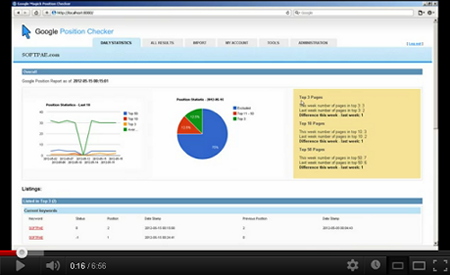
Click to see demonstration video on YouTube

Live Demo

You can find demo site of GChecker at http://apps.softpae.com/gchecker/

Latest Updates

27.05.2012 - Version 1.1
- improved UI
- option to specify Google site for checking keywords, now you can specify Google URL in your account settings for all keywords or one by one in import csv
- added function to check if you specify Google URL properly, default Google.com is used if not
- extended csv format for importing: keyword;site domain(optionally);google site URL(optionally)
- added configuration variable for DB tables prefix
- improved DB installation script + DB upgrade script added
- rewrited checking procedure by using XPath
- and make an 5 stars for this script ;)
21.05.2012 Version 1.0
- initial release

Features included in GChecker – Google position checker:

  • Easy to install and configure (read installation manual bellow),
  • !!! AntiBlocking mechanism to prevent blocking from Google !!! you do not need any proxy servers!,
  • Prepared for working in subfolder!,
  • Users/Clients managements,
  • Checking keywords in Google SERP , Domain checking,
  • Import keywords by list or csv file,
  • Adjustable “checking’s” domain for all keywords or separately, one by one,
  • Very good statistics, graphs, summary of last 10 checkings,
  • Configurable email reporting,
  • New XML /XSLT core (engine/templates),
  • Easy to use tabbed interface,
  • Well coded, advanced code, etc ..

Requirements

  • PHP5
  • curl PHP extension enabled
  • Optionaly cron
  • Know how to upload files to your website (eg: with FTP )
  • Optionaly some HTML /CSS knowledgeto style look & feel to your needs.

Installation and Configuration:

  1. Unzip the file from CodeCanyon
  2. Upload extracted files to your website (eg: to new /gchecker/ folder)
  3. Prepare (create) and empty MySQL database with appropriate user
  4. Set up user, database and cron informations to configuration file in /System/Plugins/configuration.php
  5. Set write access rights to /System/Plugins/ folder
  6. Run DB installation by open http://yourwebsite.com/gchecker/install.php (replace yourwebsite.com with URL of your website)
  7. Set up cron to be keywords checked periodically (optional, recommended – or use virtual cron after log in on Tools tab)
  8. Open your GChecker page by going to http://yourwebsite.com/gchecker/ and log in by admin/admin (replace yourwebsite.com with URL of your website)
  9. Add new users/clients, configure account information, change password, update email, import your keywords etc. – see User Manual bellow
  10. Done!

See detailed installation informations in your downloaded zip file.

User Manual


    *** Administration ***
    **********************

    1. Log in to Google Checker by your administrator username and password (default admin/admin)
    2. Go to Administration tab, setup standard user account for your client(s)
    3. If you do not use standard cron to periodically run checker engine, go to Tools tab and start virtual cron
    4. (You can use you administrator account like any other standard account)

    *** Standard user - client ***
    ******************************

    1. Log in to Google Position Checker by your username and password
    2. Go to Import tab and setup keywords for checking
    3. You can import csv file with list of keywords and domain to checking or copy and paste this list to textarea, click "Import" to import it
       - one keyword + domain (optionaly) per line, eg: 
         seo analyzer;softpae.com - this will check position of domain "softpae.com" for keyword (phrase) "seo software" 
       - or:
         seo analyzer - if you omit domain, the URL from your account setting will be used
    4. You can check your current/imported keywords/domains bellow the input form
    5. Wait while checking engine process keywords (check status of cron on Tools tab, 25 keywords every 5 min is checked)
    6. Go to Results tab to see detailed report of keywords, reload it occasionally while you don't see all results
    7. Go to Daily Statistics tab to see some interesting statistics and graphs
    8. At Account tab you can change your user settings (eg. email, URL of your base domain, password)
    9. Log out


The next step

You can extend this tool by using our SEOLyzer – Search Engine Optimization Analyzer!

Working on:

This script is incoming:

  • GogooooSE MySQL Edition – true fulltext search engine script (SQLite3 version here)
  • SmallSense – Google AdWord/AdSense clone with easy implementation to GogooooSE search script
  • XMLWebCore – Awesome website construction framework
  • Some WordPress / OpenCart templates :)

Demo

You can find demo site of GChecker at http://apps.softpae.com/gchecker/

SOFTPAE .com

SOFTPAE .com is a small and very smart development company from Slovakia. We do website programming, search engine optimization, marketing, advertising.

Support:

If you want any customizations, contact us at magic (at) softpae.com.

Others things from us:

Rate us if you love this/ours scripts :o) Thank you!

/a

Download GChecker – SOFTPAE Google position checker app (PHP Scripts)