CIRCULAR CANVAS COUNTDOWN (Canvas)

Follow me on CodeCanyon

Overview

CIRCULAR CANVAS COUNTDOWN could be apllied to any html element and could be customized for your own needs. and works in all recent browsers: Firefox, Chrome, Opera, Safari and Internet Explorer 9 as well as Mobile Safari on iPhone/iPad.

Package

  • Canvas Countdown
  • Canvas Countdown (packed)
  • Documentation & Examples

Features

  • Easy to integrate
  • Cross browser support
  • Customizable
  • Documentation & Example included

Please contact me if you have questions or if you have experienced bugs while using Shiny Hover Effect.

Download CIRCULAR CANVAS COUNTDOWN (Canvas)

Modern News: Email Theme For Wysija Plugin (Layouts)

Modern News is an email template theme for the WordPress newsletter plugin Wysija.

Features

  • 4 color themes (check out screeshots).
  • Full layered PSD file.

Wysija Newsletter Plugin

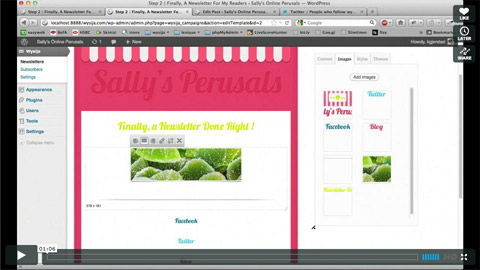
Wysija is an awesome plugin that allows you to send newsletters from WordPress, you can drag and drop your articles and images in your newsletter, track the opens, links clicks, and many more features.

See Wysija In Action

Wysija in action

Check out our marketing HTML email templates:

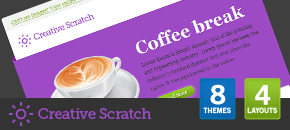
Creative Scratch       Delicious Mail 2

Open Mail       Everix Mail

Fresh Newsletter       Superstar Newsletter

Download Modern News: Email Theme For Wysija Plugin (Layouts)

Social Download System for WordPress (Social Networking)


Social Download System for WordPress gives you instant access to over 2 BILLION social media users allowing them to share your content to start downloads. Combine Facebook, Google Plus, Twitter, and LinkedIn to create a social media traffic generating powerhouse of your WordPress site. More Shares = More Traffic = More $$$

Social Download System for WordPress

Features

  • Have your users complete social actions before their downloads start!
  • Works with ANY download URL on ANY download system / service, even the built in WordPress uploader!
  • No way to start download unless social action is completed!
  • Supports 4 of the largest social media sites and 5 social buttons!
  • Powerful tinyMCE toolbar plugin / wizard makes download creation a breeze!
  • Fully customize each download button on the fly or use the quick insert feature to generate downloads instantly!
  • Cookies remember users who have alread unlocked your downloads, gives them direct link in the future!
  • Multiple download lockers on the same page or post page!
  • 5 Different color schemes!
  • AJAX Settings pagenl with global button controls.

Compatible With All The Popular Browsers

  • Google Chrome – All Recent Releases
  • Firefox – All Recent Releases
  • Safari – All Recent Releaes
  • Opera – All Recent Releases
  • Internet Explorer 8
  • Internet Explorer 9 & 10

Download Social Download System for WordPress (Social Networking)

Word Search Creator with Ad Support (Miscellaneous)

Word Search Creator with Ad Support quickly creates a word search out of any set of words. It’s fully customizable and has a print mode to print your word searches out. It is easy to insert any kind of ad you want on the page without any hassle. No technical knowledge necessary.

Download Word Search Creator with Ad Support (Miscellaneous)

HTML5 Gallery / Banner with Thumbs (3D)

This gallery was coded for mobile devices and it is 100% mobile compatible and of course it will run just as great on PC. We have tested it on iPad3 and it runs great, you will interact with it as you would with a native app, you can see a video demo at the below link.

Demo on iPad3

The HTML5 Gallery / Banner with Thumbs can be used as a gallery or as a banner rotator, it has 16 transitions included and six of them are simulating the Ken Burns effect, they run really smooth and are implemented using the new HTML5 canvas element.

The entire color theme and skin can be modified and you can have more than one instance of the gallery in the same page (you may have as many galleries as you want in the same page), each instance having different settings and images. The setup and use of this gallery are extremely simple; everything is explained in detail in the help file.

Thumbnail support: this feature is optional, so it allows you to use the gallery with or without thumbs. The thumbs can be positioned top, bottom, left or right and the thumbs images can have any format and size.

Features

Fully XML driven this makes it really easy to install and maintain

Support for multiple instances in the same page: you may have as many galleries as you want in the same page and each one of the galleries / instances has its unique set of images and settings.

Buttons are optional and can be positioned anywhere by setting the x and y position for each of them, this is a unique and useful feature.

The entire color theme can be modified and also the graphics theme can be modified, each button can have different graphics, this mean that you can add your own skins, the buttons size does not have to be specific it will adjust based on the graphic (.jpg or .png) file used.

Support any type of image format (landscape, portrait or whatever)!

16 transition included, six of them are simulating the popular Ken Burns effect, you can see all of them running in the samples.

The transition length and transition delay can be set individually for each image in seconds.

Bulk image preloader, it’s a feature for fast loading and displaying the photos; the images are loading in the background, when you navigate through photos you don’t have to wait for loading pictures because the photos will already be loaded.

Open a new page each big image can have attach to it a url, this mean that if you click or touch up on mobile the big image a new page will open, the target for that window can be set (_self or _blank), please note that this feature can be activated individually for each image or disable it globally for all big images. you can see this feature in action in the last sample, the sample with the purple color theme, when the image is clicked or touched on mobile a new browser window will open.

The gallery width and height can be set to any size, this mean that you can use this gallery in any size you can think of.

The background color can be modified or it can be left transparent.

Thumbnail support, this feature is optional you can use it with or without thumbs, the thumbs can be positioned top, bottom, left or right and the thumbs images can have any format and size.

The thumbs border color, size and space between them can be configured to any value, this also include the animation color theme when a thumb is selected with the mouse or touched with the finger on mobile.

The thumbs can be hidden if the mouse leaves the gallery area and a delay in seconds can be set for this feature, this is also optional, this mean that the thumbs can be hidden once the mouse is not over the component area or always visible.

Slide show autoplay option.

Slide show preloader and images preloader, this preloders are highly customizable, you can change the radius, color theme and position.

The slide show prealoder can be position anywhere by setting it’s x and y position.

Slide show delay can be set individually for each image.

The slide show button is optional this mean that it can be disabled, also the graphics and position for this button can be modified.

Next and previous buttons to navigate between images, as mentioned above the graphics for this buttons can be modified, the position can be set anywhere inside the gallery area, this feature is optional this mean that the next and previous button can be removed.

Description window and description button for each image, this means that you can set a different description for each image, the text has full css support so you can stylize the window as you like. This feature is also optional.

The description for the selected image has full CSS support, it can be styled with a CSS class or with inline CSS . Please note that this window is optional, it can be disabled if you choose so.

Download HTML5 Gallery / Banner with Thumbs (3D)

My Job Board (Miscellaneous)

My Job Board is based on Codeigniter’s latest framework, which makes the script really secure, tried to make something bit similar to Smashing Jobs.

Run your own job board.

Changelog v2

  • Re Designed with twtter bootstrap
  • Added User registration & Login
  • Added Job submission tied to user registration
  • Added Users can edit, delete submited jobs
  • Added Admin can delete, edit users form Admin area
  • Added At Admin can search for, users, listed jobs in admin area
  • Improved Admin area

Fetures

  • Twitter bootstrap
  • Login & Register
  • Job submission tied to user registration
  • Users can edit, delete their submitted jobs
  • Administration area
  • Edit, delete job lists & Delete, create, edit categories,
  • Delete, edit, users

Download My Job Board (Miscellaneous)

Events Widget (Calendars)

Follow Mioo on Twitter
Follow Mioo on CodeCanyon
Mioo Google+ Fan Page
Subscribe by RSS

WordPress plugin with ability to show upcoming events with date that are created as custom posts and displayed as widget. Supports categories, image oriented templates with hover effect, dark and light colored templates. Simple and nice looking addition for a website.

  • Nice wooden look
  • Custom post type and categories
  • Date management
  • Actual day highlighted
  • Suitable for both Dark and Light colored templates
  • Completely user-friendly & Easy to use

Download Events Widget (Calendars)

Modern CSS3 Navigation (Navigation and Menus)


Modern CSS3 Navigation is a unique and modern looking horizontal navigation menu. It is clean, simple and really easy to use thanks to its semantic markup. It also features important things like unlimited menu levels or cool things like fade/slide effects.

Features

  • Modern look
  • Pure CSS3
  • Smooth fade/slide effect
  • Unlimited menu levels
  • Three color schemes included
  • Easy to use (semantic markup)
  • Cross-browser compatibility
  • Clean & commented code
  • Detailed documentation.

Compatibility

  • Internet Explorer 9+ (Note: it works in older version of IE, but no submenus though)
  • Chrome
  • Opera 10+
  • Firefox 4+
  • Safari 4+

Credits

Changelog

27/05/2012 – Version 1.0

  • Initial release

Download Modern CSS3 Navigation (Navigation and Menus)

Shoutcast Info & Stats (Miscellaneous)

Shoutcast Info and Stats is a PHP script where show varius informations and statistics from web radio stations who using service Shoutcast. This script is perfect if you have a web radio station and using this service for stream your music.

Shoutcast Info and Stats using PHP and AJAX (jQuery) for show these information in your website and has a very easy installation. You can make your layout by edit one CSS file. Another feature of our script is the infomations who get from LastFM.com website for current artist.
Shoutcast Info and Stats coming with two types of block layout: Vertical and Horizontal. Each type coming wtih three styles-layouts and you can edit very easy. We using Maxmind.com’s IP database for show some information about each listener of you web station. Below you can see all features of Shoutcast Info and Stats.

Features of Shoutcast Info and Stats PHP Script
  • Show the Current Song and Artist from Shoutcast
  • Show Artist’s Biography (if is any in LastFM.com)
  • Show Artist’s photo (if is any in LastFM.com)
  • Show Current Listeners and detailed info for each listener
  • Listeners Google map
  • Listeners per country
  • Show Played songs history
  • Auto refresh information without refresh current page (default every 10 seconds)
  • Coming with 2 types and 3 layouts per type
  • Very easy installation
  • You can edit the layout very easy
  • You can make your layout very easy if you are familiar with CSS and HTML
  • You can translate to your language some words/phrases
  • Detailed Documentation
  • Free support and updates for ever
Requirements
  • PHP version 5 and up
  • cUrl libraries
  • Maxmind.com database file (GeoLiteCity.dat.gz – free download)

Download Shoutcast Info & Stats (Miscellaneous)

EZ EU Cookie Compliance (Utilities)

The easiest solution for WordPress users who need to comply with the new EU Cookie Law.

Hit Live Preview NOW to see in in action

This plugin provides a simple modal pop up when a user visits your site, informing them that you site uses cookies, which they can then accept to browse your site, or deny and be redirect away from your site.

EZ EU Cookie compliance features a settings page which allows you to alter the title, text and styling options for the pop up. You can change the background of the window, as well as text colour and background colour for the button, all from one easy to use screen. More importantly, you can also choose what URL the user should be directed to, the choice is yours.

The options available to you include:

Customise the Title of the Box
Customise the Text
Customise the Width of the Box
Customise the Top Margin (set this to 0 and the width to 100% to create a banner!)
Customise Border Radius
Customise Border Colour
Customise Gradient Colours
Customise Text Colour
Customise Accept/Deny Button Colour

Check out the demo to see it in action.

Download EZ EU Cookie Compliance (Utilities)

MailChimp Comments (Newsletters)

MailChimp Comments is a plugin for WordPress that allows you to subscribe commentators of your posts/pages via MailChimp. When a users comment something on your website, they are immediately added to your email subscription list. You can configure the plugin with respect to your users to avoid any mailing violations (spam). MailChimp Comments is a perfect way to build a list of your commentators.

Features

  • MailChimp API : commentator’s name and e-mail are submitted with MailChimp API .
  • Double Opt-In: use it to avoid mailing violations.
  • Welcome Send: send welcome message configured at MailChimp list’s settings.
  • 2 modes: enable subscription for whole website or for selected posts only.
  • Flexible List IDs: specify particular list ID for selected posts.
  • Keep user IP: user’s IP is submitted to MailChimp too (perfect for statistics).
  • Easy to install: install and activate the plugin as any other plugins.
  • Translation ready: plugin might be translated to any language.
  • Built using WordPress best practices: no any alerts from Plugin Check.

Front End Functionality

The best way to understand the idea of MailChimp Comments is to see live example. Click “Live Preview”, scroll down and leave your comment. As a result you will get e-mail that ask you to confirm your subscription.

Installation

1. Install and activate the plugin. Once activated, it creates menu item “MailChimp Comments” under menu section “Settings” in left side column in the admin area.

2. Click left side menu “Settings >>> MailChimp Comments” and do required settings. Please look at the screenshot below to see what kind of settings you can do there.
Back End Functionality: Settings

3. If you selected “Selected posts/pages” mode on settings page, then you can select posts/pages to be covered by plugin functionality. Go to post/page editor and set checkbox “MailChimp Comments” (view screenshot below). You also can specify different List ID for each post/page.
Back End Functionality: Post Editor

That’s it! Enjoy using the plugin.

Support

If you have problems regarding using the plugin, please contat me and I’ll help you.

Download MailChimp Comments (Newsletters)

App Store Screens – App Screens for WordPress (Utilities)

App Store Screens is a great plugin that makes fancy Screenshot Boxes from iTunes App Store and Mac App Store Applications. Have a look at it!


The Highlights

App Store Screens is a plugin for WordPress that allows you to add an App screens box in your posts. It’s a simple solution to make fancier your website.

Features

  • Fancy box design
  • Easy-to-use simple shorcode with popups and things
  • Custom CSS / Styling
  • Light-weight code

The Support

Need some help? If you have any questions please feel free to use the dedicated support forums. Make sure you grab your purchase code from the plugin License Certificate! (How to)

Download App Store Screens – App Screens for WordPress (Utilities)

Pro Google Adsense Tools Plugin for WordPress (Utilities)

A great utility plugin for your Google Adsense account it will show you extensive reports regarding your general Adsense information right inside your WordPress administrative area and also information base on ads type and individual ads. You will be able to select your time period for the reports you will be generating.

Some sample reports:


Features:

  • Google OAuth 2.0 support for login
  • account level reports
  • ads by types reports
  • individual ads reports
  • time period selction
  • multilanguage support
  • easy setup

Support:

Please send us a message with any question you have with our plugin and we will be happy help you out. Also let us know if you need anything included in future updates please let us know.

free counters

Download Pro Google Adsense Tools Plugin for WordPress (Utilities)

jQuery Pure Input – Tools for text fields (Forms)

Pure Input adds enhanced features to an ordinary HTML input text field. The input allows for a hint, autocomplete search (local and remote), automatic resizing as you type, the ability to tag items using the autocomplete search, navigable tokenization for adding tokens within the input, and validation of the input based on its value or the selected tokens.

Pure Input is build using object oriented JavaScript for use with jQuery, and allows for many listeners, options, and an interface of public methods. Includes a simple theme stylesheet for custom styling.

Download jQuery Pure Input – Tools for text fields (Forms)