With this php script you can convert a Google+ user public post to RSS , so you can import into wordpress with a plugin, for example.
Supporti images, title and content.
Blancer.com Tutorials and projects
Freelance Projects, Design and Programming Tutorials
download PHP, ASP.NET, Java and Javascript from CodeCanyon – the marketplace for code scripts and snippets.Javascript, Java, Program, Code, Snippet, Script, Dev, Development, Codebase, MySQL, Class, Widget, System, CMS
A help desk ticketing system will allow you to provide prompt and efficient support to your clients.
Ultra Help Desk comes by default with an integrated FAQ and manuals systems, thus allowing staff members to decrease response time and improve efficiency.

 Web based
Work from anywhere, whether you are at your desk, on the road, or working from home, our trouble ticket software has the tools you need to access your customer service database. All of Ultra Help Desk features can be accessed through a web browser on virtually any operating system.
Multi language (All words and phrases can be translated or modified using a web interface)
40 themes. You and your customers can change the theme that they like.
Support via our forums with guaranteed response in less than 12 hours (usually within 1 hour).
Option to run with SSL
Integrated FAQ and Manuals

The FAQ is a storage place for articles, for example, frequently asked questions.
The advantage of using the FAQ is that it’s easy to reach and search when using the system.
There’s also a search box available when you reply to a ticket, so that you can quickly select a message that’s already in the FAQ or manuals.
Email Piping (convert emails into tickets)
Allows you to automatically route all incoming emails into the ticket desk supporting both new emails and replies.
Ticket monitoring with centralized panel

Customers and operators are always able to see ticket status and ticket owner info.
Custom email messages
Every message that Ultra Help Desk sends can be customized using a WYSIWYG editor. You don’t have to edit any files or hack any code, it’s as simple as editing an article.
Priorities and statuses
Ultra Help Desk uses 3 types of priorities (low, normal, high) as well as 5 types of statuses (new, pending answered (by the staff), customer reply, closed).
Unlimited operators
Create as many operator logins as your business needs.
Support Departments
Allow you to route tickets to the appropriate department.
Internal notes can be set for each ticket (customers will not see them, only staff members will).
File attachments
Each message may include a file attachment. Are supported by the ticket system to allow receiving of files from clients.
Predefined answers
Allows organizing answers and quick access to common answers.
Email based submission
Allows submitting new tickets and follow-up messages via email. Both customers and operators may use email.
Access code (captcha)
To prevent ticket submissions by spambots.
Contact Form
That gives you a quick and simple way to have potential clients get in touch with you.
Announcements
Is a blog like news system allowing you to post your latest news and updates.
Downloads System

Allows you to make files available, with support for client only restricted access, and tracking of downloads.
Free upgrade.
See a full demonstration of ULTRA HELP DESK in http://soft.uy/demo/helpdesk
This plugin allows you to add advanced author box in your posts or pages with lot of features and options .
School grading system is simple PHP application for managing students, classes, subjects, school attendance and evaluation. You can enter as teacher (admin) or as parent (user) that checks specific student statistics.
Login as teacher : demo / demo
Login as parents : 8 / 0h74apdp
Included documentation inside with full database tables.
Font used : Myriad Pro, Arial
Icons : IconSweets
Link Exchange Manager is simple and powerful link exchange system which allows you to easily manage and check all your links in one place.
Supports multiple sites with unlimited number of links for each site.
You can try the demo at http://www.laca.hr/demo/linkmanager/
Email: [email protected]
Password: password
If you have any problems, please don’t hesitate to contact me.
Ezee MySQL Import tool allows users to easily import data into MySQL databases. With Ezee MySQL Tool you can also export data from tables of your MySQL database to Excel. This MySQL import tool allows you to efficiently import data from most popular file formats into MySQL database tables. With this tool you can easily –
> Import csv to MySQL
> Import Excel to MySQL
> Import mdb to MySQL
> Import dbf to MySQL
> Import txt to MySQL
not only this you can also Export MySQL data to Excel.
Top Highlighted FEATURES :
– Data import from Excel, CSV , text files , dbf, mdb into MySQL table
– MySQL data export to Excel
– Field Mapping option to customize data import.
– Easy-to-follow data export and import steps
– Well-tested functionality, created by developer for developers
– Save (profiles) import settings for each data format
– Load previously saved profiles.
– Import to existing or new tables
– Preview of imported data
– Selecting import modes/actions : Append, Update or Insert
Easy to follow 3 STEPS >>
Step 1 : Browse Source File
Step 2 : Connect Target Database
Step 3 : Do Field Mappings & Select import actions.
Graphic2CSS – a light tool for converting images into CSS . Images will be encoded into Base64 code supported by all modern browsers. IE8 limits base64 code size up to 32kb.
It helps you to have all small icons and UI control images into one single style sheet and
you can use it for email signatures.
Features
*Portable – just a two files and doesn’t need to install and neither leaves temporary files or registry entries.
*Import folders for batch processing.
*Easily set a background color for transparent PNG images to solve transparency problems for ancient web browsers.
*Encode/Decode URLs/HEX code/Base64 strings
*Encode/Decode any file into Base64 code
*Compress JavaScript/CSS with GZip.
Try before you buy:
http://www.lovershorizon.com/2012/10/graphic2css.html
Crazy Random Particles!
A simple and easy to use particle system for the iPhone and iPad that shows particles moving around in random positions.
Setting up is easy, just add some images to the project, include them and watch them spread like crazy!
Documentation included !
The HTML5 Slot Machine Gallery is size flexible or fluid, it will adapt it’s size (width and height) based on the parent container (div or some other html tag) and every piece of the gallery will align and position accordingly, this basically mean that it can be used in any kind of website, it dose not matter if you need a small or large gallery, all you have to do is to add the gallery in a place which you have chosen in your website and the gallery will adapt.
This gallery is using the GPU (hardware acceleration), the rendering speed and performance is impeccable on desktop computers and most importantly on mobile devices.
The HTML5 Slot Machine Gallery comes in with four different embed styles: Fixed Dimensions, Full Width, Full Screen and Lightbox Style. Please check the previews of this gallery and convince yourself of its quality, the complete instructions about how to setup this embed styles are included in the help file.
Amazing performance on mobile devices, you can see in the video demo that it runs just like a native app!, it was coded and optimized for mobile devices and it is 100% mobile compatible and of course it will run just as great on PC. We have tested it on IPAD3 and it runs great, you will interact with it as you would with a native app, you can see a video demo at this link.
This HTML5 Slot Machine Gallery plugin can be embedded in WordPress and you will receive, along with the download files, the complete instructions in the help file. WordPress demo available here
FEATURES :
Fully XML driven this makes it really easy to install and maintain.
Unique and original way of displaying the images, thumbs and large images.
Unique and original thumbs navigation.
Optimized for mobile, you can actually drag and swipe the images just like you would on a native mobile app (touch screen navigation support for mobile), we insist to watch again a video demo at this link
Size flexible or fluid layout!
Support for multiple instances in the same page: you may have as many galleries as you want in the same page and each one of the galleries / instances has its unique set of images and settings. You can have as many galleries as you wish.
The entire color theme and graphics skin can be modified the buttons are actually images (.png or .jpg) so you can replace them with your own graphics, the button graphics can be have a different shape, basically the look of this gallery can be completely modified. Three skins are included in the download files you can see them all in the previews.
The background color can be modified or it can be left transparent.
Full screen button (optional).
Bulk image preloader, it’s a feature for fast loading and displaying the photos, the images are loading in the background.
The thumb can have any format or size (landscape or protrait), also they can be positioned top or bottom.
Autohide buttons, you can set the gallery to autohide the buttons after a number of seconds of inactivity, the delay in seconds can be set (optional).
Slide show button, (optional).
Slide show delay, can be specified in seconds.
Slide show autoplay option.
The color theme for the slide show preloader and images preloader can be modified.
Support any type of image format, (landscape, portrait or whatever)!
Up and down buttons to scroll the thumbs, as mentioned above the graphics for this buttons can be modified (optional).
Next and previous buttons to navigate between images, as mentioned above the graphics for this buttons can be modified (optional).
Keyboard support you can navigate between the large images or thumbs with the right and left key for the large images and up and down key for the thumbs and start or stop the slideshow with the space key.
Navigation help screens (optional).
Info button and info window for each image, each image can have a info/description window, this window can be styled with css, it has full css support (optional).
The image description/info window is also flexible / fluid, this mean that it will resize to always fit the screen, it dose not matter what device is used or the screen resolution.
Many other cool features ..
WHAT IS KEN BURNS EFFECT ?
The Ken Burns effect is a type of panning and zooming effect used in video production from still imagery.
There is a demo included so you can better understand the features.
Documentation included also!
CONFIGURATION
Here is what you can achieve with the Slideshow.
Add an infinite number of images to the slideshow.
Configure the slide direction and duration.
Configure the slide crossfade duration.
Configure the slide zoom type.
SLIDE DIRECTIONS
UISlideshowDirectionTopLeftToBottomRight
UISlideshowDirectionLeftToRight
UISlideshowDirectionBottomLeftToTopRight
UISlideshowDirectionBottomToTop
UISlideshowDirectionBottomRightToTopLeft
UISlideshowDirectionRightToLeft
UISlideshowDirectionTopRightToBottomLeft
UISlideshowDirectionTopToBottom
UISlideshowDirectionCenter
UISlideshowDirectionRandom
SLIDE DURATION
The default slide duration is 20 seconds.
SLIDE CROSSFADE DURATION
The default slide crossfade duration is 3 seconds.
SLIDE ZOOM TYPES
UISlideshowZoomTypeIn
UISlideshowZoomTypeOut
UISlideshowZoomTypeRandom
CHANGE LOG
Version 1.0 – Initial release
TO DO :
Adding image annotations, image effects such as sepia, grayscale, etc, slide controls to prev/next image.
Mortgage Loan Calculator with extra Payments allow your website user to come and play with calculation for their Loans Requirements with Bar Chart Representation of the Loan Cycle. They Will get the Response of Calculator via email.
They can also input the Extra Cost which have been like Property Taxes, Insurance and Monthly Mortgage Insurance.
It will provide your user high end satisfactory Experience,
If your website is related Financial, Real estate or Home Guidance Related. Our Website Tool will be highly beneficial.
They will have to submit their Email ID. So you will Leads Stored Directly into your Database.
5 More Calculators Are Coming Up. Will Provide you Complete Set of Mortgage tools, So Keep Checking my profile or Portfolio.
If you have any suggestions, queries or Problems about our script. We love to hear it from you.
Usage or Installation of the Mortgage Calculator Script
1. Open Database and Install the Database via phpmyadmin
2. Open Config.php, Then add the Essential Parameters for Database Connection and Email and Webmaster Name for Email Funcutions.
3. Regarding Including of Calculator Follow the following details.
There are Two Types of Files in the Mortgage loan Calculator with Extra Payments Pack
First is calculator.php which you can use as it in your website. Just Upload on Your server, Where ever your want and also add the css and js files in their respective folder.
If you want to change the location of Jquery files or CSS , You can easily do that, we have properly mentioned where the files details have been added.
Other file is the include-mortgage-calculator.php, you can or use this file to include in your any current script.
Example Code is also provide for Include.
A main feature is the publication “no spam” comments in real-time to solve this problem applies analysis function relevance of the message on the article and the previous comments to her. Visitors to the site will see their comments immediately, provided that the text of the comments by the topic under discussion.
CleanTalk eliminates the need for captchas (CAPTCHA), questions / answers, and other ways to protect complicating communication on the site.
CleanTalk filters spam messages coming to mail the site administrator via the feedback form. Plugin connects to a standard component of the feedback.
You can test the plugin at demo web site by link bellow. Adminstrator login: admin, password: demo
http://demo.cleantalk.ru/joomla
Please use this installation manual.
Todo is Website Visitors Tracker With Stats Panel.what makes Todo special is that it is simple to install and use.Todo Stats Panel give you Summary of Website Visits For year and also For each month Using Google Charts .Todo Take very small space on your Database.
Simply Create Sub-directory (eg.stats) and Upload Todo Source Files After Preparation , visit installation page and Insert One Line of Code To all Pages You want To be Tracked.Now You Ready To Login To Stats Panel
I’ve used the following images, icons or other files as listed.


If you have any questions that are beyond the scope of Pause help file, please feel free to email via my user page contact form .Thanks so much!
FSQM , is a WordPress plugin which can help you collect Feedbacks, Surveys or host Quizes in your WordPress Blog. Using it, you can create unlimited forms with custom themes and collect user submissions. All user submissions are stored inside the database which you can analyze, edit and/or print. The user can also track/see their submission (obviously if you wish to) through a page.
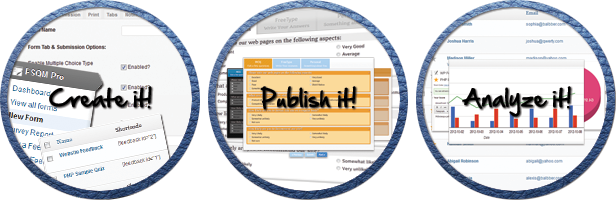
The working of the plugin is very straight forward.
Here are the favorite features of FSQM Pro:
For more detailed view, please refer to the Video Tutorial. Help is associated with almost every item on the administrator area. Also you might check the [HELP] button on the top-right corner of the screen. If you still can not find what you are looking for, you might want to contact us using the Support Forum.
A free alternative know as WP Feedback & Survey Manager Plugin is also available. Please note that the working of both the plugins are very different and the free version has very limited functionality. But you can try it to get only a glimpse of what the Pro version can do before purchasing.
If you are migrating from the Free Version to Premium Version, then you should follow the following steps to avoid any conflicts:
Initial Release


Polaroid slider mimics the feeling of the old-style polaroid photographs. It’s a powerful javascript-css slider using CSS3 and jQuery!
Create slides with image, video or HTML content or generate slides from your favorite flickr or 500px feeds.


Tested with all major browser versions including internet exploder 7-8 and variety of mobile devices!

