This is a beautiful accordion widget. Accordion Widget with an unlimited number of elements.
Features:
- Unlimited number of elements
- Personal style for each element
- Multilanguage
- Easy to use
Demo
Version:
- 1.0
First Release
Blancer.com Tutorials and projects
Freelance Projects, Design and Programming Tutorials
download PHP, ASP.NET, Java and Javascript from CodeCanyon – the marketplace for code scripts and snippets.Javascript, Java, Program, Code, Snippet, Script, Dev, Development, Codebase, MySQL, Class, Widget, System, CMS
This is a beautiful accordion widget. Accordion Widget with an unlimited number of elements.
Extrap is the name of Bootstrap Skin which performed in grey color with the mix of extra light.
You will have production ready components once you get this skin, demo is made like template for website that will inspire you in creating adorable look. It is perfect for game or software related websites, it is good for entertainment and nice for business.
It’s like screwdriver on the picture – you don’t need to have special abilities to light it up, you’ve got simple and awesome tool solving unusual problems. Once you found it – you’ll never forget what it is.
Finally, I’ve made striped progress-bar moving in right way. Hope you’ll enjoy.
Payment Express is brought to you by DPS which is a high growth, innovative global leader in payment technology. Providing PCI DSS compliant payment solutions under the Payment Express brand, they are certified with all major card schemes. A global end to end platform for e-commerce, retail and unattended that facilitates payments seamlessly in real time.
Payment Express (PxPost) Payment Gateway is a WordPress Plugin which allows the Jigoshop plugin to accept credit card payments on site without redirecting customer to Payment Express.
Important Notes : You need to have SSL Certificate Installed on your site to use this Gateway.
This app enables you to view and import all your Facebook galleries and images into your own database. It’s supporting the import of your default account photos albums, but also all of your Facebook pages galleries ! You can from the secure backend interface add or change your images captions, delete the images you don’t want to keep anymore, or also edit your albums names.
This app comes with 3 types of displays on the front interface (including a minimalist view) and you can easily use this app to import and display your Facebook images into your own website.
Try it before purchase:
Front section: Check it out
Admin section: Check it out (user: admin – password: admin)
– Ability to import your Facebook account galleries and images
– Can also import your Facebook pages albums and images
– You can customize the caption of each imported image
– You can delete the images you don’t want anymore
– You can edit your galleries name, or fully delete a gallery
– Secure backend interface
– Ability for your users to view their Facebook images from your website
– Easy way to display Facebook images into your own website
– Save bandwidth by leaving the images hosted on Facebook !
– 3 type of displays available
– Minimalist view to enable you to add your own display customization more easily
– Galleria type of display (slideshow type)
– The images plays smoothly inside fancybox
– Includes the Facebook connect feature and Facebook pages listing
– Pagination support to avoid overloading your pages !
– Very clean application that could be extended to your needs.


jLocator is a jQuery store locator plugin uses Google Maps API V3 and enables searching, sorting, filtering and pagination for your stores. No database required.
PixelStarRatings is great Plugin for Rating system on your blog’s pages, posts and portfolios.
PixelstarRating has great features like:
SCRUD is a powerful application and it enables you to create a backend site with full functionality crud (create, read, update, delete) in less than a minute without writing a single line of code.
10-24-2012 – Version 1.0
iProduct Widget displays WooCommerce Products in a collapsing product list accordion in your widget sidebar area.
Collapsing to show product page description and image gallery that load images into lightbox
There is an animated Halloween card with breachy bats and funny melancholic owl. You’ll be able to change greeting text, color of sky and moon glowing.
Please don’t forget to rate if you like it.
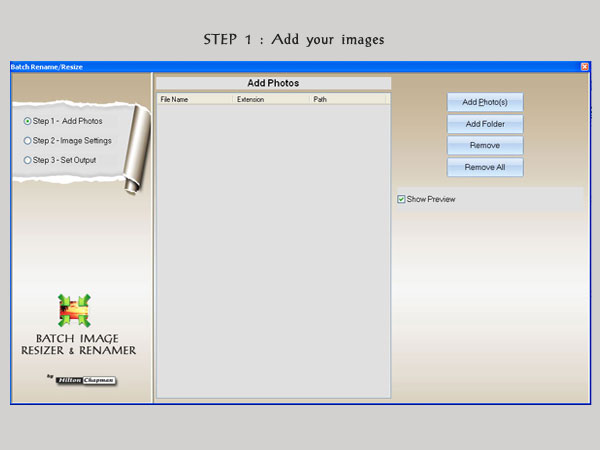
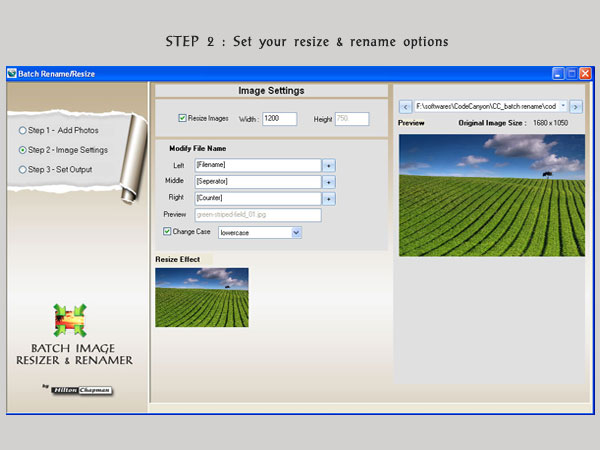
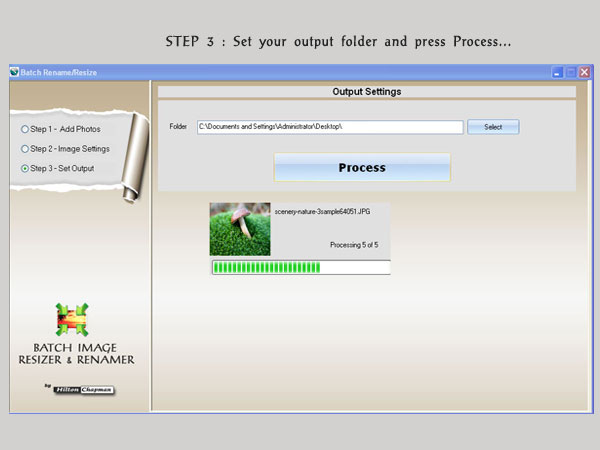
Batch-Imager is a Batch Image Resizer and Renaming Tool that intends to enable users to rename & resize images in a quick and easy batch mode. With this tool you can easily rename images and resize image. This process can be done in batch.
FEATURES
And much more…
This is a standalone application where you can generate as many maps as you want and copy the embed code and place the maps in any of your websites! No need to upload any extra files to your website, just embed the code!!
(Check out also the wordpress version of this application)
Features:
You will be able to generate hundreds of different kinds of maps, already including:
You can add active colored regions to the map, and display them in 2 different ways:

You can add interactivity to the active regions:
You will be able to costumize the visual of your maps:
If you’re a CSS pro, you can also create custom classes and customize the maps even further, creating hover effects, changing the mouse cursor, among other stuff.
You can use a embed code and place it anywhere on your website!
If no width is specified it will load with the maximum width available in the container div. For example, it will load and adapt with different sizes for phones/ipads/laptops. However, after loaded it will not change size if you resize the window.
The maps are built in SVG , no flash is used and therefore they will display in Mac products.
_
This plugin uses the powerful Google Geochart API which creates the SVG vector maps.
This module allows you to customize TinyMCE, the text editor used by Prestashop.
You can
It will replace the old version of TinyMCE by the last one released at this time (version 3.5.7).
This module is compatible with Prestashop 1.4 and 1.5
This Prestashop module allows you to import all your tracking numbers at once. Orders will be updated and your customers will receive an email with the tracking URL of their parcels
If you have problem then mail us from our dashboard.
Embed a 3D object in your WordPress post. In one line of shortcode.
STL format is popularly used for representing 3D object information.
Architects, civil engineers and people interested in 3D printing applications use it to represent structural design data.
Display an interactive 3D object model by calling a simple WordPress shortcode in your page.
[ stlview stlpath="PATH" w="px" h="px" rmode="smooth / flat / point / wireframe" ]
Thats it!
This software uses JSC3D library and depends on HTML5 /Javascript technologies at its very core. Thus the viewer runs inside a browser and is light on system resources.
The code has been commented extensively. Sample STL object models have been included to effectively demonstrate the intended usage of this product.