Baltokoskis Opencart Quick Tags Generator (OpenCart)

This module lets you automatically generate search engine optimized tags for your Opencart store. This module looks into the product name,manufacturer and description and selects the relevant keywords which are likely to be indexed by search engines, thus improving your pages search engine listing. This module especially useful if your store contains a large number of products, thus saving you a lot of time by one click tags generation for all your products.

Demo : http://niec.x10.bz/opc/admin/
User : demo
Pass : demo

If there are already tags present for the products, try removing tags and then generate tags to see the functioning of the module.

Versions Supported : 1.5.1.x,1.5.2.x,1.5.3.x

If you like our product feel free to rate it.

Download Baltokoskis Opencart Quick Tags Generator (OpenCart)

Slicetige-T (Windows)

Make a creative Twitter header image just with a clicks.
Slicetige-T helps you to slice a profile image that would match a header image. It’s a backwards compatible with a Slicetige Plus so you can convert your Facebook profile design into a Twitter profile.

Features:
*Layers support
*Styled text with gradients and textures
*QR Codes generator
*Social network buttons generator
*Basic image filters
*Bokeh and Polka dot generators

Try before you buy a Lite edition:
http://www.lovershorizon.com/2012/10/slicetige-t.html

Download Slicetige-T (Windows)

Global Gallery – WordPress Responsive Gallery (Galleries)

follow on envato follow on twitter support

Create fully responsive galleries fastly and with ease on your website. Global Gallery comes with three gallery layouts, four lightboxes ready to use and is designed to be visible on each device: whether you are using a retina MacBook or an Android phone.

Unlimited responsive galleries

Choose if display your images with a classic gallery layout, a masonry one or with the new PhothoString one (see layout examples here).
Sort images, set the author, description and title. Finally, set the thumbnail center to display images always correctly.

With Global Gallery you can make everything in few seconds!

Choose the images source

Why using only wordpress images? Global Gallery is ready to catch images from:

  • Your WordPress library
  • WordPress category posts
  • Global Galler album (created via FTP )
  • Flickr sets
  • Instagram accounts
  • Pinterest boards
  • Facebook pages
  • Google+ albums
  • 500px users

Everything is simple and easy. With no skills!
See some galleries made with different sources images here

Automatic gallery creation

Don’t want to lose time selecting images one by one? Global gallery allow you to create a gallery only with a click. Images will be added automatically giving you the ability to choose if display titles, authors and descriptions.

Set the interval on which the gallery is re-built. Everything is cached speeding up loadings.
Finally, choose if add images randomly and set a maximum images number for the gallery.

Why only one lightbox?

Why forcing you to use a specific lightbox? Global Gallery comes with four lightboxes ready to use: Fancybox, ColorBox, PrettyPhoto and the brand new LCweb lightbox!
Each one is customizable with ease with specific options!

In particular, the LCweb lightbox brings new features as a 100% responsive capability and a fullscreen layout.
It is also mobile optimized and takes advantage of the touchswipe technologies to provide a great experience to any user!

Watermark system

Protect your images disabling the right click and moreover with the Global Gallery watermark system.
Just choose wich image use, the opacity and the position.
You can choose if use watermarked images or not simply switching an option in the shortcode builder.

Take advantage of the caching system to speed up the galleries loading.
Take a look to a watermark demo here.

1 Click fast setup, thumbnail effects and much more

are not familiar with web sizes, margins or colours?
No problem, you can apply 6 predefined styles with only one click. Of course once you’ve choosed a style you can customize it to create unique styles.

Global Gallery comes also with two premium effects to apply to your thumbnails: grayscale and blur!
Everything is fully custimizable: set the overlays position and visibility, the thumbnail colours, borders, and much more!

Walkthrough Videos

To make the plugin easy for everyone, the documentation comes with detailed videos explaining each step necessary to setup and use Global Gallery:

Download Global Gallery – WordPress Responsive Gallery (Galleries)

WP – Responsive Kids Coloring Book (Media)


The wordpress version of my jQuery plugin. It’s now much more easier to add teh coloring book to your site through wordpress plugin system.
Simply add the images through custom post type and use the short code and you’re done with your publishing.

About:
This is a fun-to-use kids coloring book. You can load your own images and color them. It’s completely resposnsive and works just as well on mobile browsers as it does on desktop browsers.
You can also save the images once they are colored or undo any of the changes that you’ve done.

Looking for jQuery Version? See here:
http://codecanyon.net/item/rabid-responsive-kids-coloring-book/2739487

Download WP – Responsive Kids Coloring Book (Media)

Universal Task Manager for iPad (iOS)

This is a XCode project with all source codes and graphics files of delightful and easy to use advanced task manager for iPhone.

Project features:

  • Complete working app
  • App will work on iPad, iPad 2, iPad 3, iPad 4, iPad mini
  • Project for XCode 3.x – 4.x
  • Works on iOS 3.x – iOS 6.x
  • App use local database (CoreData).
  • App does not require Internet connection. Use it wherever you want!
  • PSD design files included
  • Create your own app from this project ans sell it in the AppStore!
  • Ready for AppStore – change graphics and Sale it!
  • Excellent support by email and skype

You can watch demo application video preview on YouTube.

Working app in AppStore based on this XCode project:

Application features:

  • Unlimited different TODO items
  • Group your items by creating unlimited categories
  • Quick Entry
  • Check “Red flags” and get Important Lists and Important items on top
  • Archive some shopping lists for later use
  • Check and uncheck products in app when you buy it just 1 click!
  • See completion of lists
  • Get red icon bagde with “need to do” (“need to buy”) counter items on your iPad, iPad mini Home Screen!
  • Add additional description fields to your products (price, date, shops, etc.)
  • Send shopping lists to email (to your wife/childrens/etc) with completion status directly in app!

What you get:

  • XCode project with complete working iPad, iPad 2, iPad 3, iPad 4, iPad mini application with all graphics and files
  • Source design PSD files
  • Detailed documentation
  • Step by step user guide “How to create your own TODO app from this sample XCode project and sell it at AppStore”

Download Universal Task Manager for iPad (iOS)

Printer Log Viewer (Windows)

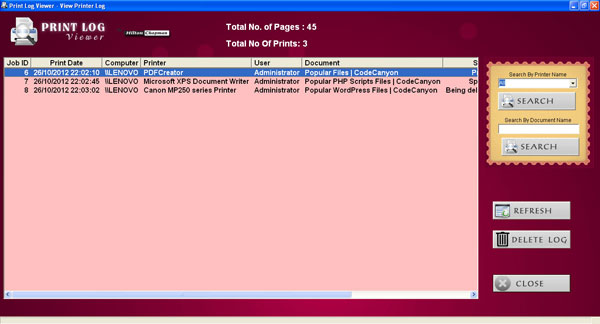
Printer Log Viewer records a list of documents printed via any printer available to your computer. Now you’ll know what documents are being printed, when they are printed, and who is printing them! Print Log viewer filters your printed data by printer name and document name.

FEATURES

  • Know what documents you print
  • Records each completed print job
  • Search printed document by name
  • Filter records by printer name
  • Support printers of all brands
  • many more…


Flag Counter

Download Printer Log Viewer (Windows)

PHP Settings Storage Class – Using INI Files & DB (Miscellaneous)

PHP Storage Class is a very simple to use class which lets you store all your configuration and settings in simple configuration files. The class is very easy to use with any of your existing projects, just drop it in and start using.

Settings Class comes with two predefined drivers (1) File Driver (2) MySQL Driver – Using which you can easily switch between File based storage or MySQL based storage.

Usage is as simple as using two methods – You can easy select where you would like to store the settings, either in a settings file or in a database – You never have to change a single line of code

Writing

$config->set("page-settings","userbrowser","chrome");

Reading

$config->get("page-settings","userbrowser");

Optimized Disk I/O Performance

It is well known that Disk I/O is potentially blocking and becomes extremely crucial when it comes to the point of saving dozens of user settings during the page load operation. In order to reduce the interaction with the disk during each save operation (file mode) and as an optimization attempt to reduce the Disk I/O cycles, this script uses a concept of Lazy Saving which Queues all the write operations till the point where there are no more write operations and finally flushes them from Memory to Disk in one shot thus speeding up the entire process.

Download PHP Settings Storage Class – Using INI Files & DB (Miscellaneous)

Ajax Contact Form with attachments (Forms)

Ajax Contact Form with Attachments and anti spam control. Multiple or single attachments files. Multiple or single recipient. Easy to configure (html, css, javascript, php). Easy to internationalize. Script based on the open source Zend Framework Components Mail and Mime. Drag and Drop feature (no spam control) is ready for touch screen. enjoy !

Download Ajax Contact Form with attachments (Forms)

eBook Creator (Media)

eBook Creator gives you custom controls to automatically or manually create Mobipocket .mobi files. Mobipocket files work natively on the Kindle family of eReaders and on iPhone, Android, Windows, OSX , and other platforms through free software.

eBook Creator can create eReader files from any RSS or Atom feed, supported by all WordPress installs, or create your entire blog as an eReader file. It can be setup to generate new Mobipocket files every day, every week, every month, or every time your blog is updated. It can generate custom books from individual blog posts or from any post category in your blog.

All of these files can be seen, managed, and downloaded through WordPress’s built in Media Library.

A handy widget has been provided for announcing your eBook capabilities to your readers.

Download eBook Creator (Media)

Pull Out Content Panel (Miscellaneous)

Pull Out Content Panel with jQuery

Fallow Envato
Fallow Twitter

Pull Out Content Panel with jQuery

Content panel that slides out at a predefined scroll position and visible at bottom of browser window, with option to expanded to full page height size to show more content.

DEMO : http://www.screenr.com/RLI8

In download file you will find instructions how install to customize the script.

For any questions and customization request please contact me via contact form.

Thank you

Download Pull Out Content Panel (Miscellaneous)

Evato – App for Envato Marketplace API (iOS)

Evato is an app it use Envato api http://marketplace.envato.com/api/documentation and fetch json into table view, and you can use it to check statement, Balance, Total sales.

Features

  • How to fetch json and display into table view
  • How to custom tableview cell
  • How to use NSUserDefault save username + api key and use it later.
  • Supported Storyboard

Download Evato – App for Envato Marketplace API (iOS)

FlipBlog Ipad for WordPress (Full Applications)

PLEASE DONT BUY THIS VERSION

THIS VERSION HAS SOME BUGS WHICH FAILED TO COMPILE ..PLEASE WAIT FOR VERSION 1 .1 IS IN THE REVIEW PROCESS CURRENTLY IN CODE CANYON …..PLEASE CHECK BACK LATER ……

FOR THOSE WHO ALREADY BOUGHT THIS ITEM , PLEASE EMAIL ME AND I WILL SEND YOU A FIXED VERSION OF THIS ITEM

THANK YOU AND SORRY FOR ANY INCONVENIENCE

Version 1.0

Video demo :
http://www.youtube.com/watch?v=BBnIRyi45M8

KEY FEATURES

1. Intergrated with WordPress
Content,category,menu,page & post can be control using your wordpress.

2. 5 Minutes installation and you’re ready to submit to the App Store
Just install FlipBlog Plugin in your wordpress & everything run like a magic.

3 iOS 5 & 6 Ready
Support latest platform

4. Multi Orientation
Support all rotation

5. Intergrated with social media
User can comment and share your blog post directlly from thier iPad

6.Intergrated with WordPress Multi nested menu
You can customize your page by your own e.g link,page or post categories.

7. Intergrated with WordPress Multilevel Category
Even your blog have 10 levels of categories. No problem with FlipBlog.

8. Variety of post template
Either you want to show a full image or maybe like a news style.

9. WYSIWYG Supported
What you see in your post is what you get in FlipBlog

10. Support Retina Display
All images was supported @2x

Download FlipBlog Ipad for WordPress (Full Applications)