DZS WordPress Testimonial Rotator (Sliders)

Intro – top

Want an awesome way to display your clients reviews on your site ? This is the widget for you! Customize everything from text and author to slideshow times and transitions. It comes packed with multiple skins ( check them in the preview ) – so you can choose the one that fits your site best! Do not worry about the size of the Testimonial Rotator. It can fit anywhere and it is responsive.

Features

  • responsive – with the Testimonial Rotator all of your clients will experience a smooth experience, wheter on HD Desktop Computer, Tablet or Phone
  • multiple skins – have been prepared for you to choose which one fits best on your site
  • 100% css skinable – want to make slight modifications to the skins ? The skins are 100% built from the css and it is very easy to edit with css knowladge
  • multiple transitions – features multiple transitions to make a cool user experience
  • SEO friendly – built with search engine optimization on mind from the ground up, the Testimonial Rotator uses html markup to build the widget
  • easy install – documentation, samples and preview build are provided so you can start up / include Testimonial Rotator in your project in minutes


Requirments

  • wordpress – self hosted install
  • basic html knowledgenot mandatory


What do you get?

  • Testimonial Rotator WordPress plugin – get creative!
  • sample data – the preview admin configuration which you can import in your own
  • documentation – extensive documentation on how to install & configure the plugin ( check the readme folder after you unpacked the package )
  • free updates – even if the value of this gallery increases with upcoming updates, you will get them for free
  • free support – for installation via my forum -> http://digitalzoomstudio.net/support/ this is the fastest form of support


Download DZS WordPress Testimonial Rotator (Sliders)

WordPress Easy Polling Plugin (WordPress)

Welcome to the WordPress Easy Polling Plugin. The plugin brings a new and easy way for you to engage your website visitors and gather opinions.

The plugin lets you ask questions for your visitors to vote on. You can display the polls as boxes or bar charts. Like the ones below.

The bar charts are animated upon click giving your users a visual aid to the popularity of the options that have been presented. Movement and colours are attractive to the eye.

The box charts show “vote” on hover and display the votes after they’ve been clicked on.

And after click

Now, something that you’re all no doubt thinking by now…..

Vote Security – we got it!

Yeah, that’s right. Just like in Dilemma! we have built into the Easy Polling Plugin vote security. This is achieved by only allowing one vote per IP address (optional).

The plugin allows you to add as many options as you’d like for each poll that you create. You can also style these in any way that you’d like – just pick your favourite colours on the Add New Poll page. If you don’t have enough options, just add a new one by pressing the button.

The plugin is really easy to use and fully feature packed.

Plugin Features

The plugin is jam packed with features, to name a few:

  • Fully customisable colours
  • As many choices as you’d like
  • Easy to use shortcodes

Plugin Specs

The plugin has been coding using high quality code and cutting edge WordPress techniques utilising some of the powerful jQuery libraries built into WordPress.

  • Custom colour picker using Farbtastic
  • Custom post types to manage the polls
  • Compressed javascript and css for faster loading

Please do check out the demo site for an interactive demo.

Download WordPress Easy Polling Plugin (WordPress)

jQuery Tweet Feed Plugin (Social Networks)

This minimal plugin allows you to easily display a live twitter timeline on your website! You can easily just copy and paste the one liner code, or get into some more of the detailed configuration.

Features include:

  • Quick copy and paste one-liner code
  • Full browser support
  • Live feed showing most recent tweets
  • Customizable Search Terms

Download jQuery Tweet Feed Plugin (Social Networks)

Facebook Viral App – Loved Gifts (Social Networking)

Live Preview: https://apps.facebook.com/luvd-gifts/

Features

Utilizes the Graph API in an iframe setting.
Uses the PHP SDK v3.1.1.
Supports OAuth 2.0.
View History of Sent and Received Gifts.
Easy-to-use admin panel for managing gifts.
Powered by jQuery AJAX .
Includes a like and send button.
Very simple, clean layout.
Runs smoothly in all major browsers.
Publish feature is available when users want to share a gift they’ve received or found in the category.
Free updates as long as it is supported.
Easily monetized with banner advertisements.

Requirements

Facebook Account
Server w/ PHP v5.3+
MySQL Database
HTTPS Capability / SSL Certificate

Download Facebook Viral App – Loved Gifts (Social Networking)

Hezecom PHP Code Generator (Database Abstractions)

Hezecom PHP Code Generator is a PHP , MySQL and PDO code generator which generate classes for each table in your database. It’s aim is to speed up your application development process. All you need to do is just create your database and the Code Generator will generate the classes which consist of INSERT , UPDATE, SELECT and DELETE which are the major database operations, not only that it will also generate stylish CSS3 forms for INSERT and UPADATE , base on the table name selected.

The generated classes are commented for easy understanding base on their operations, which means editing the code to your taste is very simple, if necessary. If you have not started using OOP in php, this will be a good starting point for you and if you have, whao! Then enjoy the power of speed using this app to generate your code. Save time and money developing your app.

Download Hezecom PHP Code Generator (Database Abstractions)

Social Network Script (Social Networking)

This is a complete social networking system inspired by facebook. This stands like an facebook clone comprising all of facebook including the user Timeline and following features. It is powered by an simple and powerful admin panel where every user activity can be closely monitored by the admin.

Features :
1. Instant Image Uploads.
2. Webcam Snaps.
3. Instant Notifications ( message & global ).
4. Instant chat & messaging.
5. Timeline.
6. Friend Relations.
7. Friends Button.
8. Autosuggestion Search.
9. Friendly URLs.
10.URL Redrections .htaccess.
11.Login & Registration.
12.More Updates Button.
13.Foreign Language Support.
14.Script Filter.
15.Text to Link.
16.Comments.
17.Profile Feed.
18.Friend’s News Feed.
19.Message archives.
20.Like button.
21.User settings to edit profile.
22.Ajax news feed load on scroll.
23.Email verification in user signup.

Download Social Network Script (Social Networking)

Mind Reader Guessing Game with Social Sharing (Miscellaneous)

I foresee your future … you are going to be amazed that no matter what number you pick the mind reading fortune teller will always get it right.

This is an amazing webpage game application that allows the user to select any number and then perform a simple math problem and a list of totally random words are displayed and the mind reader will correctly guess the word that corresponds to the resulting number. (check out the screen shots or the live demo.)

How does she do it? There is no way that she could know what number you picked or what number you will end up with. It could be anything?

If you know the secret be sure to keep it to yourself (a magician never tells) but share the page with your customers, family members, and friends. I’m sure quite a few of them will be asking how it’s done.

If you don’t know how it is done and it is driving you crazy. Just select purchase over there in the sidebar and the mystery is revealed in the installation instructions. Plus, you will get an excellent tool to add to your website.

The word list is customizable and you could change the list to reflect you and the products or services that you offer. For example the demo website might be used by a college that wants to promote their numerous degree programs, or if you had an office supply store the list could be items like … paper, scissors, stapler, notebook, etc., the possibilities are endless. And it is a great way to get your potential customers reading a list of your products or services! And hopefully they will be so amazed by the mind reader that they will want to use the quick and easy tools to tweet or share the application with all of their friends and followers and the viral movement begins.

In addition to a link to your main website’s homepage or any page that you into the single configuration file the website includes an easily configurable default tweet and link to be added to twitter or a posting with details, links, and a thumbnail image to facebook. Try out the social sharing in the demo and see just how many comments and retweets you get because your contacts are amazed at how she can guess the correct answer no matter what number you pick.

Installation is simple and everything is provided in just 12 files (including the styles and scripts) and there is no database needed. The image of the fortune teller used in demo site is NOT provided but can be purchased separately at photodune.

Image used in demo http://photodune.net/item/fortune-teller/2457196 (Small 948×632 (0.6MP)) if you would decide to purchase that image you would just replace a placeholder image as per the instructions provided and the fortune teller image will automatically be added to the site and positioned correctly.

Detailed installation instructions are provided but if you should have any problems with getting the code to work correctly, my contact information is provided and I will do everything I can to get to work for you.

The code is certified valid and has been tested and is fully functional in all browsers … even IE 6 . Includes great jQuery effects and animations like shaking up the table to randomize the listings, modal window, and tool tips for the social networking icons. Includes all of the necessary links to incorporate jQuery, jQuery UI, and the Google fonts that were used on the webpage. page is simple (not cluttered), professional and fun looking, but you can modify the look and feel to match your existing website.

Thank you for checking my item out! If you have any questions let me know.

Download Mind Reader Guessing Game with Social Sharing (Miscellaneous)

Ninja Popups for WordPress (WordPress)

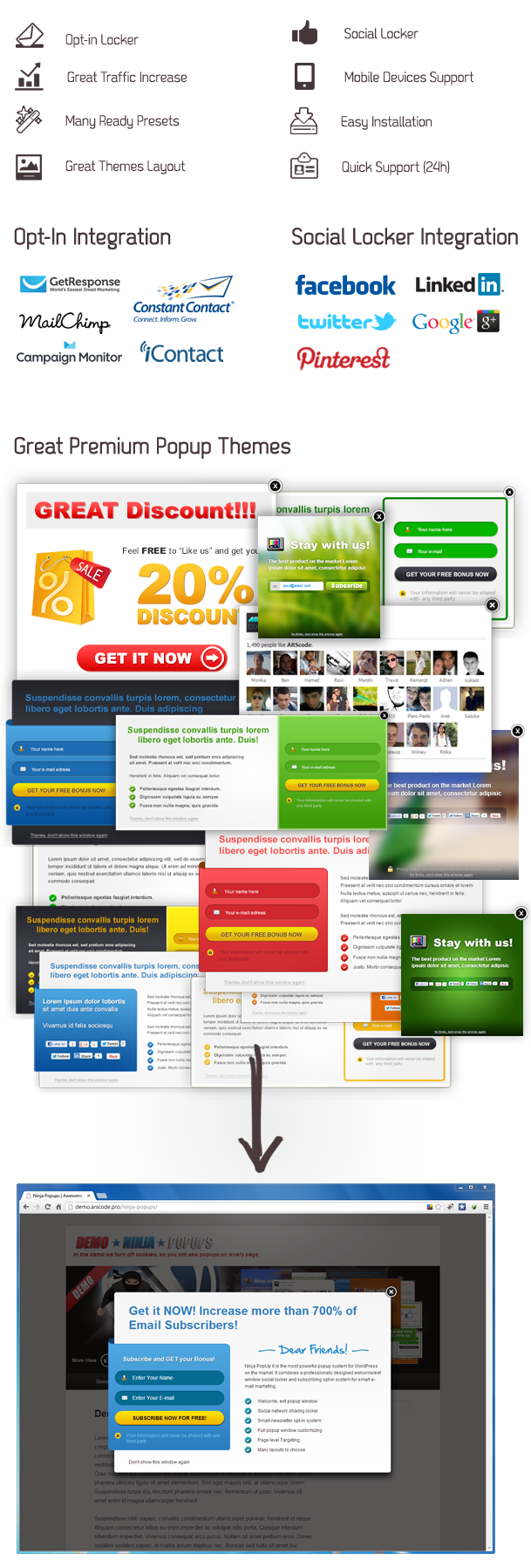
Ninja Popups combines a professionally designed popups to convert visitors on your site/blog into taking an action whether its subscribing into your newsletter, offering a discount/coupon for leaving customers, or locking content until they share you will increase your subscriber count and social signal of your site/blog which is exactly what google & other search engines want.

Key Features:

  • Easy to Configuration (No coding required!)
  • Great Popups Design (many color, many layouts)
  • Highly Customizable!
  • Translation Ready!
  • Free Upgrades
  • You can create Unlimited Popups
  • Samples Presets Included (in XML file)
  • Display Popup on load page
  • Display Popup on close/leave page
  • Page level Targeting (you can choose page/post to show popup, different popups for each post/page, turn popup on/off for all page or for few pages/posts)
  • Close button (show button: yes/no, custom close button text, auto close popup)
  • Social Network Locker (you can lock page)
  • Newsletter Locker (you can lock page)
  • Statistics
  • Time Display Settings (start date, end date)
  • Open Delay (open popup delay in seconds)
  • MailChimp Support
  • GetResponse Support
  • Campaign Monitor Support
  • iContact Support
  • Constant Contact Support
  • Store Opt-ins in CSV file or Send by Email
  • Submit Opt-in Form to Custom Url
  • Facebook Support
  • Facebook Likebox in Your Popup
  • Twitter Support
  • Google+ Support
  • LinkedIn Support
  • Pinterest Support
  • Excellent Customer Support (24h)
  • WordPress 3.4.x Ready
  • Powered by jQuery


Download Ninja Popups for WordPress (WordPress)

Avangate Gateway for WooCommerce (WooCommerce)

Description

Avangate Gateway for WooCommerce is a payment gateway plugin that allows you to safely and easily accept credit card payments with Avangate, without the need for an SSL certificate or undergoing costly PCI compliance.

Customers are automatically redirected to Avangate’s secure servers for payment with their hosted payment form, meaning that their credit card information never touches your servers and you don’t need to spend time installing and managing SSL certificates, and can focus on selling more softwares and services. With Avangate you can accept payments from Visa, MasterCard, American Express, Diners Card and PayPal.

How to use Avangate Gateway for WooCommerce?

Who may use this plugin?

This plugin is dedicated to Avangate Affiliates who want to better monitor their affiliate sells. We recommend this plugin to Avangate Affiliates that write reviews about softwares and services sold on Avangate Affiliate Network.

Why to better monitor? Why isn’t that enough just to place an ordinary affiliate link or banner (of the software I want to advertise) on my website and then sit back and wait?

Well, in that way your visitors may consider you `just an affiliate` who tries to make a few bucks, and they may not take you seriously. They may not click on your affiliate links, means: you will leave money on the table.

In the other hand: clicking on an affiliate link will drive your visitors (potential customers) to other’s website, which doesn’t mean that you already sold the software you advertised. What if they leave that website without buying the product just because they don’t like for example the design of that website, or they don’t know the language that website uses? They already left your site and maybe they never come back to your own site just because you sent them to a bad looking (or not working) website.

Is that something you want to achieve? We don’t think so… please continue reading and you will learn how to have your own fully functional online software store where your visitors don’t have to leave your website while they are purchasing the software or service you are reviewing, recommending or advertising.

First of all you will need

We recommend that you always use the latest versions.

WooCommerce is a very powerful and FREE online eCommerce store plugin, we are using that because it’s really easy to use and there are a lot of add-ons if you want to extend your website later.

Installation

Avangate Gateway for WooCommerce is really easy to install so just follow the guide:

  1. Make sure that WooCommerce plugin is already installed.
  2. Upload the `woo-avangate-gateway` folder to the `/wp-content/plugins/` directory or install it from the repository
  3. Activate the plugin through the ‘Plugins’ menu in WordPress
  4. Now you may activate Avangate in WooCommerce > Payment Gateways settings page

Settings page

Please click on WooCommerce > Settings submenu, then on Payment Gateways, then Avangate to reach the settings page of our plugin.

On that page you have to enter your Avangate Affiliate ID, your Source URL and your Order Style value, and of course you have to enable the payment gateway. (1st screenshot)

If you don’t want to use other payment methods, please disable them.

Adding a new product

Please add a Simple product – for that you may read WooCommerce’s userguide. While adding the new product, please check the option called Virtual and uncheck Downloadable, in the Attributes settings Add the following attributes to your product: Avangate ID and Vendor ID – explained on the 4th screenshot.

Avangate ID is a unique number code that every software has and you may find that in your Avangate Affiliate administration page, in the Get links section, it is called PRODS – explained on the 2nd screenshot.

Vendor ID is a unique alphanumeric code that every software vendor has and you may find that in your Avangate Affiliate administration page, in the Get links section, it is called Vendor Code – explained on the 3rd screenshot.

Once you added the short and long descriptions of the product, you may save (Publish) the document.

Add as many products from Avangate Affiliate Network as you want and your visitors will take you as a very serious `Reseller`

Coupon codes – discounts

Offering coupons is a good marketing strategy to get more customers, and we decided to add that function to our plugin that is working with the WooCommerce Coupon system.

This means: you may offer your customers discounts from time to time.

  1. For that you have to create the coupon code in your Avangate Affiliate admin – it is explained on their site.
  2. Then you have to enter those coupon codes into the WooCommerce’s Coupons page – that is explained in their userguide.

Languages

  • This plugin is translation ready and currently available in English.

Screenshots

  1. Avangate Gateway for WooCommerce Settings page
  2. Copying a product’s Avangate ID from Avangate’s site
  3. Copying a product’s Vendor ID from Avangate’s site
  4. Inserting Avangate ID and Venor ID on a product’s page
  5. Product page
  6. Cart page: 1 product added
  7. Checkout page with Avangate payment gateway

Changelog

1.0

  • Initial release!

About Avangate

Specifically designed for software markets, Avangate’s scalable and integrated solution includes a full-featured, modular and secure eCommerce platform, a partner order and revenue management system, as well as a constantly expanding worldwide affiliate network.

Download Avangate Gateway for WooCommerce (WooCommerce)

Blocks-Made Menu (Navigation)

* Browser Compatibility *

  • Google Chrome
  • Safari
  • Opera
  • Mozilla Firefox
  • Internet Explorer 9
  • Internet Explorer 8

Guide

How to change images from “Gallery” Section

First of all, choose the image you want to put in the “Gallery ” section. Now, go to “images” folder. Then, double click on the “small” folder. Remember that in the “small” folder are only the images that will be shown in “Gallery” section. Then, paste your image there. Edit the HTML file with notepad or which program you want. In case that you want your picture to be the first, replace “img src=”images/small/1.jpg” alt=”image1” ” with “img src=”images/small/your-picture-name.jpg” alt=”image1” ” and so on. Your-picture-name is the name of your photo that can be found in images/small folder.

How to move the menu in another place

First of all, the menu is only the bar which is shown in the top.

All you have to do is to go to css folder and edit “style.css” with notepad. Replace the left position of the ”.menu” category as you want. However, my advice is to let the value in procents.

Moving the menu content

After you moved the menu, you need to move the content that is shown at every click. To do this you need to go to css folder and then to edit style.css file. Find ”.container”. After this, replace the left and top values as you want. However, the job isn’t done. Here it comes the tricky part. Go to “js” folder and then edit the javascript file called “slices.js”. Go to the bottom of the file and find “openItem = function(pos, speed, easing)”. Below it there are the values you need to modify in order to tell the slices where to go. You need to modify the “top” and “left” values.

I called “distance” the variable used to calculate the width of the window. So, these need to be replaced: “top: $this needs to be replaced -> $$ 170 $$ + 100 * Math.floor(i/4) and left: $this needs to be replaced -> $$ distance/2.5 $$ + 100 * Math.floor(i%4). Make sure that the top and left values I highlighted with ”<<this needs to be replaced >>” are the same with the ones of the ”.container” from “style.css”.

However, we are not ready yet. You need to modify the values for the functions called “disperse” and “initPattern”. Go to “slices.js” and you will find them in the top of the file. These two functions tell to the slices where to go when buttons are pressed. Replace what I highlighted : t = Math.floor(Math.random()* 50) + ^ this needs to be replaced -> ^ 1 ^, l=Math.floor(Math.random()* 294) + ^ this needs to be replaced -> ^ (distance/2.5) ^. These values are the position of the slices. Replace them with the same top and left values from “style.css” of ”.menu” so that the slices will go behind the menu.

So, for initPattern function simply replace the (screenwidth/2.5) with the left value of the ”.menu” from “style.css”. Instead of (screenwidth/2.5) it will be (20/100 *screenwidth) if the left value of ”.menu” is 20%. Do the same with the disperse function.

This is all. Even though you think that it takes a lot of time to do all of these, you will see how easy it is. It takes around 5 minutes to do all these. However, if you face problems or if you need further instructions,e-mail me at [email protected]. Feel free to tell me anything you want and I will do everything for you.

* About Updates *

Updates will come soon. Buy and rate the item. I will definetely add more effects in the next versions.

Download Blocks-Made Menu (Navigation)

Animated Tabs (Tabs and Sliders)

Video with better quality will be available soon. Thanks for your patience.

These tabs are pure HTML5 /CSS3. Tabs have HTML5 structure and works on all major browsers. Tabs is easy to edit and integrate into any website.

Tabs are working on Internet Explorer 9 but animation doesn’t work, everything else is 100% the same.

Download Animated Tabs (Tabs and Sliders)

HTML5 Favicon Maker (Miscellaneous Apps)

Bug Update

Apologies for the inconvenience, there was a small bug that is making the script not work. I have already uploaded a fix to CC, it is pending approval. If you have already purchased it, please send me a message and I will mail you the latest files.

If you want to fix the bug by yourself, open index.php, replace “fav/” with ”” (nothing).
In other words, Search for fav/ and delete it

Create, Edit and Set Favicons!

Favicon Maker is a fully functional GUI icon editor for your site. You can create your own Icons, edit existing icons, save them and have a lot of fun along with customizing the look and feel of your favicon!

This editor is fully HTML5 and utilizes canvas elements and other advanced HTML5 techniques to help you create icons!

Also, you can convert icons from PNG to ICO on your server without installing Image Magick!

There is also an inline preview feature, which shows you how your Favicon will look, as and when you edit it!

Download HTML5 Favicon Maker (Miscellaneous Apps)

Retro CSS3 Navigation (Navigation and Menus)


Retro CSS3 Navigation is a vintage looking menu with beautiful typography and the more and more popular ribbon effect. It has three color schemes and it features things like unlimited menu levels or smooth CSS3 transitions. Also, it is very easy to integrate in your page thanks to its simple and semantic markup.

Features

  • Vintage look
  • Pure CSS3
  • Three color schemes
  • Unlimited menu levels
  • Minified CSS files included
  • Subtle fade effects
  • Easy to use (semantic markup)
  • Cross-browser compatibility
  • Clean & commented code
  • Detailed documentation.

Compatibility

  • Internet Explorer 8+ (Note: some features won’t be available in old browsers like IE8 )
  • Chrome
  • Opera 10+
  • Firefox 3+
  • Safari 4+

Credits

Changelog

25/11/2012 – Version 1.0

  • Initial release

Download Retro CSS3 Navigation (Navigation and Menus)

EBS Gateway for WooCommerce (WooCommerce)

EBS has been certified for PCI DSS 2 .0 Level 1 compliance and awarded ISO 27001 Compliance Certification for Information Security Management Systems (ISMS). These achievements will ensure interests of both the merchant as well as its clients are safeguarded.

Ease of integration, User Friendly interface to acquire online payments, World Class Security systems, Risk Monitoring on an ongoing basis, Smooth reconciliation, Multiple Payment Options on single platform are some of the essential features made available by EBS to Merchants, for a smooth E-commerce experience.

EBS Gateway Plugin allows the WooCommerce to accept credit card payments without worrying the Customers Credit Cards Details which are taken care by the EBS .

Download EBS Gateway for WooCommerce (WooCommerce)

PHP Profiler – Check & Debug Memory & Time Usage (Miscellaneous)

PHP Code Profiler is a Profiling Class that helps you debug your code of Memory & Execution hogs in a very intuitive manner. Capable of functioning across any existing/new PHP Project, this class is very light on memory and uses very less footprint.

PHP Code Profiler comes with an Intellingent Algo which helps you with Visual Clues (Hotspots) to identity the hogs in your code. It is as simple as that.

With the ability to TURN OFF the profiler dynamically, you can not manage a single version of your code even while debugging. No need to remove the profiling code from your main code each time.

Example Profile Result


Download PHP Profiler – Check & Debug Memory & Time Usage (Miscellaneous)