Random Loaders is an exciting way to spice up boring loading signs. They’re fun, interactive, customizable, and aesthetically-pleasing (most of the time). In addition, they utilize the latest HTML5 technologies through use of the canvas element and are compatible with any major browser type.
Category: code
download PHP, ASP.NET, Java and Javascript from CodeCanyon – the marketplace for code scripts and snippets.Javascript, Java, Program, Code, Snippet, Script, Dev, Development, Codebase, MySQL, Class, Widget, System, CMS
Multi-X Bar (Interface Elements)
Multi-X Bar is an advanced multifunctional navigation bar for your WordPress websites. It is modular system that allows to place not only navigation menu, but also any functional modules. By default, it has 7 customizable modules such as: subscription form, contact form, social sharing module, widget area module, accurate linking module, social icons and search box. As an administrator you can customize each module and their sequences, set desired menu structure and adjust whole bar by selecting suitable theme and setting responsive and appearance parameters. As a developer you can create any functional module and release it as separate plugin (Multi-X Bar has set of hooks to integrate new modules). Create comfortable browsing environment on your website. Users will appreciate it.
Features
- Nice CSS3 navigation bar: shadows, gradients, etc.
- WordPress native menu manager: create menu structure with WordPress native menu manager.
- Modular system: add available functional modules to the bar.
- 2 appearance modes: always on top and on scroll down.
- 2 color themes: set desired color theme that match your website design.
- Responsive design: support low resolution screens.
- 50+ settings options: customize Multi-X Bar as you wish.
- 7 embedded functional modules: subscription form, contact form, social sharing module, widget area module, accurate linking module, social icons and search box.
- Subscription Form module: place opt-in form on bar.
- AJAX-ed opt-in form: modern opt-in form.
- Collect contact details: store contact details in database.
- CSV Export: all data can be exported as CSV-file to be used with any newsletter systems.
- Enable/disable “Name” field: collect either names/e-mails or emails only.
- MailChimp supported: contact details can be submitted to MailChimp through their API.
- iContact supported: contact details can be submitted to iContact too.
- Contact Form module: place contact form on bar.
- Modern Contact form: HTML5+CSS3 AJAX-ed contact form.
- E-mail confirmation: plugin sends confirmation to users once they submitted info through contact form.
- Save all submitted data: all data is saved in database.
- Thanksgiving message: set thanksgiving message.
- Native wp_mail() function: confirmations and notifications are sent using native wp_mail() function, so you can adjust it with 3rd party plugins.
- Invisible spam protection: do not disturb users with captchas.
- Widgets module: add any widgets to widgets module.
- Social Sharing module: add share buttons from popular social networks (Facebook, Twitter, LinkedIn, Google+).
- Social Icons module: add links to your social profiles on bar.
- RSS icon: add RSS icon on menu bar.
- Social Icons: add desired social icons on menu bar (Facebook, Twitter, Pinterest, Google+).
- Search Box module: hide/show search box on bar.
- Accurate Linking module: accurate link contains current scrolling position.
- Drag & Drop customization: activate and sort functional modules as you wish.
- Scroll On Top button: smooth scrolling to the top.
- Easy to install: install and activate the plugin as any other plugins.
- Easy to use: plugin starts working after activation.
- Set of hooks to integrate new modules: create any functional module and release it as separate plugin (for developers).
- Set of hooks to create new themes: create new themes and release it as separate plugin (for developers).
- WordPress Best Practices: no any alerts from Plugin Check or WP_DEBUG.
Front End Functionality
The best way to understand the idea of Multi-X Bar is to see live demo. Click “Live Preview” or visit demo link. Multi-X Bar is on top of website.
Installation
- Install and activate the plugin. Once activated, it creates menu “Multi-X Bar” in the admin area.
- Click left side menu “Multi-X Bar >>> Settings” and do required settings.
- Go to menu manager “Appearance >>> Menus” and assign desired menu structure to Multi-X Bar.
That’s it! Enjoy using the plugin.
Support
If you have problems regarding using the plugin, please contat me and I’ll help you.
Download Multi-X Bar (Interface Elements)
Time Tracker app (Full Applications)
This iOS project is a full application with design, icon, ready to be submitted to the App Store.
With this app you can easily log your daily time, seeing how many hours you spent on eating, driving or walking your dog per day. On the main screen you see a timer and your activities for the current day. You can add as many activities as you want, since this app uses Core Data to store the activities and the history.
If you’re a freelancer, this app comes in handy, because you can track the time you spent with each of your project, and once done, you can easily export it in a .csv format so you can use it in any spreadheets (e.g.: Microsoft Excel, google drive).
You can also put the app into background, while running an activity, it will continue counting while you’re reading other stuff on Safari or using your phone for other stuff.
Features:
- Full documentation for every methods, properties
- Core data to store all data
- Email sharing to share the .csv files
- NSTimer
- NSFetchResultControllers
- Graphics
- Supports iOS 5+
- Supports iPhone 5 screen
- Background mode
- Animations
Download Time Tracker app (Full Applications)
jQuery Object Overlay (Loaders and Uploaders)
This plugin makes it easy to add an overlay to any element on your website. It was created to inform the user that your website is currently processing and therefore best used in ajax applications. It can also be used in conjunction with a light box that fades out the background to bring attention to the modal window. The uniqueness of this plugin is the ability to style the overlay and any text you assign yourself. It also includes an amazing ability to blur any element or make it colourless using a new feature in CSS3 called filters. Filters are currently only supported in Webkit browsers, however the plugin has been designed to automatically detect the feature in any browser and fallback to a coloured overlay that you specify, meaning that it is future proof without any modification from you.
Download jQuery Object Overlay (Loaders and Uploaders)
Repose Showcase for WordPress (Media)
Non-Wordpress Version: Repose Showcase
Repose is a javascript plugin which can be used as an amazing showcase for different stuff. Some awesome stuff that can be showcased using Repose would be portfolio, images, social links, your team, your USP or features, or pricing tables.
Features
- Full-featured Admin Panel within WordPress
- Used through a simple shortcode
- Numerous demos
- A lightbox-like plugin for viewing images
- Various Styles and Animations on Offer
Note: Images used in the preview do not form a part of the download package. Following images have been used from PhotoDune:
http://photodune.net/item/bread/729199?WT.ac=category_thumb&WT.seg_1=category_thumb&WT.z_author=cookelma http://photodune.net/item/coffee/2596879?WT.ac=category_thumb&WT.seg_1=category_thumb&WT.z_author=spottyhttp://photodune.net/item/pasta-and-tomato-sauce/199461?WT.ac=category_thumb&WT.seg_1=category_thumb&WT.z_author=elenathewise http://photodune.net/item/wedding-cake/198059?WT.ac=category_thumb&WT.seg_1=category_thumb&WT.z_author=elenathewise http://photodune.net/item/olive-oil/1455992?WT.ac=category_thumb&WT.seg_1=category_thumb&WT.z_author=mythja http://photodune.net/item/green-tea/1636127?WT.ac=category_thumb&WT.seg_1=category_thumb&WT.z_author=hitdelight http://photodune.net/item/confident-business-man/660888?WT.ac=category_thumb&WT.seg_1=category_thumb&WT.z_author=Yuri_Arcurs http://photodune.net/item/happy-woman-with-her-laptop/215103?WT.ac=category_thumb&WT.seg_1=category_thumb&WT.z_author=Yuri_Arcurs http://photodune.net/item/hanging-around/213682?WT.ac=category_thumb&WT.seg_1=category_thumb&WT.z_author=Yuri_Arcurs http://photodune.net/item/beautiful-smiling-executive/652673?WT.ac=category_thumb&WT.seg_1=category_thumb&WT.z_author=Yuri_Arcurs http://photodune.net/item/modern-interior/215565?WT.ac=category_thumb&WT.seg_1=category_thumb&WT.z_author=Yuri_Arcurs http://photodune.net/item/modern-design-interior-of-a-living-room/213911?WT.ac=category_thumb&WT.seg_1=category_thumb&WT.z_author=Yuri_Arcurs http://photodune.net/item/house-interior/1288977?WT.ac=category_thumb&WT.seg_1=category_thumb&WT.z_author=krsmanovic http://photodune.net/item/modern-interior-with-dining-room-and-stone-wall/213921?WT.ac=category_thumb&WT.seg_1=category_thumb&WT.z_author=Yuri_Arcurs
Download Repose Showcase for WordPress (Media)
Wp league fixture (WordPress)
“Wp league fixture” can generate auto football league (round-robin) fixture for each league season. It has multiple season option for each league. User can easily create as many leagues as they want. This plugin has results, scores, points and frontend design options. One can easily install and setup the plugin into the WordPress site. This plugin is compatible up to WordPress Version: 3.4.0 or higher
Download Wp league fixture (WordPress)
GetMeCooking Recipe Plugin for WordPress – Premium (Add-ons)
This WordPress recipe plugin makes it quick and easy for you to:
– Add many recipes to a blog post, or the same recipe in many posts
– Specify if the recipe is relevant for food allergies and intolerances
– Personalise the colours, heading descriptions and layout of recipes
– Search Engine Optimised
Your visitors will be able to:
– Print just the recipe, not the whole blog post. Choose with all photos, just main photo or just text
– Click on photographs to see larger versions
– Filter and search for recipes (requires an optional link to GetMeCooking)
The premium version gives you more features:
– Recipe index page – list all of your recipes on any page or blog post with a choice of different layout options
– Show recipes by category – display a list of categories (allergies, courses, etc.) on any page or blog post. Click on a category to display a list of relevant recipes
– Display fresh content – display up to 10 of your your most recently added recipes on any page or blog post
– Advanced management – see which recipes you have added to a blog post, multiple blog posts, or not yet added
– In-blog linking of recipes – recipes link to posts on your blog instead of linking to GetMeCooking
– Language support for Dutch, English, Italian, Portuguese, Russian
Please note, that in order to use the GetMeCooking Premium recipe plugin for WordPress, you will first need to install the free version of the plugin, which can be found here http://wordpress.org/extend/plugins/getmecooking-recipe-template/
Installation instructions for this plugin can be found here http://www.getmecooking.com/content/getmecooking-recipe-plugin-premium-installation.pdf
Download GetMeCooking Recipe Plugin for WordPress – Premium (Add-ons)
Real-Time Online Users (Widgets)
PHP Social Network Platform (Social Networking)
Our PHP Social Network script is similar with Twitter, allowing you to keep in touch with your friends, @mention them, create #hashtags, send messages (tweets) in real-time, receive automatic notifications upon new mentions and new messages, the script is responsive too (native application style on mobile devices), modern (metro) clean design, and so much more… view the features:
Video Demo: Video Demo (full features)
User Demo: User Demo (some features are disabled, please watch the Video Demo)
Admin Demo: Admin Panel
User Features:
Script/Admin Features:
Download PHP Social Network Platform (Social Networking)
TidyDeploy – Web Application Deployment Automation (Windows)
TidyDeploy – Automates Web-Developers’ Deployment Processes
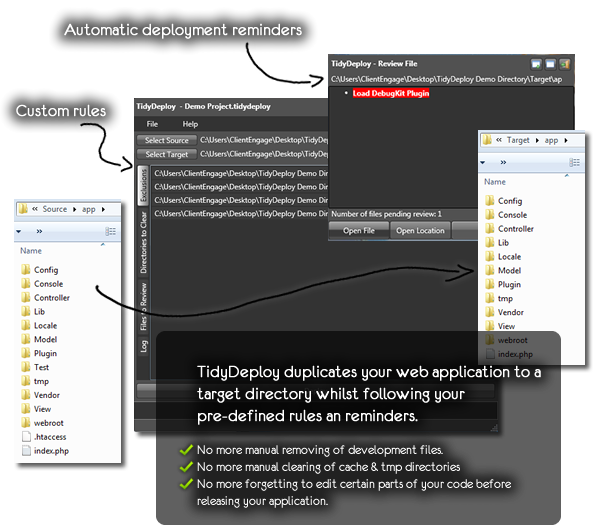
ClientEngage TidyDeploy is a Windows based application which automates the steps you usually need to follow every time you release a new web-application. TidyDeploy will follow your instructions: for example, it will delete cache files, delete files only needed for development and it will remind you what changes you need to apply to which particular files. In short: with TidyDeploy you can “set it and forget it” – gone are the times of having to “clean” your applications manually.
Check-out the demonstration video for a quick overview of how it works.
Features
- Create exclusion rules to remove certain files/directories from your application’s deployment version
- Create rules to clear certain directories (caches, tmp, sample files, etc.) when deploying your web-application
- Be reminded to perform changes on pre-defined files (e.g. removing development code, etc.)
System Requirements: Windows XP (SP3), Windows Vista, Windows 7, Windows 8 and .Net Framework 4 Client Profile
What’s included? The download includes a Setup executable which installs TidyDeploy on your Windows user account (the source is not included).
Do you closely work with your clients?
If you are looking for an advanced project management script to manage your client-interactions, then come right this way to have a look at the ClientEngage Project Platform – an advanced PHP project management script.
ClientEngage Project Platform – PHP Project Management
This particular project management script cuts-down on all the bloat that tends to make project management a nuisance. Instead, the ClientEngage Project Platform focuses on the tools you need to really get close to your customers in those crucial stages of your relationship. This will delight your clients – not only with your end-product but the whole lifecycle of getting there. So, if you are looking for project management in PHP, then the ClientEngage Project Platform is for you.

Download TidyDeploy – Web Application Deployment Automation (Windows)
Events Calendar (Calendars)
Events Calendar allows you to easily add to your website a powerful interactive calendar to present your events.
How it works
Administrator can create one or more calendars (e.g. a calendar for each events category or for different locations…) with unlimited events to add. Events can last one or more days and you can add a lot of information such as starting and ending time and date for each event, number of available places, free or paid event admission, textual description, photos, videos, location map… etc.
Have you got events in different cities? Create calendars with cities names and add all the events per city.
Managing a convention center? Easy! Create a calendar for each room and add all the conferences.
Are you a travel agent? Add to calendar all the vacations and tours of your agency.
Features
User:
– number of events per day immediately visible
– instantaneous preview the available events on rollover
– made easier netsurfing in choosing months and days
– possibility to share every event
– easy to use interface
Admin:
– unlimited number of calendars to set (each calendar can refer to a different category)
– unlimited number of events
– each calendar has its own independent set of settings
– once created a calendar, possibility to modify each event, one by one or in group, at any time
– switch between US and UK date formats
– you can add single and multiple day events
– ability to add time (start/end) and a starting and ending date for each event you add
– optionally add videos and a photo gallery for each event
– possibility to add a google map for each event
– optionally show tweets related to the event hashtag
– possibility to show flickr photos with the keyword you have chosen for the event
– you can spotlight the link to the online ticket store
– possibility to add the event website link
– fully translatable to any language!
– no coding skills required
Download Events Calendar (Calendars)
LinkedIn Viral Social App (Social Networking)


LinkedIn Viral Social App
This viral social app can let you users connect with their LinkedIn account before being able to access a reserved content (video, article, download, …).
Features
- Easy to install
- Easy to use
- Quality code
- This viral social app is equipped with the dedicated administrative module
- Be able to post a message on your users LinkedIn wall
- Automatic autopost on your users LinkedIn wall when they first connect
- Well Documented
Requirements
- PHP 5.x
- MySQL 5.x
Changelog
version 1.0 (December 30, 2012)
- Initial Released
Download LinkedIn Viral Social App (Social Networking)
Skype Message Sender (Windows)
Skype Message Sender can help you to send messages to all skype contacts ( can send message to online contacts or offline contacts) , can import contact from file by contact full name, email or skype name.
Ideal application to promote your services or to send message to all your friends.
Download Skype Message Sender (Windows)
Weather Widget 3 for WordPress (Widgets)
Weather Widget 3 is a simple widget for displaying weather conditions and forecast for places across the world.
Features :
– jQuery driven (requires minimum version 1.7)
– Uses AJAX technology
– Cache
– Ability to set default location
– Celsius or Fahrenheit units
– Displays today’s date, temperature, forecast for next 4 days
– Color customizable
– Adjustable Width (Note: Recommended minimum of 180 pixels)
– Comes with own black and white icons
– Has shortcode ( [weatherwidgetthree] )
Installation :
– Go to your WordPress admin panel and navigate to Plugins -> Add New.
– Click “Upload” and then “Browse”.
– Select the archive “Weather Widget 3 Installer for Worpdress.zip” and click “Install Now”.
– Activate the Weather Widget 3 plugin by clicking “Activate” button.
Using the shortcode :
Simply type in your post/page the following shortcode:
[weatherwidgetthree apikey=MY_API_KEY]where MY_API_KEY is the key you have obtained from http://www.worldweatheronline.com/
Obtaining API key :
To obtain free API key, go to http://www.worldweatheronline.com/register.aspx
Download Weather Widget 3 for WordPress (Widgets)
Clever Feedback (Forms)
Clever Feedback lets you easily add a feedback form to your WordPress blog. It’s simple to get started just activate the plugin and you are ready!
Yes, this is a clever plugin
This is a Clever Feedback system because you can not only collect user’s feedbacks, you can also know what your users think about all the existing user’s Feedbacks, and this is really precious.
Clever Feedback is fully customizable
All the text displayed in the Feedback modal window can be customized through the Options menu voice, no matter if your website is in English or in other languages, all the text can be customized.
If you need a Feedback form with the color of your website or brand, simply go to the Options menu voice and the change the main color, all the colored elements will change accordingly.
You can browse or store your Feedbacks and related information
Inside the Feedback menu you can browse all the received Feedback and related information, if you need to store your Feedbacks and related information you can export all the collected data as a CSV file, a very simple data file format supported by almost all spreadsheet software.
To know more on how the administration part works
I made an HD video to show you how the administration part works, check out this https://www.youtube.com/watch?v=ESK9Z7teJrw