Gimel – Bold Mobile-First Menu (Navigation and Menus)


Note: the menu can handle only one-level submenus.

Features

  • Clean & modern look
  • Pure CSS3
  • Responsive
  • Toggle with a click/single tap on mobile devices
  • Six color schemes included
  • Easy to use (semantic markup)
  • Cross-browser compatibility
  • Clean & commented code
  • Detailed documentation.

Compatibility

  • Internet Explorer 7+ (Note: the responsive features won’t be available in old browsers like IE7 and IE8)
  • Chrome
  • Opera 10+
  • Firefox 3+
  • Safari 4+

Credits

Changelog

08/05/2013 – Version 1.0

  • Initial release

Download Gimel – Bold Mobile-First Menu (Navigation and Menus)

My places map (Utilities)

Quickly and easily save your geo-located spots at any given time and save them for later. Why save them for later? So you can get directions back!!

Parked in a lot? Save it!
Found a sweet skate spot? Save it!
Found a new fishing spot? Save it!

The possibilities are endless and this would make a great addition to any existing app!

Is it already on the market? Yes! Our client has an app already on iTunes under the name “photogspot”. Click on the “Live Preview” link to be taken there!

READ BEFORE BUYING:

– No this is not for Android nor will it be made for Android
– This was made for iPhone 5 with iOS 6+
– This is not a full app, this is to be used as an element to an existing app
– I will not modify or customize the files for you

As stated above, this utility is actually already on the iTunes market and selling. It is listed as just the files itself as it is geared to a specific market.

Download My places map (Utilities)

Youtube Ultimate Party (Miscellaneous)

Its the ultimate way to use YouTube! Whether your throwing a party, or need a playlist for yourself, this is it.

You’ve never experience d YouTube like this!

Update 1.1 (Pending review) : Thanks to @Neon_, fixed an issue where the video disapeared when searching for new videos

Completely responsive(tested on android and ios devices)
Responsive video as well!
New never seen before YouTube experience
User focused integration’s
YouTube safe 3.0 API engine
NO configuration needed! Upload and go
Sharing features to share the party with friends
You really have to demo it to see how great it is!

Download Youtube Ultimate Party (Miscellaneous)

WordPress Advanced Rating System (Utilities)

Live demo

Live demo WordPress advanced rating system (WPARS). Hope you enjoy it.

Description

WordPress advanced rating system (WPARS) is good rating system for wordpress. WPARS will help you set up rating system for posts, pages and all custom post type in your wordpress website.

WPARS support many styles with custom shapes, custom colors and custom sizes which you can settings them in your wordpress admin page.

WPARS use ajax dynamic loading data, so no need reload your url when rating processed.

WPARS support protect rating method to anti-spam rating and custom rating text template will display in your website.

And more, WPARS support WPARS statistics widgets. With this widget you can insert into the sidebars for display top ratings, top scores, top average statistics generated by the WPARS. In addition there are many options that you can set up in each widget as display thumbnail for widget with control width – height, auto trim title, control number post with display, sort post by average – raters – scores, filter posts by post, page, category, tag, custom post type, custom taxonomy.

WPARS will add a menu link in your wordpress admin page to settings rating system. With this link, you can setting rating shapes, rating colors, rating sizes, protect rating, rating template and widget template will display in your website.

Featured

  • Use Ajax with no reload page when rating process.
  • Over 80 styles with 8 shapes, 10 colors and custom sizes.
  • Cookie rating protect.
  • Easy switch max rating 5 or 10 scores
  • Custom rating template display.
  • Support for post, page and all custom post type.
  • Google rich snippets support.
  • Support pro widget statistics.
  • Compatible with most browsers.
  • Compatible with WordPress 3.5.1.
  • FREE update at codecanyon when new version available.

Screenshots

Admin settings
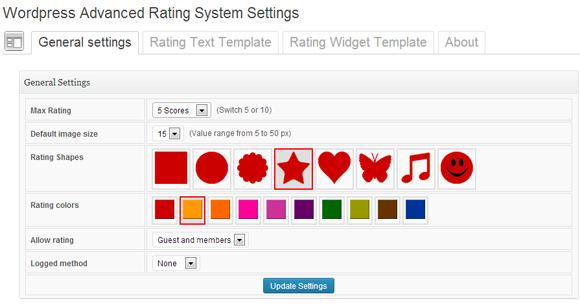
Admin settings

List shapes and colors

List shapes and color
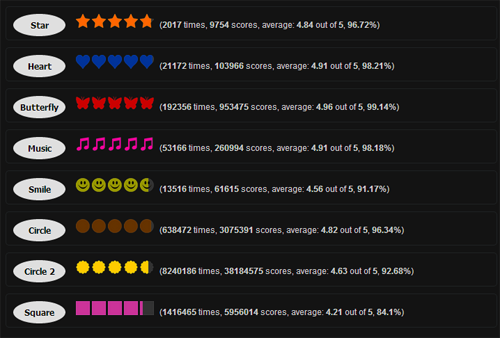
List shapes

List shapes

List colors

List colors

Custom rating images sizes
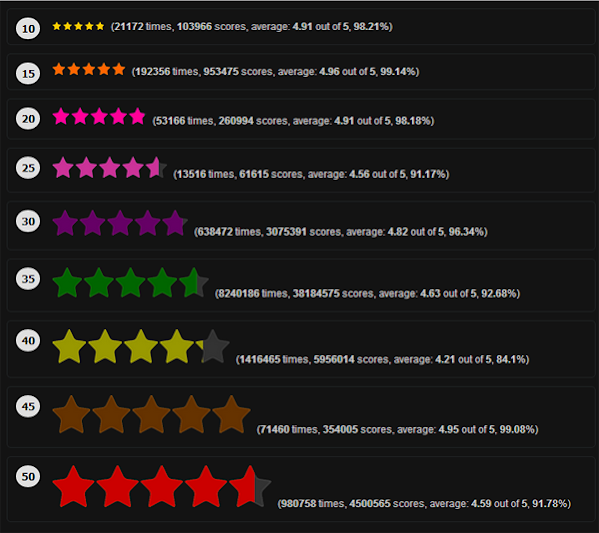
Custom rating images sizes

Widget display
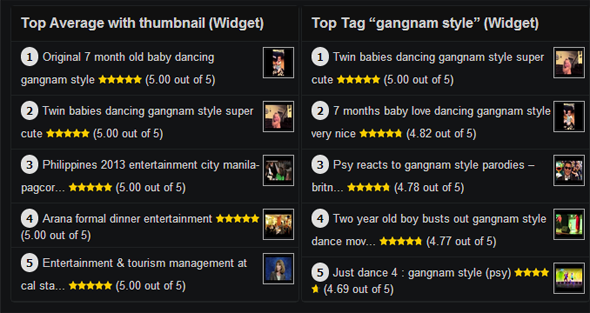
Widget display

Google rich snippets support

Google rich snippets support

Change logs

5/5/2013: Version 1.0 initial release.

Connect with us



Download WordPress Advanced Rating System (Utilities)

Responsive UK Map – HTML5 (Media)

Responsive UK Map – HTML5

This map is built in HTML5 code and runs with javascript based on the new technique of Scalable Vector Graphics (SVG), So it can be scaled to any size without losing its quality.

Features:

  • It doesn’t require special plugins to work such as Flash player, So it works on different platforms including iPad and iPhone.
  • Each region has its own parameters so you can change upcolor, hover color and click color of each region also you can enable/disable the region. You can also add HTML formatted data for each region i.e you can change the font color, size, style, underline….etc
  • You can add clickable links such as websites or emails.
  • The scroll bar appears only with long content, i.e It’s autohide with short text. So you can add information as much as you want.
  • Responsive; it can fit in its available space without the need to scroll horizontally while preserving its quality.
  • Compatible with all major browsers including Google Chrome, Firefox IE9+, Safari and Opera.
  • Easily integrated with WordPress using simple iFrame code.

Map Parameters:

  • borderColor: inter-region borders.
  • shadowColor: shadow color below the map.
  • shadowOpacity: shadow opacity, value, 0-100.
  • namesShadowColor: tooltip shadow color.
  • msgTitle: default title text (advanced version).
  • msgData: default content text (advanced version).

Per Region Parameters:

This is what you can modify for each region:

  • name: region name.
  • data: HTML formatted data appears in the text box when a user clicks this region (advanced version).
  • url: Goto URL (simple version).
  • target: open link in new window:_blank, open in current window:_self (simple version).
  • upcolor: region’s normal color.
  • overcolor: region’s color when mouse hover.
  • downcolor: region’s color when mouse clicks.
  • enable: true/false to enable/disable this region.

Based on my old XML Interactive UK Map

You might be interested in:


Download Responsive UK Map – HTML5 (Media)

Magento Admin Catalog Product Filter (Magento Extensions)

Magento Admin Catalog Product Filter is a Module for Magento Community Edition that help admin to filter better the products in Admin Catalog Product List based on Attributes.

1. Version supported: 1.5, 1.6, 1.7
2. Enable/Disable Option
3. Option to select Attribute to filter. (Ex.: Color, Size, Price, Manufacturer)
4. Catalog Products Multi filter.

Login: User: admin Pass: admin123

Download Magento Admin Catalog Product Filter (Magento Extensions)

WooCommerce Buy Selected Button (WooCommerce)

About the Extension

WooCommerce Buy Selected is a WooCommerce e-store extension that expands the customer interface and makes shopping even more convenient and user-friendly than before. The extension adds quantity fields to products of simple type on product lists as well as a “Buy selected” button located below the products. Clicking the button will add to your cart as many product items as stated in the quantity fields.

Installation

  1. Connect to your server’s FTP

  2. Copy the “woocommerce-buy-selected-button” folder from the zip into the “wp-content/plugins” directory

  3. Login to your WordPress administrator panel

  4. Click the “Plugins” tab and you will see your newly installed plugin – activate it.

Usage

There is basically no need nor possibility to configure the plugin in any way as it should work flawlessly straight after the installation.

WooCommerce Buy Selected Button In Action

1

A presentation of the extension. A customer has specified the item quantity for two products and clicked the “Buy selected” button. A handy link leading to the cart appears afterwards.

2

The cart.

Changelog

  • v1.0.1 – 2013-02-07
    * Initial version for WooCommerce 2.0
  • v1.0 – the first ready and stable version for WooCommerce 1.6.6.

Download WooCommerce Buy Selected Button (WooCommerce)

Smart Fields – Powerful Custom Fields (Utilities)

Smart Fields is a plugin which lets you build create custom fields in the most common locations of the WordPress administration area.

This plugin is great for adding fields in the administration area, but it’s up to you to display their values in your theme/plugin! This means that you need basic WordPress knowledge to be able to retrieve the right data, output it and style it according to your wishes.

Features

  • More than 20 field types
  • Repeater Field
  • Theme Options container
  • Post Meta container
  • User Meta container
  • Term Meta container & custom API
  • Widget – A base for you widget which can have all of the fields above in their forms
  • Support for multilinual fields
  • Field to Field Dependencies

Fields

A list of all available fields:

  • Separator
  • Text
  • Number
  • Select
  • Set of Checkboxes
  • Textarea
  • Select Page
  • Radio
  • Checkbox
  • Image Select
  • Map
  • Header Scripts
  • Footer Scripts
  • Image
  • Select Term
  • Color
  • Select Sidebar (with the ability to add custom sidebars through that field)
  • Date
  • Time
  • Richtext
  • Google Font
  • Repeater

Repeaters

The Repeater is one of the most powerful tools of Smart Fields. It allows you to create repeatable groups of fields, like slides in a single field.

You can also have multiple field groups, which have different fields inside of them. This means that:

  • If you are creating a slider, you can have an Image Slide, Video Slide, Text Slide, etc., each of them having it’s unique fields.
  • If you are creating a page layout field, you could have a Testimonials section, a content section and much more. This way each page can have it’s unique layout.

Multilinual Functionality

The plugin automatically integrates with qTranslate, which is a free WordPress plugin which lets you have your site in multiple languages.

When both plugins are activated, Smart Fields displays an input for each enabled language. This way, the user can enter a value for each language without you having to add additional fields or change your code.

Demo & Docs

To feel the full power of this plugin, I’d recommend you to either go to the Live Preview and create a container, or view the documentation of the plugin to see all of the methods that are available to you and how easy to use they are.

Download Smart Fields – Powerful Custom Fields (Utilities)

Slick & Clean CSS3 Login and Register Forms Pack (Forms)

Three CSS / HTML forms in One Pack

Slick & Clean CSS3 Forms are made to be easily modified and customized to suit your needs.

– 3 Forms in 1 Pack
– Clean design and code
– Easy to customize
– CSS3 and HTML powered
– Sign In, Registration and Account Reset Form
– Animated tabs
– Social login buttons
– Custom Terms & Conditions Pop Up
– Custom Tooltips for Social Login & Pop Ups for each form
– Well documentated
– Comments through the code for guidance
– IE9 fallback for placeholders

Fully packed

The package includes:

Demos & Sources
– Login, Register & Reset form in animated tabs
– Login form (Pop Up and static)
– Registration form (Pop Up and static)
– Account Reset form (Pop Up and static)

Layered PSD
– Fully layered PSD with guidelines and ease of use

Documentation
– Well documented usage of the forms

Need help? Slick support at your service

Contact us if you’re having issues modifing the forms via email or message.

If you like it, feel free to rate it :)

css contact form

Download Slick & Clean CSS3 Login and Register Forms Pack (Forms)

Url Shortener (Miscellaneous)

URL Shortener is a powerful and clean script which offers users the chance to use short urls very easy. This script can be used even by people who do not know PHP and MySQL, it having an installer which can be used by anyone. Your users have the opportunity to register,create, delete and share their own short URLs. All URLs can have a “custom name” like http://www.domain.com/yourname. With that option is very easy to keep in mind your favorite music, movies and other…

Admin features

  • Advanced admin area
  • Admin groups
  • Multiple admins with different permissions (Full Administrator, Ads Administrator, etc…)
  • Banned ips system
  • Delete shortened url
  • Add/Edit/Delete ads banners
  • Add/Edit/Delete ads iframes
  • The admin can see how many times a banner was seen (count banner views)
  • The admin can see how many times a iframe was seen (count iframe views)
  • Security questions system
  • Auto delete shortened urls after x days (this option is only for guests, users with id 0)
  • Google Analitics (admin only must insert Google client code Example: UA-12345678-1)
  • Google Adsense option (this option will disable ads banner system and will show google adsense banner on redirect page)
  • Option for delete url by user (Admin can allow users to delete own shortened urls)
  • Admin can set short url length from admin area
  • Option to enable maintenance mode
  • Option to enable TOS acceptance
  • Dual capcha system (reCAPTCHA & select image)
  • Easy install

User features

  • Latest shortened urls
  • Top 20 shortened urls (by hits)
  • Two languages avaible (english and romanian)
  • User can delete own shortened urls
  • Weekly chart
  • Recover password
  • Change password and account details
  • Total hits of shortened urls
  • Costum url
  • Responsive design
  • Metro design

Download Url Shortener (Miscellaneous)

Creative Gallery (Galleries)

Creative Gallery – A must have WordPress Image Gallery is a first of its kind of image gallery, built using jQuery and CSS3.
It helps to give your albums a unique animation effect and style.
Check out its feature below:

Online Demo

Project Features

  • A Very Creative and unique style of gallery. First of its kind.
  • Add any number of albums (boxes) in the gallery and images (icons) in the album.
  • Control placement, position and spacing of the flying out images in the album using our “Box Icon Position” feature
  • Control dimensions (height and width) of album boxes and its images icons.
  • Redirect to a particular Website URL or POP UP a large image on click of icons.
  • Control border size and color, manage rounded corner radius of albums and images.
  • Manage spacing among album boxes in the gallery.
  • Create your own galleries or use inbuilt demo galleries.
  • Show boxes open by default on page load or open on mouse over. Means control if the icons in the box are visible 1.) by default on page load or 2.) on mouse movement over them.
  • Show icons slightly outside the box or not on page load just to the box a unique look.
  • Fully customizable Admin panel to control dimensions, colors, position and spacing, alignment, animations, URLs, Uploaded media etc.
  • Implement multiple galleries on the same page.
  • Easy to use interface.
  • Single line implementation.
  • Compatible with WordPress 3.0.x, 3.1.x, 3.2.x, 3.3.x, 3.4.x, 3.5.x & Woocommerce
  • Browser compatibility (Google Chrome , Mozilla Firefox , Opera , Safari , Internet Explorer ).

Download Creative Gallery (Galleries)

Ultimate Toppanel – WordPress Plugin (Miscellaneous)

Ultimate Toppanel – WordPress Plugin Version 1.0

Ultimate Toppanel is the perfect plugin for wordpress. Extra space for your website. Choose custom animations, dimesions, icons, fonts, positions etc. . You can insert any sidebar widget in the toppanel. Add HTML Content, News, Menus, Archives, Contact Forms and so on. Demo Data included.

Features

  • Unlimited Colors
  • Custom Dimensions
  • Different Positions
  • Custom Animations
  • 40+ Icons
  • Extensive Admin Panel
  • Import/Export Options
  • Google Fonts
  • Video Tutorial
  • Extensive Admin Panel
  • Extensive Documentation

Demo


Changelog

Version 1.0 - Initial Release

Download Ultimate Toppanel – WordPress Plugin (Miscellaneous)

iOS-WebView: Open specific links in Safari + Push (Full Applications)

Create your own WebView-App for iPhone, iPod and iPad with a few clicks. You are able to define links (e.g. facebook.com), which should be opened in Safari instead of WebView. There is a nice “No Connection”-Screen with a “Try again”-Button too. But there are even more features:

– Works on iOS 4.3 to 6.1.4 and higher

– Universal-App for iPhones, iPods and iPads

– Splash-Screen + Icon supported

– “First Run”-Dialog

– “Rate my App”-Dialog

– “Follow on Facebook”-Dialog

– Geolocation & HTML5 Audio/Video & Multitasking

– Activity Indicator while loading

– Define specific websites, which should be opened in Safari instead of WebView

– Offline-Screen with “Try again”-Button

– Set local Push notifications, which are shown after the app is closed

Enjoy – if you have any questions, feel free to ask! :)

Download iOS-WebView: Open specific links in Safari + Push (Full Applications)