Fresh Coder (Miscellaneous)

How much time do you waste reloading your webpage while programming or styling? If your cross browser testing and you have 2 versions of each browser open, as well as your mobile devices, each change can take forever! We investigated this issue recently, and found live.js, But the constant refreshing is annoying! the fact that we didnt like the pure JS always refreshing implementation anyways, we came up with a hybrid php and js solution to this annoyance!

Only refreshes on code changes
Cross browser compatable
by the time you look at the browser the new code is updated!
Doesnt refresh on css change, only loads the new css!
Works for html, php, javascript, images, css and probably more we havent tested!
You could cut days off of your yearly workflow time using this, we are actually using it currently and love it!

Just include one file and make changes via ftp..thats it!

Download Fresh Coder (Miscellaneous)

Quick Reorder Magento Extension (Magento Extensions)

Ever wished there was an easier way for your customers to reorder previously purchased products from your store?

Want to increase your sales?

Now you can with our new Magento Quick Reorder Extension! This extension adds a new link in the customer’s account area that will allow them to quickly select any product(s) and qty that your customer has ordered in the last 30, 60, 90, 120, and even 180 days and add them back to their cart for checkout!

To see it in action please login as a customer on the frontend of the site:

user: [email protected]

password: temp123

Download Quick Reorder Magento Extension (Magento Extensions)

Themes Pack for Ninja Popups (Add-ons)

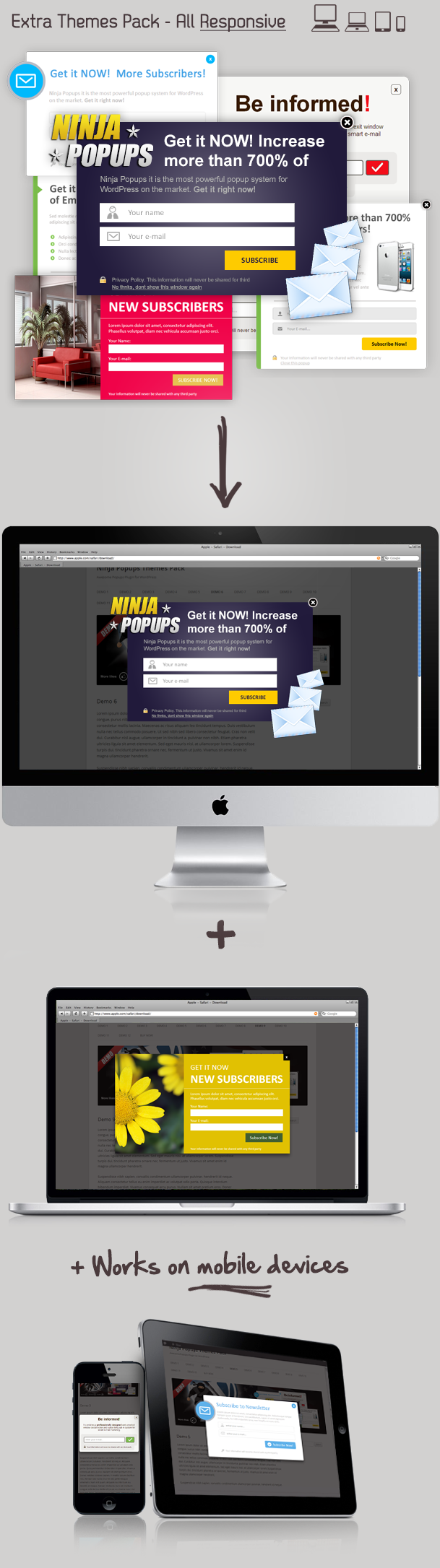
Themes Pack for Ninja Popups – this are five new, well designed Popup Themes with unlimited colors and variants.
Feel free to make your own configuration get more visitors on your site/blog with new designed responsive popup themes.

Requirement: Ninja Popups for WordPress version 2.0 or later

Key features

  • Very Easy to install
  • Responsive (works on mobiles)
  • 5 Great designed popups with unlimited colors and variants
  • Highly Customizable! (background, colors, fonts)
  • Lifetime free updates
  • Unlimited Popups with choosen theme
  • Translation Ready!
  • Excellent Customer Support (24h)
  • Powered by jQuery

Ninja Popups Extra Theme Pack

Download Themes Pack for Ninja Popups (Add-ons)

iMapper – WordPress Image Mapper / Pinner (Utilities)

iMapper – WordPress Image Mapper

iMapper – WordPress Image Mapper is a simple, yet powerful plugin that lets you select an image of your choice and pin stuff on it. It offers several embedded pins which offer special functionality, as well as the ability to import your own pins with the basic functionality. It is very intuitive and easy to use, and it will take but moments to set up your image with pins and customize the content connected to each of these pins.

iMapper is a perfect solution if you want to make your contact page a bit more dynamic. It will fit perfectly no matter what your profession is. It can easily be adapted to a health image mapper, product image mapper, contact image mapper etc.

iMapper is an ideal solution to keep the visitors of your site stay a bit longer.

Features:

– Fully responsive design
– 5 different embedded pins
– Different functionality for different pins, including accordion
– Fully customizable content
– Ability to choose which side does content open on
– Support for Google Fonts
– Import your own pins
– Extremely intuitive backend design
– Very easy to set up pins on the map with a single click
– Ability to choose if content opens up on click or hover
– Insert whatever inside the content part, including HTML tags

Download iMapper – WordPress Image Mapper / Pinner (Utilities)

Password Generator (Miscellaneous)

Give Your Visitors Access To Uncrackable Passwords

Create strong and highly secure passwords

Combine numbers, symbols, lowercase and uppercase letters

Seven password settings

  • Numbers
  • Lowercase letters
  • Uppercase letters
  • Special symbols
  • Exclude similar characters
  • Password length
  • Quantity (create multiple passwords at once)

Fully Responsive Design

Password Generator is completely responsive and will fit in any device screen

Understandable And Readable Code

Everything is CSS based
English language file included

Top 10 Most Common Passwords

  1. password
  2. 123456
  3. 12345678
  4. abc123
  5. qwerty
  6. monkey
  7. letmein
  8. dragon
  9. 111111
  10. baseball

73% of internet users have THE SAME password across multiple sites. Do you?
Create strong passwords for your websites now!

Download Password Generator (Miscellaneous)

Be My Super Affiliate Tool (Miscellaneous)

The Easy Way to Get Affiliates

This script thurns visitors in to affiliates and or buyers the easy way!

Your visitor get the opportunity to earn money on the fly just by filling the envato username!

After that they get all the affiliate tools they need to start right away It’s that Easy.

The only thing they need is a affiliate account on envato…


Features


  • Uses the Envato API to Import Envato marketplace Products.
  • Its a Stand alone affiliate tool
  • Works on domain and subdomain.
  • Display and promote your own items. 
  • Display all your products (items) with your visitors referral link automaticly.
  • Generate Share buttons with your visitors referral link automaticly.
  • Generate Facebook coment box with your visitors referral link automaticly.
  • Generate Share links with your visitors referral link automaticly.
  • Generate HTML links with your visitors referral link automaticly.
  • Generate HTML promo box with your visitors referral link automaticly.
  • Generate BBcode links with your visitors referral link automaticly.
  • Easy install just edit 3 files and upload.
  • No Coding Required! just fill in the site details and affiliate user name (only ones). 
  • Build on twitter bootstrap.
  • Share butons.
  • Optin ready money is also in the list. 
  • Google adsense ready to earn even more. 


Works on all Envato marketplaces auto grab your items on the fly. 


  • codecanyon.net
  • themeforest.net
  • activeden.net
  • audiojungle.net
  • videohive.net
  • graphicriver.net
  • 3docean.net
  • photodune.net


REQUIREMENTS

PHP CURL Extension active (the most servers already have it), it is used to get data through Envato Markeplace API.

INSTALL


1. open the setconfig file and fill in your details.

2. open te extra.php file and paste your optin form (code) 

3. open add.php file and paste your adsens or advertisement (code)

4. upload with FTP


Done! thats it!

Download Be My Super Affiliate Tool (Miscellaneous)

Kodda – Modern and Responsive WordPress Menu (Menus)

Kodda ?

Kodda is a responsive , modern , Elegant , clean & highly customizable wordpress menu.
with kodda you can add : Posts , Links , DropDown’s , Text , HTML & Shortcodes !

Demo Site : http://kodda.designonsky.com/

Try it before, you buy it ! : https://www.box.com/s/uinjs77811or47xgw224

Features

  • Ability to Style Everything on the Settings Page !
  • Ability to Change the Size and Color of the Arrows !
  • Ability to Change the Size and Color of the Responsive Icon !
  • CSS3 ( Border Radius , Box Shadow , Gradient )
  • You Can Add – Different Submenu Types
  • You Can Add – Search Form
  • You Can Add – Social Icons
  • Responsive !
  • 4 Skins ( More in the Future ! )
  • You Can Change the Trigger to ( Hover or Click )
  • And Much More !

+ Bonus

  • 30 Social Media Icons ( 5 Blue, 5 White, 5 Dark, 5 Red , 5 Gray & 5 Orange )
  • 3 Beautiful Blurred Backgrounds

Requirements

  • Only WordPress 3.3+

Compatible Browsers

  • IE7, IE8 ( No CSS3 )
  • IE9 , IE10
  • Firefox
  • Safari
  • Opera
  • chrome
  • iPhone + iPad + Android !

Important

Before you Purchase , Please Read!

  • Anything you added to a Menu Type [ Text/HTML ] , You have to style it by yourself . But theres no need to open the css files with an editor , Just go to Settings Page , Click on Style then Add You CSS Code , You will find a Beautilful Editor .
  • No Support For IE6

Download Kodda – Modern and Responsive WordPress Menu (Menus)

Smart CRON Tools (Utilities)

Plugin Home Page
Support Forums
Follow on Twitter
Video on Youtube

Plugin Information

Smart CRON Tools is a unique plugin that allows you to list, identify, remove any background job running in WordPress. Plugin adds easy to use and understand tables with all registered jobs, showing next run time, name of the job, source, schedule period and options you can perform for each job.

Main Features

  • List all scheduled jobs both one time and reccuring.
  • Preview arguments that will be passed to the job function.
  • Options to run and delete any of the scheduled jobs.
  • Built in list for quick detection of plugins that added scheduled jobs.
  • Alternate detection method through scanning of plugins to identify jobs.
  • List of all schedules periods used for recurring cron jobs.
  • Detect schedules periods source plugins using pluging scanning method.
  • Add new schedules periods that can be used for scheduling new jobs.
  • Plugin adds three new basic schedules for weekly, twice weekly and fortnight periods.

Other Features

  • Supports WordPress Multisite installations for individual sites.
  • Supports translation and includes POT file.

Version 1.0 / 2012.05.14.

  • First release

Download Smart CRON Tools (Utilities)

WooCommerce Address Proof (WooCommerce)

AD Proof is a very powerful assistant for verifying addresses over 240 countries on the planet
It removes any burdens of shop owners when delivering products to the customers by ensuring the billing/shipping addresses are correct thus increasing customer loyalty.
This plugin is just integrated with WooCommerce plugin which is most famous WordPress E-Commerce plugin

Features
– over 240 countries
– Fast engine speed
– 99.9% Web Service available
– Proxy support
– Clean code
– Simple administration interface

How to Use
– Download and unzip the plugin
– Make sure you install WooCommerce and meeet requirements in readme.txt file
– Install and activate WC-AddressProof plugin
– You are now ready to go!

Please leave me a feedback when you purchase this
Thank you!

Download WooCommerce Address Proof (WooCommerce)

WordPress Content Types Generator (WordPress)


WordPress Content Types Generator is a plugin that helps you create

  • Custom Post types
  • Custom Taxonomies
  • Custom Metaboxes
  • Custom Meta Fields

WordPress Content Types Generator uses the latests WordPress APIs and doesn’t not require any extra SQL table, it’s 100% WordPress Powered! And of course, it’s compatible with every WordPress theme.

A MODE FOR NEWBIES, A MODE FOR EXPERT

This plugin has a unique “Expert / Basic” mode that makes processes really easy for non technical users but that also provides tons of options for advanced users.

A UNIQUE EXPORT FEATURE

You can export everything: Custom Post Types, Custom Taxonomies, Metaboxes & fields to another WordPress install. It’s very easy, just copy and paste the generated code.

VIDEO TUTORIALS

Here is a list of video tutorials to show you how to use the plugin and how powerful it is. I will ad some more videos very soon.

WHAT DOES THIS PLUGIN REALLY DO?

With WordPress Content Types Generator you can extend any theme, bring new features and do pretty much everything! You want to create a “business listing”? No problem, you can. You want to create a “recipes dedicated website”? No problem! Actually, you can do a lot! With this plugin, you will be able to create:

1- CREATE CUSTOM POST TYPES

Custom Post Types are a great way to separate your contents within your WordPress install. It allows you to differentiate your contents easily. It can books, recipes, team members, or whatever.

2 – CREATE CUSTOM TAXONOMIES

Custom taxonomies are, more or less, extra categories that helps you group your content. For example it can “style”, “Food Category”, “Genre”, etc… And you can go further by defining children to these categories, for example if you have a “Location” taxonomy you can define as children “Europe”, “Asia”, “North America” etc… On the frontend you can then display items that are stored in those categories.

3 – ADD CUSTOM METABOXES TO POSTS, PAGES & CPTs

Metaboxes are container for posts meta fields. These boxes are located on add and the edit page for every content type (it can be pages, posts or custom post types).

4 – ADD CUSTOM META FIELDS TO POSTS, PAGES & CPTs

Custom fields are extra information for content types. Let’s say you created a “recipe” content type, it’s logical to create fields such as “Cooking duration”, “ingredients”, “wine associated” etc…

5 – EXPORT TO OTHER WORDPRESS INSTALLS

Every element generated by WordPress Content Types Generator can be exported to another WordPress website even if the plugin isn’t enable. Simply copy and paste the code to the theme’s functions.php file!

TRANSLATIONS

WordPress Content Types Generator is already translated into:

  • English
  • French
  • German
  • Italian

If you want to translate the plugin into your own language, contact me!

COMPLETE DOCUMENTATION

The plugin has a complete documentation to explain you step by step how to use it.

INSTALLATION

The installation process is very simple. Just like with any other WordPress plugin you will have to follow through the steps below :

  1. Log in to your WordPress administration panel
  2. Click Add New in the Plugins menu on the left side
  3. Click on the Upload link at the top of the page
  4. Locate and upload the plugin zip archive
  5. After the package is uploaded and extracted, Click Activate Plugin

SUPPORT POLICY – FREE SUPPORT

If despite all my efforts to make good products you experience a bug, or a conflict, please create a ticket in the free support forum, and i’ll do my best to help you. I also encourage you to follow the procedure i describe below:

  • Make sure WordPress, theme, and plugins are up to date
  • Disable all plugins and check if the issue still exists
  • Switch to the default WordPress theme and check for the issue (if the issue disappears then the issue is in your theme, not in the plugin)
  • Empty your cache
  • Make sure you read the documentation and followed explanations step by step

When submitting a ticket please provide details, be specific, give URLs and links to concerned pages, describe the issue as much as possible, and start your message by “hello”! ;-)

CHANGE LOG

v1.0 – 05/13/2013

  • Initial release

Download WordPress Content Types Generator (WordPress)

Metro Machine – Icon Generator (Images and Media)

Introducing the long-awaited icon-maker created using PHP GD. This application includes a JavaScript real-time icon editor that lets you customize your icon into any color, background shape/color, and size. It comes with approximately 2,500 Metro Icons included.

These icons can be downloaded to PNG or GIF after customization.

Application Requirements

To run Metro Machine, you need to have a server running PHP 4.3 or higher. It also should be running PHP GD 1.6 or higher, however it has worked on a few other versions – so test before you upgrade!

Users must have a browser that supports new HTML5 input elements and has JavaScript enabled.

Features and Benefits

The application is quite expandable. Here’s our features.

  • 2,500 icons included
  • Customize icons to any color, shape, size, or background
  • High-quality rendering
  • Quick and easy to configure
  • Well documented [see below]
  • 100% open-source and editable
  • Neat source code
  • Export as either PNG or GIF [both can be disabled/enabled]

Warnings and Notices

The application will not function on all web browsers. It will function appropriately on Internet Explorer, Google Chrome, FireFox, Safari, and Opera, as tested. The app was not designed to be used on a mobile device, and thus most mobile browsers will not correctly render or be able to customize images.

As an alternative, if you want a version that supports all web browsers, you can contact us for a Maximum Compatibility Copy, by sending us an email at [email protected]. Expect a response in less than 12 hours. The alternative copy will reduce code down to an older level, one in which still functions appropriately.

Online Documentation

To see the documentation, visit http://labs.bluefiremedia.net/metro-machine/Documentation.pdf

Download Metro Machine – Icon Generator (Images and Media)

WP Newsbar – WordPress Floating News bar (Utilities)

With this plugin you can easily create fixed/floating newsbar on your wordpress website. This plugin is built-in with custom post type, links manager and twitter integration with custom display option so you can display different newsbar on each wordpress pages.

Not running WordPress? Check out JNewsbar – jQuery Floating News bar for the original jQuery plugin.

Features

  • Create and display multiple newsbar
  • Custom Display option for WordPress Pages
  • Custom Post Type Integration
  • Links Manager Integration
  • Twitter Integration
  • Three default animation effect
  • Four default skin
  • Handles window/browser resizing
  • Toggle Multiple News
  • Compatible with IE7+, Firefox, Safari, Chrome and Opera

Download WP Newsbar – WordPress Floating News bar (Utilities)

meoReader – Your RSS Feed Reader for WordPress (WordPress)

What is the meoReader?

The meoReader is an RSS feed reader plugin for WordPress. It lets you subscribe to other web sites, single topics, or podcasts, or anything else that offers RSS feeds.

You don’t have to check all your favorite web sites over and over again, maybe not even remembering what articles you have already read.

Instead you can read all this content from different sources in just one place – the meoReader.

  • Of course you can share articles or even generate WordPress blog posts from them by simply clicking a button.
  • And of course you can save your favorite or just interesting articles in an archive.
  • And of course you can organize your subscriptions in meaningful categories.
  • And of course you can import your Google Reader subscriptions (which you can still get via the Google Takeout service).

And since the meoReader is a WordPress plugin installing, using, and updating could not be easier!

System Requirements

  • WordPress 3.0+
  • PHP 5.2+
  • jQuery 1.4.3+

Video Previews

Quick Guide

Installation

You can install the meoReader just like any other WordPress plugin:

  1. Log into your WordPress backend.
  2. Go to the “Plugins” menu and select “Add new”.
  3. Click the “Upload” link in the top bar of this page.
  4. Select the meoReader ZIP file from your local machine and hit the “Install Now” button.
  5. When you see a message that the plugin has been installed click the “Activate Plugin” link below that message…and that’s it!

Manage Your Subscriptions

You can add (= subscribing to) or delete (= unsubscribing to) RSS feeds and manage them in categories on the “subscriptions” page which you can find under “meoReader / Subscriptions”.

Categories

To add a category enter its name in to the “Category Name” field at the bottom area of this page and then simply click the “Add Category” button right next to it.

To rename a category double-click a category’s name, change the name and either hit the RETURN key to save the changes or the ESCAPE key to discard the changes.

When you delete a category that still contains RSS feeds those feeds will automatically be moved to the “Unsorted” category (which, btw, is the only one that cannot be deleted).

Feeds / Subscriptions

To add an RSS feed enter its URL into the “Feed URL” field at the top of the page, select a category from the dropdown list and hit the “Add Feed” button.

To “unsubscribe” to a feed hit the “delete” link at the far right of the feed title.

You can share entries/articles via Twitter or Facebook by clicking one of those buttons you find at the bottom of each entry/article.

You can also generate a WordPress blog post from an entry/article, also by click the button there. But make sure you’ve go the author’s approval before you re-publish an entry/article this way!

The Reader

The actual feed reading takes place in “the Reader” and “the Archive”.

By hitting the “Refresh” button on the top left all your feeds will be checked for new entries/articles.

You can read an entry/article by clicking the title (middle column) which will expand the content.

You can filter the list of entries/articles by selecting a category from the dropdown list right next to the “Refresh” button.

When your reading session is over it might be a good idea to hit the “Mark All As Read” button. So the next time you refresh the list you will see immediately which entries are new and which ones are not.

Entries/Articles will automatically be deleted after a certain amount of days that can be specified in the Settings (under “Settings / meoReader”, option “Delete entries older than [ ] days”).

The Archive

If you want to keep certain entries/articles you can move them to “the Archive” by clicking the little [A] icon on the left of each entry/article.

If you want to get rid of an entry/article that’s stored in the archive click the [A] icon there. It then will be moved back to the reader will be deleted there when it’s time has come, so to speak.

Frequently Asked Questions

Q: I’ve added an RSS feed. Why is the content not showing up in the Reader?

[A] The content might be older than what you have specified in the plugin settings (under “Settings / meoReader”). Entries that are “too old” will be deleted, respectively not saved to the database in the first place.

[B] The feed itself is not valid (according the RSS standard) or even broken, or the feed URL does not point to an XML file – though the website might still return “something readable”. If you suspect something might not be working properly please go to the subscriptions page and click the “check” link for this RSS feed. You will then see how the meoReader interprets the feed and it will show you potential problems.

If no error is being reported when checking a feed and the problem still remains, feel free to contact me. But if it turns out that the feed is broken, invalid or something alike, please contact the feed provider and ask him/her (politely) to fix it.

Download meoReader – Your RSS Feed Reader for WordPress (WordPress)
Opencart for Details Book With Advanced Search (OpenCart)

Opencart for Details Book With Advanced Search

Details Book With Advanced Search for Opencart v1.5.1.2 & v1.5.1.3 & v1.5.2.1 & v1.5.3.1 & v1.5.4.1 This extension is customized OpenCart to the bookstore and you can enter information about the book, e.g. author, isbn, edition, year, language, total page. with search options to Opencart search engine.

Supported OpenCart Versions:
All v1.5.1.2 & v1.5.1.3 & v1.5.2.1 & v1.5.3.1 & v1.5.4.1 Versions

Main features

– Advanced Search
* Default OpenCart search behavior
* Search by product attributes
* Search by manufacturer
* Search by model
* Search by ean
* Search by upc
* Search by jan
* Search by mpn
* Search by isbn

– Details Book
* Support ISBN 10 and ISBN 13
* No modifications to the database OC
* Product search by category, group attributes, attributes, and product description
* Book search can be done by book information, e.g. author, isbn, edition…
* Support multiple Author Name
* For all types of products (not just books)
* If the product is a book, under the product name (book title) will show the name of the author
* Support multilanguage and multistore.

Installation

1) Extract file “Opencart for Details Book With Advanced Search.zip”
1) Select your version and upload the contents of the “admin” and/or “catalog” folder(s) to the root directory of your OpenCart installation.
2) Available files will be overwritten
3) Be sure to backup any file that will be overwritten.
4) Done.

Supports

Tested on version 1.5.4.1 & 1.5.3.1 version. Maybe it’s working with older versions

Download Opencart for Details Book With Advanced Search (OpenCart)