Ajax Content Voting Script (Polls)

This jQuery AJAX powered voting script allows your users to vote on anything and everything on your website or application. The best part is the extreme ease of use.

No Programming Required

How nice is that? Just set a couple of data- HTML5 parameters and you can let users vote on anything on your site.

Features

  • 100% HTML 5 Compliant – http://goo.gl/qTHsR
  • Fully ajax powered
  • LIfetime IP tracking – No cheaters!!
  • Super easy configuration [No admin area required]
  • No database required [Votable content automatically tracked via xml file for easy exporting and querying]
  • Easy to change color scheme or icons
  • Modern .net Web API backend

Requirements

You need .net 4.5, Web Pages 2 Framework (Awesome), and Web API. These can be added to your existing projects with one-click via NuGet. Have a c# website or app? You can easily mix vb and c# code in your application. The documentation shows you how.

Support

Leave a comment or contact via profile if you need help.

Updates

5/17/13 - Version 1.0 Released

Download Ajax Content Voting Script (Polls)

Twitter Client App (Social Networking)

This Twitter app enables you to connect with your Twitter account, and view your Twitter timelines (tweets posted by your friends, mentions, tweets from you, and retweets done by other users of your tweets). You can also reply to any tweet, and be able to retweet a message right from the interface.

This app enables you as well the access to the list of your friends and followers, and gives you the ability to post a new tweet on your timeline.

This Twitter app can be used on your own website to enable your visitors accessing their Twitter account, and can also be used as a base for a more complex Twitter client, just as Seesmic web or other Twitter clients apps!

Features

– Twitter connect feature
– Based on the latest Twitter REST API v1.1
– View your timeline tweets
– View tweets from users mentioning you
– View your posted tweets
– View retweets from other users done on your tweets
– Display your Twitter friends and followers
– Ability to update your Twitter status
– Uses AJAX technology to load content (jQuery)
– More button to load more tweets without reloading the page
– Ability to post a reply and to retweet any tweet
– Session management (login//logout)
– Nice date display based on the elapsed time
– Responsive layout (works also great on mobile devices!)

Download Twitter Client App (Social Networking)

Support System Ticket and Sendmail (WordPress)

Support-system – WordPress Plugin

Documentation

Plugin Features

  • Login page .
  • Signup page .
  • Lost password page .
  • Add new ticket page .
  • Sendmail page .
  • Shortcode Login,Signup,Lost password,New ticket and Sendmail .
    • [vpanel_login]
    • [vpanel_signup]
    • [vpanel_lost_pass]
    • [new_ticket]
    • [vpanel_snedmail]
  • Ticket Builder
    • Text
    • Email
    • URL
    • Textarea
    • Select
    • Radio
  • Sendmail Builder
    • Text
    • Email
    • URL
    • Textarea
    • Select
    • Radio
  • RTL Support .
  • Localization Support (Easy to translate – Po and mo files included) .
  • And the amazing admin panel .

Demo user

User And Password is supports

Easy to use !

\

Download Support System Ticket and Sendmail (WordPress)

Useful Video Player (Media)

Useful Video Player allows you to embed videos to your WordPress powered website without hassle.

Among the basic features other plugins might offer you, Useful Video Player will enable you to create playlists, use videos as ads, add overlay text and images, as well as use featured images for your videos.

Instead of crowding up your WordPress interface with a lot of intricate menus, Useful Video Player will create a section in your WordPress administrator menu right after installation. From that tab you can manage your videos and edit their settings, as well as create and organize playlists.

Adding a video has never been easier. The video will be uploaded to your WordPress media folder right from your browser – a click of a button is everything you need!

Turn your video into a video advertisement and play it before any other video from your website. Monetize from external advertisers, or just promote your own product!

Create and organize playlists to provide a great way for publishing videos on the same subject or from the same date.

Use the Useful Video Player widget to place a static video or playlist wherever you want in one of the sidebars of your theme.

Besides these useful features that Useful Video Player provides, we have improved upon the basic features that website owners require.

Instead of having only one video that can be used as an advertisement, you can have as many as you want!

This way, you can set up different video ads for different videos you serve, thus making everything seem more dynamic.

Use the Skip option to allow users to skip your advertisement after a certain number of seconds, or as soon as it starts, just to give them the option to get to the content without wasting time.

You can use text or images that will be shown in the top section of your player in order to drive more traffic outwards from your website, to products you might sell on another websites. Of course, to do this, you will need to use Hyperlinks on your text or images, and with our improved features, it only takes the completion of one field with a URL to make this possible.

Choosing the link target properly will open the hyperlink accordingly.

When introducing videos to your posts or pages, all you have to do is click a single button in your WordPress toolbar. Select the video or playlist, adjust the size of the player and style, and select if you want to autoplay.

Autoplaying will start the video automatically, but if an ad is configured to play before, the ad will play automatically first!

If you don’t use the autoplay feature, you can set a Featured Image, which will be shown in the player until the user clicks it to play.

Download Useful Video Player (Media)

Avatar Upload & Webcam with Crop (Images and Media)

Simple script to upload images for users avatars, as well with the option to take a picture with your webcam and upload it directly to the server. Also you have the option to crop the uploaded image.

The script supports the following image file formats: JPG, JPEG, PNG, GIF and BMP.

Demo: http://demo.hazzardweb.net/avatar/
Documentation : http://demo.hazzardweb.net/avatar/docs/
This script is also included in Account System here : http://bit.ly/161z0FR

Download Avatar Upload & Webcam with Crop (Images and Media)

ZIP Archieve Like GMail (Loaders and Uploaders)

ZIP Archieve Like GMail function allows archieve multiple files. You can use it easily. You just need basic code information.

Features;
– Easy to use.
– Simple configure.
– One function, many page.
– You can set file prefix and file name (file name recommend unique).
– If you want to direct download, you can. But more, you can allow select and download mode.
– Your files in secure.
– You can change class with css.
– Good examples.

Download ZIP Archieve Like GMail (Loaders and Uploaders)

GuiCMS (Project Management Tools)

GuiCMS is a content management system which you can use to easily convert your static HTML pages into dynamic pages. You don’t need any knowledge of PHP or SQL. GuiCMS is lightweight, secure and very easy to use. Just add a page in GuiCMS. GuiCMS will generate a pagetag, which you can copy and paste, straight into your HTML. The dynamic content will appear into your HTML.

GuiCMS also has the ability to manage users. There are two types of users: administrators and editors. Administrators can manage users, pages and change the settings of the GuiCMS. Editors can only edit pages.

You can upload your own logo to replace he GuiCMS logo, so it will look like it’s the CMS of your own business.

Download GuiCMS (Project Management Tools)

WP e-Commerce Products Video (WP e-Commerce)

View The Online Documentation

Check The Demo

WP eCommerce Products Video

“WP e-Commerce Products video” Plugin is a wordpress based plugin which is used to show the wordpress e-Commerce products video popup from youtube, vimeo url or upload custom video by user. This plugin will help to promote your online eCommerce products by watching products video. “WP e-Commerce Products video” has sixteen (16) built-in Themes. User can change the themes depending on their websites template design.

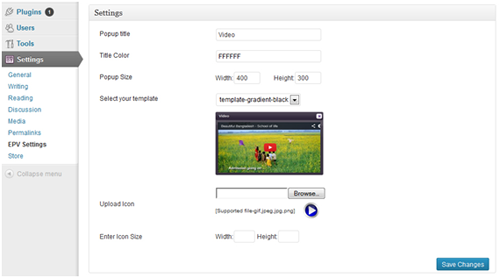
User can also customize the existing themes or add new themes from ”/wp-content/plugins/wp-e-commerce-products-video/includes/templates”. Before install WP e-Commerce Products video plugin user must be install and activate WP e-Commerce plugin first. User can customize video popup settings and upload video icon from Settings->EPV Settings of wp dashboard. “WP e-Commerce Products video” plugin has used wordpress custom metabox.

This plugin is compatible up to WordPress Version: 3.5.1 and WP e-Commerce Version 3.8.9.5.

The button screenshot, which will show video in the frontend

Frontview

How to add video with wp e-Commerce products

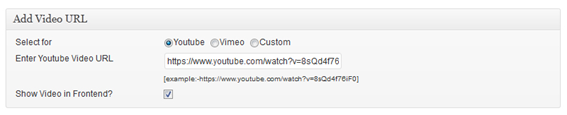
This is metabox area for add video, which is located in wp e-Commerce products add option or products edit option.

You can select video type, add video link and check the checkbox from this area. Here video link and checkbox is very important. Without those you will not see any video in the frontend.

Example: If we select youtube radio button as a video type, enter https://www.youtube.com/watch?v=8sQd4f76iF0 as a youtube video url in the video url textbox and finally check the checkbox, you will get a beautiful youtube video in the frontend as the above screenshot.

Important things, for change the video popup and themes

If you wish, you can change popup size, title and themes from this area.

Download WP e-Commerce Products Video (WP e-Commerce)

jQuery Preview Slider (Sliders)

Introduction

As many jQuery plugins, jQuery Preview Slider is a subtle combination of HTML, CSS and jQuery. It is a flexible image slider optimized for full width of the screen. It offers you preview of the next and previous slides. You can customize the navigation buttons, transition speed and transition type.

Features

  • jQuery driven image slider
  • Responsive design
  • Multiple navigation controls: buttons, image click, keyboard
  • Auto scrolling / Circular scrolling
  • Fading and sliding transitions effects
  • Easing on transitions
  • Documentation
  • Compatible with all major browsers (IE7 and above , Chrome, Firefox, Safari and Opera)
  • Customizable navigation buttons style

Download jQuery Preview Slider (Sliders)

TinyMCE 4 Image Manager (Plugins)

This is a TinyMCE plugin that replaces the default one that comes with the editor and makes that editor more useful in CSMs by adding features to it. It makes it easier to added images when using the popular wysiwyg editor. This plugin only works with the updated and stylish TinyMCE 4 versions.

Features:

  • Image Preview: When adding an image from a link, the plugin will retrieve the image and show a preview so that you are sure of the image that you are adding.
  • Permission: The plugin has a configuration file config.php that you can use to determine who can upload images or view the defined library of images. User with no permissions can only insert images from links.
  • Multiple Uploads: You will be able to upload multiple images at once by selecting them or draging and dropping.
  • Ajax Upload: The upload feature uses ajax and so no page refreshing when uploading.
  • Recent List of Files: When you insert images from an url or upload the or get them from the library, the plugin in saves them in a session and you can be able to view them the next time you open the dialog for the plugin.
  • Define an Image Library: During installation you will be able to define a path to an image library. This will be a folder with images that you can access from the plugin and also the folder to which files are uploaded to.
  • Traverse the Library Subfolder: If the library folder has nested subfolders the plugin will be able to handle them.
  • Search the Library: This plugin has a search feature for the library that allows you to search it and the subfolders for an image using the image’s name.
  • Bootstrap CSS and HTML: If you wish to change any of the styling and are familiar with the Twitter Bootstrap framework, you will have no difficulty.
  • Image Alignment: When inserting images, you will be able to define the alignment relative to the text around it. The plugin in uses float rather than the align(deprecated in HTML5)
  • Wrap Images in a Link: You can easily choose to wrap an image in a link when adding it.
  • Image Dimensions: When you add an image it is possible to define the dimension that it will be added with. You can easily keep the image’s aspec ratio.
  • Quick Install: Just modify the configuration file(if you want) and then upload to the tinymce plugins’ folder. That is it.
  • Source Code: Nothing is hidden.

Installation

  1. Unzip the file
  2. Open the file config.php and define the library path and url and also the permissions. There are comments in the php file to help you with this.
  3. Upload the files to the tinymce plugins’ folder replacing the default image plugin
  4. Open user_guide.html in a browser for instructions on getting started.

Download TinyMCE 4 Image Manager (Plugins)

Envato Portfolio on your website (Images and Media)

Overview:
Do you need a solution to add your Envato Portfolio in your Demos or on a website? This item will solve your purpose. Just add one data attribute and script will fetch your items.

Requirements:
JQuery, Css, Html 5

The Process:
You just create a bookmark collection in your Envato Account then link Javascript and css files to your html page. Lastly add a simple data attribute to div. That over.

Why Bookmark Collection?
Envato API does not support fetching items by username. It only provides way to list items using CollectionId so, you need to create bookmark collection.

Download Envato Portfolio on your website (Images and Media)

Quick Referral Addon for Powerful Exchange System (Add-ons)

The Quick Referral Addon for PES is so simple it’s Brilliant! :)

Huge Benfites are that your members can:
– Instantly Tweet about your site to Twitter and gain Instant Referrals.
– Instantly Post to Facebook and again Instant Referrals.
– Facebook & Twitter – Free Promotions for your site on Social Media and it earns your members Referrals when their friends join.
– Use Instant Social Sharing Buttons! :)

Due to massive popularity on my own PES site. I’ve decided to make the Quick Referral Addon for PES Available to Envato Members so they can benefit. Its a simple yet powerful piece of Code.

Compatible with:
– Powerful Exchange System
– Powerful Exchange System v2
– Powerful Exchange System Pro

Download Quick Referral Addon for Powerful Exchange System (Add-ons)

WordPress Youtube Channel Anywhere Plugin (Media)

The WordPress Youtube Channel Anywhere Plugin is a wordpress plugin that allow you to display specific number of videos from any youtube channel anywhere on wordpress blog/website like pages , posts , widgets , sidebars e.t.c with a responsive layout and a built-in lightbox.
Just a samll piece of text to place wherever you want it to show.Manage the video title color , hover border color e.t.c in Admin Settings Menu.

Main Features:

Easy Implementaion

Light, easy to use admin interface ,Just a small string will show a whole channel with its videos on any type of post or page or sidebar.

    
Color Selection using Color Picker

Admin Panel allow to change the border color of thumbnails and the title color of the video using built-in color picker.

 
Buillt-In Lighbox Video Player

Plugin come with a built-in lightbox video player which is also responsive and play the video using ajax on the same page.

Multi Columns/Layout Support

Using the Width setting of SHORTCODE you can select the layout of videos of a channel to be in one column or in two columns or more then two columns.

 
Responsive

Plugin show channel videos and play them in Responsive layout, so it is not a problem which device is being used to browse your website.

Unlimited Channels

You can add/show unlimited channels on each post or page , for each channel you have to add a shortcode something like that : [showchannel user=”plumplard” mwidth=”900” iwidth=”300” total=”5”] here plumplard is a username of channel.

 
All Post Types Supported

You can show videos from channel on each type of post. Even its page or post or article or sidebar , you can show videos from channels everywhere.

Custom Post Types Support

It works with custom post types too.So no worry if your theme have any custom post types.

Download WordPress Youtube Channel Anywhere Plugin (Media)