Tap & Think: ( Without Any OpenGL Codes ) (Games)

Game Play Introducing :

The bos doesn’t have balance and you must make balance with series taps and go to the target ( Exit Box ), In the way there are some shapes with arrows that they are make the box to right, left, and get up and down!

It’s Very Hard puzzle game, for Experts gamer! ;)

  • THIS GAME WRITTEN VERY EASY WITH AMATEUR CODING AND IT’S VERY GOOD FOR BEGINNER **

And you can edit so easy :

Simple tile map used

  • iPhone 5 Supported
    • WRITTEN VERY EASY FOR AMATEUR
  • Simple TileMap System
  • 45 Level included
  • Full UIView Elements Used Without Any OPENGL Codes
  • Full Game and ready to change and upload.

Download Tap & Think: ( Without Any OpenGL Codes ) (Games)

Minty Chat Map (Social Networking)

Minty Chat Map allows your visitors to add comments to an image in real-time. It can be used for location-based chat, or for commenting on content. It allows users to post anonymously and reply to posts in a comment thread.

Features

  • Map updates with new comments in real-time.
  • Hide posts older than a certain number of hours.
  • Reply to posts in a comment thread.
  • No page reloading, all changes happen in-place with AJAX.

Requirements

  • PHP 5.2+
  • MySQL

Download Minty Chat Map (Social Networking)

Columns Creator Pack Premium WP Plugin (Add-ons)

This plugin creates content that can be ordered and inserted in any page / post through their shortcodes. Themeforest have themes whose content are built for that specific theme, with this plugin you can extend those themes without you inserting html codes on wordpress editor. It was created to allow easy content creation and ordering though theme columns / blocks, and each column / block can have their specific editor. If need each column/block can have their specific javascript or css code.

Features:

  • Order content
  • Organized content and quickly created
  • Javascript Editor
  • Cascade Stylesheet Editor
  • HTML Editor
  • Visual Editor
  • 4 Shortcodes
  • Works on any theme
  • Content Builder
  • Produces Valid HTML codes
  • For beginners and advanced users
  • Easy to use and create

Download Columns Creator Pack Premium WP Plugin (Add-ons)

Adsense Click-Fraud Monitor (Utilities)

NEW:

Click-Fraud Monitoring – Protects your AdSense account!

Minimize the risk to be banned and excluded from your Adsense account due to malicious third party clicks on advertisements on your website.

Why i need Click Fraud Monitoring?

  • Prevent malicious clicks by bots on your Ads
  • Prevent malicious clicks by human user on you Ads
  • Prevent clicks by friends on your Ads who want to “help” you.
  • Prevent unintended clicks by your own
  • Features

  • Disable your Ads when a user clicks too often on them
  • User will be banned and blocked for further clicks
  • Manual unblocking of IP adresses possible
  • Works, even without reloading of your site (jQuery and Ajax)
  • Works with every Theme
  • E-Mail notification when a user is blocked
  • Activating and disabling of all Ads with only one click
  • Simple installation and setup
  • Service and support by the author
  • Periodic updates and improvements. (Feel free to make your wish)
  • …and the last but most important:

  • It protects your AdSense Account from getting banned
  • How does it work?

    The Plugin counts all clicks on your Ads. When the clicks exceeds a specified number it will be deactivated and hidden. The clicking user or bot will be blocked on a IP basis for further clicks. At the same time the plugin sends you a notification by email.

    Why would Google ban me?

    In easy words: Google takes care that every click on any AdSense advertising is done by a real human visitor. Automatic clicks by crawl bots or a lot of automated or manual processed clicks (a so-called Clickbomb) can lead to a complete and permanent exclusion from the Google AdSense service. All your earnings are lost and it is very hard to get back the access to your account. (In most cases impossible)
    The motivation behind such automatic clicks is very different. Maybe some competitor wants to harm you or a technical leads to multiple clicks by a human user. They all have in common that you as the AdSense account owner are responsible for any click fraud. You recognize unusual clicks when your page CTR is 1 – 3 % averaged and than it jumps up to 5, 10 or even more.

    This is were the “Click Fraud Monitor” comes in…for prevention!

    Get the complete documentation at: http://www.clickfraud-monitoring.com/

    Download Adsense Click-Fraud Monitor (Utilities)

    GEX – Responsive Navigation (Navigation)

    “GEX – Responsive Navigation” is a navigation component based in Javascript and CSS. This menu uses gradient color and Javascript effects to provide a beautiful design. It is a responsive menu component and can be used in various website types.

    Features

    • 8 Styles
    • Javascript/CSS3 effects
    • Icon Support
    • Collapsible
    • Cross Browser
    • Easy to use
    • Easy to customize
    • Documented

    Download GEX – Responsive Navigation (Navigation)

    Double Viewer jQuery Plugin (Images and Media)

    Double Viewer jQuery Plugin is an easy-driven and comfy app which allow you to compare two different images in one slider.
    Double Viewer jQuery Plugin works in all of main browsers and mobile devices.
    Using Double Viewer jQuery Plugin you will be able to set any colors for cursor and line and to change the size of cursor and line. Also this Double Viewer has several types of mouse controlling.
    I hope this Double Viewer jQuery Plugin will be useful for you and your site.

    Download Double Viewer jQuery Plugin (Images and Media)

    iWeather – a beautiful weather client for iOS (Full Applications)

    iWeather is a beautiful, simple and feature rich weather client for iOS. It allows you to interact with the Wunderground API to download and present all the latest local/international weather information on the go.

    Ever needed to show or use weather information in your iOS apps? iWeather will allow you to easily implement weather information to allow you to expand your application with weather based features.

    Key features:

    -> Get all the latest weather information from Wunderground weather service in just seconds! (Info including Temperature, Wind Speed, Humidity, Visibility, and much more!!).

    -> Support for the Retina Display and 4 inch iDevices such as the iPhone 5.

    -> Use weather information to update your apps with critical information for weather based functionality.

    -> Super easy to implement into your existing iOS applications.

    -> Comes with Developer PDF guide to help you get started.

    -> Shows weather using the users current location, no need for any set up! Works immediately out of the box.

    -> Requires a Wunderground API key which can be obtained for FREE from the Wunderground Developer website: http://www.wunderground.com/weather/api

    For more information, please leave a comment :)

    Download iWeather – a beautiful weather client for iOS (Full Applications)

    UberMenu – Flat Skin Pack (Add-ons)


    This plugin is an extension for UberMenu – WordPress Mega Menu Plugin

    30 New Flat Style Skins for UberMenu

    This extension gives you 30 new skins for UberMenu. That includes:

    • 8 Black Bars + Light Submenus with a highlight color
    • 7 Colored Bars + Light Submenus
    • 8 Black Bars + Dark Submenus with a highlight color
    • 7 Colored Bars + Dark Submenus

    Included Colors

    Try it out

    Check out all 30 skins on the Demo

    How it works

    Just install this plugin and you’ll get 30 new options in your UberMenu Control Panel > Style Configuration > Style Presets.

    Custom Colors

    Want to tweak the colors? The Extension includes LESS files for each of the skins, making it easy to customize the skins for those familiar with LESS.

    Important Notes

    Please note that this skin is “larger” than the default skins packaged with UberMenu – the font is larger and there is more padding – so not as many items will fit on one line as with the default skins. Be aware of this if your menu items are taking up most of the menu bar already, as this skin may make them wrap.

    Requirements

    • UberMenu 2.3+
    • WordPress 3.5+

    Download UberMenu – Flat Skin Pack (Add-ons)

    ScreenCapture – Takes full screen captures (Windows)

    ScreenCapture is a simple and elegant way to take screenshots using the spacebar. Are you visiting a website and want to take a screenshot? Press the spacebar and ScreenCapture will do the rest.

    Features:

    • Capture the screen using the space bar or using the application button.
    • Saves automatically the captures on a new folder on the desktop. Do as many snapshots as you want.
    • Extremely easy to use, elegant and intuitive.
    • Supports keyboard shortcuts.
    • Works perfectly on all versions of Windows, including Windows 8.
    • Includes documentation and user manual.

    Keyboard shortcuts:

    • Spacebar: take a capture and save it on your desktop automatically.
    • “A” key: displays information about ScreenCapture.
    • “H” key: displays a manual on how to use the application.
    • “Esc” key: close ScreenCapture or dialog.
    • “M” key: minimize application.

    Download ScreenCapture – Takes full screen captures (Windows)

    Interactive World Map (Charts and Graphs)

    Interactive World Map – HTML5

    This map is built in HTML5 code and runs with javascript based on the new technique of Scalable Vector Graphics (SVG), So it can be scaled to any size without losing its quality.
    (As much as you enlarge it, it looks better :) )

    Features:

    • It doesn’t require special plugins to work such as Flash player, So it works on different platforms including iPad and iPhone.
    • Add unlimited number of interactive cities anywhere on the map using very simple well organized javascript file. (No javascript knowledge is required)
    • Control each city individually (position, colors, URL…etc).
    • Responsive; it can fit in its available space without the need to scroll horizontally while preserving its quality.
    • Compatible with all major browsers including Google Chrome, Firefox IE9+, Safari and Opera.
    • Easily integrated with WordPress using simple iFrame code.

    Map Parameters:

    • landcolor: color of the land areas.
    • bordercolor: borders between countries.
    • shadowcolor: shadow color below the points.
    • shadowOpacity: shadow opacity, value, 0-100.
    • namesShadowColor: tooltip shadow color.

    Per City Parameters:

    This is what you can modify for each interactive point:

    • shape: choose the shape of the dot; circle or rectangle.
    • name: the name which appears in the tooltip when hover.
    • pos_X: location of the dot on X axis.(How?)
    • pos_Y: location of the dot on Y axis.(How?)
    • width: width of the rectangle.
    • height: height of the rectangle.
    • diameter: diameter of the circle.
    • outline: outline color of the point.
    • thickness: thickness of the line.
    • upcolor: color of the dot when map loads.
    • overcolor: color of the dot when mouse hover.
    • downcolor: color of the dot when clicked.
    • url: URL of this dot.
    • target: _blank or _self.
    • enable: true/false to enable/disable this dot.

    Examples of the maps that you can create yourself:

    How to get X, Y coordinates?

    The purchased files include an easy to use interactive guide to help you to find the coordinate of any point of interest, kindly have a look at this video:See Also:

    Download Interactive World Map (Charts and Graphs)

    Woocommerce Post Layout (WooCommerce)

    Explore more flexibility on your Woocommerce store. This plugin is absolutely a CMS in another CMS. It allows you to easily add more contents into different areas on your Woocommerce store.

    How to Add Social Shares:
    Visit ShareThis website and opt for a script for websites.
    Sample Script:

    <span class="st_sharethis_hcount" displaytext="ShareThis" />
    <span class="st_facebook_hcount" displaytext="Facebook" />
    <span class="st_twitter_hcount" displaytext="Tweet" />
    <span class="st_linkedin_hcount" displaytext="LinkedIn" />
    <span class="st_pinterest_hcount" displaytext="Pinterest" />
    <span class="st_email_hcount" displaytext="Email" />

    Then decide on the position you want it placed on from your woocommerce plost layout menu and place the code.
    I recommend that its placed in the “Before Main Content Area”

    How to add disquss commenting system:
    Head straight up to disquss website and get the code,then place the code where you want it to appear on your store.
    Ideal position will be the “After Main Content”

    More Stuffs You Can Do
    -place facebook comment script.
    -place specific information in certain areas.

    Download Woocommerce Post Layout (WooCommerce)

    WordPress External Media Grabber (Media)

    Demo

    Please go to WordPress External Media Grabber(WPEMG) and login with user/pass: demo/demo for check out demo action.

    Description

    WordPress External Media Grabber will remote grab media from external url link to your server and add them to WordPress media library.

    With WordPress External Media Grabber, you don’t need many time for save external file to your computer and re-upload.

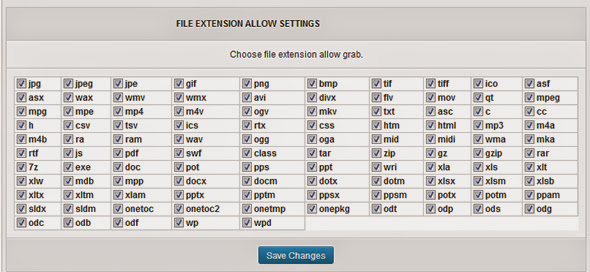
    WordPress External Media Grabber support total over 100 file type extensions. WordPress External Media Grabber can grab direct popular file extension as image file (.jpg, .jpeg, .jpe, .gif, .png, .bmp, .tif, .tiff, .ico), document file (.doc, .docx, .xls, .xlsx,
    .mdb, …), text file (.txt, .html,.css, .asc, .csv, …), audio file (.wav, .mp3, .wma, …) , video file (.wmv, .avi, .divx, .mov, .mpeg, .mp4, .mkv, .flv, …), flash file (.swf), zip file (.zip, .gz|gzip, .rar, .7z, …).

    Don’t forget rating for this plugin if you like. Thanks you so much.

    How it work?

    wordpress external media grabber work

    File extensions support

    wordpress external media grabber file extension support

    Featured

    • Direct grab external media and add to wordpress media library.
    • Support total over 100 file type extensions.
    • Auto find link and grab multi link per time.
    • Auto find link from content for grab.
    • Control file extensions allow grab.
    • Control skip list server for don’t grab.
    • Auto grab external media when write and save post.
    • Auto Replace link content die.
    • Support for newest wordpress version.

    Change logs

    19/5/2013: Version 1.0 initial release.

    Connect with us



    Download WordPress External Media Grabber (Media)

    Responsive Dribbble Portfolio WordPress Plugin (Social Networking)

    Summary

    The WordPress Dribbble Plugin is a wordpress plugin that displays the portfolio images of the saved user profile.The plugin includes a simple backend where users can set the dribble profile to show and the width of the portfolio images.

    Features

    • Easily integrates with wordpress.
    • Includes featured images on the dribble profile
    • Ajax driven
    • Data stored in XML
    • Exhaustive documentation

    Admin Credentials

    Demo User Username: demo
    Demo User Password: password

    The above accounts shouldn’t be edited. All data entered will be removed in a day or two.

    Support and Documentation

    Please drop us a line on [email protected] with any questions you may have, full documentation is included with the program to help you with your projects.

    Download Responsive Dribbble Portfolio WordPress Plugin (Social Networking)