Design Note – Easy Client Feedback on Your Designs (Project Management Tools)

Client Demo 1: Click for “Client Annotation Demo
Client Demo 2: Click for “Client Discussion Demo
Client Demo 3: Click for “Client Annotation Demo (Access Protected)”
Admin Demo: Click for “Administration Demo

Do you design for your clients? Then Design Note will be your best friend when getting feedback from your clients on your designs. An intuitive interface enables you to upload your graphics to be annotated by your clients.

A link takes them to the graphic’s page, where they can annotate your designs by simply clicking on them and leaving their feedback.

A discussion page with attachment-sharing features is also included, so you and your clients can have an in-depth conversation about your design.
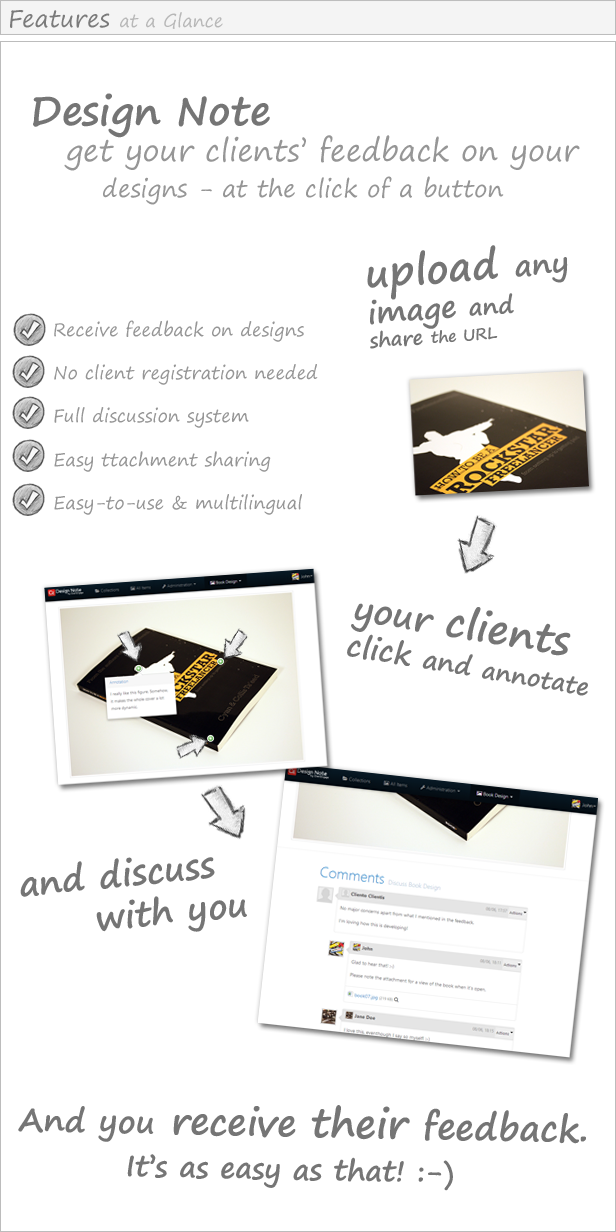
Functionality Description of ClientEngage Design Note

Design Note Functionality Overview

Fully-Featured Design Feedback Engine
  • Send your clients direct-access links to their design-projects
  • Clients can use the image/design annotation engine to provide constructive feedback for you
  • View feedback as “clicks” on your designs
  • Secure your designs by setting access codes
  • Group designs into collections if you need feedback on different versions
Additional Discussion & File-Sharing Feature
  • Start a 1-on-1 conversation with your clients and show them you are keen on their views
  • A fully-featured discussion engine for you and your clients is included too
  • Your clients can share files with you through the discussion feature
  • A notification system lets you know if there are any new client interactions
Absolute Flexibility
  • Unlimited number of administrators
  • Unlimited number of collections, items, feedbacks and discussions
  • Fully translatable through PO files: comes with English and German translations out-of-the-box
Activity Notifications
  • A notification system lets you know if there are any new client interactions
  • Optionally receive these notifications as emails so you never miss your clients’ feedback
Easy Integration & Use
  • Automated installation script – no extensive knowledge of PHP/MySQL necessary
  • Detailed handbook with installation & use instructions
  • Extensible: the system is developed with the CakePHP MVC framework and features a clean architecture. This means that, if you have
    web-development experience, the system is easily extensible

Multilingual Interface

ClientEngage Design Note was built with internationalisation in mind: currently, you can select from British and American English as well as German.

System Requirements

In order to be able to use ClientEngage Design Note, you must fulfil the following system requirements:

  • Apache 2 HTTP Server
  • Preferably with mod_rewrite enabled
  • PHP with a version of greater than PHP 5.2.8
  • MySQL with a version of greater than MySQL 5 (i.e. with InnoDB support)
  • Preferably a subdomain/domain for use with ClientEngage Visitor Voice
  • Safe mode: off
  • GD Library for image manipulation
  • Finally, the PHP PDO extensions have to be installed

Changelog

22/04/2013: 
    - Public release of ClientEngage Design Note v1.0.1

Do you closely work with your clients?

If you are looking for an advanced PHP live chat script to supercharge your client-interactions, then come right this way to have a look at the ClientEngage VisitorChat- an advanced PHP support chat script.

ClientEngage VisitorChat – a PHP-based Chat With Windows Client

The ClientEngage Visitor Chat is a fully-featured real-time chat for your websites. A clear and simple web-based administration allows you to conveniently chat with your visitors. And best of all: Visitor Chat comes with a Windows-based client out-of-the-box. Without having to visit the Visitor Chat’s admin-interface you will be notified from your Windows tray and can start chatting straight away!
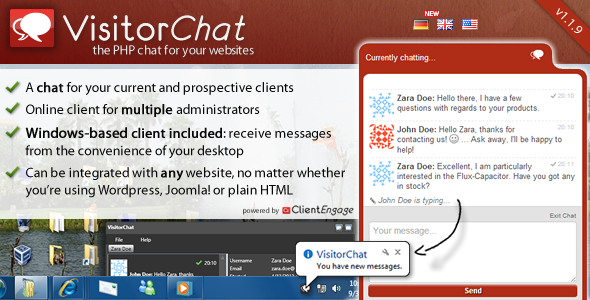
ClientEngage VisitorChat - The PHP Online Chat With Windows Client

ClientEngage Project Platform – PHP Project Management

If you are looking for an advanced project management script to manage your client-interactions, then come right this way to have a look at the ClientEngage Project Platform – an advanced PHP project management script.

This particular project management script cuts-down on all the bloat that tends to make project management a nuisance. Instead, the ClientEngage Project Platform focuses on the tools you need to really get close to your customers in those crucial stages of your relationship. This will delight your clients – not only with your end-product but the whole lifecycle of getting there. So, if you are looking for project management in PHP, then the ClientEngage Project Platform is for you.

ClientEngage Project Platform - PHP Project Management Script

Download Design Note – Easy Client Feedback on Your Designs (Project Management Tools)

wpPreview – WordPress Product Preview Manager (Utilities)

wpPreview – WordPress Product Preview Manager

If you’re working on digital product development like WordPress Theme, Joomla Template, Site Template or other PHP projects or this type of digital products, then you always need to show the demo of product to the visitor which increases the sales of the products.

wpPreview – WordPress Product Preview Manager is solution give you ability made the showcase for your project, because it built in with wordpress plugin

Features

  • Easy to use
  • Responsive Design
  • Come with 5 theme design
  • Social share
  • Desktop & Mobilephone simulator
  • Show/Hide “remove frame” button.
  • Optional logo image

Download wpPreview – WordPress Product Preview Manager (Utilities)

WP Nav Plus (Menus)

WP Nav Plus is an improved version of the WordPress menu system, which adds the ability to specify a start depth when displaying your menu on your site. This makes it much easier to implement secondary and tertiary navigation menu’s based off the hierarchy setup in WordPress’s Menu manager. In other words, you can use this plugin to ‘hide’ the levels of the menu that you do not want WordPress to show!

I have designed WP Nav Plus to be super easy to use for non-developers, while still retaining full power and flexibility for those who want it (developers mostly). Check out the demonstration video to see what I mean.

For non-developers, using WP Nav Plus is as simple as activating the plugin, and dropping the widget wherever you want it in your widget manager.

For developers, you can use WP Nav Plus in the same way that you would use the standard wp_nav_menu function (see video above for walkthrough). This allows you to bypass the widget and use WP Nav Plus directly in your template, right where you want it.

WP Nav Plus accepts all of the same arguments as the standard wp_nav_menu function, but it adds an additional argument called “start_depth”.

– A setting of 1 will exclude the 1st level menu items.
– A setting of 2 will exclude the 1st and 2nd level items, and so on.

Use this in combination with the ‘depth’ argument to set a start and end depth for your menu’s.

Download WP Nav Plus (Menus)

CSS3 Responsive Designer Toolbox (Miscellaneous)

Follow me on Twitter
Get Email Support

  • CSS3 Responsive Designer Toolbox
  • Four Colors Included
  • Field CSS3 Validation
  • Help Tooltips
  • Full Responsive

Inside Pack

  • Folder Css
  • Folder Font
  • Folder Images
  • Read_me.pdf

Icons Used in Project –
IcoMoon Free Font

FONT USED IN PROJECT (Free Font) –
Font PT Sans

FONT USED IN PROJECT (Free Font) –
Font Carrois Gothic

Rate it if you like … Enjoy…!!! :)

Download CSS3 Responsive Designer Toolbox (Miscellaneous)

HTML5 Audio Player With Playlist WordPress plugin (Media)

This is a WordPress version of my popular HTML5 Audio Player, if you need a jQuery version check here:
http://codecanyon.net/item/html5-audio-player-with-playlist/1694831

Place audio player in post, page, sidebar or theme. Multiple instances in same page supported.

A simple and powerfull HTML5 music player for your website with flash backup for older browsers.
Restyle the whole player with basic CSS!

Check this on your mobile phone (tested on IOS and Android):

Options:

  • FLASH fallback included for older browsers that dont support HTML5 audio.
  • Playlist options available
    • Add simple track url
    • Auto create playlist from folder(s) of audio files
    • XML playlist
    • Import Database playlist (example included)
    • Podcasts
    • SoundCloud
  • Restyle the player completely with the most basic of CSS
  • Optional autoplay
  • Random play on/off.
  • Looping on/off.
  • Load new playlist(s) at runtime with public API.
  • Include multiple instances on the same page.
  • Multiple instances automatically pause/stop playback when new instance is started.
  • Playlist scroll is jScrollPane and its optional (can be turned off in settings).
  • Public methods available
    • Play current media
    • Pause current media
    • Toggle current media
    • Stop current media
    • Play next
    • Play previous
    • Play media (by number or title)
    • Toggle shuffle
    • Toggle loop
    • Set volume (value)
    • Load playlist (from folder, from html, from xml, Podcast, SoundCloud)
    • Add track(s) to current playlist
    • Remove track from current playlist
    • Play audio(s) without creating playlist; just pass url(s)
    • Destroy audio
    • Destroy playlist
    • Set title
    • Output playlist data in format: {id, type, title, mp3 path, ogg path}
    • Get Setup Done
    • get Playlist Transition
    • Get Playlist Loaded
    • Get Media Playing
  • Callbacks
    • audio Player Setup Done (returns player instance sound id)
    • audio Player Playlist Loaded (returns player instance sound id)
    • audio Player Sound End (returns active counter)
    • audio Player Sound Start (returns active counter)
    • audio Player Playlist End (returns player instance sound id)
    • audio Player Sound Play (returns player instance sound id)
    • audio Player Sound Pause (returns player instance sound id)
    • Playlist Item Triggered (returns active counter)
    • playlist Item Enabled (returns playlist item)
    • playlist Item Disabled (returns playlist item)

    You might be interested in…

    Responsive Video Gallery HTML5 Youtube Vimeo

    \

    HTML5 Video & Image Background Intro

    \

    JQuery Thumbnail Gallery With Lightbox

    \

    JQuery Ken Burns Fullscreen Gallery Slideshow

    \

    HTML5 Video Gallery with Live Playlist

    \

    Youtube Vimeo Gallery Background

    \

    JQuery AutoSlide Image Gallery Slideshow with Music

    \

    JQuery Image Gallery Slideshow with MousePan

    \

    HTML5 Audio Player With Playlist

    \

    jQuery Accordion MultiPurpose Gallery Slideshow

    \

    JQuery Stack Banner Slideshow with Captions

    \

    jQuery Slice Banner Slideshow with Captions

    \

Download HTML5 Audio Player With Playlist WordPress plugin (Media)

Forced Ads for Hosting – WHMCS ADDON (Add-ons)


Forced Ads for Hosting – WHMCS ADDON

Forced Ads for Hosting is a WHMCS addon that allow you to force all customers of a specific hosting plans to insert your ads in their websites. With this software, you can perform a couple of online applications including advertising your products or services at a lower cost than using other online marketing strategies.

Live Demo

http://www.onweb.ma

Admin preview

Features

  • Easy integration with WHMCS, just upload and enable it in plugins list.
  • Managing banners and adverts.
  • Managing hosting plans.
  • Websites tracker.
  • Define a custom email to send to your customers if they fail to include your adverts.
  • Compatible with all WHMCS versions.
  • Much more in every update….

Support and Updates:

All our items are regularly tested and updated. If you have are any questions or suggestions please add a comment or visit our support forums (You can also send an email directly to [email protected]). We pride ourselves on quick and effective customer service, and we will always provide a full and proper support service free of charge for all buyers.

Changelog

* Version 1.0 – 08/06/2013:
First Release

Flag Counter

Download Forced Ads for Hosting – WHMCS ADDON (Add-ons)

Domains Blacklist – WHMCS ADDON (Add-ons)


Domains Blacklist – WHMCS ADDON

Domains Blacklist is a WHMCS addon that allow you to create and manage a blacklist of domains name from being created by your clients. As a result, it will be easy for you to exclude specific “objectionable” words in domain name chosen by your customers. Hence, you will be in a better position, when it comes to controlling the domain names that are to be registered on your hosting site.

The “objectionable” words often destroy the reputation of your hosting site, which is why new customers won’t prefer to make an account on it. Domains Blacklist tool is highly efficient, when it comes to blocking such domains.

Live Demo

http://www.onweb.ma

Admin preview

Features

  • Easy integration with WHMCS, just upload and enable it in plugins list.
  • Create and manage a words blacklist.
  • Blacklisted domains tracker.
  • Define a custom error message to display to users if they order / transfer a domain with a blacklisted word.
  • Compatible with all WHMCS versions.
  • Much more in every update….

Support and Updates:

All our items are regularly tested and updated. If you have are any questions or suggestions please add a comment or visit our support forums (You can also send an email directly to [email protected]). We pride ourselves on quick and effective customer service, and we will always provide a full and proper support service free of charge for all buyers.

Changelog

* Version 1.0 – 08/06/2013:
First Release

Flag Counter

Download Domains Blacklist – WHMCS ADDON (Add-ons)

Feature Request (Help and Support Tools)

FeatureRequest provide tools to help your clients to suggest ideas and feedbacks, it’s built with CodeIgniter & Bootstrap

Features: Version: 1.0

  • Use CodeIgniter & Bootstrap
  • Simple Admin Dashboard & User Dashboard
  • Admin can create Users directly from their dashboard
  • Admin can limit number of votes per user
  • Users are notified when admin change features status (if they are interested)
  • Comment system
  • Pagination for both comments and Suggestions
  • AJAX Pagination for comments
  • Filter Suggestions by their current status
  • Show Top Voted Suggestions
  • Show User Suggestions
  • Vote is blocked when suggestion status is different than Pending or Started
  • AJAX Rating System
  • Mail templates can be modified from admin dashboard
  • AJAX When posting new suggestion
  • AJAX login & Registering
  • Admin Notification
  • Admin can set admin rights to other users
  • Admin can block users
  • Admin can edit users information
  • Other Features

[admin]

Username: admin
Password: adminadmin

Stay tuned more version are coming with more improvements and more new features.

Flag Counter

Download Feature Request (Help and Support Tools)

BlueprintUI Content Slider (Sliders)

BlueprintUI Responsive Modal is a super simple fully responsive jQuery content slider plugin with more than 60 CSS3 powered animation possibilities and 4 home made themes to use it.

Plugin Features

  • Responsive Design – The layout adpats to the viewing environment.
  • CSS3 Animation – 62 funny and really smooth animations.
  • Themeable – 4 provided themes and simple api to create more.
  • Images and Iframes – Native support for images and iframes (youtube, vimeo, google map…).
  • Nice Api – Interact Easily with your sliders with this provided api.
  • Extensive Documentation – The plugin is provided with an extensive documentation to help you use it

Changelog

2013, June, 10 - v1.1 | Waiting for review
- Corrected a bug with not fading transition
2013, June, 8 - v1.0 | Uploaded
- Initial release

About BlueprintUI

BlueprintUI is a set of dead simple UI components to integrate in your next design, they are fully responsive and customizable.

Download BlueprintUI Content Slider (Sliders)

Backlinks Extractor (for Mac) (Mac)

NOTE (06/09/2013) : I just found a mini-bug about websites with few backlinks only. Parsing fails. Fixed version in review, and available in 24h approx. Also the updated version will show (at process start) the estimated number of backlinks that can be extracted :)

The easy way to extract backlinks !

This tool use the API of a paid service + parsing and extraction engine.

Backlinks Extractor can be really useful for people who wants to analyze their competitors SEO strategy.

Features :

  • No proxies needed !
  • No quota limits !
  • Cheap on CodeCanyon !
  • Cool and simple interface !
  • The Mac version is different from the Windows version which requires proxies to be used. This engine is different.

    Backlinks Extractor is the only one tool on Mac OS X to extract backlinks :)

    Need help, found a bug or suggestions ?
    Feel free to contact me via the comment section, I’ll try to reply you as fast as possible.

    Download Backlinks Extractor (for Mac) (Mac)

    Ajax Double Opt-In Form without Database (Forms)

    Ajax Double-Opt-In Form without Database.

    This powerful responsive ajax contact form is quickly ready for use and easy to install.
    The opt-in will be forwarded directly to your email. You can use the form as a pop-up or easily integrated into any squeeze page or web site.
    The fast way to your own email marketing list – a must have for online marketer and list builder!

    Features:

    -> Simple step by step installations routinely
    -> No database necessary!
    -> Pop-Up [on/off]
    -> Double-Opt-In [on/off]
    -> Subject and Message Field [on/off]
    -> 22 colorful themes included 
    -> All texts adaptable
    -> Multilanguage support (UTF-8)
    -> Opt-In direct to POP or IMAP
    -> High response design
    -> Runs on iPad and mobile devices

    VERY FAST – READY FOR ACTION!

    How easy works?

    If you have installed the form, they can easily be integrated into their website.
    They do not require any database!
    Now fills a visitor the form but their information will not be sent immediately to them.
    First, a visitor ‘email sent with a code number to the email.
    He confirmed the correctness of his email address.
    The visitors must now enter the code into the form.
    Only now the data is forwarded to them.
    So they can be 100% sure that they only use opt-in to receive proper disclosures and marketing for its further.

    This is the cleanest possibility of a professional email marketing list building!

    HTML5
    CSS
    jQuery
    PHP

    Download Ajax Double Opt-In Form without Database (Forms)

    eGoods Shop & Donations Script (Miscellaneous)

    This includes two scripts:

    eGoods Shop:
    When you have your own digital products
    and you want a simple-to-use system that gives you the
    ability to sell your downloadable goods (scripts, tutorials,
    videos, music etc).
    You can add a product via admin panel, chose a name,
    description, price, downloadable file and that’s it.

    When you give your clients the link to that product or
    they visit it via homepage (where products are displayed,
    you can customize it on your own though), they are redirected
    to Paypal to commit the payment.
    Upon successful payment the system sends a download link to
    the paypal address the user paid with. It is a randomly generated
    download link and valid after a specified number of downloads
    (default is 5 times but you can customize it).

    Donation script:
    Donation Demo
    With this you have the ability to get donations or receive
    custom payments, it works with Paypal Too and every
    donation/transaction is stored and you can see a list of
    transactions along with details such as (payers name,
    payers email, amount, and notes he might have sent).

    Thank you for passing by.

    Download eGoods Shop & Donations Script (Miscellaneous)

    Meta Tags Optimization (SEO)

    This plugin lets you optimize meta tags for posts/pages by providing you clear instruction to repair your meta tags. Meta tags complied with a list of SEO rules to write meta title,meta keywords and meta description. If still you’re not able to write up optimized meta tags, you may contact with me by a single click, available on meta box screen. I’ll help you to guide you to write effective meta tags based on your page contents and targeted keywords.

    Download Meta Tags Optimization (SEO)