Hangers – PHP [Hang Anything, Anywhere] (Images and Media)

Online Demo

Project Features

  • 70+ hanging styles, colors & gradients
  • 175+ animation effects (for page onload and on mouse movements)
  • Inbuilt demos & create your own hangers
  • Hang Social media, images, videos, HTML codes, Advertisments, Menu items, Buttons (like Sign up, Subscribe, Buy, Download) and more. View Screenshots
  • Admin panel (to control dimensions, colors, spacing, position, animation, hanging icons, URLs, Uploaded media etc.)
  • Implement on a Whole webpage, Inside any blog post or inside any tag element.
  • Create unlimited hangers
  • Multiple hangers on a webpage
  • Single line implementation
  • Browser compatibility (Google Chrome , Mozilla Firefox , Opera , Safari , Internet Explorer ).
  • Also available in WordPress version

Admin Panel screenshots

Control Spacing of Hangers and of Hanger Plot

Hangers and Media dimensions


Download Hangers – PHP [Hang Anything, Anywhere] (Images and Media)

Product Countdown WordPress Plugin (WooCommerce)

This is an easy Product Countdown WordPress Plugin for WooCommerce.

With a countdown displaying on your products you create something like a scarcity mentality in people. It can create a feeling of fear, anxiety and maybe desperation just because they see that the price will rise in a specific period.
It also make someone think that s/he has got only one shot right now. Buying a product then relieves much of the pressure (and the feeling of fear).

“What Does It Do?”

The Product Countdown WordPress Plugin is the most powerful scarcity plugin ever created for WooCommerce.
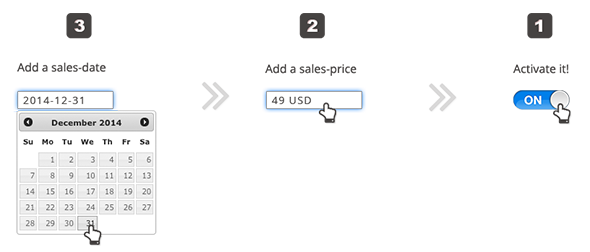
With just a few clicks you can create scarcity-based countdown-timers when a WooCommerce product is on sale.

“How Does It Work?”

What is planned for future versions?

  • Custom colorization
  • Get the plugin to work even without the need of WooCommerce

Any other cool ideas for the next version? Request a function now!

Version Changes

Current Version is: 1.0 (May 16. 2013). Click here for a full list of version changes

Other

You should have the current, self-hosted WordPress version installed. In case you need a plugin to work with a specific WordPress theme, please ask us before your purchase. This plugin requires: PHP5.3 running on your webserver and a WordPress Version higher or equal 3.5. You also need at least WooCommerce 2.0 installed.

Please check if your current theme or any of your installed plugins creates Javascript errors on the frontend. If so, please try to solve this issues before installing this plugin.

Licenses:
Uses jQuery and Countdown for jQuery v1.6.2 by Keith Wood

Download Product Countdown WordPress Plugin (WooCommerce)

justParallax. An easy Javascript parallax plugin. (JavaScript)

justParallax.js is a lightweight javascript plugin which allows users to make the background of their webpage have a subtle parallax effect with just 2 lines of code.

justParallax supports a wide variety of browsers including IE6+, Google Chrome, Mozilla Firefox, Safari, Opera and many more…

Customizable settings:
– speed. This settings defines the speed with which the background should scroll.
– vertical. Defines whether or not the background should scroll vertically.
– vertical_inversed. Defines whether or not the vertical scroll should be inverted.
– horizontal. Defines whether or not the background should scroll horizontally.
– horizontal_inversed. Defines whether or not the horizontal scroll should be inverted.

Check out the live preview for the full documentation and a playground.

Download justParallax. An easy Javascript parallax plugin. (JavaScript)

Groups Newsletters (Newsletters)

Newsletter Campaigns for Subscribers and Groups.

Groups Newsletters helps you to communicate efficiently, providing targeted information to groups of recipients through automated campaigns.

Stories

Stories make up a newsletter or a newspaper. Groups Newsletters provides a unique and flexible way of composing newsletters based on one or more stories. Read more about the concepts used by this plugin in the Concepts section of the documentation.

Automated Campaigns

Unlike your average newsletter system, Groups Newsletters combines multiple stories in a newsletter and uses campaigns to send out one or more newsletters to their recipients. The recipients for each newsletter can be different user groups (when Groups is also used).

Targeted newsletters

Among the reasons to use Groups along with Groups Newsletters you may find:

  • You want to send specific newsletters to a subset of the site’s users. For example. if you have a Premium group to which users who have purchased premium access to the site belong and you want to send out a newsletter offering them a special discount.
  • You maintain groups for specific products or services and want to make their users aware of a new feature or bug fix without sending the same information to normal subscribers.
  • Communicating with departments in a company – send out specific news that is relevant for those working in one department.
  • CRM – target valuable information at customer groups.
  • Leagues & teams – send out information on events relevant to specific groups, for example by sport, by team, by association …
  • To quickly create a Story Editors group for users who should be allowed to handle newsletters.

For regular subscribers, you can work without Groups and take advantage of the powerful newsletter campaign management features provided.

Support

Please post questions on the Groups Newsletters plugin page. Support requests are handled there usually within 24 hours, if you post here directly, it can go unnoticed for days.

Documentation

Please refer to the documentation pages for more information.

Demo

Demo Site

Groups Newsletters Demo – you can have a look at the subscription form with a neutral reCAPTCHA there.

Videos

Videos showing the administrative sections and introducing on how to use Groups Newsletters are currently being edited. Please check back here later on.

Developers

Groups Newsletters provides lots of sensible WordPress actions and filters that you can use to customize the system. It leverages custom post types and taxonomies to provide a system that any developer who is familiar with those concepts in WordPress can use, to provide a customized solution for your client.
If you have questions or suggestions, feel free to post a comment on the Groups Newsletters plugin page.

Resources

Features

Newsletters

  • Send multiple newsletters to different recipients within a single campaign.
  • Supports multiple campaigns that are sent FIFO.
  • Hold and continue running campaigns.
  • Double opt-in for visitors (no user account required) – subscribe and confirm by visiting the activation link.
  • Opt-out cancellation link.
  • Direct opt-in and opt-out for registered users.
  • Opt in on registration.
  • Opt in our out on user profile page.
  • Preview newsletters in your browser.
  • Test newsletters by sending to specific emails without the need to create a campaign.

Email

  • Independent SMTP settings – allows to use settings to mail newsletters that are independent of the rest of the emails sent by the site.
  • Send a test email using Groups Newsletters SMTP settings.
  • Multipart emails are auto-generated to provide both HTML and plain text versions of newsletters sent.

Captchas

  • Supports reCAPTCHA.
  • Provides hooks to support other CAPTCHA systems.

Shortcodes

  • Several cool shortcodes are provided, see the Shortcodes documentation for details.

Widgets

  • Several widgets are provided, see the Widgets documentation for details.

WordPress leveraged

  • Groups Newsletters fully leverages WordPress custom post types and taxonomies. It only brews it’s own where it’s really needed and allows you to clean up easily after testing.
  • It uses a lot of actions and filters that allow to customize things easily.
  • Templates are based on WordPress’ template system, both for how newsletters and stories are represented on a site as well as for emails. You can override these easily in your theme.

Developer-friendly

  • Clear and well-documented code that allows developers to easily customize things and use the system’s API.

Spaghetti

  • Well ok, it doesn’t prepare Spaghetti, but there’s a lot more cool stuff in it that hasn’t been added to the feature list. How did you ever get to read through to the end ;)?

Download Groups Newsletters (Newsletters)

Backlink Checker – Extractor (Miscellaneous)

This is an effective tool to get the backlinks of your
website. Just put your domain address and within
seconds you will have all the backlinks found displayed
to you. You can then download the results as a txt file
or simply copy them to clipboard.

Please rate 5 Stars if you like the script.

If you are rating lower than 5 Stars, please consider
contacting me first so that I can solve any possible
issue you might have with the script.

Thank you for viewing.

Download Backlink Checker – Extractor (Miscellaneous)

cP-Server Monitoring Tool (Ratings and Charts)

cP-Server Monitoring Tool is specialized for Hoster who are using cPanel as Server Management Tool. The Tool shows in live time the Status of Ports / Services, Disk Usage, Server Load, Memeory Usage, Swap Usage and Available Accounts. It also has a Overview Chart that shows process of Server Load, Memory Usage and Swap Usage – you can set manually if the Overview shows the values per day, two times a day or something individual.

Download cP-Server Monitoring Tool (Ratings and Charts)

Mail mogul – Email Newsletter Plugin for WordPress (Newsletters)

Track Opens, Bounces


Now it’s easy to keep track of your customers. Track undeliverable mails (bounces).

Choose From 6 Beautiful Designed Email-Templates


Yes, It Comes with 6 Beautiful Designed Email-Templates Which you can use to create your
newsletter In Real Time without wasting Time !

Choose Colors & Backgrounds In Real Time


You can chooseColors & Backgrounds In Real Time For Your
newsletter In Real Time. you can also edit it with HTML .

Send Preview Email Before Sending It to user


You can Send Preview Email Before Sending It to user so your user can recieve right message , in Right Way. .

In Short ..

  • custom User Permissions
  • create Live email newsletter . (wordpress live customizer)
  • Webversion for each Newsletter
  • embed Newsletter with Shortcodes
  • Unlimited Subscription Forms
  • Sidebare Widgets
  • Single or Double-Opt-in support
  • WYSIWYG Editor with code view
  • Unlimited Color Variations
  • optional Image embedding
  • Live Preview
  • Multilanguage Support
  • SMTP support
  • Import forms for Subscribers
  • No additional tables in your WordPress database
  • WordPress Multisite Ready

just Magic :


Download Mail mogul – Email Newsletter Plugin for WordPress (Newsletters)

ZoomBox 2 – The Photographer’s Premium Lightbox (Images and Media)

Intro – top

ZoomBox 2 – The Photographer’s Lightbox ! What makes ZoomBox unique to the other lightbox scripts ? In short – quality, user-friendliness, design and social media connectivity. Take a look at the demos and be convinced.

Features

  • HTML5 technology – this gallery uses the latest html5 tehniques ( like Histroy API ) to deliver a never seen before experience to your clients
  • fully responsive – looks great from mobile to HD
  • touch optimized – touch devices are not forgotten
  • two skins – two full skins to fit every brand
  • CSS3 technology – this player uses cutting-edge css3 definitions
  • easy install – purchase, download the zip, read the docs
  • iPhone / iPad optimized – this gallery has been optimized for Apple touch devices
  • Android optimized – this component has been tested on Android 4.0 and works awesome
  • developer / SASS powered – this component’s CSS has been built on top of SASS which means SASS users will have an easy time modifying the skins. For non-SASS users it’s no problem either because CSS files ( generated by SASS ) are provided
  • 100% css skinable – want to make slight modifications to the skins ? The skins are 100% built from the css and it is very easy to edit with css knowledge
  • SEO friendly – built with search engine optimization on mind from the ground up, the Testimonial Rotator uses non hidden valid html markup to build the widget
  • compatible with all major browsers, including IE – compatible from IE7 to IE10, Chrome, Safari and Firefox
  • the only lightbox script that does deeplinking right – most lightbox scripts use hashes for delivering the deeplink, but the problem with that is that facebook likes for example will not get counted for the photo the user is viewing in the ZoomBox, but for the entire page instead. With ZoomBox, each item will have it’s own comments and likes. This is awesome if you want to have a contest for example and the photo with the highest likes wins. Deeplinking can be disabled offcourse.
  • unique ability to zoom on photos – this is the perfect lightbox script for photographers to showcase their work because on any image, your visitor can zoom it and see the marvelous details you capture in your art. Just click any photo once the ZoomBox is open to test.
  • truly social – Zoombox 2 is truly social. It features the Facebook Like widget and Facebook Chat so your fans can comment on your art. And because deeplinking is done right in ZoomBox 2, each photo has it’s own likes and comments, even if on the same page. Wow!

Download ZoomBox 2 – The Photographer’s Premium Lightbox (Images and Media)

Analyzr – lower your < form >s drop rate (PHP Scripts)


IMPORTANT

Analyzr can be used with and without WordPress – (the form only need a name or id)

WHY ANALYZR?

Do not loose more precious visitors due to badly generated forms.

You would be surprised how many users start to fill in a form, but stop before finishing it. Andi t is mostly because of the form itself! With Analyzr, this problem will only be a PAST MEMORY!

Stay informed about how your forms are used, which field has the most drop outs and in the consequence, improve your form’s benefit. Your visitors will appreciate it!

  • NO DATABASE – ONLY ONE LINE OF CODE HAS TO BE ADDED – FOR BEGINNERS AND PROS!
  • Recognizes all < form >s of your website automatically
  • Has a high performance backend with detailed analyses
  • You have a blog and would like to get detailed click- and scroll-information on each post? Let’s go!
  • No license costs for additional sub pages of your website

AREN’T YOU ALSO INTERESTED..

  • how high the drop out rate is?
  • in which field most of the visitors stop their entry?
  • how often the form has been shown?
  • o how often the form has been sent?

Important Note

If you have errors or problems when using Analyzr, please contact me before rating the item so we can fix any issues together. Also, feel free to ask me any questions you may have regarding the code before purshasing to avoid mismatched expectations.

I will take my time for every problem and every question.

Together we’ll make it. You’re always welcome.

Download Analyzr – lower your < form >s drop rate (PHP Scripts)

Simple String Helper (Miscellaneous)

This class offers many functions to work with strings in PHP. The following functions are included:

validate URL
validate IPv4
validate IPv6
validate Email
validate Numeric
generate password
convert string to upper
convert string to lower
capitalize string
check if string begins with
check if string ends with
check if string contains
shorten string
shuffle string
replace string
left trim
right trim
get length of string
check if number is between numbers
difference between two dates
get Apache modules
get Apache version
Apache lookup URI
Apache request headers
Apache response headers

Download Simple String Helper (Miscellaneous)

Pipeline.NET – Limited concurrency Task Scheduler (Miscellaneous)

The Pipeline.NET component provides you with a simple but powerful and robust way of funnelling tasks through a fixed number of pipelines (threads) in your .NET applications. Funnelling means to executing N1 number of tasks on N2 number of threads. Tasks will queue until a pipeline is available and then the scheduler will determine which the next task to execute is.

Simply running 100 tasks on 6 pipelines (threads) is now very simple. All the multi-threading difficulties have been taken out of managing this process and works perfectly with the default settings. There are also various configuration options that can be adjusted to suit most needs.

  1. Number of pipelines to use for executing tasks – Funnel any number of tasks/work into a fixed number of pipelines
  2. Use of ThreadPool or non-ThreadPool threads
  3. Backup auto-wakeup event with configurable executed interval mechanism for waking persistent sleeping tasks (normally not needed, but good to have)
  4. First Come First Serve (FCFS) and Priority (with aging) scheduling

When would I use this?

  • Uploading files via FTP, REST or another API
  • High performance computing with limited number of calculators
  • Sending emails for marketing campaigns
  • Handling UI driven workload
  • Centralized workload manager with multiple client on varying platforms
  • Performing an unknown number of tasks

What are the advantages?

  • Very high performance
  • Simple to use
  • Extendable task scheduling with pre-built FCFS & Priority scheduling
  • Uses logical processor count for number of pipelines unless explicitly configured
  • Documented API
  • Support provided at support.avantprime.com

How would I use this component?


Example of how to use the PipelineScheduler with priority scheduling (with aging),
boosting priority every 500ms (1/2 second). This demo run 10 tasks with each task randomly delayed
for up to 3000ms (3 seconds).

using System;
using System.Threading;
using AvantPrime.Pipeline;

namespace AvantPrime.PipelineNET.ConsoleDemo3
{
    class Program
    {
        private static readonly Random Randomizer;
        private static int _activeTasks;

        static Program()
        {
            Randomizer = new Random((int)DateTime.Now.Ticks);
        }

        static void Main(string[] args)
        {
            var scheduler = new PipelineScheduler(6, scheduler: new PriorityScheduler(TimeSpan.FromMilliseconds(500)));
            const int taskCount = 10;

            // Priority scheduling
            Console.WriteLine("Running {0} tasks using default settings with priority scheduling.\n", taskCount);
            for (int i = 0; i < taskCount; i++)
            {
                scheduler.Push(new CustomTask(i));
            }

            Console.WriteLine("Application/Process (main thread) finished. Press any key to exit...\n");
            Console.ReadKey();
        }

        private class CustomTask : IPipelineTask
        {
            private readonly int _id;

            public CustomTask(int id)
            {
                _id = id;
            }

            #region Implementation of IPipelineTask

            public void Execute()
            {
                Interlocked.Increment(ref _activeTasks);
                var delay = Randomizer.Next(3000);
                Console.WriteLine("Starting task {0}, {1} with duration of {2}ms. Thread: {3}. Priority: {4}. Active: {5}.", _id, DateTime.Now.ToString("hh:mm:ss.fff"), delay, Thread.CurrentThread.ManagedThreadId, Priority, _activeTasks);
                Thread.Sleep(delay);
                Console.ForegroundColor = ConsoleColor.Yellow;
                Console.WriteLine("Task {0} finished at {1} with priority {2}.", _id, DateTime.Now.ToString("hh:mm:ss.fff"), Priority);
                Console.ResetColor();
                Interlocked.Decrement(ref _activeTasks);
            }

            /// <summary>
            /// Gets or sets the date and time the task was added to the queue.
            /// </summary>
            public DateTime ArrivalTime { get; set; }

            /// <summary>
            /// Gets or sets the scheduling priority of a task.
            /// </summary>
            public TaskPriority Priority { get; set; }

            /// <summary>
            /// Gets or sets the details of the task execution.
            /// </summary>
            public TaskExecutionResult ExecutionResult { get; set; }

            /// <summary>
            /// Gets or sets the original scheduling priority of a task.
            /// </summary>
            public TaskPriority OriginalPriority { get; set; }

            /// <summary>
            /// Gets or sets the last date and time the priority
            /// was boosted.
            /// </summary>
            public DateTime PriorityBoostTime { get; set; }

            #endregion
        }
    }
}

Output:

Running 10 tasks using default settings with priority scheduling.

Starting task 2, 01:42:18.193 with duration of 2877ms. Thread: 13. Priority: Normal. Active: 3.
Starting task 3, 01:42:18.193 with duration of 1709ms. Thread: 14. Priority: Normal. Active: 3.
Starting task 1, 01:42:18.193 with duration of 2183ms. Thread: 12. Priority: Normal. Active: 3.
Application/Process (main thread) finished. Press any key to exit...

Starting task 5, 01:42:18.216 with duration of 1924ms. Thread: 16. Priority: Normal. Active: 6.
Starting task 0, 01:42:18.216 with duration of 1199ms. Thread: 11. Priority: Normal. Active: 4.
Starting task 4, 01:42:18.216 with duration of 2425ms. Thread: 15. Priority: Normal. Active: 6.
Task 0 finished at 01:42:19.417 with priority Normal.
Starting task 6, 01:42:19.423 with duration of 280ms. Thread: 17. Priority: AboveNormal. Active: 6.
Task 6 finished at 01:42:19.704 with priority AboveNormal.
Starting task 7, 01:42:19.708 with duration of 2692ms. Thread: 18. Priority: Highest. Active: 6.
Task 3 finished at 01:42:19.927 with priority Normal.
Starting task 8, 01:42:19.930 with duration of 2480ms. Thread: 19. Priority: Highest. Active: 6.
Task 5 finished at 01:42:20.143 with priority Normal.
Starting task 9, 01:42:20.147 with duration of 885ms. Thread: 20. Priority: Highest. Active: 6.
Task 1 finished at 01:42:20.401 with priority Normal.
Task 4 finished at 01:42:20.644 with priority Normal.
Task 9 finished at 01:42:21.033 with priority Highest.
Task 2 finished at 01:42:21.095 with priority Normal.
Task 7 finished at 01:42:22.402 with priority Highest.
Task 8 finished at 01:42:22.411 with priority Highest.

Technologies

This component is built using the .NET 3.5 Framework which means in can be used in all .NET applications that are using the 3.5 framework or newer. This includes .NET 3.5, 4.0, & 4.5+.

You can immediately use this within your application and is very simple. Ask any questions or suggest features at support.avantprime.com!

Download Pipeline.NET – Limited concurrency Task Scheduler (Miscellaneous)

VB.NET Custom Tabcontrol Design (Miscellaneous)

Custom Tabcontrol for Visual Basic .NET WinForm Applications.

By using this VB Class, your applications will look a lot more professional.

This tabcontrol is very clear, and simple to use. It provides you simple but powerful way to make your applications gui nice, and easier to use.
You can also import this to your current project!

– Cool Design

– Animated

– Makes your applications look fancy

– Easy to use

– Professonial

– Clean

– Visual Studio 2010

– You can import this tabcontrol directly to your currently project

By purchasing you receive:

– Easy-To-Follow Tutorial

– Class/Source to use in application

No more the old and ugly tabcontrol!

Download VB.NET Custom Tabcontrol Design (Miscellaneous)