WordPress Comment Sort (Utilities)

Sort Posts by latest comments

You can sort posts for each of your theme template by going to “Setting > CommentSort” menu item. You’ll finde searate tab for each template supporting by your current theme.

Your theme can contain one or more templates for listing posts. These can be homepage template or archive template. Here is the list of most commen templates a theme can hold.

Standalone Templates

  • index.php: This is default template for homepage.
  • search.php: This is default template for search results.
  • 404.php: This is default template for 404 Error pages.
  • image.php: This is default template for displaying images.
  • attachment.php: This is default template for listing attachments.


Archive Templates

There can be one or more archive templates. These canbe for author archives, category archives ect.

  • author.php: This is default template for author archive.
  • category.php: This is default template for category archive.
  • tag.php: This is default template for tag archive.
  • archive.php: This is default template for all the archives. This template is used a default if none of the above templates is available.


You can find further detail about all theme templates Here

Download WordPress Comment Sort (Utilities)

WP URL Shortener (Utilities)

WP URL Shortener is plugin that allow you to shrink long URL to short URL with your own website domain. (e.g. yoursite.com/url/MTOLe)

This plugin will placed on wordpress meta box, under post editor.

Full documentation is included with this plugin. Check inside the Documentation folder after you extract the zip downloaded in Codecanyon.

Download WP URL Shortener (Utilities)

EmployeeBook Employee Management System (PHP Scripts)

Summary

EmployeeBook is a simple CodeIgniter based system that helps

organizations manage employees. It can be used by all organizations. Some

of the main features are user management, task management, role

management and leave management.

Demo Credentials

Demo URL : http://worldeschool.us/employeebook
Admin Username: admin
Admin Password: pass

Employee Username: employee
Admin Password: password

The above accounts shouldn’t be edited. All data entered will be removed

in a day or two.

What is

this

EmployeeBook is an efficient

employee management system for organisations. Using this system you can

easily manage your employees.

Following are the main

modules :

  1. User Manager :

    Provides user management functionality with ACL.

  2. Leave Manager : Provides leave management functionality

    with approve/reject feature.

  3. Task

    Manager

    : Handles the daily task of employees.

  4. Role Manager : Deals with the user levels.

Why

this

It is very easy to use and has

the following features :

  • 100%

    Responsive and works in all platforms(Mobile, Tablets

    & Desktops).

  • Powerful

    ACL.

  • Simple

    Interface.

  • Apply for leave

    functionality

    .

  • Approve/Reject/Cancel Leave functionality.

  • Add/Edit task functionality.
  • Leave listing with advanced

    filters

    .

  • Task listing

    with edit task functionality.

  • Standalone based on codeigniter

Get

Started

There is an automated

installation process which will install the setup at your server or your

local environment. You need to just copy and paste the contents of the

folder “EmployeeBook” at your hosting.

This installation process will install all the necessary files and

database.


  • Next you can add

    your employees from the “Add Employee” section

    and assign their role “Employee”.

  • Provide your employees with their username and

    password.

  • Now your employees can login from the

    login panel and perform their tasks.

  • Employees

    can add their daily tasks as well as edit the details of the added

    task.

  • Employee can apply for a leave from the

    Apply Leave” section.

  • Those added tasks and leaves can be viewed from the “Task

    list” and the “All leave

    listing” sections.

  • Hence you can

    manage the progress as well as the leaves of your employees.

  • You can also maintain a healthy competitive environment

    from the “Recent Updates” section.

Leave Manager

Leave

management plays an important role in any successful organisation to work

efficiently.

EmployeeBook provides an efficient leave

management interface to the organisation where employees can apply for a

leave and the HR can take necessary action on the applied leave

(Approve, Reject or

cancel) and the employee can view the status of the

applied leave instantly.


Apply

Leave

Here the employee can apply for a leave by

selecting the type of leave(Annual, medical..) date and submit it to the

HR for review.


My Leave

List

Here the employee can see the applied leaves and

their status


Leave

Listing

This section is restricted for the HR and Admin.

Here the HR gets a listing of leaves submitted by all the employees of

the organisation and can take necessary action.

Task Manager

Task manager provides an interface to the

employees of the organisation for maintaining their daily tasks.They can

add their daily task and at the end of the day they can edit the status

of the task.

The Admnistrator of the organisation can see a

listing of the task added by all the employees and can trace the work

progress.


Add Task

Here the employees can add their task by writing the title description of

the task with the estimated time.


My Task List

Here the employees can see their

task listing and take the required action on their task.


Edit Task

Here the employee

can change the status of the selected task.


Task List

Here the admin can see the task

of all the employees and trace the work done.

User Manager

This section is restricted to the Administrator

for managing the employees and their details.

Here the

administrator can add a new employee, see a listing of all the employees

and edit the details of any employee.

From the employee listing

the admin can activate/deactivate any employee and go to the edit section

for editing employee details.


Add

Employee

Admin can add a new employee from this

panel by providing a username, password, email, date of joining, role and

supervisor.


User List

Here you can see a listing of all the employees and perform various

actions such as edit particulars of the selected employee,

activate/deactivate the employee and delete a particular employee.


Edit Employee

Here you can edit

the particulars of any employee and change the details of the selected

employee.


Activate/Deactivate

Here you can deactivate a

particular employee and that employee will not be able to login.


Delete Employee

Here you can

delete the employee.

Role Manager

In an organisation we have different levels such as Employee, HR,

Manager, Admin etc. We can call these as categories within which we can

distribute our organisation and every user level has its own work.

We can categories our work and create as many roles as we want from the

create new role panel.

After creating new role we will have to

decide their capabilities and assign permissions to them.


Add New Role

Here you can add

a new role by providing name and description of the role eg role can be

HR and description Human Resource Department


Role Listing

Here you have the listing of all

the roles in the organisation and you can perform various operations on

those roles such as view, edit and permissions


Edit Role

Here you can edit the role name

and description.


Permission

Here you can provide module wise permissions to the selected

role. By providing permissions theemployee falling underthose rolescan

access those modules.

Download EmployeeBook Employee Management System (PHP Scripts)

Xj AJAX Scroll Extension (Magento Extensions)

Xj AJAX Scroll load your products on your category pages in a nice scrolling auto load manner. When you scroll down, it will load all pages automatically. This extension helps your customer for getting straight to the point by reducing the number of clicks before reaching out to the product details. It is surely improves your e-commerce website performance.

Xj AJAX Scroll Product loads your result lists via AJAX in catalog category pages, search result pages and advanced search pages. Your visitors see the new products appearing in the same page, simply by scrolling down on their browser window. This removes the frustration of always having to get to the next page to see next products, and helps you keeping your customers on your website!

Major Key Features :

1) Xj AJAX Scroll increases usability for you visitors, by removing an extra click.

2) Increase average time spent on your website by visitors.

3) Provide a better customer experience.

4) Easy to install and customizable for any type of Magento theme.

5) +Compatible with Magento 1.3.x, Magento 1.4.x, Magento 1.5.x, Magento 1.6.x, Magento 1.7.x.

Download Xj AJAX Scroll Extension (Magento Extensions)

JAXpoll (Polls)

JAXpoll is a web based polling widget for your web site that requires little more than a few lines of HTML in your web page after uploading the code to your web server. It does not require a database or any post installation set up. Upload the application to your server, add 3 lines of HTML to your web page, add a poll in the administration page and start your poll data collection.

It includes additional skins in the form of simple CSS files that can be selected with a simple skin name in the settings file (jaxpoll/jaxpollsettings.js). Custom skins can be easily designed by using one of the existing skins as a starting point and saving the new skin in the jaxpoll/css/ directory with a properly formatted name.

JAXpoll utilizes PHP 5.x on the back end and the jQuery Javascript library on the front end with an AJAX messaging system based on JSON messages between your server and the poll widget in the web browser. The poll widget will automatically load the jQuery library from if you are not already using jQuery in your web page.

The poll widget utilizes browser cookies to keep track of users who have already answered the poll and optionally you can use user IP addresses to prevent poll abuse.

You can set up as many polls as you like with starting and ending dates in the poll administration page to keep a steady stream of polls running on your web site automatically. Or you can specify the unique ID for a poll if you only wish to display a single specific poll in your web page.

The administration page provides a download button where the results of a poll can be downloaded in CSV format to be used in your preferred spreadsheet application for analysis.

The JAXpoll application also provides an AJAX function to return poll results in the Google DataTable JSON format so they can be used in the Google Charts API.

Download JAXpoll (Polls)

Spell Check (Miscellaneous)

Spell Check PHP with Suggestions

Spell check your content for errors in major
languages (english is the default).

Simply paste your text content and within
seconds this tool will spell check it and
highlight errors if any is found. It also
provides an extra version of your text,
with possible suggestions you might
use.

If you are rating lower than 5 stars please consider
contacting me first, otherwise just go ahead with 5stars :)
Thank you.

Download Spell Check (Miscellaneous)

WP Reserve Access – Security Plugin (Utilities)

This Plugin allows to have independent credentials to site. Also, this plugin can restore deleted admin profile. This plugin will be useful for developers, website owners and website managers.

Advantages:

The guarantee of a quick recovery of access to the admin panel in case of some malfunction and/or any unauthorized access to the administrator account.

Saving of time spent on searching of missed access details to the administrator account or on getting the access details that were not provided.

A quick access to the admin panel provided for the developers, website managers for the operational changes, website managing and support.

Usage:

For a website developer “WP Reserve Access” plugin – is a very convenient tool for getting the access rights to the admin panel of your client’s website very quickly. By means of this plugin the support of the website under development, the introduction of amendments and making changes via admin panel will be faster and more convenient (for a developer as well as for a customer). The plugin may also save time of a customer and a developer, which are in long-term relationship in case when the access details of the website admin panel may get lost in a large volume of data exchange.

For a website owner the integrated “WP Reserve Access” plugin – is a guarantee of a quick recovery of the access rights to the admin panel of the website. Website administrator account and access rights may very often get broken because of malfunction or this account removal (i.e. login and password), harmful influence of poor quality plugins or an unauthorized access to the website control panel. “WP Reserve Access” plugin makes it possible to solve well-spread problem with a loss of login-password information as well. After the input of generated login and password the following plugin will create a new administrator account for the website, or will enter the admin panel under current administrator account. And don’t wait while your site will hacked – just install this plugin and you can easily restore admin profile if all administrators has been deleted. Just login with reserved credentials – admin profile will created automatically.

For the project managers, who are working in the field of IT, “WP Reserve Access” plugin – is a rational technique for a quick gaining access to the admin panel of the website under development and taking the customer’s point. In this case by means of this plugin a project manager will quickly get the necessary access rights to the admin panel of the website under development, and will immediately, along with the customer, solve the issues of the website operation. Herewith, the project manager won’t waste any minute on searching and gaining the access rights to the customer website admin panel, won’t distract the team of developers of this website or a customer.

Download WP Reserve Access – Security Plugin (Utilities)

WooCommerce Social Login and Checkout plugin (WooCommerce)

Description:

Allow your customers to login and checkout with social networks such as Twitter, Facebook, Google, Yahoo,…
WooCommerce Social Login WordPress plugin enables sign-up, login and checkout with 8 social networks( Facebook, Twitter, Google, Yahoo, LinkedIn, Microsoft Live, Foursquare, AOL) for WooCommerce.
Social login fasten checkout process and enhances user experience and increases signups and conversion rate of your eCommerce shop.

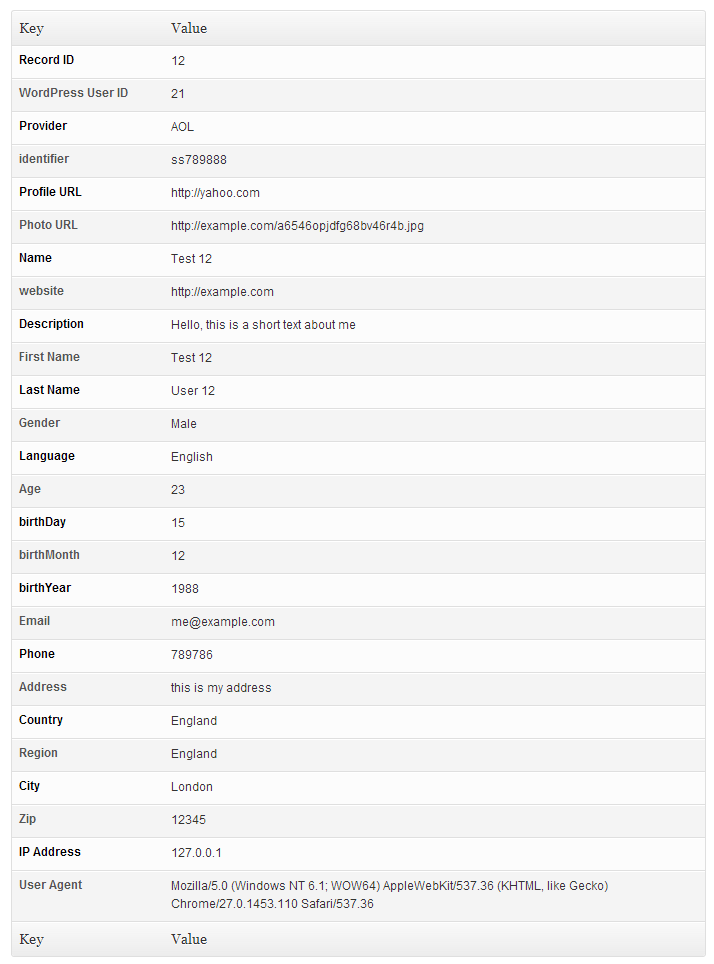
WooCommerce Social Login collects, compiles and store over 20 information about customers so you can analyze customers and find your target market.

Features:

  • Supports 8 popular social login services so customers have many options of social account to sign up.
  • One click registration and fill billing and shipping forms and user profile.
  • Sends newly created account details to user’s email.
  • Collects and store over 20 information about customers.
  • Previously registered users can link their existing account to social networks.
  • Auto Integrate with shop theme at checkout page with sliding effect.

  • Options to display social login at

    • WooCommerce Checkout Page (Login / Registration)
    • WordPress Profile Page (Link Account to Social Networks)
    • WooCommerce My Account Page (Login / Registration)
    • WooCommerce My Account Page (Link Account to Social Networks)
    • Shortcode
    • PHP function
    • WordPress Sidebar (using shortcode + text widget)
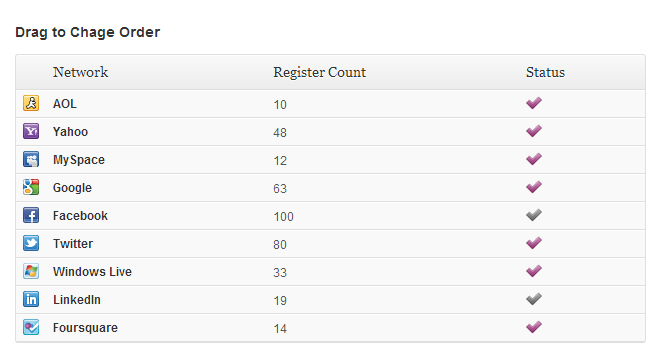
  • Admin can change the order of social networks buttons by drag and drop or disable each one.
  • Prompts users to enter an email address if the provider does not pass an email address.
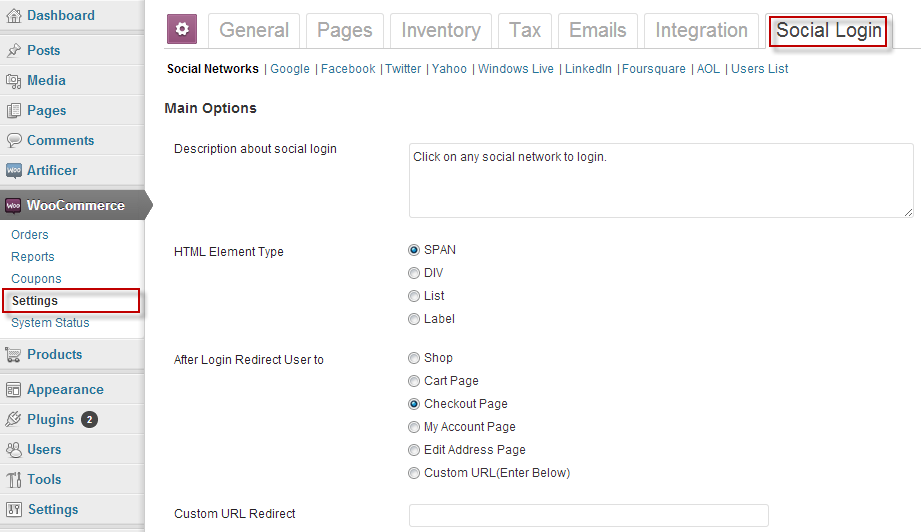
  • A clean & user friendly WooCommerce admin UI to manage everything.
  • Set login redirection to predefined relative paths or custom URL.
  • Translation ready with .po file.
  • Easy to install and configure.
  • View number of sign-ups for each social network.
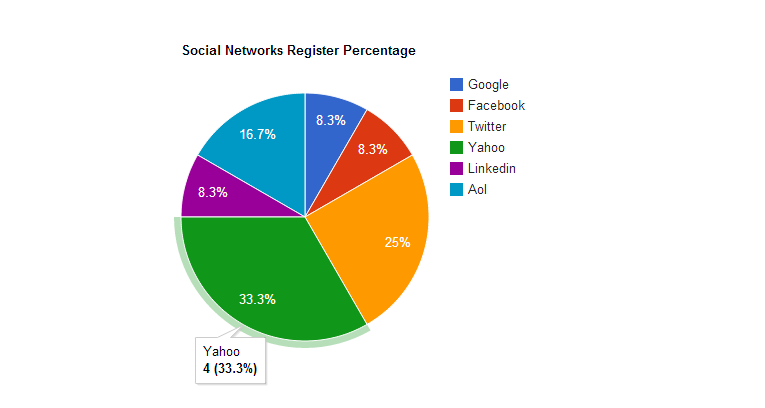
  • Generate Pie graph for Social Networks Register Percentage.
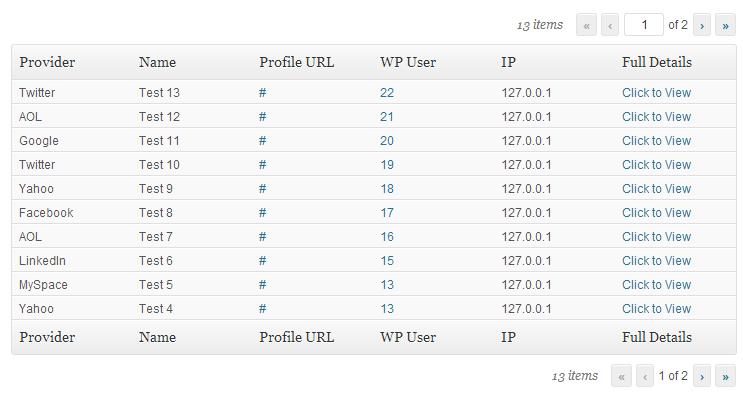
  • View user’s information list with pagination and full details view.
  • 3 size of icons + custom icons and supports fully custom design for advanced users.
  • Keep traditional login system along social Login. Both work perfectly together.
  • And more…

Download WooCommerce Social Login and Checkout plugin (WooCommerce)

Facebookish Private Messaging System (Social Networks)

DESCRIPTION

Facebookish private message system , is a bundle for TGplus Social Networking Engine which enable your users to send private message to people in there circles. It give the features that you can see on facebook messaging system to make your users more confortable with your site. Real time messaging system between you and people in your circle, it is also possible to send private message to people that are not in your circle.

TGplus Social Network Platform Bundle

This script is a bundle for TGplus social networking platform

YOU REALLY NEED THIS , TO MAKE YOUR MEMBER SEND PRIVATE MESSAGE TO OTHERS

Features

1. Sending message through users/members profile

2. Sending message to multiple users/members at the same time

3. You can also share links in your message

4. Much more…..check the demo……

Installation and Configuration

And installation and usage instruction is included in the downloaded file

Demon

Check the demo here, is either you register or login with this username and password

Username – tmontana

Password – tmontana

Please don’t update the password so that other users can test it using this password

Download Facebookish Private Messaging System (Social Networks)

CodeIgniter AWS S3 Integration Library (Miscellaneous)

CodeIgniter AWS S3 Integration Library provides an easy way to integrate AWS S3 in a CodeIgniter project. Using this library you can integrate S3 in your existing project in 5 minutes. S3 is Simple Storage Service from Amazon, Using this library you can use the S3 as a storage for user uploaded files in your CodeIgniter project easily.

Download CodeIgniter AWS S3 Integration Library (Miscellaneous)

Gamification Badge System script (Add-ons)

Description

Gamification Badge system is a bundle for TGplus Social Networking Engine , which give your site a way of gamifying users activities, like when user login,post a status, add people to circle, upload photos, e.t.c , in each activity you can assign unlimited badge to it, For example let award this user when he/she login 5times, we give you the ability to set the icon and name for each badge, you can also use the bundle to build codecanyon badge system type, which also serve as reputation for users on the site.

TGplus Social Network Platform Bundle

This script is a bundle for TGplus social networking platform

Features

1. Add unlimited badges to different kind of user activities on the site

2. Set badge icon and name from the admin panel easily

3. User badges is display everywhere user avatar is display just like codecayon is doing when you mouse over a user

4. Users badges are display on the user profile

5. Much more ….check the demo

Installation and Configuration

And installation and usage instruction is included in the downloaded file

Demon

Check the demo here, is either you register or login with this username and password

Username – thedemotester

Password – demotester

Please don’t update the password so that other users can test it using this password

Download Gamification Badge System script (Add-ons)

Website Review (Miscellaneous)

Website Review is a seo tool which will help you analyse your web page. This app provide a full information about links, meta tags of chosen domain. In addition you will see personal advices how to optimize your HTML.

Looking for a free regular licence? I’m looking for translation the application into following languages: french, german, spanish, portuguese, italian. Contact me if you are interested.

Features

  • Link Exstractor
  • Content Analysis
  • Multilanguage Interface
  • Complite Website Review
  • Website Speed Tips
  • Advice System
  • Meta Tags Crawler and Analyzer
  • Score System
  • Responsive Layout
  • Sitemap Generator
  • Websites Ratings
  • Contact Page

Requirements

  • PHP 5.1.0 or higher
  • cURL Extension
  • GD Extension
  • PDO Extension
  • Multibyte String Functions
  • safe_mode = off and open_basedir = none in PHP.INI
  • Script execution time must be greater than 120 seconds
  • Rewrite module (optional)
  • Cron Jobs (optional)
  • SMTP Mail Server (optional)

Applications demo

Site: http://website-review.php5developer.com

Installation & Documentation

All information you can find here

Changelog

v 1.0 Initial – 2013.06.09

Download Website Review (Miscellaneous)

CMS Portal (Project Management Tools)


It is a content management system designed to help small businesses around the world create professional looking portal in various fields such as Real Estate, Travel, Automobiles, Product listings, classified listings, etc. The CMS is a revolutionary idea and helps thousands of small business owners in creating a web presence. It is easy to use and has a very simple user interface. Using this CMS gives you complete control on your website where you can add, update and remove listings.

Some Key features

  • User management
  • Create and manage custom fields and forms
  • Data display on grid and list view
  • Create/edit/delete categories
  • Approve or disapprove product listing
  • Add, edit and delete product listing
  • Create CMS pages
  • Drag and drop menu (like wordpress)
  • Send newsletters to registered users
  • Options of changing logo, Labels, and content.
  • Contact us (Enquiry send to admin and user settings)
  • SEO friendly URL
  • Easy to install with the help of Install Wizard
  • much more …

Example links : Click Me

Demo link : Click Me

Documentation Video tutorial: Click Me

Updates

v1.0.0(15/06/2013)
* Initial version released

Download CMS Portal (Project Management Tools)

Widgets box (Media)

Widgets box – is assembling the necessary elements to the site. Designed in the style of metro, in colorful flowers. You can use these blocks anywhere: on forum, online store, blog, portfolio, admin panel. Widgets box – can inspire you and to lay the foundation of your website.

Widgets box includes:
-slider
-form
-maps
-more charts

Video Preview: http://www.screenr.com/laUH
Thank you for your attention.
Sincerely, dimka_ua_kh.

Download Widgets box (Media)

WordPress Guest Posts (Miscellaneous)

The WordPress Guest Posts plugin offers the opportunity to easily create posts added by any user that is not the admin of the blog page.
The regular user can complete a form with the desired content. After submitting the post, the admin will be notified and will
have the options to accept or reject the post. After accepting the post, it will be posted on the blog.

Download WordPress Guest Posts (Miscellaneous)