Pricing Table – Opencart (OpenCart)

Pricing table is a full featured, yet easy to create pricing plans. It is great for users and businesses who wish to sell online packages , hosting plans and other SAAS model products.

Key Features

  • Create pricing plans – unlimited pages.
  • Create column features– unlimited.
  • Enable and disable column according to your wish ( its adjust the row itself)
  • Enable and disable pricing plans.
  • Add to cart function work as well like normal order procedure.
  • Easy to add plans , same like creating product and then choosing at pricing plan page.
  • Add value to each feature.
  • Add cross or tick to feature.
  • Define Label , description and plans names.
  • Define tool tips for each feature.
  • Seo URL friendly.
  • Hide products from other pages.
  • Clean code and design with browser compatibility
  • Example links 1: Click Me

    Example links 2 : Click Me

    Demo link : Click Me

    Admin Control : Click Me

    Backend login details

    Username : demo and password : demo

    Updates

    v1.0.0(25/06/2013)
    * Initial version released
    

    Download Pricing Table – Opencart (OpenCart)

    WooCommerce Ajax Drop Down Cart (WooCommerce)

    Description:

    Even if you are a developer creating themes or you are just an owner of an ecommerce site using WooCommerce now you have the oportunity to offer an user friendly cart widget without much effort.

    NW ADCart plugin let’s you configure the Ajax Drop Down Cart to meet your theme design.

    Style your icons as you please by selecting the icons that you desire from the list of 10 available types of icons and choose the color that integrates well in your theme.

    Place the widget anywhere you want in your theme and you’re good to go.

    Before you start:

    Please find in the archive the folder named documentation, you have in that folder a file named index.html, double-click on it and read the documentation carefully.

    Features:

    • instant ‘add to cart’ functionality driven by ajax technology
    • instant ‘delete item from cart’ driven by ajax technology
    • easy customization of colors, position, and icons of the widget
    • 2 predefined skins
    • border radius setup option
    • you can customize the name of the type of products that the user add’s to the cart
    • custom made with iconfont instead of regular image icons
    • unlimited icon colors
    • unlimited background colors
    • shortcode capability let’s you place the widget even in your content
    • and more …

    The archive contains two folders:

    • “documentation” – you will find a complete documentation for you to easily get your way through the configuration
    • “plugin” – it contains the archive for the plugin that you will install under wp-admin
      Important! – you need to have woocommerce plugin installed for this plugin to work.

    Thanks to:

    • icomoon
    • colorpicker by eyecon
    • documenter

    Future updates:

    • you will find the list of future updates in the documentation

    Download WooCommerce Ajax Drop Down Cart (WooCommerce)

    Image Notes for WordPress (Media)

    Image Notes for WordPress is a plugin to add notes on images. It is similar to tagging in Facebook or Flickr. Use this plugin to tag your friends in your post, Label important areas of an image, add explanations over a chart, List out recipie ingredients in an image

    Features

    1. Select an area on any image and add notes
    2. Images Notes appear when user hovers mouse over image
    3. Generate a list of tags or notes below the image as seen on FB
    4. Will work with any post type or even on pages
    5. Easy options to edit or delete notes
    6. Option to show or hide taglist
    7. Different View for desktop and mobile devices
    8. The postion and size of the notes is Responsive and will adjust according to image size
    9. Setting to allow html tags in notes
    10. Setting to show or hide notes on tablet and mobile devices
    11. Setting to apply default themes or create a custom theme for image notes
    12. Instant preview of the selected or created theme before saving
    13. Well supported with free updates

    Installation

    Once you have downloaded the zip file from Code Canyon extract the contents to a folder of your choice. Chances are if you are reading this you have already done that. Find the file called ImgNotes.zip. This is the plugin file. You can upload this file from your WordPress Admin

    1. Go to Plugins > Add New
    2. Select Upload
    3. Upload the ImgNotes.zip file
    4. Activate the plugin
    5. Go to Settings > WordPress Image Notes
    6. Set the options as per your liking

    Alternatively you can manually install the plugin by following the instructions given here.

    Usage

    Adding a new note
    • Images notes are added from the user side. That is the pages which users see and NOT from admin dashboard.
    • Once you are done with editing and publishing your post. Go to view post page
    • Hover the mouse the image you want to add notes on, Add Note icon will appear at the top left corner of image
    • Click on Add Note icon on the top left corner of image, it will add a default area with a textarea, adjust it accordingly and add desired note.


    • Alternatively just click and drag over the image, it will create an area of minimum 50*50 px dimension adjust area as per requirement and add note
    Editing/Deleting a note
    • Click on Note area to be edited/deleted, edit delete icon will appear on the top left corner of the selected area.
    • Click on edit icon, edit mode will enable. Adjust the area or change the note and save

    • Click on delete icon to delete a note
    Toggling tags
    • Click on Toggle note tags icon (next to Add Note icon) to toggle tags.

    • Tags toggled off will not be shown in the user side.
    Adding custom CSS
    • Go to Settings > Image Notes
    • Choose option custom in section Choose a Theme, two new sections will appear

    • Click on checkbox I want to add my custom css in section I know what i am doing and add custom css in the text area. Do not wrap css with <script> tag as it will be automatically appended
    • Use classes defined for styling (.imgnotes-note, .inner-div, .imgnotes-notep)
    • Check preview before saving. If anything goes wrong cross check css. Make sure checkbox is checked

    Important Note – top

    • Plugin removes relative positioning of body. This may cause alignment issue in some themes, so please check your theme in our demo site before buying if you have a doubt
    • Only administrator can create or modify Notes. All other users can view notes
    • Notes creation and modification is available for Desktops only. Tablets and mobile devices can only view notes

    Download Image Notes for WordPress (Media)

    FBar – Responsive PHP Theme Switcher Demo Bar (Miscellaneous)

    If you are web designer or developer and if you are sell your works on Envato, I think this plugin ideal and very important for you. So, you can show your WordPress themes, Joomla templates or HTML templates with our awesome FBar demo bar plugin. This is a demo bar would be shown on top of page, allow users to preview another theme. The demo bar is customisable at style.css

    One of major features of this script, you can test responsive layouts with demo bar (try mini device icons), social media share buttons included (Twitter, Facebook and Google Plus), you can upload your custom logo and favicons, purchase and remove iframe button included. You can create limitless of theme demos with FBar!. You can create wonderful demo bar or theme switcher using this PHP script documentation for you even without needing to know programming or coding!

    Like this script? please don’t forget to rate it

    Large-star-on
    Large-star-on
    Large-star-on
    Large-star-on
    Large-star-on

    KEY FEATURES

    • Responsive Layout Design
    • Responsive Test Tools
    • Social Media Friendly
    • Redirect Function (Remove any bars)
    • Unlimitless Theme Demo Previews
    • Modern Browsers Compatible
    • 24/7 Support
    • Detailed Documentation

    SUPPORT

    Our support forum coming soon! But you can support via contact form on our profile page!

    USED SCRIPTS

    THANKS!

    Thanks for interesting & purchasing our work! I hope so you like it.

    LATEST WORK (BISTRO STORE HTML5 TEMPLATE)

    \

    Download FBar – Responsive PHP Theme Switcher Demo Bar (Miscellaneous)

    Neptune – Horizontal Submenu (Navigation and Menus)

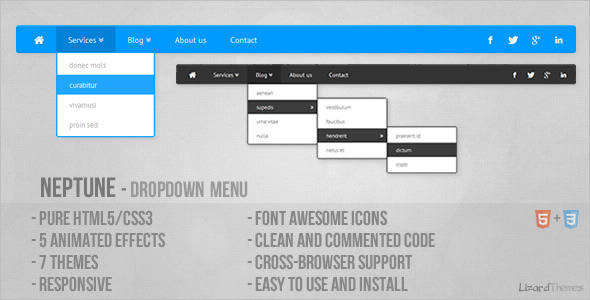
    This is pure HTML5/CSS3 menu. Menu has HTML5 structure and works on all major browsers. Menu is easy to edit and integrate into any website.

    Menu works (the main structure is 100% same) on Internet Explorer 9 and 8, but animation and some other CSS3 features do not work.

    Video Preview on YouTube (Watch in HD)
    List of my all Horizontal Submenus

    Credits

    Icons: Font Awesome

    Font: Google Web Fonts

    See also


    Download Neptune – Horizontal Submenu (Navigation and Menus)

    WP Job Hunter (Widgets)

    WordPress Job Hunter

    Turn your WordPress site to a real Job Hunter Portal!

    It’s very easy with this plugin and widget, just few clicks and the jobs are coming to you!
    You can earn a lot of money with sharing jobs on your website and in the other hand, you can get a nice content to your webpage as well.

    indeed.com has an amazing affiliate program and they pay you when somebody click on any job link. (pay per click method)

    Included Facebook share, Facebook Like, Google+ and Google Maps

    First, you have to register on https://ads.indeed.com/jobroll/ and you will get an affiliate id.
    This plugin use this ID for connecting to the Indeed Job API.
    You can track the amount what you earned daily when you login to your Indeed Affiliate Page, that is the same where you register.
    The installation and the setup are super simple, you will get a brilliant responsive widget to you website within 5 minutes.

    Features:

    • super simple setup
    • ability to set up keywords and locations for the widget
    • ability to set up separately keywords and locations for posts
    • ability to set up the number of the listed jobs for the widget between 1-10
    • instant refresh the widget job list on every page load by random
    • very fast and well-designed
    • contained the indeed logo, it is required by the indeed.com policies
    • more informative jobroll widget than the usual with a short jobs’ description
    • one-click facebook share button
    • one-click facebook like button
    • one-click google plus share button
    • show job’s location with Google Maps on post’s page by one-click
    • generate tags by automatically from the content with an intelligent method, ability to excluding tags
    • fully customizable external indeed link with four inbuilt views or with your own html elements
    • feed jobs by cron with customizable limits, used by the inbuilt adjustable keywords and location parameters
    • set up email address to get cron responses
    • no coding or any technical skills necessary
    • auto-post feature after page load
    • choosable author for the posts
    • create custom categories with keywords
    • ability to feed jobs only when the job fit to any exist category
    • enable or disable comments on jobs’ posts
    • works with any professional wordpress templates, fully adapts for the style of the templates
    • fancy, arranged tabs on admin page with a lot of help
    • Money Maker Job Board Widget for any websites

      Full Responsive Widget – Work with any professional themes

      More features:

      • quick access to the widget options
      • responsive job board widget
      • links nofollow feature
      • enable or disable stats
      • stats contain the number of total jobs, the top 50 viewed jobs and the last 50 viewed jobs
      • list of supported countries for the Location and Location Shortcode settings on admin page
      • detailed documentation and help section
      • customize jobs on the widget by enable or disable description-, location- and company informations

      No coding or any technical skills necessary

      Visitor stats

      SUPPORT

      If you have any question or feedback, please feel free to email via my user page contact form.

    Download WP Job Hunter (Widgets)

    E-mail Extractor (Miscellaneous)

    E-Mail Extractor is a web spider (PHP script) which crawls through the web and extracts e-mail addresses from webpages. You just have to enter start webpage URL, select crawling mode, set maximum number of URLs to crawl and launch a spider. It will walk around the web and collect e-mail addresses.

    Features

    • Start webpage URL: spider starts working with this page.
    • 2 crawling modes: same domain URLs only and all URLs.
    • Maximum number of URLs: spider can crawl limited and unlimited number of URLs.
    • Crawling statistics: list of URLs, e-mails and error log.
    • AJAX-ed interface: modern jQuery-driven interface.
    • Clean code: clean PHP and JavaScript code can be used for study purposes.
    • CURL and fsockopen supported: spider can work through either fsockopen or CURL.
    • Easy terminarion and resumption: close browser to stop the spider, open resumption URL to continue crawling.
    • Easy to install: edit inc/config.php.

    Limitations

    • Spider doesn’t extract e-mails from images.
    • Spider doesn’t extract e-mails from password protected area of websites.
    • Some websites may block spiders.
    • Make sure that using spiders is not against of your hosting provider TOS/TAC.

    Requirements

    • PHP version 5.0 or greater
    • MySQL version 5.0 or greater

    Installation

    Let’s imagine that you have website http://www.website.com/ and you want to install script there.

    1. Create folder email-extractor (use any other name) in root of your domain. Once created it can be reached by URL: http://www.website.com/email-extractor/
    2. Make sure that folder email-extractor has permissions 0755; index.php and ajax.php have permissions 0644.
    3. Edit inc/config.php and set MySQL database parameters.

    Download E-mail Extractor (Miscellaneous)

    Simple Instagram VIDEO (Social Networks)

    Simple Instagram Video

    Introducing Video on Instagram! This plugin leverages the newly added video stream as all of the features if the current API. Share your favorite videos and photos pulled directly from the Instagram API. Its simple, easy, and highly customizable. Start sharing now!

    Overview

    Simple Instagram Video is a premium Instagram plugin that uses the power of HTML5 Video to showcase the latest functionality of the Instagram API. We know you will love it as much as we do because we’ve designed it to be as beautiful as it is useful. Give it a try, have some fun, and share you moments with the world!

    Key Features

    • Superior Codebase –
      Built on our amazingly bulletproof framework
    • Responsive Design –
      Fully mobile-ready design adapts to any device.
    • Fullscreen Video –
      Enjoy your videos fully regardless of the device.
    • Advanced Video Thumbnail Gallery Mode –
      Share your best Instagram videos with our clean thumbnail gallery.
    • Premium Video Playlist Gallery Mode –
      Display your videos with our unique playlist style video player.
    • Popular Instagram Feed Mode –
      This feed mode pulls in the photos from the Instagram popular feed.
    • Tag Instagram Feed Mode –
      This feed mode allows you to specify a tag to search from the Instagram API.
    • User Instagram Feed Mode –
      This feed mode allows you to specify a user id to pull in photos from a specific user.
    • Multiuser Instagram Feed Mode –
      This feed mode allows you to specify multiple user id’s to pull in photos from specific users.
      Note, this feature does NOT allow load more functionality.
    • Liked Instagram Feed Mode –
      Display photos and videos that you’ve liked all accross the Instagram API.

    Download Simple Instagram VIDEO (Social Networks)

    TextTwister (Miscellaneous)

    TextTwister is an Article Spinner / Spinning PHP script.

    TextTwister is a Search Engine Optimization tool that aims to create unique variations of your web content and boost your search engine ranking by making it appear to search engines that you are always updating and changing your website.

    TextTwister works by identifying twistable sections of the sites content and choosing to display one of these options consistently for a defined point of time.

    Example

    Spot is a {red|blue|yellow} stuffed {dog|cat|bear}.
    Once put through TextTwister will because one of the following

    1. Spot is a red stuffed dog.
    2. Spot is a red stuffed cat.
    3. Spot is a red stuffed bear.
    4. Spot is a blue stuffed dog.
    5. Spot is a blue stuffed cat.
    6. Spot is a blue stuffed bear.
    7. Spot is a yellow stuffed dog.
    8. Spot is a yellow stuffed cat.
    9. Spot is a yellow stuffed bear.

    Auto Twister

    TextTwister also includes a limited and optional auto text twister that can convert text like “I’m” to “I am” or remove redundant phrases so that “RAM memory ” will sometimes be changed to “RAM” or “joint collaboration” to simply “collaboration”.

    Nested Twisting

    TextTwister can twist a section of text within a twisted section of text. Helping you create, unique, Searching Engine Results Page boosting content on your website.

    Download TextTwister (Miscellaneous)

    facebook covers pro (PHP Scripts)

    facebook covers pro script (full site build on twitter bootstrap)

    No database needed and No MySQL setup
    No SSL needed and easy to install
    included upload to facebook, post to users wall etc.
    Multi upload facebook covers to website .jpg .png .gif

    (Upload Unlimited covers)

    Remove covers auto cover counters,

    5 add spots, share this buttons, facebook invite, auto pagination, optin ready

    NOTE the covers are not included

    Features:

    unlimited covers jpg png and gif
    easy to install
    5 add spots
    easy upload covers (temp admin page) or FTP
    auto pagination
    easy remove covers (temp admin page) or FTP
    auto post to wall
    auto notification
    auto post to album
    auto pre install cover
    optin ready
    facebook comments
    share buttons
    facebook multi invite
    direct upload covers ftp
    cover counters
    temp admin page for upload and or remove the covers
    No mysql needed No SSL needed

    See screenshots or try demo

    requirements:
    php4x or beter
    facebook app id and secret

    Download facebook covers pro (PHP Scripts)

    Essential Bootstrap Form Pack (Forms)

    Mammothology Essential Bootstrap Form Pack:

    A set of styled and functional forms for your next website. Get up and running
    quickly with these fully working and attractive forms.

    Features:

    • All forms come with validation examples and database code to store input
    • Multiple versions of login & sign-in forms
    • New user registration and sign-up forms
    • Working contact form using PHP mail
    • Ajax payment form with verification and loading icon
    • Subscription billing form example
    • Stripe webhooks example to respond to Stripe events
    • Integrated into Stripe to accept payments
    • Data sorting form with example Javascript to sort and filter by date, number and string
    • Address input form and pricing tables example too

    Quick Start:

    • Unzip form pack to your root webserver folder
    • Create a database using the included SQL file which will store all form input
    • Navigate to index.php in your browser to see all the example forms
    • Add data to the forms and submit and you’ll see it saved in your database

    For Payments/Subscription Forms:

    • Sign up for a Stripe account for free at: https://stripe.com
    • Copy your Stripe Publishable Key (see Stripe Account Settings) to payment_form.php and subscribe_form.php in place of ‘YOUR_PUBLISHABLE_KEY’
    • Copy your Stripe Secret Key to subscription.php, payment.php and webhook.php in place of ‘YOUR_SECRET_KEY’
    • Copy the contents of this zip file to your web server root directory, usually named public_html
    • Use a browser to visit your domain to test the files:
    • To test the webhook, add the URL to the webhook in your Stripe Account Settings under the Webhooks tab, for example: http://example.com/server/webhook.php

    Support:

    As always, there is full support available at: http://mammothology.com/forums

    Download Essential Bootstrap Form Pack (Forms)

    Magento Meet Our People (Magento Extensions)

    It’s nice to display the members of your staff, team or working force.
    With this extension it is possible to create, organize and customize your magento team page easily.

    Features :

    – Manage Team
    – Add static block on top and bottom of your team show case
    – With CSS hover effect
    – No Javascript needed
    – Open Source code
    – Easy to use
    – Very well documented

    Download Magento Meet Our People (Magento Extensions)

    JPx Dropbox for WordPress (WordPress)

    By JPx Dropbox for WordPress you will can manage your images and sync to your dropbox then you can choose images into your post. By this method your WordPress site will display images from dropbox server, You will not save the image to your host anymore.

    JPx Dropbox provide Image Manager Interface to easy manage & choose images, You can setting optionals like: separate author’s folder when sync to dropbox and many via WordPress plugin setting page.

    Features

    1. Add,Edit,Delete,Rename files/folders sync to Dropbox.
    2. Grant Delete,Rename premission files/folders to WP authors.
    3. Separate or Combine user’s folder.
    4. Upload multiple files.
    5. Limit file size to upload.
    6. Quick preview an image with scaled image size.
    7. + Bonus HTML5 take photo from your webcam.
    8. + Sass source file for create your new theme.

    Requirements

    1. PHP 5.3+
    2. Dropbox Account (FREE)
    3. Dropbox Application Key/Secret (FREE)
    4. WordPress 3.x

    Installation and Usage guide

    You can found documentation in your downloaded zip file and at my site. Installation and Usage guide.

    Download JPx Dropbox for WordPress (WordPress)

    WordPress TagPix v.2 – Image tagging tool (Interface Elements)

    This is the WordPress plugin of my script Tagpix

    With tagPix you can tag images and create realy nice tooltips. It’s pure developed with HTML/CSS/JS. When you finish with tagging just copy/paste the shortcode on your pages or posts. Support all mayor browsers and work also on mobile devices.

    Supported Tag types

    • Photo : Support images, just paste the link of your image.
    • Video : Support video files, just paste the link of your video from YouTube or Vimeo.
    • Music : Support music links, just share the link from soundcloud.
    • Text : Support text, type anything, HTML is also allowed.
    • Link : Support links, just paste your link, give it a description and select a custom icon.

    Features

    • HTML : You can use any type of HTML tags under the Text and Link section.
    • Multimedia : Support popular services like YouTube,Vimeo and Soundcloud.
    • Icons : Setting custom icons for links.
    • Security : Secure your images and tags with a Password.
    • Browsers : Support all mayor Browsers out there.
    • Mobile : Support also mobile devices.
    • Responsive : All tagged images are responsive.
    • Updates : Free updates all the time.
    • Support : Free customer support.
    • Shortcode : Using shortcodes to display the tags.

    Suported Browsers

    • IE (7,8,9,10)
    • Firefox
    • Chrome
    • Opera
    • Safari

    Changelog

    • Vesion 2.0 released

    Download WordPress TagPix v.2 – Image tagging tool (Interface Elements)