
WP Scroll Analytics: See What They Really Read (Add-ons)

WP Scroll Analytics is a plugin for WordPress sites which tracks how far each user scrolls down a given page and how long it takes, recording the data in Google Analytics.

You can view this data in Real Time Analytics, as well as Content > Events and Content > Site Speed > User Timings. By default, it records progress in 20% intervals (20%, 40%, 60%, 80%, and 100% page depth).

Features:
– New insight into what your users actually see
– Less than 2 KB (minified code)
– Works in any recent version of WordPress (2.6+)

Requirements:
– Google Analytics asynchronous tracking code
– jQuery 1.7 or higher

Download WP Scroll Analytics: See What They Really Read (Add-ons)

HTML5 Game: Car Mini Games (Games)

“Car Mini Games” is a HTML5 game with two mini games. The first, travel as far as you can with out dying from exploding boxes. The second, bump as many cars as you can to rack up a highscore.
Controls: Tilt/Touch or use arrow keys.

Features

  • HTML5 Game
  • Two Games In One
  • Easily Customize Splash Screen
  • Supports Touch/Tilt Controls And Keyboard Arrows
  • Works On All Major Browsers
  • Includes Source File (Construct 2)
  • Includes Exported HTML5 Game for Webpages and iframe

How To Change Splash Screen And Other Images

Select the game folder. Then image folder. Find the image you wish to replace. Make note of the size and name of the image. Size your image the same as the one you are replacing and save as a .png with the same name as the image you are replacing. Drag and drop into the image folder. When prompted to replace or keep both, select replace. It is always a good idea to make backups of files you may need to use again.

I am happy to help whenever possible. You can reach me here or at [email protected]

Thanks!

Download HTML5 Game: Car Mini Games (Games)

jQuery Wah-Menu (Navigation)

Wah-Menu – Pushing/Dockable Side Menu Navigation Plugin for jQuery

Features

  • Easy to use.
  • Works on any page.
  • Perfect for Ipad navigation.
  • Docking main menu – push/show sub-menu.
  • Sub-menu fully scrollable.
  • Custom scrollbars on sub-menu containers.
  • Accent selected and tooltip colors.
  • One level media sub-menu items.
  • Dock menu on page load to give the user more page room.
  • Social media icons.
  • 230+ Entypo Icons used for menu icons.
  • Submenu header and descriptions.
  • Custom menu logo area that resizes on window resize.
  • Same Great Support!

Credits:
Custom Scrollbars
http://manos.malihu.gr/jquery-custom-content-scroller/

Entypo Font Icons:
“Entypo pictograms by Daniel Bruce — www.entypo.com”

PowerTip – v1.2.0 – 2013-04-03
http://stevenbenner.github.com/jquery-powertip/
Copyright© 2013 Steven Benner (http://stevenbenner.com/).
Released under MIT license.
https://raw.github.com/stevenbenner/jquery-powertip/master/LICENSE.txt

ImagesLoaded:
developed by Tomas Sardyha @Darsain and David DeSandro @desandro.

Known bugs:
Safari (Desktop) – Icons not showing up, animations not working
Opera (Desktop)- Paddings off for icons
Chrome (Desktop) – Social Icons not showing.

Download jQuery Wah-Menu (Navigation)

CSS3 Sidebar – vertical & horizontal (Navigation and Menus)

CSS3 Sidebar – vertical & horizontal

Colorful Sidebar with nice Hover Effects

Easy to use the beautiful and colorful css sidebar for their own website.
Simply insert into the existing CSS file and enjoy the new CSS sidebar.
Created with rounded corner, box-shadow and nice transition hover effects.
It degrades nicely on older browsers, e.g. IE7 and IE8.

Features

  • 3 available sizes (mini, normal, large)
  • 11 color variations
  • 6 button styles
  • 7 hover effects
  • Easy to change color-set – simply change the class
  • With individual icon and subtext
  • Images are used for icons
  • It works standalone

Attention – Browser-Support

  • IE7 and IE8 does not support rounded corners
  • IE9 does not support css transition hover effects

Download CSS3 Sidebar – vertical & horizontal (Navigation and Menus)

MailHub (Miscellaneous)

Usage of MailHub

On basically all my webprojects I have to send emails to somebody. The users wants to get a new password or I want to send a confirmation or an error report to a specific email address. Of cause you simply could use the mail function of php but as soon as you want to send HTML mails or mails with an attachment it becomes a little bit tricky. Also if you need some dynamic error reporting…
Therefore I wrote this “MailHub class” to reduce the necessary time to develop email notifications. Usually I define a set of emails with placeholders and replace the placeholders dynamically. In this way I am very flexible and can implement email notifications within seconds.
I created some examples to show you how easy you can use this PHP class. The source code should enable you to boost your learning curve of this class functions. In the end there is a complete list of the public functions of this class.
I hope this class saves you a lot of time so you can focus on the real challenging programming tasks.

Features

  • “MailHub” is simple and flexible
    – send mails within seconds
    – define mail templates and send them easily
    – test it out
  • Plain or HTML e-Mails
  • simple placeholder replacement for customized mails
  • easy template defination and usage
  • supports multiple attachments
  • simple debugging
  • check out the demo at http://www.bigtoe.de/demo/mailHub

Public functions of “MailHub”

  • setTo( string $email [, string $name = false] )
    define a recipient of the mail (Use the function multiple times if you want to define multiple recipients)
  • setCC( string $email [, string $name = false] )
    define a emailadress (with or without a name) that should receive the mail on cc: (Use the function multiple times if you want to define multiple recipients)
  • setBCC( string $email [, string $name = false] )
    same like setTo or setCC only for blind carbon copy (BCC)
  • setFrom( string $email [, string $name = false] )
    define the email (and the name) from the sender of the mail.
  • setBody( string $body )
    define/load the body of the email.
  • setSubject( string $subject )
    define/load the subject of the email.
  • setMailType( string $type )
    choose between plain or html email type. If you choose html type you have to define the SMTP values in the mailhub_class.php. Default value is plain.
  • replacePlaceholders( array $replacements )
    This function could be used to replace placeholders in the mail body. Placeholders are always text snippets surounded with an opening # and an ending # (like #surname#). See the examples to get a feeling of the usage.
  • addAttachment( string $file )
    you can use the addAttachment function in two ways to add an attachment to the email (could be used with plain and html mails):
    – either you add a relative path like “logo.png” or
    – you enter the name value of an input field (input type=’file’ name=’xxx’).
  • debug()
    use debug to get further information or to search for errors.
  • sendMail()
    this function sends the mails.
  • send()
    use this function to check if the mails were send out correctly. send() will returns true or false and you can print a success or failure message based on that information.

Please help me

If you are going to rate the script less than 5 stars, please tell me what I can do to make it 5 stars for you and I will fix it. I would love to hear your suggestions on how I could improve the script, leave me a comment or send me an email and your suggestion might make it in to a future version!

Download MailHub (Miscellaneous)

Reviewer WordPress Plugin (Utilities)

support

Reviewer WordPress Plugin

The Reviewer WordPress Plugin ?allows you to insert reviews inside your WordPress blog posts in a quick and easy way. The plugin flexible structure allows you to create any review type: no limits, just create a review template and insert your personal review inside your posts.
The plugin offers different layouts and colors customization so that you can adapt your reviews to your need. Each theme has a responsive layout to adapt to any devices resolution such as smartphones and tablets.

Video Preview

Features

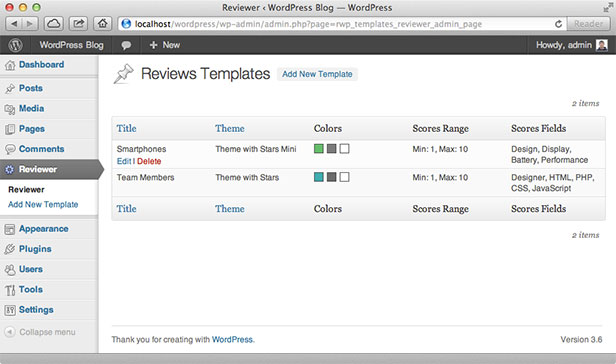
Reviews Templates Manager

You can create, customize, edit and delete templates for your reviews.
\

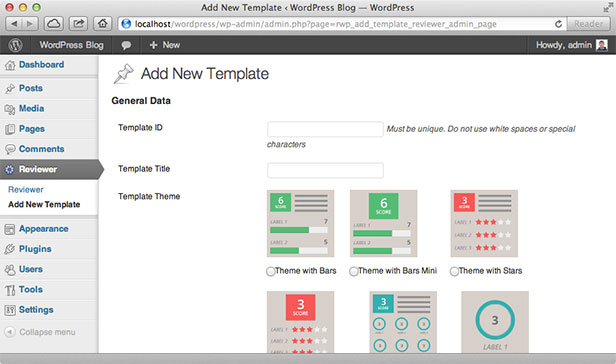
Template Costomization

You can customize your reviews templates as you need: you can choose title, scores ranges, themes, colors and more.
\

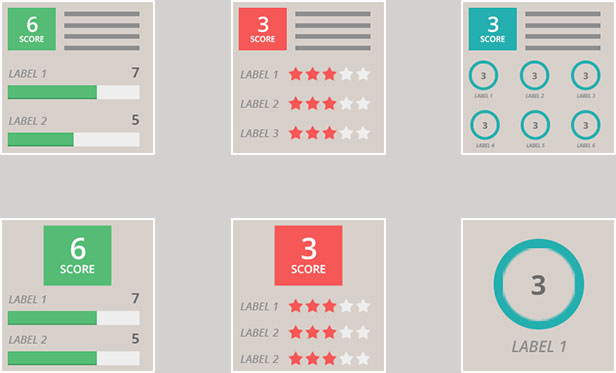
Reviews Themes

You can choose from 6 different themes for your reviews. (For more details view the live preview).
\

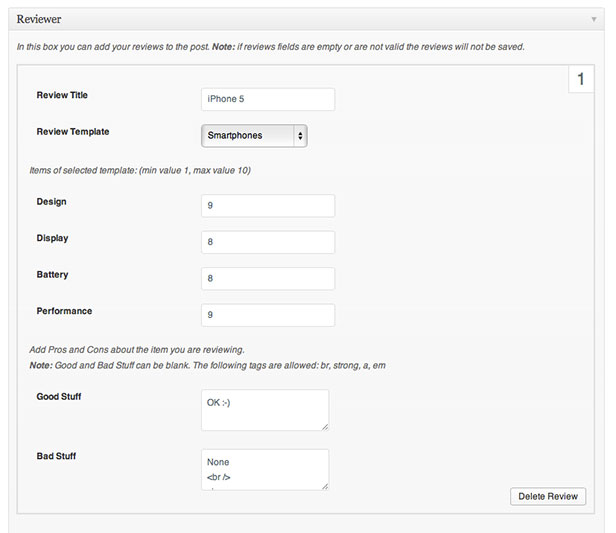
Review Box

Create your reviews in a quickly and easy way using the Review Box available in the post editor page.
\

Reviews Button

Insert your reviews at any point of your post with the review selection list.
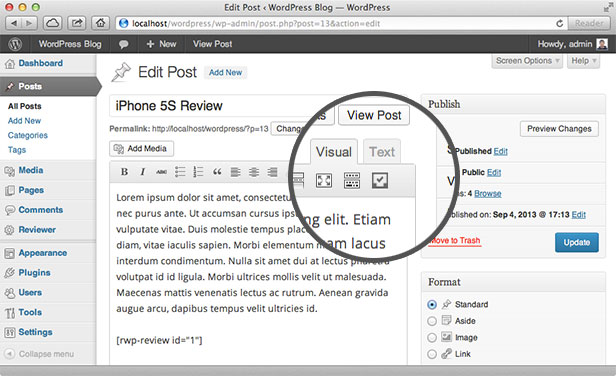
\

All Plugin Features

  • Reviews templates manager
  • 6 themes for reviews layout
  • Color customization
  • Unlimited number of reviews per post
  • Quick add review box
  • Review Shortcode
  • Reviews Shortcodes list button
  • Responsive layout
  • Retina ready

Please, do not forget to rate it!!

\

NOTE: The plugin requires PHP 5.2+ and WordPress 3.5+ to work.

Change Log

    
    Version 1.0 - 9 September 13
    Initial version
    

Download Reviewer WordPress Plugin (Utilities)

Fancy WP Maintenance Mode – WordPress Plugin (Miscellaneous)

FWPMM adds a splash maintenance mode page to your blog that lets visitors know your blog is down for maintenance. Logged in administrators get full access to configuration and the blog including the front-end.

This plugin comes with 3 professional and lovely maintenance page themes, you can switch to any one of them.

You can use a date with a countdown for information to the visitors or set unit in percent value of progress bar for information. Also you can add your social urls to display in the maintenance page.

Features

  • Responsive Layout
  • 3 Different Theme
  • Newsletter Subcribe Form
  • Collect Subscribers Email
  • Count Down Timer
  • Progress Bar
  • Custom Logo
  • Custom Background
  • Custom Heading and Banner Content
  • Activation Alert on Admin Top Bar

Download Fancy WP Maintenance Mode – WordPress Plugin (Miscellaneous)

JQuery PHP Store / Shop (Shopping Carts)

JQuery PHP Store/Shop

You need a Simple Store | Shop | Shopping cart then this is for you. After a Success of JQuery XML Store Shop now we now come up with PHP/MySQL powered Shopping Cart / Store / Shop for you. I will recommend you to please look at demo!! This is easy to use, customizable PHP/MySQL Driven Store / Shop / Shopping Cart built using JQuery, CodeIgniter, PHP, MySQL & Twitter Bootstrap Framework . Its having 2 options for the checkout Using PayPal or/and Submit order by Email

Having product options for Sizes & Colors and titles can be changed using Localization. Store Can have Unlimited categories & Products

Demo:

Server Requirements:

  • PHP 5.2.4 or newer
  • MySQL (5.1+)

Features:

  • JQuery, CodeIgniter, PHP, MySQL & Twitter Bootstrap Framework Powered.
  • Simple, Nice & Attractive
  • Localization / Multilingual / Multi Language / Translation Supported you can easily convert this store into your own language. Without changing code.
  • HTMl5 Markup
  • Cross Browser Compatibility
  • Responsive Layout
  • Search Engine Friendly URLs
  • Admin Section for Managing Store
  • Ready to use.
  • Search Functionality
  • Thumbnail for Product.
  • PayPal Checkout (Optional)
  • Submit Order by Email Checkout (Optional)
  • Products options like Size & color (Optional) and these titles can be changed using Localization. So you can change size to style etc.
  • Unlimited Categories
  • Unlimited Products
  • Well documented
  • 100% Customizable Shopping Cart
  • Many more … check the demo

Download JQuery PHP Store / Shop (Shopping Carts)

tweetsFinder (Social Networking)

The tweetsFinder plugin allows you to simply create a nice widget in your webpage that allows you and your users to easily search for recent tweets post on twitter and display them. tweetsFinder is

very easy to use and don’t requires any modifications to fit, he will automatically create the elements in a container you place in you webpage.
Important notice: This program is respecting the latest Twitter API rate limits!

Features:

  • Search & display (recent / popular / mixed results) tweets according to a search term.
  • Responsive design.
  • Search by language.
  • Limit results.
  • Very light and fast.
  • Simple CSS stylesheet – Easy to read & override.
  • Easy to configure and control.

Technical information:

  • The library has been tested with PHP 5.1+ and relies on CURL and hash_hmac.
  • The jQuery plugin is tested on the major browsers + mobiles and relies on jQuery 1.9+.
  • For security reasons the twitter Api keys (consumer + user) are defined and stored on the Server side (in twFinder_php/tweets_json.php).

Download tweetsFinder (Social Networking)

Send It – Simple file sharing (Loaders and Uploaders)

Welcome to Send It.

Send It, is the simplest and easiest way to share your files. There are no logins, no passwords, just upload the file and enter the email address, The recipient receives the email with a link to the file.

This is great for design agencies sending large files, freelancers, university students etc.

Send a file with just one click.

This can also be re-branded with your own company logo and backgrounds and used internally, or put advertising on the background and sell it to companies you work with.

The whole idea of this script is to be simple to use, easy and user friendly.

– Full iOS 6 / 7 compatible
– Responsive
– Gorgeous UI
– Anyone can use

Everything is customisable in one easy to use branding file, this is what we love about this script it’s easy for everyone to use.

We supply full installation instructions and branding documentation.

Enjoy!

Download Send It – Simple file sharing (Loaders and Uploaders)

Evasive – Pure Flat CSS3 Admin Dashboard (Navigation and Menus)

Evasive Flat CSS3 Admin Dashboard

A Pure HTML5/CCS3 admin dashboard that can be integrated into any bespoke design. Colours can be changed easily and options are unlimited. This is not a WordPress plugin and will be perfect if you wish to design your own admin area.

  • Unlimited colour possibilities
  • NO IMAGES (Not required, you can add your own (logo etc))
  • Search Form
  • Adjustable Width
  • Sub Menus
  • 308 Icon options
  • Easy to integrate
  • No Javascript/jQuery
  • Full Documentation
  • Clean commented code

Only two main files needed, a CSS file and an HTML file. Extremely lightweight clean code which can be easily added to any website. This is not a WordPress Plugin (Yet!).

The icons are done using a font called Typicon, meaning you can fully animate, customize and change the colour of the icons. There are only two changes to be made to change the colour scheme within the CSS file. Full documentation can be found within the ZIP.

A demo of the Typicons icons will be within the ZIP for reference, no PNG files are needed to make them work!

Tested and working in many popular browsers, Firefox, Safari, Opera, Chrome. If you notice any browser issues please leave a comment and I’ll rectify them ASAP.

Support

Support offered via comments section of this item. Please leave a detailed description of the problem you are having and i’ll do my best to help you correct it :-)

Noticeable Mentions

  1. Logo in the demo are copyright of Envato & CodeCanyon
  2. Typicon Font Icons
  3. Documentor 2.0

Download Evasive – Pure Flat CSS3 Admin Dashboard (Navigation and Menus)

WordPress Theme Controller (Miscellaneous)

WordPress Theme Controller is a special plugin dedicated for wordpress theme development.

After I’ve read the news about ThemeForest New WordPress Theme submission ( found here ) I’ve realized what people need, and this plugin has the scope of helping the developer and the end user, having more flexibility and “centralization”

As I’m currently in the process of development of a new theme, I am personally going to use this plugin.

“Hop In” and View the ~ 5 minute video presenting you the concept and how easy to use it is

Feel free to ask any questions in the comments section

Download WordPress Theme Controller (Miscellaneous)

IntoTheBox | Dropbox plugin for WordPress (Utilities)

IntoTheBox WordPress Plugin

This plugin will help you to easily integrate Dropbox into your WordPress website or blog. IntoTheBox allows you to view, download, delete, rename files & folders and more!

NOTE: Be sure you have a valid SSL certificate on your web server. If you don’t have a certificate yet and need one for free, try Startssl.com.

Features

  • View Dropbox folders and files on your site
  • Upload multiple files to Dropbox
  • Restrict viewing by file extension and file or folder name
  • Restrict uploading files by file extension
  • Uses WordPress Capability to determine if an user can see, download, rename or delete your files or upload new ones. You can set the required capabilities by yourself.
  • Shortcode generator
  • Secure OAuth 2 authentication
  • Multi language supported

Changelog

    
    Version 1.0 - 10 September 13 
    Initial version
    

Download IntoTheBox | Dropbox plugin for WordPress (Utilities)

Custom WebView with Sliding Menu (Android)

Please refer to Support Tab before posting a comment with a support question…

Turn your website into Android Application just in minutes with Custom Webview with Sliding Menu. You need only several minutes to customize it to your needs.

You just have to change the splash screen image, to replace the current url with your website url and you will have brand new android application, which will help you to promote your brand.

Features:

– Fast customization
– Well documented
– Sliding Menu with custom links
– Search function in Sliding Menu
– Splash screen
– AdMob ready
– Supports HTML 5 video tag
– Supports Youtube videos
– Customizable Progress Bar
– Custom Loading Animation
– Custom error page when there is no internet connection available
– Support 97% of all Android devices

Download Custom WebView with Sliding Menu (Android)