Event Booking Pro WP Plugin – ( PayPal and Modal ) (Calendars)

Admin DEMO:
username: admin

password: admin

Features

  • Unlimited Events
  • PayPal Integration
  • Offline Booking
  • Responsive Calendar Shortcode
  • Responsive Carousel shortcode –new
  • Responsive Event Box shortcode
  • Responsive Event Button shortcode
  • List Events based on filters (eventBoxes) –new
  • List Events based on filters (unordered list – dev style) –new
  • Optional Image, Description and End time Settings
  • AJAX Control Panel (no page loading)
  • 300+ Settings
  • Change Currency (new)
  • Sandbox integration
  • Every thing is customizable, from text ,color,size,padding,borders,border radius and much more.
  • Integrated Email Notification

Calendar

Event Box

Carousel

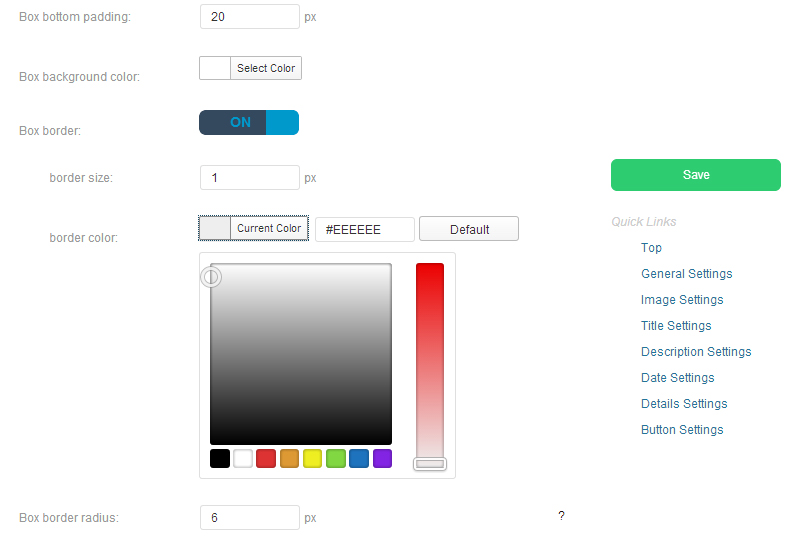
Settings

Note for buyers:

Make sure to turn of SandBox before using this plugin. Sandbox is for testing.

Download Event Booking Pro WP Plugin – ( PayPal and Modal ) (Calendars)

jQuery Mobile Nutrition Application (Full Applications)

A highly customizable jQuery mobile application enabling users to search for nutritional data for well over 1000 popular and common food items. The application uses jquery mobile AND responsive web deisgn techniques.

Demo [For membership functions]

username:[email protected]
password:demoacct

Key Features

  • Search well over 1000 popular food items
  • Full nutritional information including oils, saturated fats, calories, etc
  • Default serving sizes
  • Change serving size in real time
  • Visualize nutrition data with real time cutting edge SVG Google charts
  • Responsive charts fit any screen size
  • Members can save items to favorites
  • Full membership suite
  • Optional Facebook login/registration
  • Optional account confirmation
  • Password retrieval
  • In app admin management dashboard
  • 100% AJAX with no page refresh – ever
  • Unimited theming with jQuery Mobile Theme Roller
  • Built on jQuery Mobile [1.4]
  • Cross browser/device compatible
  • XML data storage – no database required
  • Full, thorough documentation
  • and more

Data Source

All nutrtition data gathered from the United States Department of Agriculture (USDA). Serving sizes calculated dynamically according to standards set forth by the USDA for this particular data set.

Requirements

  • .net 4.5 or higher web host


Download jQuery Mobile Nutrition Application (Full Applications)

Add Tip WooCommerce (WooCommerce)

This plugin is a WooCommerce extension designed to work along with WooCommerce. What it does is that it enables customers to add extra amount with the products they are going to buy. After product(s) have been added to cart, and the customer goes to the checkout page they will see an option to add a extra amount.

This option shows up as a notice, exactly the same as the coupon notice on WooCommerce. From there and then the customer can click on that notice and a drop down will occur prompting them to input extra amount.

They have the ability on checkout to input any extra amount, with WooCommerce fancy increase and decrease buttons. The Fee would be added alongside the regular order, meaning it will show up on the order summary on checkout page as a added extra fee, with a different heading so that customers and sellers can distinguish the different fees on purchase.

Also this added fee shows up on the email receipt with the amount added at the side. This extra fee shows up in the same table on order summary and in the receipt. It integrates well.

Their are security features in the event that the customer enters letter(s) or anything that is not a number instead of number(s) by mistake. So the input field only accepts numbers and will not allow anything else.

This plugin is great for giving delivery personnel Tips! In the case for selling non virtual goods. You can even configure it your self to suite your needs., to work outside the whole “tip” nature.

Features

The customer can:

Add their own extra amount to payment

Increase and decrease the amount with buttons provided

You the seller can:

Change the title
– to inform the customer of the option of adding an extra fee

Replace placeholder values
– showing customer example of what to input into the field

Incremental amount
– so when the customer clicks the plus (+) or minus (-) buttons, the value would increase x2 or more depending on how much you have set it too

Enable for All Products
– By default this plugin only shows up on checkout page when the customer orders non-virtual good(s) .ie. needs shipping good(s). So with this option, you can certainly make this plugin be active for all goods, even digital (virtual) goods.

Change the extra Fee Name
– Change the name that will show up on order summary and receipt that will be alongside the added amount.

Change the Button Name
– “Apply Amount” is default, so you can change that. e.g. “Apply Now” to submit the added extra amount.

Change the Success Message
– Confirmation after the amount has been submitted without errors.

Change the error message
– for mistakes, such as submitting empty amounts on checkout page.

Compatible with most themes
– fee name and amount would not show up on cart page only on checkout.

Download Add Tip WooCommerce (WooCommerce)

Instant Job Search Engine Aggregator (Miscellaneous)

Instant Job Search Engine is a job aggregator that searches multiple jobsites including: Indeed, Career Jet, CareerBuilder, SimplyHired and Monster all at once. You can browse jobs by Category or Location as well as being able to Search Jobs in realtime. Furthermore the job site is user-friendly, responsive, and customizable for any niche you can think.

Installation is simple, no database required, just upload and go. You will have a fully running job site in minutes.

Features:

  • All-in-One multiple job site search engine
  • Generate instant niche job sites
  • Search by location (country) and category
  • Make money with Ads
  • Fully Responsive
  • Light weight Twitter Bootstrap theme
  • iPhone & iPad compatible
  • No database required (only one configuration file)
  • Easy to use

Download Instant Job Search Engine Aggregator (Miscellaneous)

ZiProfile Kit (Miscellaneous)

A complete web profile kit with 5 essential pages on a single page with smooth transitions. Developed only with HTML & CSS3. 0% Javascript!

Pages

  • Home – Image Slider & Introduction
  • About Me – Brief information, Profile image & skill values
  • Services – Display the list of services
  • Projects – Display the projects with images
  • Contact Me – Email form with animation to view social networking icons.

Please rate this item. Thanks in Advance.

Please note that IE doesn’t support some CSS3 attributes.

Live Demo – Click Here

Download ZiProfile Kit (Miscellaneous)

WP Smart Like Buttons (Social Networking)

With this plugin you can add a button to your wordpress website and likes to keep
track of your posts, pages, etc. You can change the text that appears on the button
and bubble from the language file. Warning: Extracting information is not of any one
of the social networks and from MySQL WP database.

Features

  • jQuery Powared
  • Ajax Powared
  • Admin choose button style
  • 6 styles ready for use
  • Like/Unlike posts and pages
  • Facebook style button (big and small)
  • Twitter style button (big and small)
  • Google Plus style button (big and small)
  • Likes counter
  • Language file to change buttons and baloon text

Download WP Smart Like Buttons (Social Networking)

SQL Query Analyzer Form (Add-ons)

Do you want to have your own SQL query analyzer inside your .Net applications?? With SQL Query Analyzer Form you add this functionality to your systems, so you (as an admin or super user) can have acces to Databases from your own Application anywhere inside your company without having to install the respective tools to do that.

SQL Query Analyzer Form just looks for stored connection strings in your configuration file and loads them to the list, and after you have selected a ConnectionStgringName you will see all DB objects on the left, so can you use it as usually.

Features:

  • Edit or create new Stored Procedures with this tool.
  • Change the Font Color of the query textbox
  • Drag and drop a table name from the left to your query
  • Select, Insert, Delete and Update operations

Requirements:

  • .Net Framework 2.0 +
  • Save your connection strings in .config file
  • Need to add System.Configuration reference to your project (if you already didn’t)

Installation:

  • After decompressing the downloaded zip file, you will have 3 files, copy these files into your VB.Net project, in the folder among your other windows forms.
  • From the Solution Explorer, add the files to your project so it can compile.
  • That’s it!

Do you have any questions??

Please contact me: [email protected]

Download SQL Query Analyzer Form (Add-ons)

WooCommerce Volume Discount Coupons (WooCommerce)

WooCommerce Volume Discount Coupons is an extension for WooCommerce, providing automatic discounts and coupons based on the quantities of products in the cart.

Volume discounts are normally of little use unless customers are made aware of them. This extension provides an excellent solution to this need, allowing to display discounts directly on products when they apply.

Support

You are welcome to post questions and suggestions on the plugin page.

Please rate it!

Please rate this item once you have tried it. Please let us know if you have problems before you give a low rating. Many problems have usually an easy solution and we’re glad to help you. Your feedback is important so that improvements based on your needs can be made, and suggestions are always welcome!

Features

  • Automatically apply discounts based on minimum and/or maximum quantity criteria defined in coupons
  • Let customers apply volume discount coupons
  • Volume discounts can be defined for specific products and product categories
  • Directly show discounts when they apply to products
  • New shortcode that renders pretty coupons in various colors.

Summary

This extension allows to apply discounts to products in a customer’s cart based on the quantities that are purchased. The discounts can be shown directly on the products when they apply, a free-form description can be used for that purpose as well as an automated note.

The discount information can be rendered automatically for applicable products in the shop, in product category displays, product sets based on tags, product archives and individual product pages. Options allow to choose where the information should be rendered automatically.

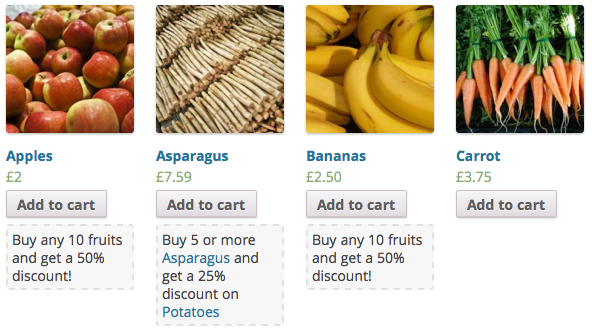
Here is an example showing different products in the shop, displaying the free-form description or the automatic discount note:

Volume Discount Coupons Description and Info Examples

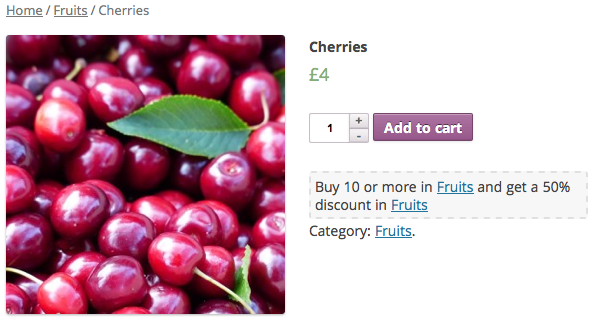
This example shows information being displayed automatically on a product page:

Volume Discount Coupon Info Example

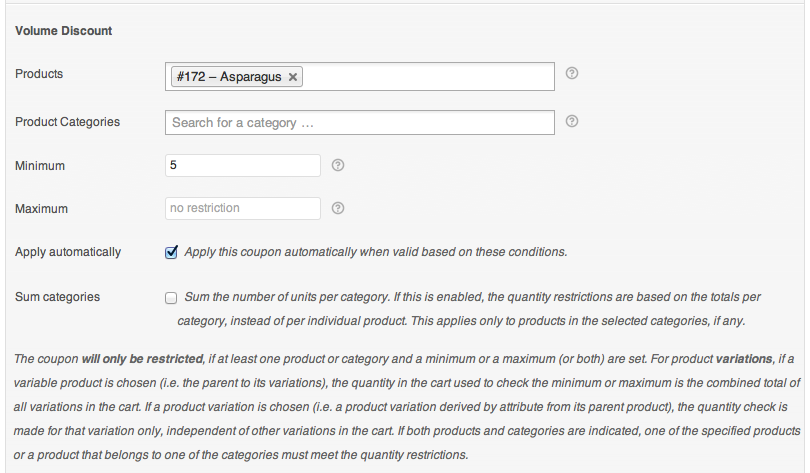
This extension adds a new Volume Discount section to coupons.

Volume Discount Coupon Restriction Settings

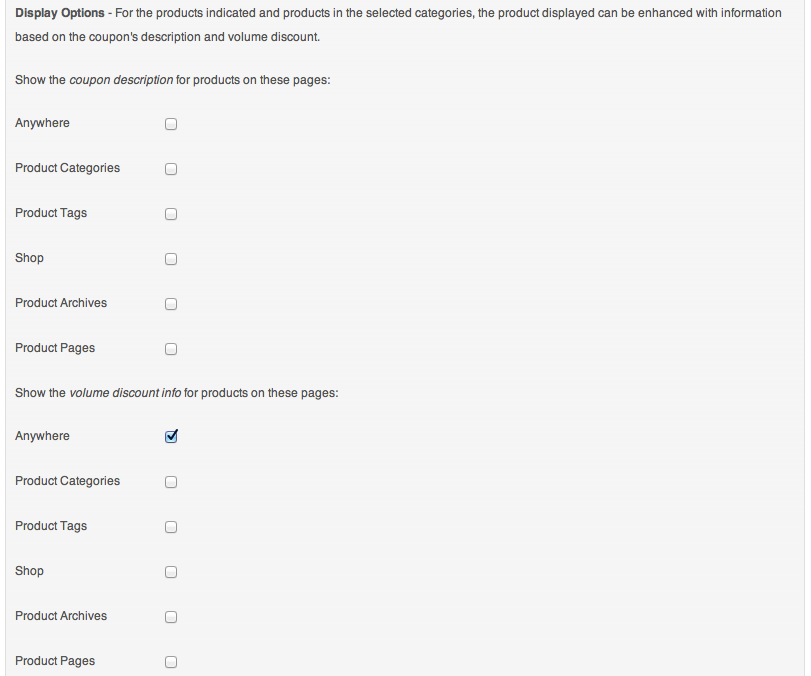
Display options are provided that allow to show discount information where it is most needed, right where the products are.

Volume Discount Coupon Display Settings

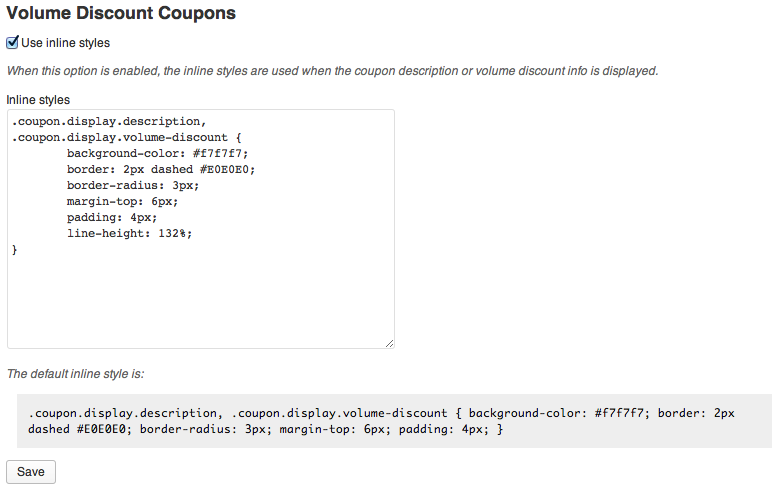
Inline styles allow quick customization for the theme.

Volume Discount Coupons - Inline Styles Settings

Coupons and discount information can also be rendered using a shortcode that provides built-in attractive styles out of the box.

Documentation

See the documentation pages.

Demo

You can see this extension in action on the Demo site – limited shop manager access to the administrative back-end is enabled on the site, log in as user coupons using the password coupons to get access. You will be able to create coupons and see the new options that this extension provides for coupons.

Two related extensions that provide additional options are also enabled on the site: WooCommerce Coupons Countdown and WooCommerce Group Coupons.

Download WooCommerce Volume Discount Coupons (WooCommerce)

TweetDis – Make Any Phrase Tweetable (Social Networking)

Thank you for choosing TweetDis!

TweetDis is a WordPress plugin, that will display a floating “call-to-action” above any piece of text you choose.
And once you click on the text, the plugin will automatically create a tweet out of it.
(In other words, TweetDis makes any piece of text “tweetable”)

99% of people won’t tweet anything, but the title of the post! Unless you MAKE THEM TWEET SOMETHING ELSE!

You should put “call-to-actions” in your article, if you think that a specific phrase deserves to be tweeted. Otherwise people will just pass by all your awesome ideas and quotes.

TweetDis hints people to tweet certain phrases… and people can tweet them in 2 clicks!

Please Note: This plugin uses shortcodes to make phrases “tweetable”. And it doesn’t interfere with your regular social buttons.

Key Features:

  • Configure how the “tweetable” phrase looks – the plugin lets you pick the color of the phrase you want people to tweet, define if it should be underlined or not and pick the style of the underline.
  • Pick from 5 different “call-to-action” designs – we have 5 designs of that floating “call-to-action” that should fit any blog design. But you can go even further and configure the colors, the size of the text and write your own call-to-action there.
  • Define the resulting tweet – you can specify a default twitter account to be used in all the tweets as well as the preposition.

Make Any Phrase “Tweetable” In WordPress

Download TweetDis – Make Any Phrase Tweetable (Social Networking)

Ultimate Modal Dialog (Interface Elements)

Ultimate Modal Dialog by Inceptive Design Labs is a simple, light weight and easy to use modal WordPress plugin.

Key Features

  • Small & Lightweight
  • Easy To Use
  • Post/page Content as Dialog’s Content
  • HTML Content as Dialog’s Content
  • Fully Responsive
  • Shortcode Support
  • Multiple Modals Per Page/Post

Examples

An example shortcode is:

[umd title="Simple Example"]Hello World![/umd]

In order to use a post’s/page’s content as modal dialog’s content, simply set the ID parameter of the shortcode:

[umd title="Post Content Example" id="24"][/umd]

Example Screenshot:

Admin Features

Shortcode Functionality

Changelog

    v1.0.1 - September 9th 2013
    * post/page content can be used as modal's content

    v1.0 - September 6th 2013
    * initial release
    

Support


Download Ultimate Modal Dialog (Interface Elements)

TAC Paypal Escrow System (WordPress)

Paypal Payment Escrow System is now avialable as WordPress Plugin. This plugin is great tool for WordPress B2B webistes where escrow system is needed and payment involves 3 people ie sender, reciever and admin. The sender makes payment to another member but the payment to another member can be released only by admin. Paypal Escrow Payment System. If you have any webiste where one member needs to pay another member for his service but the money shouldnt reach another member until the service or good is delivered by another member , then this script is good for you.

Features

Works with any WordPress Website from version 3.0 and above
It Uses paypal platform (Express Checkout And PARALLEL PAYMENTS API)
Approved PayPal Business account and access to your api details is required.
You need an approved APPID on www.x.com (i can help you with that for a few $).
You can set the currency for transactions (EUR, USD,CAD).
You can decide how much to pay reciever.
Cross-Browser compatible with mobile design too (responsive).
Userfiendly validations
Error handling
Return url (if payment accepted or canceled)
The application owner must have a PayPal Business account.
Senders and receivers can have any PayPal account type.

How it works

The sender uses his paypal id and recievers paypal id to send money After successful transffer the money is deposited in ESCROW The admin logs in the admin panel and cheks all the payments made The admin releases the paments he want and the appropriate amount he wishes

Download TAC Paypal Escrow System (WordPress)

Goagal (Skins)


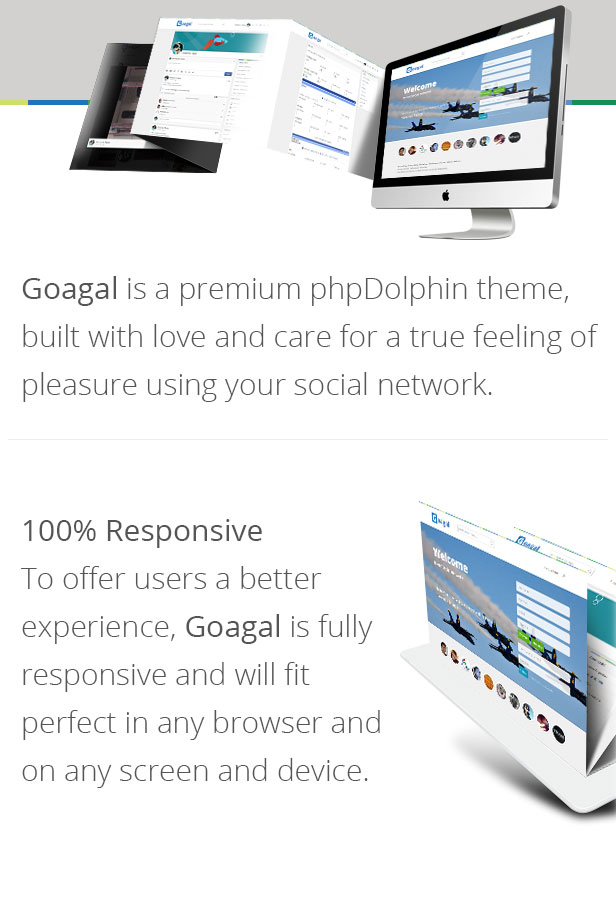
Goagal is a premium theme for phpDolphin, an intuitive, modern and powerful social network platform. This theme is 100% responsive ! Goagal will fit on any desktop, laptop, tablet or phone.

Goagal have a clean and light design and offer a to user a great experience browsing your social network.

Features

  • Compatible with phpDolphin 1.2.4+
  • Built with a clean, light design
  • RETINA READY (look good even on a retina display)
  • 100% Responsive (Goagal fit very well on any display)
  • Homepage background slideshow
  • … and many more

Download Goagal (Skins)