Fonticon – Pure Css3 Icon Font (Buttons)

3 styles of icon size

  • mini
  • small
  • medium
  • 2 option box

  • square corner (default)
  • rounded corner
  • 8 Color sample

    (You can create more combination with your css skills)

  • Red
  • Yellow
  • Orange
  • Green
  • Darkgrey
  • Blue
  • Pink
  • Violet
  • css3 effect

    box-shadow and nice transition hover effects.

    Over 100++ icon Fonts From :

  • FontAwesome
  • Zocial
  • If you have any questions relating to this item. you can get in touch with me via my user page contact form. and please take your time to rate this item

    Download Fonticon – Pure Css3 Icon Font (Buttons)

    Photo Grid (Galleries)

    Photo Grid for WordPress is simple to use plugin that combines slider and gallery in a single product.

    Features

    • Responsive
    • Size adjustable
    • Supports multiple instances
    • Uses shortcode to display the front-end
    • jQuery driven

    Installation

    • From your Admin Panel go to Plugins -> Add New -> Upload -> Browse
    • Pick the PhotoGrid archive file
    • Click “Install Now” button
    • Click Activate Now after the plugin has been installed
    • A new menu should now appear in your Admin Menu called “PhotoGrid”.

    Displaying the plugin on the front-end

    To display the plugin simply add the shortcode [photogrid] to the page or post.

    Shortcode Examples

    
    [photogrid]
    
    [photogrid album=1,2,3]
    
    [photogrid photo=1,2,3]
    
    [photogrid album=1,2,3 photo=1,2,3]
    
    [photogrid width=640 height=480]
    
    <?php 
    photogrid::enqueue_scripts(); // place before wp_head(); hook
    echo do_shortcode("[photogrid]"); // place where you want to display the html part
    ?>


    Download Photo Grid (Galleries)

    Page Scrolling – Scroll to Top / Bottom (Navigation)

    Scrollmenu with nice CSS3 Effects

    Easy to use the beautiful Page Scrolling (Scroll to Top or Scroll to Bottom / or both) for their own website.
    Simply insert into the existing CSS file and enjoy the new Page Scrolling.
    Created with rounded corner, box-shadow and nice hover effects.
    It degrades nicely on older browsers, e.g. IE7 and IE8.

    Features

    • Scroll to Top or Bottom
    • Scroll with both (Top or Bottom) or one orientation only
    • 9 Scrollmenu Styles
    • 2 color variations
    • Slide and Fade Effect with jQuery
    • Easy to change color-set – simply change the class
    • It works standalone

    Attention – Browser-Support

    • IE7 and IE8 does not support rounded corners and box-shadows

    Download Page Scrolling – Scroll to Top / Bottom (Navigation)

    Indexa – Table of Contents for WordPress (Interface Elements)

    Indexa is a WordPress plugin that creates a table of contents in your post, page or custom post type.

    Through the settings you can insert it before the content, after the content, using a widget in your sidebars or inline in the content using a shortcode. When a link in the table is clicked, the page smoothly scrolls towards the heading. Suitable for long articles with sections, documentation, tutorials and more.

    Features

    • Choose post, page and/or custom post type to show a table of contents
    • Specify the headings to include in the table
    • Create table automatically only if there’s a specified amount of headings
    • Set the necessary number of headings to create a table
    • Add a table of contents section header
    • Allow toggling the table of contents
    • Fluid responsive
    • Simple or nested counters in decimal or roman format
    • Choose whether to show a “back to top” button
    • Select to jump instantly to the headings or smoothly scroll the viewport towards them
    • Preserve custom heading IDs and CSS classes
    • Disable the TOC on a entry by entry basis
    • Set a custom TOC header entry by entry or set a general one
    • Includes widget and shortcode for alternative placement
    • Customize colors and position in content
    • Panel for custom CSS rules and properties so they’re preserved during upgrades or even if you change the site’s theme.
    • Advanced users can take advantage of the filters included to modify the TOC markup output

    Installation and Usage

    After activation, Indexa will have some default options already set so it works right out of the box. You can modify them to meet your requirements and set up the styling to match your site’s overall design.

    Placement

    To place the table of contents in an entry, you can either select one of the automatic choices, before or after the post, or disable them and use the included widget to add it to a sidebar or add it anywhere in your entry content using the shortcode included.

    Access the support forum

    Support forum

    If you need help with customization, come to the support forums!

    Download Indexa – Table of Contents for WordPress (Interface Elements)

    Tweetable Shortcode – Quick Tweet Sentences (Social Networking)


    Tweetable plugin for wordpress allows you to make sentence as a quick sharing tweet. Select some text in your wordpress post editor and simply click on the tweetable shortcode button in the wordpress editor toolbar. Induce people to tweet your words !

    Download Tweetable Shortcode – Quick Tweet Sentences (Social Networking)

    Grid FX – Ultimate Grid Plugin for WordPress (Galleries)

    Last updated: 19 Sep, 2013 That means the plugin has something new, check the version history

    Welcome to Grid FX WordPress plugin!

    Grid FX plugin lets you create unlimited grid and masonry walls and show your WordPress content beautifully. You can display your posts, custom post types, WooCommerce products, custom products, image attachments in a nice grid or masonry style that is fully responsive. Grid FX comes with full documentation, and more than 70+ custom options to fully customize the grid appearance.

    How Do You Get Started

    Grid FX works out of the box. So all you need to do is activate the plugin and use the shortcode button to insert a Grid FX wall in your post or page. That is it! The basic shortcode markup is [gridfx] If you like to customize the grid options such as post types, or categories, title/description or other options like enabling WooCommerce you can do so using the handy shortcode generator included with the plugin. there is like 70+ options that can be customized easily to give you full control of your gallery!

    Click here to view the plugin’s customization options

    Click here to view the plugin’s documentation/FAQ – in-depth manual for each shortcode option.

    Custom Effects, Built-in Views and Likes System!

    WooCommerce Integration, Unlimited Theming Options, Flexible Layout

    Built-in Navigation & Pagination (optional)

    Load More Support, Custom meta data, custom buttons and more!

    Some of the key features offered by Grid FX
    • instantly display your posts beautifully in a grid or masonry style.
    • show your custom posts (custom post types), image attachments, products, etc.
    • optional isotope filtering supports standard or custom taxonomies
    • two skins available, and ability to create unlimited skins/colors for the plugin
    • instant integration with WooCommerce using a simple setup using the shortcode generator or this little markup [gridfx integrate="woocommerce"]
    • you can embed the grids using php instead of shortcodes by doing so <?php echo do_shortcode('[gridfx]'); ?> in any php file
    • display attachments for specific one post only as a gallery
    • display custom buttons, custom meta key values on the grid item to fully customize the plugin
    • live shortcode markup generator to help you make grids asap
    • include, exclude specific categories (parent or children categories) from any taxonomy
    • control posts per page, appearance of lightbox, grid, titles, description, and more than 70 options
    • various navigation methods included: loading more button, next and previous arrow navigation, or complete pagination
    • use a custom placeholder optionally if your post does not have an image
    • clean html templates to fully customize the look of grid template if you want to do so
    Lets look at Grid FX plugin features

    BUILTIN WOOCOMMERCE SUPPORT
    Do you have WooCommerce? Do you want to show your products using the Grid FX special WooCommerce support? You do not need to set tons of options. Just set the integration method in your plugin to WooCommerce and the plugin will do the rest! The parameter to turn WooCommece for specific wall on is explained in the documentation, it can also be done easily using the shortcode generator without writing any options.

    LIVE SHORTCODE GENERATOR INCLUDED
    The live shortcode generator will give you the markup instantly as soon as you start editing options. There are more than 70 options available which can be changed on each wall.

    SHOW MULTIPLE GRIDS PER ONE PAGE
    Grid FX lets you show many grids in one page without a problem. Each grid has its own options and content source (specific category, or post, or custom post type) which makes Grid FX fun to use and build various galleries on the fly.

    SUPER-CLEAN HTML TEMPLATES
    Grid FX is very organized piece of software. HTML is seperated from the code. You will be able to edit the HTML layout easily without messing up other code. Check the /templates folder to edit the grid layout, and single item layout, etc. You can add your own stuff to the grid content and style it easily via a seperate CSS file or plugin theme file.

    HIGHLY CUSTOMIZABLE
    Even the very little details are customizable, like lightbox background, special title animations, colors, custom buttons, custom fields, and more. More than 70+ customizable parameters using the live generator/setup and described in detail one-by-one in the plugin documentation page.

    ISOTOPE FILTERING AND VARIOUS NAVIGATION STYLES
    In addition to the cool isotope filtering animations, you can let users navigate between items using 3 different styles; you can use the loading more button, next and previous arrows, pagination, or both. It gives you flexibility on choosing how you want users to navigate through your content, and how much content to display at a time.

    OWN THEMING SYSTEM AND COLORS
    This plugin has its own themes/skins. This means you can create unlimited color styles, and customize each theme as you like. You can even use a specific theme or skin for each grid or wall. The plugin comes with 2 themes by default they are light and dark with the promise of doing more themes per request. You can change your theme using the shortcode generator also per grid basis.

    Version History
    Version 1.0.1 (19 Sep 2013)
    
    * Added option to enable equal image heights optionally
    * Added option to crop images, set width and height for images
    * Corrected multiple isotope filtering (categories/terms)
    * Corrected invalid help link in admin
    * z-index bug fixes
    * Minor code fixes
    
    Version 1.0.0 (18 Sep 2013)
    
    * First Release
    

    Download Grid FX – Ultimate Grid Plugin for WordPress (Galleries)

    Ubercart AWeber sign up (Ubercart)

    Ubercart AWeber module helps you to get new subscriptions during checkout process. It simply puts additional checkbox, allowing user to sign up to your AWeber mailing list.

    Requirements:

    1. Drupal 7
    2. Ubercart 3.x installed

    Installation and configuration is easy:

    1. Copy uc_aweber directory to your Drupal modules directory
    2. Install it on Modules page (it will be under “UBERCART – EXTRA” section)
    3. Go to “Store” and in the “Configuration” panel find “AWeber.com integration”
    4. The most important thing is to enter “Mailing list name” – just as you entered it on AWeber.com for your list. You may also disable showing the checkbox (it’s enabled by default)
    5. Configure checkbox settings:
    – Checkbox order (weight) – right now 0 means it’ll be at the top and above 0 it’ll be at the end
    – Checkbox label – label describing the action (like Sign up to our newsletter)
    – Checkbox status – decide whether checkbox should be checked by default
    6. You’ll see the additional checkbox in the checkout screen
    7. When checked, user will be subscribed to your mailing list with his email and also billing first & last name

    Download Ubercart AWeber sign up (Ubercart)

    Subscribe by Email Plugin for WordPress (Newsletters)

    WordPress: Subscribe by Email Plugin

    WordPress Subscribe by Email Plugin , enables your site readers to subscribe to your post updates. This plugin does not need any special requirements to run. It is a simple FeedBurner subscription plugin for WordPress Powered sites. It adds a beautiful popup subscription form for FeedBurner subscription. Your readers can simply subscribe for Email Delivery via FeedBurner; Just by registering their email Address.

    Subscribe by Email Plugin Features

    • Popup Subscription Menu
    • Subscribe for Free Email Alerts
    • Delivery through FeedBurner
    • Easy Blog Subscription Form
    • Track you Subscribers Statistics (via FeedBurner Stats)

    Read Quick Starter Guide, to Learn How to Use WordPress Subscribe by Email Plugin to boost your site’s subscription performance and increase you subscribers.

    Download Subscribe by Email Plugin for WordPress (Newsletters)

    Steady Project – Bug Tracking (Project Management Tools)

    Steady Project is a project management and bug tracking application that is used to help in the life cycle of software development. Steady Project has the ability to create tickets, departments, users, and processes. All of these entities can be linked together within the application. Users are notified via email of ticket updates so they can stay on track of what they are working on. There are built in statistics in your dashboard so you are able to keep track of what is going on within the company. There is also the ability to upload and attach documents to numerous assets of your company so you can always have up to date material.

    If there are features you would like added for future updates please make a comment and let me know! This is an application I want to run continuous updates for so keep the requests coming!

    Steady Project is built on the CodeIgniter PHP framework and must be installed in an environment with MySQL as your database backend. The documentation and installation instructions are located within a folder called install. Using install.php in a web browser it will walk you through a guided process in getting your application up and running!

    Download Steady Project – Bug Tracking (Project Management Tools)

    Social Sidebar – CSS Social Bar with Icons (Navigation and Menus)

    The colorful Social CSS Menu

    Easy to use the beautiful and colorful Social Sidebar for their own website.
    Simply insert into the existing CSS file and enjoy the new Social Side-Bar.
    Created with rounded corner, box-shadow and share button.

    Features

    • 42 Social Icons
    • Social Icons in 3 color variations
    • 10 button color variations
    • Easy to set the position of sidebar to top, right, bottom or left
    • Optional with Share Button
    • Easy to change color-set – simply change the class
    • With optional hover text
    • It works standalone

    Social Icons

    42 Icons x 3 Versions > colorful, light (white) and dark (black)

    • Addthis
    • AIM
    • Amazon
    • Android
    • Apple
    • AWS
    • Bebo
    • Behance
    • Blog
    • Brightkite
    • CreativeCloud
    • Dailyboth
    • Delicious
    • Designfloat
    • Deviantart
    • Digg
    • Dribbble
    • Dropbox
    • Evernote
    • Facebook
    • Flickr
    • Forrst
    • Github
    • Google Plus
    • Instagram
    • Lastfm
    • Linkedin
    • MySpace
    • Picasa
    • Pinterest
    • Reddit
    • RSS Feed
    • Share
    • Skype
    • Sound Cloud
    • Spotify
    • Stumbleupon
    • Tumblr
    • Twitter
    • Vimeo
    • WordPress
    • Xing
    • Yahoo
    • YouTube

    Download Social Sidebar – CSS Social Bar with Icons (Navigation and Menus)

    Rainbow – Responsive Colored Ribbon For WordPress (Miscellaneous)

    DESCRIPTION:

    This is simple, easy-to-use, fast WordPress plugin for Responsive, Colored Header Ribbon’s on your website. It seperates rainbow element to proportional colored cells given by the user. You can use it in header, footer, menus, sidebars and etc.

    FEATURES:

    • WordPress Powered
    • Responsive
    • Easy-to-use
    • Write Less Do More
    • Simple and Fast
    • Controll on you
    • Free Color Choice for user

    COMMENT, RATE

    Please, comment and rate for better development!

    Any Questions? Contact

    For more help you can contact with us via e-mail – [email protected]

    Flag Counter

    Download Rainbow – Responsive Colored Ribbon For WordPress (Miscellaneous)

    Google Maps Generator for WordPress (Media)

    Visit us!
    MaGeek Lab Fan Page
    MaGeek Lab Profile

    Create easily, awesome maps in WordPress with this plugin!

    How it works?

    The generator allows you to create / edit maps without the needing of any code, all visual.

    Features

    • You can create maps manually with the shortcodes.
    • This plugin includes seven different skins, to give your maps an unique view, also you can tint your map with the one color option
    • The plugin also supports handling multiple markers with multiple pre made markers

    Rate us

    MaGeek Lab's Mailchimp

    Download Google Maps Generator for WordPress (Media)

    Flat manga – Build your own manga reader site. (Miscellaneous)

    Flat manga provide you with a quick and easy way to create a manga site like mangafox, mangareader. It was build with lots of features that you need for a simple flat manga and lots more for advanced. Flat manga also provide a very quick and easy way for you to customize your site that do not need to edit the source code.

    Why flat manga?

    • Quick installation (about 30 seconds, input then done, no hand-setup need).
    • 7 skins included.
    • Multi-languages support, there are english and vietnamese already, you can also add and translate your own very easy.
    • 2 comment types: facebook comment and disqus which allow you to manage with your APP ID or DISQUS account.
    • Auto grab manga: Help you to add mangas and chapters very quick from other site.
    • Pages and widgets customizable , do not need to open source code, edit them right in the dashboard.
    • Responsive design. Manga page auto fit with device, comfortable for user to read on smaller devices.
    • and more..

    Demo:
    Live demo (For security reasons, there’s no dashboard demo, sorry for that).
    Video demo

    Grabbing:
    Example

    Download Flat manga – Build your own manga reader site. (Miscellaneous)

    Sortable Video Embed Plugin (Media)

    Sortable Video Plugin

    Plugin Features

    • Embed YouTube, Vimeo, Blip.tv, Viddler, Kickstarter Videos
    • Create multiple Video Pages
    • Sortable Isotope Thumbnails
    • Creates Video Custom Post Type
    • Loads Video Without Reloading the Page
    • Responsive Design
    • Easy To Setup
    • Translation Ready
    • Fast Plugin Support

    Support

    If you need support we got you covered, support questions are typically answered within 24 hours during working days.

    Download Sortable Video Embed Plugin (Media)

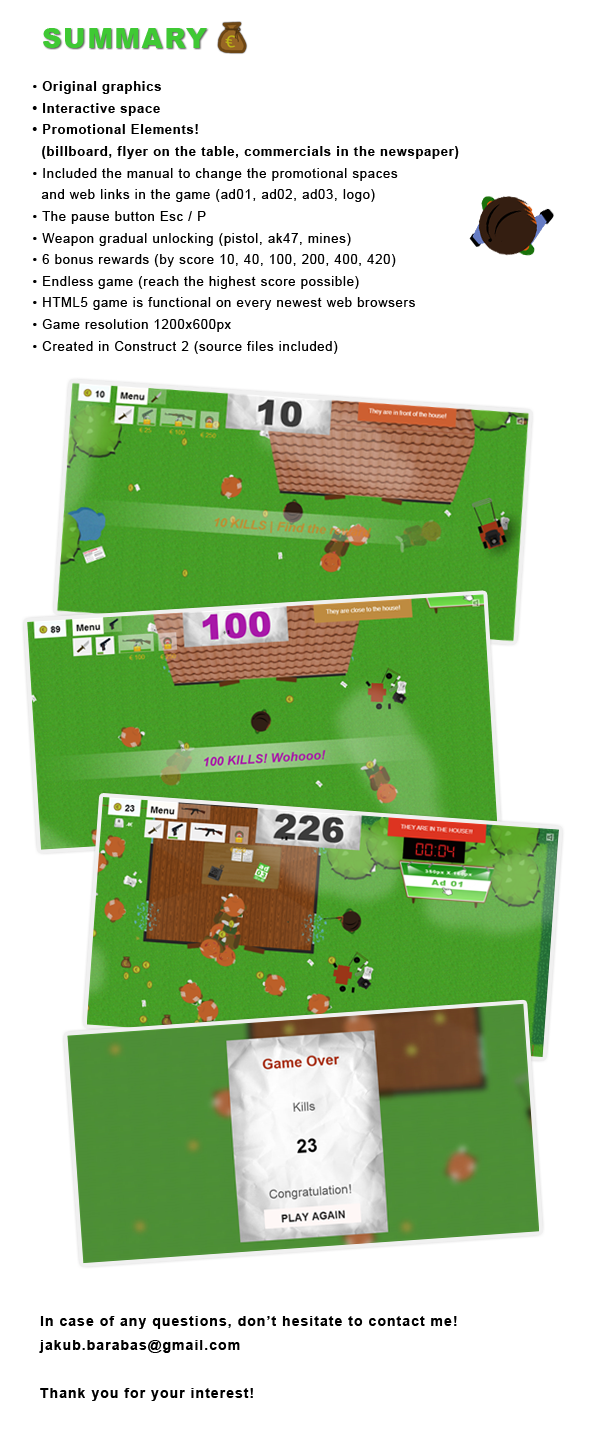
    Ad HTML5 Game (Games)


    HTML5 online game that you can make money with!

    The principle of the game is in destroying the enemies. You must not let them into the house! Collect coins and buy better weapons. Reach the highest score possible!

    You can adjust the story of the game (by adjusting the source files)!

    Also, you can sell the virtual space in the game or you can use it to promote your own websites! Three promotional areas are situated directly in the game and the player can click them at anytime – an option with the possibility to visit the website will appear.

    The game is used font Digital dream http://goo.gl/SrHtMJ.
    Made in Construct 2 (File included).

    Download Ad HTML5 Game (Games)