WP Post Thumbnail Plus (Add-ons)

Post Thumbnail Plus is here!

Post Thumbnail Plus add amazing CSS3 effects to WP post thumbnails giving a professional look to any theme while provide you a smart Image Fallback system. No more posts without their featured image!

Easy to use

  • Works out of the box with most WP 3.0+ themes
  • Integrates directly in Wp built in the_post_thumbnail function
  • No coding knowledge needed, just install it, configure the settings and you are done

Features

Post Thumbnail Plus gives a professional look to any WP theme adding beautiful CSS3 effects to the posts featured images. Choose between 8 amazing hover effects with integrated lightbox.
It gives you even a solid Image Fallback System which will get the first image of your posts and turn it in a featured image in case a featured image wasn’t set.

And what happen to the posts which don’t have images in the content? Don’t worry, Post Thumbnail Plus in this case give you the chance to choose a predefined image to use as post thumbnail for those kind of posts.

Support

Feel free to message me for any problem, question or doubt. You could contact me using the form on my CodeCanyon user page or directly by my support email included in the plugin documentation.

Download WP Post Thumbnail Plus (Add-ons)

1001 Icons Plugin – For WordPress (Utilities)


1001 Icons for WordPress enables an easy use of a large icon set from within WordPress. Icons can be inserted WordPress shortcode API or TinyMCE plugin right on your post/page editor.It is a new way to include icons to your site all is done in your WordPress editor.

1001 Icons use a large numbers of icons within the plugin packs for More than 1200 icons in order to help you to create that unique color look.

Technically any icon set can be converted into 1001 Icons compatible pack due to the plugin images manipulations functionalities, but we recommend to use the icons packs already within the plugin and those withing the growing icons packs store created by our team and available in our web site.


1001 Icons Plugin Features

  • 1200+ beautiful icons ( Icons List )
  • New icons packs
  • Easy to use panels
  • Right on your editor dashboard
  • Unlimited colors
  • Resizable icons
  • Add new icons pack using the plugin panels from the plugin page
  • Use your icons in simple way or as button.
  • Style your url with you favorite icon
  • Available in visual and html editor mode
  • Using Shortcode API
  • Very lightweight
  • Major browser support
  • And many more …

What is New ?

  • Anyicon packs can be turned into a 1001 icons pack wish will give us the freedom needed to create unlimited packs number
  • We use image manipulation libraries will give us the freedom needed to create unlimited icons effects and colors , We already used this freedom and we will take the most out of it in next version

Requirements

  • WordPress 3.0+
  • PHP 5.2+

Documentation

\ Future Plans

  • For our first version we are using simple png icons so this have an effect on the icons resizing as a result we are limiting the icon size , In order to fix this we are working on new manipulation functionalities in order to use vector icon and give the user unlimited icon size
  • Faster response : We already started working on ajax version wish will be faster and more reliable
  • Adding affect : Our team is working adding this feature to the icons , expect it soon.

What you can DO ?

  • Stay in touch with our team using our support site or direct contact using our email , to share your ideas and expectation with us , this will help us to present new and revolutionary creations
  • In the mean time enjoy our product currents version and stay in touch to have more

Support

  • If you have any further questions or you need support using or configurating this script, feel absolutely free to open a support ticket at my support site support.leavylab.p.ht . You can also use this items comments section for any presale questions. I will do my very best to help and assist you as quick as possible, You can also contact me directly using my email [email protected]

New Packs : Visit Us

Download 1001 Icons Plugin – For WordPress (Utilities)

Photography website with CMS (Drag & Drop) (Miscellaneous)

Fully responsive website for both desktop and mobile devices. This product is a full CMS system that will allow you to fully manage your Image Portfolio online as well as a free template that will function on both standard desktops and mobile devices.

FRONT END DEMO : http://sowebdesign.com/plugins/portfolio/index.php

CMS DEMO: http://sowebdesign.com/plugins/portfolio/cms/
username: demo
password: demo

(please note all content will be refreshed back to default every five minutes)

CONTENT MANAGEMENT FEATURES
– Add Categories
– Add collections to these categories
– Add Images to the collections
– Drag and Drop to reorder these images and collections
– Inline Editing
– Control Page Title and Meta Description and Meta Keywords
– Auto save on edit and reorder

FRONT END WEBSITE
– simple, responsive design
– auto adjusts for mobile phones
– scroll effect for each category
– click to access the collections images
– sliding effect to view collection
– cross browser capabilities
– lightbox feature to view image

FUTURE VERSIONS
All future versions are FREE to purchasers. We will be including a template upload section to allow users to purchase our future templates and upload.

Download Photography website with CMS (Drag & Drop) (Miscellaneous)

Image Hover Effects (Animations and Effects)

A collection of beautiful, pure CSS effects that will help you giving a special touch to your photos in few seconds.

Features

  • 13 different effects, 2 different thumbnail ratios (rectangle and square)
    • zoom-in
    • zoom-out
    • rotate
    • move-x
    • move-y
    • round
    • focus
    • sepia
    • blackwhite
    • brightened
    • saturated
    • inverted
    • blurred
  • Work in all major browsers

() Some webkit effects (sepia, blur, invert, saturation) work on webkit browsers only.

To be sure, check the top 5 browsers and the CSS filter compatibility table.


Check out the video preview

Download Image Hover Effects (Animations and Effects)

BFI WP Theme Customizer+ (Add-ons)

Easily utilize the full potential of WordPress’ Theme Customizer API in your WordPress themes! Truly a must for all ThemeForest WordPress theme authors!

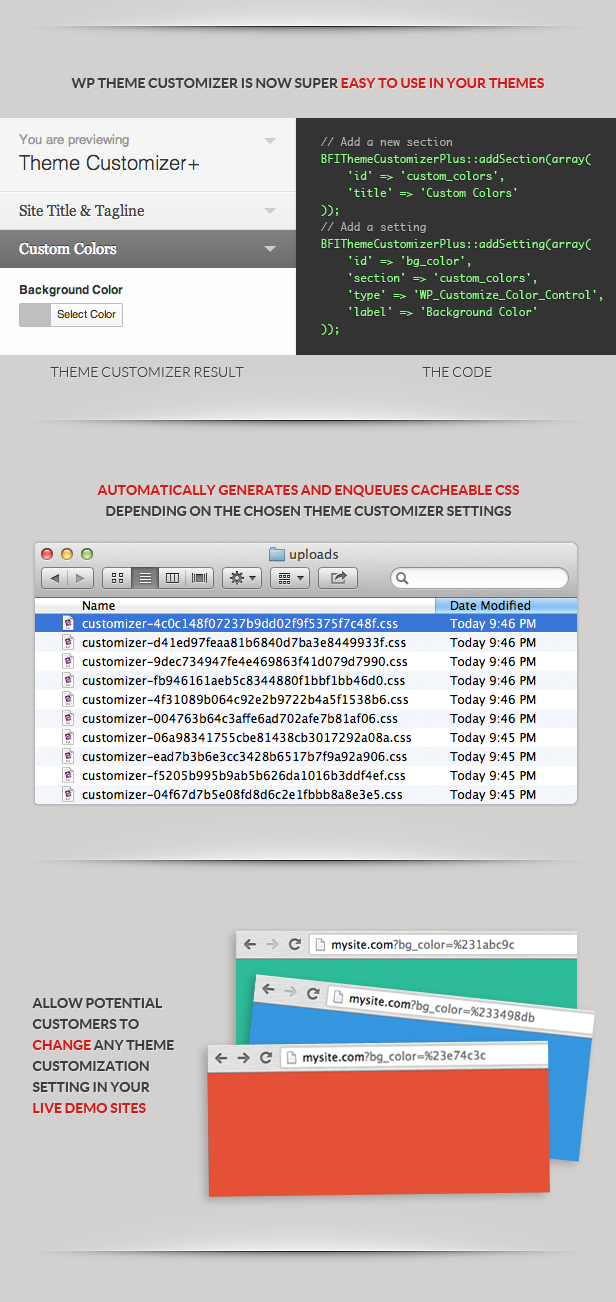
BFI Theme Customizer+ extends the functionality of WordPress’ Theme Customizer API and also makes it easier to use. This add-on automatically generates cacheable dynamic CSS files from a CSS template, and it also allows visitors to your theme demo sites to override customized settings using GET variables.

Awesome Features

  • Easy to integrate in your WordPres theme
  • Makes using WP’s Theme Customizer API super easy to use
  • Take full control of the Theme Customizer API with only 2 function calls
  • Easily extendable if you want to create more controls with custom filter hooks
  • Automatically creates dynamic CSS files for your site using WP’s FileSystem API
  • The dynamic CSS file generated is fully cachable
  • Automatically allow your visitors to change styles using GET variables in your theme demo sites
  • When your customers update your theme, all their settings will still be kept, and new settings that you define will be applied
  • Follows all ThemeForest submission requirements
  • Includes a modified Twenty Thirteen that already has this add-on integrated
  • Theme customizer in WordPress live preview updates correctly

Default & Included Customizer Controls

  • Text
  • Checkbox
  • Radio buttons
  • Select drop down
  • Select drop down pages
  • Color picker
  • File upload
  • Image upload
  • Note NEW
  • Textarea NEW

Happy Coding With The Theme Customizer+

Creating a section

BFIThemeCustomizer::addSection(array(
    'id' => 'custom_colors',
    'title' => __( 'Custom Colors', 'default' ),
));

Creating a setting/control

BFIThemeCustomizer::addSetting(array(
    'id' => 'bg_color',
    'section' => 'custom_colors',
    'type' => 'WP_Customize_Color_Control',
    'label' => __( 'Background Color', 'default' ),
));

Overridable settings for your demo sites

http://demo.mytheme.com/?bg_color=#3498db

Refer to the documentation for more details.

Happy coding!

Download BFI WP Theme Customizer+ (Add-ons)

Square Photo Gallery (Images and Media)

What is Square Gallery?
Square Gallery is a small gallery plugin for your website, which runs without any frameworks. Square Gallery doesn’t disturb your website normal operation and causes no conflicts with other code. Check out the demo gallery at the top of the page.
Square Gallery currently supports Firefox 3.0+, Safari 4.0+, Chrome 5.0+, Opera 9.5+ and Internet Explorer 8.0+.

Main Features
Square Gallery can be generated as a separate gallery page or easily integrated into existing html page. The gallery can also be used for building some nice website menus (e.g., demo). Each gallery item can be opened and enlarged in a simple but functional lightbox, or be used as a hyperlink leading to a different website page or different website.

Features:
– Small size, no frameworks
– Resizable – fit itself to any size.
– Photo captions
– Links
– Text blocks
– Lightbox
– Customizable grid width gallery
– Customizable styles
– Shuffle
– Easy insert in html pages
– Retina ready (icon fonts, etc)
– And many, many more…

Download Square Photo Gallery (Images and Media)

VineScript (Social Networking)

VineScript is a video Platform for 6 second videos calles vines, it’s similar with Vinescope, allowing users to submit vines, comment, share and like with their friends or followers.

Demo links

Front end: http://woopsy.net/vine_script/

Admin panel: http://woopsy.net/vine_script/admin/

Features

  • Search: Search for vines
  • Navigate: Navigate through all added vines
  • Features vines: 5 most popular vines are listed in right box
  • Random vine: A button on the top navigation for random vine selection.
  • Comments, share an like buttons: Maximize your traffic via social networks
  • Premade adspot: For easy ad setup.
  • Admin panel: Manage site setting and approve/reject sent vines.
  • Vine submit form: User can send you vines, and the form automatically fetches data from given link.
  • Ready to go

Server requirements

  • PHP 5.x
  • CURL
  • Mysql

Download VineScript (Social Networking)

WorldPay XML Direct Gateway for WooCommerce (WooCommerce)

WorldPay is a payment service provider for all sizes of business. Accept debit and credit card payments online and in multiple currencies.

The XML Direct plugin enables you to capture payment details on your own secure server and send the captured data to WorldPay for processing in preference to using WorldPay’s hosted payment pages. This connection model provides you with complete control over the look-and-feel of the payment experience for your customers. This model supports cardholder authentication, so using it you can comply with MasterCard’s mandate that all Maestro payments are processed using MasterCard’s SecureCode security protocol – the legacy ‘invisible’ connection method still used by some of our customers cannot support this.

NOTES : Your Sites needs to be PCI Certified and Secured with SSL Certificate also the plugin requires CURL installed on your server.

Looking for a Payment Gateway and can’t find one in our portfolio or if we haven’t integrated it for your shopping cart just contact us through the form on Profile Page so we can work out the payment gateway integration that your looking for.

You can also contact us at www.patsatech.com

Download WorldPay XML Direct Gateway for WooCommerce (WooCommerce)

WorldPay XML Direct Gateway for Jigoshop (Jigoshop)

WorldPay is a payment service provider for all sizes of business. Accept debit and credit card payments online and in multiple currencies.

The XML Direct plugin enables you to capture payment details on your own secure server and send the captured data to WorldPay for processing in preference to using WorldPay’s hosted payment pages. This connection model provides you with complete control over the look-and-feel of the payment experience for your customers. This model supports cardholder authentication, so using it you can comply with MasterCard’s mandate that all Maestro payments are processed using MasterCard’s SecureCode security protocol – the legacy ‘invisible’ connection method still used by some of our customers cannot support this.

NOTES : Your Sites needs to be PCI Certified and Secured with SSL Certificate also the plugin requires CURL installed on your server.

Looking for a Payment Gateway and can’t find one in our portfolio or if we haven’t integrated it for your shopping cart just contact us through the form on Profile Page so we can work out the payment gateway integration that your looking for.

You can also contact us at http://www.patsatech.com

Download WorldPay XML Direct Gateway for Jigoshop (Jigoshop)

PHP Live Streaming Social Network (Social Networking)


Create your own broadcasting network like ustream and justin.tv without any media server, plugin or service needed

LIVE PREVIEW

Admin Username – Password: admin – adminadmin
Mod Username – Password: mod – modmod
You need to create an account to test user features like chat, broadcast

Features

  • No media server or plugin needed
  • Multiple user levels: Admin – Moderator – User
  • Broadcaster can ban/unban a user from chat
  • Avatar, age, gender, location and about me section for user profiles
  • User search with auto completion
  • Realtime live broadcasting and chat
  • Users can’t open new broadcast if they’re already broadcasting
  • Stream audio volume, mute and fullscreen mode controls
  • Automatic stream snapshots for use in categories and home with intervals
  • Static pages
  • Broadcast categories
  • Password recovery
  • Advertising slots in the header and profiles
  • Powerful custom made ORM-like MySQL class
  • It’s peer to peer, so you don’t need a huge web server

Admin Features

  • Manage Users View, Edit, Ban, Change User Type
  • Manage Static Pages Add, Edit, Delete
  • Manage Categories Add, Edit (with inline edit feature), Delete
  • Change site name, title, description, url
  • Set the maximum allowed size for avatars
  • Set the SMTP mail settings for password recovery
  • Change header and profile advertising code
  • Clear stream cache
  • Ban users in any user’s chat

Moderator Features

  • Manage Users View, Edit, Ban
  • Ban users in any user’s chat

Sample Customers

sabanb: PratiMe.net

speeky: Vi2me.com

chenjie13723: Walkson.com

Requirements: PHP 5.2+, PHP GD Extension. That’s all :)

Download PHP Live Streaming Social Network (Social Networking)

Price Filter for OpenCart (OpenCart)

Price Filter for OpenCart

Features:

  • auto create price slider from all product in category
  • multi lagnuage and multi currency
  • set categories when filter will be display
  • extremely simple to use
  • Easy install
  • Easy setting
  • easy custom css
  • pages are 100% compatible with any custom theme.

Demo
Admin demo | login: demo | pass: demo
Admin: http://demo.btechunit.eu/admin/index.php?route=module/price_filter
Store: http://demo.btechunit.eu/index.php?route=product/category&path=20


Please use the comment section for general questions, feedbacks etc… only. For error related and for more complex problems, please use [email protected]

Download Price Filter for OpenCart (OpenCart)

Sky Tabs (Tabs and Sliders)

Sky Tabs is a clean, responsive solution for creating beautiful tabbed navigation without any javascript usage. It has different layouts, auto-height, responsive design, 9 color schemes, lots of customization options and can be easily integrated to any design.

Features

7 Different Layouts
Horizontal (top left, top right, top center, top justify, top left+right) and vertical (left, right).

Several Mobile Versions
You can choose most suitable responsive version for you: icons, stack or switcher.

Auto Height
Unique feature for animated pure CSS tabs. There is no need to manually set up height of the content.

9 Color Schemes
Each color scheme has it’s own css file, that can be easily modified for creation your own colors.

12 Animations
Smooth and beautiful effects based on CSS3: flip, scale, fade, rotate and 8 slide effects.

Nested Posibility
Tabs can be nested within each other and can have different options.

Responsive Design
A fully responsive layout that adapts perfectly for all device resolutions like mobiles, tablets and desktops.

Any Content
You can use any HTML elements inside tabs content: text, images, audio, video, etc.

Steps
Allows you to disable regular tabs and use them like steps or wizard.

Typography Set
Includes headings, paragraphs, images, unordered and ordered lists.

Grid System
Fully responsive, utilizes 12 fluid columns and supports offsets.

361 Vector Icons
Includes beautiful iconic font Font Awesome, created by Dave Gandy.

36 Useful Examples
You can use these examples as a base for creation your own tabs simple and fast.

Retina Support
Optimized to support the high quality and crisp graphics on retina screens.

HTML5 and CSS3
Take full advantage of modern web technologies. Semantic HTML markup and standards compliant CSS.

Cross-Browser
Tested on Windows (Chrome, Firefox, Opera, IE8, IE9, IE10), Mac (Safari, Chrome, Firefox, Opera), iOS (iPhone, iPad) and Android.

Documentation
Extensive step-by-step guide to help you with usage and customization.

Lifetime Support
To get support please send me an email through the contact form on my profile page.

Free Updates
Products get maintained with improvements and bug fixes.

Changelog

08.10.13 – Version 1.0

  • Initial release.

Download Sky Tabs (Tabs and Sliders)

Woocommerce Partial Orders (WooCommerce)

Its not ideal to leave a customer waiting for their goods, and most online businesses realise this and will ship out good as soon as they can.

However, if you run your store using Woocommerce, managing this can be a nightmare since there is no way to record which items in the order have been shipped and which ones haven’t. Not any more!

The Woocommerce Partial Orders plugin allows you to set each individual item in the order as shipped. The date it was marked will be stored so you know exactly when it was shipped, and the order status will be changed to Partially Completed so you can quickly and easily see which orders are not yet completed fully.

Features


Woocommerce Partial Orders Documentation

Download Woocommerce Partial Orders (WooCommerce)

Option Filter for OpenCart (OpenCart)

Option Filter

This module provides the easiest way to filter results by the included options in OpenCart.
Adds layered navigation by category and options.

The module automatically create a filter by product in that category.

Features:

  • set use checkbox or no use checkbox
  • show/hide search button
  • set catedories when filter will be display
  • select option will be display
  • extremely simple to use product filter
  • plugin is ready to translate
  • filter products in a certain category by products options
  • any type of option can be used (Text area, Select, Check box)
  • recommended use in fashion websites (clothes, shoes) with options like: size, color, shape
  • best use with products that have different stock and prices for individual options
  • easily customizable styling

Notes:
– don’t forget to add Option Values after you added the options itself
– for every option you have to specify stock. If stock is zero the option is not shown in the product page.

Demo
Admin demo | login: demo | pass: demo
Admin: http://demo.btechunit.eu/admin/index.php?route=module/option_filter
Store: http://demo.btechunit.eu/index.php?route=product/category&path=59_61


Please use the comment section for general questions, feedbacks etc… only. For error related and for more complex problems, please use [email protected]

Download Option Filter for OpenCart (OpenCart)

Megazoom Image Viewer (Images and Media)

What is Megazoom ?

The Megazoom plugin is a powerful, versatile, easy to use and customize image navigator for displaying large images prepared for showcasing products (high resolution product images, e.g. clothes, cars, technical schemes etc), displaying maps, and any other images, with its zooming, panning, dragging, navigation controls, scrollbar, zoom buttons,and highly customizable markers.It has a responsive layout making it perfect for any type of page layout.

The Megazoom plugin is mobile optimized running great on iOS (iPad, iPhone), Android and Windows8 mobile devices and of course it works on every modern browser and older browsers like IE7 and IE8. We have tested it on IPAD3 and on a SAMSUNG GALAXY S3 and it runs great on both devices, follow the links to view this demos. Video demonstration on Android or Video demonstration demo on IOS.

The Megazoom plugin can be used in any type of HTML page including WordPress, at this link there is a demo page running in WordPress (Please note that this is NOT a WordPress plugin!, the Megazoom must be installed manually with html code and the images uploaded with a ftp client, we have inclulded a tutorial about how to install it in WordPress.

We have also included full documentation, examples pages and PSD files along with five skins.

Main features

  • Tons of options (check them out in our live previews).
  • Easy to use and install.
  • Fully Responsive & Mobile Optimized (Smartphones & Tablets).
  • Fast CSS3 & JavaScript engine with fall back on CSS1 for older browsers like IE7 or IE8 (exceptional performance!).
  • Responsive layout.
  • Three dispay types: responsive, fullscreen and lightbox.
  • Support for large image resolution, we have made successful tests with images up to 6000px width and/or height.
  • The zoom factor(maximum zoom level) and start/initial zoom factor (initial zoom level) can be specified.
  • The animation zoom speed and animation pan speed. can be set.
  • Double clik zoom and double clik zoom factor (optional).
  • Mouse wheel support on desktop.
  • Mouse drag on desktop or touch drag on mobile.
  • Gestures event support on mobile, the image can be zoomed with two fingers!.
  • Keyboard support (optional).
  • Animated preloader, the preloader text can be modified.
  • Navigator window (optional).
  • Complete control buttons bar with buttons.
  • All buttons are optional, the order of buttons can be set as you wish and they can be easily removed if one or more are not needed. Below there is an image illustrating some possible buttons order scenarios.
  • Pan buttons (optional).
  • Zoom in/out buttons plus scrollbar(optional)
  • Hide / show markers button (optional)
  • Info window button for showing a detailed custom made window which supports unlimited html content (optional).
  • Hide / show controller button.
  • Fullscreen button (optional)
  • Customizable buttons tooltips, the buttons tooltips text can be modified with ease based on the presented product type (please note that the buttons tooltips are optional).
  • Awesome markers / hotspots support! Three hotspots types (link, small info window and detailed info window) allowing to display information about the product on specific regions. The markers / hotspots can be set to be displayed only after a specified zoom factor.
  • The markers / hotspots can be of any size or shape and they can vary, for example if you want to add three link type hotspots each of them can have a different size or graphics, this applies to all markers/hotspots types. The markers also have support for animated gif.
  • Built in tool for finding the correct position of the marker / hotspot on an image Basically this tool allows to move a white box over the image and displays the current position and zoom factor this way is easy to set a marker over the image. Please note that the white box info will update even if the image is zoomed offering fine tune control. Below there is an image to ilustrate this tool.
  • Customizable custom right click menu (optional). Below there is an image to ilustrate this.
  • Five awesome skins along with the .psd files included (check them out in our live previews).
  • Detailed Documentation included!.
  • Examples files for each skin and display type included, this way the html can be copied and pasted into your html page!.
  • Many others features, all of them are explained in details in the documentation files.

Special notes

The gestures events only work on IOS (Ipad and Iphone) the other operating systems dose not support gestures events.

Using the up and down keyboard arrows is also scrolling the browser if the keys are hold, this is something that can’t be prevented, the browser does not allow it. This behavior only applies if the display type is responsive or lightbox.

Mobile devices operating systems are rasterizing the image, this means that if an image has 6000px in width the operating system will reduce the width based on it’s limits.

Download Megazoom Image Viewer (Images and Media)