Innovated Theme for phpDolphin (Miscellaneous)

Innovated is a Theme for the phpDolphin Social Network Platform, featuring a flat, clean, and modern interface, cross-browser compatible and mobile responsive.

Features :

– Flat modern user interface

– Cross browser compatible

– Mobile Responsive

Compatibility :

Innovated theme is compatible with the latest version of phpDolphin [1.2.6]

Updates :

Update 1.0.1 [10/22/2013]

– Changing the style file for the latest version of php Dolphin [1.2.6].

Download Innovated Theme for phpDolphin (Miscellaneous)

Social Media Connect (Magento Extensions)


Follow me on Facebook

Follow me on Twitter


Follow me on CodeCanyon

Follow me on Google+

Xj Social Media Connect for Magento is a professional though free extension that allows your visitors to login and register with social networks like Twitter, Facebook, LinkedIn, Google and Yahoo amongst others.

It increases your magento user registration rate by simplifying the registration process and provides permission-based social data retrieved from the social network profiles.

Social Login for magento integrates with your existing magento registration system so you and your users don’t have to start from scratch.

Features Of XJ Social Login Magento Extension:

Features Of XJ Social Login Magento Extension:

  • Enables Users to login with one of their popular social accounts.Our Extension supports Twitter, Facebook, Google, LinkedIn and Yahoo in addition to Facebook.
  • Fetches customer profile from the logged in social account and displays them including the profile image.
  • Supports maximum basic templates in Magento.
  • Does not affect any default features of Magento store.
  • User Email Confirmation for Twitter Social Login is required.
  • Allows users to sign up / sign in using same email with their social accounts, without creating any duplicate accounts.
  • Download Social Media Connect (Magento Extensions)

  • Image&Video FullScreen Background WordPress Plugin (Media)

    This WordPress plugin can be used as Full Screen Multimedia Background, Full Screen Multimedia Gallery and Full Width Multimedia Slider with both Images and Videos


    \

    \
    \


    \
    IF YOU NEED ONLY THE JQUERY PLUGIN FOR THIS PRODUCT, YOU CAN DOWNLOAD IT FROM HERE: http://codecanyon.net/item/fullscreen-background-gallery-image-and-video/5290450



    video tutorial

    Installation – http://www.youtube.com/watch?v=zbE9ncL_p-w
    How To Create a Background with Images – http://www.youtube.com/watch?v=8Gnmx0kd-JU
    How To Create a Video Background – http://www.youtube.com/watch?v=9nLPQmGssx8
    How To Create a Full Width Slider – http://www.youtube.com/watch?v=3HnEXZ7nrDY
    How To Add Text Lines Over The Main Image – http://www.youtube.com/watch?v=meuRYLBma8Q


    FEATURES:

    \ Extremly Customizable

    Over 40 parameter from where you can customize the plugin.

    \ Responsive Design

    The plugin is fully responsive, including images and texts and will adapt the browser/device resolution.

    \ Mobile Compatible

    It is compatible with IOS and Android operating systems.

    \ Two Styles/Skins

    The plugin has 2 styles/skins: bullets style and thumbs style.

    \ Animated Text

    Animated text from any direction: top, bottom, left and right, CSS and HTML formated.

    \ YouTube & Vimeo Support

    Behind the main image, you can insert YouTube or Vimeo video. A play button will appear to signal this.

    \ Texture Over Images

    Optional parameter to add a texture over the images. In this manner you’ll not have to modify each image to add the texture.

    \ Links For Each Slide

    Optional links for each slide with parameter for _self or _blank. In this manner you can set a different link for each image.

    \ Two types of transitions

    You can select ‘Fade’ transition or ‘Slide’ transition to navigate between slides.

    \ Bottom Navigation Positioning

    You can position the bottom navigation to left, right or center.

    \ Touch Screen Navigation

    Parameter to enable touch screen navigation feature. It is recommended when the plugin is used as full screen gallery.

    \ Circle Timer

    Parameters for color, dimensions & transparency. Available parameter to hide circle timer.

    \ Free Updates

    Once you’ve bought the product, you can download for free, from your account, all the updated versions.


    NOTE: For mobile devices, due to IOS and Android restrictions, the video background will not autoplay and it is not recommended to play it when is set as background becasue it will disable all the website elements


     

    \

    \

    If you need additional information don’t hesitate to contact us at [email protected]. We’ll try to answer you as quickly as possible.

    Enjoy!

    Download Image&Video FullScreen Background WordPress Plugin (Media)

    Alpha – Mobile-First Responsive Menu (Navigation)


    Alpha is a simple responsive menu, optimized for mobile & touch devices. It follows the popular trend of “flat design”, having a simple but usable and easy to integrate design. On mobile devices, the fluid horizontal menu turns into a vertical menu which, just like the submenus, can be toggled with a single tap/click. Also, unlike most of the responsive menus, the links which contain submenus can still have an URL asigned, as the menu has separate buttons which toggle the submenus.

    Features

    • Clean & modern look
    • Active parent links
    • Responsive
    • Toggle menu/submenus with a click/single tap on mobile devices
    • Seven color schemes included
    • Easy to use (semantic markup)
    • Cross-browser compatibility
    • Clean & commented code
    • Detailed documentation.

    Compatibility

    • Internet Explorer 8+ (Note: the responsive features won’t be available in old browsers like IE7 and IE8)
    • Chrome
    • Opera 10+
    • Firefox 3+
    • Safari 4+

    Credits

    Changelog

    20/10/2013 – Version 1.0

    • Initial release

    Download Alpha – Mobile-First Responsive Menu (Navigation)

    Rima – Animated Tabs And Accordion Menu (Tabs and Sliders)

    Rima – Animated Pack

    • Animated Tabs And Accordion Menu
    • Based in Pure CSS3
    • JQuery fallback for IE browsers
    • If you like Rima, please dont forget to rate…

    Features

    • ANIMATED TABS
      • MULTI POSITION (RIGHT, LEFT, TOP, BOTTOM)
    • ACCORDION MENU
      • FIXED HEGHIT + SCROLL
      • OPEN SINGLE PANEL
      • OPEN MULTIPLE PANELS
    • BOTH
      • 6 COLOR SCHEME
      • 60+ ANIMATION EFFECTS
      • ICON SUPPORT (360+)
      • CROSS BROWSER
      • EASY USE
      • EASY CHANGE COLOR
      • EASY CHANGE ANIMATION EFFECTS
      • DOCUMENTED

    Inside Pack (Folder)

    • Animated Tabs
      • bottom-left
      • bottom-right
      • left-bottom
      • left-top
      • right-bottom
      • right-top
      • top-left
      • top-right
    • Accordion Menu
      • Fixed Height
        • Multiple Panles
        • Single Panle
      • Fixed Height+Scroll
        • Multiple Panles
        • Single Panle
    • Document

    Support

    Please send me an email to : [email protected]

    Change Log

    • Version 1.0
      • Initial Release

    See also

    Pofi – Animated Tabs And Accordion Menu


    Download Rima – Animated Tabs And Accordion Menu (Tabs and Sliders)

    mightySlider – Mighty Responsive Slider (Sliders)


    What’s mightySlider?

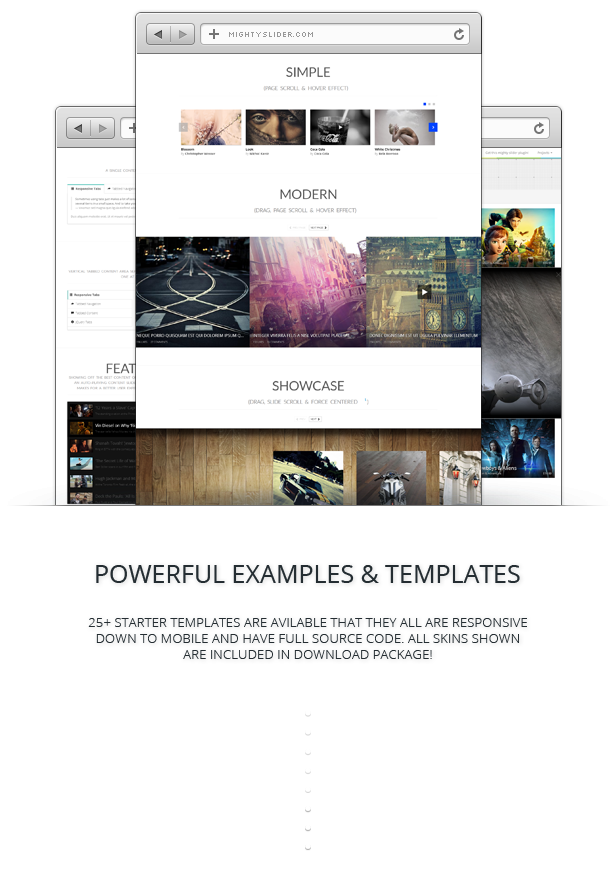
    mightySlider is a jQuery plugin for creating advanced one-directional slider with item based navigation support.

    It can be used as a simple image slider, slideshow, HTML content slider, gallery, banner rotator, video gallery, carousel or even presentation. This is achieved by a powerful & developer friendly API that provides a bunch of very useful methods giving you control over everything.

    Features

    • jQuery capabilities.
    • Responsive design.
    • Animated HTML captions with customizable effects.
    • Easy installation in your Website.
    • Unlimited Slides.
    • Unlimited Caption Layers.
    • Unlimited Caption Effects.
    • Native browser fullscreen support.
    • Cross browser, supports Chrome, FireFox, Safari, Opera and IE7+.
    • Device friendly, works in iPhone, iPad, Android Devices and Windows Phone.
    • Highly User Interface Design.
    • Fully customizable, it’s possible to customize or redesign all parts of mightySlider.
    • Search engine optimized (SEO).
    • YouTube and Vimeo videos are supported.
    • Super smooth hardware accelerated CSS3 transitions for supported touch devices.
    • Smart lazy loading – loads nearby images in background, so users don’t need to wait each time and images are available instantly.
    • Simple clean & valid markup.
    • Deep linking – link to specific slide from URL.
    • Adjustable speed, transition and easing for each caption or slide.
    • Auto cycling with optional pause on hover.
    • Thumbnails, Tabs or bullets for navigation.
    • Multiple sliders allowed on one page.
    • Keyboard support.
    • Touch support.
    • Mouse support: (Click, Wheel).
    • Clean & commented code.
    • jQuery Conflict free plugin.
    • Extended HTML documentation.
    • Powerful, documented API — public methods, properties, events.
    • Free lifetime support and updates.
    • Tons features more that makes mightySlider limitless.

    SUPPORT NOTES

    To be able to help solve a problem quickly, please read the entries below. I will do my best to assist you. I provide a full range of technical support except:

    1. I don’t support 3rd-party code (external plugins, javascripts, flash players, etc.). In those cases you have to contact the authors.
    2. I don’t support errors provoked by the strong modification of the original packages.
    3. I don’t customize the packages in personal way.
    4. If you sure that your improvement ideas will be helpful to others, please don’t hesitate to share it with me. Most likely that it will became a free package update.

    If you have a more general question relating to scripts on CodeCanyon, you might consider visiting the forums
    and asking your question in the “Item Discussion” section.

    Download mightySlider – Mighty Responsive Slider (Sliders)

    Slick Pins – Pinterest Feed Widget (Social Networking)

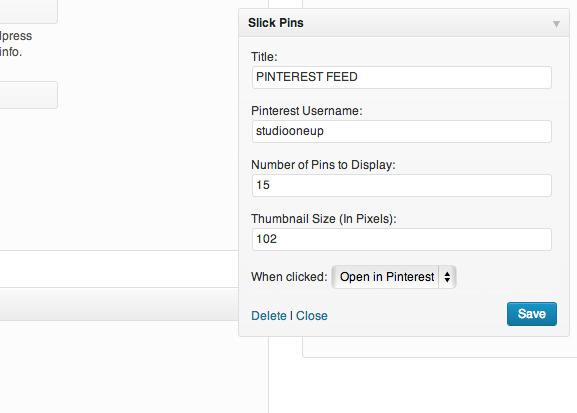
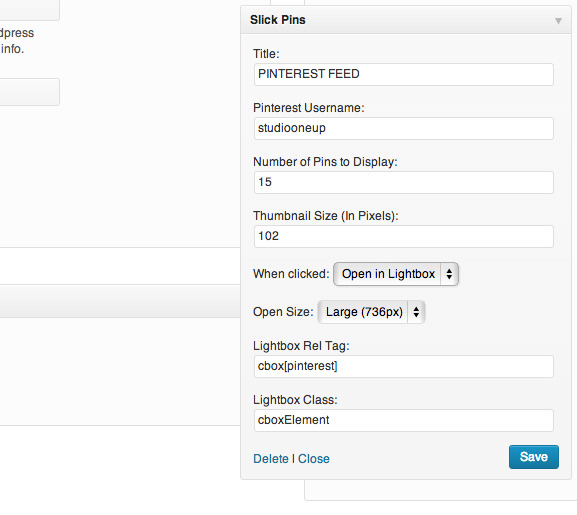
    Easily add your most recent Pinterest Pins feed as a widget. Supports linking directly to Pinterest or opening the pins in a lightbox!

    Features

    • Add a Pinterest feed widget to your website.
    • Display the most recent pins on your website from any Pinterest account.
    • Control the number of pins that you want to display.
    • Control the size of the pin thumbnails
    • Link the pins to your pinterest page, or pull them up in a lightbox directly on the site!
    • Easy access to the rel and class tags, so you can use it with your favorite lightbox (we like colorbox).
    • Choose from both the large and small versions of the pins, as offered by Pinterest.
    • Very clean, well organized code with detailed in-line commenting.
    • Lightweight and fast, this baby will not impact page load times.
    • Fanatical support. We want your feedback!
    • Tested with WordPress 3.6

    Screenshots

    Changelog

    October 23, 2013 : v1.0 
    Initial Release
    

    Download Slick Pins – Pinterest Feed Widget (Social Networking)

    Filterize. Responsive CSS3 Portfolio Gallery (Miscellaneous)

    CSS3 Responsive Gallery for sleek online presentation

    Filterize. CSS3 portfolio gallery is made to present your projects, images and references with ease and style. Check out the live demo to see the gallery in action: Demo

    Responsive, Filtered, Animated and packed with Lightbox

    • Clean design and commented code
    • Easy to customize to fit your design and color pallete
    • Made with pure CSS3 and HTML5
    • Responsive and adaptive to various screen sizes
    • Category filters
    • 3 ready themes
    • 4 column layouts for each theme
    • 2 columns
    • 3 columns
    • 4 columns
    • Full width layout
    • Animated overlays
    • Quick links for better user experience
    • Lightbox for detailed image and project presentation
    • Lightbox navigation
    • Custom scrollbars

    Need support? No worries, we got you covered

    Contact us for issues, help and guidance.

    If you like it, feel free to rate it – thank you :)

    css contact, feedback, register forms

    Download Filterize. Responsive CSS3 Portfolio Gallery (Miscellaneous)

    Multiple Wishlist Extension (Magento Extensions)


    Follow me on Facebook

    Follow me on Twitter


    Follow me on CodeCanyon

    Follow me on Google+

    XJ Advance Newsletter extension allows you to enhance and add useful and practical features to Magento’s existing newsletter functionality. It allows user to subscribe various type of newsletters. It also provides to manage and create newsletter groups where you can also having the subscription to multiple groups.

    Major Key Features

  • Easy to install and customizable for any type of Magento theme.
  • Increase average time spent on your website by visitors.
  • Provide a better customer experience.
  • Easy to install and customizable for any type of Magento theme.
  • Compatible with Magento 1.3.x, Magento 1.4.x, Magento 1.5.x, Magento 1.6.x, Magento 1.7.x.
  • Download Multiple Wishlist Extension (Magento Extensions)

    CSS Pricing Tables Five Skins DZS (Pricing Tables)

    Intro – top

    CSS3 Pricing Tables DZS is a bundle of five awesome pricing tables

    Features

    • easy to install – install and get this plugin ready in less then one minutes.
    • responsive – looks great from mobile to HD
    • CSS3 technology – this gallery uses cutting-edge css3 definitions to render awesome 3D effects in supporting browsers, the others will degrade gracefully
    • compatible with all major browsers, including IE – compatible from IE7 to IE10, Chrome, Safari and Firefox
    • SEO friendly – built with search engine optimization on mind from the ground up, the Testimonial Rotator uses non hidden valid html markup to build the widget
    • iPhone / iPad optimized – this component has been optimized for Apple touch devices
    • Android optimized – this component has been tested on Android 4.0 and works awesome

    What do you get?

    • CSS3 Pricing Tables DZS – get creative!
    • documentation – extensive documentation on how to install & configure the plugin
    • free updates – even if the value of this gallery increases with upcoming updates, you will get them for free
    • free support – for installation via my forum -> http://digitalzoomstudio.net/support/ this is the fastest form of support


    Other Great Plugins


    Credits


    Download CSS Pricing Tables Five Skins DZS (Pricing Tables)

    Christmas Snow – Cool Snow Fall WordPress Plugin (Utilities)

    Christmas Snow will turn your WordPress site into a Snowy WordPress site. By adding the Christmas flavor to your WordPress site you can make your visitors feel at home during the Christmas Season. If you are targeting Christmas Season Sales, this is the right Plugin for you. Christmas Snow Plugin has around 25 different types of Snow Flakes to choose from. You can create multiple types of Snow Flakes and choose which type to show on which Pages/Posts. Highly Customizable Plugin with lots of options.

    Features

    • 25 Different Types of Snow Flakes to choose from
    • Simple and Effective way of adding Christmas Snow to any of your WordPress site
    • Should work with all WordPress Themes
    • Create Multiple Types of Christmas Snow and choose on which Pages/Posts which Type of Christmas Snow to show
    • Number of Snow Flakes can be set
    • Snow Flake Speed can be controlled
    • Snow Flake Rotation Speed can be set
    • Snow Flake Size as user input
    • 4 Wind Directions (No Wind, Wind from Left to Right, Wind from Right to Left, Random) for Snow Flakes
    • Highly Customizable with lots of options

    Support

    If you have any problems or need help for this Plugin, don’t worry we are there. Register and open a support ticket on our site.

    Updates

    Version 1.0 on 21 October 2013
    - This is the First Version
    

    Download Christmas Snow – Cool Snow Fall WordPress Plugin (Utilities)

    Christmas Snow – Snow Fall WordPress Plugin (Utilities)

    Christmas Snow will turn your WordPress site into a Snowy WordPress site. By adding the Christmas flavor to your WordPress site you can make your visitors feel at home during the Christmas Season. If you are targeting Christmas Season Sales, this is the right Plugin for you. Christmas Snow Plugin has around 25 different types of Snow Flakes to choose from. You can create multiple types of Snow Flakes and choose which type to show on which Pages/Posts. Highly Customizable Plugin with lots of options.

    Features

    • 25 Different Types of Snow Flakes to choose from
    • Simple and Effective way of adding Christmas Snow to any of your WordPress site
    • Should work with all WordPress Themes
    • Create Multiple Types of Christmas Snow and choose on which Pages/Posts which Type of Christmas Snow to show
    • Number of Snow Flakes can be set
    • Snow Flake Speed can be controlled
    • Snow Flake Rotation Speed can be set
    • Snow Flake Size as user input
    • 4 Wind Directions (No Wind, Wind from Left to Right, Wind from Right to Left, Random) for Snow Flakes
    • Highly Customizable with lots of options

    Support

    If you have any problems or need help for this Plugin, don’t worry we are there. Register and open a support ticket on our site.

    Updates

    Version 1.0 on 21 October 2013
    - This is the First Version
    

    Download Christmas Snow – Snow Fall WordPress Plugin (Utilities)

    WordPress Security Question (Utilities)


    A Product by Flipper Code

    Wordpres Security Question is a wordpress plugin which enables security question feature on registration form. Plugin has zero configuration and start works on a single click. if you make use of a security question as a way of accessing an account if your user lost password, this plugin is perfect suitable for you.

    For any help, feature request or to report a bug, you may contact me anytime And please rate this item as per your experience with it.
    Why this Plugin?

    If you search on google about “hack wordpress” or “wordpress hack” or similar phrases, you find that most of time hackers reset password using sql injection. For more information, how to hack a website using sql injection, read this article written by me. So using plugin, it’s not possible to reset your password without know your security answer.

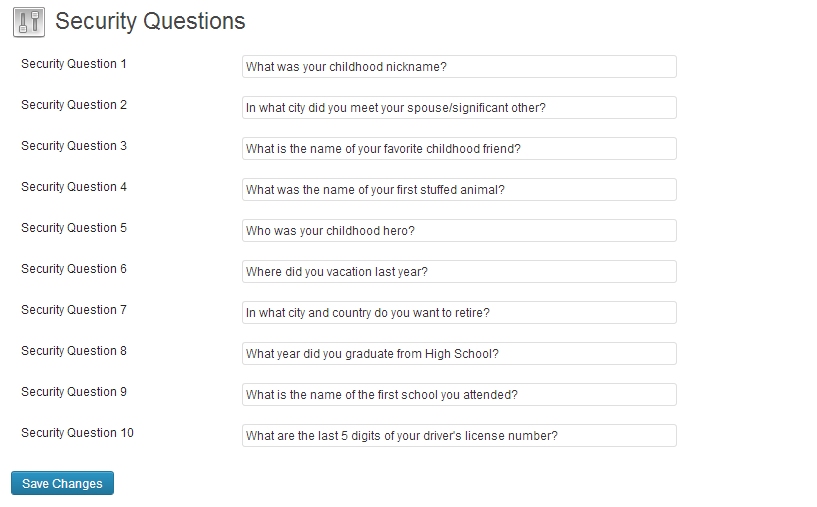
    Setup Your Questions using Backend

    A new dropdown to ask question/answer easily integrated on your wordpress registration page once you installed this plugin.

    Setup Security Question for Registration Page

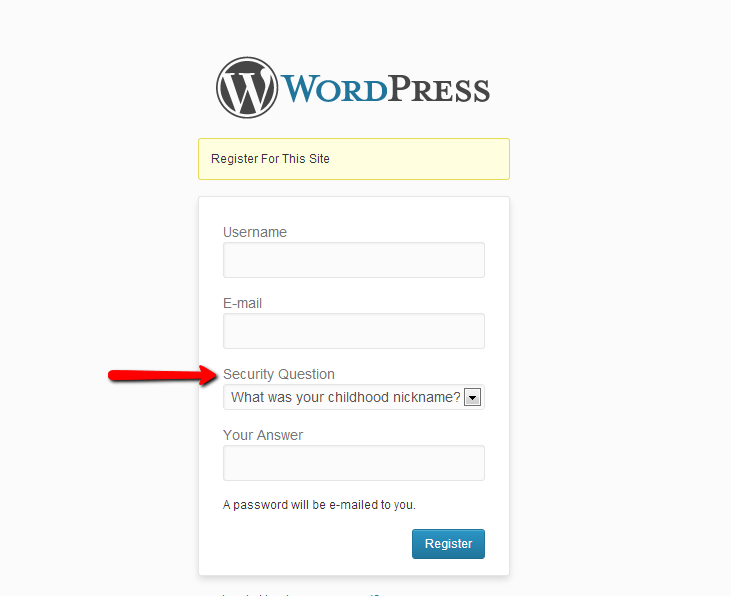
    Display Security Question on Registration

    After setup questions, a new dropbox display on registration page automatically.

    Display Security Question onRegistration Page

    Ask Security Question on Forgot Password

    To retrieve lost password, user needs to answer security question they answered before.

    ask Security Question on Forgot Password Page

    You’re Done!

    Please feel free to ask if you have any question.

    Download WordPress Security Question (Utilities)

    PBphpminifier – PHP Code Minimizer (Windows)

    Description:

    The PBphpminifier is a small and fully portable tool which is running under Windows XP/Vista/7 (Windows 8/8.1 still has to be tested some more time…) and can be used to minify PHP code. During the minifying process, the filesize will be reduced because all comments, linebreaks and a lot of spaces will be removed. There are 7 optimizing levels to adjust for the compatibility of different types of PHP scripts.

    There is also an option which replaces the existing variables and makes the code unreadable and difficult to understand. This is not a kind of encryption but the structure and the informative names of the variables will be lost. It is possible to specify a list of files and/or variables which will not be minified. This can be helpful if you don’t want your configuration files to be scrambled. The variables will be replaced because without that, the configuration script can not interact anymore with other minified files.

    It is also possible to exclude variables from beeing replaced. Some variables like $_SERVER, $_GET, $_POST (14 in total) will be disabled by default. The configuration of excluded files and/or variables can be project specific. Each project can have his own exclude configuration file which specifies the excluded components for this specific project.

    After the minifying process each script runs through the PHP parser and is checked for syntax errors. The PBphpminifier tool has a well written User Manual of 40 pages (1.1 MB – PDF format).

    This script is for everyone who wants to obfuscate his PHP code, reduce the filesize for installation packages (faster upload/download) or make the PHP code less readable/understandable for outsiders. Reducing the size of the PHP code does NOT increase the speed of your website or web application because the code will be processed on the webhost and not on the client system (webbrowser)!

    Please check the User Manual and the Screenshots for more information!

    I hope you like this tool!

    Features in Version 1.8:

    • Minify the PHP code.
    • Reduce the filesize of the PHP files.
    • Reduce the readability of the PHP code.
    • Obfuscate the PHP code (no structured code).
    • Different optimization levels (1 – 7).
    • Replace the existing variable names with short ones.
    • PHP syntax check after the optimization.
    • Minify whole projects (directories) recursively.
    • Exclude rules to exclude files and variables.
    • Default and project specific exclude rules.
    • GUI mode which shows a progressbar and additional information.
    • CLI mode without any visual output for using in batch scripts.
    • Logfile from the syntax check.
    • Exclude list which lists all excluded PHP files and variables.
    • Variable list which shows the original and replacement variables.
    • Extensive user manual for an easy and fast begin.
    • Runs on Windows XP (with included PHP CLI version: 5.4.21).
    • Runs on Windows Vista / 7 (with included PHP CLI version: 5.5.5).
    • Extensive user manual of 40 pages for an easy start.
    • The user manual covers the installation, configuration and use.
    • Small size of the tool (full installation: 16.5 MB, download 6.5 MB).
    • The PBphpminifier is fully portable.
    • No dependency on the .Net framework.
    • Easy installation (just one double click).
    • Easy configuration (edit the configuration files).
    • Low hard- and software requirements.

    Hardware Requirements:

    • Client computer (x86 / x64)
    • Pentium 4 or better processor
    • 2 GB or more RAM
    • 20 MB free harddisk space
    • Internet access (for downloading additional PHP versions)

    Software Requirements:

    • Windows operating system (XP, Vista, 7)
    • Visual C++ 2009 Redistributable package (to run PHP)
    • ZIP-Tool to unpack the download archive (like 7-Zip)
    • PDF-Viewer for reading the user manual (like Sumatra)
    • New webbrowser (like Firefox or Opera)

    Screenshots:

    Here you can check the screenshots: Screenshots

    Documentation:

    Here you can read the user manual (1.1 MB – PDF format): User Manual

    Support:

    If you need support, please use the Contact Form on my Author Page and we are glad to help!

    You can also use the Comments Page to submit a question!

    Feedback:

    If you like the script we would like to get your feedback on the Comments Page and maybe you could rate the script :-)

    Versions (Updates):

    • 21.10.2013 – Version 1.8 – Initial release on Codecanyon

    Download PBphpminifier – PHP Code Minimizer (Windows)