Footer Sticky Block For Magento (Magento Extensions)

DH Footer Sticky Blocks is beautiful extensions, highly customizable,it helps create footer sticky block in Magento.

Features

  • Easy Installation
  • Easy Configuration
  • Easy to customize
  • Open Source Code
  • Fixed or Full Width
  • Easy Insert Variable Code

Changelog

Version 1.0.0 
Initial Release

Download Footer Sticky Block For Magento (Magento Extensions)

Background slider for Prestashop (Prestashop)

Fullscreen background slider is an elegant solution for creative designs for your Prestashop template. You can add unlimited backgrounds which will be resizes to fill browser while maintaining image dimension ratio.

Display nice fullscreen background slideshow or just one background image. You can display different backgrounds per language and create random slideshows.

Features

  • Slideshow mode or display one image background (selected order or random)
  • Random slideshows
  • Seven different slide effects (Fade, Slide Top, Slide Right, Slide Bottom, Slide Left, Carousel Right, Carousel Left)
  • Set pause lenght between transitions and transition speed
  • Keyboard navigation on / off
  • Setup minimum height and width
  • Different backgrounds per language

Credits
Supersized
Images from Flickr:
Sharon Mollerus
Simon Bouchard

Download Background slider for Prestashop (Prestashop)

Login Pages (Forms)

Description

Save time and money by integrating these fully responsive login pages into your website!

Features

Fully Responsive
Works on multiple screen sizes ranging from a desktop browser to a tablet and even a mobile phone. Max needed size is 400px, lowest size is 200px.

3 Pages
Includes a sign in page, password recovery page, and sign up page. Fully HTML coded so that you only need to copy / paste and modify if needed.

10 Themes
Choose from ten different theme files or mix and match styles to create your own theme for the site you’r working on. The CSS files are split between structural and thematic files.

Messaging Components
Included in the designs are a loading spinner, message field with error, warning, and success classes, and a way to show a field in error.

Section 508 / WCAG 2.0 AA
HTML validated against current HTML5 standards as well as Section 508 (US Government standard) and Accessibility standards.

Browser Support
Works on all modern browsers including Internet Explorer version 7 and above. IE specific CSS file and coding is available for compatability.

Contains

HTML
Sign-In.html, Sign-Up.html, and Recover.html

CSS
Login-Pages.css, Login-IE.css, Thematic CSS Files

IMG
General Background Image, Thematic Images by Folder

JS
Placeholders.js – Fallback for older browsers.

PSD
Icons.psd, Login-Top.psd

Documentation
HTML file with instructions on the installation, use, and configuration of the pages.

Credits

Placeholders 3.0.0 – Adds placeholder support for forms in pre-HTML5 browsers.

Change Log

Version 1.0.0
Initial release

Download Login Pages (Forms)

MIGS Woocommerce Pro (WooCommerce)


MIGS Woocommerce Pro

This plugin is needed to integrate MIGS Payment Gateway into Woocommerce to accept payments from international customers. MIGS is the “Mastercard Internet Gateway Service” gateway that some merchants use for their generic gateway. Don’t let the name fool you, this service supports all major credit cards.

Supports

The following banks currently use MasterCard MIGs for all online credit card transactions:

  • ANZ (eGate)
  • Bendigo Bank
  • Commonwealth
  • NIB Bank
  • Suncorp (Virtual POS)
  • HSBC
  • Bank of Mauritius

Installation

To install the plugin, go to your WordPress Administration, and follow these steps:

  1. Click on Plugins
  2. Click on Add New
  3. Below the headline “Install Plugins” click Upload
  4. Click browse and find the zip file you downloaded from codecanyon
  5. Click Install Now
  6. Click acvtivate now when it is finish uploading

The plugin is now installed and activated

Now go to WooCommerce > Settings and click on the Payment Gateways tab. In here you the possibility to activate the plugin and enter alle the needed API settings.


DEMO

Live Demo MIGS

Download MIGS Woocommerce Pro (WooCommerce)

Pricely – Bootstrap Powered Price Charts (Pricing Tables)

One of the most popular frameworks today, Bootstrap gives you the ability to start your web project almost instantly.

Use Pricely to add in elegant price charts, spiced up with some CSS3 and HTML5, for showcasing your product ranges and packages.

With three distinct styles provided you can choose the one that fits your project the best.

Check out our demo to experience Pricely!

Styles

  • Classic: The classic price chart.
  • Business: For a more serious approach.
  • Professional: Got more plans, no problem…just go pro!

Features

  • Built on Bootstrap
  • Elegant Design
  • Works with most Bootstrap JS components
  • CSS3 transitions
  • Responsive
  • Clean code
  • Lightweight and quick to load
  • Button hover effects
  • Supports Modals, Collapsible areas and Tooltips (customization required)

Did we mention that you can use most of the Bootstrap JavaScript components with your tables? Just takes a little bit of customization and you make your price charts do much more than show plain text!

If you like it please don’t forget to rate it!

Download Pricely – Bootstrap Powered Price Charts (Pricing Tables)

Kykof – Professional Social Network (Social Networking)

Kykof is a Fully Functional Website Script

what is kykof?

kykof is a platform built to bring entrepreneurs together with people interested to join their projects. Our main focus is to help launch the best projects backed with the best teams

how does it work?

Once a user has signed up, they can create a project, this project will be open to all kykof users to browse and apply to join. It is up to the project owner to accept the applications based on the applicant’s profile and the level of help they can provide. Project owners can also invite users to join their project. kykof provides a discussion page for project members to discuss their terms and how they want to get started with their project

quick look at kykof features:

general:
– full website
– search engine optimized

pages:
– featured projects page
– profiles search page
– projects search page
– knowledgebase / privacy policy / terms of service
– login / signup / forgot password

creating profiles:
– personal information
– flag profile
– block profile
– invite to join project
– profile picture
– deactivate/reactivate account
– email verification system

Creating Projects:
– project information
– project requirements
– youtube video
– flag project
– close project
– limit access to project

creating a team:
– invite members to your project
– apply to join projects
– accept/deny applications
– accept/deny invitations
– fire members

discussion room:
– discuss projects
– set discussion rules
– limited to team members

internal messaging system:
– send/receive private messages
– limit access to team members
– discussion thread for easier follow-up

rating system:
– rate team members
– write a review to their profile

support system:
– open ticket
– get ticket status
– communication line between users and admin
– close/open/re-open tickets

favorites page:
– view member’s favorite profiles
– view people who favorited a member

internal notifications system:
– notify user when application is received
– notify user when invitation is received
– notify user when application is accepted
– notify user when invitation is accepted

email sending script

feedback system

admin account:
– enable/disable profiles
– enable disable projects
– view internal messages
– communicate with members
– view feedback from members
– view project flags
– answer support tickets
– edit featured projects

requirements:
php 5.4+
mysql 5+

user demo login:
[email protected]
password:123456

Enjoy!

Download Kykof – Professional Social Network (Social Networking)

Mate Boxes | WordPress Plugin (Galleries)

Mate Boxes is a plugin for WordPress that allows you to create data blocks using your images.
There is a admin panel which can help you to change the visualisation of your blocks.
You can use various columns for different types of screens. For example: for large screens – 6 columns,
for medium screens – 4 columns, for small screens – 2 columns, for extra small screens – 1 column.
You can completely disable the area for the title, the lower and middle part of the block, and leave only the image.
You can see video preview for more information: video

Features:

  • Easy sorting system
  • Automatic color adjustment
  • Unlimited number of galleries with blocks on the same site or page
  • Responsive
  • Simple to Use
  • Cross Browsers
  • Fully Customizable
  • Mobile Friendly
  • Lightbox
  • Various Columns for Different Types of Screens

Video Preview:

Version 1.0:
 First release

Photos are not included in the template. (photo by Csaba Diglics stockpicturedownload.com)
Icons by Daniel Bruce (entypo.com)

Download Mate Boxes | WordPress Plugin (Galleries)

Auto Facebook Page Video Uploader (Images and Media)

Information

This script is most powerful ever build, It’s Automatically Download the Video from Youtube or Facebook, Watermarked it using your Images (PNG, JPG or GIF no animated) and then Upload to Facebook Page, All are using just single click.

Feature:

  1. Just One click
  2. Using Facebook Apps (App ID, Secret ID) – No FB Username/Password Required
  3. Ability to download video from Facebook and Youtube
  4. Auto Write the Title, Description and Tags from the Downloaded Video File Name
  5. Manual Title and Description can be added easily
  6. Auto Delete video from server after uploading (save storage space)
  7. Set Video Publish status to “Publish” or “No Publish”
  8. Auto Add Watermark from your chosen Image from drop down.
  9. Set Watermark Position
  10. Mobile Responsive Theme, Built using bootstrap
  11. Using FFMPEG to add watermark and Convert into MP4 (Facebook friendly).
  12. Multiple Page adding Management
  13. One time connect with Facebook
  14. Auto Token Refresh or Manual.
  15. Step by Step Video Tutorial include in script


Requirements

  1. PHP 5+
  2. Apache
  3. Linux OS (Not tested on Windows or Mac)
  4. Latest FFMPEG installed on your server (FFMPEG-PHP is not required)

    1. Compile with h264 and AAC Codec
  5. Don’t Have FFMPEG install? Now included with Built-in FFMPEG (Pre-Compiled) :)
  6. CURL
  7. EXEC
  8. f_open (allow URL)


Test Requirements:

If you are interested in purchasing “Auto Facebook Page Video Uploader”, you must have following requirements activated
Download Requirement Tester PHP Script Click Here

Changelog:

Version 1.1

  1. + Add ability to run on Shared Hosting – If V1 is working great on your server then you don’t have to update.

Version 1

  1. Just Released.

Download Auto Facebook Page Video Uploader (Images and Media)

Force Newsletter for Magento (Magento Extensions)

Force newsletter subscription is a feature highly needed in Magento stores.
This extension allows you to easily collect customer email during registration and checkout process for newsletter subscription.
It also allows you to seamlessly check subscription checkbox by default or check while totally hidden from customer.

-Supports Magento CE 1.3 and later
-Supports Magento multiple website, stores and store views
-Control forcing subscription behaviour per subscription form
-Choose from disabling force subscription, check by default or force subscription
-Completely hide newsletter checkbox from frontend
-Force subscription on new customer registration
-Add newsletter subscription to one page checkout
-Checks if customer is already subscribed to newsletter before showing subscription on checkout
-If force subscription is set on checkout and customer email was previously unsubscribed, it will not be resubscribed. This behaviour does not apply if the checkbox is visible to customer checked by default.

Download Force Newsletter for Magento (Magento Extensions)

WooCommerce Groups Newsletters (WooCommerce)

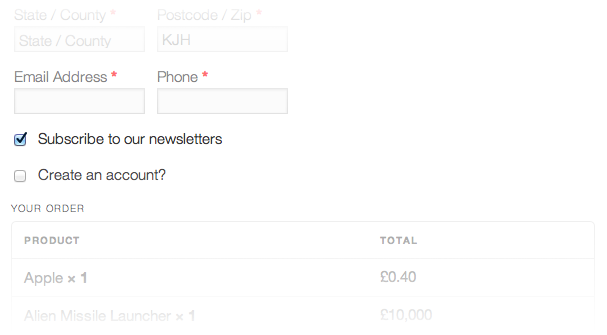
The WooCommerce Groups Newsletters extension lets customers subscribe to newsletters at checkout.

Checkout

This extension requires the Groups Newsletters plugin, which provides a newsletter campaign system for your site without the need to use third-party services. It integrates the system with WooCommerce to let customers subscribe to newsletters at checkout.

Requirements

You must have …

Optional …

  • Groups if newsletter campaigns targeted at specific customer groups are desired

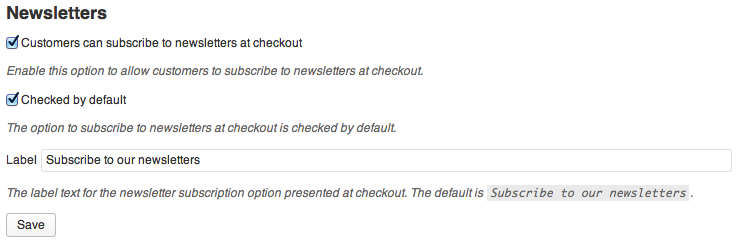
Settings

Documentation

Please refer to this extension’s documentation pages and the Groups Newsletters documentation pages for details on the newsletter campaign system.

Demo

Please refer to the Groups Newsletters demo site.

Download WooCommerce Groups Newsletters (WooCommerce)

My Presentation (Utilities)

My Presentation is a plugin for WordPress that allows to create presentations of different elements/features directly into the frontend of any theme.

Very often the sites contain special items, original design or unique features that the developer wants to put in the record and to present them in a simple form to its users. For these reasons it would be welcomed a quick and cheap solution that will save your time and resources, meanwhile bringing a considerable value for users.

For that was created My Presentation plugin, which allows the site administrator to put out those features which sets it apart from other products on the market.

A presentation is composed of one or more tooltips that are attached to different html elements from pages. Tooltips has different global and individual settings which allows you to personalize it in different ways at different elements of a page. Also there are an API for javascript that permit different hacking methods over tooltips.

My Presentation plugin is accessible to anyone and saves precious time. Also the plugin comes with a premium support for users. This product is a solution that allows you to put in evidence any element no matter how crowded is the web page. It also allows you to realize a conscious and pleasant navigation for your visitors. More than that, the plugin allows you to you interact more intensively and in a much more comfortable way with visitors. Thus they will be impressed by your page.

Possible cases for use:

  • it is necessary for the user to perform some initialization steps to understand how work certain parts of the site.
  • visitors must navigate step by step from one element to another.

My Presentation plugin can be used by a simple WordPress user for personal purposes like: blog presentation, services, customization, etc; as well as by professional developer of WordPress that can use it for commercial products presentation.

Download My Presentation (Utilities)

WSPay OsCommerce Payment Gateway (osCommerce)

WSPay is popular Croatian firm for credit / debit card payment proccesing.

Some of WSPay features:

  • On-line authorization and payment of credit cards – American Express, Visa, Diners, MasterCard, Discover (only contracted accept Diners Club cards)
  • On-line authorization and payment of bank (debit) card – Maestro (ALL BANK), Visa Electron
  • Fixed costs of using the system regardless of the number and volume of transactions
  • 3 Types of connecting online grocery system (XML, Form, WebPos)
  • On-line transaction management (authentication, billing, cancellation, refund)
  • The ability to collect in several installments (depending on the card)

Benefits of using WSPay system:

  • Faster authorization and delivery of services increases business results
  • Accepting multiple credit cards increases the number of potential buyers
  • Accepting bank (debit) card covers the segment of customers who do not have a credit card
  • Easy to plan and manage operating costs
  • Protection from fraud using stolen card
  • Different models connect to the system make it easy to implement in existing web store

How it works

The payment process is redirect one. Your customers will be redirected to a secure WSPay payment page, where they will make a payment. After the payments is complete the customers will be redirected back to your merchant store and presented with a Thank you/Receipt page.

Security

No SSL needed, the payment process uses security hashing to transfer the data and the payment itself is made on a secure WSPay page.

Testing details

  • Card: AMEX (American Express)
  • Card number: 377500963281005
  • Security number: 551

Demo url: demo

Download WSPay OsCommerce Payment Gateway (osCommerce)