My Login (Miscellaneous)

Item Description

My login is a login system for your website or project

Main Features

– Easy to set up.
– Password recovery method via email
– Password recovery simple and beautiful.
– Strong mailing service with PHPMailer
– Easy way to change the language.
– Easy to change the screen values and links.
– Icons included
– Cross browser support.
– Responsiveness.
– The background is generated from a small wallpaper via code.

Download My Login (Miscellaneous)

MKS-Screen Recorder (Windows)

MKS-Screen Recorder is able to record all screen and mouse activity on your computer and create industry-standard AVI video files.you can playback recorded video(it shows colourful).After recording just save it in to destined name with avi extension.

Features:

  • Silent capture
  • customize size
  • mouse activity options
  • #move
    #click
    #folow

  • Constant capturing option
  • adjustable focus clip
  • minimize to tray
  • double click in tray to open
  • hotkey to show from silent mode

Update:

#Frame Rate customization setting included

Download MKS-Screen Recorder (Windows)

Easy Audio Player (Media)

What is Easy Audio Player ?

Easy Audio Player it is a powerful HTML5 audio player for your website with responsive layout and full API spport, it runs with the new HTML5 audio engine and if its not supported, it will use Adobe Flash fallback. Packed with four skins with various styles it can be used in any type of layout and of course the skins can be modified.

Easy Audio Player can be used in any type of HTML page including WordPress, at this link there is a demo page running in WordPress (Please note that this is NOT a WordPress plugin!, the player must be installed manually, we have inclulded a tutorial about how to install it in WordPress).

Main features:

Packed with tone of options allowing you to control the layout and skin in the way that pleases you most.
Extremely easy to use, setup in less than 3 minutes.

Fully Responsive & Mobile Optimized (Smartphones & Tablets). Video demonstration on Android or Video demonstration demo on IOS.

Support for old browsers like IE7 and IE8.

Full API support, the player has a full set of methods and events / listeners that allows to control the player externally, even more you can hide the entire buttons bar and have an invisible player instance that can be controlled with your own set of buttons.

All buttons are optional (please note that all buttons includding the background can be hidden).

Support for multiple instances of the audio player and different audio (.mp3 files) attached to each instance.

Autoplay, the audio (.mp3 file) should start playing as soon as it is ready (optional).

Loop, the audio (.mp3 file) should start over again, when it is finished (optional).

Volume, the volume can be set.

Animation intro, the entire skin can have a animation intro once the player is ready (optional).

Four skins along with the PSD files included!

Detailed Documentation included!

Example pages included!

API – public methods:

setSource(source:String): – Set the audio path, this method accept a parameter that represents the audio source path.

setVolume(volume:Number): – Set the audio volume, this method accepts a parameter that represents a number between 0 (audio mute state) and 1 (audio maximum volume).

stopToScrub() and stopToScrub(): – Notify instance to stop to scrub (useful only if a custom scrub bar is used).

scrub(): – Notify instance to scrub (set the audio position), this method accepts a parameter that represents a number between 0 (audio start position) and 1 (audio end position).

stop(): – Stops the playback and the loading process if the loading process has started.

play(): – Start / play playback.

pause(): – Pause the playback.

destroy(): – Destroy the Easy Audio Player instance and remove it from DOM.

API – event listeners:

ready – FWDAudioPlayer.READY: – Dispatched when the Easy Audio Player instance API is actually available.

stop – FWDAudioPlayer.STOP: – Dispatched when the Easy Audio Player instance is stopped.

play – FWDAudioPlayer.PLAY: – Dispatched when the Easy Audio Player instance playback start to play.

play – FWDAudioPlayer.PLAY: – Dispatched when the Easy Audio Player instance playback start to play.

pause – FWDAudioPlayer.PAUSE: – Dispatched when the Easy Audio Player instance playback is paused.

update – FWDAudioPlayer.UPDATE: – Dispatched when the Easy Audio Player instance is playing and it’s position is changing (useful to update a custom scrub bar), this event has a property of type Number between 0 (audio start position) and 1 (audio end position).

error – FWDAudioPlayer.ERROR: – Dispatched when the Easy Audio Player instance can’t load or play the audio file, this event has a property of type String that represents the error message.

playComplete – FWDAudioPlayer.PLAY_COMPLETE: – Dispatched when the Easy Audio Player instance playback has reached the end of the audio file.

API – main attributes:

instanceName <String>: – The the Easy Audio Player instance instance name, the API is called by the Easy Audio Player instance name dot property.

skinPath <String>: – Specifies the URL of the skin path.

flashPath <String>: – Specifies the URL of the Flash (SWF) file that will handle the fallback for older browsers. If the SWF file is not in the same folder as your html page. You can change the URL path with this attribute.

sourcePath <String>: – Specifies the URL of the audio files.

useOnlyAPI <Boolean>: – Use only public API with or without the default skin, basically this will hide or show the control bar.

autoPlay <Boolean>: – Specifies whether or not to start playing the Easy Audio Player instance as soon as the audio has loaded.

loop <Boolean>: – Specifies that the Easy Audio Player instance should start over again, when the playback reaches the end.

maxWidth <Number>: – The Easy Audio Player instance maximum width in pixels.

volume <Number>: – Specifies the volume of the audio. The volume ranges from 0 (silent) to 1 (full volume).

animateOnIntro <Boolean>: – Specifies that the Easy Audio Player instance should animate or not the buttons when it is fully loaded.

animateOnIntro <Boolean>: – Specifies that the Easy Audio Player instance should animate or not the buttons when it is fully loaded.

showOnlyPlayButton <Boolean>: – Specifies if only the play button is used.

showBackgroundBar <Boolean>: – Hide or show the buttons background bar.

showVolumeScrubber <Boolean>: – Hide or show the volume scrub bar.

showVolumeButton <Boolean>: – Hide or show the volume button.

showTime <Boolean>: – Hide or show the time.

Special notes:

For simplicity we have used only two audio files, but is important to note that each audio player instance can play a different audio file (.mp3 file).

If autoplay is enabled the Easy Audio Player instance will try to play the audio file, on most mobile devices this is not allowed by the operating system.

On mobile devices the volume is always set to maximum and it can’t be modified, this is again a restrction of the mobile operating system… the volume can be modified using the device volume controller.

Keywords: audio, html5, mp3, ogg, music, player, song, responsive, volume, streaming, fallback, flash, release, wp, podcast

Download Easy Audio Player (Media)

Flipping Lightbox 3D with jQuery, and CSS3 (Images and Media)

FlipLightBox.js is a responsive jQuery lightbox plugin that is focused on providing fancy 3d flipping effect with css3 and javascript.

Features:

  • 3D Flipping Effect with CSS3
  • Support both Image Lightbox and HTML Dialog
  • Image Gallery
  • Responsive jQuery Plugin
  • 15+ Options for Customization
  • Support All Modern Browsers (chrome 16+, firefox 12+, safari 5+, opera 12+, and IE10+)
  • Support PC, Mac, iPad, iPhone
  • Keyboard shortcuts for close, navigation left and right

How to use:

Download Flipping Lightbox 3D with jQuery, and CSS3 (Images and Media)

Mini Bots PHP Class (Miscellaneous)

This PHP class is a growing collection of small spiders and web bot that go out on the web and make some small useful jobs.

Actually the mini bots can do those things:

  1. Copy a remote url to your local server: copyFile
  2. Get IP address of the user: getIP
  3. Get geographic informations from IP address: ipToGeo
  4. Get spelling for a word using Google: doSpelling
  5. Make a Tiny URL using tiny url service: doShortURL
  6. Decode a short URL of any service: doShortURLDecode
  7. Check if an URL to an mp3 is really an mp3 file: checkMp3
  8. Check if an URL exists: url_exists
  9. Do SMTP email validation: doSMTPValidation
  10. Get infos of an URL (keywords, title, images, description, favicon…): getUrlInfo
  11. Get infos of a VIDEO URL (title, description, thumb for youtube and vimeo services): getVideoUrlInfo
  12. Read facebook counters for likes, shares, comments, clicks…: readFacebookCounters
  13. Read the numbers of time a URL has been twitted: readTwitterCounter
  14. Read Google +1s counter for an URL: readGooglePlusCounter
  15. Get Google suggested keywords for a keyword: googleSuggestKeywords
  16. Get Latitude and Longitude (georeference) from an address with Google: getLatLong
  17. Get Wikipedia definition: wikiDefinition
  18. Get Vimeo Info on a video: getVimeoInfo

Future updates will bring new mini bots for you!
To fully work need cURL module installed on your server.

You can play with some methods in this interactive demo or check the complete test demo (same as live preview button).

Download Mini Bots PHP Class (Miscellaneous)

Lia 3D – Animated Menu (Navigation and Menus)

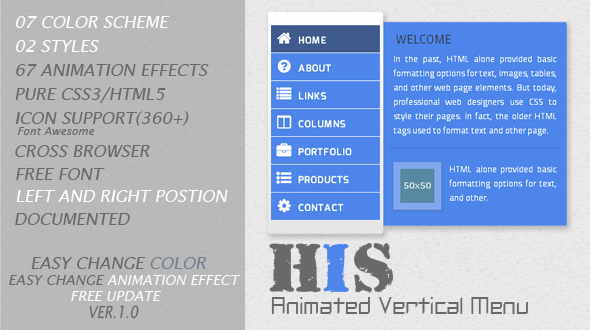
Lia 3D – Animated Menu

  • Based in Pure CSS3
  • If you like Lia, please dont forget to rate…

Features

  • 05 COLOR SCHEME
  • 02 STYLES
  • 60+ ANIMATION EFFECTS
  • PURE CSS3/HTML5
  • ICON SUPPORT (360+)
  • CROSS BROWSER
  • FREE FONT
  • EASY CHANGE COLOR
  • EASY CHANGE ANIMATION EFFECTS
  • FREE UPDATE
  • DOCUMENTED

Support

Please send me an email to : [email protected]

Change Log

  • Version 1.0
    • Initial Release

See Also

His – Animated Vertical Menu


Download Lia 3D – Animated Menu (Navigation and Menus)

Webful General Ledger Accounting (Miscellaneous)

Webful General Ledger accounting system is a php accounting system to make general ledger. System support double entry journal vouchers.

Take accounts with you anywhere you go. Manage your company accounts now. With all required reports.

Multiple companies
Multiple users
Multiple accounts
Double entry system
Trial balance
Balance sheet etc

Let me know if you have any questions or suggestions to improve it thanks.

08-11-2013
* Initial Release

Download Webful General Ledger Accounting (Miscellaneous)

Smart Timer And Counter (Countdowns)

Plugin Home Page
Support Forums
Follow on Twitter
Video on Youtube

Plugin Information

Smart Timer And Counter is a jQuery plugin that can be used to add timers and clocks to the webpage. Plugin is highly configurable and expandable through custom skins (visual component), modes (clock/timer logic) and languages (translate labels).

  • Styling is done using CSS (and Canvas for Circular skin), and all included styles are pure CSS with no images used.
  • Responsive, uses media queries to change counter sizes, and it can break into multiple lines on smaller screens.

Plugin is tested with current Android (with 2.3.5, 4.0.2 and 4.1.2) browsers, iPhone and iPad Safari and Chrome (with iOS7), all modern desktop browsers (IE8 and IE9 will not show some of the styling). It requires JavaScript and jQuery support to work.

Clock and Counter Modes, Custom Layouts

Plugin can work as clock or as counter. If used as clock, you can show current date/time, or you can start from any date. Counter can countdown to any date, countdown any number of seconds or countup to any seconds limit. Plugin can display different combination of time and date elements, dividers and labels.

List of Modes Controls
  • Layout: combine order for ‘years, ‘months’, ‘days’, ‘hours’, ‘minutes’, ‘seconds’.
  • Dividers: several dividers available to split date / time elements.
  • Number of Digits: customize number of digits for each date / time element.

4 Skins for display: Simple, Animated, Circular and Inline

4 Skins for display: Simple, Animated, Circular and Inline
Plugin has 4 skins to display clocks/counters. Simple and Animated skins have 14 styles each (some the same). Animated skin uses animations (SlideIn, SlideOut, Fade, FadeIn, FadeOut) to change digits. Inline skin can be used on SPAN tags for adding counters inline with text with minimal styling changes.

List of Available Skins
  • Simple: simple way of displaying digits, comes with 14 predefined styles.
  • Animated: uses animation to change digits, comes with 14 predefined styles and 5 animations.
  • Inline: for elements inside the text, comes with 4 predefined styles.
  • Circular: uses Canvas to render cirular dials, unlimited color customizations.

Circualar Skin uses Canvas to show circular dials

Circualar Skin uses Canvas to show circular dials
Based on third party jQuery Knob library, allows full customization of size and colors (even using transparency) for number dials.

Easy customization and integration with detailed documentation

Easy customization and integration with detailed documentation
Plugin has wide range of settings for skins, modes, language. It is easy to customiza and use with any jQuery based project. Documentation contains detailed explanation of all settings, list of values, list of styles and more. Plugin package has plenty of demos.

Other plugin features

  • Support for translation using language objects to change date/time element labels.
  • Attach your own code on callback events to handle start, stop, finish and other things.
  • Many settings to control counters display: dividers, spacing, labels location, responsiveness…
  • Includes methods to start, stop, reset or modify counter object for each applied element.
  • Includes 11 page PDF documentation with information on skins, modes, settings and styles.

Changelog

Version 1.0 / 2013.11.07.

  • First Release

Download Smart Timer And Counter (Countdowns)

Projects Seller v1.0 – Pay to download (Project Management Tools)

With this script you can sell your projects without resellers commission takes half the cost of your project. All profits just for you just need to install the script and add your projects.

Warning: do not buy anything from demo version!!! Items is only for example!!!

Admin username: admin
Admin password: admin

Features

  • Fully responsive bootstrap design
  • Paypal IPN Powared
  • Item listing with categories
  • Pay to download (after user payment is success script sell a download link on payer email with auto generated code for project download)
  • If admin update item, script send a email message to all item buyers with new download link with new code
  • Item link and video demonstration
  • User can send message to admin email from web
  • Multi currency (Admin choose from admin panel USD or EUR)
  • Admin dashboard count total earnings and total sales
  • and more… view demo

Download Projects Seller v1.0 – Pay to download (Project Management Tools)

UDSSL Now Reading WordPress Widget (Widgets)

UDSSL Now Reading WordPress Widget allows you to display a list of pages currently being read. A list of pages currently being read on your WordPress site will be shown to your visitors on the UDSSL Now Reading Widget Front End.

The following screenshot shows the widget backend appearance.

UDSSL Now Reading Widget

For more information about the UDSSL Now Reading Widget, please visit udssl.com/udssl-now-reading/

UDSSL Now Reading Monitor allows admins to see a more detailed view of the pages currently being read. But the Now Reading widget doesn’t show any of these extra information to visitors. See below screenshot of the Admin Monitor.

UDSSL Now Reading Monitor

Download UDSSL Now Reading WordPress Widget (Widgets)

Colors for Google Maps (Media)

You need a map for your website and you want to use Google Maps for it, but you don’t want to use the standard Google Maps color theme, because everyone use this. Your map should be unique?

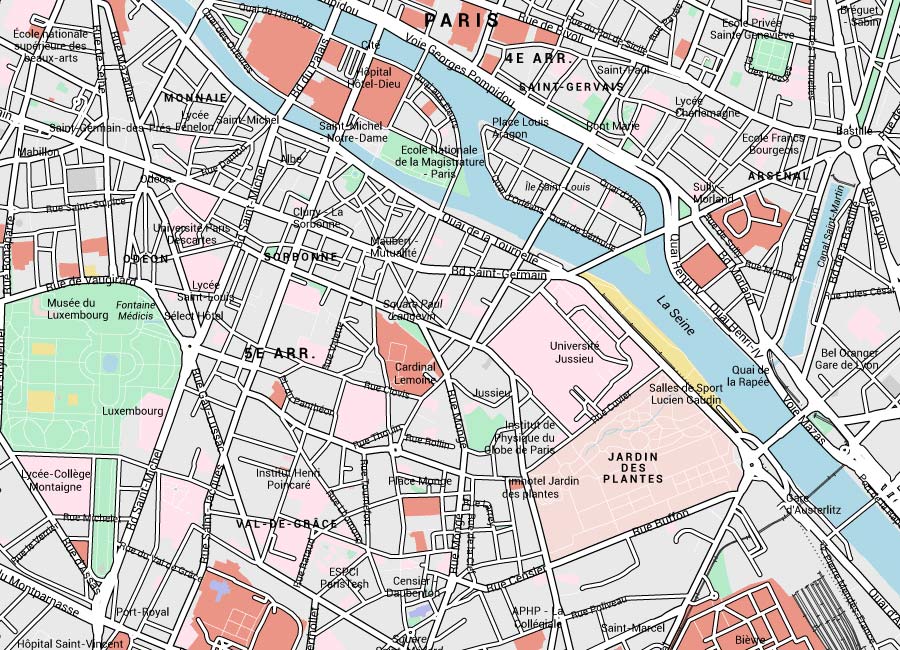
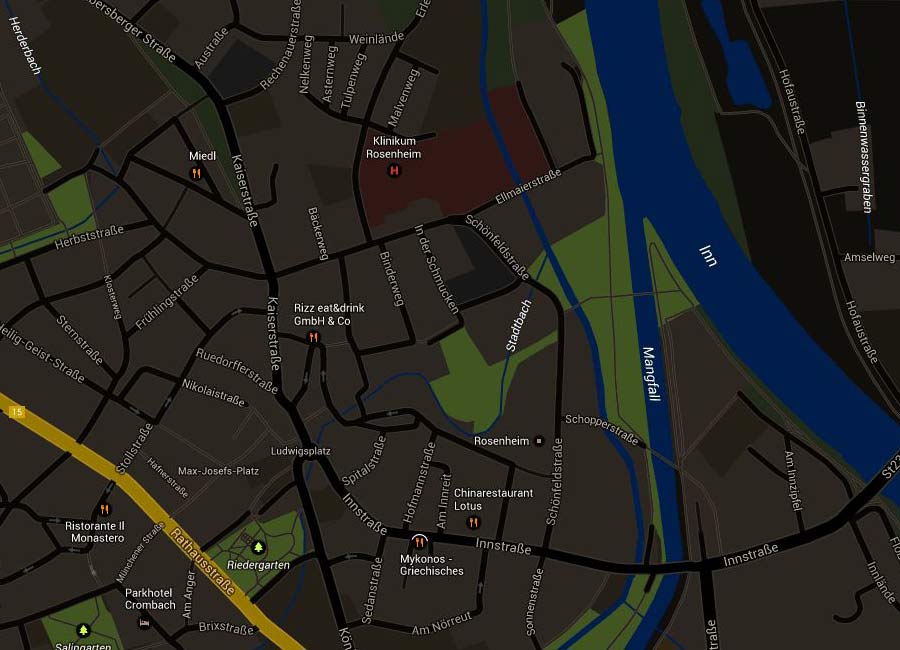
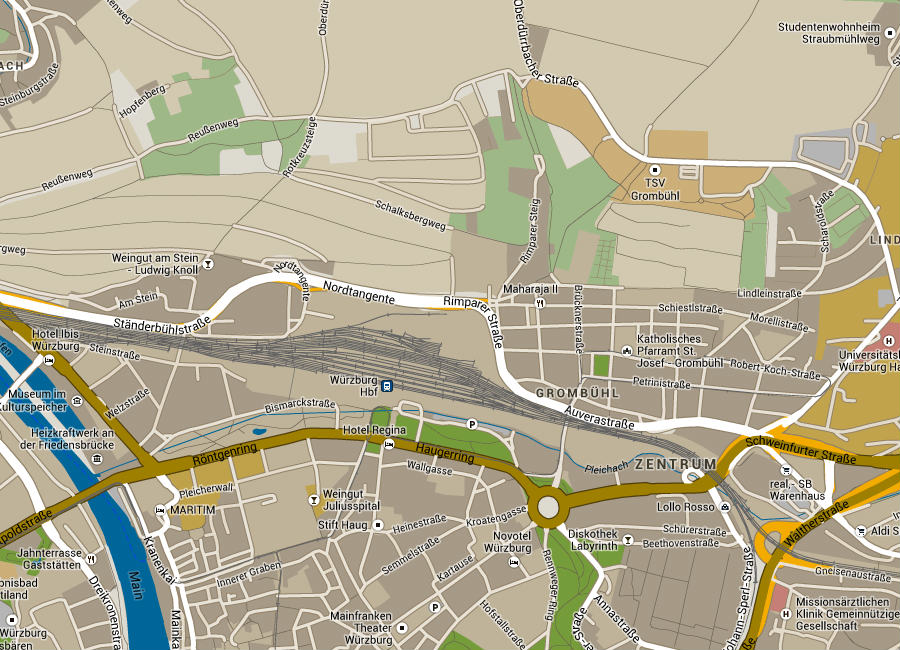
Colors for Google Maps contains many colorful skins for Google Maps.

A script changes the colors of the map.
The integration of the script is very easy and of course you can use a Google map with a colorful skin as well as the standard Google map.

It’ s easy to customize my colorful skins
For example: If you want to use a different color, you only have to change the color values?? or if you want to display an element, that I have hide, you can do this quite simply.

Create your own colorful styled skins for Google Maps
Use your favorite colors. Display only elements, that you want to have.

Successfully tested on iPad, iPhone and other mobile devices.
Compatible Browsers: Internet Explorer (IE7 and higher) Firefox, Safari, Opera, Chrome

Colors for Google Maps contains these colorful skins:

Jupiter

Children

Summer

Old

Older

Metro

Architect

Comic

Dark

Arctic

Full Moon

Grey

Dawn

Strong

Agriculture

Soft

Concrete

Crocus

only blue

Take also a look at the codecanyon screenshots to see all of them!

Download Colors for Google Maps (Media)

Slide Panel WordPress Plugin (Utilities)

A plugin help you to add slide panel via a text or image link, the panel can be updated via a exist post or page.

followrss

Features

  • Slide Panel content from exist post or page, keep the content’s flexibility and help you to update the panel easily.
  • Panel background and color can be customized via color picker in the backend.
  • Optional panel position and width, live preview in the backend.
  • Toggle button support HTML, for example can be in a text or image.
  • Compatible with latest jQuery and latest WordPress.
  • Multiple Slide Panel instance on same page.
  • Enqueue the js and css only when needed. Keep WordPress page size smaller.
  • You can add/edit the Slide Panel without touching the code. Customize/update the image and text with WordPress backend.
  • FAQ and source code are included in the package. Free update in the future.

Recommendation for you

Image Map HotSpot WordPress Plugin:

hotspot

Credit

jQuery http://jquery.com
sidr http://www.berriart.com/sidr/

Download Slide Panel WordPress Plugin (Utilities)

HTML5 Player Module for Joomla (Multimedia)
HTML5 FLASH PLAYER module displays media player on your Joomla website. By using JW Player 6, it can plays Video and Audio in many formats (mp4, mp3, flv, aac, m4a, f4a, YouTube…) and compatible with all most browsers and devices. The player automatically choose between HTML5 and Flash to bring the best performance on browsers and devices.

Download HTML5 Player Module for Joomla (Multimedia)

Banners Sort Order Module for Opencart (OpenCart)

This Opencart Module (Sort Banner) give you the possibility to order banners or sliders from the slide show trough the Opencart administration panel, then when you uploads images in “Banners” section (Admin / System / Design / Banners)

In this way your e-commerce website will start with the whished slider, and the banners will be arranged according to your needs. This module works for all types of Opencart theme.

When editing the “Banners” you will see a new column created named “Sort Order” where you can arrange banners by allocating an order number (only numbers).

This Opencart extension works only with vQmod and is tested on all versions of OpenCart since 1.5 (1.5.0 and up to date).

vQmod required to use this module! Please make sure you have vQmod installed on your ftp root system.

Demo available on:
http://sortorder.inwebb.info/admin
user: demo
password: demo

Download Banners Sort Order Module for Opencart (OpenCart)