WP Playlist Video Gallery (Galleries)

Upcoming Updates

  • jQuery Pagination – Pagination won’t refresh per click
  • Ability to hide Titles – They will show up while hovering thumbnail
  • Randomizing – Randomizing video
  • Ability to enable/disable auto play – Play on page load & auto play next

Description

wpPlaylistVG (WordPress Playlist Video Gallery) is an open-source PHP software that displays a beautiful YouTube video playlist. Search for videos by keyword, user name, specific video or video playlist. Add your favorite videos to your own playlists and show them on your website. You can create as many playlists as you like and add the generated shortcode to any post or page to show your selected videos… simple as that! If you would like to show all videos on one page, despite how many playlist you have, use this shortcode: [pvg list=’all’] Currently, we only supports youtube. wpPluginVG is extremely easy to use. Currently wpPlaylistVG only supports youtube.

Installation

  1. Download wpPlaylistVG
  2. Unzip into your plugins directory at `(wp-content/plugins)`
  3. Activate wpPlaylistVG from Site Admin > Plugins
  4. Click on option link on the main plugin page or
  5. Configure from Site Admin > Settings > wpPlaylistVG

Usage

Once you are in the plugins option panel you will need to start by creating your list name. To do so you will need to:

  1. Click on “Create/Delete Playlist”
  2. Enter a list name you would like to have in the textbox
  3. Click on the “Create list” button

Your list will than be created and it will be shown below the word “Playlist”, next you will also note that the shortcode has already ben created for you along with other options. You can either copy this shortcode and add it to a page by doing the following:

  1. Copy shortcode (i.e [pvg list=’hip hop’])
  2. Click on pages in the admin left panel
  3. Create/Modify a page
  4. Paste the shortcode in side the textarea of the page.
  5. Hit the “Update” button on the right hand side of the page

(Note: Alternatively you can use this function pvg_VideoPage (“listname”) for any custom created template pages)

To add a video to a playlist head back to Settings->wpPlaylistVG in the admin panel and here you will have to:

  1. Click on “Search/Add Videos”
  2. Enter your keyword, username, playlist id, or video id.
  3. Hit the “Search” button and watch the lists of videos appear.

Select the video you want to add to your list by clicking on the dropdown box on the “Add/Move” column. Once you have done all that, you can go back to “Create/Delete Playlists” and on the list that you selected should now be clickable. If you click on a Playlist a new window will pop open and you will be presented with the videos that you have selected for this playlist. Here you will can remove any video on the playlist. Once you have completed these steps and added a shortcode to a page, you may view the page and see how it looks. There is also one more optional step that you may take to configure how the video gallery may look. If you are still in the admin page you may want to…

  1. Click on “Configure Gallery”
  2. Change Video, Thumbnail sizes, or even add how many thumbnails you want to show per page, or per raw.
  3. Click on submit to save changes (Note: When clicking on submit using default values, the form will not change)

These are all the options we have for now, but we do expect on implementing more options and
features. Please feel free to speak with us if you ever need to.

Browser Compatibility

Playlist Video Gallery works on all main browsers, including Opera. Also works on mobile devices changing the way it displays the videos. It has been tested on Iphone 5, Ipad and Android phone/tablets. Check screenshots.

Credits

Support & Feature Requests

Please email us at [email protected] or contact us via skype (skype info is in the plugin panel) if you’re having trouble with your plugin, and I will do my best to get back to you as soon as possible. Please be patient, as I work freelance full time. I will not answer support requests left as comments on codecayon, email me instead.

I will gladly help squash any bugs that might pop up and assist as best I can in resolving issues with the plugin itself. I will continue to update wpPluginVG if updates to the WordPress core render it incompatible over time.

However, I do facilitate feature requests, also please keep in mind that we are constantly working on adding new features to wpPluginlistVG. We do have plans on making this the best video gallery plugin on the market.

Download WP Playlist Video Gallery (Galleries)

Noo Portfolio – Responsive Portfolio with Isotope (Galleries)

Noo Portfolio is a visually beautiful and responsive Joomla module for an outstanding Portfolio/Gallery on your site.
Using the power of jQuery, Noo Portfolio presents your works (from Joomla! Content, K2 or Image Folders) in a grid layout with a fancy lightbox (custom width or 100% width responsive). You are able to freely arrange items in portfolio, integrate the portfolio to your site as a separate section, enable users to click to view more detail or share your works, etc.
All items in Noo Portfolio can easily be divided in categories and it’s your choice to load which one in frontend. Each item in portfolio has a brief description with a View More icon to let users view full description in a lightbox, or redirect to the article.
One plus to Noo Portfolio is that, it is highly customizable so you can unleash your creativity to represent your work. For your inspiration, you can visit our site and see how we customize Noo Portfolio in our templates: NOOne, Noro and Noo Designer.

More demo links

NOOne Template: http://demos.nootheme.com/joomla3/noone/#section-3
Designer Template: http://demos.nootheme.com/joomla3/designer/index.php/portfolio/portfolio-door-style
Noro Template: http://demos.nootheme.com/joomla3/noro/index.php/project

Highlight Features

  • Fully responsive & supports Joomla 3.x
  • iPhone & Android Swipe Touch enabled
  • Using CSS Animation with FallBack to jQuery
  • Display items with custom width or 100% width responsive
  • Creative style in user interface
  • Support multiple languages

Download Noo Portfolio – Responsive Portfolio with Isotope (Galleries)

AJAX Cart By Xj (Magento Extensions)


Follow me on Facebook

Follow me on Twitter


Follow me on Google+

\

Ajax Cart is an extension that will help to add products to shopping cart directly from category and product page using AJAX. Customers would be able to add all product types like simple,configurable,bundled,etc from the category page also from Product Detail page.

Major Key Features

  • Enable / Disable Popup window from Backend. If You want to show popup window for after adding product to cart than simply enable popup window, and if you don’t show popup window than it will display slide effect in header indicates that your product was added to shopping cart.
  • Apply Ajax on add to cart button for category list page and product detail page. (Manageble from admin panel, If you don’t need AJAX than disble this feature from admin panel).
  • Apply ajax on add to wishlist/add to compare buttons for category listing page and product detail page. (Manageble from admin panel, If you don’t need AJAX than disble this feature from admin panel).
  • Easy to install and configure.
  • Provide a better customer experience.
  • Easy to install and customizable for any type of Magento theme.
  • Compatible with Magento 1.3.x, Magento 1.4.x, Magento 1.5.x, Magento 1.6.x, Magento 1.7.x., Magento 1.8.x.
  • Download AJAX Cart By Xj (Magento Extensions)

    Live Tv2 (Full Applications)

    Subscribe to RSS Feed
    Follow on CodeCanyon

    Live Tv2 for iPhone

    Features

    • Remote plist channel list
    • Xcode 5.0.1 and higher, storyboard
    • RTMP, RTPS, HLS (m3u8), HTTP, MMS live stream support
    • Add unlimited tv channel for frosted view controller
    • Custom player, simple customize in storyboard
    • Player based on Vitamio open multimedia framework
    • Popup channel info view and channel website view
    • Share view – Facebook and Twitter
    • Cellular network warning alert view (after a 10 minutes)

    Download Live Tv2 (Full Applications)

    SafeGuard – Protect your website from threats (Miscellaneous)

    Get in touch with us


    SafeGuard

    With SafeGuard you can protect your website from many threats.

    If you want you can also log this threats and review them in the admin panel.

    You can redirect blocked threats to a custom page for example a access denied page.

    Protection against

    • Proxys
    • VPNs
    • Spammers
    • DDos (Mass requests)
    • SQL Injections

    Other features

    • Admin panel
    • Enable logging for the desired threats
    • Redirect blocked threats to a custom page
    • Very easy to use
    • Well documented

    Changelog

    v.1.00 – 13.11.2013

    Download SafeGuard – Protect your website from threats (Miscellaneous)

    jQuery Responsive Google Charts Plugin (Ratings and Charts)

    Responsive jQuery Google Charts Plugin

    Its now easier than ever to use Google charts in your website. No javascript knowledge or jQuery knowledge is required.

    You can easily set up nice, SVG, responsive charts on your websites by setting a few HTML data- properties. Here’s all the HTML you need to set up one of six charts.

    <!--Chart HTML-->
        <div id="mybarchart" data-gchart
             data-chartsize="med-chart" 
             data-charttitle="My Cool Bar Chart" 
             data-horizontalcharttitle="Some data on horizontal axis" 
             data-verticalcharttitle="Some data on vertical axis" 
             data-containername="mybarchart" 
             data-datasource="https://docs.google.com/spreadsheet...
             data-gcharttype="bar">
        </div>
    

    Yes, its that simple. Add an unlimited number of charts by simply repeating the HTML code snippet above. Here are the different chart types in version 1:

    • Bar Chart
    • Column Chart
    • Bubble Chart
    • Candlestick Chart
    • Line Chart
    • Pie Chart

    Customization

    Easily change the global color scheme and even the font applied to the charts.

    Download jQuery Responsive Google Charts Plugin (Ratings and Charts)

    Massive Visual Builder for WordPress (Utilities)

    Massive Visual Builder: Enable its users to build WordPress Pages visually using a wide set of Shortcodes With advanced platform that has every things you need to manage page items and their layouts, came with post modules feature To display posts categories in different customized Style & Skin .

    Features

    • Post Modules: Multi miscellaneous modes to display post in fancy ways.
    • 48 Advanced Widgets: massive advanced collection of widgets including HTML widgets, WP widgets and more.
    • Template System: To save and reuse whatever you build.
    • Extendable: Add Custom Content and Massive Visual Builder will interactive with them smoothly.
    • Unlimited Layout: generate infinite templates with different layouts.
    • Responsive Grid: To display in every machine.
    • Easy to use: with Drag and Drop feature and dimensions controller.

    Plugin Elements

    Post Modules – Custom Content – Header – Menu – Frame – Spoiler – Accordion – Divider – Spacer – Button – Label – Fancy link – Tabs – Column – List – Box – Media – Table – Google Map – Facebook Like Box – Tweets – Google+ – Members – Guests – Siblings – Subpages – Plan – Service – Note – Private Note – Quote – Pullquote – Highlight – Dropcap – Bloginfo – Permalink – WordPress Calendar – WordPress Archive – WordPress Categories – WordPress Links – WordPress Meta – WordPress Pages – WordPress Recent Comments – WordPress Recent Posts – WordPress Search – WordPress Tag Cloud – WordPress Text Widget.

    Apply Post Modules 1

    – Apply Post Modules 2

    – Add Custom Elements 1

    – Add Custom Elements 2

    Download Massive Visual Builder for WordPress (Utilities)

    Bootstrap Indigo (Bootstrap)

    Bootstrap Indigo has the purpose of being a real Bootstrap Theme.

    Enjoy a brand new look of your website built on Bootstrap In Under a minute !

    Main Benefits :

    • Simple
    • Balanced Color
    • Stress-Free Theme changing
    • I guarantee under 1 minute transition from classic bootstrap to this theme.
    • Carefully crafted to change the look, and not the structure.
    • Designed for you

    Brand new Look

    • with new buttons
    • navigation pills
    • navigation tabs
    • default & inverse navigation bar
    • pagination
    • pretty labels
    • pretty badges
    • Incredible alerts look
    • Natural progress bar color
    • Natural Linked Items
    • Zen List Groups
    • Panels that are full of color
    • And true Wells.

    What are you waiting for ? Enjoy the Demonstration.

    Download Bootstrap Indigo (Bootstrap)

    Facebook Win Win (Social Networks)

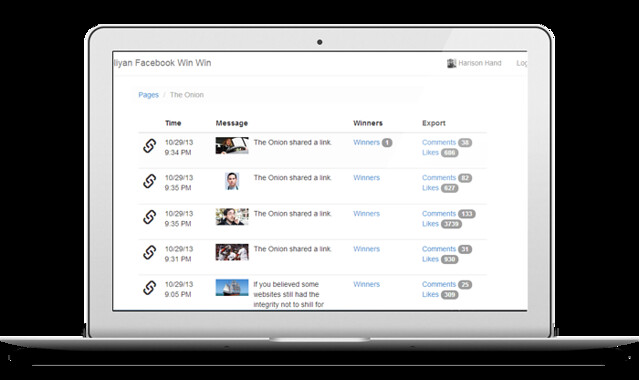
    Magnoliyan Facebook Win Win is a quick and easy way to pick a winner for Facebook timeline post promotions.

    Magnoliyan Facebook Win Win
    You already know that Facebook now allows to run promotions and winning games directly from your timeline posts. You are free to reward your commenters and/or likes and boost your page social engagement. Just announce: like to win or comment to win. If you are lucky you can get hundreds or thousands of likes and comments, but there’s no built-in facebook tool for you to export or randomly pick some of comments or likes.

    Magnoliyan Facebook Win Win helps you select a page, list posts, export comments, export likes and randomly pick one or more winners.

    Features

    • Select Winner(s) from Post “Likes” and/or “Comments”
    • Export Likes and Comments as CSV
    • Limit 1 Person to 1 Candidate
    • Javascript only, no server side scripts!
    • No DB needed
    • Created with modular backbone.js and require.js
    • Created with Bootstrap 3

    Requirements

    In order to run Magnoliyan Facebook Win Win properly you need to:

    • host it on a domain (even local/private virtual domain can work for testing purposes)
    • create your own facebook login app pointing to that domain. Please read this tutorial for more information

    Download Facebook Win Win (Social Networks)

    Webber – Web Presence Builder (Images and Media)

    What is Webber

    Webber is a web presence builder, it provides a quick start for companies and individuals towards having their web site on the internet. All aspects of the web site are controllable from within the admin area.

    Webber supports photos, embedded videos, google maps and a lot of other useful features needed to create a web site in a matter of minutes.

    Features

    – Site Sections Creation
    – About Us section
    – Filterable Portfolio
    – Embedded Items (Youtube, Soundcloud, …etc)
    – Team members / Employees Section
    – Working Contact Form with “Thank You” message
    – Custom Footer
    – Image Slider
    – One Click Google Maps Creation
    – and more

    Enjoy!

    Download Webber – Web Presence Builder (Images and Media)

    Weather 7 (Full Applications)

    Weather 7 is a elegant solution to obtaining weather information via the [WeatherUnderground API](http://www.wunderground.com/weather/api/). You can build off our already included full Xcode project or simply add to your existing project. Fahrenheit and celsius temperatures are auto calculated based on the users locale so there is no need for complicated calculations. We have included all the code to get current the conditions along with a 4 day forecast and a 4 day detailed text forecast for your current location or a searched location complete with custom weather icons and weather icons from Weather Underground.

    A simple but powerful component that demonstrates the ability to connect to and fetch weather data from the WeatherUnderground’s developer API. The source code is very easy to understand allowing you to added additional calls to the API and fetch the weather elements that fit your needs.

    FEATURES:

    • Get weather data for any location worldwide to include your current location. Includes database for saving locations. Includes search controller for Geo location and searching for locations.
    • Connect and retrieve weather data from Weather Underground’s developer API using JSON
    • Includes full sample app to jumpstart your development. Weather 7 is built for iOS 7 but supports iOS 5+

    Download Weather 7 (Full Applications)

    PayLeap Payment Gateway for WooCommerce (WooCommerce)

    PayLeap provides an comprehensive payment platform that delivers a full suite of secure payment capabilities for many different processing environments, plus innovative extras like social sharing and invoicing.
    Low, easy to understand rates— including Zero Set Up Fees. Also PayLeap will beat any contracted pricing you currently have if you simply ask them.

    1. Get rates as low as 0.75%
    2. No hidden fees

    So what this Plugin does is allows you to accept Payments through WooCommerce Store using the PayLeap Account.

    Download PayLeap Payment Gateway for WooCommerce (WooCommerce)

    PayLeap Payment Gateway for Jigoshop (Jigoshop)

    PayLeap provides an comprehensive payment platform that delivers a full suite of secure payment capabilities for many different processing environments, plus innovative extras like social sharing and invoicing.
    Low, easy to understand rates— including Zero Set Up Fees. Also PayLeap will beat any contracted pricing you currently have if you simply ask them.

    1. Get rates as low as 0.75%
    2. No hidden fees

    So what this Plugin does is allows you to accept Payments through Jigoshop Store using the PayLeap Account.

    Download PayLeap Payment Gateway for Jigoshop (Jigoshop)

    Ultimate SEO plugin for OpenCart (OpenCart)

    OpenCart is one of the best eCommerce solutions available today. OpenCart designed to meet various eCommerce needs, no matter of you have just one product for sale or your business could offer hundreds, thousand or even the million of products. However, OpenCart have some disadvantages in terms of SEO which could cause big problem to get good ranking for the site.

    Ultimate SEO plugin for OpenCart is aimed to resolve the major of OpenCart SEO issues. Ultimate SEO will help you to archive higher ranking in Google and other search engines.

    Here is the list of the main features what Ultimate SEO does:
    Removes the URL duplicates
    Generates the 404 Error pages
    Support multiple languages
    Generates SEO friendly sitemap
    Provides SEO monitoring system
    Force OpenCart to follow the hierarchy
    Fully automated
    Friendly to other plugins

    … and much more!

    Download Ultimate SEO plugin for OpenCart (OpenCart)

    Traffic Exchange – Exchanger (Miscellaneous)

    Traffic Exchanges are websites that allow users to advertise their website by visiting other websites. Traffic exchanges – Exchanger is build with lots of features such as admin panel where the site owner can easily add/edit stuff, and with nice unique design. Start you’re own traffic exchange now.
    You can also make money by selling points. Users buy points to promote their website.
    Username: admin
    Password: admincp

    Login[b]

    cpanel:[/b]
    Settings
    News Feed
    Change Skin
    Recaptcha – blocked sites
    Reported sutes
    Traffic analytics

    Total Sales
    Total Users – activate/banned/admin
    Sites – active/confirm
    packages – sell points
    Coupons – add/ coupons giveaway free points
    Points transfer log
    Edit Faq page
    and more…
    Surf – Surf links and earn points
    Edit profile
    Upload profile picture
    Add/Edit/Delete Youre site
    Referrals area
    Buy Points – to promote you’re website
    Coupon – Get free points
    Transfer/Donate your Points to other users
    and more…

    Site - Logged in[/b]

    Download Traffic Exchange – Exchanger (Miscellaneous)