


DHMENU – Mega Menu Responsive And Sliding Menu (Menus)

Introduction

This is user-friendly, highly customizable, responsive mega menu WordPress plugin. It works independently of the WordPress system menu. With this plugin, your site has a beautiful mega menu , user friendly, responsive or create sliding your menu in mobile apps.

Features

  • Easily Installation
  • Easily configure mega menu in admin page with toolbar
  • Highly customizable through the drag and drop style generator
  • 100% responsive or sliding menu in mobile apps
  • CSS3 transition
  • Horizontal/ Vertical orientation mega menu
  • Easily configure show/hide drop-down menu when colapse
  • Easily costomize drop-down: up to 12 columns, extra class, dropdown with(support full-with), alignment…
  • Support 300+ icons in Font Awesome 4.0.3
  • Easily assign widget area

Video Tutorials

Youtube(like demo) : http://www.youtube.com/watch?v=J8l1nUz5zhc

Changelog

Version 1.0.0 
Initial Release

Download DHMENU – Mega Menu Responsive And Sliding Menu (Menus)

Easy Facebook Contest (Social Networking)

Easy Facebook Contest is Easy Facebook Fanpage and Promotion Builder plugin which allows you to run unlimited Facebook contests. Please ensure you have purchased and installed the latest version of Easy Facebook Fanpage and Promotion Builder before using this plugin.

Demonstrations

Easy Facebook Fanpage and Promotion Builder demonstrations


Features

  • Create and run unlimited number of contests
  • Reward users for referring friends – you can setup bonus which user will get if referred friend enter contest.
  • Easy create designs with Page Builder
  • Fan Gate – limit contest only to your fans
  • Share Gate – a quick way to share message on participant wall which all friend will see.
  • Social Sharing – people will share your page over social networks to get additional bonus (Facebook, Google+, Twitter)

Features you get with Easy Facebook Fanpage and Promotion Builder

  • Easy integrate into your current WordPress site and start delivering content
  • Create Unlimited Facebook Fan Pages
  • Create Fan Pages quickly with easy to use Page Builder
  • Works with your 3rd Party Plugin your have installed
  • Create amazing pages with advanced design options
  • Fangate – display different content for fans and non-fans
  • Sharegate – display specific content only when users share your page
  • Integrate Facebook comments, send and like with easy to use shortcodes
  • Facebook Sweepstakes and Giveaways
  • Facebook Application Manager

Advantages of running Facebook Contest

  • Facebook can make your brand go viral.
  • Easy access to thousands of new potential customers.
  • Drives Traffic to Your Website.
  • Improves your SEO.
  • Create amazing promo campaigns and attract new fans.
  • Easy promote your special deals, products, services, events.
  • Increase number of fans or your mailing list with potential new customers.

A Facebook Contest is an easy way to engage Fans and convert them into email signups by enticing them with a prize. One Facebook contest can give you the same return on investment as hundreds of pieces of content, saving you hours. For small business owners and small marketing teams, this time-savings is invaluable. In this article you’ll learn how to run a Facebook Contest to achieve specific goals and grow your business.

Contests are a great way to:

  • Get exposure for your page. People – especially those on social media – love to be the first person to know about something, and to tell others about it. So give them some fodder for their social sharing habit! If your contest has a great prize, your followers are sure to share it with their social networks to maintain their reputation as a great source for information among their friends. Once their friends come to your Facebook page, they will probably give you a ‘like’. And even if they don’t their awareness of your brand has already been increased.
  • Increase your number of likes. There is an organic and an inorganic way to go about this. The first is to simply count on the virality of your contest to bring exposure to your page and gain likes that way. People who enter your contest probably already like your page, but if they don’t, they’ll be sure to like you now in order to hear when the winner is announced. Another common practice is to make liking a mandatory part of the entry process. This can be a highly effective way to gain more followers on Facebook, but be aware of what your goals for this contest are before deciding to go this route. If your goal is strictly to increase the number of people who like your brand, this is a great idea.
  • Grow your email database.
  • Facebook contests are fun for your fans!

Live demo

  • Font end demo can be found at Easy Facebook Demo Contest page
  • Back-end demo can be seen here (username: demo, password: demo). Please note that back-end demo is not connected to actual front end preview. In back-end demo Facebook settings page is disabled – you may preview this part in screenshot section.

Documentation

Please see the Easy Facebook Contest Documentation to preview all of the features and read for special requirements that plugin require to work. This is plugin for Easy Facebook Fanpage and Promotion Builder. Please ensure you have purchased and installed the latest version of Easy Facebook Fanpage and Promotion Builder before using this plugin.

Download Easy Facebook Contest (Social Networking)

MySQL Backup Pro Class (Database Abstractions)

MySQL Backup Pro Class

  • backup your MySQL database as
    SQL
    ,
    CSV
    or
    XML
    ;
  • upload backup to
    FTP
    server;
  • send backup as
    email
    attachment;
  • upload to
    Google Drive
    ,
    Dropbox
    ,
    Box
    ,
    SkyDrive
    and other cloud using
    WebDAV
    ;
  • send to server using
    PUTS HTTP;
  • support
    MySQL
    and
    MySQLi
    driver;
  • use CRON to automate backup your data;
  • easy installation on any server;
  • examples of both functions are included;
  • fully documented
    .

Examples

FILE

Save backup on server as file

Backup::init($params)->as_sql()->save($path);

MAIL

Send backup as attachment on email

Backup::init($params)->as_sql()->mail('[email protected]');

FTP

Upload backup to FTP server

Backup::init($params)->as_sql()->ftp($ftp_params);

HTTP

Upload backup to HTTP server using method PUTS

Backup::init($params)->as_sql()->http($http_params);

WebDAV (Cloud)

Upload backup to cloud using WebDAV

Backup::init($params)->as_sql()->webdav($webdav_params);

For more examlpes please read description.

Changelog

VERSION 1.0

  • Released

Download MySQL Backup Pro Class (Database Abstractions)

Google Analytics Opt-Out WordPress Plugin (Miscellaneous)

The Google Analytics Opt-Out WordPress Plugin is an advanced WordPress Plugin that allows your users to Opt-Out of Google Analytics.

According to an EU Article (2009/136/EG) of the EU-Privacy Directive (‘The Cookie Laws’), web sites that target EU users have to provide an opt-in or an opt-out button (depending on the country). This plugin provides an opt-out link via shortcode and a banner.

Plugin Features

Opt-Out Shortcode

With a click of a button you’re able to add a simple opt-out link to your Privacy Policy page.

Banner fixed to the bottom

A banner will be fixed to the bottom of every page so that it clearly shows that the user can opt-out.

Customization

Customize the banner with your own colors (CSS) and your own texts.

Easy Settings

Just set your UA-Code and that’s it! It also incorporates with Yoast’s Analytics plugin.

Simple JavaScript Code

A JavasScript code prevents the user for being tracked.

Support & Testimonials

  • Our plugins are made in Germany by a German engineer.
  • All technical requests regarding the plugin will end up in the engineers email account not in asia or anywhere else.
  • You will get support from the guy who wrote the plugin.
  • Maybe this are the reasons why our customers are so satisfied.
  • “Dear WP-Buddy, WOW, thanks so much for super service and great product.”
  • “Thanks WP-Buddy for listening to your buyers. Great support thanks again.”
  • “Thank you so much for the briefing. Awesome services.”
  • “I just found your plugin on Code Canyon, I love the quality of it and it shows you have great talent.”
  • “Thanks a lot for the help and support mate. It seems good after testing… please let me know u have anymore products for sale or in pipline lol”
  • “Thanks SO MUCH for taking time and writing to me the valuable information about snippets.”

Plugin Requirements

  • This plugin requires: PHP5.3 running on your webserver (if you don’t know how to update to the latest version, read this),
  • a WordPress Version higher or equal 3.7
  • a Google Account and Google Analytics, of course :)
  • No Javascript errors on your website. Otherwise the plugin will not work. Read more about this on WordPress.org

Important Notes

  • The installation of this plugin does not replace legal advice you might need to put the EU-Privacy Directive to practice accordingly.

Version History

The current version is 1.0 (Nov. 12, 2013). Click here for a full version history.

Have any questions? – FAQ

Could not find an answer to your question? Please consider reading the Google Analytics Opt-Out WordPress Plugin FAQ first.

Check out my WordPress Plugins and Themes!

Google Analytics Opt Out WordPress Plugin
Google Custom Search WodPress Plugin
Purple Heart Rating WordPress Plugin
Rich Snippets WordPress Plugin
Google Plus Author Information in Search Results
Product Countdown WordPress Plugin for WooCommerce
Google Drive as WordPress CDN Plugin
Schema Corporate WordPress Theme
Login With Amazon for WooCommerce WordPress Plugin

Download Google Analytics Opt-Out WordPress Plugin (Miscellaneous)

Social Media Wall Component (Social Networks)

Social Media Wall Component:

  • 7 difference graphic – you can easy add new,
  • 4 difference version of tabs (3 grapgics, 1 text) – you can easy add new,
  • 8 Background effects + you can easy add your own
  • you can set background color,
  • you can set width and height of information area,
  • you can set which tab is the first,
  • 2 PSD files – easy way to add new graphic
  • you can mix styles

Flag Counter

Download Social Media Wall Component (Social Networks)

Gravity Forms Simple Drip – Autoresponder Addon (Newsletters)

I love Gravity Forms for WordPress and it’s cool how it already sends simple user email notifications. Why not just also managed my simple autoresponder campaigns as well!!

Now it can with our new powerful time delay feature!

Gravity Forms Simple Drip Autoresponders Addon for WordPress is the easiest way to create a simple autoresponder campaign – a.k.a. email drip campaigns – using a plugin you probably already have!

Easy to Use

To create a dead simple autoresponder/drip campaign, follow these easy steps:

1. Upload and activate the GF Autoresponders plugin
2. Create a form (or use an existing one)
3. Create a new form notification
4. Configure the recipient, in most cases select “email field”
5. Enter your email copy in the WYSIWYG editor as you normally would
6. Select “Set Time Delay”
7. Enter how long you would like the email to delay until send!
8. Presto! You’re done.

Only steps 6 and 7 are ones that you would not normally do! Super Simple!

Once the user has submitted a form entry and time delay has been triggered, the user will receive your pre-determined email message in plain text format. No need to use external email marketing programs such as MailChimp, Aweber or Constant Contact to create dead simple autoresponder campaigns. No added fees, APIs Keys, no limits, less hassle!

Perfect for any content and email marketing strategy using WordPress!

Requirements:

GF Simple Autoresponder is an addon for the very popular Gravity Forms WordPress premium plugin. A Gravity Forms licence is required in order to use this plugin.
WordPress – Tested with WordPress version 3.7.1

Installation:

Upload the GF Autoresponder Plugin into WordPress
Activate the Plugin
A new option for “time delay” will be added into Gravity Forms’ native Notifications settings.

Changelog:

1.0 – Initial Release – 11/11/13

Download Gravity Forms Simple Drip – Autoresponder Addon (Newsletters)

Veno File Manager (Project Management Tools)


If you are looking for a simple and flexible php plug-and-play file manager, VFM is for you!

Share files with your clients by creating new users with dedicated folders, or simply use it as your personal file cloud.
Access from any device, manage users and general settings from administration panel

No DataBase needed.
With many useful features:

  • multiple users permissions
  • multiple file uploading
  • quick image preview
  • upload progress
  • files and folders name editing
  • sortable items by name, date and size
  • language manager
  • e-mail notifications
  • hotlinks prenvented
  • easy customization

Download Veno File Manager (Project Management Tools)

Simply A File Manager (Miscellaneous)

Just Simply A File Manager

Need a quick easy to use, no database, PURE PHP file manager? Need to add feature packed to that list? Then look no further!

Features

  • Bootstrap 3!
  • Mobile AND Cross Browser
  • Multi User
  • No Database
  • Real time rootkit and shell scanner
  • Upload
  • Copy
  • Move
  • Zip
  • Unzip
  • Delete
  • Download
  • Users will only ever see their directory!
  • Pure php functions

Demo Logins

  • user1 : password
  • user2 : password
  • user3 : password

Improvements

We are always looking for suggestions to improve our scripts, please let us know if theres anything you would like to see.

Download Simply A File Manager (Miscellaneous)

Premium SEO Pack – WordPress Plugin (SEO)


What’s Premium SEO Pack ?

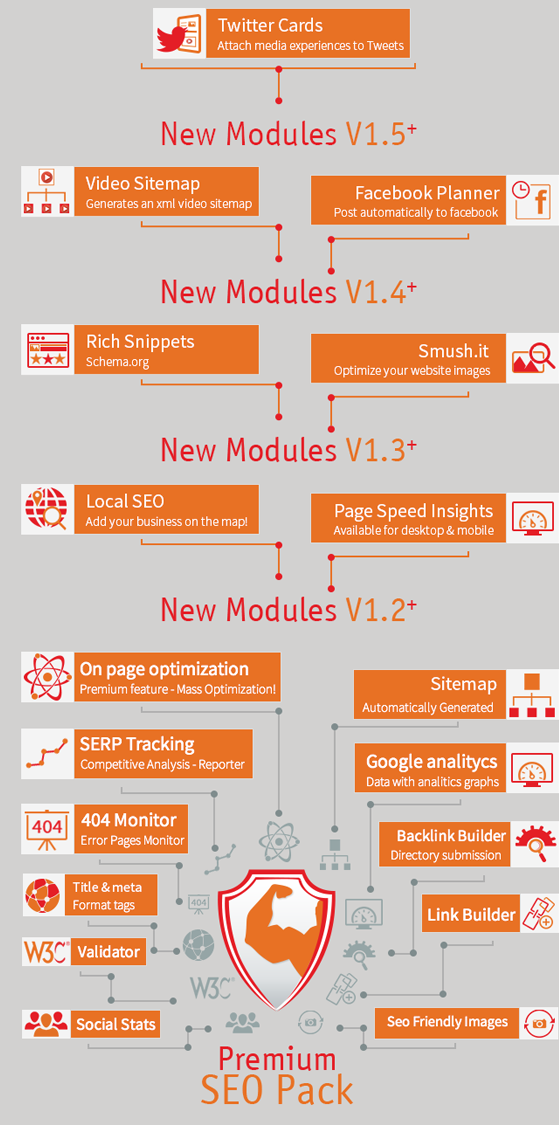
Premium SEO Pack is the newest and most complete SEO WordPress Plugin on the market!

Also it has the most unique feature, that cannot be found on any existing plugins on the market.

It’s called SEO MASS OPTIMIZATION and it allows you to mass optimize all your post/pages/custom post types in just seconds!

The Premium SEO Pack Plugin has everything that you can possibly need, starting with page analisys, social stats, page validation, SEO Frendly Images and many many more !

Mass Optimization & On Page Optimization

Mass Optimization

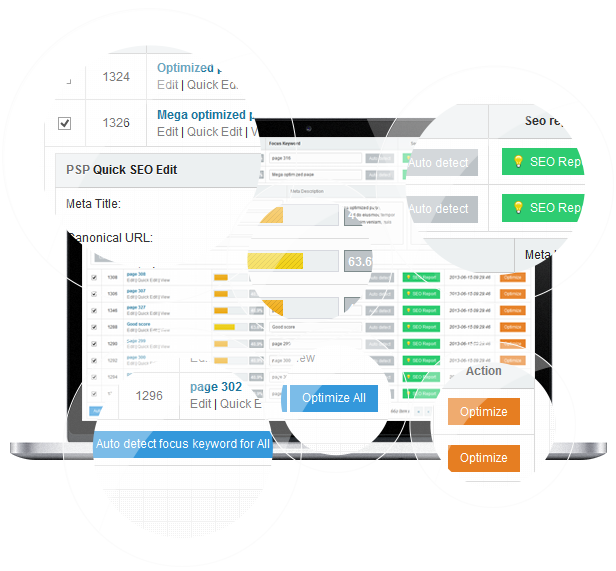
This is a premium feature that will allow you to mass optimize your wordpress website in just a few clicks!
It’s the most unique feature and you will not find it anywhere else on the market.

How does this work? Well this module allows you to optimize all your posts/pages/custom taxonomies at once!

Using this module you can auto detect the Focus Keyword for all posts/pages/custom taxonomies in just the click of a button! And not only that!
You can mass optimize the Meta Titles, Meta Descriptions and Meta Keywords for all posts/pages/custom taxonomies.

What can be easier than that? Optimize your WordPress Website in seconds!
On Page Optimization & On Categories Optimization!
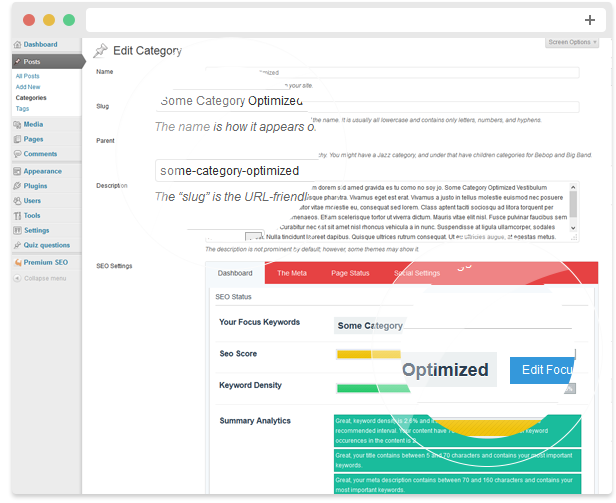
Another unique feature, we have optimization for categories as well! And for any custom taxonomies!

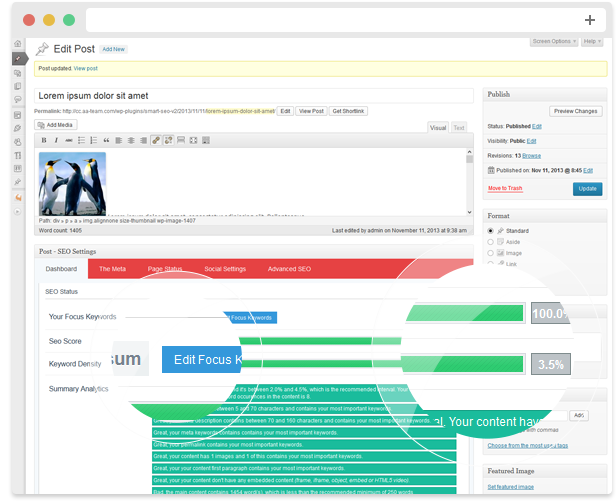
Here you can set your Focus Keyword, Check the SEO Score, The Keyword Density, The Meta with – Rich Snippet Preview, SEO Title, Meta Description & Meta Keywords.

You can also see a Page Status where you can check all the main elements, if they are in the right parameters.

Also, you can setup Social Settings, for Facebook, to use Facebook Meta, Title , Description and Image.

For advanced users we have some Advanced SEO, that includes the Meta Robots Index, Meta Robots Follow, Include in Sitemap & Canonical URL.
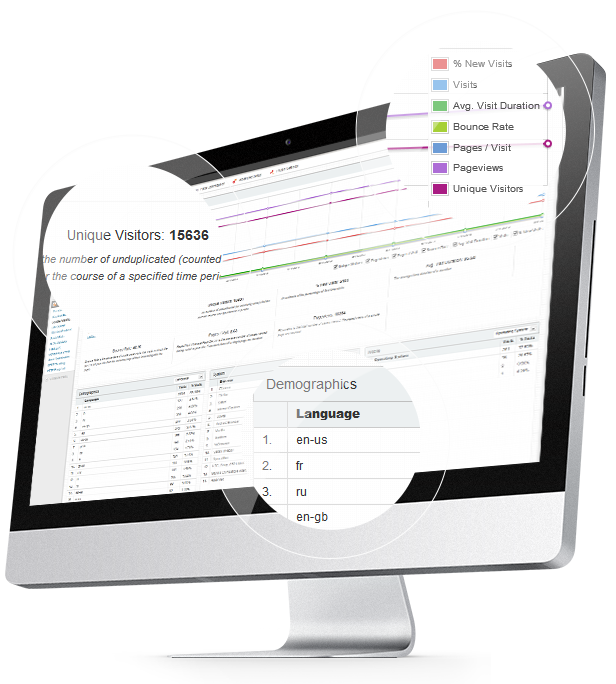
Google Analytics

Google Analytics can be a bit complicated if you don’t know what you’re looking for. We’ve made a module that takes the data from Google Analytics and transforms it into an easy to understand dashboard, that will allow you to see the impact on search engines, and not only that.
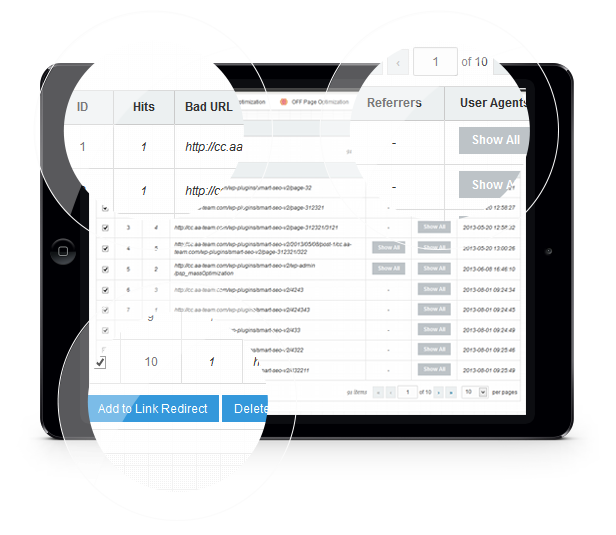
404 Monitor

Our SEO Pack also contains a 404 Monitor Module.
Keep your users visiting experience at a high level by monitoring the 404 error pages.

On this module you can see what URLs are referring visitors to 404 pages, how many hits it had and the possibility to redirect them to another page.

This helps you keep your ranking without google downgrading you.
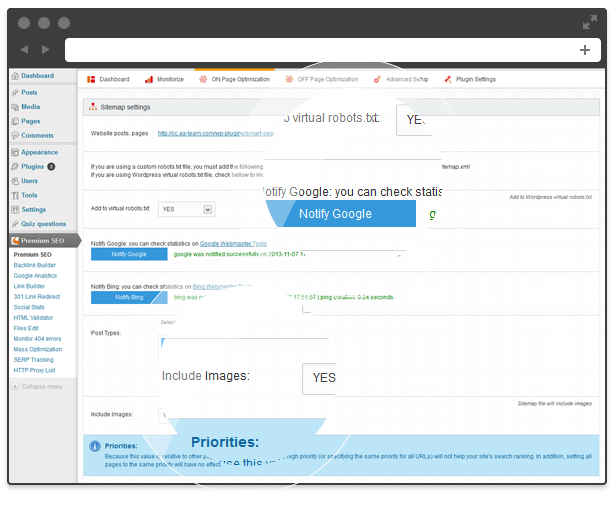
Sitemap

The Sitemap Module helps you create a sitemap for your WordPress website.
The sitemap is generated automatically, and you can submit it to Google or Bing right from the dashboard.

You can choose what to include, and if you want to include Images as well.

You can also setup how often it should update, depending on how much new content you have.
Title & Meta Format

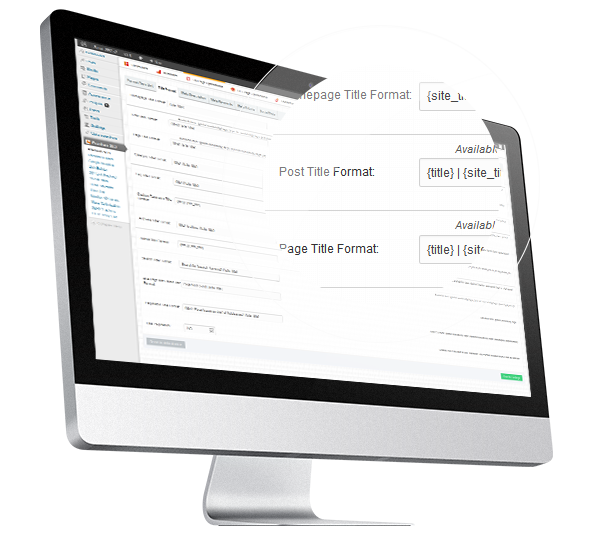
Using this module you can set custom page titles, meta descriptions, meta keywords, meta robots and social meta using defined format tags for Homepage, Posts, Pages, Categories, Tags, Custom Taxonomies, Archives, Authors, Search, 404 Pages and Pagination.
SEO Friendly Images

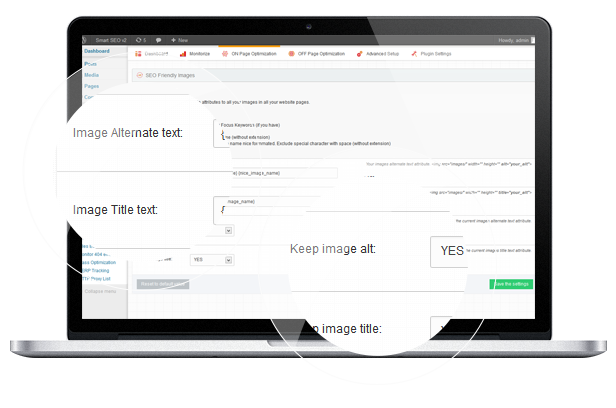
Images Optimization is an important part of Search Engine Optimization.
How does it work? This module will automatically update all images with proper ALT and Title Attributes.

If they don’t have ALT setup, the SEO Friendly Images will add them according to the options you set.

The SEO Friendly Images describes your image to search engines and when a user searches for an image this is a big factor for matches.
Link Builder

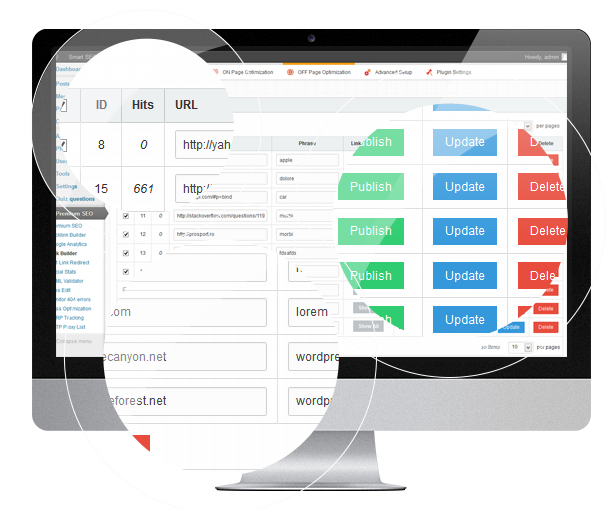
How does this module work? The Link Builder Module allows you to improve your site internal link building.

You can create list of keywords and URLs, and they will automatically be created. You don’t have to bother to take each post and modify it, this module does that for you! All you have to do is to insert a keyword and a URL, and within all your articles the links will be published.

Why do you need it? It Improves the user’s experience around the website with internal links, It Improves SEO by spreading the link around your website and you can also create Links to sources or affiliate links whom you reference a lot.
Social Stats

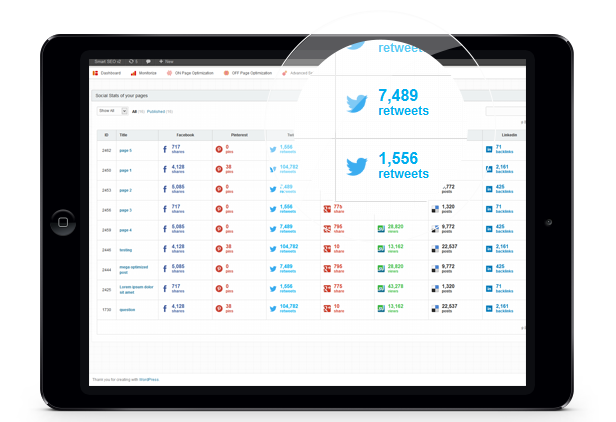
You’re putting a lot of effort on marketing your website trough social media? Want to know for sure if your tactics have results?

Using the Social Stats feature you can do it easily! Share as much as you can and we will keep track of your social network size, and if it reached the biggest social channels. You can use this tool to analyze your competition too!
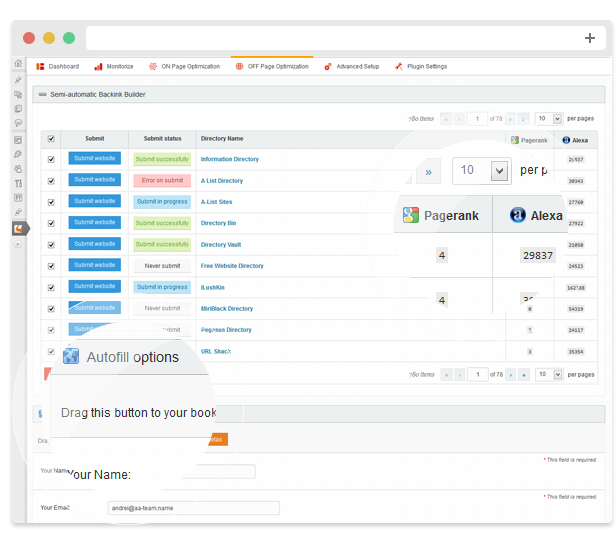
Backlink Builder (Directories Submission)

Our Backlink Builder Module will automatically add your link to thousands of different website directories that will automatically provide free backlinks for you in just minutes!

There are over 700 highly ranked directories available that you can submit your URL to.

How does the Backlink Builde module help you?

All of the directories are highly ranked websites, and these quality backlinks are very helpful for your websites for fast indexing and easy backlinks, because most of the backlink pages contain your website title, website meta description tags and site meta keyword tags.
301 Link Redirect

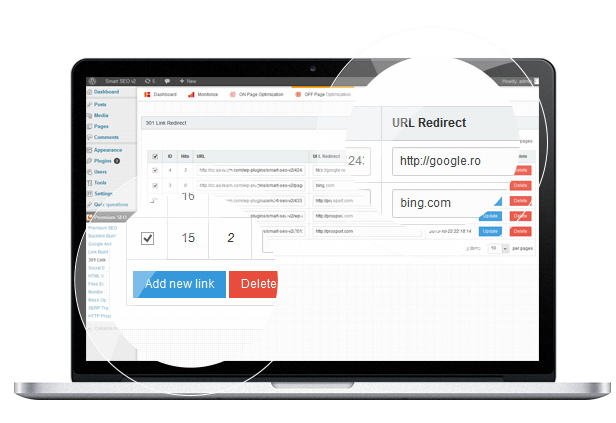
Yep, we have an Automatic 301 redirect module also. This module is very useful for any permalink changes.

The Link Redirect Module gives you an easy way of redirecting requests to other pages on your website or anywhere else on the web.
It’s very useful if you want to move a WordPress site, and you want to migrate the whole website. This way when migrating you can keep your URL structure.

By setting up 301 Redirects from old pages to new pages, any incoming links will work, and your pagerank will not suffer or be downgraded by Google.
W3C Validator

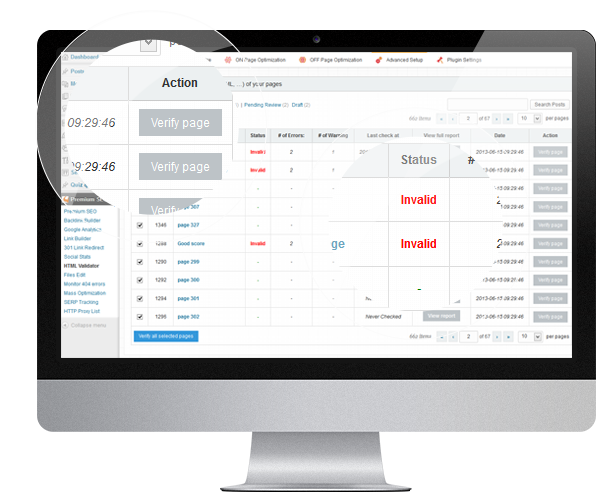
This module allows you to Mass Check the markup (HTML, XHTML, …) of your pages/posts/custom taxonomies.
You can filter by type (Posts / Pages …), verify the page, check status (valid / invalid), see the number of errors / warnings, the date when it was last checked, and to view full report.

You can also mass check all your website pages / posts at once in just a button click.

Using this module you can keep all your content optimized and according to W3C Standards.
File Edit

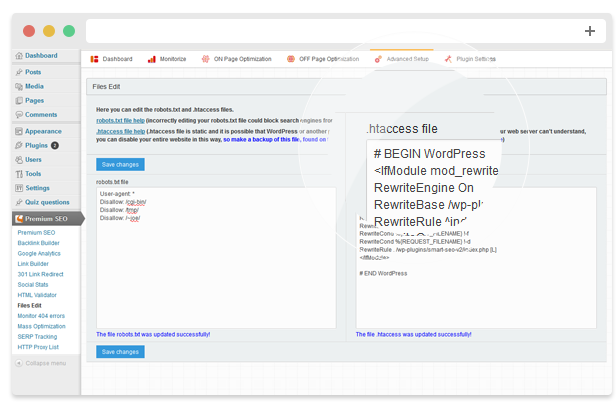
File Edit Module allows you to edit the robots.txt and .htaccess files.

It’s a bit difficult to do so, we’ve created a file edit module, from where you can easily modify / update those types of files.
Slug Optimization

Slug Optimizer removes common words from the slug of a post or page.

That way you can Increase in-URL keyword strength by removing “filler words” ” (like “a,” “am,” “and,” etc.)
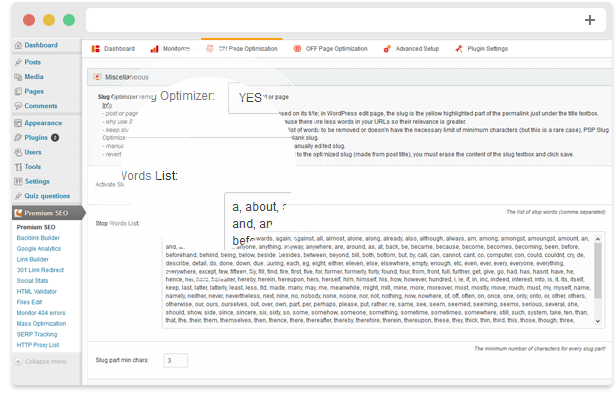
Full features list

  • Works as plugin on any WordPress Install (3.7+)
  • Based on modules manager, you must activate the modules in order to work

Monitoring Modules

  • Google Analitycs
  • 404 Monitor – you can see what URLs are referring visitors to 404 pages, how many hits it had and redirect them to another page

On page Optimization Modules

  • Mass Optimization – using this premium feature you can mass optimize all your posts/pages at once!
  • On page optimization – optimize your pages / post types one by one, right on the post/page! It also works on categories and any other custom taxonomies
  • Title & Meta Format – set custom page titles, meta descriptions, meta keywords, meta robots and social meta using defined format tags for Homepage, Posts, Pages, Categories, Tags, Custom Taxonomies, Archives, Authors, Search, 404 Pages and Pagination.
  • Sitemap – the sitemap is generated automatically trough our module
  • SEO Slug Optimizer– Slug Optimizer removes common words from the slug of a post or page
  • SEO Friendly Images – automatically update all images with proper ALT and Title Attributes


Off Page Optimization Modules

  • Backlink Builder – automatically add your link to thousands of different website directories that will automatically provide free backlinks
  • Link Builder – improve your site internal link building.
  • 301 Link Redirect – useful for any permalink changes
  • Social Stats – keep track of your social network size

Advanced Setup Modules

  • Files Edit – allows you to edit the robots.txt and .htaccess files.
  • W3C Validator – Mass Check the markup (HTML, XHTML, …) of your pages/posts/custom taxonomies.
  • SEO Insert Code – Add custom code into < head > and wp_footer

Download Premium SEO Pack – WordPress Plugin (SEO)

iSameGame (Games)


Overview

Complete iOS game, a SameGame version for iOS built in Cocos2D v2.

Features:

  • Main menu
  • Options menu to change user preferences.
  • Leaderboard scores.
  • Multiple ball types (selectable from 2-6)
  • Multiple board sizes (5×5, 10×10, 20×20)
  • Background music
  • Sound FX
  • Working on all iOS devices (iPhone 3GS/4/4S/5/5C/5S and iPad/iPad mini/iPad Retina, iPod Touch)
  • Automatic options and score saving.
  • Uses Objective-C ARC.
  • Easy to customize.

Next releases

  • Support for iAd.
  • Infinite mode.

Download iSameGame (Games)

Follow My Blog Post – WordPress Plugin (Newsletters)

follow on envato
follow on facebook
support

Follow My Blog Post plugin allows your users to follow changes on a particular post/page for your WordPress site.

Features:

  • Visitor can opt to follow the post with or without creating a user account.
  • Visitors can unfollow the post at any time using a link from email or from website via unfollow button.
  • Followed posts displayed with number of unique visitors following the post.
  • Administrative panel to view page/post wise followers with option to disable the follow for any follower.
  • Ability to log all emails to database and view the log of emails sent per post / per user.
  • Ability to confirm email for the subscription.
  • Each post, page, or custom post type on your blog have individual settings in Metabox to disable follow button or disable Email notification for particular post.
  • Includes a short code, [wpw_follow_me], that can be used to place the follow button on any page or post at any position.
  • A clean & user friendly admin UI to manage everything.

Demo:

Documentation:

Please see the Documentation of the plugin to learn how to use the plugin.

Support:

Need help? Please be sure to read the Documentation. If you’re still stuck you can contact through our support platform or email us on [email protected] for any pre-sale inquiry only.

Download Follow My Blog Post – WordPress Plugin (Newsletters)

PHP Automatic SMS Scheduler (Miscellaneous)

PHP Automatic SMS Scheduler enables you to send mobile sms to people on an exact specified date & time automatically.

The installation is very easy WordPress like!

Example scenarios:

A ) A doctor might want to send an automatic scheduled SMS to remind a patient about his appointment.

B ) A car service could remind when the service is due automatically.

C ) A company might want to send happy birthday sms to a customer automatically.

This script requires either clickatell.com OR experttexting.com SMS GATEWAY which charges based on each country/operator. You will need to purchase a credits package before being able to send any messages.

Check pricing & coverage for clickatell: http://www.clickatell.com/pricing-and-coverage/message-pricing/

Check pricing & coverage for experttexting: http://www.experttexting.com/pricing/

Download PHP Automatic SMS Scheduler (Miscellaneous)