Viral Traffic Facebook Photo Effects Pro (Social Networking)

Viral Facebook Photo Effects Pro

36 Big size Creative Facebook photo effects
It’s a Full stand alone app to create creative photo effects in 2 simple steps.

1. select an effect and upload your own or your friends photo.

2. view the generated photo download or upload the photo to facebook. Done!

Features

36 Creative facebook photo effects
Easy full translate only one file (the config file)
Photo upload (auto distrooi) for uploaded photos and generated photos.
Auto Upload to facebook.
Set as facebook profile picture.
Facebook Wall post mesage plus a link back to the script
Extra promotion text and link in the facebook walpost to promote even more!
Facebook update notification when a photo is uploaded
Download photo to user disk
Watermark branding
Facebook likebox (for your facebook page)
Share buttons sidebar
Well placed adspots on all pages
Build on bootstrap
No ssl needed
No database or MySQL needed
No extra image storeage needed (for the generated photos)
Easy install jus edit one config file.
Works on domain, subdomain or in a subfolder
It’s a Great Viral traffic builder and promote tool

Install

open set-config.php follow instructions (and or translate)
open add1.php, add2.php and add3.php put in your adds
open extra.php and put in your paypall donation button code or what you like.
ftp upload Done!

Requirements

php4x or beter
facebook app id and secret
GD library (most hostings provide this)

Changelog:

27-11-2013 v 1.1
fixt small bug
fixt layout look
added watermark
added facebook likebox
added sharebuttons
All files are affected

Download Viral Traffic Facebook Photo Effects Pro (Social Networking)

localStorage JCart (Shopping Carts)

What is localStorage JCart?

JCart localStorage is a simple shopping cart application that uses HTML 5 localStorage, a new web technology that replaces the classic cookie, giving a much better data security.

JCart localStorage can be implemented very easily in an bigger application, providing the ability to set certain information necessary for proper functioning, such as currency, vat, the path of pictures, etc..

Download localStorage JCart (Shopping Carts)

Twitter Timeline Slider – jQuery Twitter Wall (Social Networks)

Get more followers via Twitter Timeline Slider!

This plugin give an opportunity for the visitors to Follow you or Reply, Retweet and mark as Favorite your tweets through your own website. When someone retweet, reply or mark as Favorite your tweet, that will display for the other users and they can easily follow you and visit your website. With this trick, you can get much more visitors and followers, therefore your website traffic can be increased much more. You can lock the screen and set up a timer or you can allow for the users to close the slider. If you don’t allow to close the slider, it still opened until the visitor reply or retweet any of your tweets.
More followers, retweets, more visibility on Twitter, much more audience.

  • fully responsive
  • ability to lock the screen until the user reply or retweet any of your tweets
  • fixed slider position
  • automatic slide-in when the users reach the bottom of the page
  • you can enable or disable the user can close the slider
  • ability to set up timer to fadeout the slider
  • you can specify your own notice
  • viral spreading, much more audience, fans and traffic to your website
  • fully localizable Tweet box with auto detect language, but you can choose from more than 100 languages manually
  • selectable position of the slider (left or right)
  • you can set up to open the slider automatically at the bottom of the page just once per user
  • set the number of tweets to display
  • dark and light style
  • fancy jquery animation with fadeout and easing slide effect
  • option to disable the slider on the entire website and enable it on a specified page with adding [enable_twitter_timeline_slider] code to the content
  • full detailed documentation
  • transparent background when the screen locked, ability to set the transparency
  • unlock the screen with click on the background (if you allow to close the slider for the users)
  • option to disable the slider on a specified page with adding [disable_twitter_timeline_slider] code to the content
  • full customizable separated CSS file
  • you can hide or show the Twitter icon and you can replace it to your own logo with a simple setting
  • attractive shake effect, you can disable or set frequency timer to shake (from 5sec to 5min)
  • three different icon size
  • set the icon vertical position
  • auto open the slider if you want, when the users reach the bottom of the page
  • mobile-friendly slider, work on tablets and mobile devices
  • lightweight scrollbar to display the former tweets

Check out the demo pages:

Credits

I owe a big thank you for the following websites:

Download Twitter Timeline Slider – jQuery Twitter Wall (Social Networks)

Prostats2 – Pro Web Analytics (Ratings and Charts)

What is Prostats v2 ?

Prostats is a tiny, fast and secure script that will record your site(s) visitors ( human or robot ) information ( such as ip, country, browser, OS, referrer, page visited and a lot more ) in milliseconds . You can install Prostats on ANY php sites such wordpress, dle, php-nuke or ANY other php site ( static or dynamic ) . You can also install the script on one site and use it in multiply sites !

Key Features

  • Real-time update .
  • Multiply Domains & Hosts : Install once and record multiply sites information . Sites that are within same host with source and/or sites that are in totally different servers ! Just don’t worry , script will handle it !
  • Multiply Users : Define unlimited users and give access to different domain names to each one of them ! You can also define a default user for guests !
  • Detailed day / month statistic
  • Pages statistic : total top-pages , monthly top-pages , daily top-pages , pages visited by robots & more !
  • OS & Browser statistic : total most-used-browser and os , monthly most-used-browser and os , daily most-used browser and os & more !
  • Robots : Robots all-time visits , Robots monthly visits
  • Referrers : Top-referrers list !
  • Graphs : every list has it own graph & page
  • Support & Upgrades : by purchasing you’ll have life-time free support and script will be upgraded by your ideas ! Also this script is documented and commented so if you have slightest knowledge of coding , you’ll be able to upgrade or change it yourself !
  • This script contains installer which will almost do everything . You just need to upload script .

Requirements

Php , mysql database , mysqli php-extension and Curl php-extension ( for multiply sites )
Do i have the requirements ? 99% if shared hosts do . But if you want to be sure use google.com ^^ or just contact your host manager .

Prostats v1

Since the core and database tables has been changed , unfortunately upgrading from V1 to V2 is not possible .

Demo admin username:password = admin:password

Demo user username:password = prostats:prostats

To change users , use this url : http://prostats2.moosbat.com/admin/?login

Download Prostats2 – Pro Web Analytics (Ratings and Charts)

WP e-Commerce Social Login – WordPress plugin (WP e-Commerce)

follow on envato
follow on facebook
support

WP e-Commerce Social Login extension allows users to login and checkout with social networks such as Facebook, Twitter, Google, Yahoo, LinkedIn, Foursquare, Windows Live.

Features:

  • One click registration.
  • Ability to sends newly created account details to user’s email.
  • Auto Integrate on checkout page.
  • Includes a short code, [wpsc_social_login], that can be used to place the social login buttons on any page, as well as a widget that can be used in any widget area.
  • Ability to set custom redirect URL on which user will get redirected after they login with social media.
  • Admin can change the order of social networks buttons by drag and drop.
  • View number of sign-ups for each social network.
  • Generate Pie graph for Social Networks Register Percentage.
  • A clean & user friendly admin UI to manage everything.

Documentation:

Please see the Documentation of the plugin to learn how to use the plugin.

Support:

Need help? Please be sure to read the Documentation. If you’re still stuck you can contact through our support platform or email us on [email protected] for any pre-sale inquiry only.

Download WP e-Commerce Social Login – WordPress plugin (WP e-Commerce)

Mailchimp Custom Popup Subscription for wordpress (Newsletters)


If this plugin is useful, could you please help us to rate it? it will be a big encouragement to improve for us.

MailChimp Custom Popup Subscription for WordPress

“MailChimp Custom Popup Subscription” plugin is an amazing email subscriber plugin which allows the site Admin to create Custom Popup, place YouTube/Vimeo embed videos, image or any sort of HTML or custom content in the subscription popup and the Visitors can Subscribe their email to the MailChimp subscription list. It is flexible, best and simple way to subscribe email for newsletter. Admin can set “MailChimp Custom Popup Subscription” plugin through a Popup style which has various display options or Admin can add this into a widget area.

If you want convert the visitors to your members or subscribers then the Custom Popup is the best solution to tell the users why they should subscribe or to show them a new advertisement or Banner on the popup to allure them get subscribed.

If you want your website to reach every reader, you have to use email and “MailChimp Custom Popup Subscription” plugin will be useful to promote your company to the general people.

“MailChimp Custom Popup Subscription” plugin is very useful for those people who need to send Newsletters to users. This powerful plugin allows users to collect and manage emails & newsletters with an easy way.

“MailChimp Custom Popup Subscription” plugin has some excellent features and very easy to install or setup. “MailChimp Custom Popup Subscription” plugin is more flexible and compatible with many existing plugins in the WP repository. This Plugin is fully customizable. Users can easily configure the plugin into the new or existing WP websites. This plugin is compatible up to WordPress Version: 3.7.1.

Front View of this Plugin:

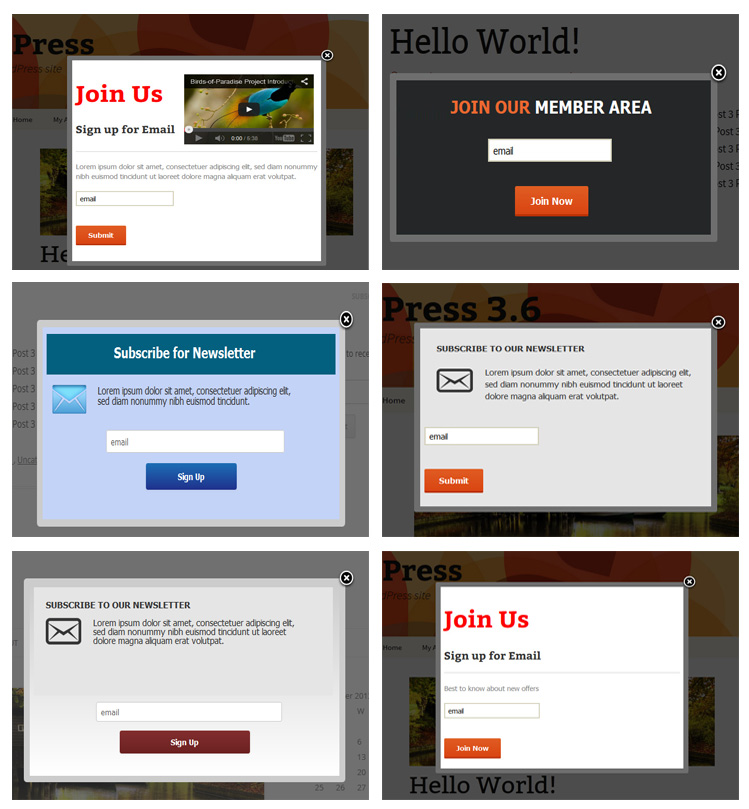
Some Popup Samples

Features of MailChimp Custom Popup Subscription

  • Admin can show the subscription form into the Popup and/or Widget area.
  • Fully customizable and many advance features for the Popup design like
    • Admin can design the custom popup according to his website template using html editor.
    • Admin can place YouTube/Vimeo embed videos, image or any sort of HTML/custom content in the subscription popup.
    • Popup display time can be set like after 1minute, 1day, 1 week, 1 month, 3 month, 6 month and 1 year.
    • Admin can set the “Display option” for Home, Pages only, Single post only, Archives only or for All pages.
    • Admin can customize Popup width, height, background color, border color, overlay color.
    • Admin can active/deactivate the popup.
    • Admin can set the subscription mandatory or not.
    • Button text, button color and button hover color can be customizing from admin.
    • “Subscription Success Message”, “Subscription Text Box” and “Subscription Button Designs” are customizable.
    • Admin can set the “Container Border Radius” and “Bottom Content position”.
    • Two color boxes are for to set the Gradient color and if you want to make Gradient color, it will be better to use light and deep combination. If you not use Gradient then put one field blank.
  • It has option to send email newsletter to registered user.
  • Very easy installation and setup.

Features of the Widget section of admin

  • Admin can customize the Title and title color of the Plugin.
  • Admin can set the Title in three positions.
  • Admin can put the custom text above the email text box.
  • Admin can set Button text.

Download Mailchimp Custom Popup Subscription for wordpress (Newsletters)

HTML5 Youtube video player with subtitles (Media)

This video player supports subtitles, playlist, HTML5 and youtube videos. Subtitles and playlist can be disabled. Player can have from 1 video to unlimited number of videos. Each video can have own subtitles. Player layout is responsive so it fits perfectly in every website design.

Features

  • easy setup
  • responsive
  • playlist support
  • subtitles support
  • HTML5 video support
  • Youtube video support
  • click & drag (touch) to control gallery
  • mobile friendly (iPhone, iPad, android)
  • 100% vector icons, retina-ready
  • all browsers compatible
  • multiple instances: you can insert more players in same page
  • optional logo: you can add your logo as image (.jpg, .png).
  • optional preview image: if you want your player to be paused when page loads, you can set preview image
  • autohide controls: you can choose after how much seconds player controls will disappear
  • autoplay: on/off
  • complete volume control
  • tooltip for time seek
  • fullscreen support (when not supported real fullscreen it switches to full browser support)
  • double click to enter/exit fullscreen
  • SPACE key play/pause
  • ESCAPE key to exit fullscreen
  • installation instructions included
  • Flag Counter

Download HTML5 Youtube video player with subtitles (Media)

WordPress Article Social Share (Social Networking)

Item Description:

The Article Social Share plugin adds a sleek social bar in your articles and pages, to burst your page views.

Features:

  • Elegant & Sleek CSS3 Design
  • Ultra fast share buttons loading
  • See Share counter from the posts/pages list in the wp-admin side
  • Light and Dark predefined styles

  • Posts, pages and custom
    post types supported
  • Display the social share icons on index pages including the home page
  • Responsive Layout

  • Change Icons order

  • Facebook, G+, Twitter, Linkedin,
    Pinterest, Print, Comments.

  • Different bar positions
  • Disable the social share bar in specific posts/pages
  • Cross Browser Support

Credits:

Recommended Items


Download WordPress Article Social Share (Social Networking)

Snowpress – WordPress christmas plugin (Miscellaneous)

The magic of christmas on your wordpress website.

Super easy to use. Just upload and config the size of the flakes and the speed that they will generated and your amazing wordpress christmas website is ready.
(visitors can turn off snowstorm)

Preview video

https://www.youtube.com/watch?v=WnW0Lq0jmBM

Merry Christmas.

Download Snowpress – WordPress christmas plugin (Miscellaneous)

Moncoco-Todeo – TO DO App for iOS (Full Applications)

You want to have a simple and beautiful to do App for iPhone? Todeo is made for you!


It is compatible with iOS 7.x and runs on iPhone 5 / 5S / 5C and iPod Touch 5th generation. Requirements to open the project : OS X 10.8 And Xcode 5.0

How Use My App ?

You just have to custom the color if you want to do it and you are Ready ! For know how to do it, just read the cool documentation !

Todeo Features v1.0

  • Cool Flat Design
  • Easy configuration : you don’t have experience with code or Objective C ? Great because you don’t need any programming skill to configure Todeo app
  • Good code : you can easily edit and change Todeo’s code.
  • Support and documentation : Todeo comes with a tutorial. Our team is providing a really quick support

This app use a very cool flat design with very funny color. Enjoy

I’m going to make a lot of update, so if you have any idea leave a comment !

Download Moncoco-Todeo – TO DO App for iOS (Full Applications)

Corler MHBS – Multi Hotel Booking Script (Miscellaneous)

Coler MHBS is a script that allows booking rooms in some hotels. It is easy-to-use and easy-to-setup and it will help you to easily create a booking system into your website.

Features

There are three sections: one dedicated to the
booking (in the root), one dedicated to the administration panel for each user (the
hotel manager) and one dedicated to general control panel (for administrator).

  • The registration section allows customers to choose the hotel and book a date on it.
  • The administration panel for each user (the hotel manager) allows all operators of
    the hotel to change the dates busy, manage rates and check reservations.
  • The general control panel (for administrator) allows you to check the registered
    users and the total bookings.

With this script you can also record credit card during the booking process. Depending on the period and the number of people, the system automatically calculates the price according to what each hotel manager set. You can also lock the dates busy.
This script is provided in English, German and Italian (each user chooses its own language). All this is provided in a minimal and intuitive graphical interface.

Requirements

Corler MHBS needs a simple Web Server with PHP 5 & MySQL database and a Web Browser. Once bought, you can see and edit all the full code of Corler MHBS. The installation is simple thanks to the guide with images supplied (in the folder “install/”) and the possibility to contact us by email for assistance.

Demo

BOOK: http://quicknube.altervista.org/corlermhbs/ .

HOTEL MANAGER: http://quicknube.altervista.org/corlermhbs/book/admin/ (username: hotelcorler; pass: hotelcorler).

ADMIN: http://quicknube.altervista.org/corlermhbs/book/admin/ (username: admin; pass: password).

Please note that in the demo we had to disable a lot of functions. Sorry for that.

Download Corler MHBS – Multi Hotel Booking Script (Miscellaneous)

Social Sidebar for WordPress (Social Networking)

Description

Quickly add CSS3 social links to your WordPress site with this very configurable plugin!

Features

WordPress Configuration
Set your links and styles through a settings page in the WordPress admin panel, modify as needed.

Automatic Integration
The link code and stylesheet automatically append to the header and footer of your site’s theme using the wp_head and wp_footer functions.

HTML5 / CSS3
Works on all the newest browsers, properly tagged and contains transitions.

100 Icons
Choose from 100 icons derived from a number of online services and several general icons to create the perfect sidebar for your site.

4 Themes
Default, light, transparent, and color themes available.

2 Sides
Set your bar on the left or right side of the page.

2 Styles
Defaults to blocks on the side, but you can also set the style to show circles.

4 Label Styles
Square, curved, rounded, and fancy label styles for just the right fit when the icons are moused over.

Contains

Plugin Files
Folder with PHP, CSS, JS, and Font files, ready for upload and install.

Documentation
HTML file with instructions on the installation, use, and configuration of the plugin.

Icons

Aid
Android
Apple
Blogger (x2)
Bookmark (x2)
Bubbles (x2)
Bullhorn
Cog (x2)
CSS3
Delicious
Deviantart (x2)
Dribbble (x3)
Facebook (x3)
Flattr
Flickr (x4)
Forrst (x2)
Foursquare (x2)
Github (x5)
Google
Google-Drive
GPlus (x4)
Heart
Home (x2)
HTML5 (x2)
Instagram
Joomla
Lanyrd
LastFM (x2)
LinkedIn
Linux
Mail (x3)
Paypal (x2)
Picassa (x2)
Pinterest (x2)
Power
Reddit
RSS (x3)
Share
Skype
Soundcloud (x2)
Stackoverflow
Star
Steam (x2)
Stumbleupon (x2)
Thumbs-Up
Tumblr (x2)
Twitter (x3)
User (x2)
Users
Vimeo (x3)
Windows
Windows8
Wordpress (x2)
Xing (x2)
Yahoo
Yelp
Youtube (x2)

Credits

IcoMoon – Font icons used in the sidebar links.

Change Log

Version 1.0.0
Initial release

Download Social Sidebar for WordPress (Social Networking)

Sublime Layer Slider – Responsive PHP Plugin (Images and Media)

Sublime Layer Slider is a fantastic PHP Layer Slider with a great backend so that you can create your slides without having to do any programming.

Sublime Layer Slider is easy to install and use. It doesn’t even need mysql configuration.

Have a look at the great demo to see how Sublime this Layer Slider is.

Here are a list of features which make this plugin excellent.

  • Simple installation
  • Simple slide administration (no programming required)
  • Beautiful slides with amazing text and image layers
  • 11 brilliant animations
  • Free updates with new features
  • Free support

Download Sublime Layer Slider – Responsive PHP Plugin (Images and Media)