Tse Animation – Text and Image Animation Maker (Utilities)

Visual tool to add the text and image animation effect on WordPress page/post. It is an advanced WordPress plugin that allows you to quickly and easily create html5/css3 animation without touching any code. In a few clicks you will have an animation effect.


Features:

  • Create an animation without knowing any HTML ,PHP or Javascript
  • Works with all CSS3 Browsers, supports Chrome, FireFox, Safari, Opera and IE10 +.
  • Fully compatible with WordPress 3.3 or later
  • 4 types of layer – Text, image, solid and image Array layer
  • 3 types of attribute parameter setting for each layer – Style, Animation, and Event
  • Responsive layout
  • Text shadow support
  • 800+ Icons included in
  • Enable to insert sound
  • Text mask and Image mask for Image layer
  • Shortcode and Widget available
  • Help Html File included.

please see the live preview.

Download Tse Animation – Text and Image Animation Maker (Utilities)

Fancy Product Designer – WooCommerce plugin (WooCommerce)

The most successful Product Designer on codecanyon finally available for WooCommerce.

  • For WordPress – no coding knowledge required
  • Enable a product as a Fancy Product easily
  • Add multiple views to a product, e.g. a front and back of a T-Shirt
  • Helpful product builder in the admin
  • Add images and texts to a view and set parameters like x, y, price, color…
  • Manage the designs for the sidebar and their categories
  • Settings tab integrated in the WooCommerce settings
  • Change product designer’s dimensions, styling and other options in the settings
  • Handle the default parameters for design and text elements in the settings
  • Over 40 options to change the text and labels in an own language
  • Use System Fonts, Google Webfonts (320+) & Custom Fonts for the fonts dropdown
  • Edit link for each oder item in the cart
  • Customers can retrieve their customized products from the “View Order” page
  • Customers can share their customized products with others by using unique URL’s
  • Open the customized product in the “Edit Order” page & view the element parameters
  • Save each element of the order as an image on your web server

Download Fancy Product Designer – WooCommerce plugin (WooCommerce)

Google Maps Photo Geo Tag EXIF & Mobile Direction (Navigation)

Feature
• Geo Tag all images in Google Maps
• Get EXIF data
• Custom Google Maps Drive direction
• Mobile ready
• Panoramio effect, localize all your photo
• Add the photo in the map in the place where they are taken
• Easy to integrate
• Use Google Maps

Download Google Maps Photo Geo Tag EXIF & Mobile Direction (Navigation)

Advance Point of Sale System (POS) (Shopping Carts)

Point Of Sale System

(POS-3.38 Code Project + Apps) is C# based Desktop application.
The Latest Technology | Excellent Features | Competitive Rates
========================================================================
This is suitable for small and medium businesses/organization specially

  • Super-shop
  • Restaurants
  • Sales Management
  • Inventory System
  • Stock Management

It is Very Useful for Super-shop management.

Live Preview

https://dl.dropboxusercontent.com/u/76473169/PoS_sys/POS_3-0-3.html

For Support, Please email directly at

[email protected]

Main Features

  • Add User, Manage users
  • Stock Items ,Items List,
  • Sales Register with barcode scanner
  • Receipt Print
  • Sales Reports
  • Payment Report
  • Graph chart
  • Profit/loss chart
  • Pie chart
  • Bar-code creator
  • System Configuration
  • Data Backup

Requirement

Microsoft.NET Framework 3.5 client or 4.0
Windows installer 3.1
Windows xp , 7 , 8 (Support all windows version)

Live Preview

https://dl.dropboxusercontent.com/u/76473169/PoS_sys/POS_3-0-3.html
https://dl.dropboxusercontent.com/u/76473169/PoS_sys/POS_index.html
user/password
=========================================
admin/admin
mn/mn
salem/sa

Download Advance Point of Sale System (POS) (Shopping Carts)

Grid Carousel Gallery WordPress Plugin (Galleries)

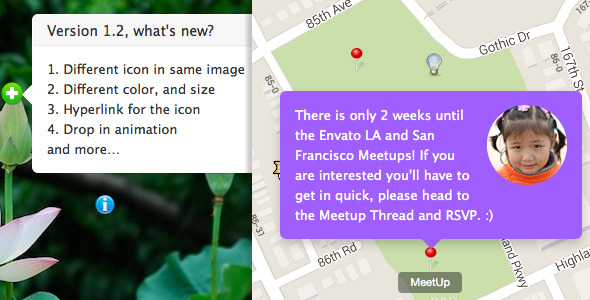
A plugin help you to add a responsive Grid Carousel Gallery to your post or page via shortcode.

followrss

Features

  • Support batch upload, and convert the large image to small thumbnail via PHP automatically, help you to add a gallery in a minute, keep the gallry load fast too.
  • Responsive and flexible layout, works fine in the small screen device (like iPhone, iPad) too.
  • Retina ready.
  • Multiple and unlimited carousel on same gallery.
  • Multiple and unlimited gallery instance on same page.
  • Live preview in the backend, what you see is what you get.
  • Optional padding between each image.
  • Optional lightbox or image link.
  • Optional arrow and dot navigation.
  • Optional slideshow and slideshow delay.
  • Compatible with latest jQuery and latest WordPress.
  • Enqueue the js and css only when needed. Keep WordPress page size smaller.
  • You can add/edit the chart without touching the code. Customize/update the image with WordPress backend.
  • FAQ and source code are included in the package. Free update in the future.

Recommendation for you

Image Map HotSpot WordPress Plugin:

hotspot

Credit

jQuery http://jquery.com
jcarousel http://sorgalla.com/jcarousel/
wookmark http://www.wookmark.com/jquery-plugin
Great shots from http://www.flickr.com/photos/markjsebastian/

Download Grid Carousel Gallery WordPress Plugin (Galleries)

NACHO Lightbox for WordPress (Galleries)

Follow nachothemes on CodecanyonFollow nachothemes on Twitter

NACHO Lightbox is an awesome WordPress plugin which helps you showcase images,
videos and galleries. It is directly integrated into the WordPress editor, and it will work with
your older posts. Easily customizable using the shortcode generator.

Features

options panel

Intuitive and user-friendly options panel.

Don’t like the shortcode generator? Hyperlinking images and videos will open them in a lightbox.
Also, galleries can be created using the default Media Manager in the editor.

The plugin includes a responsive grid with an adjustable number of
columns
so that your images look perfect on mobile, tablet and desktop.


Sharp graphics on any device. The lightbox will adapt to the screen which are you
using, so it will look different in portrait and landscape mode.


The plugin allows you to change images using intuitive navigation. On desktop computers,
most users will prefer the keyboard arrows, while on mobile they will want to swipe to
the next image like in a native application. The plugins supports both of them.

Video tutorials


Other features

  • Sharing buttons that your visitors will love
  • Translation ready(po and mo files included)
  • Fast and lightweight
  • Deep linking, every item has it’s own link
  • Replaces(or not) your gallery shortcode
  • Intuitive options panel
  • Designed for every device, optimized for mobile
  • jQuery based
  • Native browser fullscreen support
  • YouTube and Vimeo videos are supported
  • Smart Content recognizer(lightboxes your hiperlinks and images)
  • Keyboard and touch navigation
  • Group lightboxes and mix different content types
  • Relative dimension settings
  • Retina ready

Important notes

  • The plugin isn’t compatible with ajax themes
  • Gallery shortcode will be overwritten by the lightbox, but you can disable
    that from the admin panel

Changelog

v1.00 ( Dec 7 2013 )
* initial release

Download NACHO Lightbox for WordPress (Galleries)

WooCommerce Sell In Posts (WooCommerce)

This plugin allows you to add a WooCommerce sales box to any post in wordpress.

Left and Right floating boxes are vertically oriented and Centered horizontal.

This is great if you have posts talking about specific products. Rather than linking to the product page, just include the item in a box on the post page. It includes an Add to Cart Button.

This is installed with simple short code [woo_in_post id=”{product_ID}” class=”{left|right|center}”]

The left and right work very well in large blocks of text. The center option is great if you want the sales box to be like a banner in between paragraphs or below an embedded video.

Sales box also has a link back to the full product page in your store.

Download WooCommerce Sell In Posts (WooCommerce)

WooCommerce Cross Sell on Products Page (WooCommerce)

The WooCommerce Cross Sell on Products page adds the ability to cross sell items on the Single Products page.

This plugin comes with the ability to add multiple items to the cart at one time. Cross sell items are listed below the product summary and above the add to cart button.

Each cross sell items is clickable to open a popup window with more product information to help the customer in their shopping.

This is a very useful plug in if you sell a lot of items that need accessories. For example if you sell a cell phone, you can cross sell cases and chargers that you recommend on that same page.

To use it, just install the plugin and then add items to the built in cross sell box that is already in WooCommerce.

Download WooCommerce Cross Sell on Products Page (WooCommerce)

EditrWP WordPress Plugin (Miscellaneous)

EditrWP is a WordPress Pllugin facilitating creation of Editr based embeds. Originally found at the following URL: http://lab.idered.pl/editr/

EditrWP supports:
– GUI uploader
– shortcode creator
– file manager
– multiple Editr themes
– multiple Editr views
– coffee and less parsers
– setting defaults for generic Editr project

EditrWP doesn’t support GitHub Gists!

Download EditrWP WordPress Plugin (Miscellaneous)

CSS3 Shadow Hover Effects (Animations and Effects)

CSS Shadow Hover Effects for Images

Easy to use the beautiful Shadow Hover Effects for their own website.
Simply insert into the existing CSS file and enjoy the new Shadow Hover Effects.

Features

  • No Images
  • Pure CSS
  • Without JavaScript or jQuery
  • 17 Shadow Hover Effects
  • It works standalone

Attention – Browser-Support

  • Information about browser compatibility, look at the “Compatibility Screenshot”

Download CSS3 Shadow Hover Effects (Animations and Effects)

PhotoFans – Your Social Network to Share Photos (Social Networking)

Description

With PhotoFans, we can build our network of fans to photography.

It is easy to configure and NOT requires much resource to the server.

Users can upload their pictures, browse the photos of other users, comment, chat with other users in real time, and more.

In addition, it is optimized for search engines quickly positioned, all pages of the application users.

Features

Here are some of its main features:

  • Live Chats, Messages, Comments.
  • Notifications on likes, comments, following, and chat.
  • Likes, hashtag, emoticons in chat y comments.
  • Multileguage system.
  • Theme System.
  • Responsive Design.
  • Optimized for SEO.
  • Demonstration Page

    You can see the application running at the following address:

    http://www.PhotoFans.info

    Access the maintenance area

    When the application is installed, a user is created. This user also is an administrator:

    Username: usermain
    Password: 123456

    Maintenance Area Options

    General Settings: To configure the more general aspects of the application.
    Manager Users: Section that is used to manage user accounts.
    Languages: In this option you can choose default language of the system.
    Themes: In this option you can choose default theme of the system.
    Manage Ads: To configure the areas of advertising. These areas are advertising 200×200 pixels.
    Pages: To enter the content to different pages of the website.

    Visitors

    Flag Counter

    Download PhotoFans – Your Social Network to Share Photos (Social Networking)

    jQuery Multiple Timeless Select (Miscellaneous)

    Pre Note

    Version 1.1 will be submited on Monday, if you can think of any extra features you may wish to see, please leave a comment

    Overview

    • 1 Required Param
    • 7 Available Optional Params
    • OOP Code
    • Powered by jQuery
    • 1 Main Component & Two Helper Components within the main one
      • Controller
      • Modal Helper
      • KeyStroke Helper

    How it Works ?

    1. Start Searching
    2. View Suggested Results
    3. Select

    Features

    • Fast & Flexible
    • Supports unlimited instances
    • Lag Free
    • Compliant with other plugins
    • Easily Customizable ( read more below )

    What Will I receive ?

    • The Library
    • A working demo with PHP
    • A working demo which takes data from json files
    • Documentation
    • Support Via Email
    • Free Setup And One integration on Extended License Purchase

    Strong Documentation

    On Every Method, extending, and everything

    Available Options

    Required

    Alias Description
    data-mt-request-url The location where the information will be pulled

    Optional

    Alias Description Default
    data-mt-max-tags Max Selected Options 1
    data-mt-request-method Request Method used to fetch the information from data-mt-request-url POST
    data-mt-clear-on-select Clear Search Input on Option Select 1
    data-mt-close-on-select Close Selection Modal on Option Select 1
    data-mt-close-on-unfocus Close Selection Modal on Input unfocus 1
    data-mt-tag-input-name Selected option name within the HTML Form tag
    data-mt-default-values Default Values None
    data-mt-custom-param- Extra Params on requests None

    Customization & Changes

    Special Skeleton Setting

    Events Assigned & Interaction Logic Changes

    Edit the tags display structure

    Change the Default Plugin Settings Easily

    Download jQuery Multiple Timeless Select (Miscellaneous)

    CountDown Pro WP Plugin – WebSites/Products/Offers (Utilities)

    You can use it as CountDown for WebSites, Events and Products launch or as expiry date for Offers and Discounts


    \

    \
    \


    \
    IF YOU NEED ONLY THE JQUERY PLUGIN FOR THIS PRODUCT, YOU CAN DOWNLOAD IT FROM HERE: http://codecanyon.net/item/countdown-pro-for-websiteseventsproducts-launch/5495472

     

    video tutorial

    Installation – http://www.youtube.com/watch?v=Vtd2oQA0sRY
    How To Manage the Social Channels – http://www.youtube.com/watch?v=_BAYq9tO5nU
    How To Create a Countdown for Your Website and Enable Maintenance Mode – http://www.youtube.com/watch?v=FLAKvdpdu5Y
    How To Create a Countdown For Product Launch and Include It In Your Pages – http://www.youtube.com/watch?v=AUUJiSFJbxM
    How To Create an Electronic Countdown – http://www.youtube.com/watch?v=v5CD3YBBUHs

    FEATURES:

    \ Extremly customizable

    Over 80 options from where you can customize the plugin.

    \ Suitable for any website

    You have parameters to change everything: colors, fonts, transparency, borders, dimensions. In this manner you can integrate the plugin in any website

    \ Responsive Design

    The coundown plugins if fully responsive. Parameter to enable or disable responsive behavior. Please check this responsive example

    \ Begin Date & End Date

    Parameters to set the interval: Begin Date & End Date. The launching date contains: Year, Month, Day, Hour, Minute and Second

    \ Server Time or Computer Time

    Parameter to use Server Time or Computer Time

    \ CallBack Function

    You can define a CallBack function which will be executed when the CountDown will end.

    \ Multi Purpose Usage

    You can use it as countdown for WebSites, Events, Products launch or as expiry date for Offers, Discounts

    \ Two Versions

    ‘Circular’ and ‘Electronic’ versions available. All customizable from parameters.

    \ Multiple Instances

    You can insert multiple countdowns on your website or on the same page.

    \ Social/Share

    Options to add social icons in order to promote your website on all the available channels.

    \ Logo Section

    Optional parameter to set your logo. Also, logo link available with parameter for _self or _blank

    \ Free Updates

    Once you’ve bought the product, you can download for free, from your account, all the updated versions.


    *NOTE: the cirlces are built using HTML5 canvas, so the circles will not appear in IE7 and IE8 since these 2 browsers don’t have HTML5 support.


     

    \

    \

    If you need additional information don’t hesitate to contact us at [email protected]. We’ll try to answer you as quickly as possible.

    Enjoy!

    Download CountDown Pro WP Plugin – WebSites/Products/Offers (Utilities)