Pure CSS Buttons with Arrow (Buttons)

A collection of several modern buttons with pure CSS arrow.

Based on simple HTML5 syntax, CSS3 files and no JavaScript included. There is also attached source SCSS files for further design changes after purchase. So you can customize the look of this buttons (colors, radius etc.) to be more suitable for your project.

Download Pure CSS Buttons with Arrow (Buttons)

Story Box jQuery Plugin (Media)

Story Box

Because every website has to offer an unique experience

Bringing your Themes & Templates the power to be always Unique

Features

  • CSS Transitions
  • Works on all major devices
  • Lightning fast interaction
  • Extremely Fast Setup
  • Works independently
  • Supports Random Effects
  • Mobile Support
  • Based on jQuery
  • 24 Entrance Effects
  • 20 Exit Effects

Entrance Effects

  • fadeInUp
  • fadeInRight
  • fadeInDown
  • fadeInLeft
  • fadeInUpBig
  • fadeInRightBig
  • fadeInDownBig
  • fadeInLeftBig
  • bounceInUp
  • bounceInRight
  • bounceInDown
  • bounceInLeft
  • flipInX
  • flipInY
  • rotateIn
  • rotateInDownLeft
  • rotateInDownRight
  • rotateInUpLeft
  • rotateInUpRight
  • pulse
  • swing
  • wobble
  • flash
  • tada

Exit Effects | Optional

  • hinge
  • fadeOutUp
  • fadeOutRight
  • fadeOutDown
  • fadeOutLeft
  • fadeOutUpBig
  • fadeOutRightBig
  • fadeOutDownBig
  • fadeOutLeftBig
  • bounceOutUp
  • bounceOutRight
  • bounceOutDown
  • bounceOutLeft
  • flipOutX
  • flipOutY
  • rotateOut
  • rotateOutDownLeft
  • rotateOutDownRight
  • rotateOutUpLeft
  • rotateOutUpRight

Download Story Box jQuery Plugin (Media)

Super 7 – Responsive WordPress Image Slider Plugin (Sliders)

Current Version: v. 1.0.0
Compatible with: jQuery 1.10+, jQuery 2.0
Requirements: jQuery 1.8.3+
WordPress Version Compatible: WordPress v.3.3


LOOKING FOR THE JQUERY VERSION? CLICK HERE!

General Overview

Super 7 is one of the most complete image slider ever.
It is built in latest WordPress and mobile compatible so anyone can easily use it without any restriction.
And it is fully responsive and modern features like Video embed,Smart Lightbox are supported which make it more stunning.

Specially designed for anysize image adaption and speed is optimized as well.
Supports plenty of 2d/3d transitions so users will have great choice of modern & smooth animations.
It’s especially flexible for users to customize which makes the slider most complete ever.

If you like Super 7 , don’t forget to leave us 5 stars. :) .

Key Features

  • 300+ wonderful animations(2d,3d) – Animations will come more as new version released.
  • Easy to implement and customize
  • Unlimited slides – Users can insert as many slides as he wants.
  • Unlimited Title Caption
  • Native browser support
  • Html5/Css3 transitions support – It uses html5/css3 transition for modern browsers.
  • Image Lazy Loading – Super 7 loads all images at once so that he/she doesn’t wait again while slides.
  • Image Preview support – Super 7 provides image preview option on hover.
  • Customizable width and height – Width and height can be set.
  • Fully responsive – It’s fully responsive so it can be attached in touch device.
  • Full width functionality involved – Full width slider is available
  • Lightbox support – It supports lightbox based on users’ demand.
  • Touch device support – Touch events are supported.
  • Mouse swipe navigation support – Swipe functionality is available so users feel comfortable to navigate.
  • Scroll Navigation Type
  • Video content support(Youtube,Vimeo) – Embeded videos are supported.
  • Carousel support – Carousel viewmode is supported.
  • Bullet support – Bullet viewmode is supported.
  • Several customizable skin supported – 6 predefined skins are there and More importantly,Users can customize skin as he wants.
  • Keyboard navigation available
  • Multiple browser configuration(IE8+,Opera,Chrome,Safari,Firefox)
  • Automation support
  • Progressbar type can be set(linear/circle)

Support

The followers of Super 7 are always supported by us.
For any complaint or queries, Do not hesitate even a sec to contact us who will be happily assisting you to solve the problem.

Credits

Many thanks to all of them who made this slider come into the world.

JQuery: http://jquery.com/
JQuery Easing Plugin: http://gsgd.co.uk/sandbox/jquery/easing/
JQuery Flippy Plugin: http://guilhemmarty.com/flippy
JQuery Knob Plugin: https://github.com/aterrien/JQuery-Knob/blob/master/js/jquery.knob.js
JQuery Modernizr Plugin: http://modernizr.com/download
JQuery SliceBox Plugin: http://tympanus.net/codrops/2011/09/05/slicebox-3d-image-slider/
Monkey Patch: https://github.com/zachstronaut/jquery-animate-css-rotate-scale
Background Texture(textured_stripes) : http://subtlepatterns.com/

Update/Release Log

12/13/2013: Version 1.0.0

Initial Release

Download Super 7 – Responsive WordPress Image Slider Plugin (Sliders)

Online Restaurant Menu (Full Applications)

Admin Application Demo

Admin Panel URL : http://krazyidea.com
username: admin
password:
123

Download Android apk file. click here

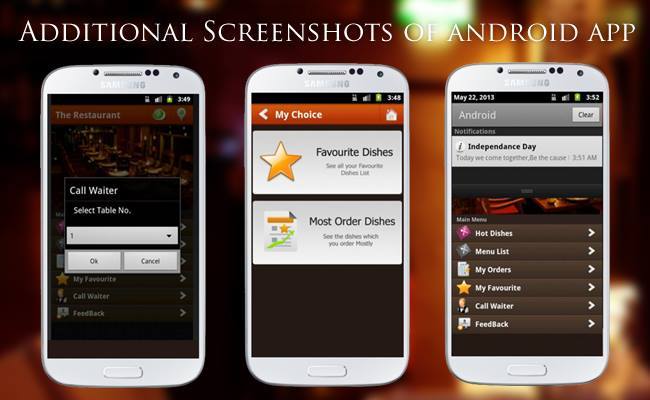
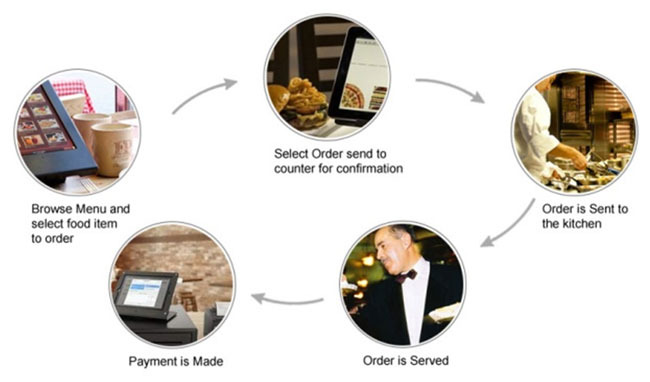
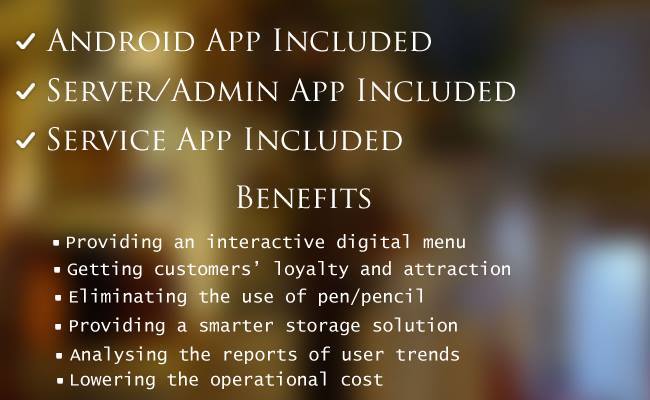
An Android Application which helps the restaurant owner to implement the system by which the customers can order food through their mobiles phones or tablet, and owner can see the orders and reports.

Screen Shots

image1

image2

image3

image3

image3

Android Application Features.

  • Complete Restaurant Menu.
  • Favorite dishes.
  • Hot dishes.
  • Call waiter.
  • Search Dishes.
  • Give Feedback.
  • Display Dishes according to customer trend.
  • categorized Dishes.
  • Order history.
  • Greeting Messages.
  • Display Ads

Server/Admin Application Features.

  • Category Management.
  • Ingredient Management.
  • Dishes Management.
  • Order Management.
  • Ads Management.
  • Greetings Management.
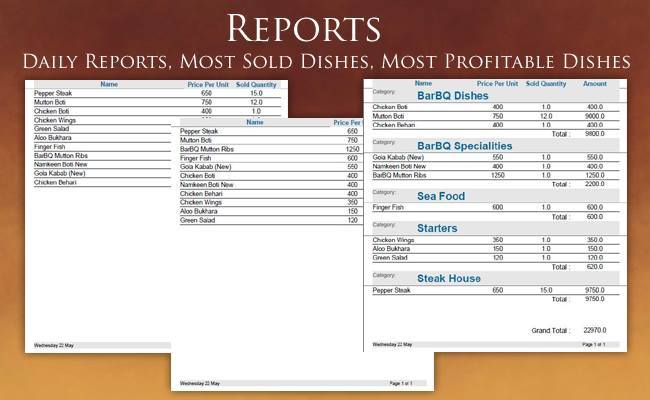
  • Detailed Reports.
  • General Settings. — Tax Settings. — unit Settings.

Note

If you want any help or you want us to develop android app for you.
you can contact us.
Email: [email protected]
Website: http://loadingworld.com

Download Online Restaurant Menu (Full Applications)

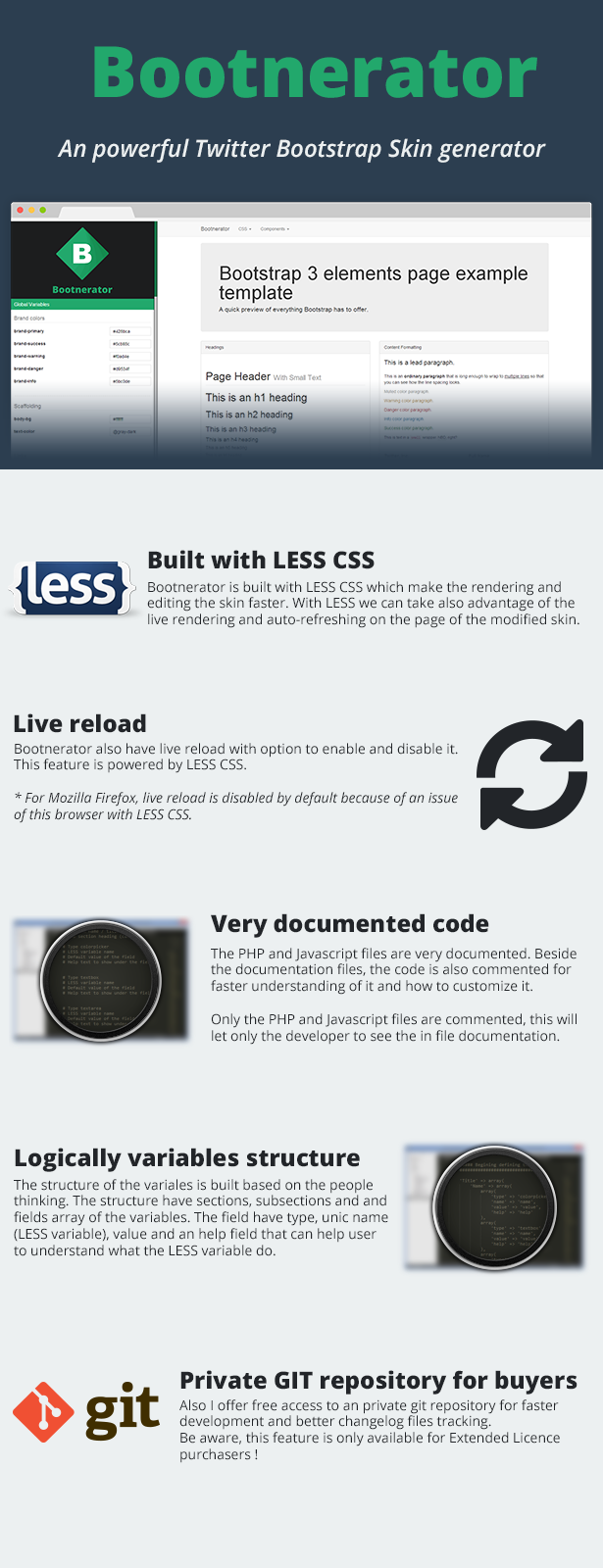
Bootnerator | Twitter Bootstrap Skin Generator (PHP Scripts)


Bootnerator is an premium Twitter Bootstrap Skin / Theme generator. Bootnerator is powered by LESS CSS and PHP.

Bootnerator is an powerfull tool that can be used by all peoples, from developers to newbies. The design is updated live to offer an interactive and complete experience with easy design editing.

Company Guide / Brochure (Templates)

Company Guide – Your Company Brochure.
It’s an app that have basic and necessary information that any Company/Organization must have, Like it’s News, Products, Location on Map, Media, About Us & Contact Us, In a neat simple way.
Company Guide Features:
– Applicable for any Company / Organization (can be for example: Any University/School, SuperMarkets, Any selling Store, Restaurants, Libraries…etc
– For expected graduating students, it can be your Graduation Project!
Company Guide Features:
– News RSS Feed into friendly List. (just change URL & it will work right away”
– Easy Updatable online XML Database connected to your Listview.

– Static / Dynamic data choices available.
– Put your Company marker on Google Map.
– Show Direction from User location to your Company location.
– Nice Gallery view to display Company/Products pictures.
– All Company Contact details in one neat List.
– Step by Step Documentation.

Try our Demo of Company Guide now on Google Play:
https://play.google.com/store/apps/details?id=com.aou.eg

—-
Why your Company should buy have app like Company Guide?
– Marketing: You can put small banner or bar code for your App in your site, or at your Company, on news…etc
– Fame: Any big company have mobile app, it’s mobile age now.
– Accessibility: app is available to be downloaded & used to anyone, anywhere, & anytime.
– Prestige: to have mobile app is really giving good prestige & 1st good impression to the client.
– Light & neat: let’s be honest, you can’t put much info in a free flyer (2 pages for example) that you distribute to people, but in mobile app that doesn’t exceed 2MB, you can put mostly all your companies data in addition to the ability of updating this data, available anywhere, anytime in an organized easy way, so you saved effort, cost & time.

Download Company Guide / Brochure (Templates)

WooCommerce Add Custom Quantity to Cart (WooCommerce)

WooCommerce Add Custom Quantity to Cart

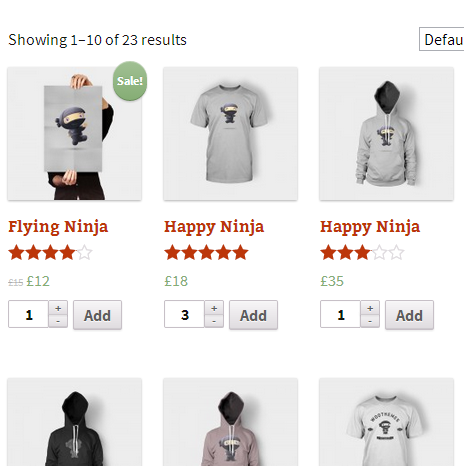
Allows for letting customers add a custom quantity of products to the Cart on the Product List page.

Using this WooCommerce extension you can let users specify a quantity of a product to be added to the cart directly on the Product List page.

The extension has been tested on WordPress versions 3.5 to 3.7.1. WooCommerce 2.0.x is required.

Change log:

  • 1.0 (2013-12-09)
    • Initial release.

Download WooCommerce Add Custom Quantity to Cart (WooCommerce)

Domain and Hosting Manager (Project Management Tools)

The system was made to give webmasters an easy to handle and clean overview of how much income or loss they have from providing hosting.

It is made up from four modules and each of them handles different tasks. One for creating, modifying and deleting domains, one for creating, editing and deleting servers one for income calculation and one which can change the login details of the system. The webmaster also gets an overall status of his servers on top of every module.

Demo account:
Username: admin
Password: admin

Documentation:
http://demo.erdsoft.net/Domain_and_Hosting_Manager/readme/

Download Domain and Hosting Manager (Project Management Tools)

jQuery Goal Thermometer (Miscellaneous)

This jQuery fund raising thermometer is perfect any sort of goal, whether it be sales, donations, fundraising, or even personal progress.

It works perfectly on standard or high-resolution retina screens. Just add a few lines to your HTML and you’re ready to go. The download also comes with a layered PSD of the thermometer.

Download jQuery Goal Thermometer (Miscellaneous)

Mobile Detect-Redirect Plugin With Cookies – WP (Utilities)

\\

Mobile Detect-Redirect WordPress Plugin With Cookies

A simple WordPress plugin that does exactly what it’s supposed to:

  • it detects mobile devices
  • it redirects visitors to a mobile website (or, allows them to choose if they want to be redirected or not)

Main Features

  • can be installed just like any other plugin
  • uses the default WordPress settings API to handle all options
  • all texts shown in the redirect window can be translated (changed) from the options page in the admin panel (no code editing required)
  • you can choose between redirecting the users without their confirmation and allowing them to choose if they will be redirected
  • uses cookies to remember the user’s choice (if the user wants his choice to be remembered) for a certain number of days. The number of days can be changed from the options page
  • you can extend the list of devices directly from the options page
  • you can add custom CSS rules to further customize the redirect window directly in the options page
  • requires jQuery to work

Options Page:

\

Notes:

The demo also works on dekstops, so you can test it. The source files you receive are set to mobile devices only (you have an option to enable desktop mode too, for tests).

Download Mobile Detect-Redirect Plugin With Cookies – WP (Utilities)

Slide It. – Sticky & Sliding Website Elements (Tabs and Sliders)

Slide It. Sticky and Sliding elements are a great way to give your visitors a better interaction and users experience. The pack consist from a 15 different HTML5 and CSS3 layouts with various screen positions.

15 sticky and sliding elements for website

  • Contact form
  • Quick Message form
  • Feedback form
  • Login and Registration form
  • Newsletter form
  • Quick search
  • Advanced search
  • Quick page rating
  • Mini promo calendar
  • Monthly Events calendar
  • Simple Cookies banner
  • Extended Cookies banner
  • Simple Sticky footer
  • Simple Pullout menu
  • Social Connect slideout

Up to 6 different positions included

  • Top Left
  • Top Right
  • Bottom Left
  • Bottom Right
  • Left
  • Right

Easy to install and customize

  • Clean design and commented code
  • Easy to customize to fit your design and color scheme
  • Made with pure CSS3 and HTML5
  • Mostly responsive and adaptive to various screen sizes
  • Easy to install and adjust
  • Control if the item is opened or closed as default
  • Lightweight and clear to understand code

Need help? No worries, we’re just an email away

Contact us for issues, help and guidance.

If you like it, feel free to rate it – thank you :)

css contact, feedback, register forms

Download Slide It. – Sticky & Sliding Website Elements (Tabs and Sliders)

SEO Monster 2 – Seo Reporting Framework (Project Management Tools)


What is this script about?

Well, it`s pretty simple, SEO Monster 2 it`s an advanced PHP script, designed for running customisable SEO reports. You can create unlimited SEO profiles, that can include over 30 fully customisable SEO checks. The script features an easy to use admin panel, that can be used to change many aspects of your site, like the language, skin, facebook like box and so much more. The reports can be viewed not only on the site, but they can also be downloaded as PDF files. The script it`s easy to install, you only need to upload the files, and edit one file. The requirements are low, so it will run smooth on almost every decent servers.

Note* The server where the demo is located has limited CPU resources, so it will run a slower than it should.

Check the demo

Front end: SEO Monster 2
Back end: SEO Monster 2 – Admin Panel (User:admin,Pass:admin) Some features are disabled.

Features

Main features:

=> Fully customisable SEO reports with over 30 SEO checks (3 profiles included)
=> Highly customisable via admin panel
=> Easy to install (just upload the files)
=> Fully translatable (EN,RO included)
=> Google adsense & analytics ready
=> View/Download the reports as PDF
=> Easy to change, Cross browser, responsive design – Bootstrap (3 skins included)
and so much more…

Front end features:

=> Host information:Ip adress & blacklist status, Country, Region, Provider

=> Domain Info:Google Pagerank, Alexa rank, Alexa popularity, Whois

=> Crawling status:HTTP response, Robots.txt, Sitemap

=> Head elements:Title Tag (Lenght, Stop words, Keywords in title, Keywords relevance), Meta keywords (keywords, number of keywords, Relevance with site), Meta description (Description, Length, Keywords in description, Relevance)

=> Content checks: Language (24 languages supported:albanian, arabic, catalan, danish, dutch, english, esperanto, estonian, euskara, finnish, french, german, guarani, hebrew, irish, italian, ladino, latin, norwegian, portuguese, romanian, spanish, swedish, welsh),Number of words, Number of characters, Keywords in content, Content relevance, Keywords in italic, Keywords in bold, Headings check, Iframes check

=> Url structure: Domain, Keywords in domain, Lenght, Subdomains

=> Links check: Internal links, External

=> User experience: Page loading speed, Grammar errors (11 languages supported:english,french, german,catalan,danish,dutch,italian,portuguese,romanian,spanish,swedish), Responsive check, Contact page

Admin panel features

=> Seo settings: Site name, Site slogan, Site meta description, Main page text

=> Layout settings: Favicon, Bootstrap skin, Language, Include Facebook like box

=> Framework settings: Default profile, Public, Include keywords, Include seo profiles, Allow PDF exportation

=> SEO profiles manager:Add, edit, delete seo profiles. You can choose from over 30 seo checks, categorised in “Crawling checks, Head elements checks, Content checks, URL structure checks, Links checks, User experience checks”

=> Ads and analytics:1 Ad spot, under the menu bar, Google analytics code

=> Statistics:Version checker, number of analysed sites, number of profiles

Requirements

BASIC REQUIREMENTS
A hosting account (VPS/Dedidcated/Shared)
A domain/subdomain
SERVER REQUIREMENTS
PHP 5.3 (or newer)
PHP cUrl() function (preferable with CURLOPT_FOLLOWLOCATION allowed)
PHP GD library (required for the PDF generator)
A decent max_execution_time configuration (60 seconds should be enough)

Updates

12/10/2013 [1.0]

  • Initial Release

Download SEO Monster 2 – Seo Reporting Framework (Project Management Tools)

jQuery Handwriting (Miscellaneous)


DEMO || DOCUMENTATION

Description

This is a javascript based tool that uses the canvas object to draw symbols. Each symbol is defined using multiple curves and each curve consists of start, end and control point. The tool comes with two sets of curves with limited number of symbols, but more symbols and more sets can be created and added to the tool in the future. The tool allows decoration of the curves with images defined by user. While the tool features more than 20 options to customize it can be used in a simple configuration like this:

jQuery('#yourDivID').HandWriting();

Basic Usage

<script src="http://code.jquery.com/jquery-1.8.0.js"></script>
<script src="jquery.handwriting.js"></script>
<script>
 jQuery(document).ready(function($){  
  jQuery('#hello_world').HandWriting();
 });  
</script>

The tool gives errors when working with jquery versions lower than 1.8.0, because the absence of parseHTML method. All testing during development was performed with jquery 1.9.1.

<div id="hello_world" style="font-size: 16px; color: #888; position: relative; width: 580px; height: 280px;">Hello <span style="color:#fff">World</span></div>

The tool uses some absolute positioned canvas element in the targeted div, so it is a must that the div is with relative or absolute position. The font size and color of the targeted div are only used to display its content if javascript is disabled, thus these properties are not used in the actual animation. The text content can be styled with spans though, where color and few other options can be set.

Features

  • two sets of symbols
    The tool features two sets of symbols – one similar to Verdana font, and another one with more calligraphic look.
  • 85 symbols in each set
    These are A B C D E F G H I J K L M N O P Q R S T U V W X Y Z a b c d e f g h i j k l m n o p q r s t u v w x y z 1 2 3 4 5 6 7 8 9 0 . , ! ? ( ) [ ] ; : @ $ % & * = + – / ’ ” > <
  • size of animated symbols
    Can be set using a scale parameter. Must be tuned manually to user’s needs, because different sets of symbols have different basic sizes. It is a float number where 1 means 100%. This parameter affects many aspects of the animation – space between letters, line height, padding, etc.
  • size of line height
    This parameter is used when the text must be laid out on more than one line. It is set in pixels and is affected by the scale parameter.
  • color of text
    Color can be set for all targeted objects with parameter, or can be set for individual parts of texts. Spans with inline color value can define that parameter.
  • stroke width
    Line width can be set with parameter for all selected objects, or selectively for parts of text in span elements using data-width parameter. Line width is not affected by the scale parameter.
  • top/left offset
    Two options allow the setting of offset from the top and side borders of the selected div. If the div has padding it will not be used for animation, but only to display content when javascript is not available. These parameters are in pixels and are affected by the scale parameter.
  • text alignment
    It is possible to set left, right and center alignment for the text, which applies on all text. Text align can be set with inline style for the selected div objects, or with parameter.
  • curves speed drawing
    Integer numbers that define in how many steps each curve of each symbol will be animated. One parameter is used for visible curves and another for the invisible curves between letters and words. These numbers are also used when images are place to decorate the curves. More parts mean more images over the curve.
  • pen
    Pen can use different image set by user. Pen ball must be in top/left corner of pen image. Pen can be hidden.
  • images
    Images can be used in the animation and are managed with several parameters. One of the parameters is an array of paths to images that the user intends to use. Another parameter is array of floats that each image will use to scale its size.
    One method to use images is to put them zoomed out on each defined point on the curve. Then gradually zoom out the image to the scale defined. Images can be placed exactly on the curves or slightly offset which can defined with another parameters. Images can gradually rotate starting from random direction, or use fixed direction. The amount of frames to animate this behavior can be set. Very interesting results can be achieved depending on type of images used.
    Another method of using images is to do short animations – for example blooming flower. Then store the animation in png files. There is a parameter that can force the tool to alternate the images and as a result the animation shows on all curves it is set for.
  • stroke above image
    It is possible to define if the stroke will draw above or below the canvas that animates images.
  • pause
    It is possible to pause and continue animation using public method
  • replay
    A parameter can define if animation will play again after it is finished.
  • finish effect
    When animation is done it can either fade or stay. If it is going to fade an interval can be set for duration of fade. If it is going to fade a wait interval can set, so text can be read before it fades.
  • overall speed
    Speed can be set in milliseconds. It affects each frame animated.
  • complete
    User can define a function that will execute when animation is complete.

Download jQuery Handwriting (Miscellaneous)