Colio – jQuery Portfolio Content Expander Plugin (Images and Media)

Responsive Portfolio Content Expander Plugin with Black & White Theme

Colio plugin will help you display details about your portfolio items in form of expandable viewport that can be placed above, below or inside your portfolio grid. This is great plugin for one-page and multipage sites, where you have to use space efficiently. Plugin includes black and white theme, is compatible with isotope and quicksand filtering plugins, can be easily integrated in any portfolio with just few modifications. Also it works on desktop, tablets and mobile browsers. Check its features below!

Features

  • Responsive
  • Mobile optimized
  • Includes black and white theme
  • Different placement options & dynamic inside placement
  • Inline or AJAX content
  • Content filters and callbacks
  • Easy integration in existing portfolio
  • Compatible with isotope and quicksand plugins
  • Autoscroll to view
  • Retina-ready navigation
  • Valid markup
  • JSHint compliant code
  • Detailed install instructions

Credits

Following plugins have been used in preview – Isotope, Quicksand, Fancybox, Flexslider

Download Colio – jQuery Portfolio Content Expander Plugin (Images and Media)

Di Letter (Widgets)

Advanced Mailing List widget for collecting visitor’s e-mail addresses with CSV import/export features.

Main Features:

– Ajax based widget form so no page reload is needed
– No hard-coded placeholders and responses so you can translate widget to whatever language you want from “Settings” page.
– Extremely easy to use
– Export lists to CSV file that can be used in popular mail clients
– Import existing CSV list to your database
– Ignore duplicate e-mails (with option to allow)
– Additional fields like First and Last name (optional)
– Storing export files on server for later use
– Checking if e-mail is a valid e-mail format, otherwise it will not be accepted so no junk will be added to your database
– Customizeable widget with it’s own CSS file. (by default, it uses style from your theme)

Included is help.html file which you also get when you install plugin on your wordpress site under “Di Letter -> Help”

Download Di Letter (Widgets)

Twitter Timeline Widget Module for Joomla (Joomla)

Real-time Twitter Timeline in Module Position, Smart and Easy

A module to display your Twitter updates of your twitter streams based on recently released widget features from Twitter. Simply give your Twitter widget ID, select style and enjoy.

Key Features:

  • Loads Twitter Widget from Id
  • Shows Updates almost Instantaneously in Real Time
  • Flexible and Easy
  • Works with any Joomla Template
  • Custom Style
  • Custom Link Color
  • Custom Border & Background Color
  • Custom Tweet Limit
  • Related Users
  • Use Header, Footer and Border

Easy to Setup:

  1. Put your twitter widget ID
  2. Select Module position
  3. Save and enjoy
  4. Play with the available options related to styling and design

Usage:

  • To find ID of your widget from Twitter account go to Settings > Widget and create a New Widget, then an embed code will be generated. From this embed code you will find an ID for this Widget. Click here for Video tutorial or Check this Google plus album for screenshots
  • You have to give your Twitter Screen Name and this widget ID into the module setting

Joomla Compatibility:

This Plugin works for all Joomla (1.x, 2.x and 3.x) versions.

Customer Review:

Just follow the directions, they even made a youtube clip to help you with it. I tried the free version, but I was quickly convinced it did exactly what I want, so I upgraded to the pro version. Easy to install and easy to use.

– Mr.Atari

Download Twitter Timeline Widget Module for Joomla (Joomla)

Responsive Top Bottom Panel Slider Joomla Plugin (Joomla)

Show Any Module (such as Login, Notice etc.) in a Compact Fashion

A cool system plugin to load any module on a sliding panel. Comes with tons of features so that you have great flexibility to take advantage and fulfill your site’s requirements.

Key Features:

  • Show Any Module Compactly and Make Easily Accessible to Visitors
  • Fully Responsive and Smart Device Compatible
  • Supports both MooTools and jQuery Library
  • Simultaneously Use both Top and Bottom Panel
  • Supports Text and Custom Image for Label
  • Control Button Width and Position (Left, Middle, Right)
  • Single Color and Gradient Styles
  • Separate Button for Top and Bottom
  • Full control to style-match with your Joomla site

Panel Styling :

  • Show up to 3 Modules in Each Panel
  • Control for Panel Width and Height)
  • Built-in 10 Transition Styles
  • Single Color or Gradient
  • Separate Panel Settings for Top and Bottom

Easy to Setup:

  1. Provide the Module IDs that you wish to show on Slider
  2. Enable Panel and Select the Desired Settings for Panel and Button
  3. Save and Enjoy

Joomla Compatibility:

This Plugin works for all Joomla (1.x, 2.x and 3.x) versions.

Customer Review:

Very flexible panel with fantastic support.
It says “Top” panel, but it can be loaded top or bottom. It works as a plugin to load other module and can load several module in multiple columns, a nice touch.
The best part was the service: I had a few customization requests and the programmers responded quickly to find solutions.
Very impressed. Will definitely be looking through more of this developers extensions.
– bettermentflux

Download Responsive Top Bottom Panel Slider Joomla Plugin (Joomla)

Inside Blog Ninja Bar Plugin (Social Networking)

Exted your Ninja Short URL & Bar plugin functions to the inside of your blog pages and enjoy a new and exclusive engagement features and at the same time provide a more fluent experience for your visitros. Some Ninja Bar plugins requires this plugin to be installed in order to work and this plugin extend the functions of other plugins to all the pages of your site.

For example, The Cookies Ninja Bar plugins will feature the cookie warning on all the pages of your site and not just on the external pages with with short URLs if you have this plugin installed.

This plugin requires to have installed the Ninja Bar URL Shortener & Bar WordPress plugin and is not intended to work alone.

Download Inside Blog Ninja Bar Plugin (Social Networking)

Facebook Likebox Module for Joomla (Joomla)

Facebook Likebox inside Module Position On Joomla Site. Smart & Fast

Facebook Like Box Module is an easy implementation of the popular Facebook like box as a module for Joomla. It saves you time, coding and enables quick integration into any of your Joomla site. Our product supports both version of Joomla. It uses official Facebook social plugin.

Key Features:

  • Displays Your Facebook Likes, Fans & Followers
  • Flexibility of Customizing Its Position
  • Full Control to Style-match with Your Joomla site
  • Custom Width, Hight, Border & Color Schemes
  • Show/Hide Faces
  • Show/Hide stream
  • Show/Hide box header

Supported Plugins:

  • Facebook Likebox
  • Facebook Comment plugin(new)
  • Facebook Activity plugin(new)
  • Facebook Recommend plugin

Easy to Setup:

  1. Put Your Facebook URL
  2. Select Your Style and Position
  3. Save and Enjoy

Joomla Compatibility:

This Module works for all Joomla (1.5, 2.5 and 3.x) versions.

Download Facebook Likebox Module for Joomla (Joomla)

Related Article After Content Plugin for Joomla (Joomla)

Show Related Items at Anywhere in the Content of a Page. Simple & Smart

Ever wondered how the great news websites suggest related articles, great e-commerce sites show other related products as their visitors browse any particular page and read a story? With this Plugin you can achieve just that with style.

Key Features:

  • Related articles fetched by title matching, Joomla native tag (for joomla 3.0), native tag of K2 and Zoo
  • Previous or Next Item
  • Random Post From Related Articles or Fully Random
  • Ascending or Descending Related Articles Picked Up from Meta-tags
  • Mobile Device Compatible. Great Flexibility and Option to Customize
  • Related Articles Box Heading
  • Show Directions Words
  • For specific Categories Plugin Enable/Disable Options
  • Exclude categories option during fetching related articles
  • Skip Words option by title matching (like adverb etc.)
  • Custom Background Color
  • Use Gradient

Supported Components:

  • Supports Com_Content
  • Supports K2_Content
  • Supports Zoo_Content

Easy to Setup:

  1. Put the Plugin in Your Site
  2. Select Your Style and Position
  3. Save and Enjoy

Joomla Compatibility:

ThisPlugin works for all Joomla (1.5, 2.5 and 3.x) versions.

Customer Review:

Great plugin and excellent support, It works great, Thanks.
– Hyberico

Download Related Article After Content Plugin for Joomla (Joomla)

Weminder – Android Weather Application Template (Full Applications)

Follow Us on TwitterFollow Us on Envato

Weminder - Android Weather Application Template

Weminder - Android Weather Demo Download

Changelog

V1.0.0
02/01/2014 - Initial Release

Our Support

We care our customers, we are always here to help! If you are experiencing any installation, compiling or modifying issues, please send an email to [email protected].
Please allows 24 – 48 hours for the best solution :)

Download Weminder – Android Weather Application Template (Full Applications)

Social Crowd Module for Joomla (Joomla)

A Fantastic Module Which show Your social followers or likes. Smart and Attractive

A Super Way to proudly display your Followers, Subscribers & Likes from your favorite social networks, This is an excellent, lightweight and easy to use Module which is packed with full customization. Fully compatible with any standard browsers.

Key Features:

  • Displays Your Followers & Likes from Different Social media
  • Shows Updates Almost Instantaneously in Real Time
  • Full Control to Style-Match with Your Joomla Site
  • Packed With Full Customization Options
  • Works with any Joomla Templates
  • Custom color Option Float panel background, Border & Round Corner
  • Share Box Use Round Corner, Gradient, Border
  • Share Box Color: Gray, Dark, Clean
  • Mobile Device Compatible

Easy to Setup:

  1. Put Your Social Media ID
  2. Select Style and Position
  3. Save and Enjoy

Joomla Compatibility:

This Module works for all Joomla (1.5, 2.5 and 3.x) versions.

Customer Review:

Does what it says, easy to setup. Immediate email response on a possible future update to add more social networks. Recommend!

– Pietro Filipi

Download Social Crowd Module for Joomla (Joomla)

Orbisius Smart Sidebar (Miscellaneous)

The plugin measures the height of the sidebar and the main content areas.
If the sidebar is taller it will be reduced and a vertical scrollbar will appear.
This will provide a better user experience.

This is very helpful when when you write a short blog post/page and you have a taller sidebar area.

= Features / Benefits =

  • Better visual experience for the user
  • Works with any well written theme as long as you configure the correct ID or CSS classes for the main content and sidebar areas.
  • The plugin analyzes the current theme and lists all the found IDs and classes
  • Set Minimal Height of the Sidebar
  • Adjust the final height either by +/-
  • Easy to use: configure it and that’s it

Download Orbisius Smart Sidebar (Miscellaneous)

Document Embed Plugin (Shortcode Based) for Joomla (Joomla)

A Shortcode Based Joomla Plugin to Embed Document in Your Site, Easy & Simple

If you have a Joomla site and want to embed documents on your pages from the most popular document sharing site without worrying about handling codes, Crazy Document Embed Plugin for Joomla may come handy and a smart way to handle your documents.

Key Features:

  • Show Various Documents from
  • Manager with Control for Document Embed Size
  • Fluid Grid Layout
  • Start Slide Show from Defined Slide Number
  • Full Control to Style-Match With Your Joomla Site
  • Lightweight Output Design
  • View Mode Set to Scroll View/Slideshow for Scribd
  • Direct PDF file Embed Support (added from 2.1 version)
  • Supported Sharing Sites are Slideshare, Scribd, DocStoc, SlideBoom, SlideSix, Prezi & Empressr
  • Control Hide/Show for Prezi
  • Autoplay Enable/Disable for Embed

Easy to Setup:

  1. Put The Plugin in Your site
  2. Select Your Style and Position
  3. Save and Enjoy

Usage:

The usage of the plugin and writing the shortcode is fairly simple. In its simplest form you just have to copy the URL of the document you want to embed from your browser and paste inside the url parameter. For more than one URL just placed a comma (,) in between the URLs.
{cbdocembed url="1st URL, 2nd URL, 3rd URL" /}

Joomla Compatibility:

This Module works for Joomla (1.6, 1.7, 2.5 ) versions.

Customer Review:

Works Very Well, simple code. Great support.

– Denis Mior

Download Document Embed Plugin (Shortcode Based) for Joomla (Joomla)

Advanced CRM (Project Management Tools)


Informations :

Demo : http://leodumontier.com/live/crm/
Documentation : http://www.leodumontier.com/doc/crm/

Login list :

Emily Miller

  • Username : emily.miller
  • Password : emily123
  • Alex Johnson

  • Username : alex.johnson
  • Password : alex123
  • Aaron Walter

  • Username : aaron.walter
  • Password : aaron123
  • Denis James

  • Username : denis.james
  • Password : denis123
  • Glen Carter

  • Username : glen.carter
  • Password : glen123
  • Harper Scott

  • Username : harper.scott
  • Password : harper123
  • Features :

    General

  • Possibility to change language
  • Contact

  • Add / Modify / Archive contact (more than 35 fields available)
  • Add / Modify / Archive interlocutor
  • Upload files (independent for each contact)
  • Write note
  • Print detailed contact card (informations, history calls, interlocutors, notes …)
  • View history calls
  • Contact list: Order, change cols, archive, …
  • Call

  • Add / Modify call (title, message, …)
  • Upload file
  • Automatic meter, counting the time past
  • Associate an interlocutor to the conversation
  • See more information of the contact during the call
  • Add fast interlocutor
  • Calendar

  • Add / Modify / Delete appointement (Length, time, date, title, message, color)
  • Share / Send appointement between user
  • Configuration hours and days
  • Navigate between weeks
  • Email

  • View email (message and attachment)
  • Send email
  • Address book
  • Multiple mailbox
  • Config mailbox (income server, outgoing server)
  • Task

  • Add / Modify / Delete task (Title, summary, message, icon, color, deadline, …)
  • Upload file
  • Add note
  • Share / Send task between user
  • Settings

  • Show Stats
  • Add / Remove user (name, username, password, avatar)
  • Import data (CSV)
  • Export data (CSV)
  • Back system (To FTP server)
  • Timeline

  • Post message
  • Post pic
  • Post Youtube video
  • Add comment
  • Chat

  • Status (Online, Offline, Busy, Away, Invisible)
  • Dynamic message
  • Smiley
  • Exchange files between user
  • Create group chat
  • And much more …


    Download Advanced CRM (Project Management Tools)

    Like Button (Miscellaneous)

    About

    Like Button is JavaScript and PHP based script that allows you to add like functionality for your projects.

    Features list

    • Easy to install and customize
    • Uses PHP file as database
    • Nice prealoader for long requests
    • Allows to like and unlike(optional)
    • You can bind value of 2 or more buttons with the same id
    • Color schemes
    • Match Twitter and Facebook social buttons sizes
    • Counter can be a link
    • 2 Views: horizontal and vertical

    Upcoming features

    • Embed form – allow other users to embed your button on their pages
    • Database compression
    • MySQL support

    Changelog

    Version 1.0, 2014-01-01

    Initial release

    Download Like Button (Miscellaneous)

    Visual Columns for WordPress (Utilities)

    It has never been easier to quickly create responsive columns in WordPress, and you do no longer need to mess around with shortcodes. Visual Columns is a 12-column fluid grid system that easily lets you add columns to your WordPress powered website. The fluid grid system uses percents instead of pixels for column widths. It ensures proper proportions for key screen resolutions and devices.

    Insert columns with a few clicks and you are ready to go. It is really that easy!

    Visual Columns for WordPress

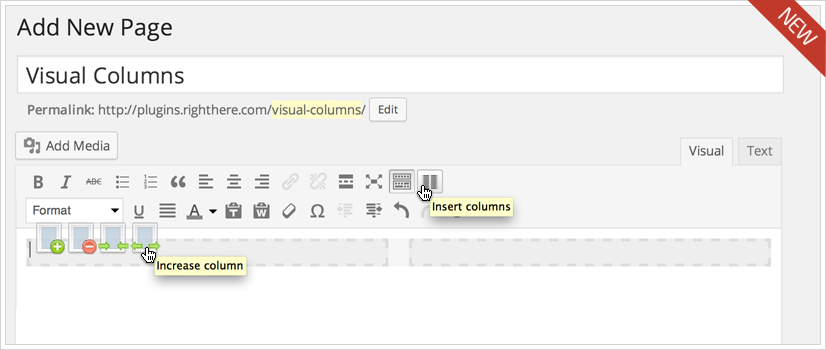
    Click the Insert Columns icon in the WordPress menu and two columns will be inserted, each spanning 6 columns (total 12 columns).

    You can easily insert columns, remove columns, increase the width or decrease the width simply by the click of the mouse.

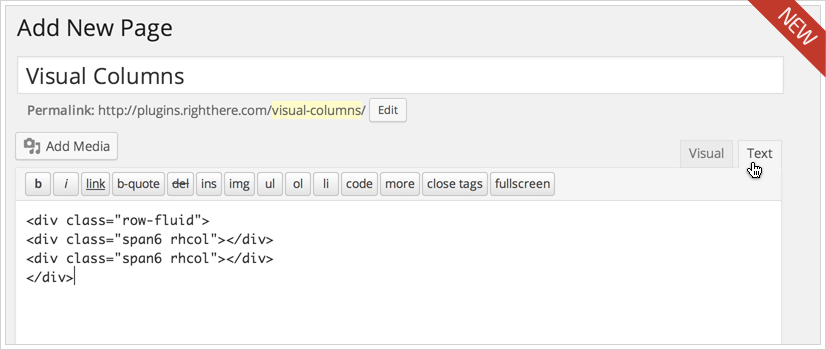
    This screenshot shows how the two columns look when you view the source code.

    Visual Columns for WordPress

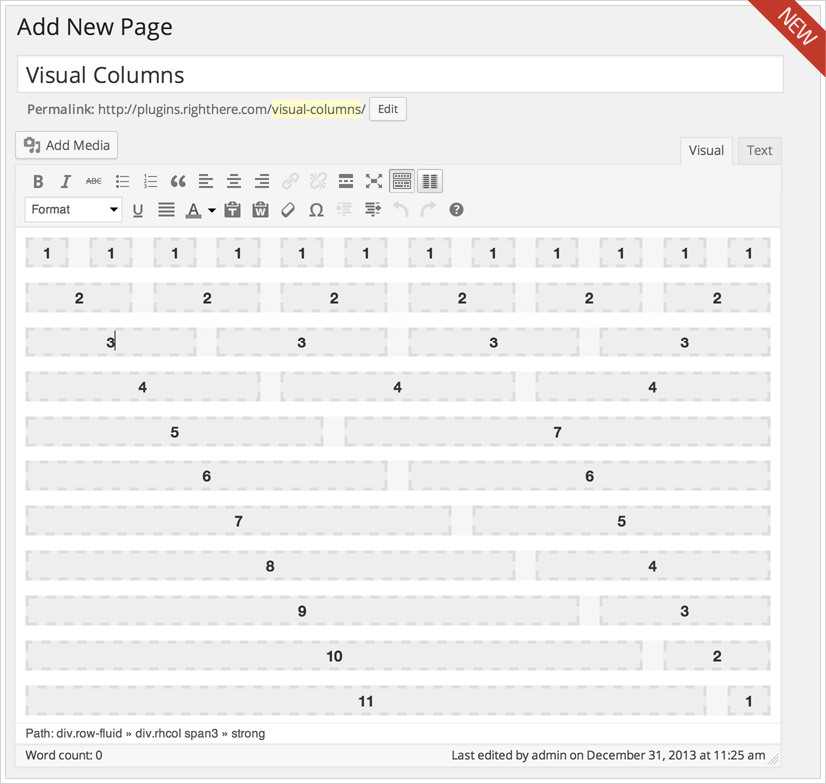
    You have an almost endless number of combinations for creating layouts (columns).

    Visual Columns for WordPress

    You can try the Visual Columns your self. We recommend you to test it before you to buy it. Check out how the responsive columns work.

    Simply use the following login details

    Username: DemoUser
    Password: TryMeNow

    Download Visual Columns for WordPress (Utilities)

    Product Box – Slider PopUp for Products & News WP (Advertising)

    Product Box

    Product Box is a WordPress Plugin that allows you to display a big Slider PopUp on load/on click. You could use it to show your latest products on a e-commerce store, some very important news etc…

    Features

    • No Coding Knowledge Required
    • FlexSlider
    • WordPress 3.8 Compatible
    • 2 Featured Images with swipe hover effect
    • Custom Post type
    • Completly Responsive
    • Pre built layouts, free layout
    • 3 Shortcodes included
    • Cookies functions included

    Animations & Plugin Engine

    Product Box includes 2 beautiful jQuery plugins and 1 CSS plugin.

    • Fancybox: used to PopUp
    • Flexslider: a powerful responsive jQuery slideshow
    • Animate.css: the core of most the animations in the plugin. Choose between more than 50 options

    Rich Admin Panel

    • General Options

      • Enable on Small Screens
      • Do not display again at the same user for [X] minutes
      • Pause on Hover
      • Display Navigation Controls
      • Display Title
      • Enable only in front Page
      • Layout Type
    • Style

      • Box Opening Animation
      • Box Closing Animation
      • Slider Animation
      • Title Color
      • Content Color
    • Advanced Options

      • Include Flexslider
      • Include Fancybox
      • Force Cookies Elimination

    Updates

    Version 1.0

    - Initial Release
    

    Download Product Box – Slider PopUp for Products & News WP (Advertising)