Social Share and Vote Button Flyout Box for Joomla (Joomla)

Increase Traffic, Client Engagement and Spread Brand through Social Power

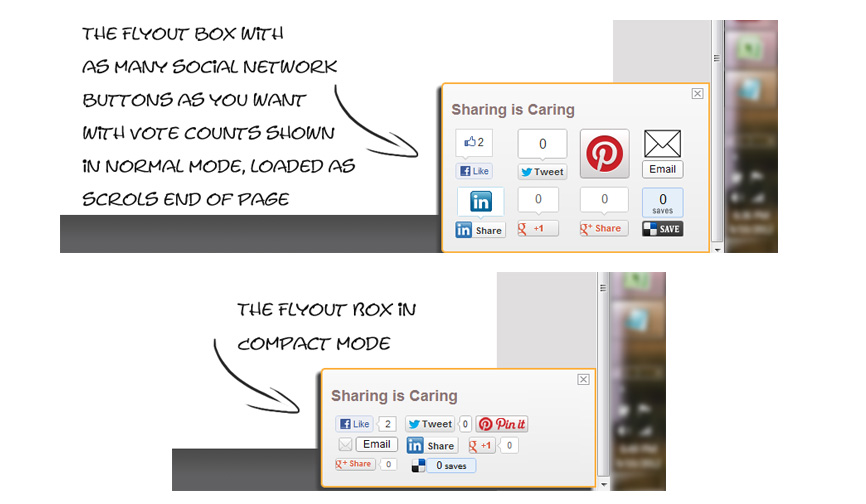
Making your site Social Share friendly has never been so important. Shows all favorite Social Vote Button in Flyout Box to improve your site’s social integration. You won’t find so many built-in Social Networks in other similar plugin!

Key Features:

  • Displays all Popular Social Network Icons in Flyout
  • Options to Display Flyout Box at Middle or Bottom Page
  • Mobile/ Smart Device Compatible
  • Freedom to Choose any Social Network of Choice
  • Easy to Use and Super Flexible
  • Option for Normal or Compact Button
  • Control for Buttons and Flyout Box

Supports 25+ Social Networks:

  • Most Popular ones such as Facebook Like, Recommend, Linkedin, Google+, Google Share, Tweeter, Pinterest
  • Supports even Not so Popular ones such as Topsy, Dzone, Diggita, Upnews, Designbump
  • Top Bookmarking sites such as Delicious, Digg, Stumble, Redit
  • We will Add New Ones as they Come or on Request

FlyOut Box Styling & Design Match:

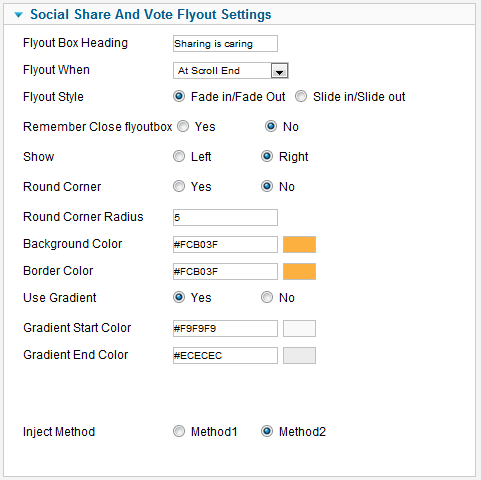
  • Flyoutbox background color option using color picker
  • Flyoutbox border color option using color picker
  • Flyoutbox gradient color option using color picker
  • Flyout When Scroll Full window/Half window/Scroll end
  • Flyout style Fade in/Fade out and Slide in/Slide out
  • Setting Round Corner Radius of Flyoutbox

Easy to Setup:

  1. Choose FlyBox Settings
  2. Turn on the Social Networks you want
  3. Save and Enjoy

Joomla Compatibility:

This Plugin works for all Joomla (1.5, 1.6, 1.7, 2.5) versions.

Download Social Share and Vote Button Flyout Box for Joomla (Joomla)

Awesome Builder – Drag & Drop Page Builder (Utilities)

Awesome Builder is a WordPress Drag & Drop Page Builder and shortcodes generator that offers the best solution you need to build a modern web page in the easiest way ever.

You don’t have to add any new blocks, just use your current widgets as we support all widgets

\

\
\
\
\
\
\

Use any widget

You can use any widget in your WordPress website in this page builder, we have tested it with many widgets and it worked fine.

Responsive Layout

Control how your elements appear in every device “Desktop – Tablet – Mobile”, and control the layout width in every side.

Widget Animation

Add css3 animations to any element and let your content flow-in in a decent way, its very easy to assign an animation..

Nested Rows

Ever wanted to add a row inside another, here you can do it as easy as drag and drop, and btw its unlimited you can have unlimited nested rows.

Full Width Row and Background

Make your row full width in a few clicks and assign a background “color, image or HTML5 video”.

Simple UI

The simplest UI we ever built, and the most powerful too, you should find everything whenever you need in very simple way.

25+ Ready Widget

Even if you don’t need that you can use any widget, but we wanted to produce you with some widgets to make your life easier.

Save and Re-use

Clone any previously saved content in one click and it loads instantly, its ajaxed for speed.

Translate into your language

You can translate the plugin to your own language, just translate the po file and load it.

Built with OOP/Less/Bootstrap

It’s clean and professional code, very easy to extend and very powerful to use.

Features

  • Use any widget
  • Responsive layout
  • Show/hide any widget in screen
  • Full Width Row Support
  • Row background
  • Video background
  • Clone saved templates
  • support css3 animations for any widget
  • Nested Rows
  • Simple UI
  • 25+ ready widgets
  • Translation files
  • Built with OOP/Less/Bootstrap

Packed Widgets

  • Service Column
  • Button
  • Call an action
  • Facebook Post
  • Facebook Like Box
  • Google Plus Box
  • Twitter Feed
  • Twitter Slider
  • Title
  • Ads
  • Social Icons
  • Flickr
  • Video
  • Audio
  • Tabs
  • Pricing Tables
  • Toggle
  • Space
  • Divider
  • Center Content
  • Percentage
  • Box
  • Slider
  • Team Member
  • UL “Unordered List”
  • Icon

Credits

  • Option Tree plugin

Kindly Rate After your purchase :)

Download Awesome Builder – Drag & Drop Page Builder (Utilities)

Screets CX – WP Chat plugin for Sales & Support (Utilities)

Chat with your customers on your website for sales and support easily, and beautifully.

Ideas   |   Pre-sale questions?   |   Support Forums

Keep in touch!    Facebook   Twitter

Features

  • New design – CX comes with new user interface
  • Core renewed – The core of the plugin is much stronger now
  • Advanced control on login/offline forms – Everything can be optional / hidden
  • Grab visitors’ attention with badge! – Badge appears on startup with sound alert
  • Offline messages history – Don’t miss offline messages sent by contact form
  • Works on WP admin bar – You don’t need to stay chat console
  • Auto update – Auto update from our servers
  • Multi operators – Multi operators & visitors
  • Unlimited chats – No limits on concurrent chats
  • Widget customisation – Customize colors, design and messages
  • Private data – All data stored in your own server
  • One-time fee – No monthly payments
  • Secure – CX follows WordPress security procedures like preventing direct and unauthorized accesses to plugin files, using nonces for sending forms in admin panel and providing secure DB and AJAX requests.
  • Tested with WordPress 3.8

Idea

By default, CX simply uses Ajax technique instead of Web Sockets. Because it’s pretty straightforward and works even on Internet Explorer. Also, you probably don’t need any server modifications for this plugin. It works with native PHP 5 server and WordPress fine.

When a visitor sends a message, all online operators get it at the same time and any operator can reply the visitor’s message.. Besides, more than one operators can join the same conversation. It means, one visitor get help from more than one operators at the same time if you wish.

Limitations

  • Works with only WordPress 3.4 or newer versions.
    Multisite is NOT supported.
  • You may have errors if site homepage is different from the directory you installed WordPress.
  • Operators must use WordPress admin panel to answer visitors (no mobile support yet for operators)

How it works?

Download Screets CX – WP Chat plugin for Sales & Support (Utilities)

WP Github Repository plugin (Widgets)

The WP Github Repositories WordPress plugin is a Widget for displaying your own repository in your Blog, with several Themes.

The Widget is responsive, and easy to use and to customize. it’s working in WordPress 3.6 +

The Widget has been developed to he highest quality standards and tested in all major modern browsers.

Features

  • The Widget have six theme,
  • Responsive,
  • Work in all major modern browser,
  • Easy to use and to customize

Download WP Github Repository plugin (Widgets)

WooCommerce Recently Purchased Products (WooCommerce)

Techieresource Facebook
Techieresource Twitter
TechieResource Codecanyon
techieresource.com

WooCommerce Recently Purchased Products plugin allows you to display the recently purchased products on anywhere of your site, with widget and shortcodes. you can also limit the No. of products to be shown, on front end.

  1. Products Thumbnail, Date, Title options.
  2. Widget Ready and Shortcode Option.
  3. No.of Products to show Option.
  4. List Products From, Complete, Processing ,on-hold Order status, Or All Status.
  5. Translation Ready.
  6. Cross Browser compatible.

WooCommerce Recently Purchased Products V1.0 (20-01-2014)

Download WooCommerce Recently Purchased Products (WooCommerce)

Sold Item Notification – Salenotice (Magento Extensions)

– A box that pops up that gives the impression an item has been sold even if it has not. The idea is to give a potential buyer confidence that people are buying and therefore they will buy also.
– The Sold Item Notification shows at the left bottom corner.
– Support multiple stores.
– Can use actual orders or fake orders, just switch Yes or No
– Compatible: all magento version: 1.3.x -> 1.8.0

Download Sold Item Notification – Salenotice (Magento Extensions)

ConfessionBox – PHP Confessions Script (Social Networking)

What is ConfessionBox

ConfessionBox is a PHP script it’s main aim to make allow our buyers to create their own confessions website maybe for High Schools or colleges or maybe for their city etc. In this script we have and many features which enriches the website. The website is developed in Bootstrap 3.0

The awesome feature of our confession script is that we have added features like Image confessions, Video Confessions etc. This script also provides features like liking and commenting using the Facebook Plugin, we are using facebook plugins to ensure that no one can do a bot usage for commenting or to use abusive languages anonymously. We also provide an amazing admin panel which have features like configuring the website, moderating confessions, managing existing confessions etc. We have also created a small Developers API which will help developers to embed the confessions.

The another main reason behind adding this script for buyers to buy is that on internet theirs no where any official confessions website. So this is a win and win situation for the buyers to start their own and make a history.

You can even earn money using this script, because of the advertisements. This script is AD ready so that you don’t face problems while placing advertisements on the website.

Features

  • Support for Image, Video, Confessions
  • Sleek and Responsive Design built in Bootstrap 3.0
  • Works perfectly on all devices: mobile, tablets, ipads etc
  • Confessions Categories like: Latest, Random, Popular etc
  • Youtube and Vimeo Video URL support
  • Developer/Programmers API
  • Advertisement Ready (2 AD units)
  • Like and Comment system using Facebook Plugin to make sure their’s any spamming or bot attack.
  • Shows time in AGO format eg: 10 Hours Ago
  • Search results for users to find confessions.
  • Views counter for Confessions
  • Pagination for better User Experience
  • Social Plugin Integrated
  • Inbuilt Spam filter (No one can resend same confession again and again)
  • Confession Form Validation
  • Easy to customize or re-design
  • Fast and efficient installation
  • Make money by adding Advertisements
  • Awesome admin panel with features likes: approve, reject, edit etc.
  • Google Analytic ready or you can use any analytic applications
  • Add a time for users to add another confession eg: when a user did his first confession then you have to decide after how many seconds he’ll do his second confession
  • Limit on image uploading size
  • A feature to restrict children or old persons (this can be enable or disable, you can also add specific age for them)
  • Add a limit for confession characters (similar to twitter eg: 160 Characters)
  • If you want you can publish confession without moderating, it depends on you, you can enable or disable it anytime
  • Add numbers of confession shown per page
  • Have a restriction of Image formats eg: to allow only JPG, PNG, JPEG images for user to upload
  • Custom success message
  • Facebook like box at the side to increase your likes on facebook
  • You can edit site details like: Site Title, Site Name, Site Meta Description, Site keywords even the Site Timezone etc using the Admin Panel
  • Safe admin panel, no chances for a hacker to hack
  • You can also view the attachment before publishing and then you can decide wether to publish the confession or not to publish
  • Website Statistics on the Admin Dashboard stats like: Total Confession, Textual confessions or non textual confessions, age group stats, gender stats, moderation panel stats, top 5 confessions etc
  • AND MUCH…..WATCH A LIVE DEMO…

Live Demo Informations

Demo URL: CLICK HERE
Admin Panel: Sorry we are not showing admin panel demo because it may be harmful for a demo website. Maybe any anonymous user will change the name or any other settings for the DEMO version. That’s why we have added screenshots of the admin panel.

Download ConfessionBox – PHP Confessions Script (Social Networking)

Search By SKU – SKU on Product Page – OpenCart (OpenCart)

Why SKU ?

OpenCart Defaultly provides “Product Code” on Product Page Which Displays Model No. of Product, But Some Kind of Goods don’t have Model Nos. Like Diamond, Jewelry, Clothes etc. So, At that Time, SKU is Very Helpful To Store Owner to Uniquely Identifing Their Products and Also Easy For Visitor/Buyer to Remember/Note.

This Plugin is compatible with 1.5.5.x and 1.5.6 version!

Features

  • Display SKU on Product Page
  • Search By SKU
  • Working With Customized Themes.
  • Easy Installation
  • Required vQmod

Download Search By SKU – SKU on Product Page – OpenCart (OpenCart)

Image Magnify WordPress Plugin (Add-ons)

This plugin extend the WordPress built-in TinyMCE editor, help you to insert a image with magnifier to your page or post easily.

See how it works in a Youtube video.

followrss

Features

  • Extend the WordPress built-in editor, easy to use.
  • Optional magnifier radius, color, size, and default position.
  • Optional blur or gray filter for the image, driven by CSS3 and SVG, so you don’t have to prepare the blur or gray image. Just upload your original image and set the filter in the shortcode to make it work.
  • Support touch gesture, works fine in small device like iPhone too.
  • Compatible with latest jQuery and latest WordPress.
  • Enqueue the js and css only when needed. Keep WordPress page size smaller.
  • FAQ and source code are included in the package. Free update in the future.

Recommendation for you

Image Map HotSpot WordPress Plugin:

hotspot

Credit

jQuery http://jquery.com
Great shots from http://www.flickr.com/photos/markjsebastian/

Download Image Magnify WordPress Plugin (Add-ons)

PHP Dashboard Skin (Bull Market) (Skins)

Transform your PHP Dashboard to the look and feel of Wild Bull Market. To use, unzip the contents of this file, into your PHP Dashboard skins folder and select this skin from the Settings Panel. NOTE: To use this skin, you will need to purchase PHP Dashboard scirpt (see PHP Scripts – Data Abstractions section).

Download PHP Dashboard Skin (Bull Market) (Skins)

Twitter Tweet Product Card – OpenCart vQmod (OpenCart)

People most attract when they see “Image” instead of Words”

As We all know Twitter is Biggest Place For Marketing, it provide to tweet with your words, only links not images to follow. But Here, To Compare With other Social Compititor, Twitter provides Extra Features for Online Seller to promote their Product with Extra Tweet Option Called “Twitter Card”, It Includes Image with on Screen Preview. Here, Twitter Card Marker OpenCart Plugin Extension built by profesionals for professionals.

As you can see in preview image, Twitter Card Marker makes Normal Tweet with Some Nice Look With Improving Product Status By Including Price, Currency, Location etc using This Plugin Extension.

Here, We are providing you “Twitter Card”.

Tweet your product with Best view to Get More Traffic using This OpenCart Plugin Extension File.

This Plugin is compatible with 1.5.5.x and 1.5.6 version!

Features

  • Easy Installation
  • Required vQmod

Download Twitter Tweet Product Card – OpenCart vQmod (OpenCart)

PHP Dashboard Skin (San Francisco Nights) (Skins)

Transform your PHP Dashboard to the look and feel of cool San Francisco Nights. To use, unzip the contents of this file, into your PHP Dashboard skins folder and select this skin from the Settings Panel. NOTE: To use this skin, you will need to purchase PHP Dashboard scirpt (see PHP Scripts – Data Abstractions section).

Download PHP Dashboard Skin (San Francisco Nights) (Skins)

Diamond Healthy Tips (Full Applications)

Description :

Diamond Healthy Tips is an Android Application that helps you to improve your life and being fit and healthy. It has database with 1000 healthy useful tips. You can free to browse all of them and you can receive a tip daily at a time that you can specify. Also you can share any tip by different ways (on social sites like: Facebook or Twitter and you can sending tip to your friends by whatsApp,email and SMS also you can copy the tip to clipboard).

Demo version : Install from google play

Features :

  • Sharing on Facebook and Twitter.
  • Sending by WhatsApp, Email and SMS.
  • Controlling different settings.
  • Searching tips.
  • Adding your own tips.
  • Tip of the day at time you set.
  • Support Multi-Devices.

Download Diamond Healthy Tips (Full Applications)

Indeed Smart PopUp (Add-ons)

What is Smart Pop-Up for WordPress?

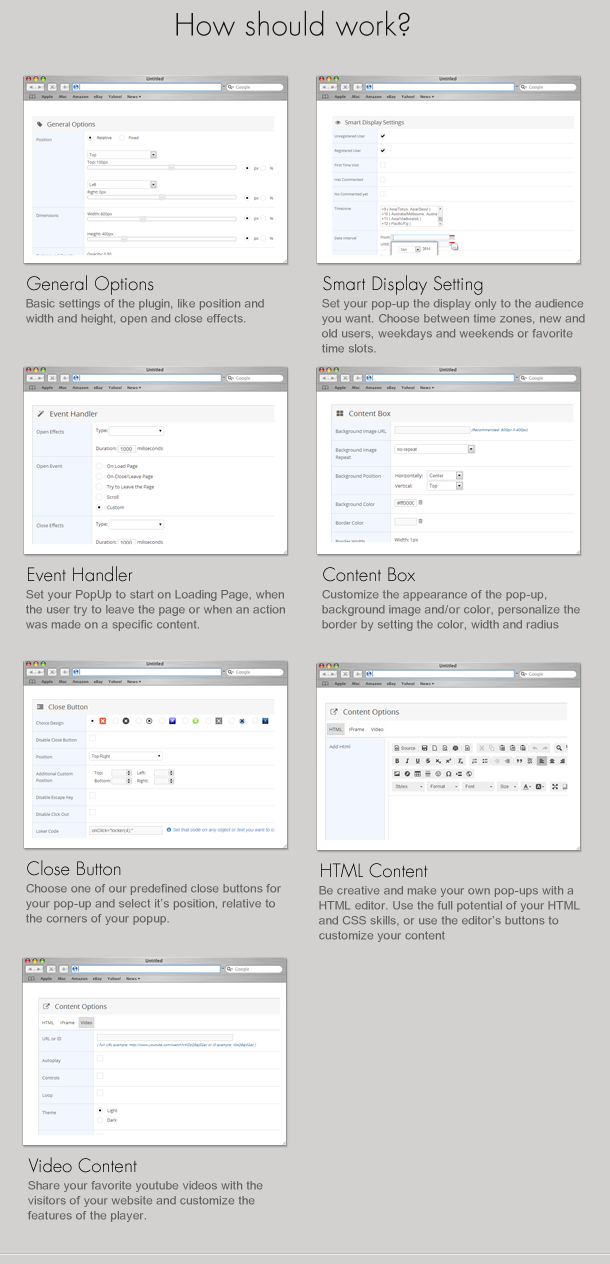
Indeed Smart Pop-Up for WordPress is a great plugin that will allow you to create unlimited pop-ups with a friendly user interface. You will then be able to use the shortcode or PHP code in your content items (posts, pages) or templates.

With over 40 options grouped in 7 sections this plugin will allow you to create fully customized pop-ups.

You can set each element in absolute values (number of pixels) or relative values (% based on relevant element).

The idea behind this plugin was to create a really useful tool for people that have a real interest in their audience and one of the most important feature of this plugin is the ability to filter though the visitors and only be displayed to the targeted audience. For example you can select to display the pop-up only to unregistered users, or only to first time visitors. You can imagine that making such decisions requires some kind of information about the visit and the visitor to be stored, so you even have this information available in the admin section.

If you want to be super aggressive with your pop-ups you can hide the close button and disable the escape key and mouse click outside of the pop-up and make the visitor watch the message for the duration you set.

You can see more on Plugin Website Page: http://wpindeed.com

In the Future…

This plugin is already in use on some of our regular clients websites and we know that the next think they want is to have a nice preview system for the templates. As far as we are concerned this is the next feature we want to include, if you have any suggestions please let us know.

Requirements

If you want to use this plugin, all you need to do is install WordPress 3.5+, and install the plugin.

Download Indeed Smart PopUp (Add-ons)

Vine Video Embed Module and Content Plugin (Joomla)

Display Your Favorite Vine Videos in Module Position or With Content Easily

Freedom to use any Vine Video anywhere using simple Shortcode. With this extension you can easily display videos from the highly popular Vine sites on any module position or inside article. Light weight and simple to use.

Key Features:

  • Works both in Module Position and within Content
  • Support Multiple Video Resolution
  • Support Multiple Videos
  • Customizable look
  • View Type: Simple/Postcard
  • Resolution: 600px, 480px, 320px and Custom value
  • Alignment
  • Video URL
  • Advanced Caching
  • Light Weight
  • Shortcode: {vineembed align='right'
    url='https://vine.co/v/bXZre5gtYgT'
    viewtype='postcard' resolution='300' /}

Easy to Setup:

  1. Put the Plugin in Your Site
  2. Select Module by ID, Style and Module position
  3. Save and Enjoy

Usage

  • You may view individual module’s id by going to Module Manger.
  • Input this id or multiple ids (separated by comma) in Module Settings area of the plugin

Joomla Compatibility:

This Plugin works for all Joomla (1.5, 2.5 and 3.x) versions.

Download Vine Video Embed Module and Content Plugin (Joomla)